
ESBT-460 - Earphones AIWA - Free user manual and instructions
Find the device manual for free ESBT-460 AIWA in PDF.


| Product Type | True Wireless Stereo (TWS) Earphones |
| Brand | Aiwa |
| Model | ESBT-460 |
| Color Options | Black, White |
| Driver Size | 10 mm |
| Frequency Response | 20 Hz - 20 kHz |
| Impedance | 32 Ohms |
| Bluetooth Version | 5.0 |
| Wireless Range | 10 meters (33 feet) |
| Battery Capacity (Earbuds) | 50 mAh each |
| Battery Capacity (Charging Case) | 400 mAh |
| Playback Time | Up to 5 hours (earbuds), additional 15 hours with case |
| Charging Time | Approx. 1.5 hours (earbuds), 2 hours (case) |
| Charging Port | Micro USB |
| Water Resistance | IPX4 (splash-proof) |
| Weight (Single Earbud) | 5 g |
| Weight (Charging Case) | 40 g |
| Dimensions (Earbud) | 22 x 15 x 25 mm |
| Dimensions (Charging Case) | 60 x 40 x 30 mm |
| Controls | Touch sensors for play/pause, track skip, volume, call handling |
| Microphone | Built-in, with noise reduction |
| Compatibility | iOS, Android, Windows, Mac |
| Included Accessories | Earbuds, charging case, USB cable, silicone ear tips (S/M/L), user manual |
| Maintenance | Clean with dry cloth; do not use liquids. Store in case. |
Frequently Asked Questions - ESBT-460 AIWA
User questions about ESBT-460 AIWA
0 question about this device. Answer the ones you know or ask your own.
Ask a new question about this device
Download the instructions for your Earphones in PDF format for free! Find your manual ESBT-460 - AIWA and take your electronic device back in hand. On this page are published all the documents necessary for the use of your device. ESBT-460 by AIWA.
USER MANUAL ESBT-460 AIWA
natural_image
Black and white photo of a pair of outdoor earbuds with earphones and control buttons (no text or symbols visible)Bluetooth®
AUTHENTIC PRODUCT
Charging the earphones
The earphones have a RECHARGEABLE built-in lithium-ion polymer battery:
- Insert a micro USB into the MICRO USB CHARGING
PORT of the remote control. The LED indicates will turn and drive charging
The red LED indicator will turn blue once the bar
is fully charged.
Notes
Use a standard 5V USB Charger (not included) with the
Fully charge the earphones before using it for the first time.
REMOTE CONTROLLER

POWER ON/OFF
Switching ON the earphones
When the earphones are OFF, LONG PRESS (Press and Hold) the MULTIFUNCTION Button for about 2 seconds. The LED STATUS INDICATOR will light up and the earphones will vibrate for about 3 seconds to indicate the power is switched ON.
Switching OFF the earphones
When the earphones are ON, LONG PRESS (Press and Hold) the MULTIFUNCTION Button for about 3 seconds. The LED STATUS INDICATOR will go off and the earphones will vibrate for about 3 seconds to indicate the power is switched OFF.
BLUETOOTH PAIRING
Connect your mobile phone or tablet of computer with the earphones using Bluetooth wireless technology to listen to music or to make phone calls. Begin by pairing your phone/tablet/computer with the earphones. When you power ON the earphones for the first time, follow the steps below.
- Turn on the earphones; a voice prompt will announce
"Pairing mode", and the LED STATUS INDICATOR
will flash intermittently in red and blue.
This means that the earphones are already searching
(1) 2.2018-04-2018
- Turn the Bluetooth function of your smartphone, search for the Bluetooth devices list and select AIWA ESBT-460 Enter the code "0000" if needed.
3.If the device is paired successfully, the LED STATUS
INDICATOR will flash in blue slowly, and a voice
prompt will notify that the device is connected
Having successfully paired the device it will automatically connect to the earphones the next time.
MUSIC PLAYBACK
Playing Music from your Mobile Phone (or Tablet)
Once your device and the earphone are paired, you
can listen to music through Bluetooth.
To play or pause the playback, press the
MULTI-FUNCTION button once.
is move forward to the next track, press and hold the + button (LONG PRESS)
To go back to the previous track,
go back to the previous track, press and old the — button (LONG PRESS)
Volume adjustment
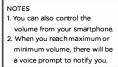
• To increase the physical volume, press
the + button (SHORT PRESS).
• To decrease the playback vol.
the -button (SHORT PRESS)
Playing Music from a MICRO-SD (or TF type) memory card
Insert a memory card into the slot on the Remote Controller
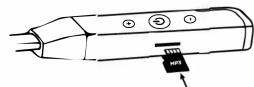
Once the memory card is inserted, the earphone will automatically start playing the first MP3 song which is stored on the card.
You can control VOLUME and Move to NEXT/PREVIOUS songs using the Remote Controller buttons in the same way as mentioned above.
When a memory card is inserted, the Bluetooth functions are disabled. To re-connect and use Bluetooth, simply remove the memory card from the slot. The earphones will automatically re-pair (re-connect) with your smartphone/tablet/computer.
PHONE FUNCTIONS
Phone Calls
You can use the earphones to attend to your calls in handsfree mode. When you receive an incoming call, the earphones will VIBRATE to alert you, so you will nevery miss a call.
- To ANSWER an incoming call, SHORT PRESS the MULTIFUNCTION button (Press and Release it).
• To REJECT an incoming call, LONG PRESS the MULTIFUNCTION
- button (Press and HOLD the button for 3 seconds). - To END (HANG UP) a call, SHORT PRESS the MULTIFUNCTION button (Press and Release it).
Voice Assistant (iOS / ANDROID)
Your earphones are compatible with Siri and Google Voice Assistant. To activate your smartphone's VOICE ASSISTANT:
- DOUBLE TAP the MULTIFUNCTION Button (Short Press it 2 times consecutively). The MICROPHONE of the earphone can be used to speak your command.
VOICE PROMPTS
Your earphones have a built in system which will alert or PROMPT you with a human voice as follows:
You will hear "power on" when the earphone is powered on
You will hear "power off" when the earphone is powered off
You will hear "pairing" when the earphone enters pairing mode
You will hear "connected" when the earphone is paired
You will hear "low battery" when the earphone is in low power status
You will hear "max volume" when the volume is at the loudest level
You will hear "minimum volume when the volume is at the lowest level
FACTORY RESET
In case the earphones do not automatically go into PAIRING MODE or during initial startup if the LED STATUS INDICATOR does not flash red and blue, please follow this procedure to RESET the earphones:
-
Power OFF the earphones (Press and Hold the MULTIFUNCTION BUTTON. The LED will turn RED and stay on for 3 seconds, then the LED will switch off. The device is now Powered Off).
-
Wait 1 minute and then LONG PRESS (Press and Hold) the MULTIFUNCTION BUTTON. Keep the button pressed without releasing it until the LED STATUS INDICATOR starts flashing red and blue continuously.
-
The earphones have now been RESET and the device is now in PAIRING MODE. You may now pair your mobile phone/tablet to the earphones using the normal procedure as shown in this manual.
WORKS WITH ALL BLUETOOTH DEVICES

SPECIFICATIONS
Bluetooth version: V5.0 Bluetooth protocols: A2DP, SPP, AVRCP, HFP, HSP Wireless range: 10m (30 Ft.) Battery: 3.7V Lithium, 200mAh Charging time: 2 hours Standby Time: 180 hours Music Playback time: 15 hours Audio Frequency Response: 20Hz - 20,000Hz Sensitivity: 10±3 dB Impedance Per Driver: 32 Ohms Charging Port Type: Micro-USB Socket Charging Requirement: Standard USB 5V, 1A or higher
ACCESSORIES Kit Included


All Rights Reserved. All specifications are subject to change without prior notice. All trademarks and trade names are the property of their respective owners. The Bluetooth® word mark and logos are registered trademarks owned by Bluetooth SIG, Inc. and any use of such marks is under license.
Brand : AIWA
Model : ESBT-460
Category : Earphones