
L05 - Smartwatch ACER - Free user manual and instructions
Find the device manual for free L05 ACER in PDF.
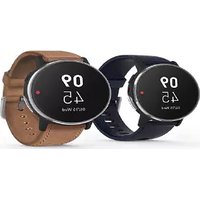


| Product Type | Notebook |
| Brand | Acer |
| Model | L05 |
| Operating System | Windows 10 (pre-installed) |
| Display Size | 15.6 inches |
| Display Resolution | 1920 x 1080 pixels |
| Processor | Intel Core i3-7100U (2.4 GHz, up to 2.4 GHz) |
| Memory (RAM) | 4 GB DDR4 |
| Storage | 500 GB HDD |
| Graphics | Intel HD Graphics 620 |
| Battery Type | Built-in Lithium-ion |
| Battery Capacity | 48 Wh, 4-cell |
| Wireless Connectivity | Wi-Fi 802.11ac, Bluetooth 4.2 |
| Ports | USB 3.0 x2, USB 2.0 x1, HDMI, VGA, Ethernet, Audio combo jack |
| Dimensions (W x D x H) | 38.1 x 25.6 x 2.5 cm |
| Weight | 2.2 kg |
| Operating Temperature | 0°C to 35°C |
| Storage Temperature | 0°C to 35°C |
| Humidity | 45% to 80% (non-condensing) |
| Cleaning Instructions | Turn off, disconnect charger, use soft moist cloth; avoid liquid cleaners |
| Safety Certifications | FCC Part 15, Industry Canada RSS247, EAC |
Frequently Asked Questions - L05 ACER
User questions about L05 ACER
0 question about this device. Answer the ones you know or ask your own.
Ask a new question about this device
Download the instructions for your Smartwatch in PDF format for free! Find your manual L05 - ACER and take your electronic device back in hand. On this page are published all the documents necessary for the use of your device. L05 by ACER.
USER MANUAL L05 ACER
Regulatory Information and Safety Guide
© 2017. All Rights Reserved.
Regulatory Information and Safety Guide
This revision: 06/2017
TABLE OF CONTENTS
Basic care and tips for using your device 4
Skin sensitivities.... 4
Taking care of your device.... 4
General 5
Safety instructions 5
Device servicing.... 5
Cleaning and servicing.... 6
Battery and adapter information 6
Guidelines for safe battery usage 6
Warnings and regulatory information 8
Medical devices 8
Vehicles 8
Potentially explosive environments...... 9
Disposal instructions.... 10
FCC radio frequency interference requirements 10
Canada — Industry Canada (IC) 11
Compliant with Russian regulatory certification.... 12
Children should be careful with the interconnect cable (wiring) between the power supply (adapter) and this device, in particular as a potential trip hazard.
BASIC CARE AND TIPS FOR USING YOUR DEVICE
Read these instructions carefully. Keep this document for future reference. Follow all warnings and instructions marked on the device.
Skin sensitivities
Some people may experience reactions to certain materials used in jewelry, watches, and other wearable items that are in prolonged contact with their skin. This can be due to allergies, environmental factors, extended exposure to irritants like soap, sweat, or other causes. You may be more likely to experience irritation from any wearable device if you have allergies or other sensitivities. If you have known skin sensitivities, please take special care when wearing the device. You may be more likely to experience irritation from the device if you wear it too tightly. Remove the device periodically to allow your skin to breathe. Keeping the device and the band clean and dry will reduce the possibility of skin irritation. If you experience redness, swelling, itchiness, or any other irritation or discomfort on your skin, please remove the device and consult your physician before resuming wear. Continued use, even after symptoms subside, may result in renewed or increased irritation.
Taking care of your device
Your device will serve you well if you take care of it.
- Do not expose the device to direct sunlight. Do not place it near sources of heat, such as a radiator.
- Do not expose the device to temperatures below 0 °C (32 °F) or above 50 °C (122 °F).
- Do not subject the device to magnetic fields.
- Do not expose the device to rain or moisture.
- Do not spill water or any liquid on the device.
- Do not subject the device to heavy shock or vibration.
- Do not expose the device to dust or dirt.
- Never place objects on top of the device.
- Do not slam the device display when you close it.
- Never place the device on uneven surfaces.
General
- Do not use this device near water.
- Do not place this device on an unstable cart, stand or table. If the device falls, it could be seriously damaged.
- To avoid damage of internal components and to prevent battery leakage, do not place the device on a vibrating surface.
- Your device and its enhancements may contain small parts. Keep them out of the reach of small children.
Safety instructions
Device servicing
Do not attempt to service this device yourself, as opening or removing covers may expose you to dangerous voltage points or other risks. Refer all servicing to qualified service personnel.
Unplug this device from the wall outlet and refer servicing to qualified service personnel when:
- The power cord or plug is damaged, cut or frayed.
- Liquid was spilled into the device.
- The device was exposed to rain or water.
- The device has been dropped or the case has been damaged.
- The device exhibits a distinct change in performance, indicating a need for service.
- The device does not operate normally after following the operating instructions.
- The device exhibits a distinct change in performance, indicating a need for service.
- The device does not operate normally after following the operating instructions.
Cleaning and servicing
When cleaning the device, follow these steps:
- Turn off the device.
- Disconnect the charger.
- Use a soft, moist cloth. Do not use liquid or aerosol cleaners.
Battery and adapter information
Guidelines for safe battery usage

Warning
Batteries may explode if not handled properly. Do not disassemble or dispose of them in fire.
Do not tamper with batteries. Keep them away from children.
Follow local regulations when disposing of used batteries.

Important
Device with built-in Battery
Built-in battery must be replaced by an authorized service center. Do not attempt to replace or remove the battery by yourself.
Improper replacement or mishandling could damage the battery, cause overheating, result in injury, or cause a risk of fire or explosion. Please check the user manual for the device information.
- Do not charge battery in temperatures above 35 °C (95 °F) or below 0 °C (32 °F). Charging in abnormally high or abnormally low temperatures can cause battery deformation or damage.
- The charging port must be clean and free from debris and should only be used with Acer charging equipment. Use of a non-Acer
battery or charging equipment can cause damage to the product and will void the warranty.
- If you plan to store the device for a long period of time, turn-off the device, remove AC power and store the product at room temperature (0 °C - 35 °C) in a dry (humidity: 45% - 80%), well-ventilated area. Avoid direct sunlight, high temperatures and high humidity. Do not leave your device's battery completely discharged for a long period of time; this may cause battery deformation or damage. We recommend that the battery is checked and charged to approximately 50% capacity every 6 months.
- ONLY CHARGE THE BATTERY IN A CLEAN, WELL VENTILATED AREA.
WARNINGS AND REGULATORY INFORMATION
Medical devices
Operation of any radio transmitting equipment, including wireless phones, may interfere with the functionality of inadequately protected medical devices. Consult a physician or the manufacturer of the medical device to determine if they are adequately shielded from external RF energy or if you have any questions. Switch off your device in health care facilities when any regulations posted in these areas instruct you to do so. Hospitals or health care facilities may be using equipment that could be sensitive to external RF transmissions.
Pacemakers. Pacemaker manufacturers recommend that a minimum separation of 15.3 centimeters (6 inches) be maintained between wireless devices and a pacemaker to avoid potential interference with the pacemaker. These recommendations are consistent with the independent research by and recommendations of Wireless Technology Research. Persons with pacemakers should do the following:
• Always keep the device more than 15.3 centimeters (6 inches) from the pacemaker - Not carry the device near your pacemaker when the device is switched on. If you suspect interference, switch off your device, and move it.
Hearing aids. Some digital wireless devices may interfere with some hearing aids. If interference occurs, consult your service provider.
Vehicles
RF signals may affect improperly installed or inadequately shielded electronic systems in motor vehicles such as electronic fuel injection systems, electronic antiskid (anti-lock) braking systems, electronic speed control systems, and air bag systems. For more information, check with the manufacturer, or its representative, of your vehicle or any equipment that has been added. Only qualified personnel should service the device, or install the device in a vehicle. Faulty installation
or service may be dangerous and may invalidate any warranty that may apply to the device. Check regularly that all wireless equipment in your vehicle is mounted and operating properly. Do not store or carry flammable liquids, gases, or explosive materials in the same compartment as the device, its parts, or enhancements. For vehicles equipped with an air bag, remember that air bags inflate with great force. Do not place objects, including installed or portable wireless equipment in the area over the air bag or in the air bag deployment area. If in-vehicle wireless equipment is improperly installed, and the air bag inflates, serious injury could result. Using your device while flying in aircraft is prohibited. Switch off your device before boarding an aircraft. The use of wireless devices in an aircraft may be dangerous to the operation of the aircraft, disrupt the wireless telephone network, and may be illegal.
Potentially explosive environments

Warning
Do not operate a portable transmitter (including this wireless adapter) near unshielded blasting caps or in an explosive environment unless the transmitter has been modified to be qualified for such use.
Switch off your device when in any area with a potentially explosive atmosphere and obey all signs and instructions. Potentially explosive atmospheres include areas where you would normally be advised to turn off your vehicle engine. Sparks in such areas could cause an explosion or fire resulting in bodily injury or even death. Switch off the device at refueling points such as near gas pumps at service stations.
Observe restrictions on the use of radio equipment in fuel depots, storage, and distribution areas; chemical plants; or where blasting operations are in progress.
Areas with a potentially explosive atmosphere are often, but not always, clearly marked. They include below deck on boats, chemical transfer or storage facilities, vehicles using liquefied petroleum gas (such as propane or butane), and areas where the air contains chemicals or particles such as grain, dust or metal powders.
Do not switch the notebook on when wireless phone use is prohibited or when it may cause interference or danger.
Disposal instructions
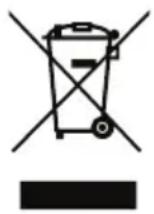
Do not throw this electronic device into the trash when discarding. To minimize pollution and ensure utmost protection of the global environment, please recycle. For more information on the Waste from Electrical and Electronics Equipment (WEEE) regulations, visit www.acer-group.com/public/Sustainability
FCC radio frequency interference requirements
This device complies with Part 15 of the FCC Rules. Operation of the device is subject to the following two conditions:
- This device may not cause harmful interference.
- This device must accept any interference that may cause undesired operation. • 15.21
You are cautioned that changes or modifications not expressly approved by the part responsible for compliance could void the user's authority to operate the equipment.
Interference statement
This wireless adapter has been tested and found to comply with the limits for a Class B digital device, pursuant to Part 15 of the FCC Rules. These limits are designed to provide reasonable protection against harmful interference in a residential installation. This wireless adapter generates, uses, and can radiate radio frequency energy. If the wireless adapter is not installed and used in accordance with the instructions, the wireless adapter may cause harmful interference to radio communications. There is no guarantee, however, that such interference will not occur in a particular installation. If this wireless adapter does cause harmful interference to radio or television reception (which can be determined by turning the equipment off and on), the user is encouraged to try to correct the interference by taking one or more of the following measures:
- Reorient or relocate the receiving antenna of the equipment experiencing the interference.
- Increase the distance between the wireless adapter and the equipment experiencing the interference.
- Connect the device with the wireless adapter to an outlet on a circuit different from that to which the equipment experiencing the interference is connected.
- Consult the dealer or an experienced radio/TV technician for help.
Canada — Industry Canada (IC)
This device complies with RSS247 of Industry Canada. This device complies with Industry Canada RSS247.
This device complies with Industry Canada licence-exempt RSS standard(s). Operation is subject to the following two conditions: (1) this device may not cause interference, and (2) this device must accept any interference, including interference that may cause undesired operation of the device.
Modifications to the device
Acer cannot be held responsible for unauthorized modifications made by the user and the consequences thereof, which may alter the conformity of the device.
Compliant with Russian regulatory certification
EAC


- REGULATORY INFORMATION AND SAFETY GUIDE
- TABLE OF CONTENTS
- BASIC CARE AND TIPS FOR USING YOUR DEVICE
- WARNINGS AND REGULATORY INFORMATION
- SKIN SENSITIVITIES
- TAKING CARE OF YOUR DEVICE
- GENERAL
- SAFETY INSTRUCTIONS
- DEVICE SERVICING
- CLEANING AND SERVICING
- BATTERY AND ADAPTER INFORMATION
- GUIDELINES FOR SAFE BATTERY USAGE
- WARNING
- IMPORTANT
- MEDICAL DEVICES
- VEHICLES
- POTENTIALLY EXPLOSIVE ENVIRONMENTS
- DISPOSAL INSTRUCTIONS
- FCC RADIO FREQUENCY INTERFERENCE REQUIREMENTS
- INTERFERENCE STATEMENT
- CANADA — INDUSTRY CANADA (IC)
- MODIFICATIONS TO THE DEVICE
- COMPLIANT WITH RUSSIAN REGULATORY CERTIFICATION
- EAC
Brand : ACER
Model : L05
Category : Smartwatch