PXBSPS-180 - Polisher Ozito - Free user manual and instructions
Find the device manual for free PXBSPS-180 Ozito in PDF.


User questions about PXBSPS-180 Ozito
0 question about this device. Answer the ones you know or ask your own.
Ask a new question about this device
Download the instructions for your Polisher in PDF format for free! Find your manual PXBSPS-180 - Ozito and take your electronic device back in hand. On this page are published all the documents necessary for the use of your device. PXBSPS-180 by Ozito.
USER MANUAL PXBSPS-180 Ozito

BRUSHLESS 2-IN-1 SANDER / POLISHER
INSTRUCTION MANUAL
SPECIFICATIONS
Input: 18V
No Load Speed: 500-2,800/min
Speed Settings: 7
Disc Diameter: ∅180mm
Weight: 2.2kg
ozito.com.au
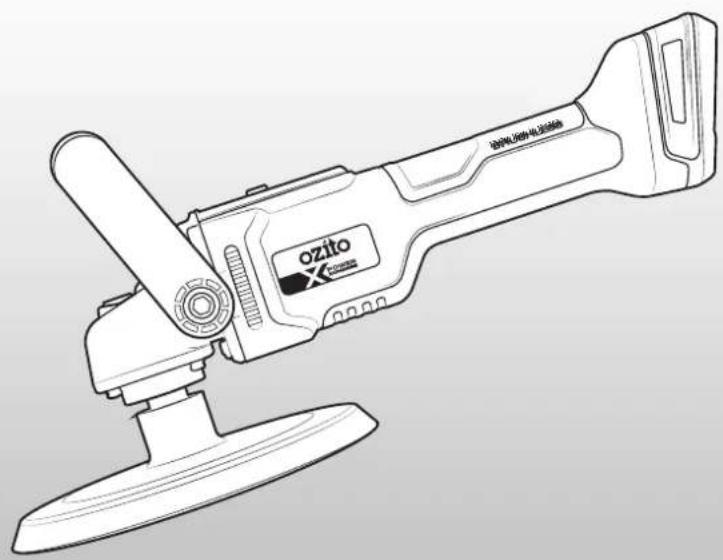
natural_image
Line drawing of a ozito-based handheld device with two base plates and a handle (no text or symbols)STANDARD EQUIPMENT
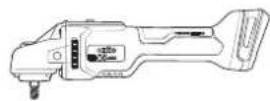
Brushless 2-in-1 Sander / Polisher
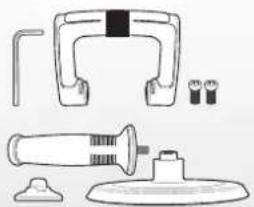
natural_image
Technical line drawing of a mechanical device with no visible text or symbolsHex Key, D Handle, 2 x Handle Bolts, Side Handle, Spacer & Hook & Loop Accessory Disc
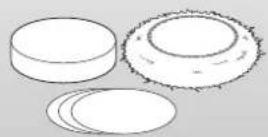
Foam Application Pad,
Synthetic Polishing Bonnet, 3
x Sandpaper (60, 80, 120grit)
5 YEAR REPLACEMENT WARRANTY
PXBSPS-180
WARRANTY
IN ORDER TO MAKE A CLAIM UNDER THIS WARRANTY YOU MUST RETURN THE PRODUCT TO YOUR NEAREST BUNNINGS WAREHOUSE WITH YOUR BUNNINGS REGISTER RECEIPT. PRIOR TO RETURNING YOUR PRODUCT FOR WARRANTY PLEASE TELEPHONE OUR CUSTOMER SERVICE HELPLINE:
Australia 1800 069 486
New Zealand 0508 069 486
TO ENSURE A SPEEDY RESPONSE PLEASE HAVE THE MODEL NUMBER AND DATE OF PURCHASE AVAILABLE. A CUSTOMER SERVICE REPRESENTATIVE WILL TAKE YOUR CALL AND ANSWER ANY QUESTIONS YOU MAY HAVE RELATING TO THE WARRANTY POLICY OR PROCEDURE.
WARNING
The following actions will result in the warranty being void.
- If the tool has been operated on a supply voltage other than that specified on the tool.
- If the tool shows signs of damage or defects caused by or resulting from abuse, accidents or alterations.
- Failure to perform maintenance as set out within the instruction manual.
- If the tool is disassembled or tampered with in any way.
The benefits provided under this warranty are in addition to other rights and remedies which are available to you at law.
Our goods come with guarantees that cannot be excluded at law. You are entitled to a replacement or refund for a major failure and for compensation for any other reasonably foreseeable loss or damage. You are also entitled to have the goods repaired or replaced if the goods fail to be of acceptable quality and the failure does not amount to a major failure.
Generally you will be responsible for all costs associated with a claim under this warranty, however, where you have suffered any additional direct loss as a result of a defective product you may be able to claim such expenses by contacting our customer service helpline above.
5 YEAR REPLACEMENT WARRANTY
Your Product is guaranteed for a period of 60 months from the original date of purchase and is intended for DIY (Do It Yourself) use only. If a product is defective it will be replaced in accordance with the terms of this warranty. Lithium Ion
batteries and chargers are covered by a 36 month
warranty and are excluded from the warranty extension. Warranty excludes consumable parts.
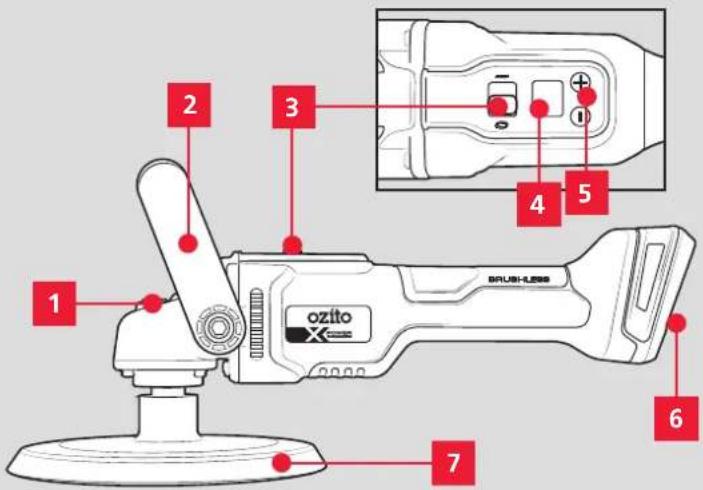
KNOW YOUR PRODUCT
BRUSHLESS 2-IN-1 SANDER/POLISHER
-
Spindle Lock
-
Speed Control Buttons
-
D Handle
-
Battery Seating
-
On/Off Switch
-
Hook & Loop Accessory Disc
-
Digital Speed Display
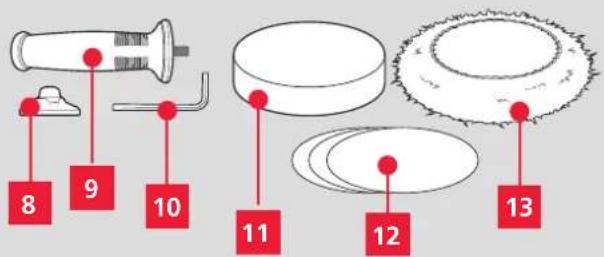
ACCESSORIES
-
Spacer
-
Foam Application Pad
-
Side Handle
-
3 x Sandpaper (60, 80, 120gr)
-
Hex Key
-
Synthetic Polishing Bonnet
BATTERY & CHARGER
This tool is compatible with all batteries & chargers from the Ozito Power X Change range.
ONLINE MANUAL
Scan this QR Code with your mobile device to take you to the online manual.

SETUP & PREPARATION
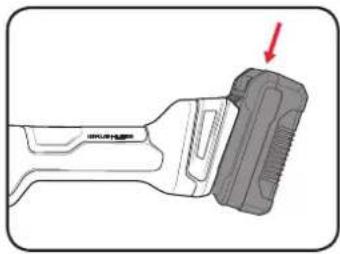
1. FITTING THE BATTERY
Installing The Battery Pack
- Slide the battery into the tool base until it clicks into place.
natural_image
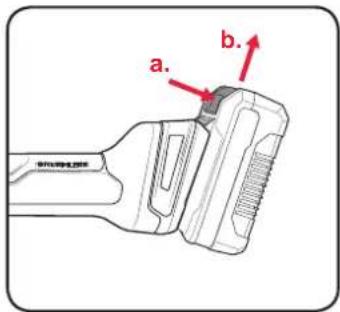
Diagram of a mechanical tool with a red arrow pointing to a component (no text or symbols present)Removing The Battery Pack
- Hold down the battery release button and then slide the battery out.
2. FITTING THE SECONDARY HANDLES 3.

ENSURE THE TOOL IS SWITCHED
OFF AND THE BATTERY IS REMOVED BEFORE
PERFORMING ANY OF THE FOLLOWING TASKS.
Attaching The Side Handle
The side handle should be used when working on contoured worksurfaces.
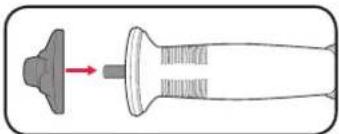
- To attach the side handle, slide the spacer onto the side handle screw.
natural_image
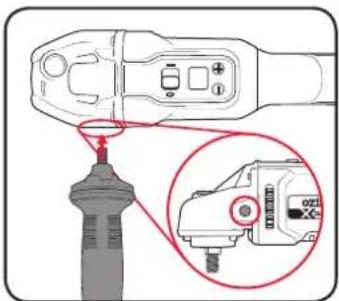
Diagram of a mechanical component with a shaft and housing, showing a force or direction indicator (no text or symbols)- Screw the side handle into one of the handle bolt holes on the tool.
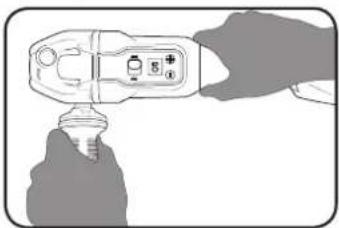
Note: Always hold the tool handle and side handle with both hands when the tool is in use.
natural_image
Illustration of a hand holding a handheld device with buttons and a bulb (no text or symbols visible)- To remove the handle, turn it anti-clockwise to unscrew it from the unit.
Attaching The D Handle
The D handle should be used when working on flat work surfaces.
- Place the tool between the two arms of the D handle, then slide the handle forward into the slots on each side of the tool.
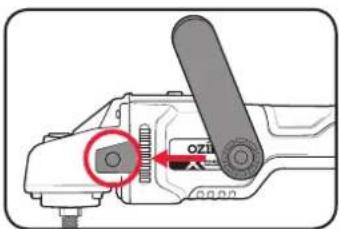
- Place a handle bolt into the hole on the side of the D handle, and use the hex key to tighten this into place.
-
Repeat Step 2 with the second bolt on the other side of the handle.
-
To remove the D handle, undo the two bolts with the hex key and slide the handle off the tool.
TACHING ACCESSORIES

ENSURE THE TOOL IS SWITCHED
OFF AND THE BATTERY IS REMOVED BEFORE
PERFORMING ANY OF THE FOLLOWING TASKS.
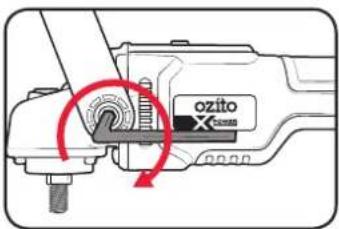
Attaching The Hook & Loop Accessory Disc
- Press and hold down the spindle lock buton.
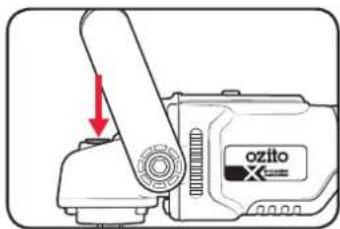
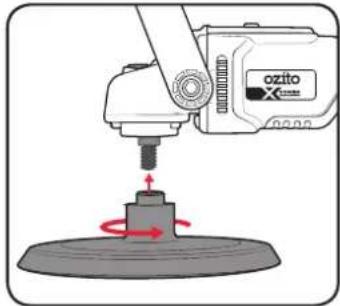
- Slide the accessory disc onto the spindle and turn it anti-clockwise to attach it.
natural_image
Illustration of a robotic arm operating on a platform with a red circular motion indicator (no text or symbols)- To remove the accessory disc, press and hold down the spindle lock button, then turn the accessory disc clockwise to unscrew it.
Installing Accessories To The Disc
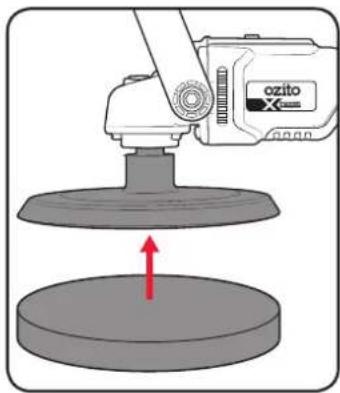
- Press the hook & loop backing of the selected accessory against the bottom of the accessory disc to attach it.
natural_image
Illustration of a robotic presser operating a circular base with a red upward arrow, no text or symbols present.Sandpaper Selection
Selecting the correct grit of sandpaper is an important step in achieving optimum results. Coarse grit will remove the most material. Finer grit will produce a smoother finish. The condition of the workpiece will determine the grit of the sandpaper to be used. The higher the grit number, the finer the grade of sandpaper.
If the surface is rough, start with a coarse grit and sand until the surface is uniform. Medium grit may then be used to remove scratches left by the coarser grit. Finer grit is then used to finish the surface. Always continue sanding with each grade of sandpaper until the surface is uniform.
MATERIAL APPROPRIATE GRIT
| Coarse Sanding | Fine Sanding | |
| Paintwork 180 400 | ||
| Wood: Softwood 60 240 | ||
| Hardwood | 60 180 | |
| Veneer | 240 320 |
Note: If intermediate sanding is required, choose a grit rating between coarse and fine. The above table is intended as a guide only. To ensure a satisfactory result, a small, inconspicuous area should first be tested to ensure the grit of sandpaper chosen is suitable for the desired finish.
Replace the sand paper when it becomes worn.
4. CONTROLS
Turning The Unit On/Off
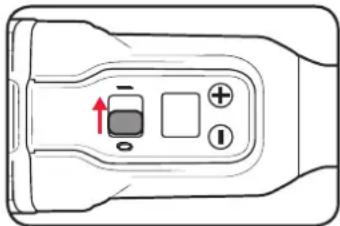
- To turn the unit on, slide the on/off switch to the 'I' position. The number '00' will show on the digital speed display.
natural_image
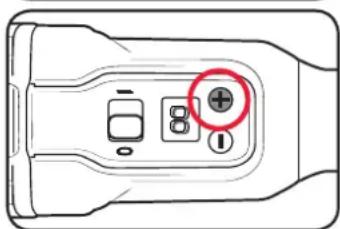
Top-down schematic of a device control panel with buttons and a central indicator (no text or symbols)- Press the '+' button to start the unit at the first speed increment.
natural_image
Top-down diagram of a device control panel with buttons and display (no text or symbols)- To turn the unit off, slide the on/off switch to the '0' position.
Controlling The Speed
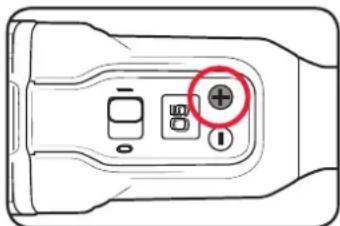
- Press the '+' button to increase the rotation speed of the disc.
natural_image
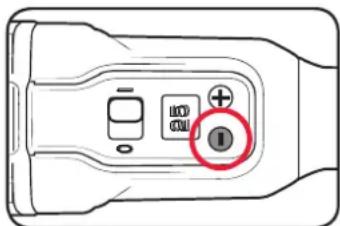
Diagram of a device control panel with buttons and a red circle highlighting the positive button (no text or symbols present)- Press the '-' button to decrease the speed.
natural_image
Diagram of a device control panel with a highlighted button (no text or symbols)
WARNING! USE ONLY SPEEDS 5, 8, & 10 FOR POLISHING. USE SPEEDS 10, 15, 20, 25, & 30 FOR SANDING APPLICATIONS. FAILURE TO FOLLOW THIS DIRECTION MAY CAUSE DAMAGE TO THE WORKSURFACE.
5. USING THE BUFFER POLISHER

WARNING! ENSURE HANDS ARE KEPT CLEAR OF MOVING PARTS DURING OPERATION TO AVOID INJURY.
Before Polishing
Test a small inconspicuous area of the surface. Refer to polish manufacturer's instructions regarding application and drying times.
Using too much polish may:
- Reduce the life of the foam pad
• Make polishing difficult and take longer - Cause the foam pad to come off

WARNING! DO NOT USE ABRASIVE & CUTTING COMPOUNDS TO POLISH WITH THIS TOOL. DOING SO WILL VOID THE WARRANTY.
Applying Polishing Compound
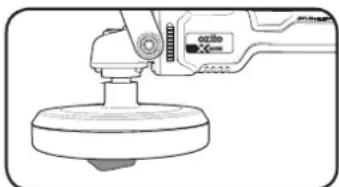
- Ensure the foam application pad is clean and fitted to the tool.
Note: Never use the polishing bonnet to apply polish to a surface.
- Apply a small amount of polishing compound or liquid to the foam pad.
natural_image
Line drawing of a hand using a tool to press or install a circular component, no text or symbols present
WARNING! ALWAYS START & STOP POLISHER AGAINST THE SURFACE TO BE POLISHED.
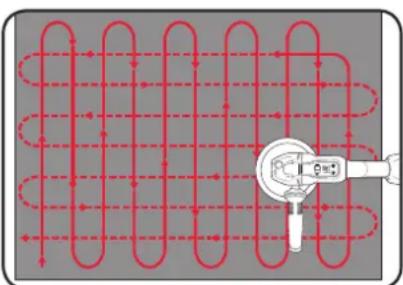
- Hold the polisher on the surface and start the tool. Allow the motor to reach steady speed and move the polisher using long sweeping strokes in a crisscross pattern.
natural_image
Pure diagram of a coiled pipe with red dashed lines indicating flow, no text or symbols presentNote: Start at the lower speed settings and slowly increase the speed as required within the recommended settings. Use only speeds 5, 8, & 10 for polishing applications to prevent damage to the surface.
Note: Do not apply excessive force to the polisher. Allow the polisher to do the work.

WARNING! ALWAYS KEEP TOOL MOVING TO AVOID DAMAGING THE WORK SURFACE.
- Once polishing compound has been applied to the entire surface using the foam pad, switch off the tool before removing the polisher from the surface and removing the battery. You can now move onto the polishing process.
Polishing
Wait until the wax has dried fully before continuing with polishing.
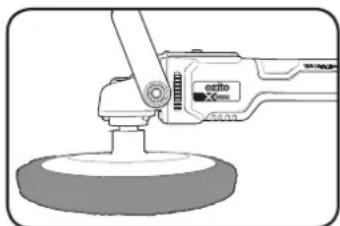
- Remove the foam application pad and replace with the clean polishing bonnet.
natural_image
Illustration of a precision tool with a circular base and lever (no text or symbols)
WARNING! ALWAYS START & STOP POLISHER AGAINST THE SURFACE TO BE POLISHED.
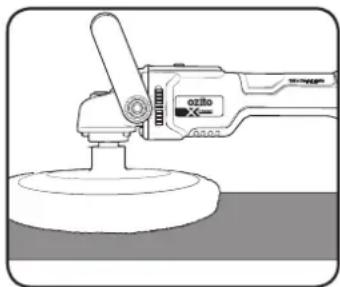
- Insert the battery, hold the polisher on the surface and start the tool.
Note: Use only speeds 5, 8, & 10 for polishing applications to prevent damage to the surface.
- Allow the motor to reach steady speed and move the polisher using long sweeping strokes in a crisscross pattern.
natural_image
Line drawing of a cleaning tool with a circular base and handle (no text or symbols)Note: Do not apply excessive force to the polisher. Allow the polisher to do the work.
- Buff and polish the entire section until all dried polish is removed for a swirl-free polished surface.
Polishing Tips
- If streaking occurs while polishing, there is too much polishing wax on the surface. Stop the tool, remove the bonnet and clean it of excess wax before resuming polishing again.
- It is best to start with large flat surfaces and ending with the hard-to reach areas.
- Apply polishing compound and polish in sections to ensure even polishing.
- Never force the polisher. The weight of the tool supplies adequate pressure, to do the work. Applying additional pressure will slow the motor, rapidly wear the bonnet, and greatly reduce the polisher speed. This will slow the polishing rate and produce an inferior quality surface.

WARNING! EXCESSIVE PRESSURE WILL OVERLOAD THE MOTOR, CAUSING OVERHEATING AND POSSIBLE DAMAGE TO THE MOTOR AND/OR DAMAGE TO THE SURFACE.
- Use a clean terry cloth bonnet (not supplied) for final buffing and polishing to achieve a superior finish.
6. USING THE SANDER 7. TROUBLESHOOT

WARNING! THIS PRODUCT IS NOT RECOMMENDED FOR SANDING DRYWALL OR PLASTER DUE TO THE ULTRA-FINE SANDING PARTICLES PRODUCED. DRYWALL SANDERS IN CONJUNCTION WITH DUST EXTRACTION ARE RECOMMENDED FOR DRYWALL AND PLASTER SANDING APPLICATIONS.
Sanding Operations
-
Secure the material to be sanded where possible.
-
Fit the appropriate grit sandpaper to the accessory disc.
-
With a firm grip on the sander, switch the tool on.
-
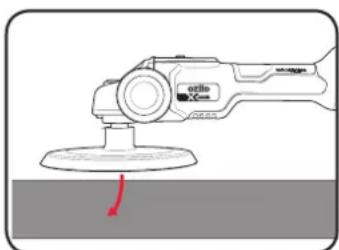
Gradually lower the sander onto the workpiece with a slight forward movement.
natural_image
Illustration of a hand using a power tool to clean or restore a surface (no text or symbols visible)- For optimum results, use either of these strokes.
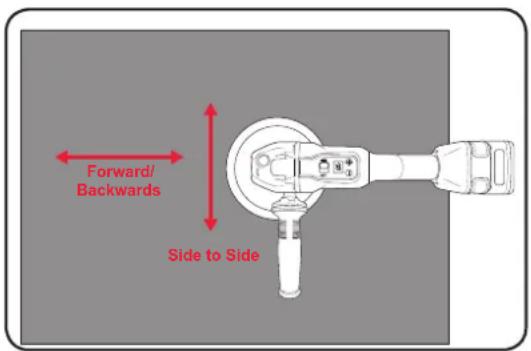
Sanding Tips
Never force the sander. The weight of the sander supplies adequate pressure, allowing the sandpaper to do the work. Applying additional pressure will slow the motor, rapidly wear the sandpaper, and greatly reduce the sander speed. This will slow the removal rate and produce an inferior quality surface.

WARNING! EXCESSIVE PRESSURE WILL OVERLOAD THE MOTOR, CAUSING OVERHEATING AND POSSIBLE DAMAGE TO THE MOTOR AND/OR DAMAGE TO THE SURFACE.
Be sure to check your workpiece often. The sander is capable of removing material rapidly, especially with coarse paper.
Do not sand on one spot for too long. The sander's rapid action may remove too much material, creating an uneven surface.
G
The polisher is not removing the compound from the surface
Ensure a clean polishing bonnet (not the foam application pad) is fitted to the polisher.
Sparking visible through the housing air vents
A small amount of sparking may be visible through the housing vents. This is normal and does not indicate a problem.
Short Battery Runtime
Ensure the battery is properly charged. It will take 4-5 charging cycles before the battery reaches optimum charge and run time.
Digital Error Codes
If a problem occurs with the tool, an error code will show on the digital display screen. Refer to the table below for the error code meaning and possible solutions.
If the tool still does not start after following the directions below, contact Ozito Customer Service.
| Error Code | Cause Solution | |
| E1 | Battery Current Overload | Start the tool with no load on it. If the tool runs normally, you may be applying too much pressure while working.Change the attached battery. |
| E3, E4 | Tool is overloaded | Start the tool with no load on it. If the tool runs normally, you may be applying too much pressure while working. |
| E5 | Tool is overheated | Allow the tool to cool down for 30 minutes before restarting. |
| E6 | Battery is out of charge | Change/charge the battery |
| E7, E8 | Mechanical (Gear) failure | Start the tool with no load on it.Change the battery. |
| E9 | Battery voltage is too high | Change the battery & start the tool with no load on it. |
MAINTENANCE DESCRIPTION OF SY

WARNING! BEFORE CLEANING OR CARRYING OUT ANY MAINTENANCE PROCEDURE, ENSURE THAT THE BATTERIES HAVE BEEN REMOVED.
Cleaning The Polishing Bonnet & Foam Application Pad
The included application pad and polishing bonnet can be re-used. For maximum life and performance, these should be cleaned after each use.
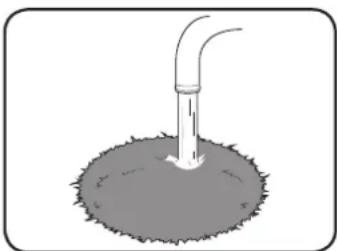
- Remove the bonnet and/or foam pad from the tool and hand wash under warm water.
natural_image
Simple line drawing of a pipe inserted into a circular opening with a small outlet (no text or symbols)- Allow the accessories to air dry before using it again.
Note: If needed, the bonnet can be machine washed in cold water with a small amount of detergent.
Cleaning The Tool
When not in use, the tool should be stored in a dry, frost free location, keep out of children's reach.
If the housing of the tool requires cleaning, do not use solvents. Use of a cloth only is recommended. Never immerse any part of the tool into liquid.
Note: Ozito Industries will not be responsible for any damage or injuries caused by repair of the tool by an unauthorised person or by mishandling.
IBOLS
| V | Volts | ∅ | Diameter | |
| /min | Revolutions or reciprocations per minute | n_0 | No load speed | |
 | Wear eye, ear & breathing protection | Wear hearing protection | ||
 | Wear breathing protection | Wear eye protection | ||
 | Regulatory Compliance Mark (RCM) | Warning | ||
 | Read Instruction Manual | Wear gloves | ||
CARING FOR THE ENVIRONMENT
Power tools that are no longer usable should not be disposed of with household waste but in an environmentally friendly way. Please recycle where facilities exist. Check with your local council authority for recycling advice.

Recycling packaging reduces the need for landfill and raw materials. Reuse of recycled material decreases pollution in the environment. Please recycle packaging where facilities exist. Check with your local council authority for recycling advice.
SPARE PARTS
Spare parts can be ordered from the Special Orders Desk at your local Bunnings Warehouse.
For further information, or any parts not listed here, visit www.ozito.com.au or contact Ozito Customer
Service:
Australia 1800 069 486
New Zealand 0508 069 486
E-mail: enquiries@ozito.com.au

ELECTRICAL SAFETY

WARNING! When using mains-powered tools, basic safety precautions, including the following, should always be followed to reduce risk of fire, electric shock, personal injury and material damage.
Read the whole manual carefully and make sure you know how to switch the tool off in an emergency, before operating the tool.
Save these instructions and other documents supplied with this tool for future reference.
The charger has been designed for 230V and 240V only. Always check that the power supply corresponds to the voltage on the rating plate.
Note: The supply of 230V and 240V on Ozito tools are interchangeable for Australia and New Zealand.
If the supply cord is damaged, it must be replaced by an electrician or a power tool repairer in order to avoid a hazard.
Using an Extension Lead
Always use an approved extension lead suitable for the power input of this tool. Before use, inspect the extension lead for signs of damage, wear and ageing. Replace the extension lead if damaged or defective.
When using an extension lead on a reel, always unwind the lead completely. Use of an extension lead not suitable for the power input of the tool or which is damaged or defective may result in a risk of fire and electric shock.
The power supply for this products charger should be protected by a residual current device (rated at 30mA or less). A residual current device reduces the risk of electric shock.

GENERAL POWER TOOL SAFETY WARNINGS

WARNING! Read all safety warnings and all instructions. Failure to follow the warnings and instructions may result in electric shock, fire and/or serious injury.
Save all warnings and instructions for future reference. The term "power tool" in the 's refers to your mains-operated (corded) power tool or battery-operated (cordless) tool.
-
Work area safety
a. Keep work area clean and well lit. Cluttered or dark areas invite accidents.
b. Do not operate power tools in explosive atmospheres, such as in the presence of flammable liquids, gases or dust. Power tools create sparks which may ignite the dust or fumes.
c. Keep children and bystanders away while operating a power tool. Distractions can cause you to lose control. -
Electrical safety
a. Power tool plugs must match the outlet. Never modify the plug in any way. Do not use any adapter plugs with earthed (grounded) power tools. Unmodified plugs and matching outlets will reduce risk of electric shock.
b. Avoid body contact with earthed or grounded surfaces, such as pipes, radiators, ranges and refrigerators. There is an increased risk of electric shock if your body is earthed or grounded.
c. Do not expose power tools to rain or wet conditions. Water entering a power tool will increase the risk of electric shock.
d. Do not abuse the cord. Never use the cord for carrying, pulling or unplugging the power tool. Keep cord away from heat, oil, sharp edges or moving parts. Damaged or entangled cords increase the risk of electric shock.
e. When operating a power tool outdoors, use an extension cord suitable for outdoor use. Use of a cord suitable for outdoor use reduces the risk of electric shock.
- Personal safety
a. Stay alert, watch what you are doing and use common sense when operating a power tool. Do not use a power tool while you are tired or under the influence of drugs, alcohol or medication. A moment of inattention while operating power tools may result in serious personal injury.
b. Use personal protective equipment. Always wear eye protection. Protective equipment such as dust mask, non-skid safety shoes, hard hat, or hearing protection used for appropriate conditions will reduce personal injuries.
c. Prevent unintentional starting. Ensure the switch is in the off-position before connecting to power source and/or battery pack, picking up or carrying the tool. Carrying power tools with your finger on the switch or energising power tools that have the switch on invites accidents.
d. Remove any adjusting key or wrench before turning the power tool on. A wrench or a key left attached to a rotating part of the power tool may result in personal injury.
e. Do not overreach. Keep proper footing and balance at all times. This enables better control of the power tool in unexpected situations.
f. Dress properly. Do not wear loose clothing or jewellery. Keep your hair, clothing and gloves away from moving parts. Loose clothes, jewellery or long hair can be caught in moving parts.
g. If devices are provided for the connection of dust extraction and collection facilities, ensure these are connected and properly used. Use of dust collection can reduce dust-related hazards.
h. Do not let familiarity gained from frequent use of tools allow you to become complacent and ignore tool safety principles. A careless action can cause severe injury within a fraction of a second.
- Power tool use and care
a. Do not force the power tool. Use the correct power tool for your application. The correct power tool will do the job better and safer at the rate for which it was designed.
b. Do not use the power tool if the switch does not turn it on and off. Any power tool that cannot be controlled with the switch is dangerous and must be repaired.
c. Disconnect the plug from the power source and/or the battery pack from the power tool before making any adjustments, changing accessories, or storing power tools. Such preventive safety measures reduce the risk of starting the power tool accidentally.
d. Store idle power tools out of the reach of children and do not allow persons unfamiliar with the power tool or these instructions to operate the power tool. Power tools are dangerous in the hands of untrained users.
e. Maintain power tools. Check for misalignment or binding of moving parts, breakage of parts and any other condition that may affect the power tool's operation. If damaged, have the power tool repaired before use. Many accidents are caused by poorly maintained power tools.
f. Keep cutting tools sharp and clean. Properly maintained cutting tools with sharp cutting edges are less likely to bind and are easier to control.
g. Use the power tool, accessories and tool bits etc. in accordance with these instructions, taking into account the working conditions and the work to be performed. Use of the power tool for operations different from those intended could result in a hazardous situation.
h. Keep handles and grasping surfaces dry, clean and free from oil and grease. Slippery handles and grasping surfaces do not allow for safe handling and control of the tool in unexpected situations.
- Service
a. Have your power tool serviced by a qualified repair person using only identical replacement parts. This will ensure that the safety of the power tool is maintained.

SANDER/POLISHER SAFETY WARNINGS

This appliance is not intended for use by persons (including children) with reduced physical, sensory or mental capabilities, or lack of experience and knowledge, unless they have been given supervision or instruction concerning use of the appliance by a
person responsible for their safety.
- Remove batteries before changing accessories. Accidental start-ups may occur if the battery is plugged in while changing an accessory.
- Disposing of dust. Be extremely careful of dust disposal, materials in fine particle form may be explosive. Do not throw sanding dust on an open fire. Spontaneous combustion, may in time, result from a mixture of oil or water with dust particles.
- Always wear eye protection and a dust mask for dusty applications and when sanding overhead. Sanding particles can be absorbed by your eyes and inhaled easily and may cause health complications.
- Use special precautions when sanding chemically pressure treated timber, paint that may be lead based, or any other materials that may contain carcinogens. A suitable breathing respirator and protective clothing must be worn by all persons entering the work area. Work should be sealed by plastic sheeting and persons not protected should be kept out until work area is thoroughly cleaned.
- Do not 'wet sand' with this sander. Liquids entering the motor housing are an electrical shock hazard.
- Do not use sandpaper intended for larger sanding pads. Larger sandpaper will extend beyond the sanding pad causing snagging, tearing of the paper or kick-back. Extra paper extending beyond the sanding pad can also cause serious lacerations.
- Some dust created by power sanding, sawing, grinding, drilling and other construction activities contain chemicals known to cause cancer, birth defects or other reproductive harm. Some examples of these chemicals are:
- Lead from lead-based paints;
- Crystalline silica from bricks, cement and other masonry products, and;
- Arsenic and chromium from chemically-treated timber.
Your risk from these exposures varies, depending on how often you do this type of work. To reduce your exposure to these chemicals: work in a well ventilated area and work with approved safety equipment, such as dust masks that are specially designed to filter out microscopic particles.
- Never lay the power tool down until the accessory has come to a complete stop. The spinning accessory may grab the surface and pull the power tool out of your control.
- Do not press the spindle lock while the disc is spinning.
- Hold the tool handle and secondary handle (D handle/side handle) at all times when the tool is
in use.
- Do not run the power tool while carrying it at your side. Accidental contact with the spinning accessory could snag your clothing, pulling the accessory into your body.
- Keep moving parts away from your body, other people and animals.
- Regularly clean the power tool's air vents. The motor's fan will draw the dust inside the housing and excessive accumulation of powdered metal may cause electrical hazards.
- Do not operate the power tool near flammable materials. Sparks could ignite these materials.
- This power tool is intended to function as a polisher and sander. Do not use this tool for anything other than polishing and sanding, operations for which the power tool was not designed may create a hazard and cause personal injury.
- Do not use accessories which are not specifically designed and recommended by the tool manufacturer. Just because the accessory can be attached to your power tool, it does not assure safe operation.
- Do not use a damaged accessory. Before each use inspect the accessory such as tear or excess wear. If power tool or accessory is dropped, inspect for damage or install an undamaged accessory.
- Do not allow any loose portion of the polishing bonnet or its attachment strings to spin freely. Tuck away or trim any loose attachment strings. Loose and spinning attachment strings can entangle your fingers or snag on the workpiece.
- Always keep tool moving during polishing and sanding process, staying in one position may damage surface.
Kickback and Related Warnings
Kickback is a sudden reaction to a pinched or snagged rotating wheel, backing pad, brush or any other accessory. Pinching or snagging causes rapid stalling of the rotating accessory which in turn causes the uncontrolled power tool to be forced in the direction opposite of the accessory's rotation at the point of the binding. Kickback is the result of power tool misuse and/or incorrect operating procedures or conditions and can be avoided by taking proper precautions as given below.
- Maintain a firm grip on the power tool and position your body and arm to allow you to resist kickback forces. Always use auxiliary handle, if provided, for maximum control over kickback or torque reaction during start-up. The operator can control torque reactions or kickback forces, if proper precautions are taken.
- Never place your hand near the rotating accessory. Accessory may kickback over your hand.
- Do not position your body in the area where power tool will move if kickback occurs. Kickback will propel the tool in direction opposite to the wheel's movement at the point of snagging.
- Use special care when working corners, sharp edges etc. Avoid bouncing and snagging the accessory. Corners, sharp edges or bouncing have a tendency to snag the rotating accessory and cause loss of control or kickback.