TU950TLE8 - Cooker Technika - Free user manual and instructions
Find the device manual for free TU950TLE8 Technika in PDF.


User questions about TU950TLE8 Technika
0 question about this device. Answer the ones you know or ask your own.
Ask a new question about this device
Download the instructions for your Cooker in PDF format for free! Find your manual TU950TLE8 - Technika and take your electronic device back in hand. On this page are published all the documents necessary for the use of your device. TU950TLE8 by Technika.
USER MANUAL TU950TLE8 Technika
pie
Instructions for Use FreestInstructions for Use and Installation
Freestanding Cookers:
- TU950TLE8
TECHNIKA

pie
| Segment | Value | |---|---| | Cont | 100 |Contents
For your safety
Safety of children and the infirm 3
Cleaning and maintenance 3
During use....4
Installation....5
Service and spare parts 6
Use and Care
Description of the appliance 7
Oven & Accessories 8
Controls....9
Instructions for use 10
How to use your oven 12
Positioning the oven trays & shelves....13
Cooking modes 14
6-button digital clock 16
Practical cooking advice 19
Cleaning & maintenance 25
Disposal....30
Installation
Technical data 31
Instructions for Installation....32
Dimensions 33
Combustible surfaces 33
Anti-tilting chain 34
Connection to the gas supply 35
Electrical connection 36
Replacing the power supply lead....36
Before leaving 36
Gas Conversion
NG-U-LPG....37
U-LPG - NG....38
For Your Safety
We recommend that you read the instructions in this owner's manual carefully before use for the best performance and to extend the life of your appliance. It will provide you with all the information you need to ensure its safe installation, use and maintenance. Retain this owner's manual for future reference.
To maintain the efficiency and safety of this appliance, we recommend that you do the following:
- Always call the Technika service department if there are any faults with your appliance.
• Always use original spare parts available from Technika. - This appliance is designed for non-commercial, household use and it must not be altered in any way.
- This appliance can only be used safely when it is correctly connected to an efficient earthing system in compliance with current electrical safety standards.
- If the supply cord is damaged, it must be replaced by the manufacturer or its service agent or a similarly qualified person in order to avoid a hazard.
Packaging items such as plastic bags, polystyrene, nails, etc. are potentially dangerous, and therefore appropriate measures must be taken to prevent children and the disabled from coming into contact with them.
Safety of children and the infirm
This appliance must only be used by adults. Make sure that children do not touch the controls or play with the appliance.
The exposed parts of this appliance heat up during cooking and remain hot for some time even after it is switched off. Keep children well away until the appliance has cooled down.
Cleaning and maintenance
Keep the appliance thoroughly cleaned. Food residues may cause fire risks.
For Your Safety
During use
- The appliance becomes hot. Care should be taken to avoid touching heating elements inside the oven.
- WARNING: Accessible parts will become hot when in use. To avoid burns and scalds, children should be kept away.
- The appliance is not intended for use by young children or infirm persons without supervision. Young children should be supervised to ensure that they do not play with the appliance.
• DO NOT use a steam cleaner to clean the appliance. - This product is designed to cook foods inside private homes and for non-commercial purposes. It should not be used for any other purpose.
- After using the appliance, make sure that all controls are in 'CLOSED' or 'OFF' position.
- DO NOT USE OR STORE FLAMMABLE MATERIALS IN THE APPLIANCE STORAGE DRAWER OR NEAR THIS APPLIANCE.
• DO NOT SPRAY AEROSOLS IN THE VICINITY OF THIS APPLIANCE WHILE IT IS IN OPERATION. - DO NOT STORE OR USE FLAMMABLE LIQUIDS OR ITEMS IN THE VICINITY OF THIS APPLIANCE.
- WHERE THIS APPLIANCE IS INSTALLED IN MARINE CRAFT OR IN CARAVANS, IT SHALL NOT BE USED AS A SPACE HEATER.
- Only use the appliance to cook food and nothing else.
- Disconnect the appliance from the electrical mains if it is not functioning properly and before cleaning or performing maintenance.
- Use oven gloves to place cookware in the oven or when removing it. Always grip the oven door handle in the centre.
- Technika will not accept any liability as a result of any damage due to incorrect installation or improper use.

For Your Safety
Installation
- Installation of the appliance and its connection to the electrical mains must only be carried out by Authorised Personnel. Before any service procedure, it is important to check that the appliance is DISCONNECTED from the electrical mains.
- DO NOT modify or attempt to modify this product.
- After removing the appliance from the packaging, make sure that it is undamaged and that the electrical lead is in perfect condition. Otherwise, contact your dealer before operating the appliance.
- Make sure that air is able to circulate freely around the appliance. Poor ventilation produces a shortage of oxygen.
- Make sure that the appliance is supplied with the type of gas indicated on the data label and the gas type label next to the gas connection point.
- Use of a gas cooking appliance produces heat and moisture in the room in which it is installed. Ensure that the room is well ventilated by keeping the air intakes open and in good working order or by installing an extractor hood with discharge pipe.
- If the appliance is used intensively for a long time the effectiveness of the ventilation will have to be increased, for example by opening a window or increasing the power of any electric extractor fan.
For Your Safety
Avoid the following:
- Touching the appliance with wet parts of the body.
• Using the appliance while barefoot. - Improper or dangerous operation.
- Obstructing the ventilation or heat dissipation slots.
- Allowing power supply cables of other appliances to come into contact with hot parts of the oven.
- Exposing the appliance to atmospheric agents such as rain, or direct sunlight.
• Using the oven for storage purposes.
• Using flammable liquids near the appliance.
Authorised personnel must be contracted to...
• Install the appliance according to these installation instructions and any local requirements.
- Replace the temperature probe if it is damaged. The probe is part of thermostat. Only use the temperature sensing probe recommended for this oven.
Technika Service Department must be contacted...
- If in doubt about the operation of the appliance.
- If in doubt about the soundness of the appliance after removing it from its packaging.
- If the power supply cable has been damaged or needs to be replaced.
- If the appliance requires a service or you need spare parts.
Service and spare parts
If the appliance fails to operate correctly, never attempt to repair the appliance yourself. Repairs by unskilled persons may cause damage and accidents. First refer to the contents of this manual. If you do not find the necessary information, contact your nearest Service Center. Servicing work on this appliance must be carried out by Authorised Personnel. Always request the use of original spare parts.
For Service & Spare Parts please contact: 1800 333 244
Use and Care
Description of the appliance
- Timer
- Semi-Rapid burner
- Control Knob (Cooktop Burners)
- Rapid burner
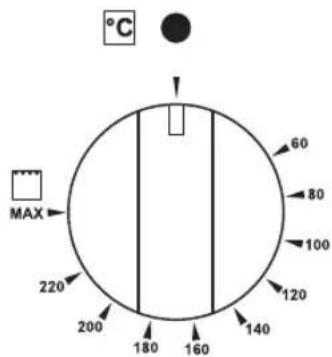
- Cooking Temperature Selection Knob
- Fish burner
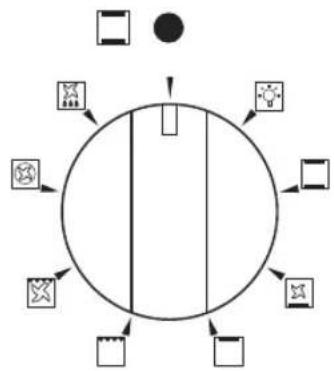
- Cooking Mode Selection Knob
- Wok burner
- Auxiliary burner
- Pan supports
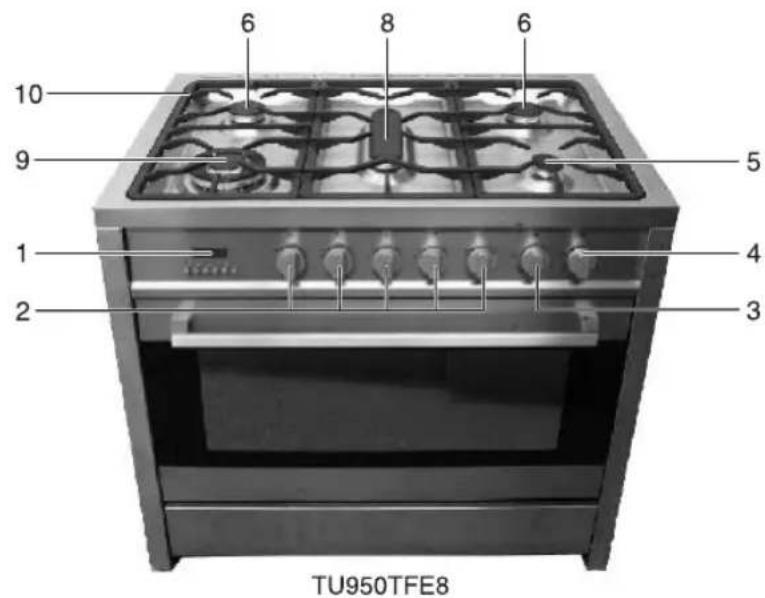
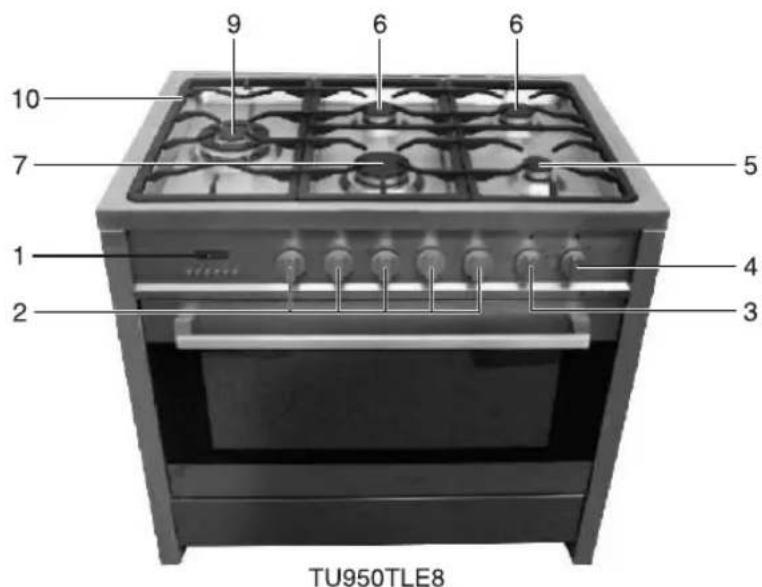
Model TU950TME8 has the same burner configuration as model TU950TLE8 except the Semi-Rapid and Rapid burners are located on the left side of the cooktop and the wok burner is located on the centre of the cooktop.
Use and Care
Oven & accessories
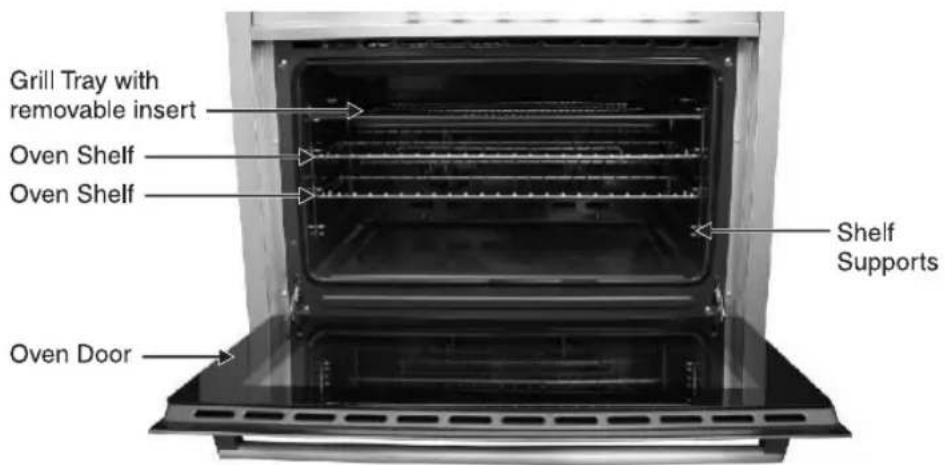
The oven is supplied with chrome wire Shelf Supports and a range of shelf options as shown below. There are four shelf positions on the oven.
Use and Care
Controls
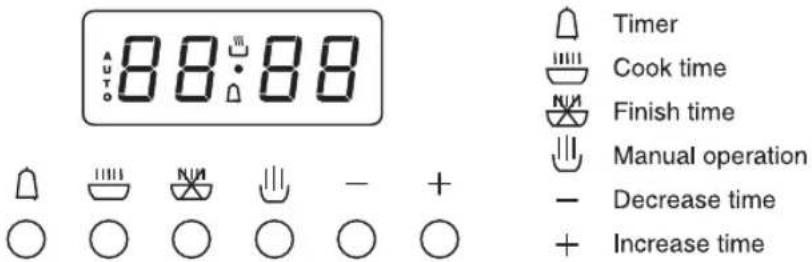
Digital Automatic Clock


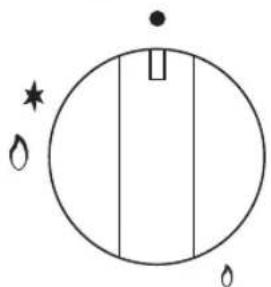
Control Knob (Cooktop Burners)
natural_image
Simple circular diagram with vertical lines and small symbols (no text or labels)Cooking Temperature
Selection Knob
Cooking Mode
Selection Knob
flowchart
graph TD
    A["Start"] --> B["Process Step 1"]
    B --> C["Process Step 2"]
    C --> D["End"]
    style A fill:#f9f,stroke:#333
    style B fill:#ccf,stroke:#333
    style C fill:#cfc,stroke:#333
    style D fill:#fcc,stroke:#333
Use and Care
Instructions for use (cooktop burners)
The symbols on the control knobs mean the following:
- No gas flow or 'Off'

Maximum gas flow or 'high' flame and lighting position
Minimum gas flow or 'low' flame
All operating positions must be set between the maximum and minimum flow settings, and never between the maximum setting and the closed position.
Use and Care
To light the cooktop burners
To light the burner, press the control knob fully down and hold the knob down before rotating anti-clockwise to the High Flame position. The ignition device is integrated into the control knob and is automatically activated by pushing down on the control knob.
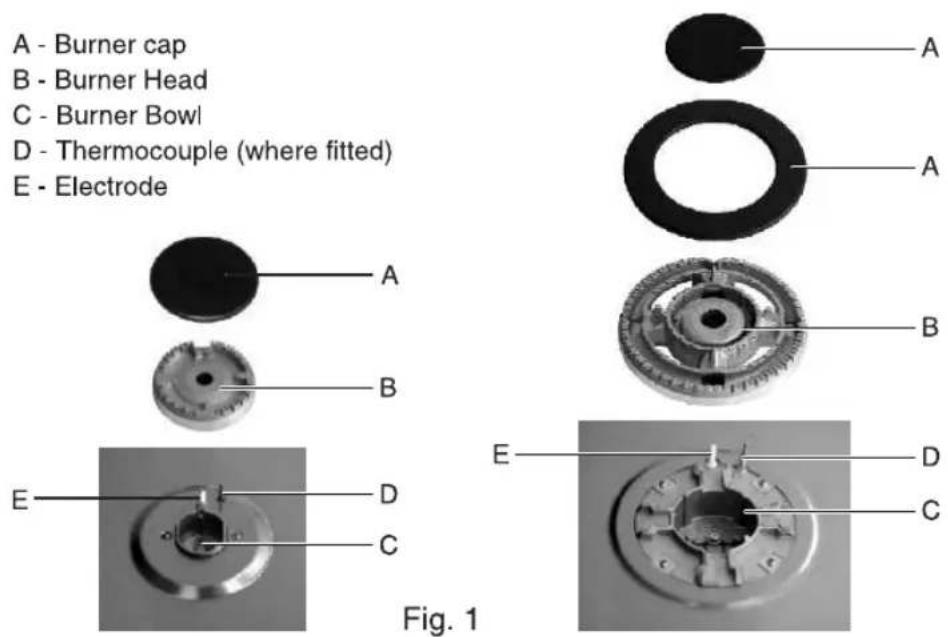
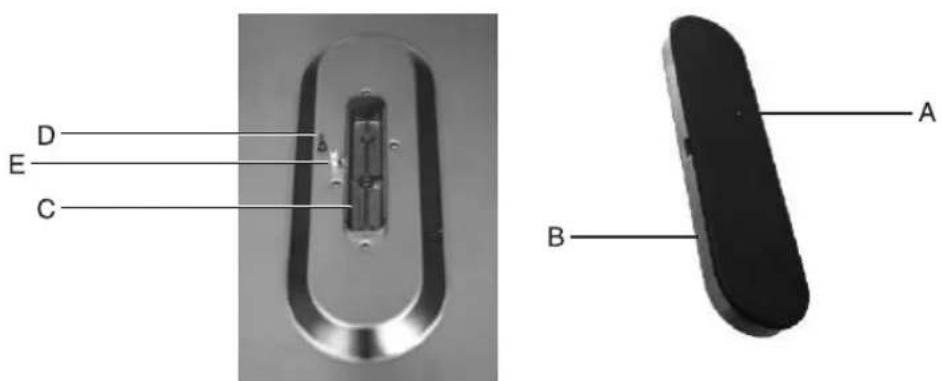
After lighting the flame, keep the knob pressed for about 10 seconds: this time is necessary to heat up the thermocouple (Fig.1-D) and activate the safety valve, which would otherwise cut off the gas flow. This step only applies where flame failure device is fitted.
In the instance of a power failure, place a lit match near the burner and proceed as described above. If the flame does not light after the first attempt, wait 5 minutes for the gas to dissipate before attempting to re-light the burner.
Once lit, check that the flame is even and turn the control knob to adjust the flame as required. If the flame is uneven, check that the 'burner head/skirt' and 'burner cap' are correctly positioned. To turn off the flame, turn the control knob clockwise to the off position (● symbol). Before removing pots or pans from the burners, always turn off the flame.
For correct use of the cooktop
For lower gas consumption and better efficiency, use only flat-bottomed pans of dimensions suitable for the burners, as shown in the table below. Also, as soon as a liquid comes to the boil take care to turn the flame down to a level that will just keep it boiling.
| Burner | Minimum diameter | Maximum diameter |
| Large(rapid) | 150mm | 260mm |
| Medium(semi-rapid) | 130mm | 180mm |
| Fish | 310mm x 140mm | 460mm x 230mm |
| Small(Auxiliary) | 90mm | 160mm |
| Triple Flame (Wok) | 210mm | 270mm |
During cooking processes involving fats or oils, watch your foods carefully because these substances may catch fire if overheated.
Use and Care
How to use your oven
This multi-function oven combines the advantages of traditional convection ovens with modern fan assisted ovens in a single appliance. It is an extremely versatile appliance that allows you to choose easily and safely between different cooking modes. The various cooking modes are selected by means of a cooking mode selection knob, located on the control panel.
To operate the oven:
- Ensure that manual mode is selected (page 16)
- Turn the cooking mode selection knob to the desired cooking mode (explanation of cooking modes is on pages 14 to 15)
- Turn the cooking temperature selection knob to the desired temperature (cooking guide is on pages 23 to 24) or to 'MAX' if Grilling.
The first time you use your appliance, we recommend that you set the thermostat to the highest setting, set the cooking mode selection knob to a cooking mode and leave the oven on for about half an hour with nothing in it and the oven door shut. Then, open the oven door and allow the oven to cool. Any odour that may be detected during this initial use is due to the evaporation of substances used to protect the oven during storage.
Note: Place the Baking Tray provided on the bottom shelf position of the oven to prevent any spillages from dripping onto the bottom of the oven. Never place anything (including foil and oven trays) on the bottom of the oven when it is in operation because this could damage the enamel. Only place your cookware (dishes, trays, aluminum foil, etc.) on the Oven Shelves provided with the appliance.
natural_image
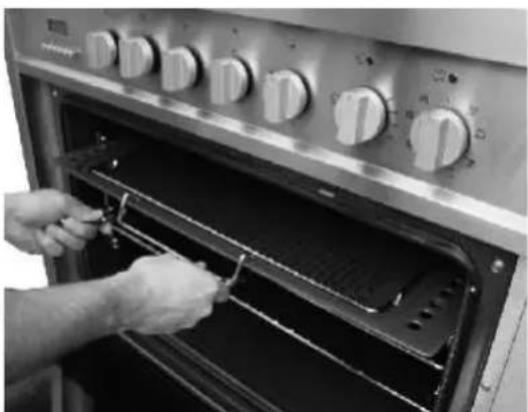
Person installing or adjusting a large oven with control knobs and grilles (no visible text or symbols)If supplied, use the chrome wire handle shown left when removing the trays from the oven.
Use and Care
Positioning the oven trays & shelves
The Baking Tray, Grill Tray or Oven Shelf can be located in any of the five height positions in the oven if your oven does not have Telescopic Shelf Supports. Oven Shelves cannot be fitted to the Telescopic Support. Only fit the Baking Tray or Grill Tray to the Telescopic Support.
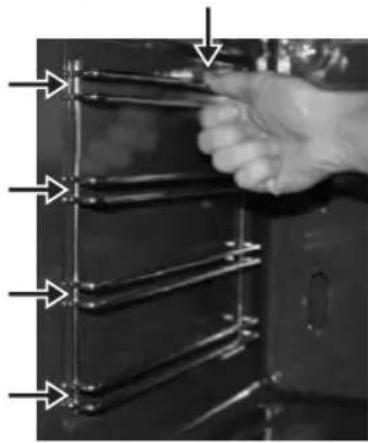
Refer to the 'Cooking Mode Table' for the recommended shelf position. When fitting the trays or shelves, ensure they are fitted between the two wires that are closest together as shown below. Oven Shelves have a stop so that they are not fully withdrawn by accident. To fully remove the Oven Shelves, lift the front of the shelf slightly and withdraw fully from the oven. Note that the Grill Tray and Baking Tray do not have a stop position and can be fully withdrawn without interruption, so be careful not to accidentally fully withdraw the trays.
Fit Trays and Shelves between bars as shown right
natural_image
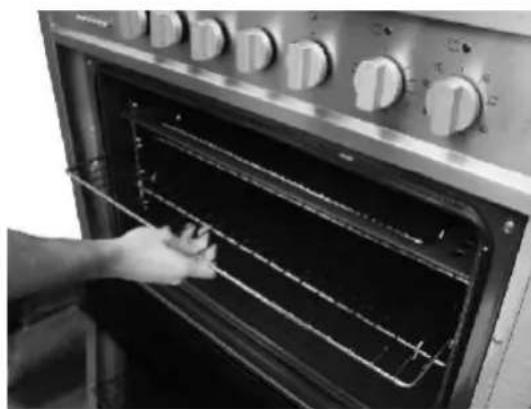
Close-up of a hand holding a metal rack with multiple metal bands, no visible text or symbolsTo remove the Oven Shelf Support, push down on the wire below the locking pin, pull away from the oven wall until you can release the bottom of the support from the holes in the oven wall. Replace in reverse procedure.
natural_image
Person opening a vintage oven with visible grilles and control knobs (no text or symbols)Oven Shelf fitted to chrome wire Shelf Support
Use and Care
COOKING MODES
Convection mode □
When set to Convection mode, the top and bottom heating elements operate together like a 'normal' conventional oven that you have probably used before.
Convection mode is best suited for traditional baking and roasting and you should only use one shelf at a time, otherwise the heat distribution will be uneven. You can balance the amount of heat between the top and the bottom of the dish by selecting a different shelf height. If you want more heat at the top of the dish place the dish on the top or second shelf. For more heat at the bottom of the dish, place the dish on third or fourth shelf.
Delicate cooking mode
When set to Delicate cooking mode, the bottom element and the fan will operate. This mode is suitable for pastries, cakes and non-dry sweets in baking tins or moulds that require heat from the bottom.
Top heat mode
When set to Top heat mode, the top heating element operates. This mode can be used to brown food at the end of cooking.
Grill mode
Select 'Grill' mode with cooking mode selection knob and turn cooking temperature selection knob to 'Max'. When set to Grill mode, the top inner element operates. The extremely high and direct temperature of the grill makes it possible to brown the surface of meats and roasts while locking the juices in to keep them tender. Grill mode can also be used for dishes that require a high temperature on the surface such as beef steaks, veal, rib steak, filets, hamburgers, etc.
Grill food with the oven door ajar (when not using fan).
Use and Care
Fan assisted grill mode

Select 'Fan Assisted Grill' mode with cooking mode selection knob and turn cooking temperature selection knob to the desired temperature setting. When set to Fan Assisted Grill mode, the top inner element and the fan operate. This mode increases the circulation of air throughout the oven, which helps prevent food from burning on the surface, allowing the heat to penetrate right into the food. Particularly suitable for kebabs made with meats and vegetables, sausages, ribs, lamb chops, chicken, quail, pork chops, fish steaks, stuffed cuttlefish etc.
In Fan Assisted Grill mode, grill with the oven door shut.
Baking mode
When set to Baking mode, the fan element and the fan operate providing a delicate heat distributed uniformly throughout the oven.
This mode is ideal for baking and cooking delicate foods on multiple shelves, especially cakes that need to rise such as cream puffs and for certain tartlets, sweet or savoury biscuits, savoury puffs, swiss rolls and small portions of vegetables, etc.
Defrost mode
When set to 'Defrost' mode, the fan located at the back of the oven circulates room temperature air around the food. This is recommended for the defrosting of all types of food, but in particular for delicate types of food which do not require heat, for example: ice cream cakes, cream or custard desserts, fruit cakes, etc. By using 'Defrost' mode, the defrosting time is approximately halved. In the case of meat, fish and bread, it is possible to accelerate the process by selecting 'Multi Cooking mode' and setting the temperature between 80°C to 100°C.
Use and Care
6 BUTTON DIGITAL CLOCK
This model has a digital display, 24hr clock with 6 control buttons. When the power is connected, the screen displays 3 flashing numbers and 'AUTO'.
Adjusting the digital clock
To set the correct time, press the ⏻ button first, then + or - button to advance forward or backward until the correct time is displayed.
Manual operation setting
If 'AUTO' is flashing, automatic or semi-automatic program has been set. Press ⏻ button, 'AUTO' will clear from the display and the oven can be operated manually.
Automatic setting
Automatic setting of the oven allows you to select the end time, cooking time, temperature and cooking mode. The oven will switch on, cook according to the selected cooking mode and temperature and then switch off automatically.
- Press 📋 button, set cooking time with + and - buttons.
- Press 📋 button, set roast finish time with + and - buttons.
- Set cooking temperature and cooking mode by turning the thermostat knob and selector knob.
After the above setting, 'AUTO' will illuminate, which means the automatic cooking feature of the oven is set.
For example: if cooking time takes 45 minutes and you want it to finish at 14:00:
- Press 📋 and set the cook time to 45 minutes using + and - buttons.
- Press 📄 and set the finish time to 14:00 using + and - buttons.
After the above setting, the current time is displayed and 'AUTO' will flash, indicating that the automatic cooking feature is set. When the clock displays 13:15, the oven will start cooking automatically. While cooking, 'AUTO' and 📋 will flash.
When the clock displays 14:00, the oven automatically stops cooking. The alarm will ring and 'AUTO' will flash, press the button and the ringing will stop.

Use and Care
Semi-automatic setting
There are two methods of semi-automatic cooking:
A. Start cooking now and set cooking time:
This semi-automatic setting of the oven allows you to start cooking immediately, set the cooking time (up to 10 hours), select the temperature and cooking mode. The oven will cook according to the selected cooking mode and temperature and then switch off automatically once the cooking time has elapsed.
- Press 📋 button, set cooking time with + and - buttons.
- Set cooking temperature and cooking mode by turning the thermostat knob and selector knob.
The oven starts immediately, and 'AUTO' will flash. After the cooking time has elapsed, the oven automatically stops cooking. The alarm will ring and 'AUTO' will flash, press the button and the ringing will stop.
B. Start cooking now and set the finish time:
-
Press 📋 button, set cooking finish time with + and - buttons (up to 23 hours and 59 minutes).
-
Set cooking temperature and cooking mode by turning the thermostat knob and selector knob.
The oven starts immediately, and 'AUTO' will flash. When the finish time is reached, the oven automatically stops cooking. The alarm will ring and 'AUTO' will flash, press the button and the ringing will stop.
When the 📄 button is pressed during semi-automatic cooking, the set cooking time is displayed. If the 📄 button is pressed and the time is set back to '0', the semi-automatic setting will be cancelled. When ⏰ button is pressed again, the oven will revert to the manual mode.
Use and Care
Timer
The digital countdown timer can be set up to 23 hours and 59 minutes maximum.
To set the timer, press the 🔒 button and then + or - button until the desired time is displayed. Once the 🔒 button is released, the current time and 🔒 is displayed. When the 🔒 button is pressed the remaining time is displayed. When the set time is reached, 🔒 disappears and the alarm will ring. To stop the alarm, press the 🔒 button.
Note: After pressing the 🔊 button, timer settings should be done within 5 seconds.
In case of a power failure, all settings including the time display will be lost. When the power is returned, three '0' and 'AUTO' will be displayed.
The oven light
Set cooking mode selection knob to 📷 symbol to switch on the oven light/s. The oven light/s stay on when the oven is operating.
Cooling ventilation
In order to cool down the exterior of the appliance, this model is equipped with a cooling fan, which switches on automatically. When the cooling fan is on, you will notice a flow of air exiting between the oven door and the control panel.
Note: When cooking is finished, the cooling fan continues to operate until the oven cools down and then switches off automatically.
Use and Care
PRACTICAL COOKING ADVICE
The oven offers a wide range of settings which allow you to cook any type of food in the best possible way. With time you will learn to make the best use of this versatile cooking appliance and the following directions are only a guideline which may be varied according to your own personal experience.
Preheating
If the oven needs to be preheated, the 'Convection' mode or 'Baking' mode should be selected. These are the most efficient modes, which will reach the desired temperature as quickly as possible using the least amount of energy.
Once the food has been placed in the oven, the desired cooking mode should then be selected.
Multi shelf cooking
If you want to cook food on several shelves, select the 'Baking' mode as this is the only cooking mode that allows you to do so.
When cooking delicate foods on more than one shelf, use the 'Baking' mode. This mode allows you to cook on 3 shelves at the same time. Refer to the 'Cooking Guide' table.
Use and Care
Using the grill
This multi-function oven has 2 different grilling modes.
Use the 'Grill' mode ☐ with the oven door ajar, place the food on the centre of the grill pan, insert and fit the grill pan on either the 3rd or 4th shelf from the bottom. Note: only the central part of the top heating element operates for grilling.
When using 'Grill' mode, we recommend you set the thermostat to the highest setting. However, this does not mean you cannot use lower temperatures, simply adjust the thermostat knob to the desired temperature.
Use 'Fan assisted grill' mode with the oven door shut. This mode is very useful for grilling foods rapidly, as the distribution of heat by the fan makes it possible not only to brown the surface, but also to cook the bottom of the food. It can also be used for browning foods at the end of the cooking process, such as adding that gratin finish to pasta bakes for example.
When using 'Fan assisted grill' mode, place the food on the 2nd or 3rd oven shelf from the bottom, then place a dripping-pan on the 1st rack from the bottom to prevent fat and grease from dripping onto the oven floor. We recommend you set the thermostat to 200^ , as it is the most efficient temperature for 'Fan assisted grill' mode. However, this does not mean you cannot use lower temperatures, simply adjust the thermostat knob to the desired temperature.
Important: for best results and to save energy, always use the 'Fan assisted grill' with the oven door shut.
Use and Care
Baking cakes
When baking cakes, always place them in a preheated oven. Make sure you wait until the oven has been preheated thoroughly (the indicator light will turn off). To prevent heat loss and the cake from dropping, do not open the oven door during baking.
In general...
... if pastry is too dry
Increase the temperature by 10^ C and reduce the cooking time.
... if pastry has dropped
Use less liquid or lower the temperature by 10^ C.
... if pastry is too dark on top
Place it on a lower shelf, lower the temperature, and increase the cooking time.
... if cooked well on the inside but sticky on the outside
Use less liquid, lower the temperature, and increase the cooking time.
... if the pastry sticks to the pan
Grease the pan well and sprinkle it with a dusting of flour or use greaseproof paper.
... if I used multi shelf cooking and one shelf is more cooked
Use a lower temperature setting next time. It is not necessary to remove the food from all the racks at the same time.
Use and Care
Cooking pizza
For best results when cooking pizza:
• Preheat the oven for at least 10 minutes.
- Use a light aluminum pizza pan, placing it on the shelf supplied with the oven. Don't use the dripping pan since this will extend the cooking time, making it difficult to get a crispy crust.
- Do not open the oven door frequently while the pizza is cooking;
- If the pizza has a lot of toppings (three or four), we recommend you add the mozzarella cheese on top halfway through the cooking process.
- For best results, only use one shelf at a time, but if you want to cook on two shelves, use the 2nd and 4th racks from the bottom with a temperature of 220^ C and swap them halfway through cooking.
Cooking fish and meat
When cooking white meat, fowl and fish, use a temperature setting from 180^ C to 200^ C.
For red meat that you want well done on the outside while tender and juicy in the inside, it is best to start with a high temperature setting (200°C-220°C) for a short time, then turn the oven down afterwards.
In general, the larger the roast, the lower the temperature setting. Place the meat on the centre of the shelf and place the dripping pan beneath it to catch the fat.
Make sure that the shelf is inserted so that it is in the centre of the oven. If you would like to increase the amount of heat from below, use a lower shelf height. For savoury roasts (especially duck and wild game), dress the meat with lard or bacon on the top.
Cooking guide
| Selector knob setting | Food to be cooked | Level from below | Temperature (°C) | Time in minutes(*) |
| Traditional cooking [C268] | First courses | |||
| Lasagne | 2-3 | 210-230 | 30 | |
| oven-baked pasta | 2-3 | 210-230 | 40 | |
| MEAT | ||||
| Roast veal | 2 | 175-200 | 30-40/kg | |
| Roast beef | 2 | 210-240 | 30-40/kg | |
| Roast pork | 2 | 170-200 | 30-40/kg | |
| Chicken | 2 | 170-200 | 45-60 | |
| Duck | 2 | 170-200 | 45-60 | |
| Goose-turkey | 2 | 140-170 | 45-60 | |
| Rabbit | 2 | 170-200 | 50-60 | |
| Leg of lamb | 1 | 170-200 | 15/kg | |
| Roast fish | 1-2 | 170-200 | According to dimensions | |
| Pizza | 1-2 | 210-240 | 40-45 | |
| DESSERTS | ||||
| Mecingue | 1-2 | 50-70 | 60-90 | |
| Short pastry | 1-2 | 170-200 | 15-20 | |
| Cianbella | 1-2 | 165 | 35-40 | |
| Savoyards | 1-2 | 150 | 30-50 | |
| Brioches | 1-2 | 170-200 | 40-45 | |
| Fruit cake | 1-2 | 170-200 | 20-30 | |
| [BYOW] | Browning food to perfect cooking | 3-4 | 15 | 220 |
(*) With preheated oven
| Selector knob setting | Food to be cooked | Level from below | Temperature °C | Time in minutes |
| Fun forced cooking [ZKBC] | First courses | |||
| Lasagna | 2 | 190-210 | 20-25 | |
| Oven-baked pasta | 2 | 190-210 | 25-30 | |
| Creole rice | 2 | 190-220 | 20-25 | |
| MEAT | ||||
| Roast veal | 2 | 150-170 | 65-90 | |
| Roast pork | 2 | 150-160 | 70-100 | |
| Roasted beef | 2 | 160-170 | 65-90 | |
| Fillet of beef | 2 | 160-180 | 35-45 | |
| Fillet lamb | 2 | 130-150 | 100-130 | |
| Roast beef | 2 | 170-180 | 40-45 | |
| Roast chicken | 2 | 170 | 70-90 | |
| Roast duck | 2 | 160-170 | 100-160 | |
| Roast turkey | 2 | 150-160 | 160-240 | |
| Roast rabbit | 2 | 150-160 | 80-100 | |
| Roast hare | 2 | 160-170 | 30-50 | |
| Roast pigeon | 2 | 140-170 | 15-25 | |
| Fish | 2-3 | 150-170 | According to dimensions | |
| Pizza | 2-3 | 210-240 | 30-50 | |
| DESSERT'S(PASTRIES) | ||||
| Cambella | 2-3 | 150-170 | 35-45 | |
| Fruit cake | 2-3 | 170-190 | 40-50 | |
| Sponge-cake | 2-3 | 190-220 | 25-35 | |
| Brioches | 2-3 | 160-170 | 40-60 | |
| Strudel | 1-2 | 150 | 25-35 | |
| Savoyard pudding | 2-3 | 160-170 | 30-40 | |
| Bread | 2-3 | 190-210 | 40 | |
| Toast | 1-2 | 220-240 | 7 |
Use and Care
Cooking guide (cont'd)
| Selector knob setting | Food to be cooked | Level from below | Time in minutes | |
| First surface | Second surface | |||
Grilling | Pork chops | 4 | 7-9 | 5-7 |
| Fillet of pork | 3 | 9-11 | 5-9 | |
| Fillet of beef | 3 | 9-11 | 9-11 | |
| Liver | 4 | 2-3 | 2-3 | |
| Veal Escalopes | 4 | 7-9 | 5-7 | |
| [SKWD] | Half chicken | 3 | 9-14 | 9-11 |
| Sausages | 4 | 7-9 | 5-6 | |
| Meat-balls | 4 | 7-9 | 5-6 | |
| Fish fillets | 4 | 5-6 | 3-4 | |
| Toast | 4 | 2-4 | 2-3 | |
Note: Cooking times are approximate and may vary according to personal taste. When cooking using the grill or fan assisted grill, the dripping pan must always be placed on the 1st oven shelf from the bottom.
Use and Care
Cooktop cleaning and maintenance
Before cleaning, make sure all burners are 'off' and allow the appliance to cool down.
The enamelled or stainless steel parts should be washed with lukewarm water without using any abrasive powders or corrosive substances. If any stainless steel has difficult to remove stains, use cleaners specifically recommended to clean stainless steel. After cleaning any surface, it is advisable to rinse thoroughly and dry.
Wash the burner caps and head/skirts often with hot water and detergent, taking care to remove all deposits. Ensure the burner ports in the head/skirts are clear and are not blocked by water or detergent. The hob pan stands can also be washed in a dishwasher. For stubborn dirt, use ordinary non-abrasive detergents or specific commercial products. We strongly advise not to use scouring pads, steel wool or acids for cleaning. Do not steam clean this appliance.
Ignition plug
Automatic burner ignition is provided by a ceramic 'plug' and a metal electrode (E in fig.1). Periodically clean these parts of the hob thoroughly. In addition, to avoid ignition difficulties, check that the cavities in the burner are not obstructed. To remove deposits from the burner cavities, remove the burner caps (see images right). After cleaning, put the burner heads and caps back together and return them correctly to their position. After washing, replace the pan supports, checking that they are correctly positioned.
Use and Care
Oven cleaning and maintenance
Before cleaning your oven or performing maintenance, make sure that the cooking mode selection knob and the cooking temperature selection knob is set to 'OFF'. To extend the life of your oven, it must be cleaned frequently.
The inside of the oven should preferably be cleaned immediately after use, when it is still warm (but not hot), with warm water and soap. The soap should be rinsed away and the interior dried thoroughly. Avoid using abrasive detergents, scourers acidic cleaners such as lime scale remover, etc. as these could damage the enamel. If stains are particularly tough to remove, use cleaners specifically recommended to clean ovens and follow the instructions provided with the cleaner. Never use a steam cleaner for cleaning inside the oven.
If you operate your oven for an extended period of time, or if you are cooking dishes that contain a lot of water, condensation may form on the oven door. Dry it using a soft cloth and try reducing the cooking temperature.
There is a rubber seal surrounding the oven opening which is necessary to ensure the correct operation of the oven. Check the condition of this seal on a regular basis. If necessary, clean it but avoid using abrasive products or objects to do so. Should it become damaged, please contact Technika Service Department. We recommend you avoid using the oven until it has been repaired.
Never place anything (including foil and oven trays) on the bottom of the oven when it is in operation because this could damage the enamel.
Clean the glass door using non-abrasive products or sponges and dry it with a soft cloth.
Do not use abrasive cleaners or sharp metal scrapers to clean the oven door glass since they can scratch the surface, which may result in shattering the glass.
Use and Care
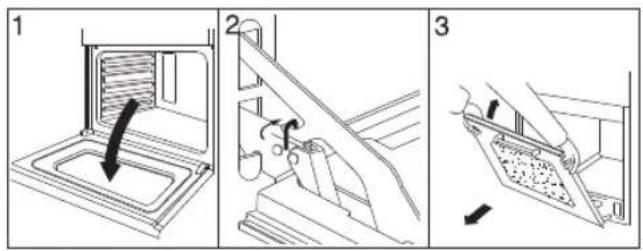
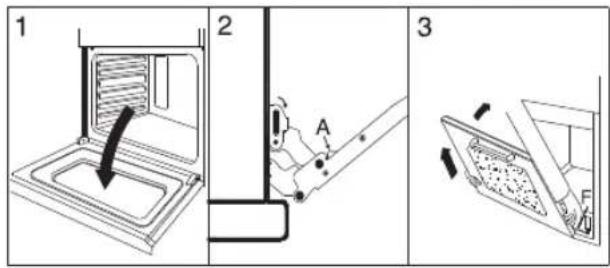
How to remove the oven door
You can remove the oven door for better access to the oven when cleaning. There are 2 styles of oven door so you should first identify which style you have. Proceed as follows for each style:
Oven door style 1:
- Open the door fully.
- Lift up and turn the small hooks located on the two hinges.
- Grip the door on the two external sides, shut it slowly but not completely.
- Pull the door up towards you, lifting it out of the oven frame.
• To replace the door, use the reverse procedure.
Oven door style 2:
- Open the door fully.
- Lift up and turn the small hooks situated on the two hinges.
- Grip the door on the two external sides and close it approximately half way. Unlock the door by pressing on the clamps 'A'.
• Pull the door up towards you, lifting it out of the oven frame.
• To replace the door, use the reverse procedure.
Use and Care
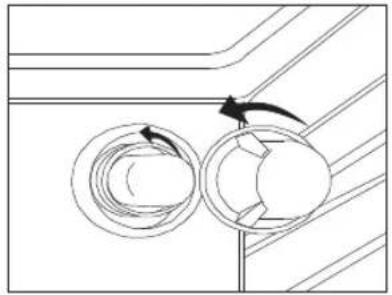
Replacing the oven lamps
WARNING: Ensure that the appliance is switched off before replacing the lamp to avoid the possibility of electric shock.
Remove the glass cover of the lamp-holder as shown below.
Remove the lamp and replace with a lamp resistant to high temperatures (300°C) with the following characteristics:
- Voltage: 220-240V
- Wattage: 25W
- Type: E 14
Replacement lamps are available from Technika. Replace the glass cover and reconnect the oven to the mains power supply.
natural_image
Diagram of a mechanical component with rotating parts and directional arrows, no text or symbols present
Use and Care
Routine maintenance
Have the condition and efficiency of the gas pipe and the pressure regulator (if installed) checked periodically. If anomalies are found, do not repair components but have the faulty component replaced. To ensure good performance and safety, the gas regulator taps must be greased periodically.

Periodic lubrication of the taps and any other appliance service must only be carried out by Authorised Personnel.
Abnormal operation
Any of the following are considered to be abnormal operation and may require servicing:
• Yellow tipping of the burner flame.
- Sooting up of cooking utensils.
- Burners not igniting properly.
- Burners failing to remain alight.
- Burners extinguished by cupboard doors.
• Gas valves, which are difficult to turn.
In case the appliance fails to operate correctly, contact Technika.
Service and parts
Before leaving the factory, this appliance was tested and adjusted by specialist skilled staff to give the best operating results. Any subsequent necessary repairs or adjustments must be carried out with the greatest care and attention by authorised personnel. For this reason, we strongly advise you contact the Technika Service Center, specifying the nature of the problem, the model of the equipment and the serial number. This data is provided on the data label adhered to the base of the appliance and on the duplicate data label. Always use original Techinka spare parts.
Warranty
Your new appliance is covered by a warranty. The details of your warranty conditions are on your Warranty Card supplied with the appliance. Keep the physical receipt which documents your purchase of the appliance and purchase date as you will need to show this for any Warranty repairs. Warranty cannot be claimed without proof of purchase.
Use and Care
Disposal
By ensuring this product is disposed of correctly, you will help prevent potential negative consequences for the environment and human health, which could otherwise be caused by inappropriate waste handling of this product.
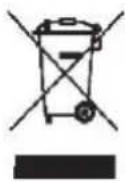
The symbol on the product indicates that this product may not be treated as household waste. Instead it shall be handed over to the applicable collection point for the recycling of electrical and electronic equipment.
Disposal must be carried out in accordance with local environmental regulations for waste disposal.
For more detailed information about treatment, recovery and recycling of this product, please contact your local city council office.

Installation
Technical data
• Gas intake connection 1/2" BSP
• Electricity supply 240V AC (50Hz)
| Burner Type | Natural Gas1.0 kPa | Universal LPG2.75 kPa | ||
| Injector(mm) | Nominal Gas Consumption | Injector(mm) | Nominal Gas Consumption | |
| Auxiliary | 0.88 | 3.7 MJ/h | 0.53 | 3.4 MJ/h |
| Semi Rapid | 1.16 | 6.8 MJ/h | 0.68 | 6.0 MJ/h |
| Rapid | 1.50 | 11.0 MJ/h | 0.88 | 10.2 MJ/h |
| Fish | 1.50 | 11.0 MJ/h | 0.88 | 10.2 MJ/h |
| Wok | 1.75 | 14.5 MJ/h | 1.00 | 13.1 MJ/h |
Inner dimensions of the oven:
Width: 43.5cm
Depth: 40cm
Height: 32cm
Inner Volume of the oven: 105 litres.
Voltage and Frequency of Power Supply:
240V \~ 50Hz
Electrical Features:
Oven light: 2×25W
Spit motor: 4W
Upper heating element: 2200W
Bottom heating element: 1800W
Grill heating element: 2900W
Circular heating element: 2×1800W
Motor ventilator: 2×30W
Cooling fan: 20W


Installation
Instructions for installation
This appliance shall be installed only by authorised persons and in accordance with the manufacturer's installation instructions, local gas fitting regulations, municipal building codes, electrical wiring regulations, AS 5601-2004 - Gas Installations and any other statutory regulations.
IMPORTANT: Installation, assembly and gas/electrical connections must be carried out by authorised personnel.
Data Label - The Data Label is located on the rear of the appliance. A duplicate Data Label is supplied to adhere in an accessible area next to the appliance. This appliance is suitable for Natural Gas and Universal LPG; ensure that the available gas supply matches the Data Label and the gas type label.
Ventilation - Ventilation must be in accordance with AS5601-2004 - Gas Installations. In general, the appliance should have adequate ventilation for complete combustion of gas, proper flueing and to maintain temperature of immediate surroundings within safe limits.
Before any procedure, it is important to check that the appliance is DISCONNECTED from the electrical mains. The Manufacturer declines all responsibility for any damage deriving from installations in breach of the regulations in force or from failure to comply with these installation instructions.
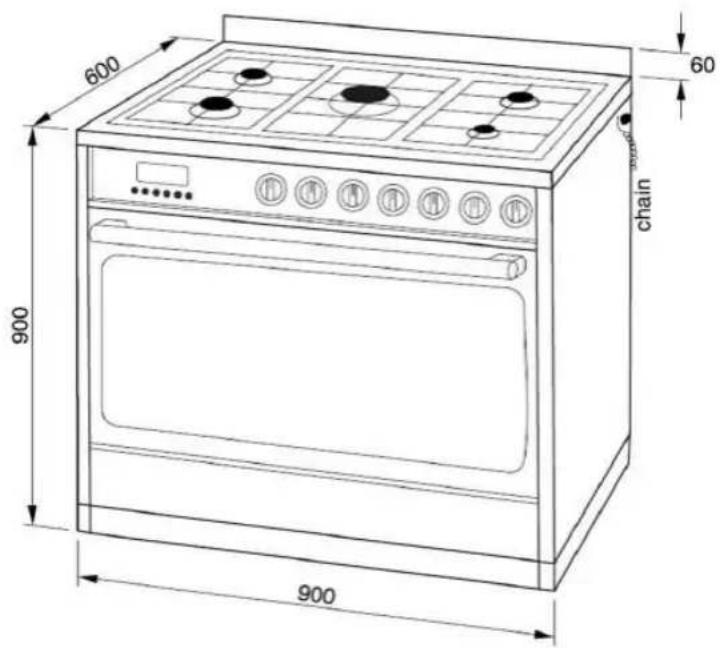
Combustible Surfaces
This appliance shall be installed in accordance with AS 5601-2004 - Gas Installations Figure 5.1: Required Clearances around Domestic Cooking Appliances.
Any adjoining wall surface situated within 200mm from the edge of any burner must be a suitable non-combustible material for a height of 150mm for the entire length of the appliance. Any combustible construction above the appliance must be at least 600mm above the top of the burner and no construction shall be within 450mm above the top of the burner. Zero clearance is permitted on the side and rear adjoining surfaces below the maintop.
If the bench-top is situated within 200mm from the edge of any burner, it should be 10mm or more below the hob as shown above.
Install Range Hoods and Exhaust Fans in accordance with the manufacturer's instructions, no closer than 600mm above the maintop for Range Hoods and 750mm for Exhaust Fans.
THE APPLIANCE MUST NOT BE INSTALLED ON A BASE.

Installation
Anti-tilting chain/hose restraining chain
WARNING: Ensure the chains are correctly anchored to prevent the appliance from tilting forward and to prevent strain on the hose when the cooker is pulled forward.
The cooker is supplied with two chains which are connected to the rear left and right of the appliance. The chains should be connected to the wall directly behind the chains as low as possible to prevent the appliance from tilting forward. The chains also prevent strain on the hose when the cooker is pulled forward. Ensure the chain connections are strong enough to support the weight of the appliance.
Once the chains are installed, check that they prevent the appliance from tilting forward and that there is no strain on the hose when the cooker is pulled as far forward as the chains allow.
If the cooker is INSTALLED between two cupboards you must drill a 16mm hole level to the safety chain height on either cupboard as far back as possible, locate the cooker into position and pass the safety chains through the 16mm holes, with the cooker in the final position pull both safety chains and secure them to the inside of the cupboard with two screws on each safety chain.
Please test that the cooker does not tilt forward.
Incorrect Installation
Accidental Tipping
Chains are provided as a preventative measure against accidental tipping. These chains must be fitted as part of the installers compliance.. Failure for your installer to fit chains in accordance with the relevant installationcode will make the installation of your upright cooker non-compliant and class as an illegal installation.
Incorrect Installation
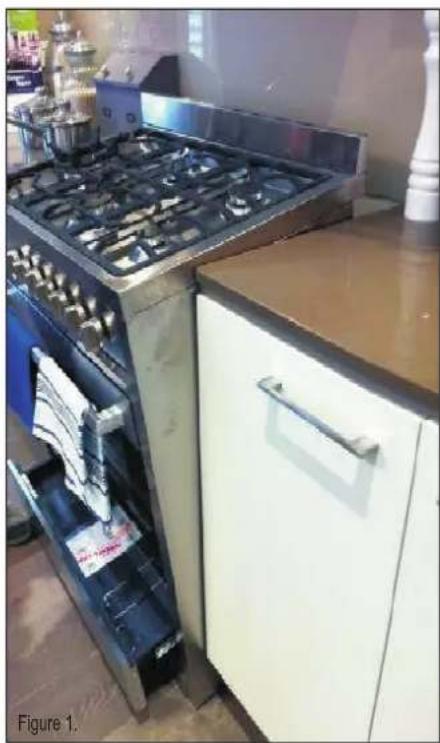
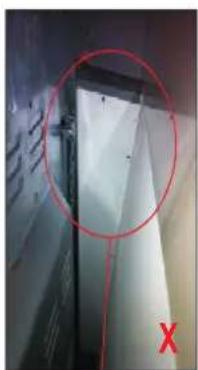
The photographs on this page are of one single kind of incorrect installation (although there are many) which does not have the chains sufficiently secured, figure 1. shows an example of how far forward an oven can tip when not secured properly. Note: Correct installation is part of the installers compliance
natural_image
Interior view of a kitchen with a large open oven and stainless steel stove (no visible text or symbols)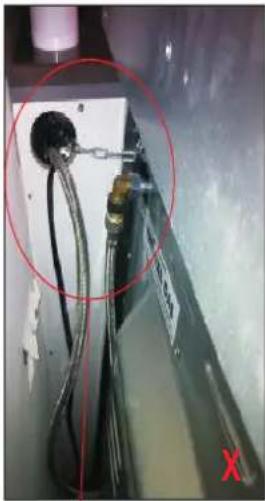
natural_image
Close-up of a mechanical or electrical component with wires and connectors, circled in red (no visible text or symbols)Hole in cabinet too large, Allowing the upright oven to tilt forward
natural_image
Close-up of a metallic panel with a red circle highlighting a section, marked with an 'X' in the corner (no readable text or symbols)Left Side of oven, chain not attached
Unfortunately the example on this page is the way many installers are installing uprights. They may believe that they are using the correct method by putting the chain through a hole into the adjacent cabinet and screwing the chain to the back wall but it will not work if not done properly.
Putting the chain into the adjacent cabinet is the preferred method, provided there is no slackness in the chain..
Some installations only have a single chain affixed. Both chains must be fixed as part of the installers compliance. Failure to fix both chains will make the installation non compliant.
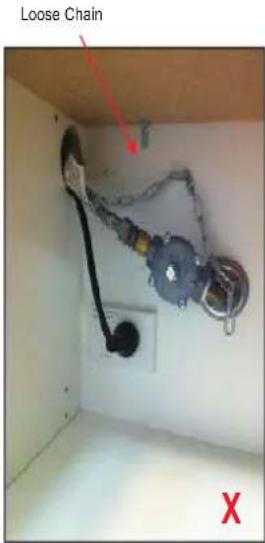
Correct Chain Installation
Left Side
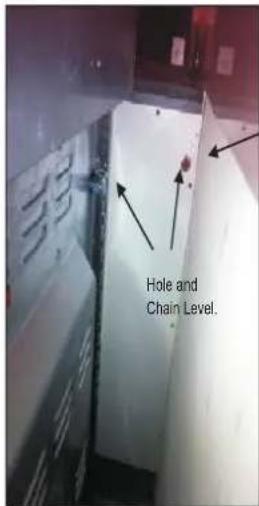
In order to prevent the oven from tipping forward as shown on the previous page, we need to make sure both chainsprovided with the oven are used.
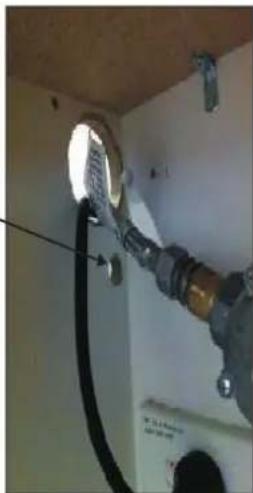
On the left side of the oven a 16mm drill bit was used to drill through the cabinetry into the adjacent cabinet, as you can see the hole has not been drilled hard up against the wall because there is a 16mm board at the rear of the cabinet. The height of the hole from the floor is level with where the chain attaches to the oven.
The right side has been drilled much the same, a new hole has been drilled below the gas and power supply hole.
natural_image
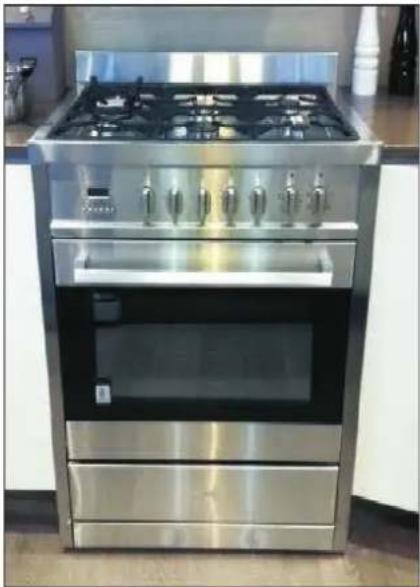
Modern stainless steel electric stove with four gas panes and front doors (no visible text or symbols)Right Side
natural_image
Interior view of a room with a pipe and electrical wiring, no visible text or symbols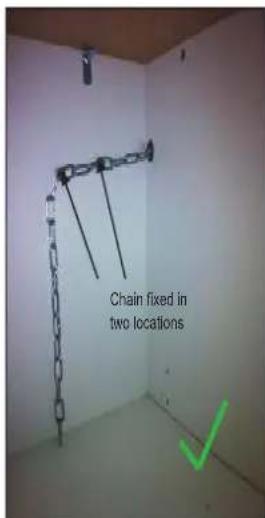
Once the holes have been drilled the chains can be fed through and the upright can be fitted into position.
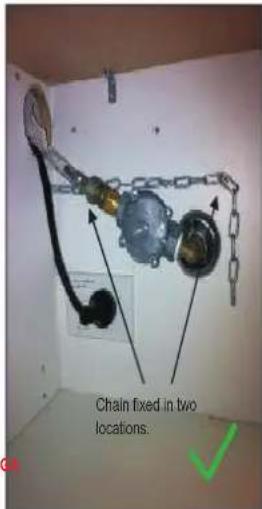
The chains then need to be pulled as tight as possible from inside the cabinet while at the same time being fixed to the rear of the cabinet using a self drilling wood screw. It is better to have the screw fixed closer to the hole for better support. The left and right side examples shown have two extra screws attached to the chain which makes the installation neater by keeping the chain off the shelf away from the gas and electricity supply, they will also provide added support.
At this point the oven will be secured in location and will not move forward at all, it is recommended that all upright oven chains be fitted in this way.
Installation forms part of the installers compliance and that in line with AG regulations chains are designed to be installed to prevent cooker from tilting. They are not designed to replace parental supervision when the cooker is in use.

Installation
Connection to the gas supply
For ease of service, the cooker should be connected with a Flexible Hose, which complies with AS/NZS 1869 (AGA Approved), 10mm ID, class B or D, between 1 - 1.2m long and in accordance with AS5601 for a high level connection.

WARNING: Ensure that the hose is not subjected to abrasion, kinking or permanent deformation and should be able to be inspected along its entire length. Unions compatible with the hose fittings must be used and connections tested for gas leaks. The fixed consumer piping outlet should be at approximately the same height as the cooker connection point, pointing downwards and approximately 200mm - 300mm in from the left hand side of the cooker. The hose should be clear of the floor when the cooker is in the installed position. The hose restraint chain supplied should be anchored to the wall so that the chain prevents strain on the hose connections when he cooker is pulled forward.
The supply connection point must be accessible with the appliance installed. Fit the supplied elbow and gasket as shown in the illustration below. The gas inlet connection has a 1/2" BSP male thread. When making the connection, take care not to apply excessive stress by counterbalancing tightening force. Ensure that the available gas supply is the same as the gas type label affixed near the gas connection point. If not, contact Technika for a Gas Conversion Kit. The gas supply pressure must be adjusted in accordance with the data label for the gas type. Adjust the test point pressure with the largest burner operating at maximum.
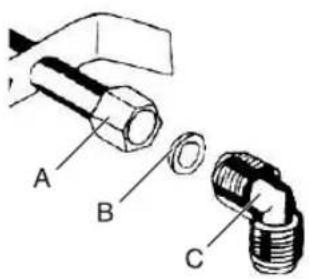
A - Manifold Nut
B - Gasket
C - Elbow

Installation
Electrical connection
Fit a plug that is appropriately rated for the load indicated on the data plate to the cable supplied with the appliance. The plug must be compatible with the socket outlet fitted to the final sub-circuit in the fixed wiring that is intended to supply this appliance.
If connecting the cable directly to the mains, install a suitable isolating switch with a minimum contact opening of 3mm between the appliance and the mains. The isolating switch should be sized according to the load on the data label and should comply with current regulations (the earth wire should not be interrupted by the circuit breaker).
Connection to the electricity supply must be made by an authorised person is accordance with the Wiring Rules AS/NZS3000.
The supply cable should be positioned so that it does not reach a temperature of more than 75^ C.
Replacing the power supply lead
If the supply cord is damaged, it must be replaced by the manufacturer or its service agent or a similarly qualified person in order to avoid hazard.
Before leaving
When the installation is complete, always check for gas leaks using a soapy solution. Never use a flame to make this check.
Ignite all burners on high flame to ensure correct operation of gas valves, burners and ignition. Turn gas taps to low flame position and observe each burner to ensure they ignite completely at all ports and that the flame is stable. Conduct these checks for each burner individually and concurrently.
When satisfied with the hotplate, please instruct the user on the correct method of operation. In case the appliance fails to operate correctly after all checks have been carried out, please call the Technika Service Centre.
pie
| Category | Value | |---|---| | Gas C | 100 |Gas Conversion (NG to U-LPG)
Parts needed...
- Test Point Assembly - ULPG Gas Type label
- Auxiliary Jet ∅0.53mm - Semi-Rapid Jet ∅0.68mm
- Rapid / Fish Jet ∅0.88mm - Wok Jet ∅1.00mm
Converting to a different gas type
When converting from Natural Gas to Universal LPG ensure that the NG regulator is removed and replaced with the Test Point Assembly supplied in the conversion kit. An AGA Approved gas regulator suitable for a supply pressure of 2.75kPa should be part of the gas tank supply and the test point pressure must be adjusted to 2.75kPa.
Changing the jets
- Remove pan supports, burner heads and caps.
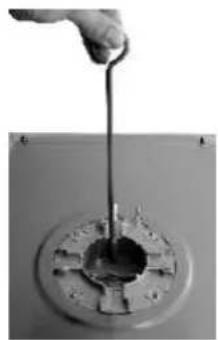
- Use a size 7 socket wrench to unscrew and remove the jets, replacing them with those supplied in the conversion kit. Ensure you use the correct jet for the corresponding burner.
- Reassemble the burner heads, caps and pan supports.
- Fit the Gas type label supplied in the conversion kit next to the gas connection point and remove the existing label.
natural_image
Hand pouring liquid into a circular mechanical component (no text or symbols visible)Setting the minimum level
- Light one of the burners and turn the tap to minimum flame.
- Remove the corresponding control knob.
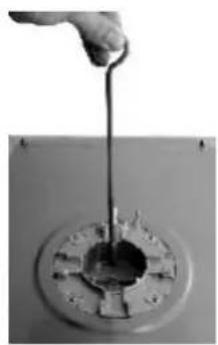
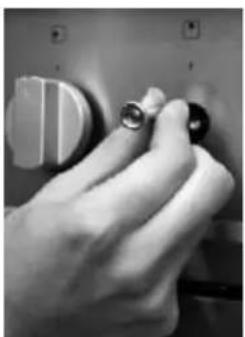
- Use a thin blade screwdriver to turn the by-pass screw located above left of the gas valve shaft as shown right. Turn the by-pass screw fully clockwise. The result should be a small, stable flame which is uniform around the entire burner ring. If not, turn the by-pass screw anti-clockwise until satisfied with the flame.
- Check that the burner does not go out when the tap is turned quickly from the maximum to the minimum position.
- Repeat for each burner.
natural_image
Close-up of a hand pressing down on a control panel with buttons (no visible text or symbols)
pie
| Category | Value | |---|---| | Gas C | 100 |Gas Conversion (U-LPG to NG)
Parts needed...
- NG Regulator -NG Gas Type label
- Auxiliary Jet ∅0.88mm - Semi-Rapid Jet ∅1.16mm
- Rapid / Fish Jet ∅1.50mm - Wok Jet ∅1.75mm
Converting to a different gas type
When converting from Universal LPG to Natural Gas ensure that the ULPG test point is removed and replaced with the AGA Approved NG Regulator supplied in the conversion kit. The test point pressure must be adjusted to 1.00kPa with the largest burner operating on maximum flame.
Changing the jets
- Remove pan supports, burner heads and caps.
- Use a size 7 socket wrench to unscrew and remove the jets, replacing them with those supplied in the conversion kit. Ensure you use the correct jet for the corresponding burner.
- Reassemble the burner heads, caps and pan supports.
- Fit the Gas type label supplied in the conversion kit next to the gas connection point and remove the existing label.
Setting the minimum level
- Light one of the burners and turn the tap to minimum flame.
- Remove the corresponding control knob.
- Use a thin blade screwdriver to turn the by-pass screw located above left of the gas valve shaft as shown right. Turn the by-pass screw fully clockwise then turn it anti-clockwise 1 turn for the Wok, 7/8 turn for the Fish, 3/4 turn for the Rapid, 12 turn for the Semi-Rapid and 3/8 turn for the Auxiliary. The result should be a small, stable flame which is uniform around the entire burner ring. If not, turn the by-pass screw anti-clockwise until satisfied with the flame.
- Check that the burner does not go out when the tap is turned quickly from the maximum to the minimum position.
- Repeat for each burner.
natural_image
Hand pouring liquid into a circular mechanical component (no text or symbols visible)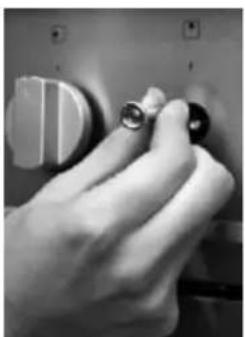
natural_image
Close-up of a hand pressing down on a control panel with buttons (no visible text or symbols)READ THE INSTRUCTION BOOKLET BEFORE INSTALLING AND USING THE APPLIANCE.
The manufacturer will not be responsible for any damage to property or to persons caused by incorrect installation or improper use of the appliance.
The manufacturer is not responsible for any inaccuracies, due to printing or transcription errors, contained in this handout. In addition, the appearance of the figures reported is also purely indicative.
The manufacturer reserves the right to make changes to its products when considered necessary and useful, without affecting the essential safety and operating characteristics.
Technika constantly seeks ways to improve the specifications and designs of their products.
Whilst every effort is made to produce up to date literature, this document should not be regarded as an infallible guide. Actual product only should be used to derive cut out sizes.
All Technika Appliances must be installed by a qualified person/s with adherence to the relevant electrical, plumbing and AGA codes, with compliance being issued as required by state or national legislation.
Additionally all Technika Upright cookers must have chains installed correctly in adherence to the relevant AGA, and plumbing codes by the Licenced installer.
For maximum effectiveness and efficiency all rangehoods should be installed with the use of ductwork, by a licenced installer with adherence to the relevant state and national building codes and regulations.
All Technika appliances are for Domestic use only, and must be installed by a licence installer into Domestic Applications only, without exception and to the required Authorities guidelines. Any installation outside of this will VOID warranty. Alfresco areas are not a Domestic application.