EM-SF3 - Massage device Etekcity - Free user manual and instructions
Find the device manual for free EM-SF3 Etekcity in PDF.


User questions about EM-SF3 Etekcity
0 question about this device. Answer the ones you know or ask your own.
Ask a new question about this device
Download the instructions for your Massage device in PDF format for free! Find your manual EM-SF3 - Etekcity and take your electronic device back in hand. On this page are published all the documents necessary for the use of your device. EM-SF3 by Etekcity.
USER MANUAL EM-SF3 Etekcity
natural_image
Line drawing of a washing machine with two circular vented zones and a digital display (no text or symbols)Thank you for purchasing the EM-SF3 Smart Foot Massager by Etekcity.
If you have any questions or concerns, please reach out to our helpful Customer Support Team at support@etekcity.com. We hope you enjoy your new foot massager!
BECOME AN ETEKCITIZEN
Get exclusive deals, giveaways, and product registration. Better products for better living. Find us at etekcity.com
Table of Contents
| Package Contents | 3 |
| Specifications | 3 |
| Important Safety Information | 4 |
| Function Diagram | 6 |
| Using the Massager | 7 |
| VeSync App Setup | 9 |
| Configuration | 10 |
| App Operation | 14 |
| Favorite Settings | 16 |
| Massager Settings | 18 |
| Maintenance | 20 |
| Troubleshooting | 21 |
| Warranty Information | 23 |
| Customer Support | 24 |
Package Contents
| 1 x Foot Massager |
| 1 x AC Power Adapter |
| 1 x Quick Start Guide |
| 1 x Warranty Card |
Specifications
| Power Supply Input: AC 10 | 0-240V, 50-60HzOutput: DC 12V, 2.5A |
| Rated Power 24W | |
| Dimensions 18.4 x 15.4 x 10 | 0.7 in /467 x 390 x 272 mm |
| Weight 12.1 lb / 5.5 kg | |
| Operating Temperature 32°-104°F / 0°-40°C | |
| Storage Temperature 14°-122°F / -10°-50°C | |
| Bluetooth® Version 5.0 | |
| Compatible Systems Android 5.1/iOS 9.2 and above | |
Important Safety Information
To reduce the risk of burns, fire, electric shock, or other injury, follow all instructions and safety guidelines. Read all instructions before using.
DANGER:
- Always unplug this massager from the electrical outlet immediately after using and before cleaning.
- Examine your massager's fabric covering for any sign of damage before using. If there are any blisters, tears, or cracks, do not use your massager.
- Never use pins or other metallic fasteners with this massager.
- Keep dry. Do not use the massager if it is wet.
WARNING:
- Do not leave your massager unattended when plugged in. Unplug when not in use, and before putting on or taking off parts.
- Do not operate under a blanket or pillow. Overheating can occur causing fire, electric shock, or other injury.
- Close supervision is necessary when your massager is used by or near children, invalids, or persons with disabilities.
- Only use this appliance as directed in this manual. Do not use attachments not recommended by Etekcity.
- Do not use the massager if it has been dropped, if it is not working properly, or if any of its parts (including the cord or plug) are damaged. Contact Customer Support (see page 24).
- Do not use the massager if it has been dropped in water.
- Turn off and stop using the massager immediately if it makes an unusual noise, emits a strange smell, or if smoke comes from it. Contact Customer Support (see page 24).
-
Do not carry the massager by the cord.
-
Keep the cord and adapter away from heated surfaces.
- Do not insert any object into any opening unless directed by the manual.
- Do not use outdoors.
- Do not operate where aerosol (spray) products are being used or where oxygen is being administered.
- To disconnect, turn off all controls, then unplug.
- The massager may get hot enough to cause burns on any control setting. Do not use when sleeping. Do not use on infants, disabled persons, or people who are sleeping or unconscious. Do not use on sensitive skin or if you have poor blood circulation. Check the skin in contact with the heated area of the massager frequently to reduce the risk of blistering.
- Do not use this massager on swollen or inflamed areas. If you have any injury, disease, or reduced feeling in your lower legs or feet, then consult a physician before using.
- The massager is not intended for medical use or as a substitute for medical attention.
-
Do not crush the massager.
-
Do not use this massager for more than 30 minutes at a time.
- Never stand with feet in the massager. Only use while seated.
- Do not stand on the massager or place heavy objects on it.
- Do not remove the housing cover.
- Do not try to repair the massager. Contact Customer Support (see page 24) if the massager is malfunctioning.
- Positioning your massager incorrectly or applying excess pressure may result in pain or injury.
- Not for commercial use. Household use only.
SAVE THESE INSTRUCTIONS
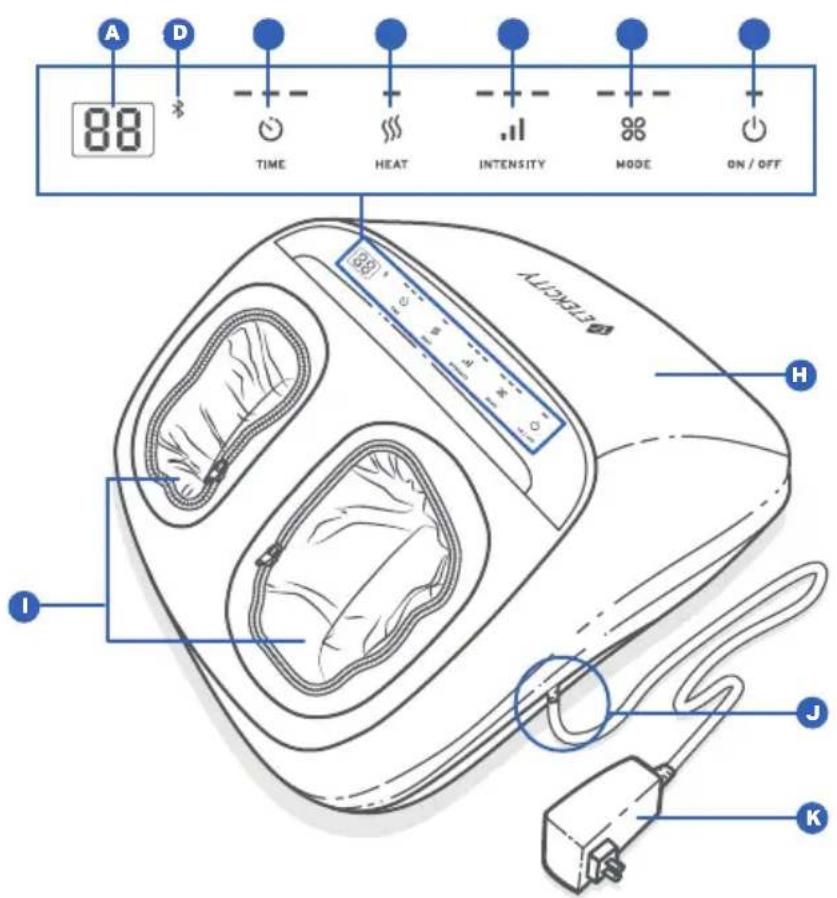
Function Diagram
A. Timer Display
B. Bluetooth ^® Indicator
C. Timer Button
D. Heat Button
E. Intensity Button
F. Mode Button
G. Power Button
H. Massager Housing
I. Detachable Foot Sleeves
J. AC Power Adapter Input
K. AC Power Adapter
Using the Massager
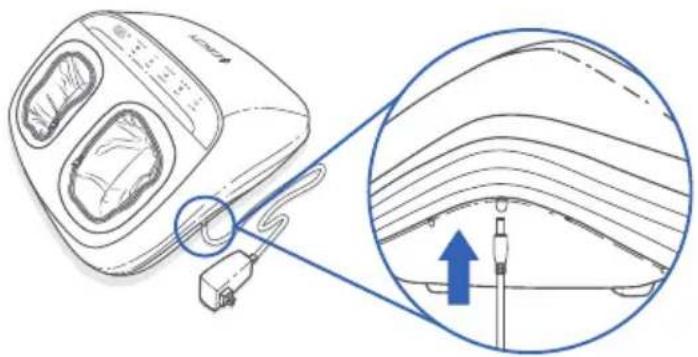
Before using, connect the AC power adapter to the massager [Figure 1.1] and plug in to an outlet.
A. Tap 🔊 to start the massager. Tap 🔊 again at any time to stop the massager.
B. Tap 🔒 to adjust the massage time between 15, 20, and 25 minutes.
Note: The timer will restart each time you tap 🔒.
natural_image
Diagram of a washing machine with cable and connector, showing internal wiring and a close-up view of the component (no text or symbols present)Figure 1.1
C. Tap to turn the heating function on or off.
D. Tap "I" to adjust the massage air pressure level between 1 (Low), 2 (Medium), and 3 (High).
E. Tap ✿ to change the massage mode between Mode 1, 2, and 3.
- Mode 1: The massage rollers move slower for a gentler massage.
- Mode 2: The massage rollers move faster for a more powerful massage.
- Mode 3: The massage rollers will start and pause regularly for a massage with more air pressure.
Note: The default settings when the massager is turned on are a 15 minute timer with heat off and low intensity in massage mode 1.
CAUTION: Never stand with feet in the massager. Only use while seated.
Using the Massager
Tips
- Do not use this massager for more than 30 minutes at a time.
- If the massager is used for too long, overheat protection will activate and the massager will shut down. Allow the massager to cool for about 40 minutes before using again.
- Avoid using with only 1 foot unless necessary, as this may shorten the life of the massager.
- If you feel uncomfortable or feel pain while using the massager, stop using immediately. Consult a physician if necessary.
VeSync App Setup
Note: Due to continuing updates and improvements, the VeSync app may appear slightly different. In case of any differences, follow the in-app instructions.
- To download the VeSync app, scan the QR code, or search "VeSync" in the Apple App Store® or Google Play™ Store.
Note: For Android users, you must select Allow to use VeSync.

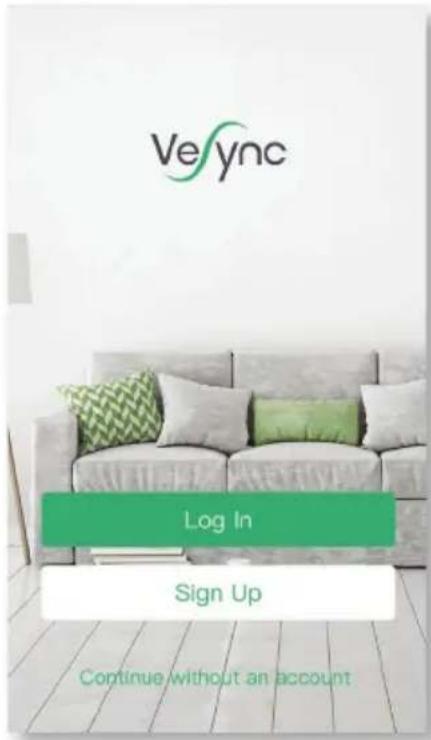
- Open the VeSync app. If you already have an account, tap Log In. To create a new account, tap Sign Up.
Configuration
Set up your massager with the VeSync app.
- Press ⏻ to turn on the massager. The massager will automatically go into Bluetooth pairing mode, and ✕will blink.
- Tap +
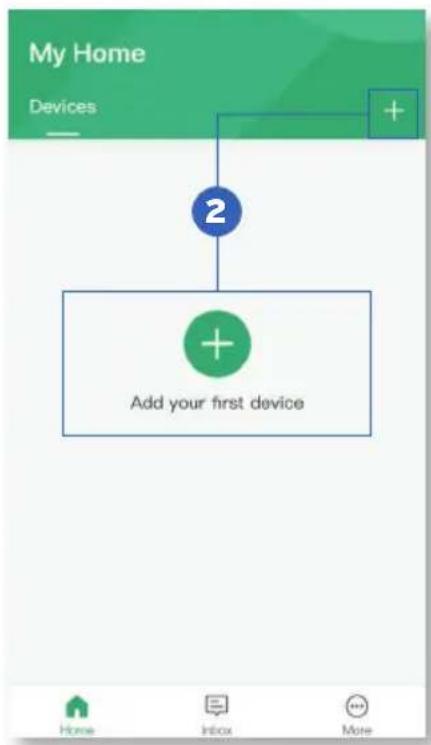
Configuration (cont.)
- Tap Massager and select your massager.
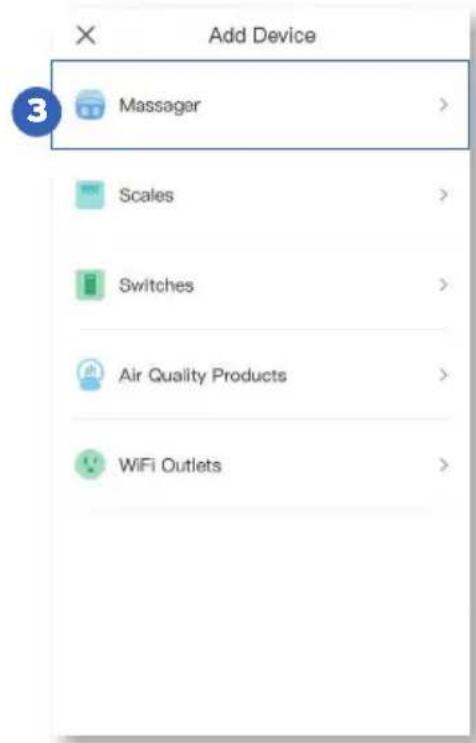
Note: Your phone's Bluetooth must be turned on to connect to the massager. If prompted, turn on Bluetooth in your phone settings.
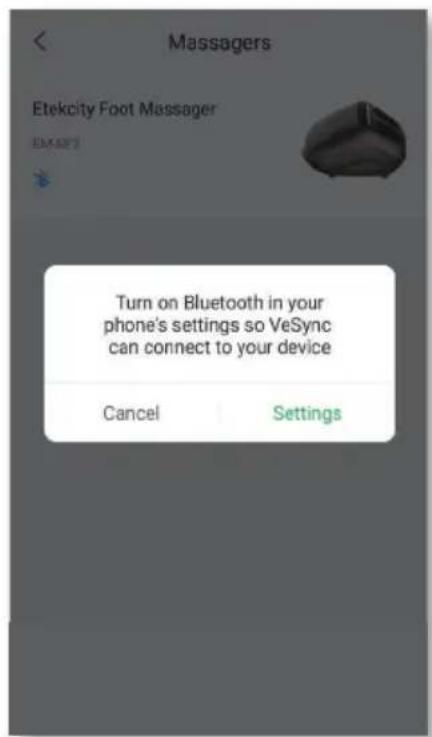
Configuration (cont.)
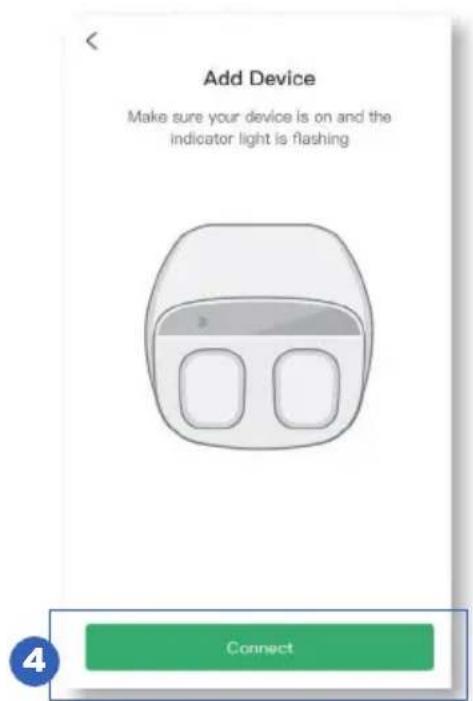
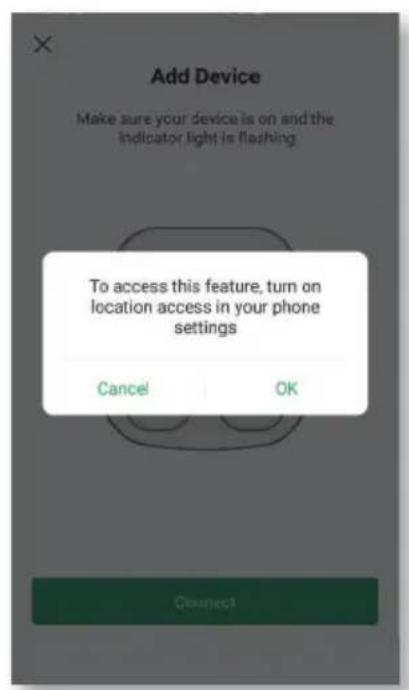
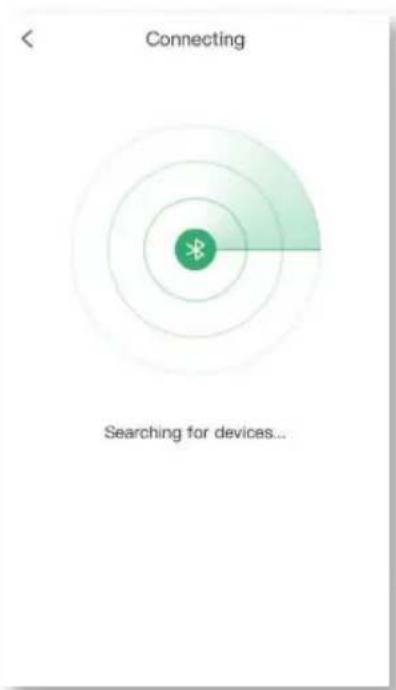
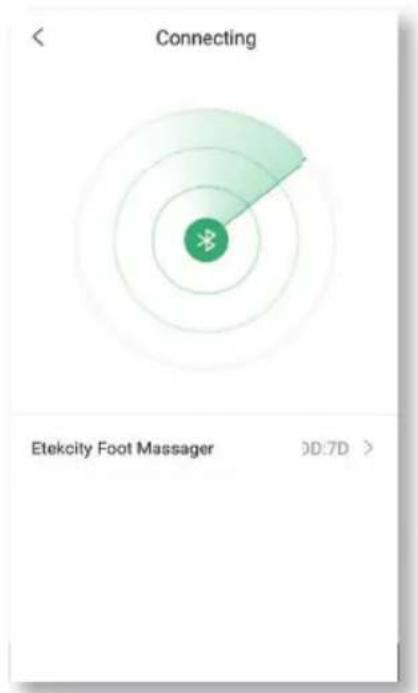
- Tap Connect. When the app discovers your massager, tap on its name.
Note: Your phone's GPS / Location service must be turned on to discover the massager. If prompted, turn on Location in your phone settings.
Configuration (cont.)
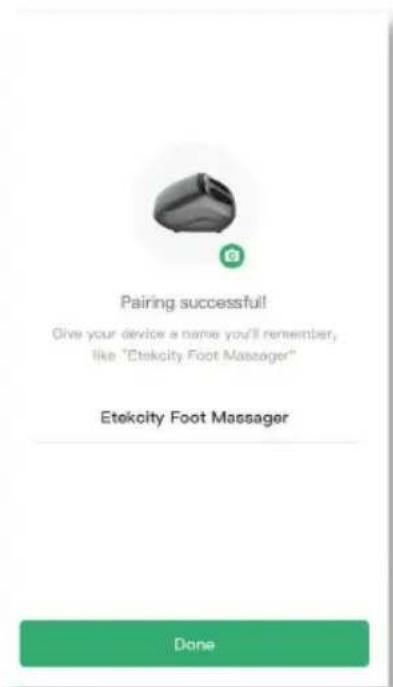
- Give your massager a unique name, or use the default name.
Note:
- Tap to change the massager icon.
- You can change the name and icon at any time by going to the massager screen and tapping 📋.
App Operation
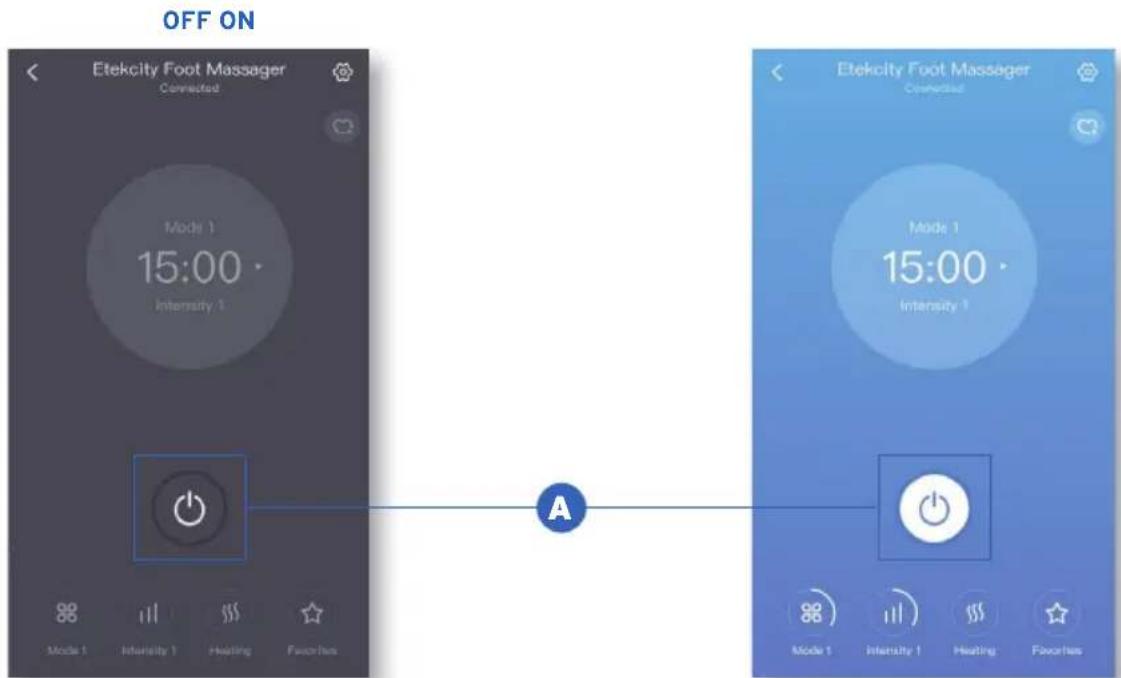
Note: The massager must be plugged in before using with the app.
A. Tap ⏻ to turn the massager on or off.
App Operation (cont.)
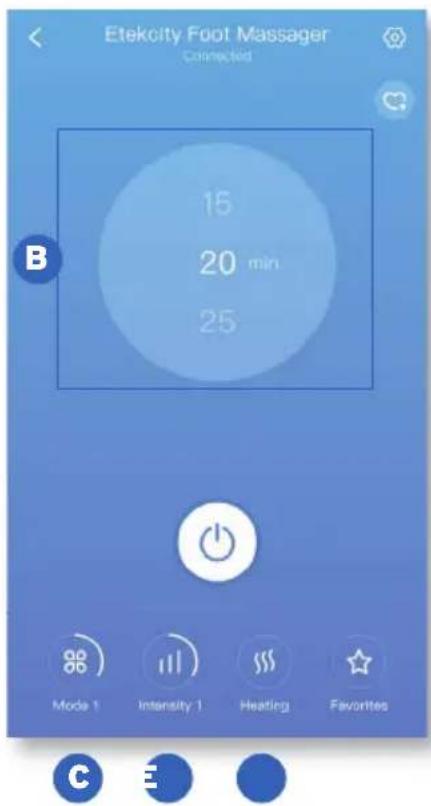
B. Scroll on the central display to select a timer. Choose between 15, 20, and 25 minutes.
C. Tap ✿ to change the massage mode between Mode 1, 2, and 3.
D. Tap .I to adjust the massage pressure level between 1 (Low), 2 (Medium), and 3 (High).
E. Tap to turn on or off the heating function.
Favorite Settings
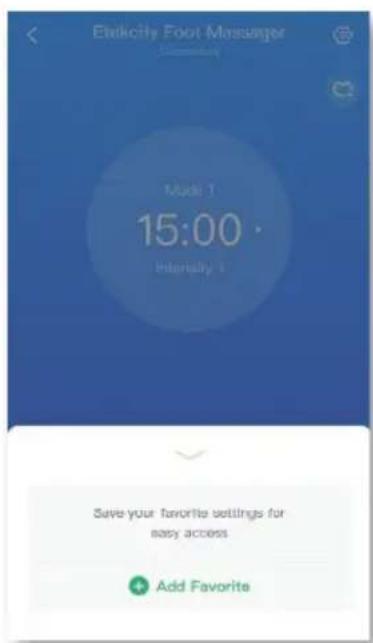
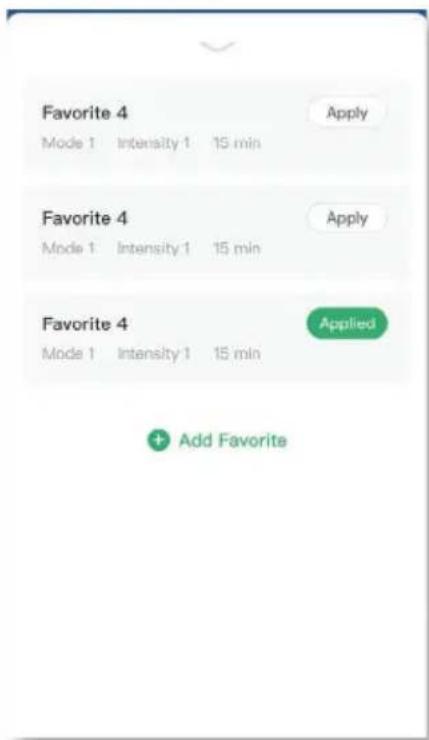
A Favorite is a shortcut to easily apply saved settings to your massager.
To add a Favorite, tap Favorites and follow the in-app instructions.
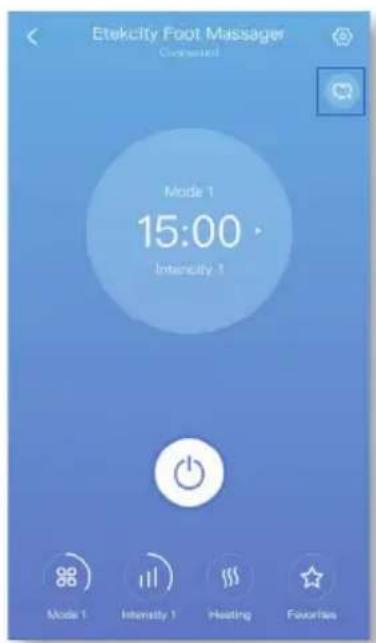
You can also tap 🤒 in the upper right corner to save your current settings as a Favorite.
Favorite Settings (cont.)
Tap Favorites to view a list of all your saved Favorite settings. Tap Apply to immediately use a Favorite setting. Tap on a Favorite to edit it. To remove a Favorite, swipe left and tap 📄Tap to collapse the list.
Note: You can change your settings at any time, even while using a Favorite.
Massager Settings
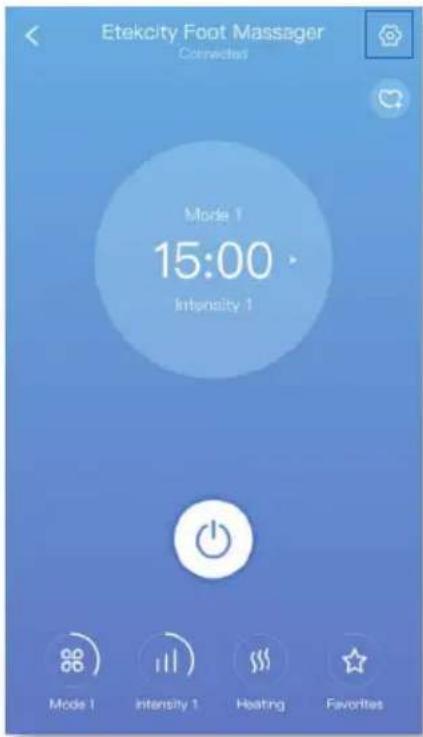
Tap 📧 to see Device Settings.
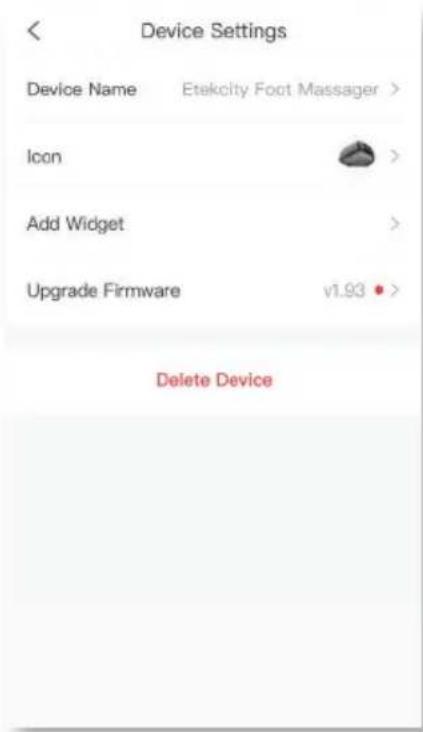
In Device Settings, you can change the massager's name and icon, upgrade firmware, and delete the massager from your VeSync app.
Massager Settings (cont.)
Note:
- Regularly upgrade your firmware to make sure your massager works correctly.
-
You can also delete your massager from the My Home screen in the VeSync app.
-
iOS™: Swipe left on the massager's name to delete.
- Android™: Press and hold for 2 seconds on the massager's name to delete.
Maintenance
- Launder the removable foot sleeves when necessary. Wash on delicate cycle in cool or warm water (lower than 122^ / 50^ ).
Note: Laundering may slightly discolor the cloth cover. Wash with dark colors. - Use a soft cotton cloth and non-abrasive detergent to clean the massager. Never immerse in water.
- Keep away from heat sources and direct sunlight.
- Do not store in extreme temperatures. Storage temperature should be 14°-122°F / -10°-50°C.
Troubleshooting
| Problem Possible Solution | |
| The massager won't turn on. Make sure the | massager is plugged in. |
| Unplug the AC power adapter from the massager and plug it back in. | |
| The massager won't connect to my phone. | Make sure your phone has Bluetooth turned on and is within 32 ft / 9.75 m of the massager. |
| Make sure your massager isn't connected to any other phones. Bluetooth devices can only connect to 1 phone at a time. | |
| The massager is turned on, but the massage functions stopped working. | If you have been using the massager for a long time, overheat protection may have activated. Turn the massager off and allow it to cool for at least 40 minutes. |
| The massage intensity is too strong or too weak. | Change the mode and intensity settings of the massager to match your preferences. |
| An unknown error occurred. Turn off the massager and turn it back on again. | |
| Unplug the AC power adapter from the massager and plug it back in. | |
| The massager is making an unusual noise, emitting a strange smell, or smoke is coming from it. | Turn off and stop using the massager immediately. Contact Customer Support (see page 24). |
FCC Statement to the User
This device complies with Part 15 of the FCC Rules. Operation is subject to the following two conditions:
(1) This device may not cause harmful interference, and
(2) This device must accept any interference received, including interference that may cause undesired operation.
Any changes or modifications not expressly approved by the party responsible for compliance could void the user's authority to operate this equipment.
This equipment has been tested and found to comply with the limits for a Class B digital device, pursuant to Part 15 of the FCC Rules. These limits are designed to provide reasonable protection against harmful interference in a residential installation. This equipment generates, uses and can radiate radio frequency energy and, if not installed and used in accordance with the instructions, may cause harmful interference to radio communications. However, there is no guarantee that interference will not occur in a particular installation. If this equipment does cause harmful interference to radio or television reception, which can be determined by turning the equipment off and on, the user is encouraged to try to correct the interference by one of the following measures:
• Reorient or relocate the receiving antenna.
- Connect the equipment into an outlet on a circuit different from that to which the receiver is connected.
- Increase the separation between the equipment and receiver.
- Consult the dealer or an experienced radio/TV technician for help.
FCC Radiation Exposure Statement
This equipment complies with FCC radiation exposure limits set forth for an uncontrolled environment. End users must follow the specific operating instructions for satisfying RF exposure compliance. To maintain compliance with FCC RF exposure compliance requirements, please follow operation instructions as documented in this manual. This transmitter must not be co-located or operating in conjunction with any other antenna or transmitter. This equipment should be installed and operated with a minimum distance of 20 cm between the radiator and your body. The availability of some specific channels and/or operational frequency bands are country dependent and are firmware programmed at the factory to match the intended destination. The firmware setting is not accessible by the end user.
Warranty Information
| Product Name | Smart Shiatsu Foot Massager |
| Model | EM-SF3 |
| Default Warranty Period 1 | year |
| For your own reference, we strongly recommend that you record your order number and date of purchase. | |
| Order Number | |
| Date of Purchase | |
Terms & Policy
Etekcity warrants all products to be of the highest quality in material, craftsmanship, and service, effective from the date of purchase to the end of the warranty period.
Etekcity will replace any product found to be defective due to manufacturer flaws based on eligibility. Refunds are available within the first 30 days of purchase. Refunds are only available to the original purchaser of the product. This warranty extends only to personal use and does not extend to any product that has been used for commercial, rental, or any other use in which the product is not intended for. There are no warranties other than the warranties expressly set forth with each product.
This warranty is non-transferrable. Etekcity is not responsible in any way for any damages, losses, or inconveniences caused by equipment failure by user negligence, abuse, or use noncompliant with the user manual or any additional safety, use, or warnings included in the product packaging and manual.
This warranty does not apply to the following:
- Damage due to abuse, accident, alteration, misuse, tampering, or vandalism.
- Improper or inadequate maintenance.
• Damage in return transit. - Unsupervised use by children under 18 years of age.
Etekcity and its subsidiaries assume no liability for damage caused by the use of the product other than for its intended use or as instructed in the user manual. Some states do not allow this exclusion or limitation of incidental or consequential losses so the foregoing disclaimer may not apply to you. This warranty gives you specific legal rights and you may also have other rights which may vary from state to state.
ALL EXPRESSED AND IMPLIED WARRANTIES, INCLUDING THE WARRANTY OF MERCHANTABILITY, ARE LIMITED TO THE PERIOD OF THE LIMITED WARRANTY.
Additional 1-Year Warranty
You can extend your 1-year warranty by an additional year. Log onto www.etekcity.com/warranty and enter your order number (for example, from Amazon or Houzz) to register your new product for the extended warranty.
If you are unable to provide the order number for your product, please type a short note in the order number field along with the date you received your product.
Defective Products & Returns
If your product proves defective within the specified warranty period, please contact Customer Support via support@etekcity.com with your order number. DO NOT dispose of your product before contacting us. Once Customer Support has approved your request, please return the unit with a copy of the invoice or your order number.
Customer Support
If you encounter any issues or have any questions regarding your new product, please contact our helpful Customer Support Team. Your satisfaction is our goal!
Customer Support
Etekcity Corporation
1202 N. Miller St., Suite A
Anaheim, CA 92806
Toll-Free: (855) 686-3835
Email: support@etekcity.com
Support Hours
Mon-Fri, 9:00 am-5:00 pm PST/PDT
*Please have your order confirmation number ready before contacting Customer Support.
Connect with us @Etekcity




ETEKCITY°
Building on better living.
v01.02