
SSM-151 - Loudspeaker ROLAND - Free user manual and instructions
Find the device manual for free SSM-151 ROLAND in PDF.


| Product Type | Active Studio Monitor Speaker |
| Dimensions (W x H x D) | 300 x 200 x 250 mm |
| Weight | 5.5 kg |
| Power Supply | AC 100-240V, 50/60Hz |
| Power Consumption | 50W |
| Frequency Response | 50 Hz - 20 kHz |
| Output Power | 30W RMS per channel |
| Inputs | XLR, TRS, RCA |
| Controls | Volume, Bass, Treble |
| Cabinet Material | MDF with vinyl finish |
| Accessories Included | Power cable, user manual |
| Maintenance & Cleaning | Wipe with a dry cloth; do not use solvents. |
| Safety Precautions | Do not expose to rain or moisture. Use only specified power source. |
| Spare Parts & Repairability | Contact Roland service center for genuine parts and repairs. |
| General Information | Designed for accurate sound reproduction in recording and mixing. |
Frequently Asked Questions - SSM-151 ROLAND
User questions about SSM-151 ROLAND
0 question about this device. Answer the ones you know or ask your own.
Ask a new question about this device
Download the instructions for your Loudspeaker in PDF format for free! Find your manual SSM-151 - ROLAND and take your electronic device back in hand. On this page are published all the documents necessary for the use of your device. SSM-151 by ROLAND.
USER MANUAL SSM-151 ROLAND
Thank you, and congratulations on your choice of the SST/SSW/SSM Speaker System.
Before using this unit, carefully read the sections entitled: "USING THE UNIT SAFELY" (p. 2) and "IMPORTANT NOTES" (p. 3). These sections provide important information concerning the proper operation of the unit. Additionally, in order to feel assured that you have gained a good grasp of every feature provided by your new unit, this manual should be read in its entirety. The manual should be saved and kept on hand as a convenient reference.
Features
Roland's SST/SSW/SSM speaker systems, designed, developed, and manufactured in the U.S.A., offer the ideal combination of excellent sound, superb design, and outstanding value.
- The enclosures (except for the SSM-151) feature a trapezoidal design, allowing them to be arrayed in radiating clusters.
- The metal speaker grills and 3/4" plywood cabinets are designed to withstand the rigors of professional use.
- The tweeter features a built-in auto-reset protection circuit to prevent problems from input overload before they start (not featured on the SSW-351).
- The SSM-151 can be oriented at two different floor angles (35 and 55 degrees), allowing selection of the most appropriate angle for your particular stage environment.
- The crossover network components have been carefully selected to ensure high input capacity and precise impedance characteristics.
- Speakon® NL4MP (speaker connectors) are featured to allow high-reliability connections.
- Oversized steel carrying handles help to provide exceptional portability.
* Speakon® is a registered trademark of NEUTRIK.
USING THE UNIT SAFELY
INSTRUCTIONS FOR THE PREVENTION OF FIRE, ELECTRIC SHOCK, OR INJURY TO PERSONS
About ⚠️ WARNING and ⚠️ CAUTION Notices
 | Used for instructions intended to alert the user to the risk of death or severe injury should the unit be used improperly. |
 | Used for instructions intended to alert the user to the risk of injury or material damage should the unit be used improperly.* Material damage refers to damage or other adverse effects caused with respect to the home and all its furnishings, as well to domestic animals or pets. |
About the Symbols
| Symbol | The △ symbol alerts the user to important instructions or warnings. The specific meaning of the symbol is determined by the design contained within the triangle. In the case of the symbol at left, it is used for general cautions, warnings, or alerts to danger. |
| Deter | The ⊙ symbol alerts the user to items that must never be carried out (are forbidden). The specific thing that must not be done is indicated by the design contained within the circle. In the case of the symbol at left, it means that the unit must never be disassembled. |
| Dose | The ● symbol alerts the user to things that must be carried out. The specific thing that must be done is indicated by the design contained within the circle. In the case of the symbol at left, it means that the power-cord plug must be unplugged from the outlet. |
ALWAYS OBSERVE THE FOLLOWING
WARNING
- Before using this unit, make sure to read the instructions below, and the Owner's Manual.

- Do not open or perform any internal modifications on the unit.

- Do not attempt to repair the unit, or replace parts within it (except when this manual provides specific instructions directing you to do so). Refer all servicing to your retailer, the nearest Roland Service Center, or an authorized Roland distributor, as listed on the "Information" page.

- Never use or store the unit in places that are:
- Subject to temperature extremes (e.g., direct sunlight in an enclosed vehicle, near a heating duct, on top of heat-generating equipment); or are
- Damp (e.g., baths, washrooms, on wet floors); or are
- Humid; or are
- Exposed to rain; or are
- Dusty; or are
- Subject to high levels of vibration.
- When using the unit with a rack or stand, the rack or stand must be carefully placed so it is level and sure to remain stable. If not using a rack or stand, you still need to make sure that any location you choose for placing the unit provides a level surface that will properly support the unit, and keep it from wobbling.


WARNING
- This unit, either alone or in combination with an amplifier and headphones or speakers, may be capable of producing sound levels that could cause permanent hearing loss. Do not operate for a long period of time at a high volume level, or at a level that is uncomfortable. If you experience any hearing loss or ringing in the ears, you should immediately stop using the unit, and consult an audiologist.

- Do not allow any objects (e.g., flammable material, coins, pins); or liquids of any kind (water, soft drinks, etc.) to penetrate the unit.


- Immediately turn the power off, remove the power cord from the outlet, and request servicing by your retailer, the nearest Roland Service Center, or an authorized Roland distributor, as listed on the "Information" page when:

- Objects have fallen into, or liquid has been spilled onto the unit; or
- The unit has been exposed to rain (or otherwise has become wet); or
- The unit does not appear to operate normally or exhibits a marked change in performance.
- In households with small children, an adult should provide supervision until the child is capable of following all the rules essential for the safe operation of the unit.

- Protect the unit from strong impact. (Do not drop it!)

CAUTION
- The unit should be located so that its location or position does not interfere with its proper ventilation.

- Try to prevent cords and cables from becoming entangled. Also, all cords and cables should be placed so they are out of the reach of children.

- If you need to move the instrument, take note of the precautions listed below. At least two persons are required to safely lift and move the unit. It should be handled carefully, all the while keeping it level. Make sure to have a firm grip, to protect yourself from injury and the instrument from damage.

- Disconnect all cords coming from external devices.
- Remove the unit from the speaker stand.
Important Notes
In addition to the items listed under "USING THE UNIT SAFELY", please read and observe the following:
Connection
- Before making any connections, be sure all units in the system are OFF. Also be sure that all amplifier and mixer volume controls are at MINIMUM.
- Before connecting SST/SSW/SSM Speakers to an external crossover read the specification chart carefully.
Maintenance
- For everyday cleaning wipe the unit with a soft, dry cloth or one that has been slightly dampened with water. To remove stubborn dirt, use a cloth impregnated with a mild, non-abrasive detergent. Afterwards, be sure to wipe the unit thoroughly with a soft, dry cloth.
- Never use benzine, thinners, alcohol or solvents of any kind, to avoid the possibility of discoloration and/or deformation.
Additional Precautions
- To avoid disturbing your neighbors, try to keep the unit's volume at reasonable levels (especially when it is late at night).
- To avoid possible breakdown, do not use the unit in a wet area, such as an area exposed to rain or other moisture.
Making Connections
- Before you make connections, make sure that the power of all equipment is turned off. Also make sure that the volume controls on your amplifier and mixer are turned to the minimum position.
- Use speaker cables to connect the output terminals of the amplifier to the inputs of the speakers.

When connecting speakers, pay attention to the polarity (+/-) of the amplifier.

The SST/SSW/SSM speakers have a nominal impedance of 8 ohms. Check the recommended load impedance of your amplifier.

When connecting speakers in parallel, make sure that the polarity matches. Since the total impedance of all speakers will decrease if they are connected in parallel, check the recommended load impedance of your amplifier once again to make sure.

In order to get the best sound quality, please use thick and sturdy speaker cables. Avoid using cheap cables, or shielded cables intended for use with a guitar. In order to achieve high-reliability connections, we recommend that you use Speakon® connectors (speaker connectors). When making Speakon® connections, refer to the network circuit diagram in the specifications.

These speakers are equipped with self-recovering protection circuitry designed to guard the tweeters from excessively high input and abnormal signals. The circuit is tripped when the speaker is presented with excessive input, thus preventing sound output from the tweeter; this does not indicate a malfunction. In such instances, lower the amp volume; the tweeter function is restored automatically after 5–10 seconds. Contact a Roland Service Center if the speaker function does not recover properly.

The Roland SST/SSW speakers are designed to allow multiple units to be combined to create high-output spaker clusters. The SSW-351 speaker system can be driven with a single amp when using its built-in crossover network, or driven with a multi-amp system when an external crossover is used, and is also the ideal subwoofer system for use in conjunction with a SST-151/251. In order to take full advantage of its performance and to protect the speakers, please read the following explanations carefully.
SST-151/251/SSM-151
Connect the inputs of the SST-151/251/SSM-151 directly to your amplifier. If you wish to add an additional SST-151/251/SSM-151, connect it in parallel. To connect the additional SST-151/251/SSM-151, use the second PARALLEL INPUTS an an output.
Basic Connection
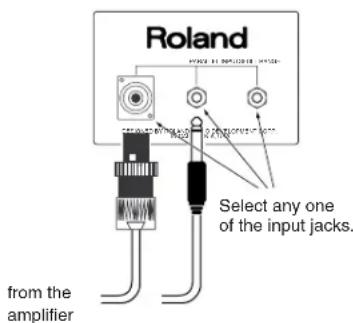
(input impedance: 8 ohms)
Parallel Connection
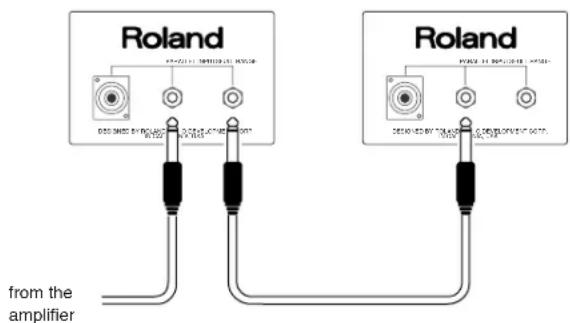
(combined input impedance: 4 ohms)
SSW-351
The SSW-351 contains a built-in crossover network.
There are several ways in which an additional speaker can be connected to the SSW-351.
- Since the HIGH FREQ OUTPUT is routed through the internal crossover network, a signal from which the low range has been cut will be sent to the connected speaker.
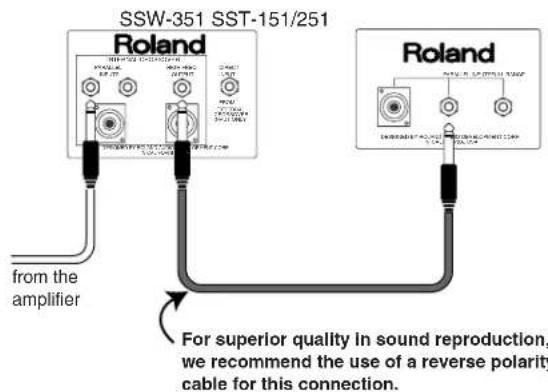

In this case, the combined impedance will be 8 ohms.
- The speakers can be driven by multiple amps very simply with the internal crossover network. When driving the speakers with two power amps (bi-amping), connect the speakers using the parallel input jacks.
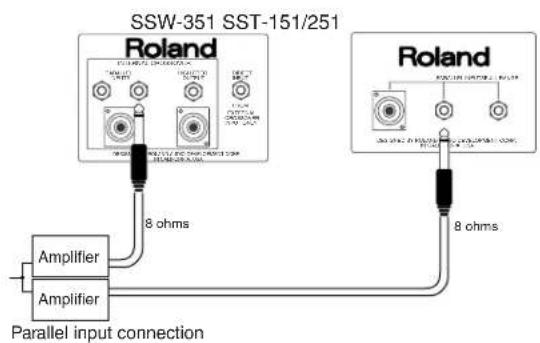

The volume balance between the subwoofers (SSW-351) and full-range speakers (SST-151/251) and be adjusted with the power amp level settings.

Using two power amps provides greater headroom when driving the speakers.
- The PARALLEL INPUTS can be used as an output to connect an auxiliary woofer or a full range speaker. A full frequency range signal will be sent to the connected speaker.
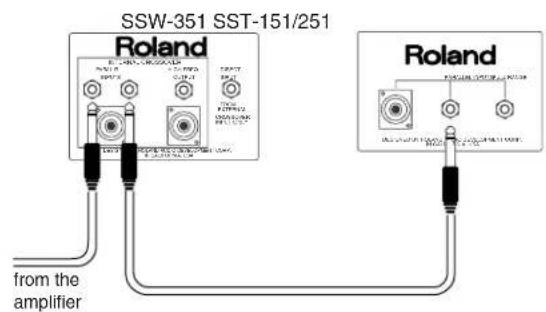

In this case, the combined impedance will be 4 ohms.

A method to increase low-range sound pressure levels.
- If you wish to use an external channel divider (crossover network) instead of using the built-in crossover network, make connections to the DIRECT INPUT. Pay attention to the crossover frequency of each speaker that is connected.
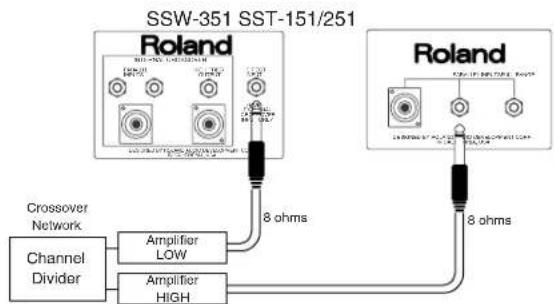

Carefully read the specifications before connecting an external channel divider (crossover network).

For the crossover frequency, we recommend frequencies between 100 Hz and 200 Hz.
Setting Up the SSM-151
When used as a stage floor monitor, the SSM-151 can be set at two different floor angles.
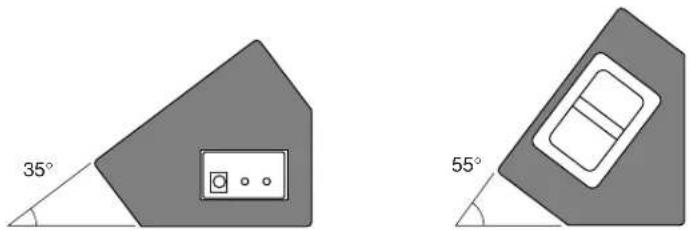

When setting up monitor speakers, be sure to observe the following points in order to prevent the speakers from falling over (exercise caution particularly when using the 55-degree setup, as the speakers may topple more easily in this orientation than when set up 35 degrees).

* Do not sit or place feet on the speakers.
* Do not place the speakers on unstable or inclined surfaces.
* Do not use the speakers as steps.
Specifications
Model SST-151 SST-251 SSW-351 SSM-151
| Enclosure | Bass-reflex | Bass-reflex Bass-reflex Bass-reflex | ||
| Speakers | 12" Woofer + Horn Tweeter | 15" Woofer + Horn Tweeter 18" Woofer 12" Woofer + Horn Tweeter | ||
| Power Handling (rated) *1 150 W 200 W 200 W 150 W (max) | 450 W | 600 W 600 W 450 W | ||
| Frequency Response | 58 Hz-16 kHz | 52 Hz-20 kHz 45 Hz-1.5 kHz 58 Hz-16 kHz | ||
| Nominal Impedance | 8 ohms 8 ohms 8 ohms 8 ohms | |||
| Sensitivity (1 W/1 m) | 98 dB | 100 dB 97 dB 98 dB | ||
| Crossover Frequency | 4 kHz | 1.5 kHz 200 Hz 4 kHz | ||
| Connectors (1/4" phone) | Parallel Inputs x 2 Parallel Inputs x 2 Parallel Inputs x 2 Parallel Inputs x 2 | |||
| Direct Input x 1 | ||||
| High Freq Output x 1 | ||||
| (Speakon® NL4MP) | Parallel Input x 1 | Parallel Input x 1 Parallel Input x 1 | Parallel Input x 1 | |
| High Freq Output x 1 | ||||
| Weight | 20 kg/44 lbs | 31.8 kg/70 lbs | 39.5 kg/87 lbs | 14.5 kg/32 lbs |
| Dimensions | 407 x 407 x 642 mm | 572 x 407 x 762 mm | 572 x 559 x 838 mm | 620 x 400 x 360 mm |
| (W x D x H) | 16 x 16 x 25-1/4 inches | 22-1/2 x 16 x 30 inches | 22-1/2 x 22 x 33 inches | 24-7/16 x 15-3/4 x 14-3/16 inches |
| Accessory | OWNER'S MANUAL | OWNER'S MANUAL | OWNER'S MANUAL | OWNER'S MANUAL |
*1 EIA RS426A
* In the interest of product improvement, the specifications and/or appearance of this unit are subject to change without prior notice.
Pin Diagram of Speakon® NL4FC
* A Speakon® male connectors used by this device is sold separately.
- Features
- USING THE UNIT SAFELY
- INSTRUCTIONS FOR THE PREVENTION OF FIRE, ELECTRIC SHOCK, OR INJURY TO PERSONS
- ALWAYS OBSERVE THE FOLLOWING
- WARNING
- CAUTION
- Important Notes
- Connection
- Maintenance
- Additional Precautions
- Making Connections
- SST-151/251/SSM-151
- SSW-351
- Setting Up the SSM-151
- Specifications
- Pin Diagram of Speakon® NL4FC
Brand : ROLAND
Model : SSM-151
Category : Loudspeaker