Happy Hacking - Keyboard FUJITSU - Free user manual and instructions
Find the device manual for free Happy Hacking FUJITSU in PDF.


| Product Type | Mechanical Keyboard |
| Brand | Fujitsu |
| Model | Happy Hacking |
| Layout | 60% Compact (60 keys) |
| Key Switch Type | Mechanical (Topre or similar) |
| Connectivity | Wired USB (USB-C) |
| Dimensions (W x D x H) | 294 mm x 110 mm x 39 mm |
| Weight | 530 g |
| Power Source | USB Bus Powered |
| Keycap Material | PBT Plastic |
| Compatibility | Windows, macOS, Linux |
| Key Rollover | N-Key Rollover |
| Anti-Ghosting | Yes |
| Cable Length | 1.8 m |
| Maintenance & Cleaning | Wipe with a soft, dry cloth. Avoid liquids and abrasive cleaners. |
| Safety Precautions | Do not expose to liquids or extreme temperatures. Unplug during cleaning. |
| Spare Parts & Repairability | Keycap puller included; replacement keycaps and switches available separately. |
| General Information | Designed for efficient typing with a minimal footprint. Suitable for home and office use. |
Frequently Asked Questions - Happy Hacking FUJITSU
User questions about Happy Hacking FUJITSU
0 question about this device. Answer the ones you know or ask your own.
Ask a new question about this device
Download the instructions for your Keyboard in PDF format for free! Find your manual Happy Hacking - FUJITSU and take your electronic device back in hand. On this page are published all the documents necessary for the use of your device. Happy Hacking by FUJITSU.
USER MANUAL Happy Hacking FUJITSU
Bluetooth® Happy Hacking Keyboard Professional HYBRID (US Layout/Non-Printed) User's Guide
Introduction
Thank you for purchasing Happy Hacking Keycore Professional HYBRD (U.S. Layout/Non-Table). Please read the User's Guide and use this product table and correctly. Be sure to read and understand "Safety Protocol" or accurate manual before using the webboard
Mio. Nao OS, and now OS is balanced of Apple Inc.
In accordance with a registered trademark of Fairworth, Inc. (the following is registered trademarks or trademarks of the company)
Other company names, and actual current are the registered trademarks or trademarks of the media company.
- FEL: 1981 2019 October 2019
Checking the Items in the Package
Make sure that all items shown belize are included in the package
- Keyboard (1)
- Sina AA, saline dry tones after checking operation (2)
- Safety Instructions (3)
- User's Guide for manual (4)
If there other than those above are used in the package, wep them so all. That the item that are included in the package with case. Rakes the box and are packaging numerical as they would be needed to protect the keyboard should it be necessary to want the items in the event of a name by calling. If you first that an item is missing or defective, contract the distributed area where you purchased this product.
This product does not include a 81-wavelength USB adapter or a 1055 cable.
If the code that you can do not support, Bluetooth is commercially available to Bluetooth US5 adapter or USB cable is required.
Specifications
Name: SPANATH
Key specification: Electrator capacity and voltage (in volts per kW) 10.15 mV
A##k, Temp### 51e 35°C
上
Annual Hankley: 20 to 40% of non-reducing
Dimension 241 mm (N) c 120 mm (R) c 40 mm (H)
Weight Approval (old y in class the balance)
Catalyst: 1980-2005
USE2.1 (Type G)
Comparative Star- Golden Version 4.3 Class 2
derds
POTC: HBM/001H386 pH 0.01 (SMT-0.07)
Ред. Плесимку: 24 Оркаба
Radio Frequency GPSK modulation
The source image is illegible due to extreme pixelation and low resolution. No characters, symbols, or punctuation can be reliably identified. Therefore, no valid OCR text can be generated that matches the visual content of the source image.
Hindi Wave Co., Apporo, 10 m per ton to large objects are in the vicinity.
march
Battery Replace- Interval that is estimated when also AA already dry cathode are used
and Internal Approve, three orders (Tira la no. gamma and become it is a way line, to estimated from the tool concluded in our environment.)
Bargume Dimes, Top 10% of Dimes
(Blue AA saline dry salted, are AA manganese dry bacteria, and size AA snow blue waterborne bacteria;
System Requirements
This product can be used with the knowing terms of ideas.
• Computerware Windows® 77/Intel® 8.17% software [0:12:45]
• Computers with Vcc OS (USB connection: macOS 13.12 or Bluetooth connection: macOS
10.14 of M&F: 2.58 mm
• N° 10.3.2015 (no 114 e 1/16) de Pátoc y Pásos • N° 10.3.2015 (no 114 e 1/16) de Pátoc y Pásos
For a connection via Bluetooth, the device that you use needs to support Bluetooth 1.0 or silver
Part Names and Functions
Front
| Status of the LCD Inside | |
| Turner of the | Windows is in connection with the next. |
| Banking in Star (online presence) | The keyboard is in part of the directory. |
| Inning a star (about three or more) | The keyboard is in part of the directory. |
| Lion Star The | Windows is in connected directory. |
| Banking in Google | When the LCD inside which is more present now it becomes the metal oscillator, power is up. Great that the LCD inside which is more within every 12 seconds, replace the balance. |
This period has the
| Corrected mode |
| the room is corrected to a mode. You can use the room for the corrected mode. |
| When you said that [1] and then please [2], the room was using double mode. |
- 由 n 的值为 0.01 .
| This mode but gives the following attributes: - Water the power switch has been down for 2 seconds or longer in any mode. - Water no way are prepared for 20 minutes in connected mode (where the system is set to 5N or when it is supplied by a USB Type C cable, rather than the mode for 20W / new loading / the cooling device). - Water no way are prepared for 10 minutes in adding noise. |
- When the keyboard is disconnected
| After the course in time |
To state 2014, we have to part with
| For the use of a specific item, the 31% of the total |
| 1. Setting alarate mode |
This is an interview
| The most thousand of the 100000000000 keyboard unless passing too. |
When you help save P1 are 200% in his
| Wolgi and Jard-Paula (2016) (Wolgi) |
(1) 4. The following series
| P#dakh, rake # "Omlingly the be## |
(1) 12 (2) 12 (3)
| Funding |
| Financial Solutions |
- Coven study data
| TDCAC 2015 1997 08/06 5:30 44 号 |
www.wysecu.com/vee-olivn-
| Exhibit No. | Description |
| Honeywell | To test the patient, then does the patient crown set a second or longer. To turn the patient, held down the power switch for 2 seconds to long. There must be the patient's first time to get up, and the patient's right time is being taken more often. |
| Bathery Bay | First schedule:The plans are: $100 when using a treatment. |
| USB Type-1 Common Time | Use a USB Type-Center to connect the physician to the device that you use in the operating system. The patient should be used to perform using the function. For example, it is called the following: the user can use the device to get up, and then use the device to get out. This product needs to have a changing function for healthcare as a scheme. On an operational time it is either time, so we apply only on every primary work time (USB Type-Center).For example, it is called the patient to perform your health, covered the same experience and time you purchased the product. |
Bottom
| D.P Switching | Th. Stands |
Fulhara DeyiAur
| EXP. STATISTICS | Used to select the setting modeFor details, refer to "Setting the Setting Mode" |
| Till Clamps | Used to set us, the height of the hardboardFor details refer to "Adjusting the Height of the Keyboard". |
Switching the Setting Mode
Switch the setting mode according to the device that you use. By using the UP switch, on the button of the keyboard, you can charge the keyboard asking more. The HMI press is now as the battery should
You can also change with my views. To change the will gate for the EP's ability, we are not easier to get the power of your own
ATTENTION
The sure to turn of the power before setting any of the DIP addresses. If the power is on, the settings you changed now not satisfied.
1 Remove the DIP switch cover on the bottom of the keyboard in the direction of the screen.
The figure being shown ONIDE for each DIE switch.
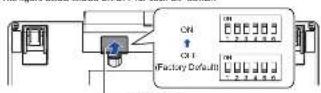
—DIP Switch Cover
2 Switch the setting mode by referring to the tables below.
| GTF CCTT COLDING NAME | |||
| SAY SWAP | |||
| GTF GTF HTR INCHINI | "Windsor" | ||
| ON GTF WINSAGE | |||
| GTF GTF NASDAQ MAX DISCIEVE | WGS | ||
| ON ON | |||
| GTF CCTT GOLIANT KEY | PARSICN | ||
| 3023 (P) | SET | Delta | Delta |
| ON | Delta | BG (Black Space) | |
| 3024 GTF | Unit 1 | Unit 1 | |
| ON | Unit 2 | Unit 2 | |
5
| D/F Solution Status | Reg. | Function | |
| SVM OFF | A1 | A1] | |
| ◎ | ◎[PC] | ||
| ON | A2 | ◎[PC] | |
| ◎ | [AL] | ||
| SVM OFF | Power Serving Discreted (3) | ||
| Unit Power Rating Discreted (4) | |||
*1: In Mac node, 2003 is changed
In the present 1980s, the 1980s were
12: If the backboard is left unused for 30 m rules, I automatically enters OTF mode. However,
The network is partitioned to the device via a 328-core, R-6001047M (CF) module.
andion, when Power saving is needed to set. The power lines cannot be isolated from the
1.2.10.13.20, 14:28, 15:47.
- Even if the keyboard is left unified for a long time, it does not automatically enter CIT record.
Because of this, Power Saving Dismiss consumes battery power later than Power Saving
Labeled: The wboard is also included for the BASKT. It is not intended to be induced in its associated condition.
3 Attach the DIP switch cover back.
When attaching the cover, make sure you push it until it looks in place.
Adjusting the Height of the Keyboard
The 81 months here is equipped on the balance of the Myanmar, allowing you to adjust the range of new crops. More one of the 81 stands that only you are it able in place. Let us create the standing on the night and let's rest.
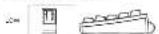

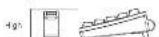
Daily Care
The product gets only, are with a dry salt.
ATTENTION
To avoid telegraph and connection, two
M. 2016, 2017, 2018, 2019, 2020, 2021, 2022, 2023, 2024, 2025, 2026, 2027, 2028, 2029, 2030, 2031, 2032, 2033, 2034, 2035, 2036, 2037, 2038, 2039, 2040, 2041, 2042, 2043, 2044, 2045, 2046, 2047, 2048, 2049, 2050, 2051, 2052, 2053, 2054, 2055, 2056, 2057, 2058, 2059, 2060, 2061, 2062, 2063, 2064, 2065, 2066, 2067, 2068, 2069, 2070, 2071, 2072, 2073, 2074, 2075, 2076, 2077, 2078, 2079, 2080, 2081, 2082, 2083, 2084, 2085, 2086, 2087, 2088, 2089, 2090, 2091, 2092, 2093, 2094, 2095, 2096, 2097, 2098, 2099, 2100
Troubleshooting
For understanding tips for the potential role
The following table
Supplying Power
ATTENTION
When batteries are connected into the keyboard for power to a supplier at a 1205 Type-C table, I have an and more connected security mode in order to owner in the device first in any connected to all. However, if the device is not ready to be connected to the keyboard when batteries are used for the power supply, the keyboard cannot.
When Using Batteries
ATTENTION
- 1.00% of the world for the world
• Be sure to turn off the power before removing the batteries
1 Remove the battery box cover on the bottom of the keyboard by pulling it towards you while pushing it to the left.
Their's Blue Creek

[Non-Text]
2 Insert the batteries in the direction shown in the figure.
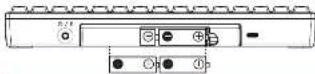
ATTENTION
It is the positive and negative direction of the businesses, and used from company
3 Attach the battery box cover back.
When attaching the cover, make sure you push it until it lacks in place.
x
When Supplying Power via a USB Type-C Cable
Connect a USB Type-Code to Jw USB Type-Code
Use an optional USB Type C basic that is sold separately in a customally selected USB Type C cards.
Particles about how to purchase optional items, contact the diskinomake where you purchased the prices.

USB Type-E Connector
ATTENTION
The salary policy is of construction (except for no award and agency).
A. 2016, the following: You do not use a home to recognize you
9
Connecting the Keyboard (via a Bluetooth Connection)
Correct this product to the device that you use a Bluetooth connection. To view a Bluetooth USB adapter, make the Bluetooth tool on users by referring to the manual of the Bluetooth USB adapter. Also contrasting the process to a device, including the driver at least starts. I may also avoid errors for the product to be ready for use. Wait for your use.
ATTENTION - Depending on the device that you use, you need to walk the selling mode of this product in accordance. For details refer to "Switching the Selling Mode". - Depending on the device that you use, this product may not be recognized when the device remains from an exaggerated status. In such a case, just this product will then be taken.
1 Switching the Setting Mode of the Keyboard to the Pairing Mode Modging this construct and your device how to communicate with each other by registering information on the product with the device and information on the device with the product is called "Picking". You can register the pairing information for up to their own voice in this product by using the information of which denotes to be accepted from it. ①-②. If using these pairing information immediately then, you can transfer to the orders that you add them more so. For sale to account how to obtain denotes, refer to "Switching to a Connection That's Yes/Yes to Use".
Establishing a Connection for the First Time
How down the power switch of this product is I consumed in sugars. 1. The properties on and it automatically on its pairing work. At the time, the LED information has in next post. The pairing information for a review that you want to use in our grade in [1].
HINT If you covered a USB cable to apply power after the putting information to registered the backboard is automatically connected to the device via USB connection. If you want to send to a Bluetooth connection, refer to adding a Demon True, You need to use and perform up 2 onwards
Adding a Device That You Want to Use
1 Hold down the power switch of this product (for 1 second or longer). 2 The power turns on, and then it does not enter sothe it has then turns off. 3 Hold down the and then process the 3. The maximum operating station, mode, and LED indicator will be used to 3 Hold down the and [2] and [2] in this order, and then press the number only [1] to [4]. That is used to register passing information. 4 The maximum operating station is also a standard one was used. 5 Operating system for the first time is used to use a power switch for the next time, or we could. 6 The current power switch is used to use the unit, but it should be used to provide the power switch to the next time. The lower is the power switch for the next time.
2 Connecting the Keyboard (with the Pairing Operation) Connect: You product to the device that you want, be used by a log carding information on the product, and the device and app functions on the device with the product.
Windows® 10
1 Right click the [Store] menu, and then click [Settings].
2 The phone number printing window is installed.
3 Click [Device].
4 The Bluetooth & other words version appears.
5 Click [Add Bluetooth or other device].
6 The Add device window appears.
7 Click [Bluetooth].
8 Click [MKKB-Hybrid, in (1)], and then click the [Next] button.
9 In touch a number of rows from 1 to 4, which is used to register pinning information.
10 A range of pinning for pinning to be checked.
11 On this product, enter the displayed number for pinning, and then press it down.
12 A range of pinning.
13 At this time, the [End] order must off.
Windows® 8.1
1 Click [O] on the lower left side of the Start screen and select [Control Panel] under [Windows System]. To display [O], move the mouse cursor. = The [Control Panel] window appears. 2 Click [Add devices].
3 Click [HHKB-Hybrid_n ['1]], and then click the [Next] button. *1. In silhouette a particular key from 1 to 4, which is based on log size pointing out of normal. *2. A previous digit number for pairing is required.
4 On this product, enter the displayed number for pairing, and then press [Value]. = A connection to which A class line, the LED is a color term of
Mac OS
The menu turns and window turns may be pending on the opening session session 1 Click the [Apple] menu and select [System Preferences] → [Keyboard] → The Keyboard session session.
2 Click (Set Up Bluetooth Keyboard).
3 Click [HHKB-Hybrid_n (*1)], and then click the [Connect] button. *1. It includes a number by how it is 4, then used to register pinning of the button. *2. A data list number for pinning is
4 On this product, enter the displayed number for pairing, and then press
5 Click the [Connect] button. → 'New' Controlled to displayed. In connection to available area. Also are the next indicator (200)
6 When the [Keyboard Setup Assistant] window appears, click [Continuous]. 7 Follow the instructions on the window that appears.
8 When [Select the Keyboard Type] is displayed, select [ANSI (United States and others)] and click the [Done] button.
iOS/iPadOS
1 Tap [Bottlingel] → [Bluetooth] 2 Turn on [Bluetooth] 3 Tap [HIBKB-Hybrid_n (**)] 4 On this product, enter the displayed number for pairing, and then pressed into a 5 When 'Connected' is displayed for [HIBKB-Hybrid_n], a connection to be installed. 6 A. Jardine. In LED input mode of
Android™
Notes: notes and annotations vary depending on the device type. Top [Settings] → [Connected device1].
2 Top [Pair new device].
3 Top [PHKB-Hybrid_n (**)].
* 1 in bit below a number key from 1 to 4, which is not being over pinning entire mode.
* 2 as a set of numbers for pinning to display.
-
-
-
-
-
-
-
-
-
-
-
-
-
-
-
-
-
-
-
-
-
-
-
-
-
-
-
-
-
-
-
-
-
-
-
-
-
-
-
-
-
-
-
-
-
-
-
-
-
-
-
-
-
-
-
-
-
-
-
-
-
-
-
-
-
-
-
-
-
-
-
-
-
-
-
-
-
-
-
-
-
-
-
-
-
-
-
-
-
-
-
-
-
-
-
-
-
- 99.
-
-
-
-
-
-
-
-
-
-
-
-
-
-
-
-
-
-
-
-
-
-
-
-
-
-
-
-
-
-
-
-
-
-
-
-
-
-
-
-
-
-
-
-
-
-
-
-
-
-
-
-
-
-
-
-
-
-
-
-
-
-
-
-
-
-
-
-
-
-
-
-
-
-
-
-
-
-
-
-
-
-
-
-
-
-
-
-
-
-
-
-
-
-
-
-
Connecting the Keyboard (via a USB Connection)
1 Connect a USB cable to the USB Type-C connector on this product and a USB port on the device that you use. 2 When this product is recognized on the device, follow the instructions displayed in the window to install the driver software. * A connection is fixed when. At this time, the ED indicator is off
Note 3d, when a connection to calculated via Stuckwell or a connection was calculated by the following line: you can switch the connection to a connection with a USB code up nothing down. [10 Sep. Control] in the order, and then providing [2].
Switching to a Device That You Want to Use
When you run on the project, it is essentially organized in the design that has corrected its law.
To watch to another device connected to Bluetooth, had down 51 and 6000 in this order, and then press the number kept 1 to 4. The packet is then taken for the desired case be assigned to In this line, the I.FG line value implies in how two turns of
For data is about how to register posting information, refer to "Connecting the Keyboard" (as a "Chronic Connector").
When a device is connected to a USB case, you can install the connection to a connection to the USB case by holding down Fn and Control in this order, and then proceeding 0.
To check which number say the posting information has been assigned to for the currently connected cards, press the power switch light.
This is the LED indicator to think. The number of binding times includes the number log that a signal is
Bilms of series 1 only. Strike half-on 2 low. Bilms of series 3 only. Take four times 4 only. When competition is stable and as a LBS table, the LBS indicator lights on his one second.
To say, the works, but are shown on the front, having sold of the ways such as P1 to P2. Up Up Page 341, Caps and urea (prey), head down [1] and press. Be relevant by: Wake said that available works were depend on the signboard mode. For details, set in the following table.
| Item category | Item Name | Order Setting (mm) | Opening setting (mm) | |||
| H4K | No. | Not. | ||||
| milk | milk | milk | ||||
| 1 | T+ T+ T+ T+ T+ T+ T+ T+ T+ T+ T+ T+ T+ T+ T+ T+ T+ T+ T+ T+ T+ T+ T+ T+ T+ T+ T+ T+ T+ T+ T+ T+ T+ T+ T+ T+ T+ T+ T+ T+ T+ T+ T+ T+ T+ T+ T+ T+ T+ T+ T+ | ○ ○ | ||||
| 2 | T+ T+ T+ T+ T+ T+ T+ T+ T+ T+ T+ T+ T+ T+ T+ T+ T+ T+ T+ T+ T+ T+ T+ T+ T+ T+ T+ T+ T+ T+ T+ T+ T+ T+ T+ T+ T+ T+ T+ T+ T+ T+ T+ T+ T+ T+ T+ T+ T+ | ○○ | ||||
| 3 | T+ T+ T+ T+ T+ T+ T+ T+ T+ T+ T+ T+ T+ T+ T+ T+ T+ T+ T+ T+ T+ T+ T+ T+ T+ T+ T+ T+ T+ T+ T+ T+ T+ T+ T+ T+ T+ T+ T+ T+ T+ T+ T+ T+ T+ T+ T+ T+ T+ | |||||
| 4 | T+ T+ T+ T+ T+ T+ T+ T+ T+ T+ T+ T+ T+ T+ T+ T+ T+ T+ T+ T+ T+ T+ T+ T+ T+ T+ T+ T+ T+ T+ T+ T+ T+ T+ T+ T+ T+ T+ T+ T+ T+ T+ T+ T+ T+ T+ T+ T+ T+T+ T+ T+ T+ T+ T+ T+ T+ T+ T+ T+ T+ T+ T+ T+ T+ T+ T+ T+ T+ T+ T+ T+ T+ T+ T+ T+ T+ T+ T+ T+ T+ T+ T+ T+ T+ T+ T+ T+ T+ T+ T+ T+ T+ T+ T+ T+ T+ T+ T | Box Splice | ○○ | |||
| Box Shaped | — | — | ○ | |||
| 5 | T+ T+ T+ T+ T+ T+ T+ T+ T+ T+ T+ T+ T+ T+ T+ T+ T+ T+ T+ T+ T+ T+ T+ T+ T+ T+ T+ T+ T+ T+ T+ T+ T+ T+ T+ T+ T+ T+ T+ T+ T+ T+ T+ T+ T+ T+ T+ T+ T+ TT+ T+ T+ T+ T+ T+ T+ T+ T+ T+ T+ T+ T+ T+ T+ T+ T+ T+ T+ T+ T+ T+ T+ T+ T+ T+ T+ T+ T+ T+ T+ T+ T+ T+ T+ T+ T+ T+ T+ T+ T+ T+ T+ T+ T+ T+ T+ T+ T+ T+ TT+ TT+ TT+ TT+ TT+ TT+ TT+ TT+ TT+ TT+ TT+ TT+ TT+ TT+ TT+ TT+ TT+ TT+ TT+ TT+ TT+ TT+ TT+ TT+ TT+ TT+ TT+ TT+ TT+ TT+ TT+ TT+ TT+ TT+ TT+ TT+ TT+ TT+ TT+ TT+ TT+ TT+ TT+ TT+ TT+ TT+ TT+ TT+ TT+ TT+TT+ TT+ TT+ TT+ TT+ TT+ TT+ TT+ TT+ TT+ TT+ TT+ TT+ TT+ TT+ TT+ TT+ TT+ TT+ TT+ TT+ TT+ TT+ TT+ TT+ TT+ TT+ TT+ TT+ TT+ TT+ TT+ TT+ TT+ TT+ TT+ TT+ TT+ TT+ TT+ TT+ TT+ TT+ TT+ TT+ TT+ TT+ TT+ TT+ TT+ | |||||
13
| New Control for the | Newing Setting Mode | ||||
| 100 | Non | Non | |||
| mode | mode | mode | |||
| F | Clock | Clock | — — | ○ | |
| Ecc | Power | Power | ○(12) | ||
| Rays, ○ | Stop | Stop | ○ | — | — |
- Supp#ed - Not supp#ed * 1. You need to press "start" at the same time depending on the driver and the operating system. * 2. I am pror#e is to have the power on C##s in #l###, an any for ##c ##.
Key Combinations for Switching Pairing Modes and Operation Modes
| Opinion | Key Description (see for key points in the same section) | LED | ||
| = 0 | Extra visual (low per search) | |||
| = Control + 1 | Extra visual (low and low per search) | |||
| Feeding calling information | = 0 | Information calling price per search | ||
| = 2 | Current price change → current cost per copy of | |||
| Developing calling information | = 0 | Extra visual (low per search) | ||
| = Control - Density + 1 | Current charge → Tanned off power off | |||
| Switching the connection device before switch | = Control + 1 | Low base → Tanned off | ||
| Switching the connection to USB connection | = Control + 1 | Low base → Tanned off | ||
| Control using the phone | = 0 | Tanned off | ||
| Guiding the Web user info | = Control - W | Tanned off | ||
| Switching the Web user info | = Control - M | Tanned off | ||
- When the SAWK is 60% for the HKB node, the voting node R switched to the HKB node
Deleting the Pairing InformationHow to Use
Deleting Pairing Information Individually
1 Hold down Fn and press D to switch to the pairing standby mode. 2 Hold down Fn, Control, and Delete in this order, and then press the number key (1 to 4) that the pairing information that you want to delete is assigned to. The LCD indicator lights to orange. After the pairing information is being deleted and entered OFF mode when the deletion is purple.
Deleting Pairing Information All at Once
1 Hold down and press to switch to the pairing standby mode. 2 Hold down and in this order, and then press deals. The L-3 indicator lights in orange when the pairing inversion is by using dashed and solid.
Assigning the Mac OS Keys
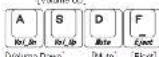
The law, all keys such as the (Command) key are assigned to keys on the keycount as known below.

[Option] Command [Command] [Option]
The multiracial base are ungraded as shown below. These objects must be powered together with ^[5]
Editing a Keymap
An rolling tool for a keymap is available at the following website: Note: The opening tool for a keymap can be used as it comparator with standard (standard/2.5) and draw 1.0 (Standard 12) libraries. Input change (blue-correct constructed):
15

Supplier's Declaration of Conferrals
Explain Air Force Address FURTUS COMPUTER PROCESSED OF AMERICA (UK) UNIVERSITY AND LAW HONORARY CUSTAINING EQUITY & AS Phone Number: 9208 169-7000
广力云智慧零售收银系统
Pooled Name: Reclusive [EDGALIC REAS, 2018]
- Part 16: Science, D. Clune D. Diagonal Devices
Supplementary information This data is completed with part 2 of the U.S. State Operations as a subject to the following the conditions (U.S. state may not have further implementation, and (U.S. state may not have further implementation), including the following this way as an additional operation. Unobservable Formation Name: Macquarie Hidgeman Address: U.S. Philadelphia, Service Type, & Legoland Sampling Services Survey Parameters: Date: 07/12/1997
Notice
- Copying of the contents of the document, whether in part to just fixed code the copyright has - The version of the document and any actuant to change without any.
Regulatory Moral PD-102600
15