
HS830 - Earphones MOTOROLA - Free user manual and instructions
Find the device manual for free HS830 MOTOROLA in PDF.


| Type | Bluetooth Headset |
| Brand | Motorola |
| Model | HS830 |
| Dimensions | Approximately 50 x 20 x 15 mm (earbud) |
| Weight | Approximately 12 g |
| Connectivity | Bluetooth 2.0 |
| Battery Type | Lithium-ion rechargeable |
| Battery Life | Up to 8 hours talk time, 120 hours standby |
| Charging Time | Approximately 2 hours |
| Driver Unit | 15 mm dynamic |
| Frequency Response | 20 Hz - 20 kHz |
| Impedance | 32 ohms |
| Sensitivity | 105 dB |
| Microphone | Omnidirectional, built-in |
| Controls | Multi-function button, volume rocker |
| Compatibility | Most Bluetooth phones, devices |
| Input | Micro-USB charging port |
| Operating Range | 10 meters |
| Maintenance | Clean with soft dry cloth; avoid moisture |
| Safety | Do not expose to extreme temperatures; use only approved charger |
| Spare Parts | Earbuds, charging cable available separately |
| Repairability | Replaceable battery by professional |
Frequently Asked Questions - HS830 MOTOROLA
User questions about HS830 MOTOROLA
0 question about this device. Answer the ones you know or ask your own.
Ask a new question about this device
Download the instructions for your Earphones in PDF format for free! Find your manual HS830 - MOTOROLA and take your electronic device back in hand. On this page are published all the documents necessary for the use of your device. HS830 by MOTOROLA.
USER MANUAL HS830 MOTOROLA
Get Connected in 5 Quick Steps
1 - CHARGE 2 - START BLUETOOTH FEATURE
= 3 - PAIR 4 - CONNECT TO NECK STRAP
5 - TEST AND USE

BEFORE YOU BEGIN
Before using this product, read the important Safety and Legal Information on samples, and follows its instructions.
Take a moment before you get started to familiarize yourself with your new HS830 Wireless Module.
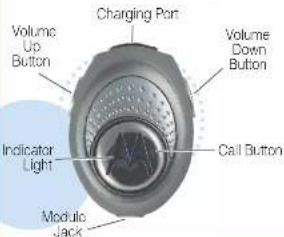

CHARGE ur Module's Battery
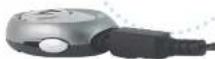
Release Tab Down
1 Plug the Motorola charger into the end of the module with the release tab facing down.
The indicator light turns on when the battery is charging. It may take up to 1 minute for the indicator light to turn on. When the module's battery is fully charged (about 2 hours), the indicator light turns off.
2 Disconnect the charger. Note: Module is not functional while charging.

START BLUETOOTH FEATURE Your Phone
Your phone's Bluetooth feature is off by default. To use your wireless module, you must turn on the Bluetooth feature in your phone.
For most Motorola phones:
1 Press ☐ (Menu) > Settings > Connection > Bluetooth Link > Setup.
2 Scroll to Power.
3 Select Change.
4 Scroll to On.
5 Press Select to turn on the Bluetooth feature. The Bluetooth feature remains on until you turn the feature off.
Note: These steps are for most Motorola phones. For other phones, see your phone's user a guide.

PAIR Your Module
Before you can use your wireless module, you must pair link it with your phone.
Step A - PUT THE MODULE IN PAIRING MODE
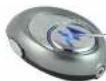
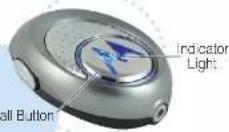
Indicator Light
1 Ensure the wireless module is turned off (indicator light, not blinking).
2 Press and hold the Call Ⓤ button for 6 seconds. The indicator light will initially flash, but continue to hold down the button until the indicator light is steadily lit.
If the indicator light is flashing or not steadily lit when releasing the button, repeat both steps 1 and 2 on this page.
Motorola, Inc. Consumer Advocacy Office 1307 East Algonquin Road Schaumburg, IL 60196 USA
Part Number: 6309495A49-O
MOTOROLA and the Stylyd M laco are registered in the US Prime 15 Trademix Office. The Blue Smith terminals are owned by their products and used by Motorola Inc. under license. All other product or service services are properly of their respective owners.
The use of wireless devices and other electronic devices may be provided or restricted to certain areas. Always cover the grid and regulations on the use of these products.
C. Motors, Inc. 2015

PAIR CONTINUED Your Phone
Step B - SET YOUR PHONE TO LOOK FOR YOUR MODULE
For most Motorola phones:
1 On your Motorola phone, press 📄 (Menu) > Settings > Connection > Bluetooth Link > Handsfree > Look for Devices.
The phone lists Bluetooth devices it finds.
2 Select Motorola HS830
3 Select OK or Yes to pair your module with your phone.
4 Enter the passkey: 0000
5 Select OK
When your wireless module successfully pairs with your phone, the indicator light changes from steadily lit to flashing.
Note: These steps are for most Motorola phones. For other phones, see your phone's user's guide.

CONNECT Module to Neck Strap
1 Insert the 2.5mm plug from the neck strap into the module jack on the bottom of the wireless module.
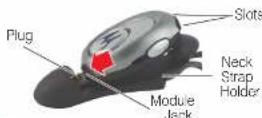
2 Push the wireless module back into the neck strap holder.
3 Insert the two tabs on the neck strap holder into the slots on the top of the wireless module.
4 Place the neck strap around your neck and insert the earbud in your ear.

TEST AND USE
Your phone and wireless module are now paired and ready to make and receive calls. To make a call:
1 Place the neck strap on and the earoud in your ear.
2 On your phone, dial the number you want to call and press the SEND key.
3 If your phone and module are successfully paired, you will hear ringing on the earbud. After you have successfully paired your phone and module, you don't need to repeat these steps. For daily use, ensure that your module is turned ON and that your phone's Bluetooth feature is ON.
To save battery power, turn OFF the module when you don't use it for an extended time.
TROUBLESHOOTING
My phone doesn't find my wireless module. Make sure the indicator light on your wireless module is on and steady when your phone is searching for devices (see step 3).
My wireless module worked before but now it's not working.
Make sure your phone is on and the Bluetooth feature is turned on in your phone (see step 2). If the Bluetooth feature was turned off or was turned on only temporarily, you may need to restart the Bluetooth feature (see step 2) and pair your phone and wireless module again (see step 3).
Features and Functions Guide
HS830 Bluetooth® Wireless Module

IMPORTANT:
Be sure to first follow the Quick Start Guide on the reverse side to complete initial setup of your HS830.
TURNING ON AND OFF
To turn on the wireless module, press and hold the Call ⚙ button on your module until the indicator light begins flashing. The indicator light blinks when the power is on.
To turn off the wireless module, press and hold the Call Ⓧ button on your module for 5 seconds. The indicator light will flash rapidly and then stop flashing.
ADJUSTING VOLUME
To adjust the volume on your wireless module, press the Volume Up or Volume Down button until you reach the desired volume level.
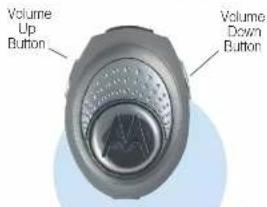
When increasing for decreasing volume, a single audio tone is heard when reaching maximum (or minimum) level.
MAKING CALLS
Function Action
Make a voice dial call Tap the Call button and speak the name after the tone
Receive a call Tap the Call button
End a call Tap the Call button
Reject a call Press and hold the Call button until you hear a beep
Redial last call Press and hold the Call button until you hear a beep
Mute a call Press and hold both Volume buttons until you hear a beep.
Unmute a call Press either Volume button
Transfer a call from the Tap the Call button phone to the module
MAKING CALLS CONTINUED
Function Action
Answer a second Press and hold the incoming call Call button (places first call on hold)
Toggle between two Press and hold active calls the Call button
Join a 3-way call Press and hold (Note: Feature is phone/ both Volume network dependent.) buttons
Put an active call on. Press and hold the hold or resume a call Call button until you on hold hear a beep
Note: Your HSSC supports both landsfree and Headset Profiles. Accessing call functions depends upon which profile your chore supports. See your chore's user's guide for more information.
INDICATOR LIGHTS
The indicator light provides information about your wireless module status.
With the Charger Plugged In
Indicator Light Module Status
On (steady) Charging Off Charging complete
With No Charger Plugged In
Indicator Light Module Status
Off Power off On (steady) Pairing mode 10 rapid flashes Pairing successful
Slow pulse Connected (on a call)
Quick flash Standby (not on call)
Note: After 5 minutes of inactivity, the indicator light stops leaving to conserve power, but the headset remains in standby mode.
AUDIO TONES
Audio Tone Module Status
Single high tone when Volume at minimum pressing volume button or maximum
Five rapid high tones Low battery repeated every 60 sec.
No audio indications: Out of range deteriorating quality
Series of 4 tones Call active (low to high)
Ring tone Incoming call
Single high tone Pairing confirmation Single low tone Voice activation
Dual high/low tone recognized Voice tag not
Single high tone End call
Series of 4 tones (high to low) Audio link closed (headset mode)
Call ended (handfree mode)
AUDIO TONES CONTINUED
Audio Tone Module Status
Fast high/low No tone every network/service
5 seconds (max.
& min. volume confirm been)
No tone Power off
The wireless module sounds an audible alert so that you do not miss an incoming call even if your phone is in a bag or briefcase. The audible alert can be turned on or off by pressing and holding both Volume buttons for 3 seconds.
Note: Disabling the audible alert does not affect the phone or earbud operation. A sera will still be heard in the earbud speaker if the phone is set to other than silent mode
OTHER WIRELESS MODULE APPLICATIONS
The wireless module can also be used as a handsfree device on a helmet. The Motorola SYN0997 Universal Helmet Adapter mounts to almost any helmet - motorcycle/scooter, skiing, snowboarding. The wireless module slides into the helmet adapter creating a handsfree accessory for your helmet.
Two wireless modules can also be configured for full-duplex voice communication with each other. For example, a motorcycle driver may communicate wirelessly with a rider sitting behind.
For details on these applications, see the HS830 Helmet Adapter User's Guide.