
LTV-32W6 - Television WESTINGHOUSE - Free user manual and instructions
Find the device manual for free LTV-32W6 WESTINGHOUSE in PDF.


| Product Type | LCD TV |
| Brand | Westinghouse |
| Model | LTV-32W6 |
| Display Size | 32 inches (32.02" viewable diagonal) |
| Panel Type | TFT Active Matrix WXGA LCD |
| Resolution | 1366 x 768 |
| Viewing Angles | 170° horizontal / 170° vertical |
| Video Inputs | VGA, HDMI, YPbPr (2), Composite, S-Video, RF |
| Audio Output | SPDIF (PCM/RAW), RCA (L/R) stereo |
| Speaker Output | 9W x 2 channels |
| Power Supply | 120 VAC, 60 Hz, 3 A |
| Power Consumption (On) | < 180 W |
| Power Consumption (Active Off) | < 3 W |
| Dimensions (W x H x D) | 797.8 mm x 640.8 mm x 211.7 mm |
| Weight (Net) | 17.0 kg |
| Weight (Gross) | 22.5 kg |
| Cleaning Screen | Use soft lint-free cloth; if needed, non-ammonia non-alcohol glass cleaner |
| Cleaning Case | Soft dry cloth; mild non-abrasive detergent if needed |
| Safety Notes | Do not expose to rain/moisture; unplug during storms; do not block vents |
| Parental Control | Password (default 0000), TV PG and MPAA ratings |
| Remote Control | Requires 2 AAA batteries |
Frequently Asked Questions - LTV-32W6 WESTINGHOUSE
User questions about LTV-32W6 WESTINGHOUSE
0 question about this device. Answer the ones you know or ask your own.
Ask a new question about this device
Download the instructions for your Television in PDF format for free! Find your manual LTV-32W6 - WESTINGHOUSE and take your electronic device back in hand. On this page are published all the documents necessary for the use of your device. LTV-32W6 by WESTINGHOUSE.
USER MANUAL LTV-32W6 WESTINGHOUSE
natural_image
Line drawing of a flat-screen computer monitor with no text or symbolsContents
Cleaning the LCD TV....2
Product Safety Instructions....3
Antenna Installation Safety....4
Safety Guidelines....5
INSTALLATION
Package Contents....6
Front View of the LCD TV....6
Rear View of the LCD TV....6
Side View of the LCD TV....7
Input connectors of the LCD TV....8
Remote Control....9
Installation....11
OSD Functions
IMAGE SETTINGS: Brightness / Contrast / Saturation / Hue / Sharpness / Color Temp/ Reset / VGA Setting....14
DISPLAY SETTINGS: Main Source / PIP Source / Aspect Ratio /PIP Mode / Swap / PIP Size / PIP Position / Audio From....15
AUDIO SETTINGS: Bass / Treble / Balance / MTS / Mute / Speaker / Audio Out / Reset....16
TV/ HDTV SETTINGS: TV System / Auto Scan / Channel Edit / Local Time / Daylight SAV....17
PARENTAL CONTROLS: Password / TV PG Rating / MAPP Rating / Password Edit....18
GENERAL SETTINGS: Transparency / Menu Position / System Info / Closed Caption / Language / Sleep Timer / Menu Timeout / Backlight / Next Page / Power On Plug / LED Set / Factory Reset / Previous Page....19
Specifications....20
Troubleshooting....23
Explanations of required symbols :
| SYMBOL | SYMBOL DEFINITION |
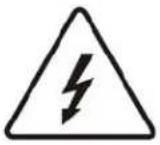 SA 1965 SA 1965 | DANGEROUS VOLTAGE:The lightning flash with arrowhead symbol, inside an equilateral triangle, is intended to alert the user to the presence of uninsulated "dangerous voltage" within the product's enclosure that may be of sufficient magnitude to constitute a risk of electrical shock to persons. |
 SA 1966 SA 1966 | INSTRUCTIONS:The exclamation point inside an equilateral triangle is intended to alert the user to the presence of important operating and maintenance (servicing) instructions in the literature accompanying the appliance. |
Cleaning the LCD TV
• MAKE SURE THE LCD TV IS TURNED OFF
• NEVER SPRAY OR POUR ANY LIQUID DIRECTLY ONTO THE SCREEN OR CASE
To clean the screen:
- Wipe the screen with a clean, soft, lint-free cloth. This removes dust and other particles.
- If it still is not clean, apply a small amount of non-ammonia, non-alcohol based glass cleaner onto a clean, soft, lint-free cloth, and wipe the screen.
To clean the case:
- Use a soft, dry cloth.
- If it still is not clean, apply a small amount of non-ammonia, non-alcohol based, mild non-abrasive detergent onto a clean, soft, lint-free cloth, then wipe the surface.
Disclaimer
Westinghouse Digital does not recommend the use of any ammonia or alcohol-based cleaners on the LCD TV screen or case. Some chemical cleaners have been reported to damage the screen and/or LCD TV case. Westinghouse Digital will not be liable for damage resulting from the use of any ammonia or alcohol-based cleaners.
Thank you for purchasing a Westinghouse LCD TV www.westinghousedigital.com
PRODUCT SAFETY INSTRUCTIONS
Follow and obey all warnings and instructions marked on the LCD TV. For your safety, please read all the safety and operating instructions before you operate the LCD TV. Keep this user's manual for future reference.
Overloading
Do not overload wall outlets, extension cords, or power strips. This can result in fire or electronic shock.
Power Cord Protection
Power supply cords should be routed so that they are not likely to be walked on or pinched by items placed upon or against them. Periodically inspect the cords and each end of the cords for damage. The LCD TV shall be installed near a wall socket outlet and the plug on power cord shall be readily accessible.
Ventilation
Slots and openings on the cabinet are provided for ventilation purposes. To ensure reliable operation of the LCD TV and to protect it from overheating, these openings must not be blocked or covered.
- Do not block the openings by placing the LCD TV on a bed, sofa, rug or other similar surface.
- Do not place the LCD TV in a built-in installation such as a bookcase or rack unless proper ventilation is provided and the manufacturer's instruction have been adhered to.
Other Notices
- Avoid exposing the LCD TV to direct sunlight or high temperatures.
- Avoid exposing the LCD TV to moisture or high humidity.
- Do not attempt repairs yourself. Your warranty does not cover repairs or attempted repairs by anyone not authorized by Westinghouse Digital.
- If your LCD TV will not be used for a long period of time, unplug the LCD TV and remove the batteries from the remote control.
Precautions
- Avoid touching the screen. Skin oils are difficult to remove.
- Never remove the rear cover. Your LCD TV contains high-voltage parts. You may be seriously injured if you touch them.
- Avoid exposing your LCD TV to direct sunlight or another heat source. Orient your LCD TV away from direct sunlight to reduce glare.
• Always handle your LCD display with care when moving it. - Place your LCD TV in a well-ventilated area; don't place the LCD TV in airtight compartments. Do not place anything on your LCD TV that prevents heat dissipation.
- Ensure that the area around the LCD TV is clean and free of moisture.
- Do not place heavy objects on the LCD TV, audio/video cables, or power cord.
- If the LCD TV emits smoke, abnormal noise, or a strange odor, immediately turn it off and contact the Westinghouse Service Center.
- WARNING – To Reduce The Risk Of Fire Or Electric Shock, Do Not Expose The LCD TV To Rain Or Moisture! The LCD TV shall not be exposed to dripping or splashing and objects filled with liquids, such as vases, shall not be placed on the TV.
Antenna Installation Safety
1) Read these instructions.
2) Keep these instructions.
3) Heed all warnings.
4) Follow all instructions.
5) Do not use the LCD TV near water.
6) Clean only with a dry cloth.
7) Do not block any ventilation openings. Install in accordance with the manufacturer's instructions.
8) Do not install near any heat sources such as radiators, heat registers, stoves, or other apparatus (including amplifiers) that produce heat.
9) Do not attempt to bypass the safety purpose of the polarized or grounding-type plug. A polarized plug has two blades with one wider than the other. A grounding-type plug has two blades and a third grounding prong. If the provided plug does not fit into your wall outlet, consult an electrician for replacement of the obsolete outlet.
10) Protect the power cord from being walked on or pinched particularly at the ends of the cord.
11) Only use attachments/accessories specified by the manufacturer.
12) Use only with the cart, stand, tripod, bracket, or table specified by the manufacturer, or sold with the LCD TV. When a cart is used, use caution when moving the cart to avoid injury or damage.

13) Unplug the LCD TV during lightning storms or when it is not being used for a long period of time.
14) Refer all servicing to qualified service personnel. Servicing is required when the LCD TV has been damaged in any way, such as the power-supply cord or plug is damaged, liquid has been spilled or objects have fallen into the LCD TV, it has been exposed to rain or moisture, it does not operate normally, or the TV has been dropped.
Outdoor Antenna Grounding
If an outside antenna or cable system is connected to the LCD TV, be sure the antenna or cable system is grounded to prevent voltage surges and built-up static charges. Article 810 of the National Electrical Code, ANS/NFPA 70, provides information on proper grounding of the mast and supporting structure, grounding of the lead-in wire to an antenna discharge unit, connection to grounding electrodes, and requirements for the grounding electrode.
Lightning
For added protection for the LCD TV during a lightning storm, or when it is left unattended and unused for long periods of time, unplug it from the wall outlet and disconnect the antenna or cable system. This will prevent damage to the LCD TV due to lightning and power-line surges. Do not disconnect the antenna or the power cord during a heavy storm – lightning may strike while you are holding the cable cord, causing serious injury. Turn off your LCD TV and wait for the weather to improve.
Power Lines
An outside antenna system should not be located in the vicinity of overhead power lines or other electric light or power circuits. When installing an outside antenna system, extreme care should be taken to keep from touching such power lines or circuits.
Safety Guidelines
WARNING: This device must be operated with the original power supply, part number LT32B-2-ES.
CAUTION: The power supply outlet should be located near the LCD TV and should be easily accessible. Always use the appropriate AC cord that is certified for your specific country. Some examples are listed below:
USA......UL Canada......CSA
Japan ...... Electric Appliance Control Act
IMPORTANT NOTICE CONCERNING POWER CORD SELECTION
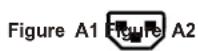
The specific power cord for this LCD TV is enclosed and has been selected according to the country of destination and must be used to prevent electric shock. Use the following guidelines if it is necessary to replace the original cord set, or if the cord set is not enclosed. The female receptacle of the cord set must meet IEC-60320 requirements and should look like Figure A1 below:
For the United States and Canada
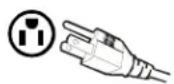
In the United States and Canada the male plug is a NEMA5-15 style (Figure A2), UL Listed, and CSA Labeled. For LCD TVs that are placed on a desk or table, type SVT or SJT cord sets may be used. For LCD TVs placed directly on the floor, only SJT type cord sets may be used. The cord set must be selected according to the current rating for the LCD TV. Please consult the table below for the selection criteria for power cords used in the United States and Canada.
| Cord Type | Size of Conductors in Cord | Maximum Current Rating of Unit |
| SJT 18 AWG | 10 Amps | |
| 16 AWG | 12 Amps | |
| 14 AWG | 12 Amps | |
| SVT 18 AWG | 10 Amps | |
| 17 AWG | 12 Amps |
FCC Compliance Statement
This equipment has been tested and complies with the limits for a Class B digital device, pursuant to part 15 of the FCC Rules. These limits are designed to provide reasonable protection against harmful interference in a residential installation. This equipment generates, uses, and can radiate radio frequency energy, and may cause harmful interference to radio communications if not installed and used in accordance with the instructions. However, there is no guarantee that interference will not occur in a particular installation. If this equipment does cause harmful interference to radio or television reception, which can be determined by turning the equipment off and on, the user is encouraged to try to correct the interference by one or more of the following measures:
- Reorient or relocate the receiving antenna.
- Increase the separation between the LCD TV and receiver.
- Connect the equipment into an outlet on a circuit different from that to which the receiver is connected.
- Consult the Westinghouse Service Center or an experienced radio/TV technician for assistance.
FCC Warning
To assure continued FCC compliance, the user must use a grounded power supply cord and the provided shielded video interface cable with bonded ferrite cores. If a BNC cable used, use only a shielded BNC (5) cable. Also, any unauthorized changes or modifications not expressly approved by Westinghouse Digital will void the user's authority to operate this device.
INSTALLATION
This User Manual covers models:
LTV-27w7 HD, LTV-32w6 HD and LTV-37w2 HD
Package Contents
Your product package includes:
• Westinghouse LCD TV
- Remote Control (with batteries)
- Power Cord
- Quick Connect Guide
- User's Manual
- Warranty Card
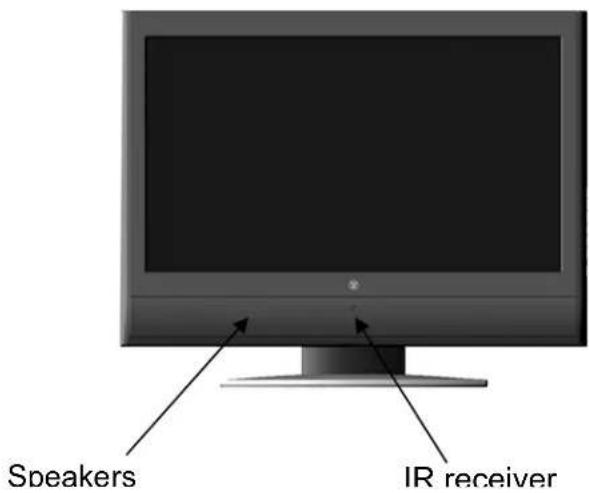
Front View of the LCD TV
Rear View of the LCD TV
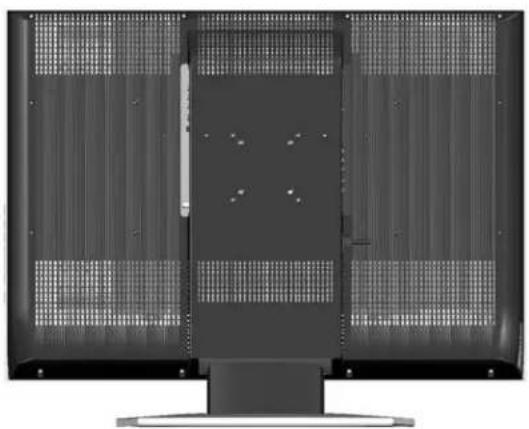
natural_image
Front view of a flat-screen computer monitor with ventilation grilles and a central screen (no visible text or symbols)Side View of the LCD TV
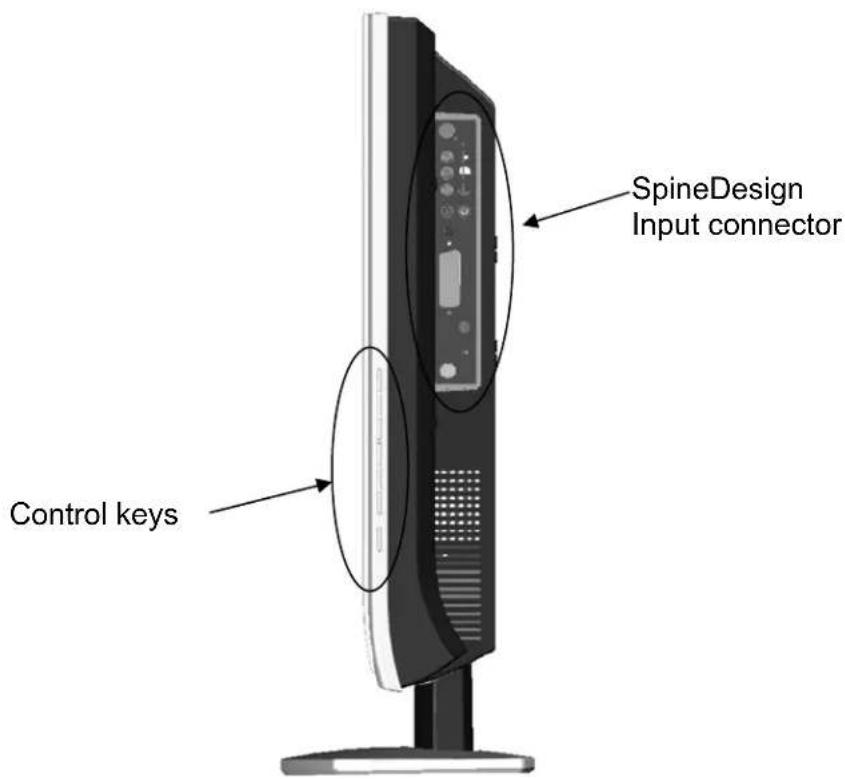
Control Key
| MENU | 1. Menu Turn OSD | Menu ON/OFF |
| + VOL - | 2. Volume + / - | Increase/Decrease sound volume or adjust a highlighted control while in the OSD Menu |
| + CH - | 3. Channel + / - | Channel up/down when input is TV or highlight a control while in the OSD Menu |
| INPUT | 4. Input source | Select Active Video Input or choose a selection while in the OSD MENU |
| ➊ | 5. Power Power ON/OFF | |
Input connector

- S-Video Input
Connect to a legacy video device such as a VCR or video game system. - Video Input
Connect the Composite Video to a legacy video device such as a VCR or video game system. - Video & S-Video Audio Input (Right / Left)
Connect an external audio source to this jack (Audio (R/L). This connection supports either S-Video or Video input. - SPDIF Output
Connect this output to an external stereo audio amplifier, receiver or surround sound processor with SPDIF Input. - Audio Output (Right / Left)
Connect this output to an external stereo audio amplifier, receiver or surround sound processor with R/L audio Inputs. - ANT. (RF-input)
Connect the LCD TV to an over-the-air antenna or cable service to view NTSC or ATSC (HDTV) content. - SERVICE
Factory service port - VGA Audio IN
Connect to the Audio out (Green) from a computer. - VGA
Using a 15-pin VGA cable, connect to a computer or other device with a VGA output. - YPbPr1 Input
Connect external video devices with component output to these jacks. - YPbPr1 Audio 1 Input (Left / Right)
Connect an external audio source to this jack. - YPbPr2 Input
Connect an external video device with component output to these jacks. - YPbPr2 Audio 2 Input (Left / Right)
Connect an external audio source to this jack. - HDMI-HDCP input
Connect to an external video device such as HD Digital cable/satellite receiver, HD Set-Top-Box, Media Center PC, or DVD player. - HDMI Audio Input (Left / Right)
Connect the audio input if you using a DVI-to-HDMI converter. - AC IN (Power)
Connect the power cord from AC IN to a power source.
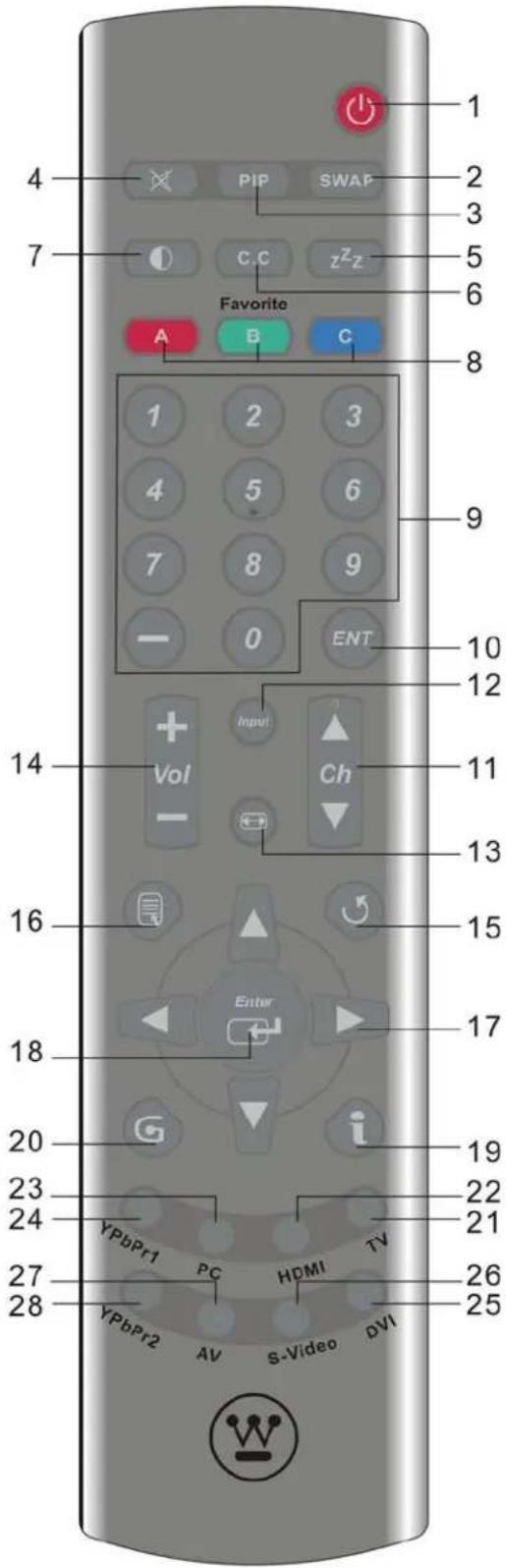
Remote Control
- POWER :
Switch the power On/Off
- SWAP :
Swap Main/Sub screen picture on PIP or POP.
- PIP :
Turn the PIP mode On/Off.
- Mute :
Turn the Sound On/Off.
- Sleep:
Set Sleep Timer to Turn Off.
- CC:
Close Caption On/Off.
- Backlight:
Backlight control.
- Favorite :
3 Favorite keys (A;B;C) for NTSC and ATSC mode.
Recall: Press Favorite keys(A, B, or C) to recall favorite channel
Save: Select channel to be saved; Press "Enter" and Favorite keys (A, B, or C) to save Favorite channel. (See note page 10)
- Channel number keys :
Select specific channel.
- Enter :
Execute a command or +100 when entering a channel greater than 100.
- Ch▲/▼ :
TV Channel Up/ Down adjustment.
- Input :
Scroll input source TV, HDTV, Video, S-Video, YPbPr1, YPbPr2, VGA, and HDMI.
- Scaling :
Select Video Display format "STANDARD" or "FILL".
- Vol +/- :
Volume Up / Down adjustment.
- Last CH:
Switch to previous channel.
- Menu :
Turn OSD Menu ON.
- ▼ / ▲ / ◀ / ▶ :
OSD Menu control.
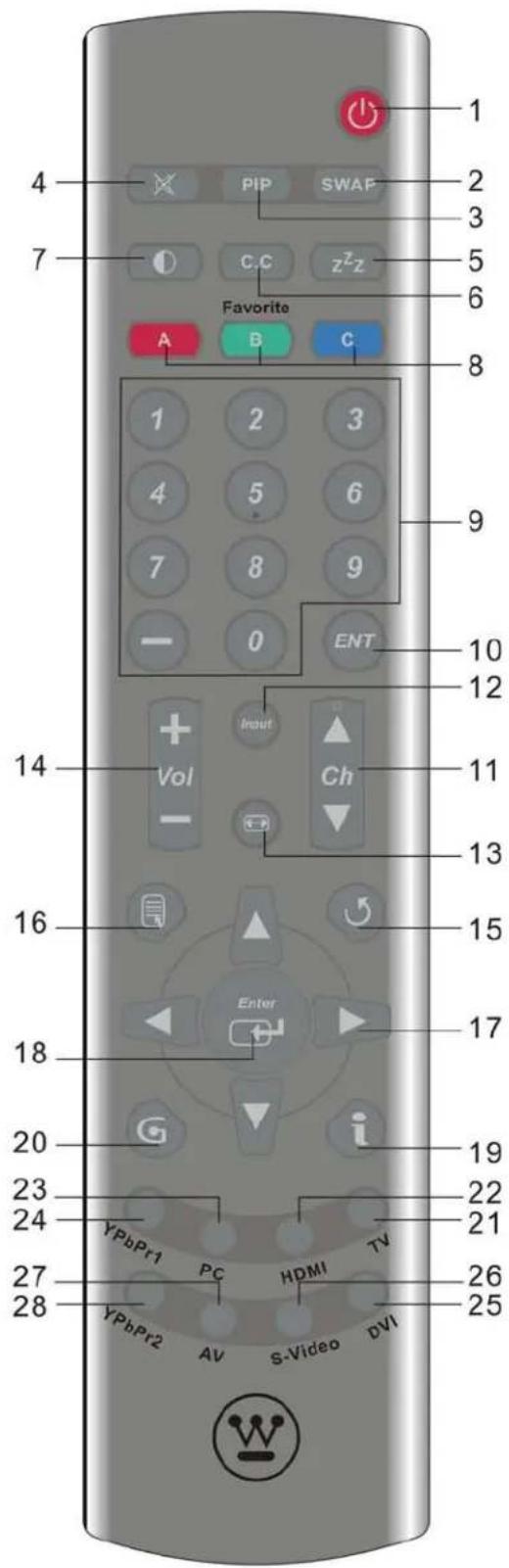
- Enter :
Execute a command.
- INFO :
Display the source and channel information
- EPG :
Electronic program guide for HDTV.
- TV:
Select TV source input.
- HDMI:
Select HDMI source input.
- PC :
Select VGA source input.
- YpbPr1:
Select YPbPr1 source input.
- DVI:
No function Select DVI source input
*For models with DVI input
- S-video:
Select S-video source input.
- AV:
Select AV source input.
- YpbPr2:
Select YpbPr2 source input.
Note: Before setting up favorite channel buttons, please make sure channel list is saved in TV. If not, auto scan to save a channel list in TV.
Installation
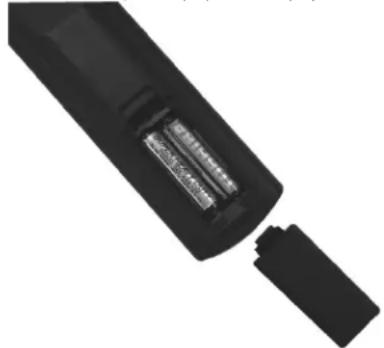
1. Insert Remote Control Batteries
1) Remove the battery cover.
2) Insert the batteries corresponding to (+) and (−) marks on the battery compartment.
natural_image
Close-up of a black cylindrical electronic device with internal components (no visible text or symbols)3) Re-attach the battery cover.
CAUTION:
- Only use AAA batteries.
- Do not mix new and old batteries. This may result in cracking or leakage, which may pose a fire risk or lead to personal injury.
- Insert batteries according to (+) and (−) markings. Inserting the batteries incorrectly may result in cracking or leakage, which may pose a fire risk or lead to personal injury.
- Dispose of used batteries in accordance with local laws and regulations.
- Keep batteries away from children and pets.
- When the remote control will not be used for an extended period, remove the batteries.
Connect one or all of the following into the back of the LCD TV.
IMPORTANT: Before beginning, make sure all devices are turned off.
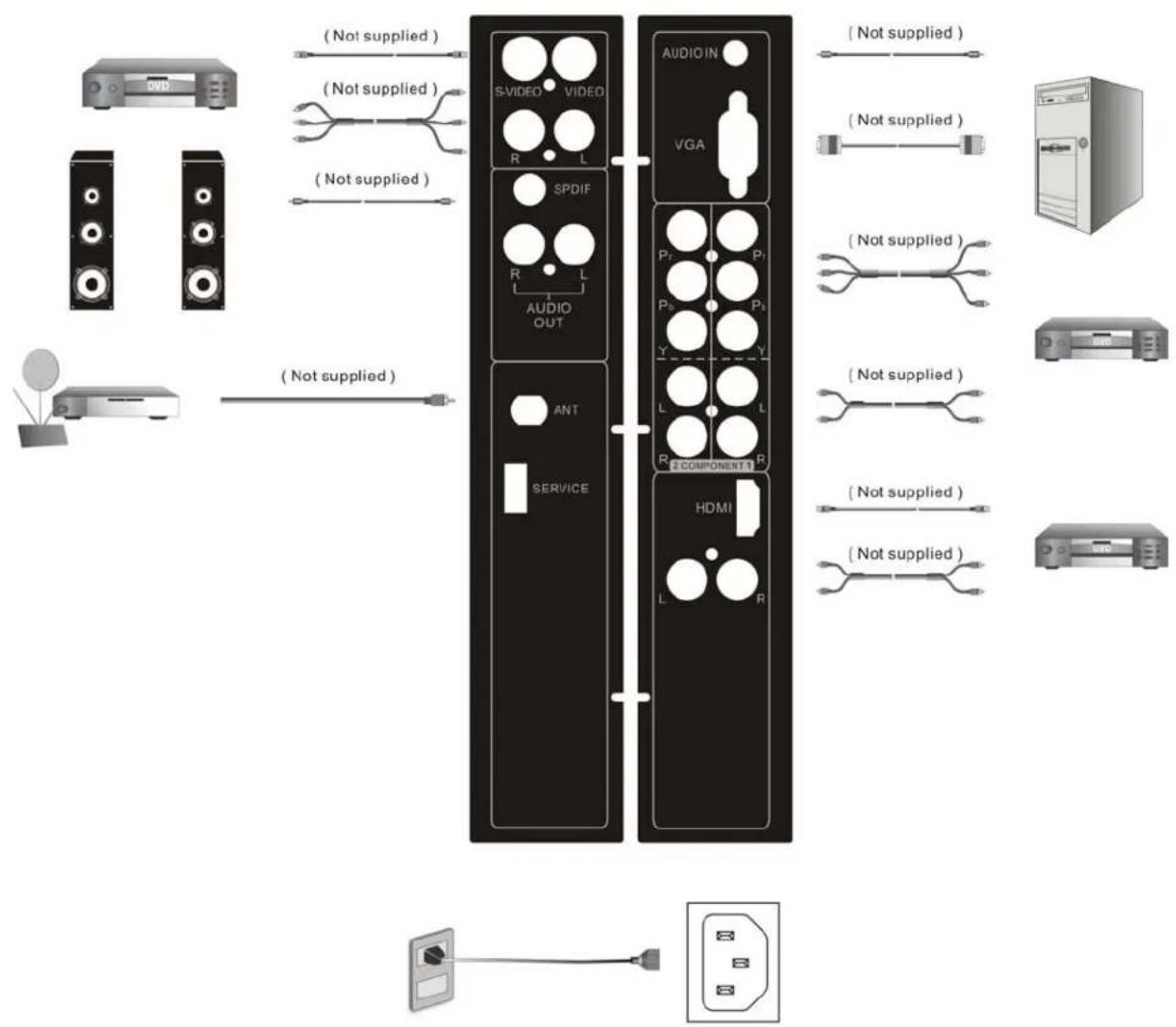
2. Connect audio and video cables from a PC
VGA CONNECTION: Connect an analog VGA cable from your PC VGA OUT port to the LCD TV VGA IN port.
AUDIO CONNECTION: Connect a stereo mini cable from the PC's AUDIO OUT port to the AUDIO IN port on the LCD TV.
3. Connect Video, S-Video, YPbPr, Antenna/Cable to Video Devices
Connect Video/Audio cables from compatible devices to the back panel of the LCD TV.
flowchart
graph TD
    A["Audio Unit"] -->|Not supplied| B["Video Units"]
    B --> C["SPDIF"]
    C --> D["AUDIO OUT"]
    D --> E["ANT"]
    E --> F["SERVICE"]
    F --> G["HDMI"]
    G --> H["L"]
    G --> I["R"]
    J["Server"] --> K["Switch"]
    L["Radio Station"] --> M["Radio Station"]
    N["Radio System"] --> O["Radio System"]
    P["Water Source"] --> Q["Water Source"]
    R["Power Supply"] --> S["Power Supply"]
    T["External Power Supply"] --> U["External Power Supply"]
    style A fill:#f9f,stroke:#333
    style B fill:#ccf,stroke:#333
    style C fill:#cfc,stroke:#333
    style D fill:#fcc,stroke:#333
    style E fill:#cff,stroke:#333
    style F fill:#ffc,stroke:#333
    style G fill:#cfc,stroke:#333
    style H fill:#fcc,stroke:#333
    style I fill:#cfc,stroke:#333
    style J fill:#fcc,stroke:#333
    style K fill:#ffc,stroke:#333
    style L fill:#cfc,stroke:#333
    style M fill:#fcc,stroke:#333
    style N fill:#cfc,stroke:#333
    style O fill:#fcc,stroke:#333
    style P fill:#ffc,stroke:#333
    style Q fill:#cfc,stroke:#333
    style R fill:#fcc,stroke:#333
4. Connect power cables
Connect the power cord to the LCD TV then to a properly grounded AC outlet. IMPORTANT: The power input voltage for LTV-27w7 HD and LTV-32w6 HD is 120VAC, 60 Hz ONLY, Before beginning, make sure all devices are turned off.
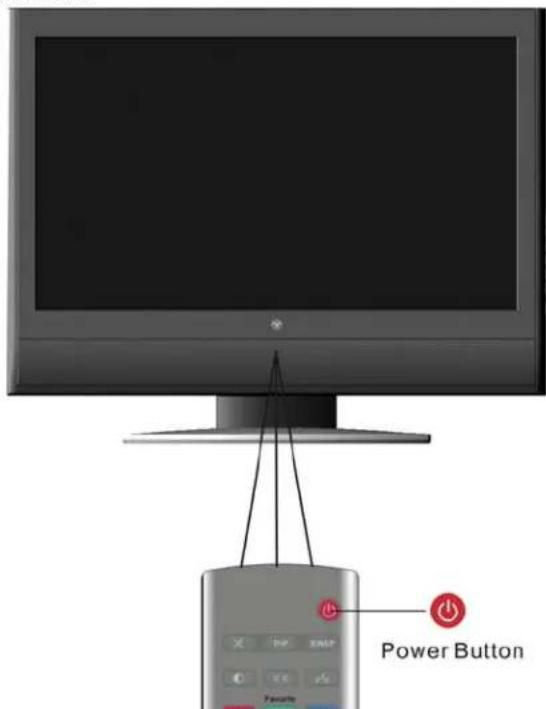
5. Turn Power On
Press the Power button on the right side of the LCD TV, or press the Power (Red) button on the remote control.
6. Select input source for the LCD TV using the OSD menu or remote control
7. If connecting to Antenna, Cable or other RF source on TV Inputs:
See page 17 to auto scan and edit available channels.
8. If connecting to a PC (VGA):
For the best picture quality, set the timing mode of you computer to 1360 x 768 at 60Hz. Refer to the graphic card's user guide of your computer to set this timing mode.
Function adjustment:
All the function can be adjusted either by the remote control or using the control keys on the right side of LCD TV.
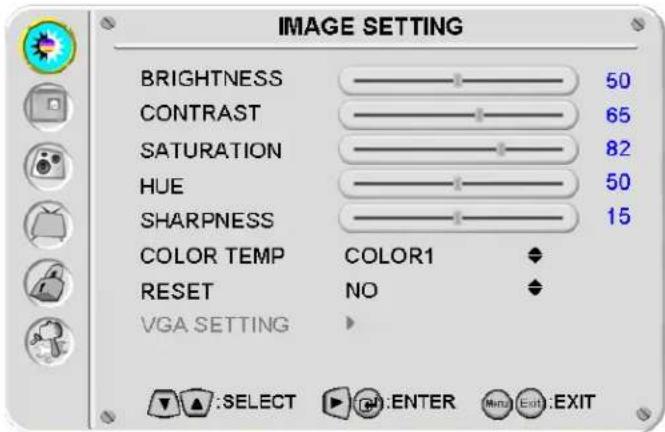
To display the OSD main menu, press the Menu button on the right side of front control keys of the LCD TV or the MENU key on the remote control. Press ▼/▲ arrow keys to select desired OSD Menu and ◀ / ▶ arrow keys to select desired OSD sub-menu.
IMAGE SETTING:
| Function Name | Function |
| BRIGHTNESS | Brightness adjustment |
| CONTRAST | Contrast adjustment |
| SATURATION | Saturation adjustment |
| HUE | Hue adjustment |
| SHARPNESS | Sharpness adjustment(Sharpness cannot be adjusted in PC mode) |
| COLOR TEMP Color | temperature adjustment (Color 1, Color 2, Color 3) |
| RESET | Select “YES” to call the factory default setting for Image setting.Select “NO” to keep your picture adjusts setting. |
| VGA SETTING VGA | setting adjustment |
DISPLAY SETTING:
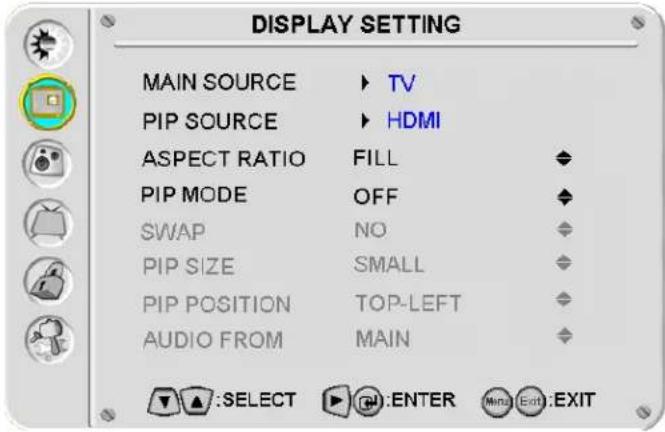
| Function Name | Function |
| MAIN SOURCE | Select main screen sources: "TV", "HDTV", "VIDEO", "S-VIDEO", "YPbPr1", "YPbPr2", "VGA", "HDMI" |
| PIP SOURCE Select | sub screen sources |
| ASPECT RATIO Select | "STANDARD", "FILL" |
| PIP MODE Select | "OFF", "PIP", "PBP", "POP". |
| SWAP Swap main screen and sub-screen source. | |
| PIP SIZE | Sub screen display size adjust ("SMALL", "MEDIUM", "LARGE") |
| PIP POSITION Sub screen display horizontal /vertical position adjustment. | |
| AUDIO FROM Select | main screen or sub screen audio sources. |
Table 1:
| SUBMain | VGA | HDTV | Video | S | Video | YPbPr1 | YPbPr2 | TV | HDMI |
| VGA | X | X | X | X | X | X | X | O | |
| HDTV | X | X | X | X | X | X | X | O | |
| Video | X | X | X | X | X | X | X | O | |
| S Video | X | X | X | X | X | X | X | O | |
| YPbPr1 | X | X | X | X | X | X | X | O | |
| YPbPr2 | X | X | X | X | X | X | X | O | |
| TV | X | X | X | X | X | X | X | O | |
| HDMI | O | O | O | O | O | O | O | X |
AUDIO SETTING:
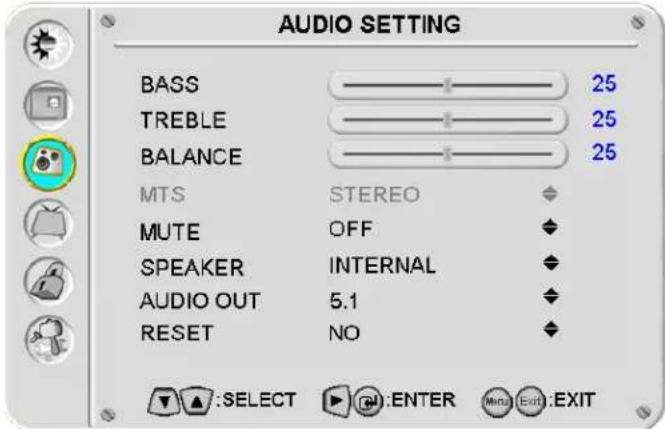
| Function Name | Function | |
| BASS | Bass | adjustment |
| TREBLE | Treble | adjustment |
| BALANCE | Balance | adjustment |
| MTS Select STEREO | , MONO, or SAP | |
| MUTE | Select | audio “OFF” or “ON” |
| SPEAKER Select “internal”, “external”, or “Both” speakers | ||
| AUDIO OUT Select $PDIF OUT for 2.1 channel or 5.1 channel | ||
| RESET Select “NO” or “YES” | ||
TV/HDTV SETTING:
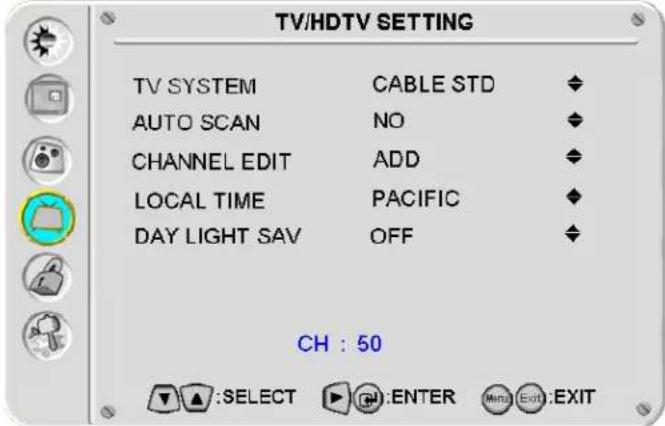
| Function Name | Function |
| TV SYSTEM | CABLE STD → CABLE IRC → ANTENNA |
| AUTO SCAN Select | “NO” or “YES” |
| CHANNEL EDIT Select | “ADD” or “DELETE” |
| LOCAL TIME | Select local time:“CANADA”, “EASTERN”, “CENTRAL”, “MOUNTAIN”, “PACIFIC”, “ALASKA”, “HAWAII”, “SAMOA”, “NEWFOUNDLAND” |
| DAYLIGHT SAV | Day light saving:On mode: “daylight saving” times to beginOff mode: “daylight saving” is over |
PARENTAL CONTROL:
The parental controls feature prevents viewers from watching programs that are not age-appropriate, such as programs containing violence or adult language.
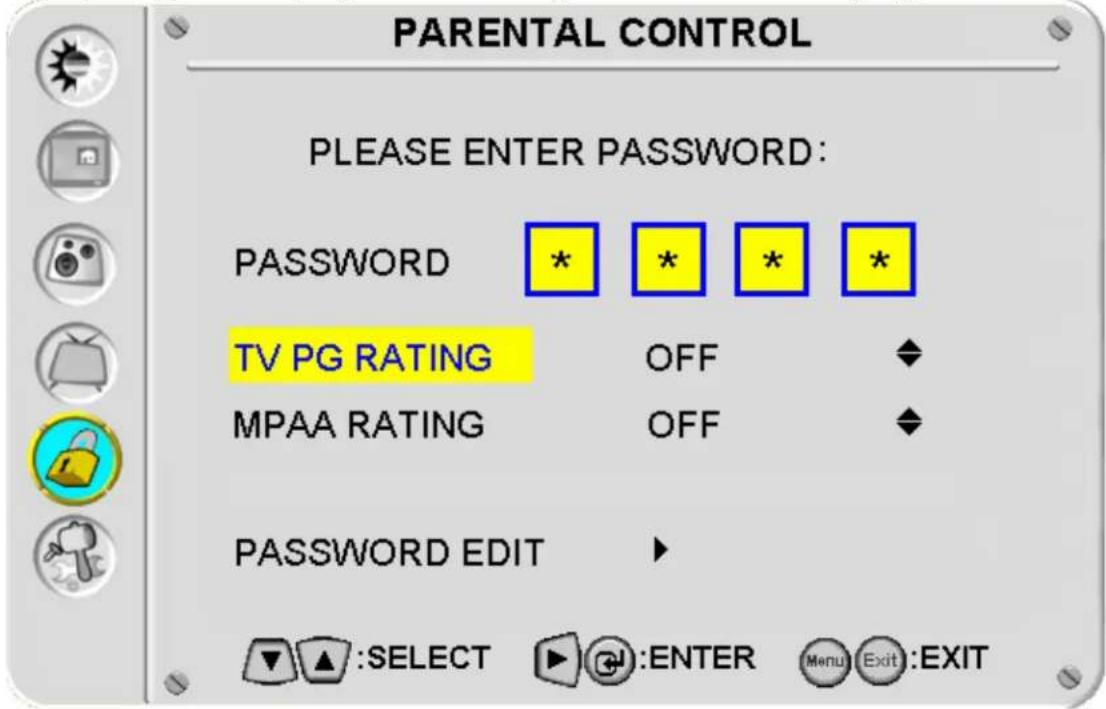
| Function Name | Function |
| PASSWORD | The factory default password is “0000”. Use remote control to key in the number and enter the parental controls sub-menu. |
| TV PG RATING Select “TV-MA”, “TV-Y”, “TV-Y7”, “TV-G”, “TV-PG”, “TV-14”, “TV-MA” or “OFF”. | |
| MPAA RATING Select “G”, “PG-13”, “R”, “NC-17”, “X”, or “OFF” | |
| PASSWORD EDIT | Enter new pass word |
| TV PG Rating MPAA Rating | |||
| TV Y All | children NONE Not available | ||
| YTV Y7 | For elder children G General audience | ||
| TV G | General audience | PG | Parental guidance suggested |
| TV PG | Parental guidance suggested | PG-13 | Parents strongly cautioned |
| TV 14 | Parents strongly cautioned | R | Restricted |
| TV MA | Mature audience only | NC 17 No | one 17 and under admitted |
| OFF | None | X | Adult audience only |
| OFF | None | ||
GENERAL SETTING:
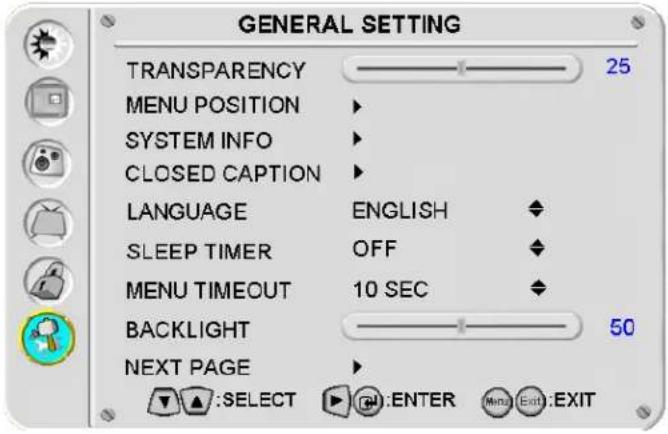
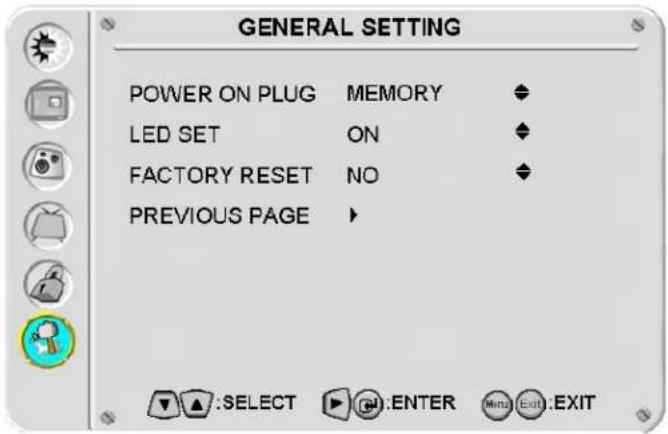
| Function Name Function | |
| TRANSPARENCY Set OSD transparency level | |
| MENU POSITION OSD horizontal/vertical position adjustment | |
| SYSTEM INFO Display input source, type and signal | |
| CLOSED CAPTION | Turn the closed caption OFF or CC1, CC2, CC3, CC4, TEXT1, TEXT2, TEXT3, TEXT4 |
| LANGUAGE OSD language selection | |
| SLEEP TIMER Set sleep timer to turn off the power automatically | |
| MENU TIMEOUT Set the time to turn off the OSD | |
| BACKLIGHT | Backlight adjustment |
| NEXT PAGE Select to next page | |
| POWER ON PLUG | ON: To memorize the DC power status. If last DC power status is on, TV will power on automatically when plugged back in.OFF: turn off POWER ON PLUG function. |
| LED SET | ON: Turn on TV indicator LED.OFF: Turn off TV indicator LED. |
| FACTORY RESET | YES: recall OSD default setting.NO: skip the change. |
| PREVIOUS PAGE Return to previous GENERAL SETTING page. | |
LTV-27w7 HD LCD TV Specifications
| Model Name | LTV-27w7 | HD | |
| Panel | Type | 27" (32.02" viewable diagonal area), TFT (Thin Film Transistor), Active Matrix WXGA LCD, 1366 x 768 vertical stripe | |
| Color | Anti-reflective | coating + Anti-glare coating | |
| Viewing Angles | 170° (H) / 170° (V) | ||
| Input Signal | Video/Audio VGA Analog * 1 (75 ohms, 0.7 Vp-p)/Mini-Stereo *1H/V separated (TTL) for PC; fh: 30-80 kHz, fv: 50-75 HzHDMI-HDCP *1 / RCA (L/R) stereo *1TV system antenna / NTSC & ATSC *1 in USYPbPr * 2 / RCA (L/R) Stereo * 2Composite * 1 / S-Video * 1 / RCA (L/R) stereo * 1Composite * 1 / RCA (L/R) Stereo * 1 | ||
| Output Signal | RCA (L/R) Stereo * 1;SPDIF (PCM/RAW) *1 | ||
| HDTV Compatibility | 480i, 480P, 720P, 1080i | ||
| PC Compatible | Recommended 1366 x 768 @ 60HzSupported 1280 x 1024 @ 60, 75Hz 800 x 600 @ 60, 75 Hz1024 x 768 @ 70, 75 Hz 720 x 400 @ 70 Hz848 x 480 @ 60Hz 640 x 480 @ 60, 75 Hz832 x 624 @ 75Hz (MAC) | ||
| Speaker Output | 9w (x 2 Channels) | ||
| Power | Voltage 120VAC, 60 Hz, 3A | ||
| Temperature (Note A) | Operating 0 to + 35°C (Hum. <90%)Storage -20 to +60°C (Hum.< 35%) | 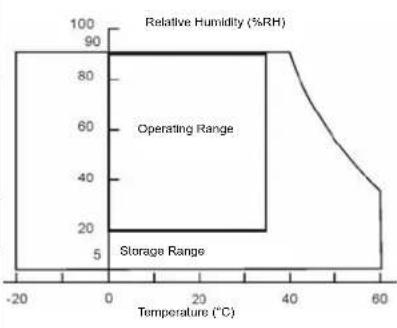 | |
| Humidity (Relative)(Note A) | Operating 20 to 90% non-condensing. (Ta< 35%)Storage 10 to 90% non-condensing. (Note A)Wet-bulb temperature should be 39°C Max. (Ta> 40°C)Note A: The temperature and relative humidity range is shown in right side | ||
| Altitude | Operating 0 to 3,000 mStorage 0 to 12,000m | ||
| Dimensions | Physical 677.3 mm (W) x 557.5 mm (H) x 212 mm (D) | ||
| Weight | Net / Gross 12.6 kg / 14.7 kg | ||
| Regulations | UL/C-UL, FCC-B | ||
| Consumption | On <180w (Blue LED)Active Off <3w (Orange LED) | ||
| Preset Timing Mode (Pre-adjusted to reduce blanking: 1366 x 768 at 60Hz)Warning: Do not set the graphics card in your computer to exceed these refresh rates; doing so may result in permanent damage to the LCD TV.Note: Product Specifications are subject to change without notice. | |||
LTV-32w6 HD LCD TV Specifications
| Model Name | LTV-32w6 | HD | |
| Panel | Type | 32" (32.02" viewable diagonal area), TFT (Thin Film Transistor), Active Matrix WXGA LCD, 1366 x 768 vertical stripe | |
| Color | Anti-reflective | coating + Anti-glare coating | |
| Viewing Angles | 170° (H) / 170° (V) | ||
| Input Signal | Video/Audio VGA Analog * 1 (75 ohms, 0.7 Vp-p)/Mini-Stereo *1H/V separated (TTL) for PC; fh: 30-80 kHz, fv: 50-75 HzHDMI-HDCP *1 / RCA (L/R) stereo *1TV system antenna / NTSC & ATSC *1 in USYPbPr * 2 / RCA (L/R) Stereo * 2Composite * 1 / S-Video * 1 / RCA (L/R) stereo * 1Composite * 1 / RCA (L/R) Stereo * 1 | ||
| Output Signal | RCA (L/R) Stereo * 1;SPDIF (PCM/RAW) *1 | ||
| HDTV Compatibility | 480i, 480P, 720P, 1080i | ||
| PC Compatible | Recommended 1366 x 768 @ 60HzSupported 1280 x 1024 @ 60, 75Hz 800 x 600 @ 60, 75 Hz1024 x 768 @ 70, 75 Hz 720 x 400 @ 70 Hz848 x 480 @ 60Hz 640 x 480 @ 60, 75 Hz832 x 624 @ 75Hz (MAC) | ||
| Speaker Output | 9w (x 2 Channels) | ||
| Power | Voltage 120VAC, 60 Hz, 3A | ||
| Temperature (Note A) | Operating 0 to + 35°C (Hum. <90%)Storage -20 to +60°C (Hum.< 35%) | | |
| Humidity (Relative)(Note A) | Operating 20 to 90% non-condensing. (Ta< 35%)Storage 10 to 90% non-condensing. (Note A)Wet-bulb temperature should be 39°C Max. (Ta> 40°C)Note A: The temperature and relative humidity range is shown in right side | ||
| Altitude | Operating 0 to 3,000 mStorage 0 to 12,000m | ||
| Dimensions | Physical 797.8 mm (W) x 640.8 mm (H) x 211.7 mm (D) | ||
| Weight | Net / Gross 17.0 kg / 22.5 kg | ||
| Regulations | UL/C-UL, FCC-B | ||
| Consumption | On <180w (Blue LED)Active Off <3w (Orange LED) | ||
| Preset Timing Mode (Pre-adjusted to reduce blanking: 1366 x 768 at 60Hz)Warning: Do not set the graphics card in your computer to exceed these refresh rates; doing so may result in permanent damage to the LCD TV.Note: Product Specifications are subject to change without notice. | |||
LTV-37w2 HD LCD TV Specifications
| Model Name | LTV-37w2 | HD | |
| Panel | Type | 37" (37.02" viewable diagonal area), TFT (Thin Film Transistor), Active Matrix WXGA LCD, 1366 x 768 vertical stripe | |
| Viewing Angles | 178° (H) / 178° (V) | ||
| Input Signal | Video/Audio VGA Analog * 1 (75 ohms, 0.7 Vp-p)/Mini-Stereo *1H/V separated (TTL) for PC; fh: 30-80 kHz, fv: 50-75 HzHDMI-HDCP *1 / RCA (L/R) stereo *1TV system antenna / NTSC & ATSC *1 in US | ||
| Component Video * 2 / RCA (L/R) Stereo * 2Composite * 1 / S-Video * 1 / RCA (L/R) stereo * 1Composite * 1 / RCA (L/R) Stereo * 1 | |||
| Output Signal | RCA (L/R) Stereo * 1;SPDIF (PCM/RAW) *1 | ||
| HDTV Compatibility | 480i, 480P, 720P, 1080i | ||
| PC Compatible | Recommended 1366 x 768 @ 60HzSupported 1280 x 1024 @ 60, 75Hz 800 x 600 @ 60, 75 Hz1024 x 768 @ 70, 75 Hz 720 x 400 @ 70 Hz848 x 480 @ 60Hz 640 x 480 @ 60, 75 Hz832 x 624 @ 75Hz (MAC) | ||
| Speaker Output | 9w (x 2 Channels) | ||
| Power | Voltage 120-240VAC, 50/60 Hz, 3A | ||
| Temperature (Note A) | Operating 0 to +35°C (Hum. <90%)Storage -20 to +60°C (Hum.<35%) | 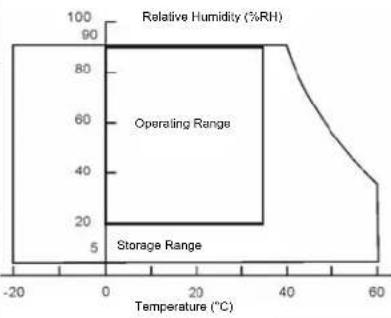 | |
| Humidity (Relative).(Note A) | Operating 20 to 90% non-condensing. (Ta<35%)Storage 10 to 90% non-condensing. (Note A)Wet-bulb temperature should be 39°C Max. (Ta>40°C)Note A: The temperature and relative humidity range is shown in right side | ||
| Altitude | Operating 0 to 3,000 mStorage 0 to 12,000m | ||
| Dimensions | Physical 1051.3 mm (W) x 718.7 mm (H) x 225.9 mm (D) | ||
| Weight | Net / Gross 28.0 kg / 34.5 kg | ||
| Regulations | UL/C-UL, FCC-B | ||
| Consumption | On <290w (Blue LED)Active Off <3w (Orange LED) | ||
| Preset Timing Mode (Pre-adjusted to reduce blanking: 1366x 768 at 60Hz)Warning: Do not set the graphics card in your computer to exceed these refresh rates; doing so may result in permanent damage to the LCD TV.Note: Product Specifications are subject to change without notice. | |||
Troubleshooting
No Power
- Make sure power button is ON (Blue LED).
• Make sure AC power cord is securely connected to the AC socket. - Plug another electrical device (such as a radio) to the power outlet to verify that the outlet is supplying the proper voltage.
Parental Control Password is "Lost"
- In the unlikely occurrence, select “PASSWORD EDIT” and enter “0000” to reset the password.
Audio Interconnection Issues
- Remember that S-Video and Composite (AV) share the same audio source.
Power is ON but No Screen Image
- Make sure the video cable connected to the LCD TV is tightly secured to the video output port on the back of the computer. If the other end of the video cable is not attached properly to the LCD TV, secure it tightly.
- Adjust brightness and contrast.
- If you are using a Macintosh computer older than G3, you need a Macintosh adapter.
- Check Source settings.
Wrong or Abnormal Colors
- If any colors (red, green, or blue) are missing, check the video cable to make sure it is connected securely. Loose or broken pins in the cable connector could cause an improper connection.
- Connect the LCD TV to another computer.
Remote Control Buttons Do Not Work
- Press only one button at a time.
Snow Appears on Screen
- Check your antenna connection.
- Check the TV / CATV selection.
No Sound
- Check the audio connection.
- Press MUTE on the remote control, so that MUTE disappears from the screen.
- Check the audio settings. The LCD TV audio may be set to SAP or minimum.
- Press the Volume + (Up) key on the remote control.
- Make sure that headphones are not connected to the Headphone Jack on the LCD TV.
- Make sure the speaker setting is set to "internal".
Remote Control Does Not Work
- Make sure batteries are inserted correctly.
- Replace batteries with new ones if necessary.
Remote Control Code Not Found in a "Universal" Remote
- Purchase a separate "learning" remote control.
Image Quality Issues
- For the best TV image quality, “Standard Definition” TV should be viewed in 4:3 format.
How Can I Find More Help?
- Log on to: www.westinghousedigital.com
- Contact Westinghouse Customer Service at (866) 287-5555 or write us at service@westinghousedigital.com

www.westinghousedigital.com
- Contents
- INSTALLATION
- OSD Functions
- Explanations of required symbols :
- Cleaning the LCD TV
- To clean the screen:
- To clean the case:
- Disclaimer
- PRODUCT SAFETY INSTRUCTIONS
- Overloading
- Power Cord Protection
- Ventilation
- Other Notices
- Precautions
- Antenna Installation Safety
- Outdoor Antenna Grounding
- Lightning
- Power Lines
- Safety Guidelines
- IMPORTANT NOTICE CONCERNING POWER CORD SELECTION
- For the United States and Canada
- FCC Compliance Statement
- FCC Warning
- This User Manual covers models:
- Package Contents
- Side View of the LCD TV
- Control Key
- Remote Control
- Insert Remote Control Batteries
- CAUTION:
- Connect audio and video cables from a PC
- Connect Video, S-Video, YPbPr, Antenna/Cable to Video Devices
- Connect power cables
- Turn Power On
- Select input source for the LCD TV using the OSD menu or remote control
- If connecting to Antenna, Cable or other RF source on TV Inputs:
- If connecting to a PC (VGA):
- Function adjustment:
- IMAGE SETTING:
- PARENTAL CONTROL:
- Troubleshooting
- No Power
- Parental Control Password is "Lost"
- Audio Interconnection Issues
- Power is ON but No Screen Image
- Wrong or Abnormal Colors
- Remote Control Buttons Do Not Work
- Snow Appears on Screen
- No Sound
- Remote Control Does Not Work
- Remote Control Code Not Found in a "Universal" Remote
- Image Quality Issues
- How Can I Find More Help?
Brand : WESTINGHOUSE
Model : LTV-32W6
Category : Television