
VR-2418 - Television WESTINGHOUSE - Free user manual and instructions
Find the device manual for free VR-2418 WESTINGHOUSE in PDF.


| Product Type | Television |
| Brand | Westinghouse |
| Model | VR-2418 |
| Screen Size (Diagonal) | 24 inches |
| Resolution | 1920 x 1080 (Full HD) |
| Aspect Ratio | 16:9 |
| TV System | ATSC (Digital) & NTSC (Analog) |
| Power Consumption | 60W |
| Input Voltage | AC 100-240V, 50/60Hz |
| Audio Output Power | 2 x 3W (THD ≤ 7%) |
| HDMI Inputs | 2 |
| VGA (PC) Input | 1 |
| Component Video (YPbPr) Input | 1 |
| Composite Video Input | 1 |
| Headphone Output | 1 |
| Coaxial Output | 1 |
| Integrated Tuner | ATSC for HDTV broadcast |
| ENERGY STAR Certified | Yes |
| Remote Control | Full-function infrared remote included |
| Clean Instructions | Clean only with dry cloth |
| Ventilation | Do not block ventilation openings; maintain minimum distances |
| Safety Features | Polarized plug, auto power-off, no user-serviceable parts inside |
| Wall Mountable | Yes (follow manual for compatible mount) |
Frequently Asked Questions - VR-2418 WESTINGHOUSE
User questions about VR-2418 WESTINGHOUSE
0 question about this device. Answer the ones you know or ask your own.
Ask a new question about this device
Download the instructions for your Television in PDF format for free! Find your manual VR-2418 - WESTINGHOUSE and take your electronic device back in hand. On this page are published all the documents necessary for the use of your device. VR-2418 by WESTINGHOUSE.
USER MANUAL VR-2418 WESTINGHOUSE
Safety and Warnings....2-3
Introduction......4
Installation....5-8
Remote Control....9
Operation....10-13
IMPORTANT SAFETY INSTRUCTION
1) Read these instructions.
2) Keep these instructions.
3) Heed all warnings.
4) Follow all instructions.
5) Do not use this apparatus near water.
6) Clean only with dry cloth.
7) Do not block any ventilation openings, install in accordance with the instructions.
8) Do not install near any heat sources such as radiations, heat registers, stoves, or other apparatus (including amplifiers) that produce heat.
9) Do not defeat the safety purpose of the polarized plug. If the provided plug does not fit into your outlet, consult an electrician for replacement of the obsolete outlet.
10) Protected the power cord from being walked on or pinched particularly at plugs, convenience receptacles, and the point where they exit from the apparatus.
11) Only use attachments/accessories specified by the manufacturer.
12) Unplug this apparatus during lighting storms or when unused for long periods of time.
13) Refer all servicing to qualified service personnel. Servicing is required when the apparatus has been damaged in any way, such as power-supply cord or plug is damaged, liquid has been spilled or objects have fallen into the apparatus, the apparatus has been exposed to rain or moisture, does not operate normally, or has been dropped.
14) Mains plug is used as the disconnect device, the disconnect device shall remain readily operable.
15) The ventilation should not be impeded by covering the ventilation openings with items, such as newspapers, table-cloth, curtains, etc.
16) No naked flame sources, such as lighted candles, should be placed on the apparatus.
17) Attention should be drawn to the environmental aspects of battery disposal.
18) The use of apparatus in moderate climate.
19) The apparatus shall not be exposed to dripping or splashing and that no objects filled with liquids, such as vases, shall be placed on the apparatus.

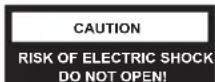

CAUTION
TO REDUCE THE RISK OF ELECTRIC SHOCK, DO NOT REMOVE COVER (OR BACK). NO USER SERVICEABLE PARTS INSIDE. REFER SERVICING TO QUALIFIED SERVICE PERSONNEL.

The symbol indicates that dangerous voltages constituting a risk of electric shock are present within this unit.

The symbol indicates that there are important operating and maintenance instructions in the literaturaccompanying this unit.
WARNING:
To reduce the risk of fire or electric shock, do not expose this apparatus to rain or moisture.
WARNING:
The batteries shall not be exposed to excessive heat such as sunshine, fire or the like.
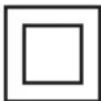
This symbol indicates that this product incorporates double insulation between hazardous mains voltage and user accessible parts. When servicing use only identical replacement parts.


This marking indicates that this product should not be disposed with other household wastes throughout the EU. To prevent possible harm to the environment or human health from uncontrolled waste disposal, recycle it responsibly to promote the sustainable reuse of material resources. To return your used device, please use the return and collection systems or contact the retailer where the product was purchased. They can take this product for environmental safe recycling.
This Westinghouse product has earned the ENERGY STAR® for meeting U.S. Federal energy efficiency guidelines as set by the Department of Energy and Environmental Protection agency. The ENERGY STAR® program exists to provide energy saving guidelines and help promote energy efficient products and practices. Changes to certain features, settings and functions of this TV can change and/or increase its power consumption. Depending on how settings are changed, power consumption may exceed the limits required for ENERGY STAR® qualification.
natural_image
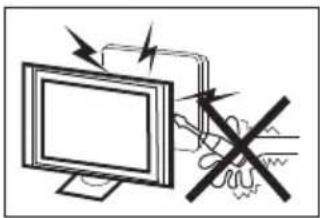
Illustration of a computer monitor with a warning symbol and a crossed-out hand gesture (no text or labels)High voltages are used in the operation of this television receiver. Do not remove the cabinet back from your set. Refer servicing to qualified service personnel.
natural_image
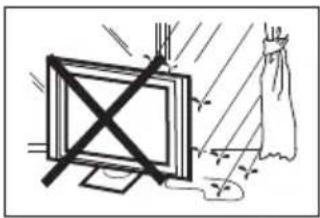
Simple line drawing of a monitor with a cross symbol and a cloth, no text or symbols presentTo prevent fire or electrical shock hazard, do not expose the television receiver to rain or moisture.
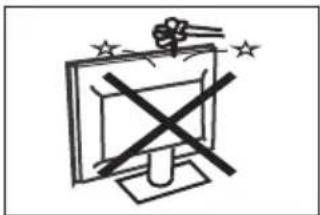
Do not drop or push objects into the television cabinet slots or openings. Never spill any kind of liquid on the television receiver.
natural_image
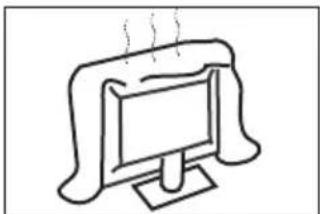
Simple line drawing of a computer monitor with a curved frame and ventilation grille (no text or symbols)Do not block the ventilation holes in the back cover. Adequate ventilation is essential to prevent failure of electrical components.
natural_image
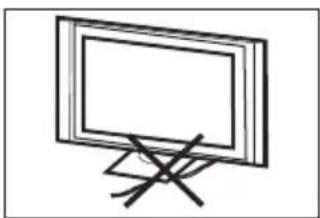
Simple line drawing of a flat-screen monitor with a stand and diagonal lines (no text or symbols)Do not trap the power supply cord under the television receiver.
natural_image
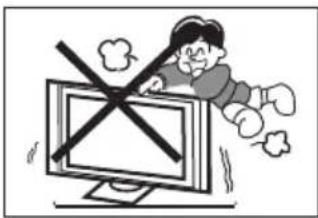
Cartoon illustration of a person lying on a computer monitor with a crossed-out window symbol (no text or symbols present)Never stand on, lean on, or suddenly push the television or its stand. You should pay special attention to children. Serious injury may result if it falls.
natural_image
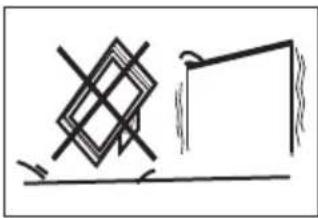
Simple line drawing of a geometric structure with intersecting lines and a rectangular frame (no text or symbols)Do not place your television on an unstable cart, stand, shelf or table. Serious injury to an individual, and damage to the television, may result if it falls.
natural_image
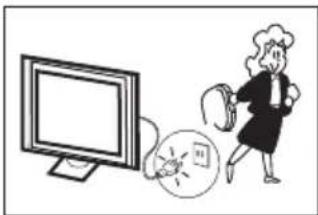
Illustration of a person standing next to a computer monitor and a circular object with a flame (no text or symbols)When the television receiver is not used for an extended period of time, it is advisable to disconnect the AC power cord from the AC outlet.
natural_image
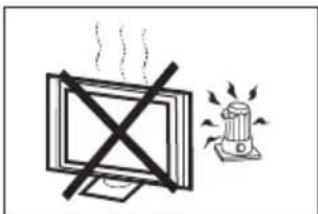
Simple line drawing of a monitor with a cross symbol and a warning light emitting smoke (no text or symbols)Avoid exposing the television receiver to direct sunlight and other sources of heat. Do not stand the television receiver directly on other products which give off heat, e.g. video cassette players and audio amplifiers. Do not place open flame sources, such as lighted candles on the television.
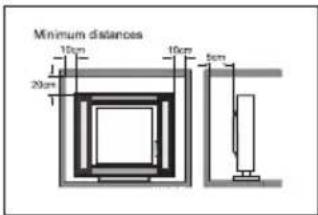
If the television is to be built into a compartment or similar enclosure, the minimum distances must be maintained. Heat build-up can reduce the service life of your television, and can also be dangerous.
Main Features
■ 1920 x 1080 native resolution for Full-HD(1080P) performance
■ Integrated ATSC TV tuner for HDTV broadcast reception
■ High brightness provides a vivid and brilliant picture
■ Deeper blacks and brighter whites with high contrast
■ Wide Screen aspect ratio (16:9) for a complete home theater experience
■ HDMI input for true digital connection
■ VGA port for connection to PC
■ Built-in stereo speaker system
■ Full-function Remote Control
Accessories
| Power Cable...... | 1 |
| Infrared Remote Control...... | 1 |
| User's Manual...... | 1 |
| Battery (AAA)...... | 2 |
| Quick Start Guide...... | 1 |
Specifications
| Viewing Size (diagonal): | 24 inch |
| Resolution: | 1920 x 1080 |
| Aspect Ratio: | 16:9 |
| TV System: | ATSC Digital system and NTSC Analog system |
| Video Signal System: | NTSC/PAL/SECAM |
| Receiving Channels: | Cable:1-135 / Air: 2-69 (ATV&DTV) |
| Power Consumption: | 60W |
| Input Power Voltage: | AC 100V-240V 50/60Hz |
| Audio Output Power (THD≤ 7%): | 2x3W |
| High-Definition Multimedia Interface (HDMI) Input: | x 2 |
| YCb(Pb)Cr(Pr) Input: | x 1 |
| Composite Video Input: | x 1 |
| Analog RGB (VGA) Input: | x 1 |
| Component/Composite and PC Audio Input: x 2 | |
| Headphone Output : | x 1 |
| Coaxial Output: | x 1 |
| Horizontal Definition (TV line) | Composite Video Input >=350Video Input >=400YCb(Pb)Cr(Pr) >=400 |
HDMI is a trademark of HDMI Licensing LLC in the United States and other countries.
Front panel
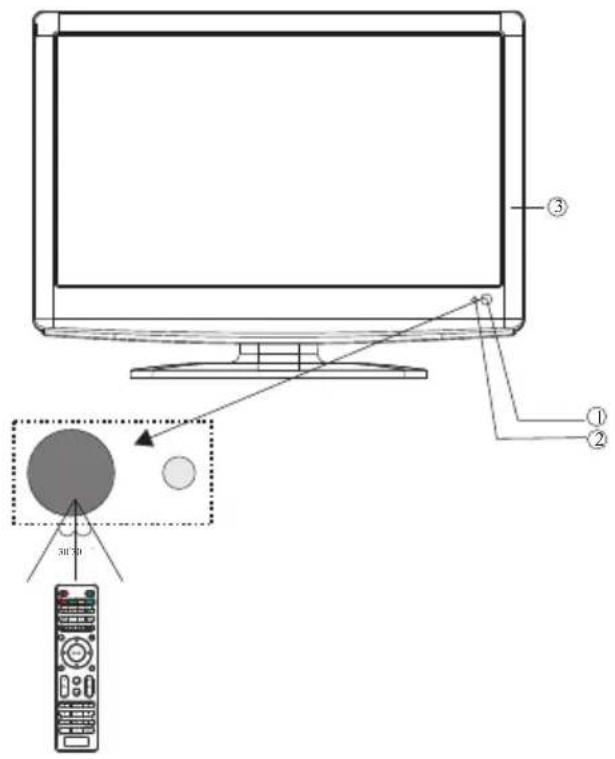
1: Remote control sensor.
2: Indicator LED:
GREEN ○ POWER ON.
RED ● STAND BY.
3: Keypad.
Side panel
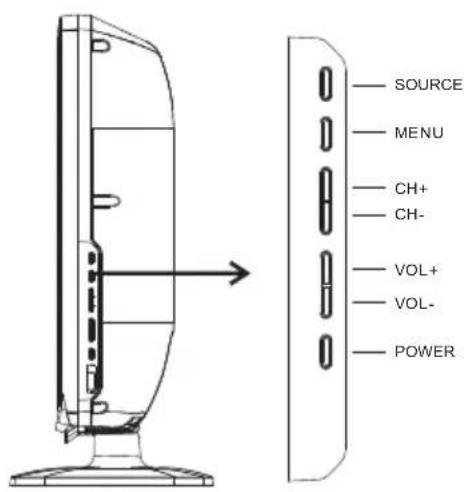
1.SOURCE
To display the input source menu.
2.MENU
To display main MENU.
3.CH+/CH-
In TV mode, to change the channel up and down.
In MENU mode, to select the menu item.
4.VOL+/VOL-
To adjust sound level.
In MENU mode, to adjust the menu items.
- POWER: Press this button to turn the unit ON.
REAR CONNECTORS

- HDMI1 Input
- HDMI2 Input
- Composite Video Input
- Component Video (YPbPr) Input
- Audio Input
-
VGA Port (PC Input)
-
Headphone Output
- PC Audio Input
- Coaxial
- Antenna (RF) Input
- AC Power Socket
Note: 1. Composite video input and component video input share the audio input.
2. When a DVI connector is used on HDMI1 Input, use "PC Audio" for the audio signal input.
3. When a DVI connector is used on HDMI2 Input, use "YPbPr Audio" for the audio signal input.
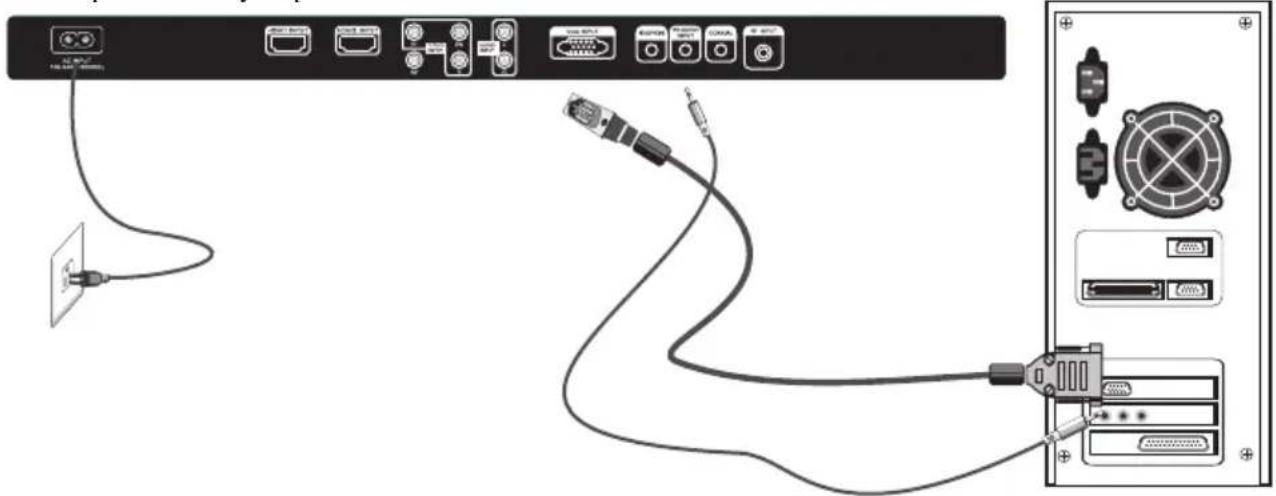
PC
STEPS:
Be sure both the TV and computer are turned off.
- Connect VGA and audio cable.
- Connect the power cord.
-
Power on the TV, switch to VGA mode.
-
Power on the PC.
This sequence is very important.
natural_image
Diagram showing connections between a server rack, cable, and connected electronic devices (no text or symbols visible)PRESET MODE
| RESOLUTION | V.Freq.(Hz) H.Freq.(KHz) | ||
| 1 | 720*400 | 70 | 31.47 |
| 2 | 640*480 | 60 | 31.47 |
| 3 | 640*480 | 75 | 37.50 |
| 4 | 800*600 | 60 | 37.88 |
| 5 | 800*600 | 75 | 46.88 |
| 6 | 1024*768 | 60 | 48.36 |
| 7 | 1024*768 | 70 | 56.48 |
| 8 | 1024*768 | 75 | 60.02 |
| 9 | 1280*1024 | 60 | 63.98 |
| 10 | 1280*1024 | 75 | 80.00 |
| 11 | 1920*1080 | 75 | 80.00 |
ANTENNA
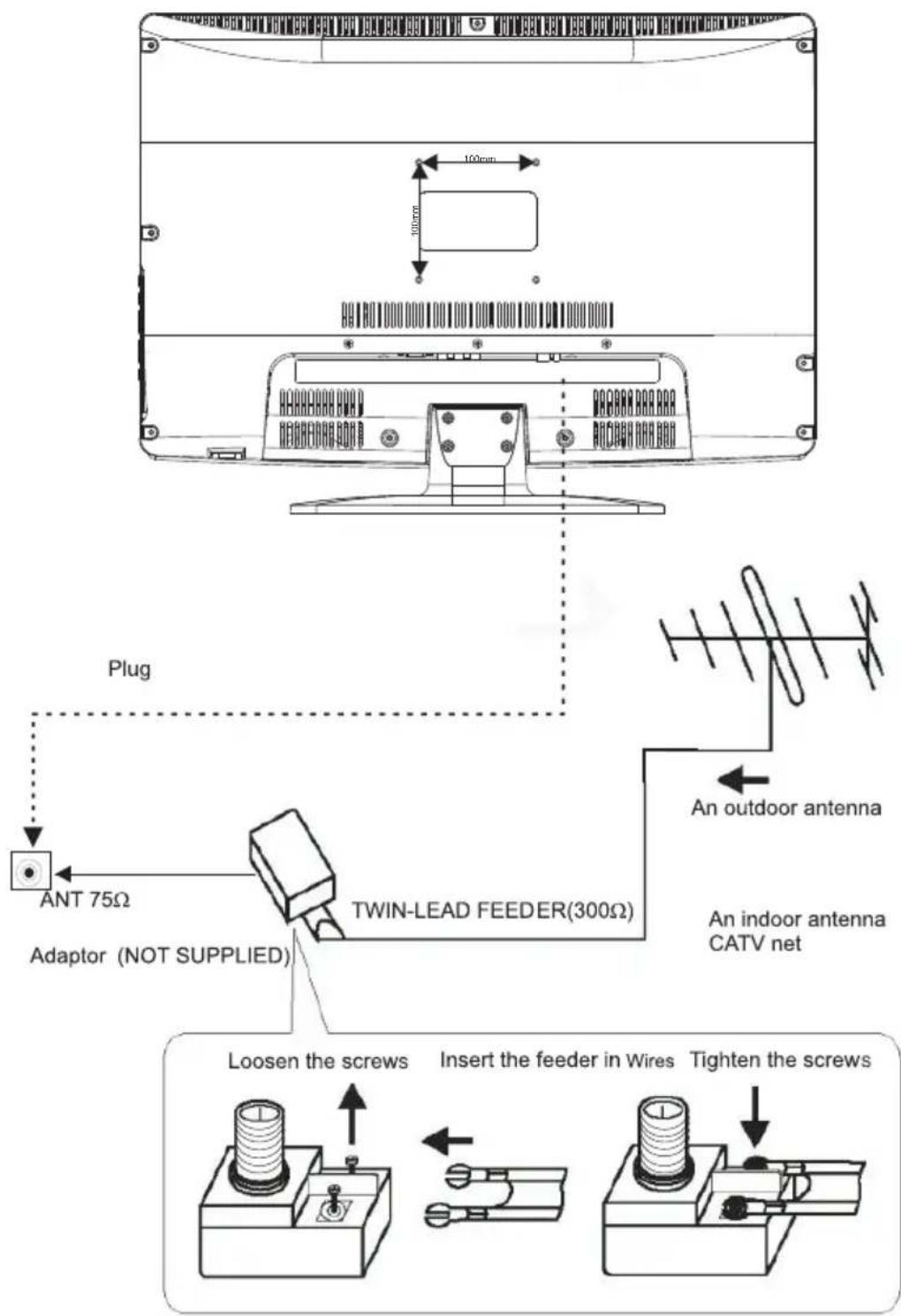
Note:
Aerial connections: IEC (female).
Input impendance: 75 unbalanced.
AV EQUIPMENT
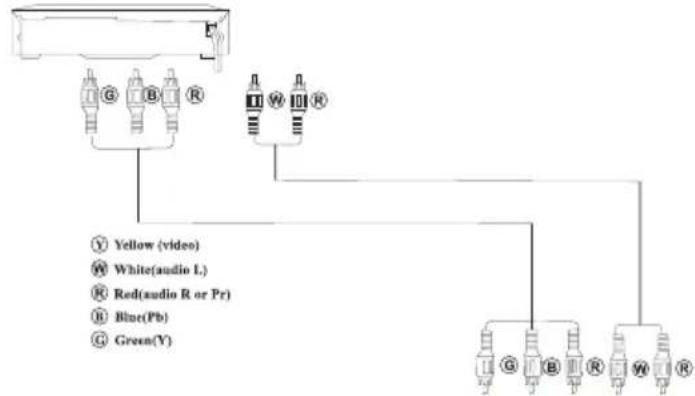
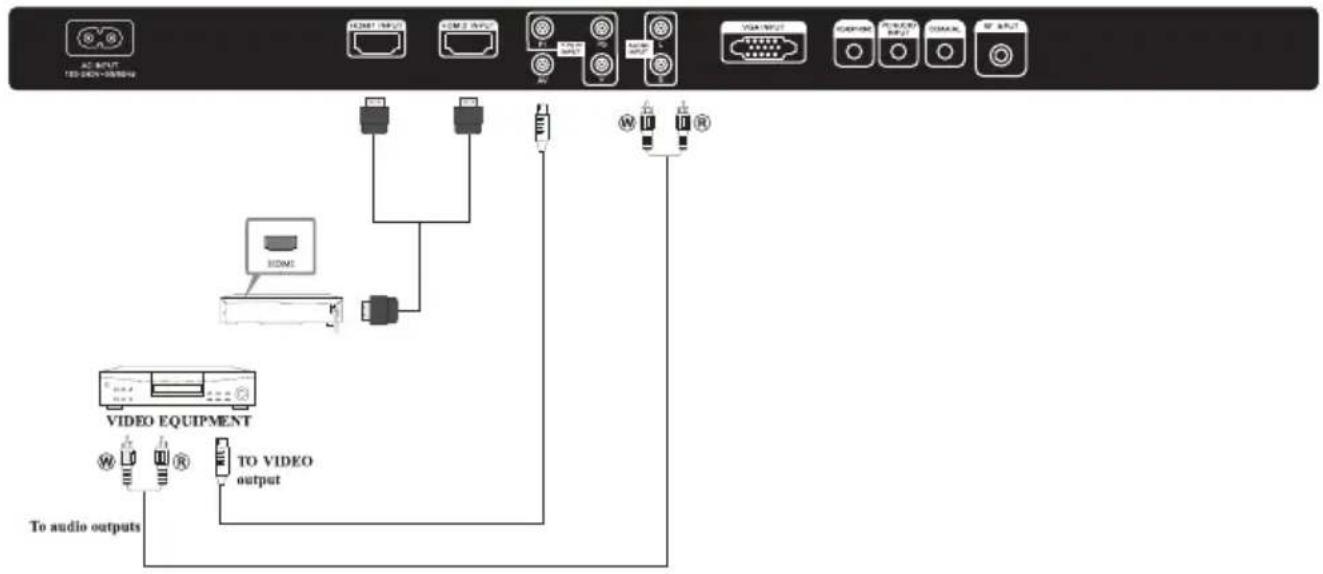
This TV provides one group of AV and one group of YPbPr for convenient connection to a VCR, DVD or other video equipment. Please refer to the owner's manual of the equipment to be connected as well.
You can use the input terminals on the TV set as follows.
VIDEO EQUIPMENT with YPbPr
flowchart
graph TD
    A["AC INPUT"] --> B["824M1 INPUT"]
    A --> C["824M2 INPUT"]
    A --> D["824M3 INPUT"]
    A --> E["824M4 INPUT"]
    A --> F["824M5 INPUT"]
    A --> G["824M6 INPUT"]
    A --> H["824M7 INPUT"]
    A --> I["824M8 INPUT"]
    A --> J["824M9 INPUT"]
    A --> K["824M10 INPUT"]
    A --> L["824M11 INPUT"]
    A --> M["824M12 INPUT"]
    A --> N["824M13 INPUT"]
    A --> O["824M14 INPUT"]
    A --> P["824M15 INPUT"]
    A --> Q["824M16 INPUT"]
    A --> R["824M17 INPUT"]
    A --> S["824M18 INPUT"]
    A --> T["824M19 INPUT"]
    A --> U["824M20 INPUT"]
    A --> V["824M21 INPUT"]
    A --> W["824M22 INPUT"]
    A --> X["824M23 INPUT"]
    A --> Y["824M24 INPUT"]
    A --> Z["824M25 INPUT"]
    A --> AA["824M26 INPUT"]
    A --> AB["824M27 INPUT"]
    A --> AC["824M28 INPUT"]
    A --> AD["824M29 INPUT"]
    A --> AE["824M30 INPUT"]
    A --> AF["824M31 INPUT"]
    A --> AG["824M32 INPUT"]
    A --> AH["824M33 INPUT"]
    A --> AI["824M34 INPUT"]
    A --> AJ["824M35 INPUT"]
    A --> AK["824M36 INPUT"]
    A --> AL["824M37 INPUT"]
    A --> AM["824M38 INPUT"]
    A --> AN["824M39 INPUT"]
    A --> AO["824M40 INPUT"]
    A --> AP["824M41 INPUT"]
    A --> AQ["824M42 INPUT"]
    A --> AR["824M43 INPUT"]
    A --> AS["824M44 INPUT"]
    A --> AT["824M45 INPUT"]
    A --> AU["824M46 INPUT"]
    A --> AV["824M47 INPUT"]
    A --> AW["824M48 INPUT"]
    A --> AX["824M49 INPUT"]
    A --> AY["824M50 INPUT"]
    A --> AZ["824M51 INPUT"]
    A --> BA["824M52 INPUT"]
    A --> BB["824M53 INPUT"]
    A --> BC["824M54 INPUT"]
    A --> BD["824M55 INPUT"]
    A --> BE["824M56 INPUT"]
    A --> BF["824M57 INPUT"]
    A --> BG["824M58 INPUT"]
    A --> BH["824M59 INPUT"]
    A --> BI["824M60 INPUT"]
    A --> BJ["824M61 INPUT"]
    A --> BK["824M62 INPUT"]
    A --> BL["824M63 INPUT"]
    A --> BM["824M64 INPUT"]
    A --> BN["824M65 INPUT"]
    A --> BO["824M66 INPUT"]
    A --> BP["824M67 INPUT"]
    A --> BQ["824M68 INPUT"]
    A --> BR["824M69 INPUT"]
    A --> BS["824M70 INPUT"]
    A --> BT["824M71 INPUT"]
    A --> BU["824M72 INPUT"]
    A --> BV["824M73 INPUT"]
    A --> BW["824M74 INPUT"]
    A --> BX["824M75 INPUT"]
    A --> BY["824M76 INPUT"]
    A --> BZ["824M77 INPUT"]
    A --> CA["824M78 INPUT"]
    A --> CB["824M79 INPUT"]
    A --> CC["824M80 INPUT"]
    A --> CD["824M81 INPUT"]
    A --> CE["824M82 INPUT"]
    A --> CF["824M83 INPUT"]
    A --> CG["824M84 INPUT"]
    A --> CH["824M85 INPUT"]
    A --> CI["824M86 INPUT"]
    A --> CJ["824M87 INPUT"]
    A --> CK["824M88 INPUT"]
    A --> CL["824M89 INPUT"]
    A --> CM["824M90 INPUT"]
    A --> CN["824M91 INPUT"]
    A --> CO["824M92 INPUT"]
    A --> CP["824M93 INPUT"]
    A --> CQ["824M94 INPUT"]
    A --> CR["824M95 INPUT"]
    A --> CS["824M96 INPUT"]
    A --> CT["824M97 INPUT"]
    A --> CU["824M98 INPUT"]
    A --> CV["824M99 INPUT"]
    A --> CW["824M100 INPUT"]
The TV can be connected to the following devices: VCR, multi disc player, DVD, camcorder, video game or stereo system, etc.
YPbPr can support these video formats: 480i, 576i, 480p, 576p, 720p, 1080i.
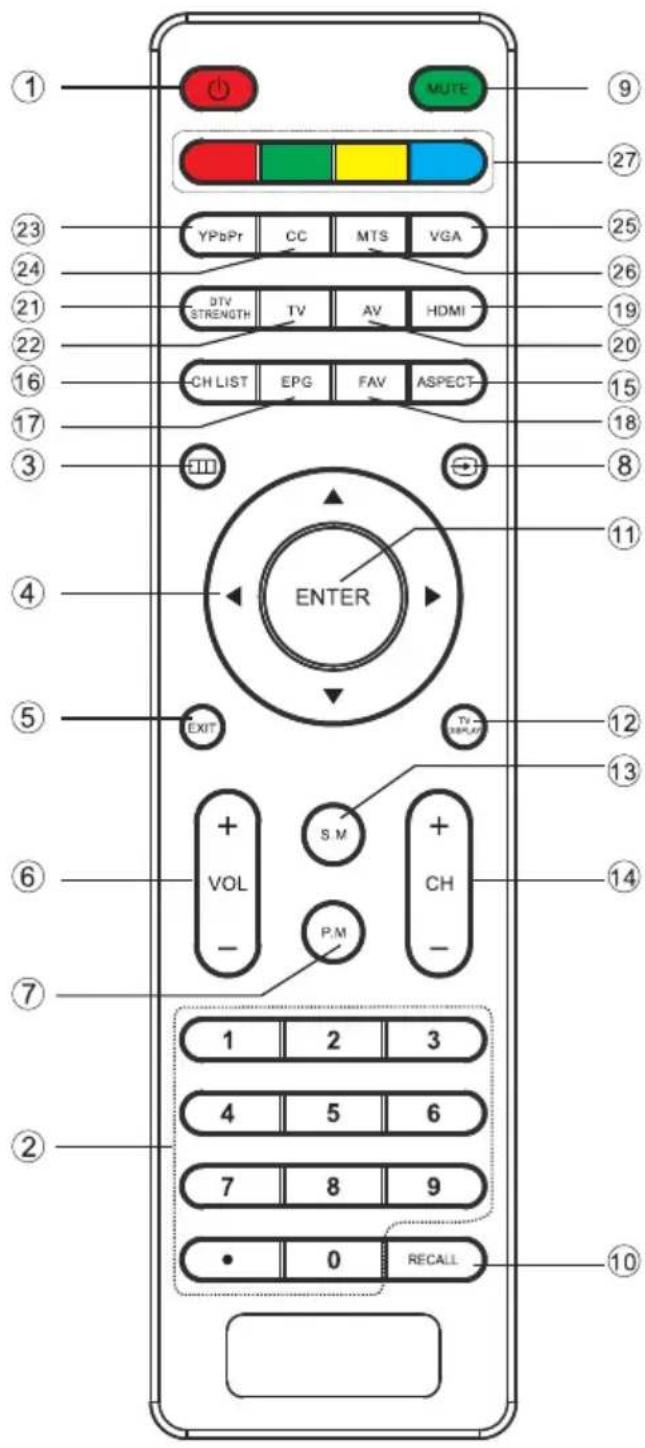
1: POWER
To turn the TV on.
2: NUMBER KEY
For direct access to .channels
3: Displays the main on-screen menu.
4: CURSOR
To move within the menu.
5: EXIT
To exit the menu.
6: VOL+/-
To adjust sound level.
7: P.M
To switch picture mode.
8: ☑ Press to display and select the available video sources.
9: MUTE
To disable or enable the sound.
10: RECALL
To access the previously viewed channel.
11: ENTER
Confirms selection.
12: TV DISPLAY
Displays/removes the program information
13: S.M
To switch sound mode.
14: CH+/CH-
To access the next or previous channel.
15: ASPECT
To change picture aspect.
16: CH LIST
To display the channel list.
17: EPG
To display all the information of DTV programs.
18: FAV
To access your favorite channels in digital TV mode.
19: HDMI
Hot key to go directly to HDMI source.
20: AV
Hot key to go directly to AV source.
21: DTV STRENGTH
To display the DTV signal strength menu.
22: TV
Hot key to go directly to TV source.
23: YPbPr
Hot key to go directly to YPbPr source.
24: CC
To enable or disable the CC function.
25: VGA
Hot key to go directly to VGA source.
26: MTS
To switch the sound stereo.
27: COLOR KEYS
Reserved keys
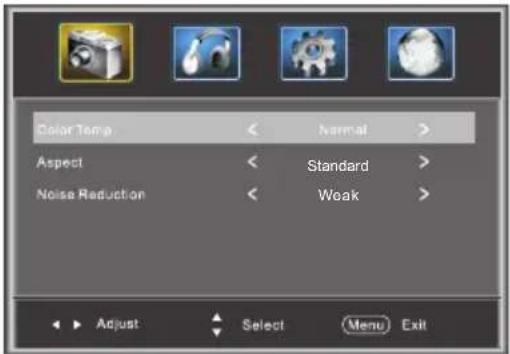
1. PICTURE MENU
The first item of the MENU is PICTURE MENU. You can adjust picture effect here, such as contrast, brightness, etc.
Press ▼▲ to select, press ◀▶ to adjust, press MENU to exit.
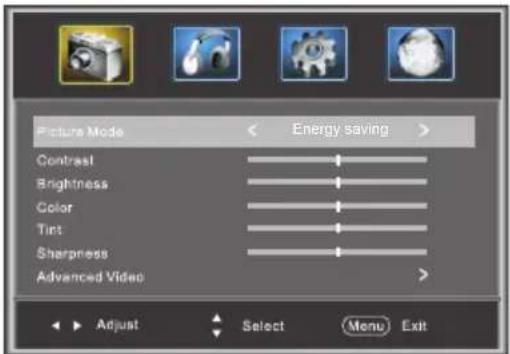
Note:
If you want to adjust contrast, brightness, color, and sharpness, the picture mode must return to "Custom" status.
Advanced Video:
Press ▼▲button to select Advanced Video, press button, the screen will display as follow:
2. AUDIO menu
The second item of the MENU is AUDIO MENU. You can adjust sound here.
Press ▼▲ to select, press ◀▶ to adjust, press MENU to exit.
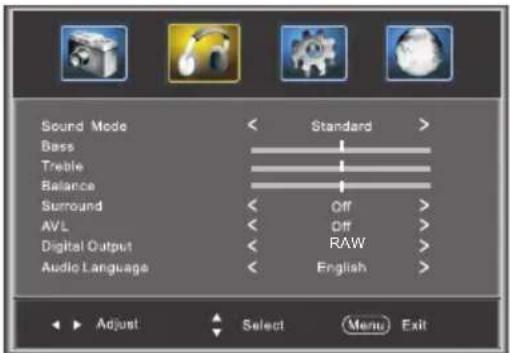
Note:
Audio language is available in ATSC/TV Programming only.
3. SETUP MENU
The third item of the MENU is SETUP MENU. You can setup system here.
Press ▼▲to select, press ◀▶to adjust, press MENU to exit.
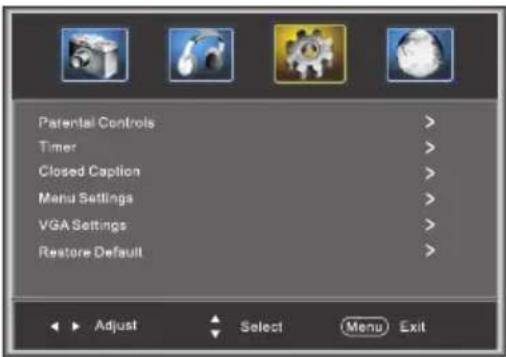
Note:
Restore Default: Reset all the settings to default value.
3.1. Parental Controls:
Press ▼▲button to select , Parental Controls button, the screen will display as follow:
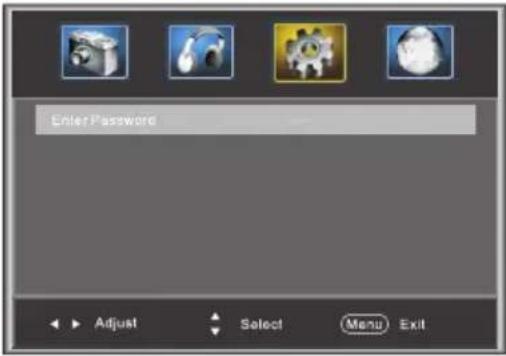
Enter the password, it will go into Parental Control menu. Factory default password is 6666.
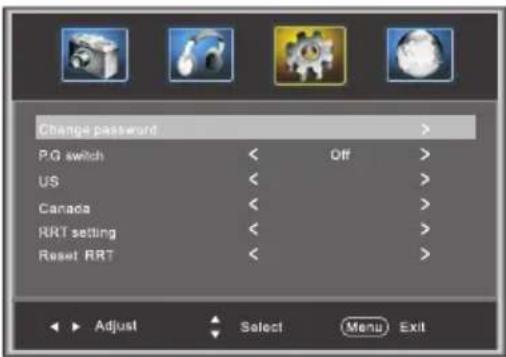
Change Password:
Press ▶ button, the screen will display as follow:
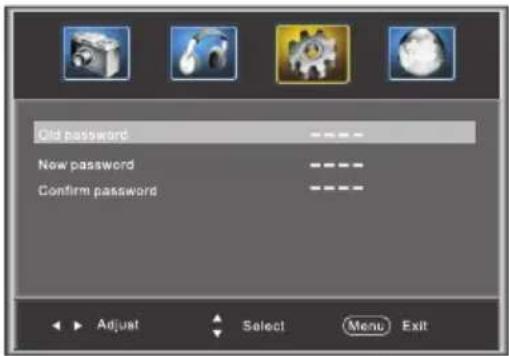
1).Old password: Input the old password
2). New password: Input the new password
3). Confirm password: Input the new password again
P.G Switching:
When the ParentalCONrthe below options listed below can beadjusted.
US: Press ▶ button, the screen will display as follow:
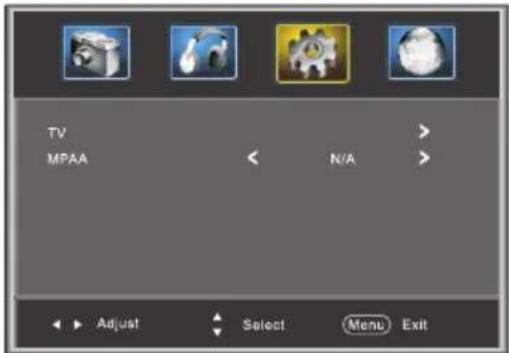
1:TV: Press ▶button, the screen will display as follows:
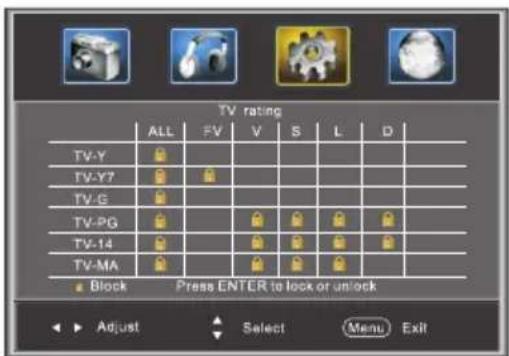
| Rating Content | Content | |||||
| FV(Fantasy violence) | V(Violence) | S(Sexual situation) | L(Adult language) | D(Sexually suggestive dialog) | ||
| Suggested age | TV-Y (All children) | |||||
| TV-Y7(Direct to order children) | X | |||||
| TV-Gi(General audience) | ||||||
| TV-PG(Parental Guidance suggested) | X | X | X | X | ||
| TV-14(Parents strongly cautioned) | X | X | X | X | ||
| TV-MA(Mature audience only) | X | X | X | |||
And use the ENTER key to switch lock/unlock Parental Control feature.
2). MPAA: Switching the movie-rating control level; N/A, G, PG, PG-13, R, NC-17, X.
| Rating | Description | |
| Age | G | General audiences, All Ages admitted |
| PG | Parental Guidance suggested. Some material may not be Suitable for children. | |
| PG-13 | Parents strongly cautioned. Some material .may be Inappropriate for children under 13. | |
| R | Restrict. Under 17 requires accompanying parent or adult guardian(age varies in some jurisdictions) | |
| NC-17 | No one 17 and under admitted. | |
| X | X is an order rating that is unified with NC-17 but may be encoded in the data of order movies. | |
Canada: Press ▶ button, the screen will be displayed as follow:
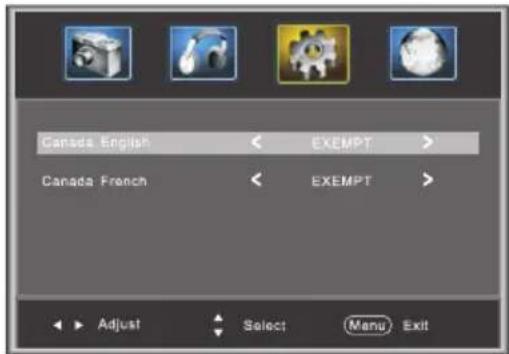
1): Canada English: Switching the English rating control level: EXEMPT, C, C8+, G, PG, 14+, 18+.
| Rating | Description | |
| Age | E | Exempt: Includes news, sports, documents and other information programming: talk shows, music videos, and varicty programming. |
| C | Children: Intended for younger children under the age of 8 years. Pays careful attention to themes that could threaten their sense of security and well-being. | |
| C8+ | Children over 8 years old: Contains no portrayal of violence as the preferred, acceptable, or only way to resolve conflict; nor encourage children to imitate dangerous acts which they may see on the screen . | |
| G | General: Considered acceptable for all age groups, Appropriate viewing for the entire family, contains very little violence, physical, verbal or emotional. | |
| PG | Parental Guidance: Intended for a general audience, but may not be suitable for younger children (under the age of 8) because it could contain controversial themes or issues. | |
| 14+ | Over 14 Years: Could contain themes where violence is one of the dominant elements of the storyline But it must be integral to the development of plot or character. Language usage could be profane and nudity , present within the context of theme. | |
| 18+ | Adults: Intended for viewers 18 years and older and might contain depictions of violence, which while related to the development of plot, character or themes, are intended for adult viewing. Could contain graphic language and portrayals of secretary and nudity. | |
2). Canada French: Switching the French-rating control level: E, G, 8ANS+, 13 ANS+, 16ANS+, 18ANS+.
| Rating | Description | |
| Age | E | Exempt programming |
| G | General :All ages and children, contains minimal direct violence,but may be integrated into the plot in a humorous or unrealisticmanner . | |
| 8ans+ | General but inadvisable for young children :May be viewed by awidc public audience, but could contain scenes disturbing tochildren under 8 who cannot distinguish between imaginary andreal situations. Recommended for viewing with paren. | |
| 13ans+ | Over 13 years: Could contain scenes of frequent violent scenesand in tense violence. | |
| 16ans+ | Over 16 years: Could contain frequent violent scenes and violence. | |
| 18ans+ | Over 18 years: Only for adult viewing. Could contain frequentviolent scenes and extreme violence. | |
RRT setting: in ATSC digital TV mode, it can be adjusted
Reset RRT: Press ▶ button, the screen will be displayed as follow:
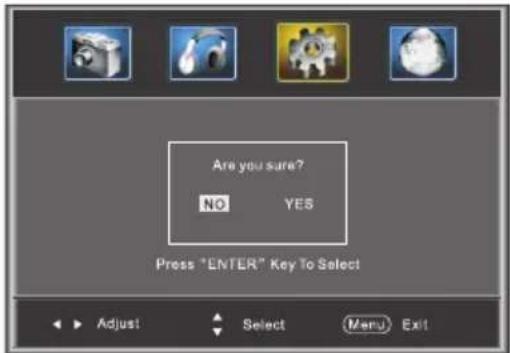
3.2 Timer
You can adjust the timer here.
Press ▼▲to select, press ◀▶to adjust, press MENU to exit.
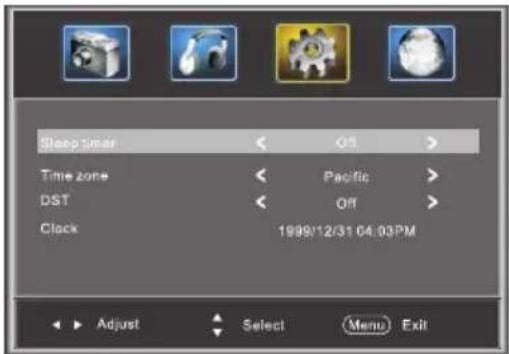
Sleep Timer: Adjust this item to set the sleep timer. Note:
Time zone, DST and the clock are available in ATSC programming only, and the Clock can't be adjust.
3.3 Closed Caption: Switching close caption mode.
Press ▼▲ button to select Closed Caption, Press button, the screen will display as follow:
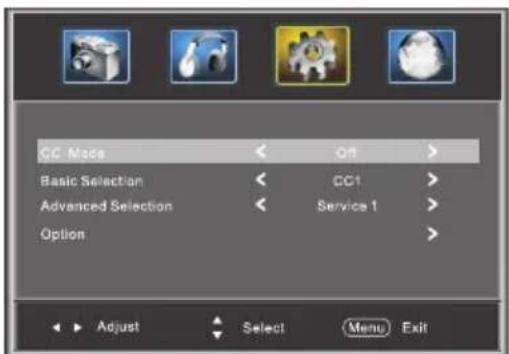
1): Advanced selection: only ATSC program is available.
2): Option: Used to edit CC font.
Press ▶ button, the screen will display as follow:
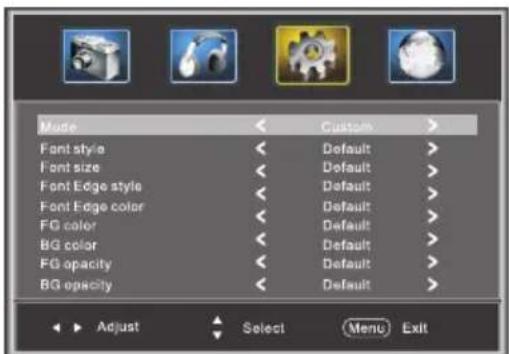
NOTE: Only ATSC program is available.
3.4 Menu Settings
You can adjust the Menu Settings here.
Press ▼▲ to select, press ◀▶ to adjust, press MENU to exit.
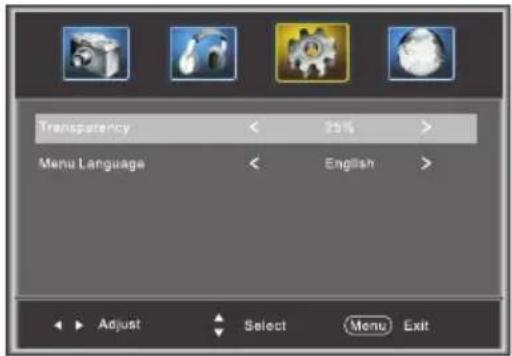
3.5 VGA Settings: When PC Mode is available.
Press ▼▲button to select VGA Settings, Press button, the screen will display as follow:
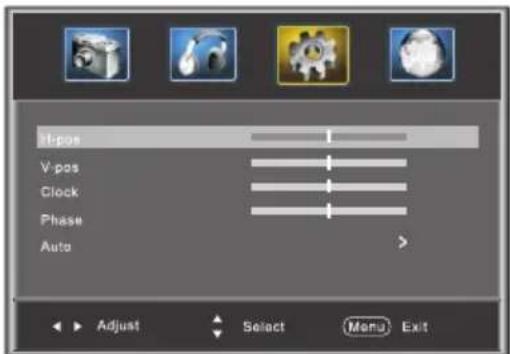
1). H-Pos: Adjust the horizontal position of the screen.
2). V-Pos: Adjust the vertical position of the screen.
3). Clock: Fine tune the screen width.
4). Phase: Fine tune the phase of the screen. Usually don't adjust this item.
5). Auto: Auto adjust to fit the screen.
4. Channel MENU
The fourth item of the MENU is Channel MENU. You can adjust digital and analog TV Channels.
Press ▼▲ to select, press ◀▶ to adjust.
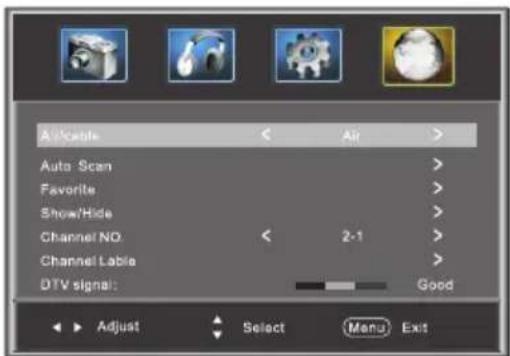
1). Air/Cable: select Air TV signal and cable TV signal.
2). Auto Scan: If it's the first time you use the TV, you should scan all the TV channels first, press the ▶ button to confirm, you will see the menu:
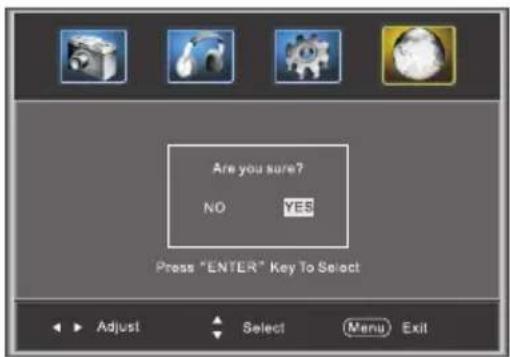
select "yes" item and press the ENTER button to confirm, You will see the message below which indicates auto search is in process.
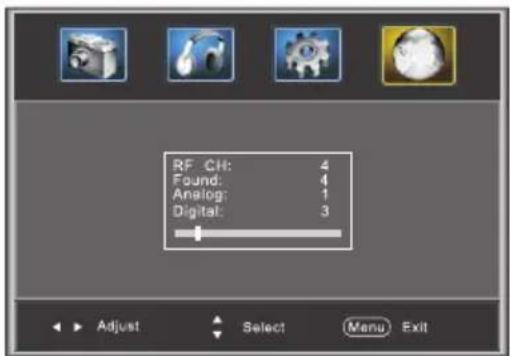
3). Favorite: Press ◀ button to choose/delete the favorite channel.
4). Show/Hide: Press ◀ button to display or hide current channel.
5). Channel NO.: Display the current channel number.
6). Channel label: Press ▲▼button to edit current channel name.
7). DTV signal: Display DTV strength signal. It can't be selected and adjusted.

www.westinghousedigital.com
S/N:
- IMPORTANT SAFETY INSTRUCTION
- CAUTION
- WARNING:
- Main Features
- Accessories
- Front panel
- Side panel
- REAR CONNECTORS
- PC
- STEPS:
- ANTENNA
- AV EQUIPMENT
- PICTURE MENU
- AUDIO menu
- SETUP MENU
- Parental Controls:
- P.G Switching:
- Timer
- Closed Caption: Switching close caption mode.
- Menu Settings
- VGA Settings: When PC Mode is available.
- Channel MENU
Brand : WESTINGHOUSE
Model : VR-2418
Category : Television