Vital 850 - Receiver SpeakerCraft - Free user manual and instructions
Find the device manual for free Vital 850 SpeakerCraft in PDF.


| Product Type | Multi-Zone Receiver |
| Brand | SpeakerCraft |
| Model | Vital 850 |
| Dimensions (W x H x D) | 17 x 3.5 x 12 inches (43.2 x 8.9 x 30.5 cm) |
| Weight | 15 lbs (6.8 kg) |
| Power Supply | 120V AC, 60Hz (US models) |
| Power Consumption | 200W (max) |
| Amplifier Type | Class D, multi-channel |
| Output Power per Channel | 50W RMS @ 8 ohms (8 zones) |
| Total Output Power | 400W RMS |
| Frequency Response | 20 Hz - 20 kHz ±1 dB |
| Inputs | 8 line-level RCA, 1 AUX 3.5mm |
| Outputs | 8 speaker pairs (binding posts) |
| Control Interfaces | IR input, RS-232, Ethernet |
| Key Features | Multi-zone audio distribution, independent volume control, source selection per zone |
| Impedance | 8 ohms (compatible with 4-8 ohms) |
| THD (Total Harmonic Distortion) | <0.05% (typical) |
| Signal-to-Noise Ratio | >90 dB A-weighted |
| Chassis Material | Metal, black finish |
| Cooling | Passive (fanless) |
| Maintenance | Wipe with dry cloth; do not use liquids |
| Safety | Disconnect power before cleaning; avoid moisture |
| Repair & Spare Parts | Contact SpeakerCraft customer service for authorized service |
| General Information | Designed for whole-house audio; compatible with SpeakerCraft keypads and controllers |
Frequently Asked Questions - Vital 850 SpeakerCraft
User questions about Vital 850 SpeakerCraft
0 question about this device. Answer the ones you know or ask your own.
Ask a new question about this device
Download the instructions for your Receiver in PDF format for free! Find your manual Vital 850 - SpeakerCraft and take your electronic device back in hand. On this page are published all the documents necessary for the use of your device. Vital 850 by SpeakerCraft.
USER MANUAL Vital 850 SpeakerCraft
INSTALLATION INSTRUCTIONS
Vital 1250/850
Digital Amplifiers
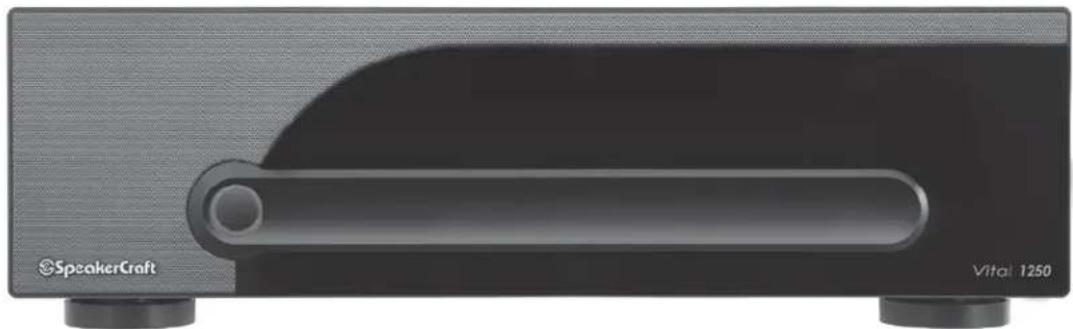
natural_image
Exterior view of a speakercraft device with a horizontal scroll bar and two base stations (no visible text or symbols on the device body)SAFETY INSTRUCTIONS

CAUTION
RISK OF ELECTRIC SHOCK DO NOT OPEN

CAUTION: To reduce the risk of electric shock, do not remove cover (or back). No user-serviceable parts inside. Refer servicing to qualified service personnel.
- Explanation of Graphical Symbols

The lightning flash with arrowhead symbol, within an equilateral triangle, is intended to alert you to the presence of uninsulated "dangerous voltage" within the product's enclosure that may be of sufficient magnitude to constitute a risk of electric shock to persons.

The exclamation point within an equilateral triangle is intended to alert you to the presence of important operating and maintenance (servicing) instructions in the literature accompanying the app'ance.
- Read Instructions - All the safety and operating instructions should be read before the appliance is operated.
- Retain Instructions - The safety and operating instructions should be retained for future reference.
- Heed Warnings - All warnings on the appliance and in the operating instructions should be adhered to.
- Follow Instructions - All operating and other instructions should be followed.
- Water and Moisture - The appliance should not be used near water - for example, near a bathtub, washbowl, kitchen sink, laundry tub, in a wet basement, or near a swimming pool, etc.
- Carts and Stands - The appliance should be used only with a cart or stand that is recommended by the manufacturer.
PORTABLE CART WARNING

- Wall or Ceiling Mounting - The appliance should be mounted to a wall or ceiling only as recommended by the manufacturer.
- Ventilation - The appliance should be situated so that its location or position does not interfere with its proper ventilation. For example, the appliance should not be situated on a bed, sofa, rug, or similar surface that may block the ventilation openings; or placed in a built-in installation, such as a bookcase or cabinet that may impede the flow of air through the ventilation openings.
APPLICABLE FOR USA, CANADA OR WHERE APPROVED FOR USAGE
CAUTION: TO PREVENT ELECTRIC SHOCK, MATCH WIDE BLADE PLUG TO WIDE SLOT, INSERT FULLY.
ATTENTION: POUR EVITER LES CHOCS ELECTRIQUES, INTRODUIRE LA LAME LA PLUS LARGE DE LA FICHE DANS LA BORNE CORRESPONDANTE DE LA PRISE ET POUSSER JUSQU AU FOND.
- Heat - The appliance should be situated away from heat sources such as radiators, stoves, or other appliances that produce heat.
- Power Source - The appliance should be connected to a power supply only of the type described in the operating instructions or as marked on the appliance.
- Power-Cord Protection - Power-supply cords should be routed so that they are not likely to be walked on or pinched by items placed upon or against them, paying particular attention to cords at plugs, convenience receptacles, and the point where they exit from the appliance.
- Cleaning - The appliance should be cleaned only as recommended by the manufacturer.
- Nonuse Periods - The power cord of the appliance should be unplugged from the outlet when left unused for a long period of time.
- Object and Liquid Entry - Care should be taken so that objects do not fall into and liquids not spilled into the inside of the appliance.
- Damage Requiring Service - The appliance should be serviced by qualified service personnel when:
a. The power-supply cord or the plug has been damaged; or
b. Objects have fallen onto, or liquid has been spilled into the appliance; or
c. The appliance has been exposed to rain; or
d. The appliance does not appear to operate normally or exhibits a marked change in performance; or
e. The appliance has been dropped, or the cabinet damaged.
- Servicing - The user should not attempt to service the appliance beyond those means described in the operating instructions. All other servicing should be referred to qualified service personnel.
- Grounding or Polarization - The precautions that should be taken so that the grounding or polarization means of an appliance is not defeated.
Thank you for purchasing the SpeakerCraft Vital digital amplifier.
More power, more channels and more music. SpeakerCraft amplifiers deliver the power and fidelity you demand whether you need a couple of channels for stereo or you want to distribute music throughout your home. When SpeakerCraft set out to develop the custom installation industry's most complete line of amplifiers, we knew we had to have answers for the variety of situations that you encounter. Having years of success with our Big Bang amplifiers, SpeakerCraft is reVitalizing our amplifier line to include several digital amplifiers: Vital 1250, Vital 850 and Vital 170V.
These amplifiers include the necessary features needed for flexible, reliable custom installation. Custom friendly features include multiple turn-on modes, independent level controls for each channel and pass through outputs. The Vital series of amplifiers is a highly reliable solution for every installation with a blend of power, performance, and value.
| Table Of Contents | Page | ||
| Features | 4 | ||
| Front | Panel Diagram | 4 | |
| Rear | Panel Diagram | 5 | |
| System Design & Operation Consideration | 5 | ||
| System | Design Examples | 6 | |
| Installation | Considerations | 12 | |
| Installation | 12 | ||
| Operation | 14 | ||
| Troubleshooting | 14 | ||
| Specifications | 15 | ||
| Warranty | 16 |
FEATURES
Audiophile Design
Sophisticated design and superior internal components result in outstanding sound quality, performance and long term reliability.
Advanced Protection
Each channel is individually protected. If the circuitry determines that a channel must be shut down for protection, a rare occurrence, only the channel affected will be turned off. The other channels will continue to play. Once conditions return to normal, the affected channel will be turned back on and operate as normal.
Flexible Input Selection
Each of the channels can be assigned a variety of source inputs. A dedicated input can be assigned to each channel. Each channel can also be configured to play common signals from the Bus or Auxiliary inputs. This provides the flexibility needed in sophisticated custom audio installations.
Bridging
The power output of adjacent channels can be combined to provide extra power when needed in certain areas. This is easily accomplished by flipping a single switch.
Individual Channel Level Adjustments
Each channel has its own level adjustment. This allows the loudness of each speaker to be perfectly matched to its area.
Multiple Power Modes and Output Trigger
There are three ways to turn the amplifier on: constant, trigger and audio sense. This allows the amplifier to operate seamlessly as part of a sophisticated custom installation. A separate output trigger allows the amplifier to activate other components via a voltage trigger.
Rack Mountable
Each amplifier includes a set of rack ears (no hardware) for rack mounting applications.
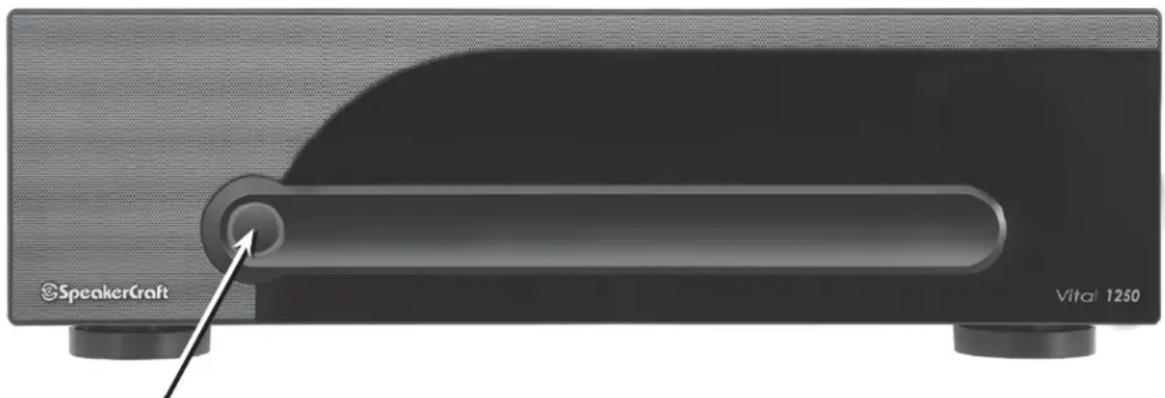
Diagram 1 - Front Panel
natural_image
Close-up of a speaker craft device with a lever and indicator finger (no text or symbols on the device itself)Master power switch. Turns off power to amplifier and Power Mode Circuitry.
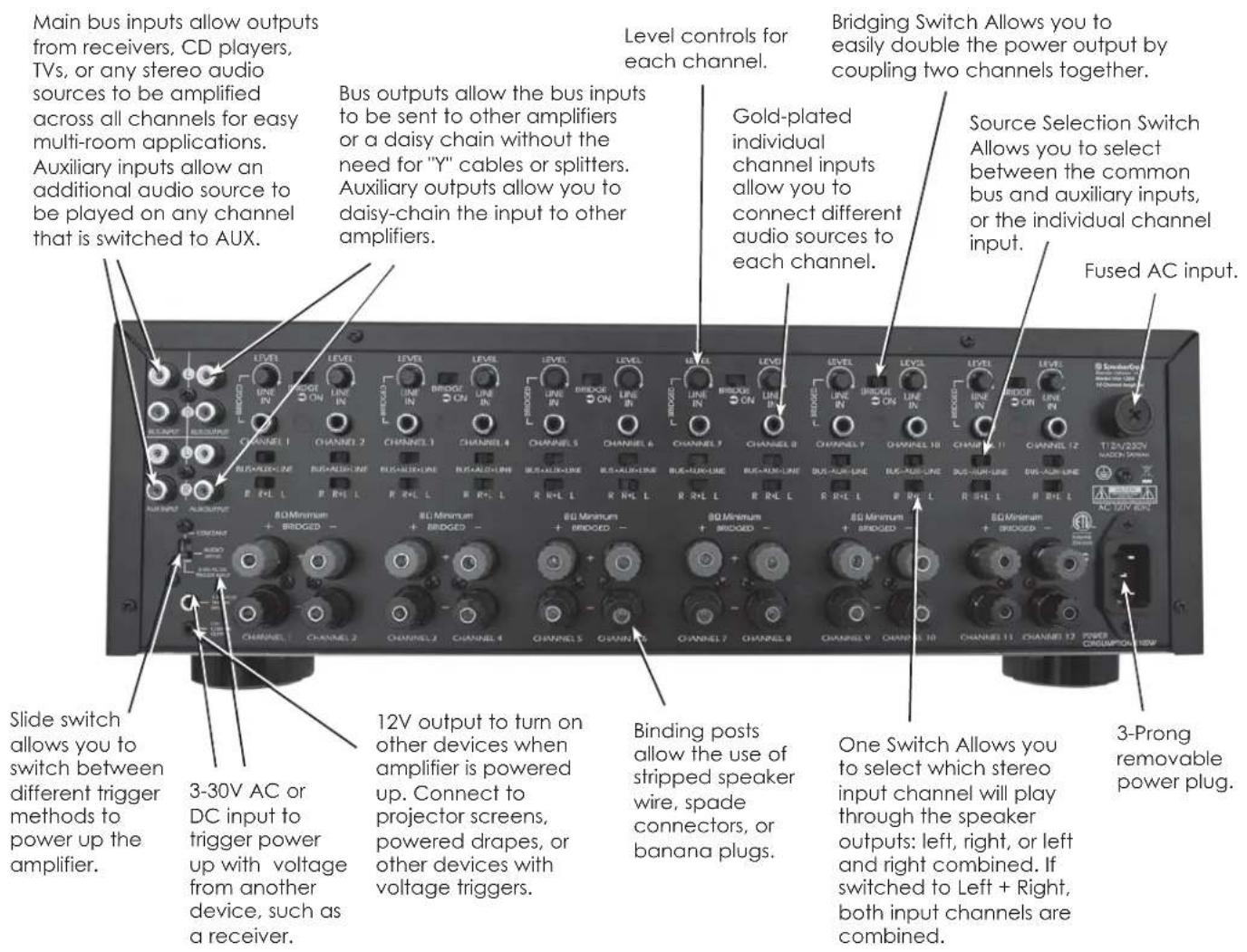
Diagram 2 - Rear Panel
SYSTEM DESIGN & OPERATION CONSIDERATIONS
To best understand system design and operation of the Vital amplifiers it is useful to understand the following terms and features.
Multi-Room
A system design that plays the same source at the same time in all rooms. If a change is made in one room, the same change takes place in all other rooms. For example, if a listener changes from CD to Tuner in the bedroom, the same change will be heard in the kitchen. Note: With the use of volume controls or speaker switchers the volume of each room can be controlled separately of the other rooms.
Multi-Zone
A system design that allows different sources to be played in each room. A change in one room can be made without changing the other rooms. For example the CD player can be heard in the bedroom while the kitchen is playing the tuner.
Bridging
The combining of 2 channels to create one mono channel. It is useful when more volume is needed in a particular area.
Source
Component, audio or video, that provides an audio signal. Examples are CD, VCR, DVD, tape deck and tuner. The source provides the audio information that is amplified by the Vital amplifiers.
Channel
A distinct unit of the Vital amplifier that provides output to one speaker. The input to each channel can be configured to select from the BUS INPUT, the AUX INPUT or that channel's unique CHANNEL INPUT. Two adjacent channels can be bridged to provide higher power to one speaker.
Level Controls
Allows any of the channels to be adjusted independently to raise or lower the output of each channel. This may be used to control the speaker output in order to balance different rooms or areas of the system.
BUS\*AUX\*LINE Switch
Allows each channel to play a variety of different inputs. Depending on the switch position the channel amplifies the signal connected to the BUS input, the AUX input, or its own LINE input.
R R+L L Switch
When either a BUS or AUX input is selected, this switch is used to direct the channel to play the left signal from the input "L" or the right signal from the input "R", or a combined right and left signal from the input "R+L".
Bus Input
Allows the signal from a source to be distributed to any of the channels on the amplifier.
Auxiliary Inputs
Allows a the signal from a secondary source to be distributed to any of the 12 channels of the amplifier.
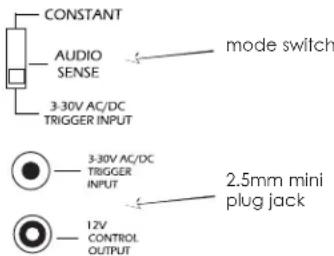
Power Mode Selection
There are three ways to turn the amplifier on and off. Use the following list to decide which mode will work best for your application. See Diagram 3 below.
1. Constant
Use this selection when you wish to manually turn the amplifier on and off by using the front mounted power button.
2. Trigger
Use this selection if you wish the amplifier turn on when it receives voltage (3-30V A/C or D/C) from an external source and turn off once that voltage has stopped. Some components have voltage outputs that are designed for this use. In addition there are devices that can be used as part of an automated system that will provide voltage to enable the mode. The voltage source must be connected to the trigger-input jack on the back of the amplifier.
3. Audio Sense
Use this selection when you want the amplifier to turn on when the amplifier's main input receives an audio signal. At the moment that either the left or right input jacks receive a signal the amplifier is turned on. Once the signal stops the amplifier waits 3 minutes and then turns off.
Diagram 3:
Power Mode Selection
SYSTEM DESIGN EXAMPLES
There are many ways to configure the Vital amplifier. The following pages contain some typical installation examples. Use these examples to generate ideas for your system design.
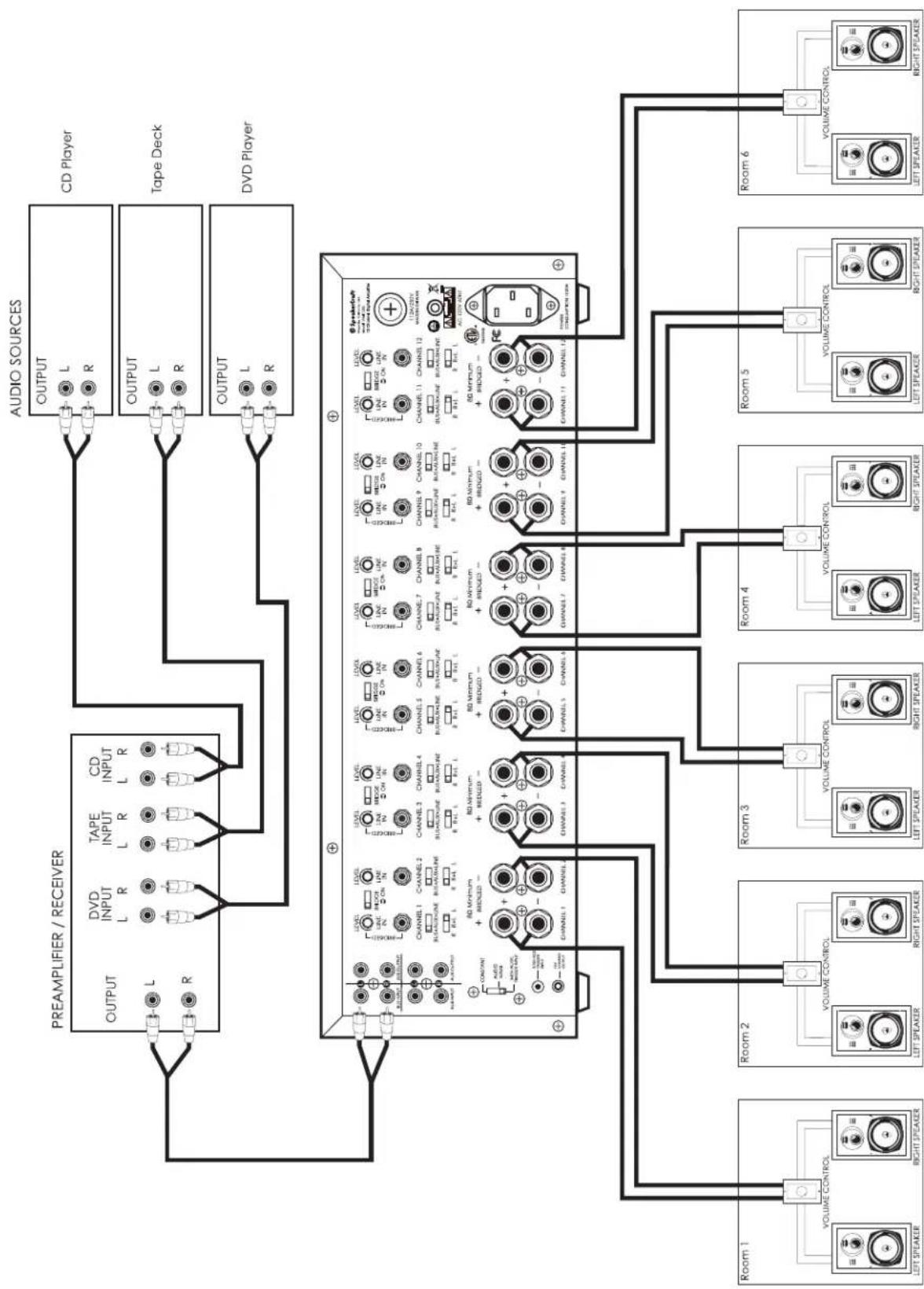
Multi-Room Installation Example (Diagram 4)
This illustrates the simplest use of the Vital amplifier, distributing audio throughout the home. In this example only one source can be selected at a time, all pairs of speakers have the same audio signal available.
The Input Selection switch is set to "BUS" on all channels. Adjacent channels are assigned left and right.
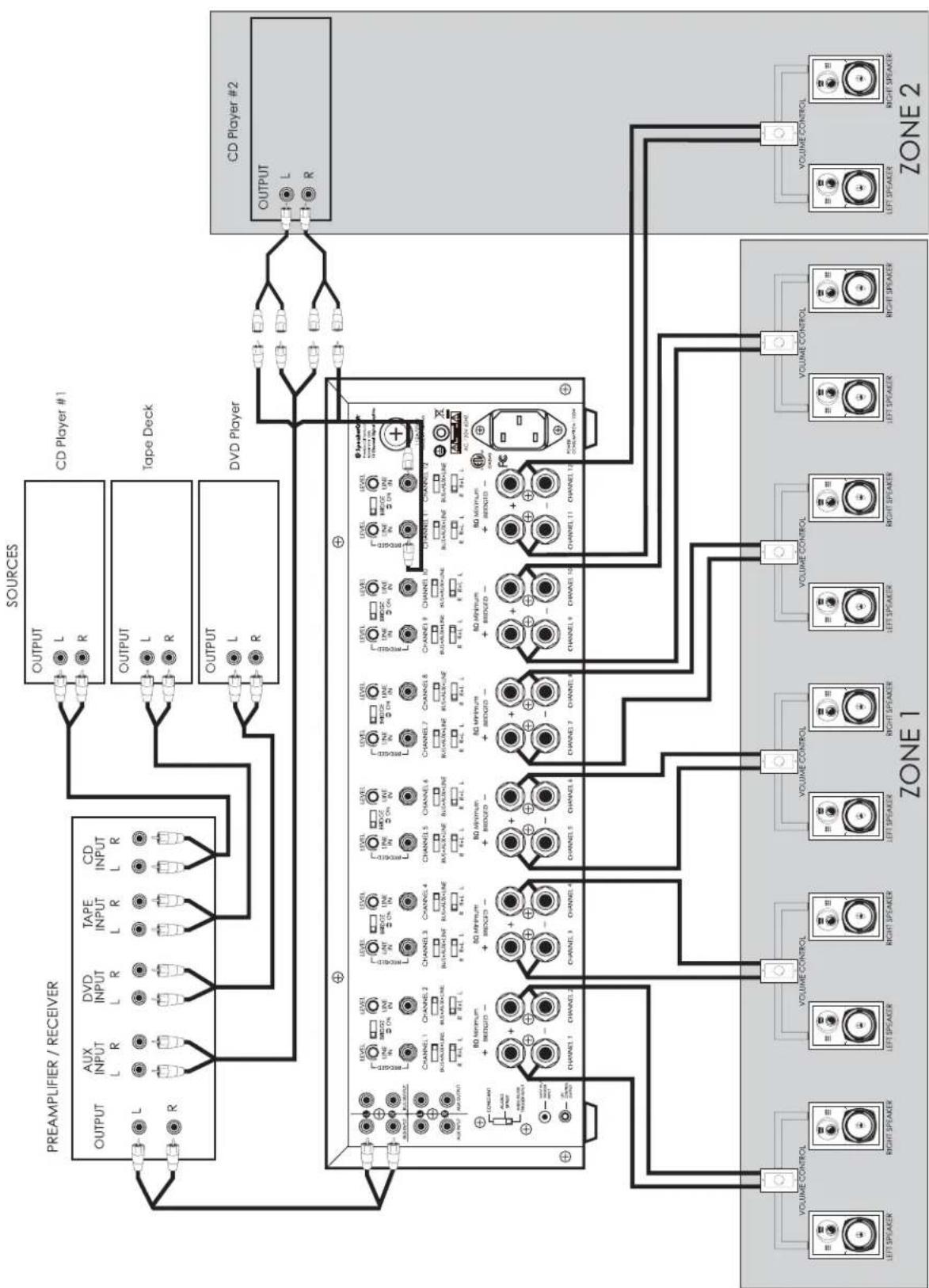
Multi-Zone Example #1 (Diagram 5)
This illustrates the simplest way to provide an audio signal to one area that is independent of the main audio signal. Zone 2 uses a CD player connected to just that Zone. The rest of the system operates Zone 1 and is connected to the preamplifier / receiver.
The Input Selection switch on channels 1-10 is set to "BUS" with adjacent channels assigned left and right. The Input Selection Switch on channels 11 and 12 are set to "LINE".
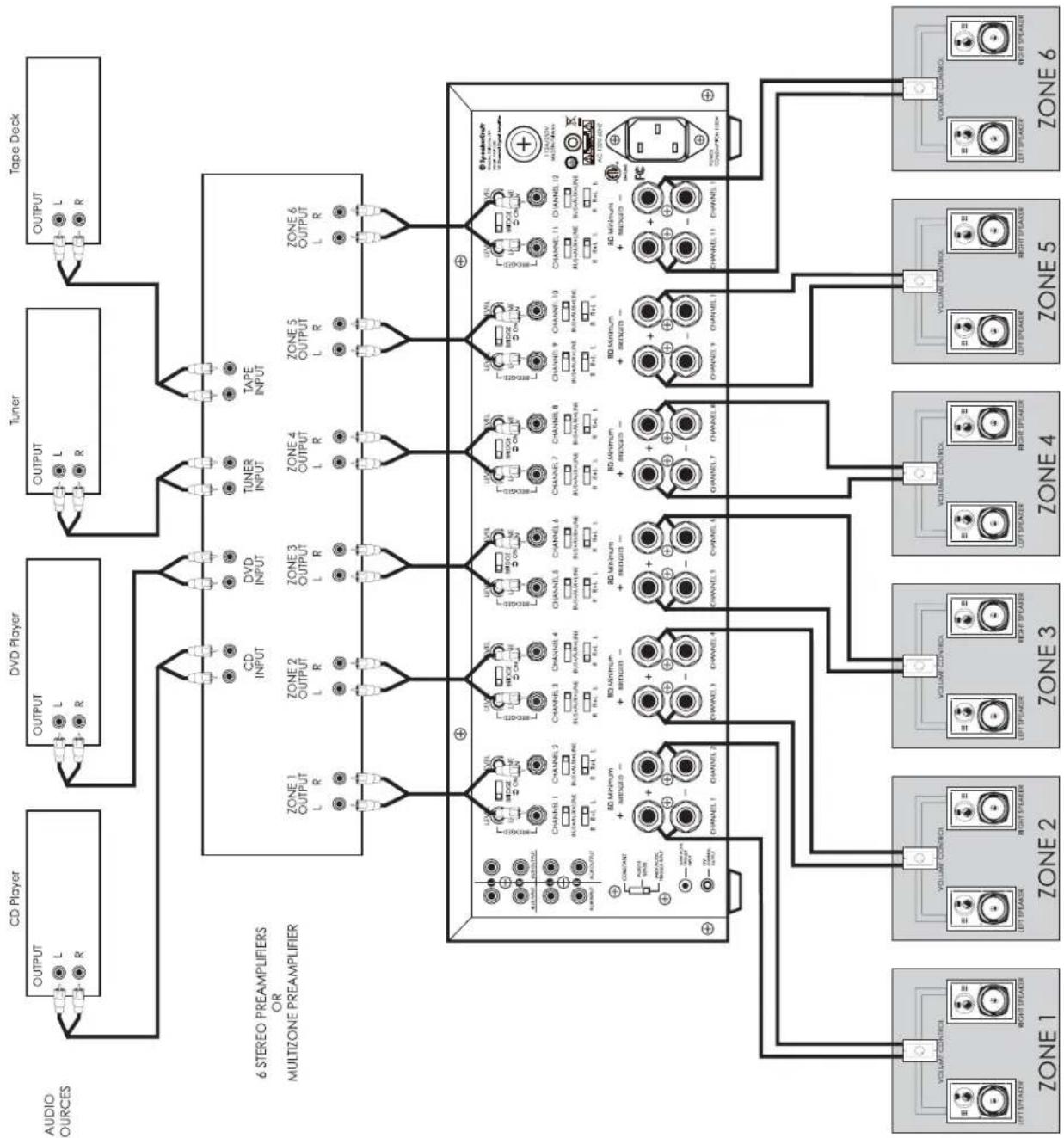
Multi-Zone Example #2 (Diagram 6)
This illustrates the ability to listen to different audio signals in each zone, independent of every other zone. The system relies on a multi-zone preamplifier or up to 6 independent preamplifiers.
The Input Selection switch on each channel is set to "LINE"
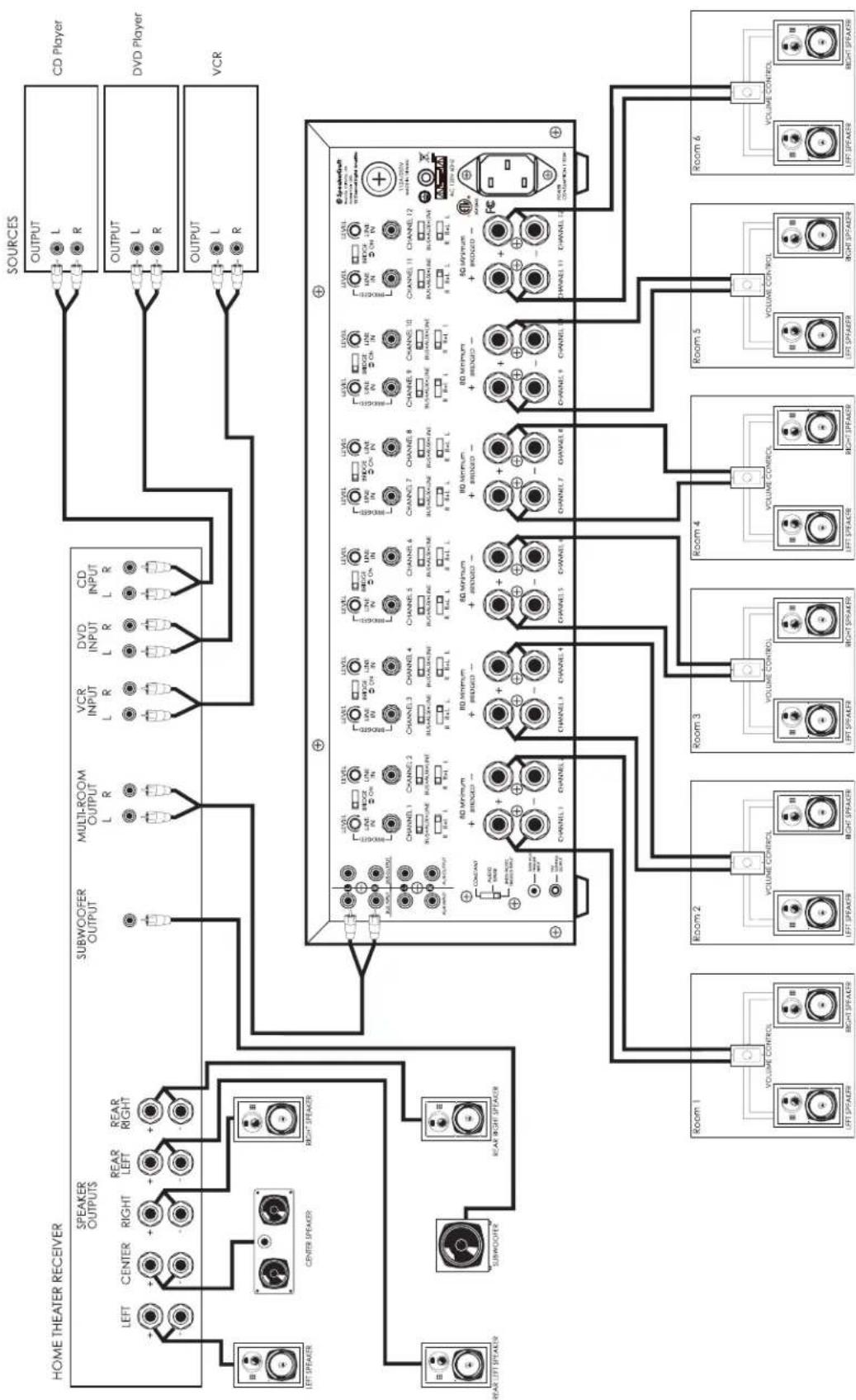
Home Theater / Multi-Room Example (Diagram 7)
This configuration allows the user to access the sources connected to a home theater receiver for use in a multi-room installation. It relies on the home theater receiver having a multi-room or similar output. The Input Selection switch on each channel is set to "BUS" with adjacent channels assigned left and right.
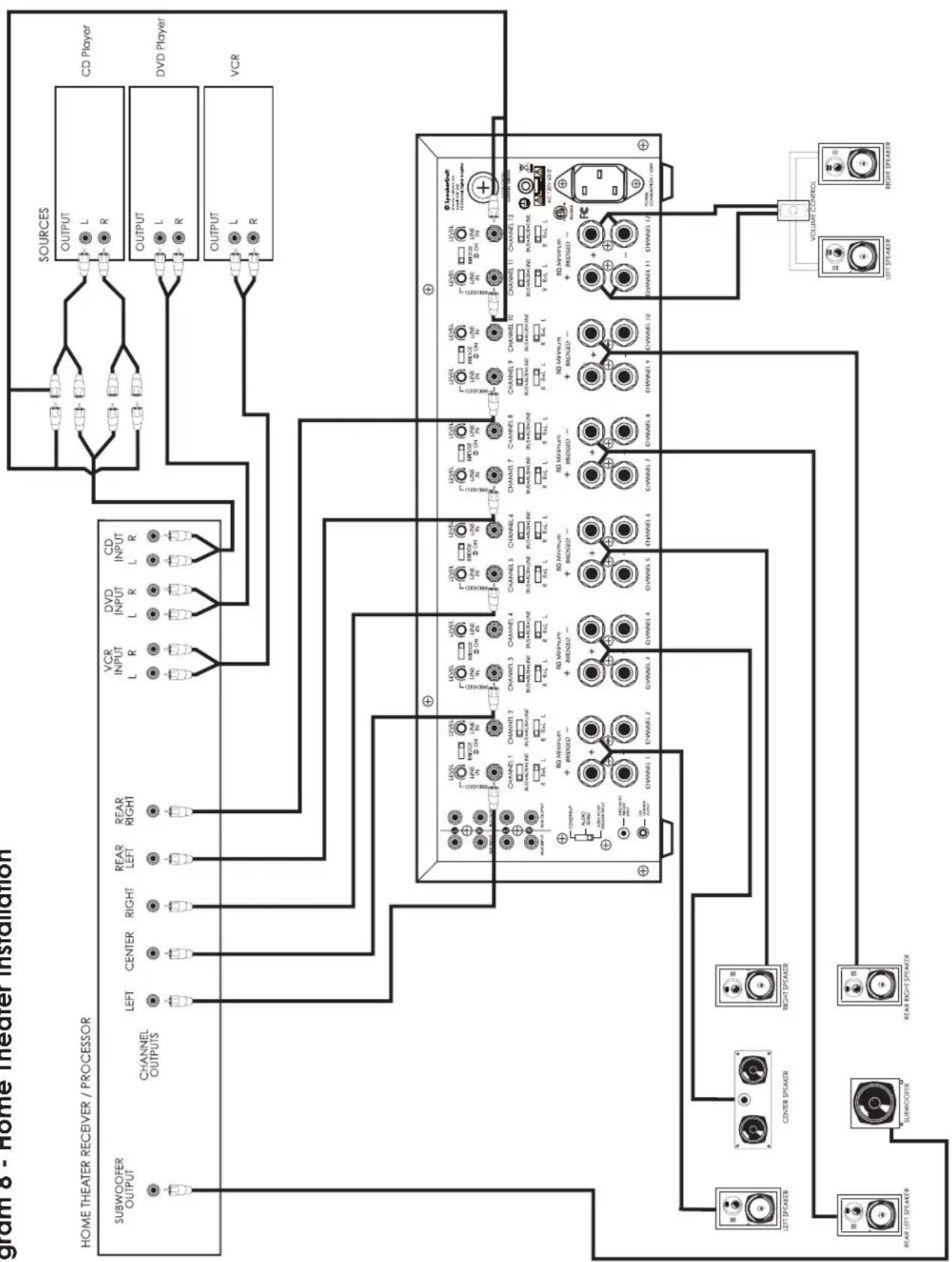
Home Theater Example (Diagram 8)
This example uses the power amplifier to drive the speakers in the home theater system. The two channels remaining are used to provide music to a separate area or room.
This configuration utilizes the bridging mode to provide additional power. The following adjacent channels are bridged together: 1 and 2, 3 and 4, 5 and 6, 7 and 8, 9 and 10. Note that on each one of these the signal is connected to the "LINE IN" on the first channel of the pair, the Bridging switch is set to "ON". When bridging be sure to use the top speaker outputs as illustrated on Diagram 8.
Diagram 4 - Multi-Room Installation
flowchart
graph TD
    subgraph Audio Sources
        A["CD Player"] --> B["OUTPUT"]
        C["Tape Deck"] --> D["OUTPUT"]
        E["DVD Player"] --> F["OUTPUT"]
    end

    subgraph Preamplifier / RECEIVER
        G["OUTPUT"] --> H["VIDEO INPUT L R TAPE INPUT L R CD INPUT L R"]
        I["OUTPUT"] --> J["VIDEO INPUT L R TAPE INPUT L R CD INPUT L R"]
        K["OUTPUT"] --> L["VIDEO INPUT L R TAPE INPUT L R CD INPUT L R"]
    end

    M["Room 1"] --> N["VOLUME CONTROL"]
    O["Room 2"] --> P["VOLUME CONTROL"]
    Q["Room 3"] --> R["VOLUME CONTROL"]
    S["Room 4"] --> T["VOLUME CONTROL"]
    U["Room 5"] --> V["VOLUME CONTROL"]
    W["Room 6"] --> X["VOLUME CONTROL"]

    H --> Y["CHANNEL 1 CHANNEL 2 CHANNEL 3 CHANNEL 4 CHANNEL 5 CHANNEL 6 CHANNEL 7 CHANNEL 8 CHANNEL 9 CHANNEL 10 CHANNEL 11 CHANNEL 12 CHANNEL 13 CHANNEL 14 CHANNEL 15 CHANNEL 16 CHANNEL 17 CHANNEL 18 CHANNEL 19 CHANNEL 20 CHANNEL 21 CHANNEL 22 CHANNEL 23 CHANNEL 24 CHANNEL 25 CHANNEL 26 CHANNEL 27 CHANNEL 28 CHANNEL 29 CHANNEL 30 CHANNEL 31 CHANNEL 32 CHANNEL 33 CHANNEL 34 CHANNEL 35 CHANNEL 36 CHANNEL 37 CHANNEL 38 CHANNEL 39 CHANNEL 40 CHANNEL 41 CHANNEL 42 CHANNEL 43 CHANNEL 44 CHANNEL 45 CHANNEL 46 CHANNEL 47 CHANNEL 48 CHANNEL 49 CHANNEL 50 CHANNEL 51 CHANNEL 52 CHANNEL 53 CHANNEL 54 CHANNEL 55 CHANNEL 56 CHANNEL 57 CHANNEL 58 CHANNEL 59 CHANNEL 60 CHANNEL 61 CHANNEL 62 CHANNEL 63 CHANNEL 64 CHANNEL 65 CHANNEL 66 CHANNEL 67 CHANNEL 68 CHANNEL 69 CHANNEL 70 CHANNEL 71 CHANNEL 72 CHANNEL 73 CHANNEL 74 CHANNEL 75 CHANNEL 76 CHANNEL 77 CHANNEL 78 CHANNEL 79 CHANNEL 80 CHANNEL"]
    N --> O["CHANNEL 1 CHANNEL 2 CHANNEL 3 CHANNEL 4 CHANNEL 5 CHANNEL 6 CHANNEL 7 CHANNEL 8 CHANNEL 9 CHANNEL 10 CHANNEL 11 CHANNEL 12 CHANNEL 13 CHANNEL 14 CHANNEL 15 CHANNEL 16 CHANNEL 17 CHANNEL 18 CHANNEL 19 CHANNEL"]
    O --> P["CHANNEL 1 CHANNEL 2 CHANNEL 3 CHANNEL 4 CHANNEL 5 CHANNEL 6 CHANNEL 7 CHANNEL 8 CHANNEL 9 CHANNEL"]
    P --> Q["CHANNEL 1 CHANNEL 2 CHANNEL 3 CHANNEL 4 CHANNEL 5 CHANNEL"]
    Q --> R["CHANNEL 1 CHANNEL"]
    style Audio Sources fill:#f9f,stroke:#333
    style Preamplifier / RECEIVER fill:#ccf,stroke:#333
    style Audio Sources fill:#cfc,stroke:#333
Diagram 5 - Multi-Zone Installation #1
flowchart
graph TD
    subgraph PREAMPLIFIER / RECEIVER
        A["OUTPUT"] --> B["DVD INPUT"]
        B --> C["TAPE INPUT"]
        C --> D["CD INPUT"]
        D --> E["SOURCES"]
        E --> F["OUTPUT"]
        F --> G["CD Player #1"]
        G --> H["Tape Deck"]
        H --> I["OUTPUT"]
        I --> J["DVD Player"]
    end

    subgraph CD Player #2
        K["OUTPUT"] --> L["CD Player #2"]
        L --> M["VOLUME CONTROL"]
        M --> N["VOLUME CONTROL"]
        N --> O["VOLUME CONTROL"]
        O --> P["VOLUME CONTROL"]
        P --> Q["VOLUME CONTROL"]
    end

    style PREAMPLIFIER / RECEIVER fill:#f9f,stroke:#333
    style CD Player fill:#ccf,stroke:#333
    style CD Player #2 fill:#cfc,stroke:#333
    style VOLUME CONTROL fill:#fcc,stroke:#333
    style VOLUME CONTROL fill:#cff,stroke:#333
    style VOLUME CONTROL fill:#ffc,stroke:#333
    style VOLUME CONTROL fill:#cfc,stroke:#333
    style VOLUME CONTROL fill:#fcc,stroke:#333
    style VOLUME CONTROL fill:#ffc,stroke:#333
    style VOLUME CONTROL fill:#cfc,stroke:#333
    style VOLUME CONTROL fill:#fcc,stroke:#333
    style VOLUME CONTROL fill:#ffc,stroke:#333
    style VOLUME CONTROL fill:#cfc,stroke:#333
    style VOLUME CONTROL fill:#fcc,stroke:#333

    %% Legend
    subgraph ZONE 1
        X["VOLUME CONTROL"] --> Y["LEFT SPEAKER"]
        Y --> Z["RIGHT SPEAKER"]
        Z --> AA["LEFT SPEAKER"]
        AA --> AB["RIGHT SPEAKER"]
        AB --> AC["LEFT SPEAKER"]
        AC --> AD["RIGHT SPEAKER"]
        AD --> AE["LEFT SPEAKER"]
        AE --> AF["RIGHT SPEAKER"]
        AF --> AG["LEFT SPEAKER"]
        AG --> AH["RIGHT SPEAKER"]
        AH --> AI["LEFT SPEAKER"]
        AI --> AJ["RIGHT SPEAKER"]
        AJ --> AK["LEFT SPEAKER"]
        AK --> AL["RIGHT SPEAKER"]
        AL --> AM["LEFT SPEAKER"]
        AM --> AN["RIGHT SPEAKER"]
        AN --> AO["LEFT SPEAKER"]
        AO --> AP["RIGHT SPEAKER"]
        AP --> AQ["LEFT SPEAKER"]
        AQ --> AR["RIGHT SPEAKER"]
        AR --> AS["LEFT SPEAKER"]
        AS --> AT["RIGHT SPEAKER"]
        AT --> AU["LEFT SPEAKER"]
        AU --> AV["RIGHT SPEAKER"]
        AV --> AW["LEFT SPEAKER"]
        AW --> AX["RIGHT SPEAKER"]
        AX --> AY["LEFT SPEAKER"]
        AY --> AZ["RIGHT SPEAKER"]
        AZ --> BA["LEFT SPEAKER"]
        BA --> BB["RIGHT SPEAKER"]
        BB --> BC["LEFT SPEAKER"]
        BC --> BD["RIGHT SPEAKER"]
        BD --> BE["LEFT SPEAKER"]
        BE --> BF["RIGHT SPEAKER"]
        BF --> BG["LEFT SPEAKER"]
        BG --> BH["RIGHT SPEAKER"]
        BH --> BI["LEFT SPEAKER"]
        BI --> BJ["RIGHT SPEAKER"]
        BJ --> BK["LEFT SPEAKER"]
        BK --> BL["RIGHT SPEAKER"]
        BL --> BM["LEFT SPEAKER"]
        BM --> BN["RIGHT SPEAKER"]
        BN --> BO["LEFT SPEAKER"]
        BO --> BP["RIGHT SPEAKER"]
        BP --> BQ["LEFT SPEAKER"]
        BQ --> BR["RIGHT SPEAKER"]
        BR --> BS["LEFT SPEAKER"]
        BS --> BT["RIGHT SPEAKER"]
        BT --> BU["LEFT SPEAKER"]
        BU --> BV["RIGHT SPEAKER"]
        BV --> BW["LEFT SPEAKER"]
        BW --> BX["RIGHT SPEAKER"]
        BX --> BY["LEFT SPEAKER"]
        BY --> BZ["RIGHT SPEAKER"]
        BZ --> CA["LEFT SPEAKER"]
        CA --> CB["RIGHT SPEAKER"]
        CB --> CC["LEFT SPEAKER"]
        CC --> CD["RIGHT SPEAKER"]
        CD --> CE["LEFT SPEAKER"]
        CE --> CF["RIGHT SPEAKER"]
        CF --> CG["LEFT SPEAKER"]
        CG --> CH["RIGHT SPEAKER"]
        CH --> CI["LEFT SPEAKER"]
        CI --> CJ["RIGHT SPEAKER"]
        CJ --> CK["LEFT SPEAKER"]
        CK --> CL["RIGHT SPEAKER"]
        CL --> CM["LEFT SPEAKER"]
        CM --> CN["RIGHT SPEAKER"]
        CN --> CO["LEFT SPEAKER"]
        CO --> CP["RIGHT SPEAKER"]
        CP --> CQ["LEFT SPEAKER"]
        CQ --> CR["RIGHT SPEAKER"]
        CR --> CS["LEFT SPEAKER"]
        CS --> CT["RIGHT SPEAKER"]
        CT --> CU["LEFT SPEAKER"]
        CU --> CV["RIGHT SPEAKER"]
        CV --> CW["LEFT SPEAKER"]
        CW --> CX["RIGHT SPEAKER"]
    end

    %% Legend
    A1["AUX INPUT"] & A2["DVD INPUT"] & A3["TAPE INPUT"] & A4["CD INPUT"] & A5["SOURCES"] & A6["VOLUME CONTROL"] & A7["VOLUME CONTROL"] & A8["VOLUME CONTROL"] & A9["VOLUME CONTROL"] & A10["VOLUME CONTROL"] & A11["VOLUME CONTROL"] & A12["VOLUME CONTROL"] & A13["VOLUME CONTROL"] & A14["VOLUME CONTROL"] & A15["VOLUME CONTROL"] & A16["VOLUME CONTROL"] & A17["VOLUME CONTROL"] & A18["VOLUME CONTROL"] & A19["VOLUME CONTROL"] & A20["VOLUME CONTROL"] & A21["VOLUME CONTROL"] & A22["VOLUME CONTROL"] & A23["VOLUME CONTROL"] & A24["VOLUME CONTROL"] & A25["VOLUME CONTROL"] & A26["VOLUME CONTROL"] & A27["VOLUME CONTROL"] & A28["VOLUME CONTROL"] & A29["VOLUME CONTROL"] & A30["VOLUME CONTROL"] & A31["VOLUME CONTROL"] & A32["VOLUME CONTROL"] & A33["VOLUME CONTROL"] & A34["VOLUME CONTROL"] & A35["VOLUME CONTROL"] & A36["VOLUME CONTROL"] & A37["VOLUME CONTROL"] & A38["VOLUME CONTROL"] & A39["VOLUME CONTROL"] & A40["VOLUME CONTROL"] & A41["VOLUME CONTROL"] & A42["VOLUME CONTROL"] & A43["VOLUME CONTROL"] & A44["VOLUME CONTROL"] & A45["VOLUME CONTROL"] & A46["VOLUME CONTROL"] & A47["VOLUME CONTROL"] & A48["VOLUME CONTROL"] & A49["VOLUME CONTROL"] & A50["VOLUME CONTROL"] & A51["VOLUME CONTROL"] & A52["VOLUME CONTROL"] & A53["VOLUME CONTROL"] & A54["VOLUME CONTROL"] & A55["VOLUME CONTROL"] & A56["VOLUME CONTROL"] & A57["VOLUME CONTROL"] & A58["VOLUME CONTROL"] & A59["VOLUME CONTROL"] & A60["VOLUME CONTROL"] & A61["VOLUME CONTROL"] & A62["VOLUME CONTROL"] & A63["VOLUME CONTROL"] & A64["VOLUME CONTROL"] & A65["VOLUME CONTROL"] & A66["VOLUME CONTROL"] & A67["VOLUME CONTROL"] & A68["VOLUME CONTROL"] & A69["VOLUME CONTROL"] & A70["VOLUME CONTROL"] & A71["VOLUME CONTROL"] & A72["VOLUME CONTROL"] & A73["VOLUME CONTROL"] & A74["VOLUME CONTROL"] & A75["VOLUME CONTROL"] & A76["VOLUME CONTROL"] & A77["VOLUME CONTROL"] & A78["VOLUME CONTROL"] & A79["VOLUME CONTROL"] & A80["VOLUME CONTROL"] & A81["VOLUME CONTROL"] & A82["VOLUME CONTROL"] & A83["VOLUME CONTROL"] & A84["VOLUME CONTROL"] & A85["VOLUME CONTROL"] & A86["VOLUME CONTROL"] & A87["VOLUME CONTROL"] & A88["VOLUME CONTROL"] & A89["VOLUME CONTROL"] & A90["VOLUME CONTROL"] & A91["VOLUME CONTROL"] & A92["VOLUME CONTROL"] & A93["VOLUME CONTROL"] & A94["VOLUME CONTROL"] & A95["VOLUME CONTROL"] & A96["VOLUME CONTROL"] & A97["VOLUME CONTROL"] & A98["VOLUME CONTROL"] & A99["VOLUME CONTROL"] & A100["VOLUME CONTROL"]
Diagram 6 - Multi-Zone Installation #2
flowchart
graph TD
    A["CD Player"] --> B["OUTPUT L R"]
    C["DVD Player"] --> D["OUTPUT L R"]
    E["Tuner"] --> F["OUTPUT L R"]
    G["Tape Deck"] --> H["OUTPUT L R"]

    I["6 STEREO PREAMPLIFIERS OR MULTIZONE PREAMPLIFIER"] --> J["ZONE 1 OUTPUT L R"]
    I --> K["ZONE 2 OUTPUT L R"]
    I --> L["ZONE 3 OUTPUT L R"]
    I --> M["ZONE 4 OUTPUT L R"]
    I --> N["ZONE 5 OUTPUT L R"]
    I --> O["ZONE 6 OUTPUT L R"]

    J --> P["CHANNEL 1 CHANNEL 2 CHANNEL 3 CHANNEL 4 CHANNEL 5 CHANNEL 6 CHANNEL 7 CHANNEL 8 CHANNEL 9 CHANNEL 10 CHANNEL 11 CHANNEL 12 CHANNEL 13 CHANNEL 14 CHANNEL 15 CHANNEL 16 CHANNEL 17 CHANNEL 18 CHANNEL 19 CHANNEL 20 CHANNEL 21 CHANNEL 22 CHANNEL 23 CHANNEL 24 CHANNEL 25 CHANNEL 26 CHANNEL 27 CHANNEL 28 CHANNEL 29 CHANNEL 30 CHANNEL 31 CHANNEL 32 CHANNEL 33 CHANNEL 34 CHANNEL 35 CHANNEL 36 CHANNEL 37 CHANNEL 38 CHANNEL 39 CHANNEL 40 CHANNEL 41 CHANNEL 42 CHANNEL 43 CHANNEL 44 CHANNEL 45 CHANNEL 46 CHANNEL 47 CHANNEL 48 CHANNEL 49 CHANNEL 50 CHANNEL 51 CHANNEL 52 CHANNEL 53 CHANNEL 54 CHANNEL 55 CHANNEL 56 CHANNEL 57 CHANNEL 58 CHANNEL 59 CHANNEL 60 CHANNEL 61 CHANNEL 62 CHANNEL 63 CHANNEL 64 CHANNEL 65 CHANNEL 66 CHANNEL 67 CHANNEL 68 CHANNEL 69 CHANNEL 70 CHANNEL 71 CHANNEL 72 CHANNEL 73 CHANNEL 74 CHANNEL 75 CHANNEL 76 CHANNEL 77 CHANNEL 78 CHANNEL 79 CHANNEL 80 CHANNEL"]

    P --> Q["VOLUME CHAMPION"]
    Q --> R["LEFT SPEAKER"]
    Q --> S["RIGHT SPEAKER"]

    S --> T["VOLUME CHAMPION"]
    T --> U["LEFT SPEAKER"]
    T --> V["RIGHT SPEAKER"]

    U --> W["VOLUME CHAMPION"]
    W --> X["LEFT SPEAKER"]
    W --> Y["RIGHT SPEAKER"]

    X --> Z["VOLUME CHAMPION"]
    Z --> AA["LEFT SPEAKER"]
    Z --> AB["RIGHT SPEAKER"]

    AA --> AC["VOLUME CHAMPION"]
    AC --> AD["LEFT SPEAKER"]
    AC --> AE["RIGHT SPEAKER"]

    AD --> AF["VOLUME CHAMPION"]
    AF --> AG["LEFT SPEAKER"]
    AF --> AH["RIGHT SPEAKER"]

    AG --> AI["VOLUME CHAMPION"]
    AI --> AJ["LEFT SPEAKER"]
    AI --> AK["RIGHT SPEAKER"]
Diagram 7 - Home Theater/Multi-Room Installation
flowchart
graph TD
    subgraph Home_THEATER_RECEIVER
        A1["LEFT Speaker"] --> B1["CENTER Speaker"]
        A2["RIGHT Speaker"] --> B2["SUBWOOFER OUTPUT"]
        C1["REAR LEFT Speaker"] --> B3["SUBWOOFER OUTPUT"]
        D1["REAR RIGHT Speaker"] --> B4["SUBWOOFER OUTPUT"]
    end

    subgraph CD_Payer
        E1["OUTPUT L R"] --> F1["DVD INPUT L R"]
        E2["OUTPUT L R"] --> F2["CD_INPUT L R"]
        G1["OUTPUT L R"] --> H1["VCR"]
    end

    subgraph VCI_Payer
        I1["OUTPUT L R"] --> J1["DVD Player"]
        I2["OUTPUT L R"] --> J2["VCR"]
    end

    subgraph Room_1
        K1["VOLUME CONTROL"] --> L1["LEFT SPEAKER"]
        K2["VOLUME CONTROL"] --> L2["RIGHT SPEAKER"]
        K3["VOLUME CONTROL"] --> L3["LEFT SPEAKER"]
        K4["VOLUME CONTROL"] --> L4["RIGHT SPEAKER"]
        K5["VOLUME CONTROL"] --> L5["LEFT SPEAKER"]
        K6["VOLUME CONTROL"] --> L6["RIGHT SPEAKER"]
        K7["VOLUME CONTROL"] --> L7["LEFT SPEAKER"]
        K8["VOLUME CONTROL"] --> L8["RIGHT SPEAKER"]
    end

    subgraph Room_2
        M1["VOLUME CONTROL"] --> N1["LEFT SPEAKER"]
        M2["VOLUME CONTROL"] --> N2["RIGHT SPEAKER"]
        M3["VOLUME CONTROL"] --> N3["LEFT SPEAKER"]
        M4["VOLUME CONTROL"] --> N4["RIGHT SPEAKER"]
        M5["VOLUME CONTROL"] --> N5["LEFT SPEAKER"]
        M6["VOLUME CONTROL"] --> N6["RIGHT SPEAKER"]
    end

    subgraph Room_3
        O1["VOLUME CONTROL"] --> P1["LEFT SPEAKER"]
        O2["VOLUME CONTROL"] --> P2["RIGHT SPEAKER"]
        O3["VOLUME CONTROL"] --> P3["LEFT SPEAKER"]
        O4["VOLUME CONTROL"] --> P4["RIGHT SPEAKER"]
        O5["VOLUME CONTROL"] --> P5["LEFT SPEAKER"]
        O6["VOLUME CONTROL"] --> P6["RIGHT SPEAKER"]
    end

    subgraph Room_4
        Q1["VOLUME CONTROL"] --> R1["LEFT SPEAKER"]
        Q2["VOLUME CONTROL"] --> R2["RIGHT SPEAKER"]
        Q3["VOLUME CONTROL"] --> R3["LEFT SPEAKER"]
        Q4["VOLUME CONTROL"] --> R4["RIGHT SPEAKER"]
        Q5["VOLUME CONTROL"] --> R5["LEFT SPEAKER"]
        Q6["VOLUME CONTROL"] --> R6["RIGHT SPEAKER"]
    end

    subgraph Room_5
        S1["VOLUME CONTROL"] --> T1["LEFT SPEAKER"]
        S2["VOLUME CONTROL"] --> T2["RIGHT SPEAKER"]
        S3["VOLUME CONTROL"] --> T3["LEFT SPEAKER"]
        S4["VOLUME CONTROL"] --> T4["RIGHT SPEAKER"]
    end

    subgraph Room_6
        U1["VOLUME CONTROL"] --> V1["LEFT SPEAKER"]
        U2["VOLUME CONTROL"] --> V2["RIGHT SPEAKER"]
    end
Diagram 8 - Home Theater Installation
flowchart
graph TD
    A["HOME THEATER RECEIVER / PROCESSOR"] --> B["SUBWOOFER OUTPUT"]
    A --> C["CHANNEL OUTPUTS"]
    A --> D["LEFT"]
    A --> E["CENTER"]
    A --> F["RIGHT"]
    A --> G["REAR LEFT"]
    A --> H["REAR RIGHT"]
    A --> I["VCR INPUT L R"]
    A --> J["DVD INPUT L R"]
    A --> K["CD INPUT L R"]
    A --> L["SOURCES OUTPUT"]
    L --> M["L R"]
    L --> N["L R"]
    L --> O["CD Player"]
    L --> P["DVD Player"]
    L --> Q["VCR"]

    A --> R["CHANNEL 1"]
    R --> S["CHANNEL 2"]
    S --> T["CHANNEL 3"]
    T --> U["CHANNEL 4"]
    U --> V["CHANNEL 5"]
    V --> W["CHANNEL 6"]
    W --> X["CHANNEL 7"]
    X --> Y["CHANNEL 8"]
    Y --> Z["CHANNEL 9"]
    Z --> AA["CHANNEL 10"]
    AA --> AB["CHANNEL 11"]
    AB --> AC["CHANNEL 12"]

    A --> AD["CHANNEL 1"]
    AD --> AE["CHANNEL 2"]
    AE --> AF["CHANNEL 3"]
    AF --> AG["CHANNEL 4"]
    AG --> AH["CHANNEL 5"]
    AH --> AI["CHANNEL 6"]
    AI --> AJ["CHANNEL 7"]
    AJ --> AK["CHANNEL 8"]
    AK --> AL["CHANNEL 9"]
    AL --> AM["CHANNEL 10"]
    AM --> AN["CHANNEL 11"]
    AN --> AO["CHANNEL 12"]

    A --> AP["CHANNEL 1"]
    AP --> AQ["CHANNEL 2"]
    AQ --> AR["CHANNEL 3"]
    AR --> AS["CHANNEL 4"]
    AS --> AT["CHANNEL 5"]
    AT --> AU["CHANNEL 6"]
    AU --> AV["CHANNEL 7"]
    AV --> AW["CHANNEL 8"]
    AW --> AX["CHANNEL 9"]
    AX --> AY["CHANNEL 10"]

    A --> AZ["CHANNEL 11"]
    AZ --> BA["CHANNEL 12"]

    B --> BB["LEVEL LINE IN OUT ON IN OUT"]

    C --> BC["LEVEL LINE IN OUT ON IN OUT"]

    D --> BD["LEVEL LINE IN OUT ON IN OUT"]

    E --> BE["LEVEL LINE IN OUT ON IN OUT"]

    F --> BF["LEVEL LINE IN OUT ON IN OUT"]

    G --> BG["LEVEL LINE IN OUT ON IN OUT"]

    H --> BH["LEVEL LINE IN OUT ON IN OUT"]

    I --> BI["LEVEL LINE IN OUT ON IN OUT"]

    J --> BJ["LEVEL LINE IN OUT ON IN OUT"]

    K --> BK["LEVEL LINE IN OUT ON IN OUT"]

    L --> BL["LEVEL LINE IN OUT ON IN OUT"]

    M --> BM["LEVEL LINE IN OUT ON IN OUT"]

    N --> BN["LEVEL LINE IN OUT ON IN OUT"]

    O --> BO["LEVEL LINE IN OUT ON IN OUT"]

    P --> BP["LEVEL LINE IN OUT ON IN OUT"]

    Q --> BQ["LEVEL LINE IN OUT ON IN OUT"]

    R --> BS["LEVEL LINE IN OUT ON IN OUT"]

    S --> BT["LEVEL LINE IN OUT ON IN OUT"]

    T --> BU["LEVEL LINE IN OUT ON IN OUT"]

    U --> BV["LEVEL LINE IN OUT ON IN OUT"]

    V --> BW["LEVEL LINE IN OUT ON IN OUT"]

    W --> BX["LEVEL LINE IN OUT ON IN OUT"]

    X --> BY["LEVEL LINE IN OUT ON IN OUT"]

    Y --> BZ["LEVEL LINE IN OUT ON IN OUT"]

    Z --> CA["LEVEL LINE IN OUT ON IN OUT"]

    AA --> CB["LEVEL LINE IN OUT ON IN OUT"]

    AB --> CC["LEVEL LINE IN OUT ON IN OUT"]

    AD --> CD["VOLUME CONTROL"] & DD["VOLUME CONTROL"] & DD["VOLUME CONTROL"] & DD["VOLUME CONTROL"] & DD["VOLUME CONTROL"] & DD["VOLUME CONTROL"] & DD["VOLUME CONTROL"] & DD["VOLUME CONTROL"] & DD["VOLUME CONTROL"] & DD["VOLUME CONTROL"] & DD["VOLUME CONTROL"] & DD["VOLUME CONTROL"] & DD["VOLUME CONTROL"] & DD["VOLUME CONTROL"] & DD["VOLUME CONTROL"] & DD["VOLUME CONTROL"] & DD["VOLUME CONTROL"] & DD["VOLUME CONTROL"]
INSTALLATION CONSIDERATIONS
DO:
- Place the amplifier with the feet resting on a solid flat level surface.
- Place the amplifier in a well-vented area to provide proper cooling. In areas that lack proper ventilation, such as tight cabinets or racks, it may be necessary to install small fans to create air movement.
DON'T:
- Don't block the ventilation holes on the top or bottom of the amplifier. Never place it on carpeting or similar material.
- Don't place the amplifier in any other position other than horizontal with the feet down. Never place on its side or resting on the back where the terminals are located.
- Don't place the amplifier near heat sources, or in an area that it would be exposed to moisture.
YOU SHOULD KNOW
- The power supply is very large and therefore may cause a hum to be heard in some components if they are placed very close to the amplifier.
INSTALLATION
CAUTION: All connections and switching must be done with the amplifier's master power switch positioned to "off".
Select the Power Mode Selection
Refer to the Power Mode Selection area under system design and operations considerations to determine which setting to use to turn the amplifier on. Once you have determined which mode you will be using set the switches as outlined in the following chart:
| Selection Mode | Switch Settings Active Light | |
| Constant Power Mode will Selection = Set to “Constant”.Master Power Button = Depress to “In” position to turn amplifier “On”, out position is “Off”. | light up when the amplifier is “On/Active” and will go off when it is “off”. | |
| Trigger | Power Mode Selection = Set to “Trigger”.Master Power Button = Leave in the “On” position (Button Depressed). | Power button will light up only when the amplifier receives a voltage indicating the amplifier is “On/Active”. Will turn off once the voltage has stopped. |
| Audio Sense | Power Mode Selection = Set to “Audio Sense”.Master Power Button = Leave in the “On” position (Button Depressed). | Power button will light up only when the amplifier receives an audio signal to the main inputs indicating the amplifier is “ON”/active. Will turn off three minutes after the signal has stopped. |
Selecting Inputs (See Diagrams 9 & 10)
Each channel is capable of delivering the source from many inputs. The three main inputs are BUS, AUX and LINE IN. The selection for these inputs is done via the Input Selection switch, marked "BUS-AUX-LINE". To select a source for each channel, follow the steps below:
- Select the desired source input. Set the Input Selection switch to BUS (will play source connected to the BUS INPUT), AUX (will play source connected to the AUX INPUT) or LINE (will play source connected to the LINE IN).

Diagram 9
- The BUS and AUX inputs each have a left and right input. The left, right or combined left and right signal from these may be selected via the switch marked "R R+L L". Select the side you want the channel to deliver. Selecting "R" will play the right channel of the selected input. Selecting "L" will play the left channel of the selected input. Selecting "R+L" will play the combined signals of right and left.
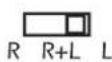
Diagram 10
Selecting Bridge Mode (See Diagram 11)
It is sometimes desirable to combine two channels into one through bridging. The output of the combined channels can then be used to power one speaker.
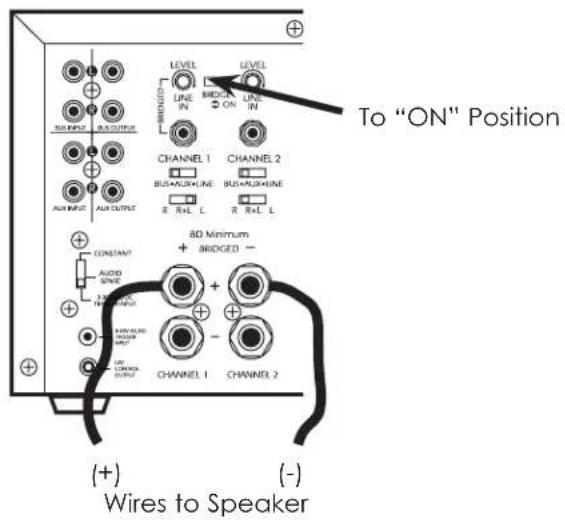
To bridge two adjacent channels move the switch marked "BRIDGE" to the "ON" position.
The speaker must be connected to the terminals immediately under the "BRIDGED" text as indicated in Diagram 11. All input selection and settings for the bridged channels will be done on the channel to the left.
Do not connect more than one speaker to the outputs of the bridged channel.
Diagram 11
Control Output
The 12V output jack on the back of the amplifier can be used to turn on a variety of components equipped to be activated when they receive a 12V DC output. Voltage is only delivered to the jack when the amplifier is "on" or active. When the amplifier turns off, the voltage ceases.
Before connecting another device to the 12 output please make sure that the device can accept 12V DC at 150ma. To connect the output to another device you must access the output jack with a two-conductor plug that fits into the 2.5mm jack. Be aware that the tip of the plug will be (+). If you are unsure about using this feature please contact an authorized SpeakerCraft dealer for assistance.
Connecting the Speaker Wires
CAUTION: Only make connections when the amplifier is turned off.
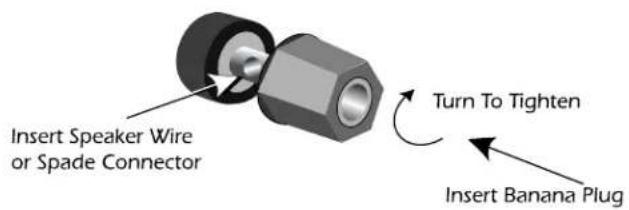
Using Standard Connections (See Diagram 12)
For best performance use high quality speaker cables. The banana plug outputs on the back of the amplifier allow for a variety of ways to connect your speakers to the amplifier.
Diagram 12: Binding Post Detail
Connecting the Line Level Audio Inputs
CAUTION: Only make connections when the amplifier is turned off.
There are three areas that an input signal can be connected, BUS, AUX and LINE IN. Refer to the System Design Examples to determine which is best suited for your application.
Audio Outputs
Sources connected to the "BUS" or "AUX" inputs can be forwarded to other components or amplifiers by connecting to the corresponding output sections to the right of each input section. By using standard audio patch cables, you can connect these outputs to the inputs of another amplifier. Up to 5 SpeakerCraft amplifiers can be daisy-chained together.
AC Power
Plug the socket of the AC cord supplied with the amplifier into the receptacle on the rear of the amplifier. Depending on your region, plug the AC cord directly into a 120V 60 Hz, 130V 50Hz or 240V 50 Hz wall outlet.
CAUTION: Do not plug the amplifier into the preamplifier or receivers switched outlet. If you wish to have the amplifier turn on once the preamplifier or receiver is activated, use one of the turn on modes, voltage or audio.
OPERATION
See Diagram 1 for the location of the following:
Power Switch
The switch on the front panel of the amplifier will turn off all amplifier circuitry no matter which turn on mode is selected. Refer to the "Power Mode Selection" section for further information.
Protection Red LEDs
When lit the "Protection" LEDs located on the front of the amplifier indicate that either a fault in the wiring, the speaker, or the amplifier has caused the channels associated with the LED to shut down.
Level Adjustment Knobs
The level adjustment knobs on the back panel of the amplifier can be used to adjust the level of each channel. There are many reasons for needing to adjust the level. You may wish to closely match other levels in the system, or you may wish to limit the volume level in an area, such as a child's room.
TROUBLESHOOTING
The Vital amplifier is designed to function trouble-free. Most problems occur because of operating errors. If you have a problem please check the troubleshooting list first. If the problem persists, contact your authorized SpeakerCraft dealer or SpeakerCraft technical support at (800) 448-0976 or e-mail us at techsupport@speakercraft.com.
| The Problem Possible Causes And Solutions | |
| No sound is heard on all channels. | Audio cable to the source component is not connected properly or the cable is bad. Use another cable that you know is good.The Input Selection switch is positioned incorrectly. Refer to installation instructions for proper settings.Some or all of the internal fuses are blown. Return the amplifier to your SpeakerCraft dealer for servicing. |
| No sound is heard on one or some channels. | Audio cable to the source component is not connected properly or the cable is bad. Use another cable that you know is good.The Input Selection switch is positioned incorrectly. Refer to installation instructions for proper settings.The Bridging switch is positioned incorrectly. Refer to installation instructions for proper settings.Check the termination points of the speaker cable at both the amplifier and speaker.A speaker is not working. Make sure by connecting the channel to a speaker that you know to be working. |
| No sound is heard on one or some channels.(Continued) | The level adjustment on the channel is turned all the way down. Turn it clockwise to raise the volume.Some or all of the internal fuses are blown. Return the amplifier to your SpeakerCraft dealer for servicing. |
| Hum or buzzing sound is heard. | The sound may be caused by a ground loop in the system. Try to eliminate this by reversing the AC plugs of other components in the system.Other causes include faulty cables. |
| Amplifier will not turn on. | The amplifier must be plugged into a live outlet. The power switch on the front panel must be on.The Power Mode switch may be positioned incorrectly. |
SPECIFICATIONS Vital Amplifiers
Vital 1250
Rated Power: 50 Watts x 12 Channels, 8Ω, 2
Channels Driven, Remaining Channels Driven at 1/8 of Rated Power.
• <0.40% THD+N (20 Hz to 20 kHz)
• <0.05% THD+N (1W, 20 Hz to 20 kHz)
Power at 4 Ohms: 75 Watts x 8 Channels, 2 Channels Only Driven at a Time.
• <0.50% THD+N (at 1 kHz)
• <0.05% THD+N (1W, at 1 kHz)
Bridged Power Output: 170 Watts x 6 Channels, 8Ω, 2 Channels Only Driven at a Time.
- < 0.50% THD+N (at 1 kHz)
S/N Ratio (A-WTD)
• >102 db
Frequency Response
• ± 0.7 dB, 20 Hz to 20 kHz, 8Ω
• ± 1.5 dB, 20 Hz to 20 kHz, 4Ω
Input Sensitivity
- 1.0 Vrms
Input Impedance
• >20 k Ω
Damping Factor
• >60
Power Consumption
• US: 120 VAC, 60 Hz
• Europe: 230 VAC, 50 Hz
• Australia: 240 VAC, 50 Hz
• Standby: 7 Watts/120V, 1 Watt/230V
& 240V (ErP)
• Active On, No Signal: 80 Watts
- All Channels Driven to 18 of Rated Power:
210 Watts, 8Ω, 270 Watts, 4Ω
Fuse Rating
• 120V Version: T12A/250V
• 230V/240V Version: T6.3AL/250V
Dimensions: 3U (H x W x D) 6" x 17 ^1/8 " x 16" (152 mm x 435 mm x 406 mm)
Weight: 49 lbs. (22 kg)
Vital 850
Rated Power: 50 Watts x 8 Channels, 8Ω, 2 Channels Driven, Remaining Channels Driven at 1/8 of Rated Power.
- < 0.40% THD+N (20 Hz to 20 kHz)
• <0.05% THD+N (1W, 20 Hz to 20 kHz)
Power at 4 Ohms: 75 Watts x 8 Channels, 2 Channels Only Driven at a Time.
• <0.50% THD+N (at 1 kHz)
• <0.05% THD+N (1W, at 1 kHz)
Bridged Power Output: 170 Watts x 4 Channels, 8Ω, 2 Channels Only Driven at a Time.
• <0.50% THD+N (at 1 kHz)
S/N Ratio (A-WTD)
• >102 db
Frequency Response
• ± 0.7 dB, 20 Hz to 20 kHz, 8Ω
• ± 1.5 dB, 20 Hz to 20 kHz, 4Ω
Input Sensitivity
- 1.0 Vrms
Input Impedance
• >20 k Ω
Damping Factor
• >60
Power Consumption
• US: 120 VAC, 60 Hz
• Europe: 230 VAC, 50 Hz
• Australia: 240 VAC, 50 Hz
• Standby: 6 Watts/120V, 1 Watt/230V
& 240V (ErP)
• Active On, No Signal: 65 Watts
- All Channels Driven to 18 of Rated Power:
148 Watts, 8Ω
Fuse Rating
• 120V Version: T10A/250V
• 230V/240V Version: T5AL/250V
Dimensions: 3U (H x W x D) 6" x 17 ^1/8 " x 16" (152 mm x 435 mm x 406 mm)
Weight: 43 lbs. (20 kg)
WARRANTY
Limited Two-Year Warranty
SpeakerCraft Inc. warrants to the original retail purchaser only that this SpeakerCraft product will be free from defects in materials and workmanship for a period of two years, provided the product was purchased from a SpeakerCraft Authorized Dealer.
Defective products must be shipped, together with proof of purchase, prepaid insured to the SpeakerCraft Authorized Dealer from whom they were purchased, or to the SpeakerCraft factory at the address listed on this installation instruction manual. Freight collect shipments will be refused. It is preferable to ship this product in the original shipping container to lessen the chance of transit damage. In any case, the risk or loss or damage in transit is to be borne by the purchaser. If upon examination at the Factory or SpeakerCraft Authorized Dealer it is determined that the unit was defective in materials or workmanship at any time during this warranty period, SpeakerCraft or the SpeakerCraft Authorized Dealer will, at its option, repair or replace this product at no additional charge, except as set forth below. If this model is no longer available and can not be repaired effectively, SpeakerCraft, at its sole option may replace the unit with a current model of equal or greater value. In some cases where a new model is substituted, a modification to the mounting surface may be required. If mounting surface modification is required, SpeakerCraft assumes no responsibility or liability for such modification. All replaced parts and product become the property of SpeakerCraft Inc. Products replaced or repaired under this warranty will be returned to the original retail purchaser, within a reasonable time, freight prepaid.
This warranty does not include service or parts to repair damage caused by accident, disaster, misuse, abuse, negligence, inadequate packing or shipping procedures, commercial use, voltage inputs in excess of the rated maximum of the unit, or service, repair or modification of the product which has not been authorized or approved by SpeakerCraft. This warranty also excludes normal cosmetic deterioration caused by environmental conditions. This warranty will be void if the Serial number on the product has been removed, tampered with or defaced.
This warranty is in lieu of all other expressed warranties. If the product is defective in materials or workmanship as warranted above, the purchaser's sole remedy shall be repair or replacement as provided above. In no event will SpeakerCraft be liable for any incidental or consequential damages arising out of the use or inability to use the product, even if SpeakerCraft Inc. or a SpeakerCraft Inc. Authorized Dealer has been advised of the possibility of such damages, or for any claim by any other party. Some states do not allow the exclusion or limitation of consequential damages, so the above limitation and exclusion may not apply.
All implied warranties on the product are limited to the duration of this expressed warranty. Some states do not allow limitation on the length of an implied Warranty. If the original retail purchaser resides in such a state, this limitation does not apply.