FaceCam 1320 - Webcam GENIUS - Free user manual and instructions
Find the device manual for free FaceCam 1320 GENIUS in PDF.


| Product Type | Webcam |
| Brand | Genius |
| Model | FaceCam 1320 |
| Category | Webcam |
| Resolution | 1280 x 720 (720p HD) |
| Frame Rate | 30 fps |
| Lens | Fixed focus |
| Microphone | Built-in |
| Interface | USB 2.0 |
| Compatibility | Windows, Mac OS, Chrome OS |
| Dimensions (W x H x D) | 70 x 50 x 40 mm |
| Weight | 100 g |
| Power Supply | Via USB |
| Cable Length | 1.5 m |
| Mounting Type | Clip-on / Tripod mount |
| Field of View | 60° |
| Low Light Performance | Standard |
| Privacy Shutter | No |
| Maintenance | Wipe with dry cloth; avoid liquids |
| Safety | Keep away from water and heat sources |
| Spare Parts | Not available separately |
| Warranty | 1 year |
Frequently Asked Questions - FaceCam 1320 GENIUS
User questions about FaceCam 1320 GENIUS
0 question about this device. Answer the ones you know or ask your own.
Ask a new question about this device
Download the instructions for your Webcam in PDF format for free! Find your manual FaceCam 1320 - GENIUS and take your electronic device back in hand. On this page are published all the documents necessary for the use of your device. FaceCam 1320 by GENIUS.
USER MANUAL FaceCam 1320 GENIUS
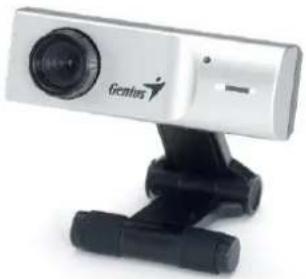
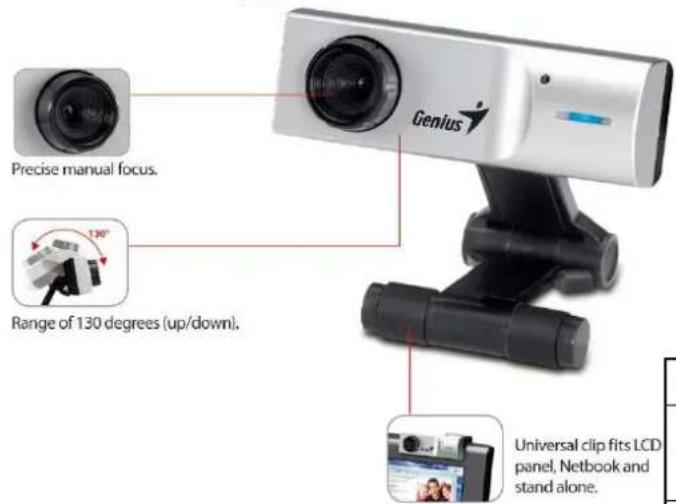
FaceCam1320 is the latest precision 1.3MP webcam from Genius. It works with Windows 7, Mac 10.4.9 above, and Linux kernel 2.6.21 above. Enjoy video chatting with popular instant messaging applications like Skype, MSN, Google Talk, iChat, or use it in Facebook. FaceCam 1320 use the new IPM* function can help prevent unauthorized outside access get control your webcam. You also get up and down range of 130 degrees. For more information, contact your local sales representative today.
natural_image
White Gelcent camera with black tripod base (no visible text or symbols)


No Driver required!
Features:
• Premium adjustable lens keeps your face always in focus
- IPM* function: An intelligent security mechanism that can help prevent unauthorized outside access get control of your webcam
- Suitable for Facebook or YouTube, upload and record videos easily
• Unversial clip, great for LCD, Netbook and stand alone
Date Available:
(Image Protection Mechanism) Install the driver, the security mechanism that can help prevent unauthorized outside access get control of your webcam. *Windows only
*Download the driver from www.geniusnet.com
System Requirements:
- For PC
Pentium 4 2.4 GHz or AMD equivalent - Windows 7/Vista/XP SP2 operation system DirectX 9.0 above
For Mac
- 2.33 GHz Intel Core 2 Duo compatible 1.07 GHz Power PC G4
- Mac OS 10.4.9 above
512MB RAM
- 500MB HDD (1GB recommended)
• DVD-ROM for software installation
● Available USB port (USB2.0 recommended)
Package Contents:
- FaceCam 1320 webcam
● Multi-language quick guide
WEEE information:
• Body Weight (g): 62g
● Body Size (LxWxH): 60 x 20 x 67 mm
● Package Size (LxWxH): 60 x 115 x 168 mm
• PCs/Carton: 20pcs/Carton
• CUFT: 1.09 CUFT/ CTN (357 x 324 x 269 mm)
P/N: 32200178101
EAN: 4710268233565 / UPC: 091163233565
| Model Name | eFace 1300 | FaceCam 1320 |
| Product image | ||
| Image Sensor | 1.3 MP CMOS | 1.3 MP CMOS |
| Lens type | Manual focus | Manual focus |
| Interface | USB 2.0 | USB 2.0 |
| *IPM (Image Protection Mechanism) | - | √ |
| File format | JPEG/WMV JPEG/WMV | |
| Image resolution | 8MP(Interpolation),1280 x 1024, 1024 x 960,800 x 600640 x 480, 352 x 288,320 x 240, 176 x 144,160 x 120 pixels | 1280 x 1024, 800 x 600640 x 480, 352 x 288,320 x 240, 176 x 144,160 x 120 pixels |
| Video resolution | CIF: Up to 30 fps VGA: Up to 30 fps 1280 x 1024: Up to 15fps | CIF: Up to 30 fps VGA: Up to 30 fps 800 x 600: Up to 9fps 1280 x 1024: Up to 9fps |
| View angle | Up/Down: 130 degrees Rotate: 360 degrees | Up and Down: 130 degrees |
| UVC (Plug & Play) | √ | √ |
| System support | Windows 7/Vista/XP SP2 Mac 10.4.9 above Linux kernel 2.6.21 above | Windows 7/Vista/XP SP2 Mac 10.4.9 above Linux kernel 2.6.21 above |
* IPM (Image Protection Mechanism): An intelligent security mechanism that can help prevent unauthorized outside access get control of your webcam. You need to install the "Button manager" driver to use this function. Only works in Windows.
Please download the driver from www.geniusnet.com