
XRU300 - Controller VIZIO - Free user manual and instructions
Find the device manual for free XRU300 VIZIO in PDF.


| Product Type | Universal Remote Control |
| Manufacturer | VIZIO |
| Model | XRU300 |
| Power Supply | 2 AA batteries (Not included) |
| Number of Devices Controlled | Up to 8 |
| Wireless Technology | Infrared (IR) |
| Learning Capability | Up to 130 commands |
| Code Saver | Retains codes for up to 10 minutes during battery change |
| Battery Saver | Auto power-off after 30 seconds of inactivity |
| Programming Methods | Direct code entry and smart search (auto-code search) |
| Compatible Device Types | TV, STB, DVD, DVR, Audio, Blu-ray, Cable, and more |
| Buttons | Power, source input, device selectors (TV, STB, DVD, AUDIO, DVR, HD, CD, AUX), numeric keys, navigation, volume, mute, channel, menu, info, guide, colored keys, transport (play, stop, etc.), learn, list, exit, back, last, wide, dash, 4 programmable keys (L1-L4) |
| Display | None (LED indicator only) |
| Color | Black (typical) |
| Warranty | 1 year limited (non-commercial use) |
| Regulatory Compliance | FCC Part 15 Class B, ICES-003, RSS-210 |
| Technical Support | Email: techsupport@vizio.com, Phone: (877) 698-4946 |
| Cleaning Instructions | Use a soft cloth; if heavily soiled, use a soft cloth moistened with diluted neutral cleaner (wring well) |
| Safety Precautions | Keep dry, avoid heat/humidity, remove batteries during long storage, do not disassemble or drop |
| Country of Origin | Not specified |
Frequently Asked Questions - XRU300 VIZIO
User questions about XRU300 VIZIO
0 question about this device. Answer the ones you know or ask your own.
Ask a new question about this device
Download the instructions for your Controller in PDF format for free! Find your manual XRU300 - VIZIO and take your electronic device back in hand. On this page are published all the documents necessary for the use of your device. XRU300 by VIZIO.
USER MANUAL XRU300 VIZIO
Regulatory Cautions ......2
Button Descriptions ....3
Initial Setup ....5
Battery Insertion ....5
Precautionary tips for the battery .....5
Battery Saver 5
Code Saver ....5
Code Setup......6
Setup for TV or other devices ......6
Using the smart search function
Smart Learning....7
Troubleshooting 9
Warranty .....11
Code List ....13
Congratulations on your purchase of VIZIO Universal Remote Control. With this Universal Remote, juggling multiple remote controls is a thing of the past! Your new remote controls up to 8 devices, including the most popular brands of TV, Blu-Ray, DVD, DVR, Cable, and more.
Note: Some functions from your original remote may not be controlled by this remote. Use the original remote, if available, to control such functions.
Sometimes buttons other than described in these instructions may actually perform the function. For example, the CHAN and VOL buttons might be used to navigate through menu choices. We recommend you experiment with the remote to identify if such situations pertain to your equipment.
Your new remote is easy to use, easy to program, and it gives you total control—at the touch of your fi ngertips!
Regulatory Cautions
FCC Caution
THIS DEVICE COMPLIES WITH PART 15 OF THE FCC RULES. OPERATION IS SUBJECT TO THE FOLLOWING TWO CONDITIONS:
(1) THIS DEVICE MAY NOT CAUSE HARMFUL INTERFERENCE, AND (2) THIS DEVICE MUST ACCEPT ANY INTERFERENCE RECEIVED, INCLUDING INTERFERENCE THAT MAY CAUSE UNDESIRED OPERATION.
NOTE: This equipment has been tested and found to comply with the limits for a Class B digital device, pursuant to part 15 of the FCC Rules. These limits are designed to provide reasonable protection against harmful interference in a residential installation.
This equipment generates, uses and can radiate radio frequency energy and, if not installed and used in accordance with the instructions, may cause harmful interference to radio communications. However, there is no guarantee that interference will not occur in a particular installation. If this equipment does cause harmful interference to radio or television reception, which can be determined by turning the equipment off and on, the user is encouraged to try to correct the interference by one or more of the following measures:
- Reorient or relocate the receiving antenna.
- Increase the separation between the equipment and receiver.
- Connect the equipment into an outlet on a circuit different from that to which the receiver is connected.
- Consult the dealer or an experienced radio/TV technician for help.
NOTE: Modifications to this product will void the user's authority to operate this equipment.
Canadian Notice
This Class B digital apparatus complies with limits for radio noise emissions specified in ICES-003 of the Department of Communications. This device complies with RSS-210 of Industry and Science Canada Operation is subject to the following two conditions: (1) this device may not cause interference, and (2) this device must accept any interference, including interference that may cause undesired operation of the device.
Button Description
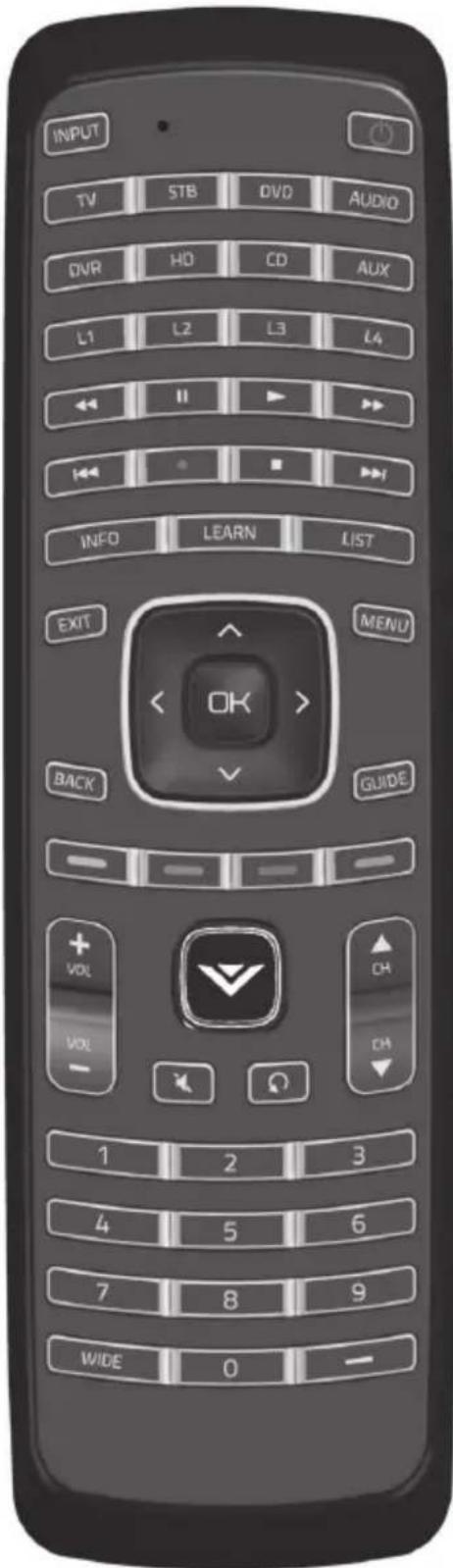
INPUT – This button allows the user to cycle through the available source inputs.
POWER – Press this button to turn the component on or off.
TV, STB, DVD, AUDIO, DVR, HD, CD, AUX – Device buttons. Used to program a set of commands to control a single device.
L1, L2, L3, L4 - Miscellaneous programmable keys.
Transport keys – Play, Stop, Pause, Record, Fast Forward, and Rewind.
INFO – Display additional info of the programming.
LEARN – Press and hold to start learning commands.
LIST – Press this button to display listing.
EXIT – Press this button to exit from the on-screen menu.
MENU – Display the on-screen menu.
OK – Use this button for the on-screen menu. Press it to confirm or choose a highlighted menu selection.
Up, Down, Left, Right – These buttons are used to navigate the on-screen menu.
BACK – Press this button to return to previous the on-screen menu.
GUIDE – This button displays program guide information.
Colored keys – Use with your STB, DVR, etc., if available.
V Button – This button starts VIZIO Internet Apps or other component's multimedia function, if available
Volume Up/Down – This button turns the volume up or down.
MUTE – This button turns the sound on and off.
Channel Up/Down – These buttons change the channels up or down.
LAST – This button recalls the previously viewed channel.
NUMBER BUTTON PAD – Use these buttons to select a channel.
WIDE – This button switch between display mode.
(DASH) – Use to select digital sub-channels. For example, channel 28-2 would be selected by the button sequence 2, 8, DASH, 2.
puteS laitinl
Insert the battery to the battery compartment to activate the remote control.
Battery replacement
Insert two AA batteries into the remote control. Make sure that you match the (+) and (-) symbols on the battery with the (+) and (-) symbols inside the battery compartment. Re-attach the battery cover.
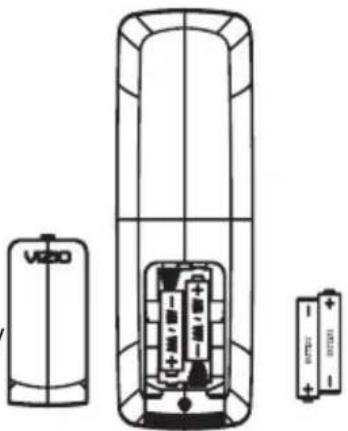
Precautionary Tips for Inserting the Battery
- Only use AA batteries
- Inserting the battery incorrectly may result in cracking or leakage that may pose a fire risk or lead to personal injury.
- Dispose of the battery in accordance with local laws and regulations.
- Keep the battery away from children and pets.
Battery Saver
Your remote automatically turns off if the buttons are depressed more than 30 seconds.
Code Saver
You will have up to 10 minutes to change the battery in your remote without losing codes you have programmed. However, to avoid losing your codes, do not press any buttons until battery is installed in the remote.
puteS
Programming for TV, STB, DVD, AUDIO, DVR, HD, CD and AUX
Note: TV mode can be programmed for TV codes ONLY. STB and DVD mode can be programmed to control ANY kind of device listed in the code list. The remote is pre-programmed to operate VIZIO TVs under TV mode and VIZIO Blu-Ray Players under DVD mode.
- Manually turn on your TV (or device you want to control).
- Press the TV (or device) button and hold for 5 seconds until the LED flashes twice. LED will remain lit.
- Find the programming code for your TV (or device) in the code list and enter it using the Number Buttons. The LED flashes once after entering each digit. If the code is accepted, the LED flashes twice after the last digit is and then turns off.
If the code is invalid, the LED will have a long blink and then turns off. Please repeat Steps 2 and 3 with the next code listed for the component and manufacturer.
- Point the remote control at the TV (or device) and press the POWER button. The TV (or device) should turn off.
Note:
- If your TV (or device) does not respond, try all the codes for your brand. If the codes do not work, or your brand is not listed, see “Using the smart search function, page 7.”
- Sometimes a code listed will only include limited functions. Try other codes that may include more functionality.
Setup, cont.
Using the Smart Search Function
If you cannot find the manufacturer in the component list or the program code does not work, you can use the remote control to search for the correct device code.
To search for a device code:
- Manually turn on the device.
- Press and hold the matching device button (TV, STB, DVD , etc) for 5 seconds until the LED flashes twice. The LED will remain lit.
- Press 9 9 1 using the Number Buttons. The LED flashes twice after the last digit is entered and LED will remain lit.
- Point the remote control at the device, then press the POWER button. The code search begins. The LED flashes every 3 seconds during the search. Move your finger to the OK button.
- When the device turns off, press the OK button within three seconds to save the code. If the device does not respond correctly, repeat the search procedure to find another code.
Resetting the Remote to Factory Settings:
- Press and hold the V button for 5 seconds until the LED flashes twice. LED will remain lit.
- Press 9 1 9 1 9 using the Number Buttons. The LED flashes twice after the last digit is entered and then turns off. The remote is now reset to factory settings.
Smart Learning
Please note:
- Your VIZIO Universal Remote can store a total of 130 commands.
- Not all commands from all remotes can be programmed.
- Commands cannot be assigned to the 8 device buttons (TV, STB, DVD, etc).
- You can re-program a button by following the steps below.
Using the Smart Learning Mode
- Press the device button that you wish to program (TV, STB, DVD, etc). Then press and hold the LEARN button for 5 seconds. The LED will light up. This indicates the Universal Remote is in learning mode.
- Align the transmitter of the original remote control with the front window of the Universal Remote (For best results, the remotes should be about 5cm apart pointing to each other). The VIZIO Universal Remote can only learn commands from one remote at a time. For example, you cannot teach commands from both a TV remote and a DVD remote.
- Press the button on the Universal Remote that you wish to program. When the LED flashes, it is ready to receive the command.
- Press and hold a button on the original remote until the LED light on the Universal Remote flashes three times. The LED will then remain lit. This indicates that it has learned the code. (If LED only flashes twice and then stops, the Universal Remote's memory is full, and you must delete some learned commands.)
- Repeat steps 3-4 until all the desired buttons have been learned by the Universal Remote.
- When finished, press the LEARN button to complete the code learning. The LED light will turn off. The Universal Remote will automatically exit learning mode if it is inactive for 20 seconds or longer.
Clearing a Device Button
-
To clear a device button (TV, STB, DVD, etc) of all learned commands, press and hold the device button for 5 seconds. The LED will light up.
-
Press 9 9 9 1. The LED blinks twice to indicate the device button is cleared of all commands.
Maintenance & Troubleshooting
VIZIO Remote Control Precautions
- The remote control should be kept dry and away from heat sources. Avoid humidity.
- If the Component responds erratically to the remote control or does not respond at all, check the battery. If the battery is low or exhausted, replace it with a fresh battery.
- When not using the remote control for a long period of time, remove the battery.
- Do not take the battery apart, heat it, or throw it into a fire.
- Do not subject the remote control to undue physical stress, such as striking or dropping it.
Cleaning the Remote Control
- Use a soft cloth for cleaning.
- If the remote control is seriously contaminated, use a soft cloth moistened with diluted neutral cleaner to clean the display. Wring water out of the cloth before cleaning to prevent water from penetrating into the housing.
Troubleshooting
-
Remote control does not work with my TV:
-
Point the remote control directly at the remote sensor on your TV.
- Remove any obstacles between the remote control and the remote sensor.
- Replace old batteries with new batteries.
-
Press the TV button on the top of the remote to return to the TV mode.
-
The remote control is not working with my devices.
-
Move closer to the device.
- Point the remote control directly at the remote sensor on your device.
- Remove any obstacles between the remote control and the remote sensor.
- Replace old batteries with new batteries.
-
Make sure you have pressed the correct device button at the top of the remote.
-
The remote control does not work with my device after programming it.
- Set the remote control code correctly. If the code that is listed first for your device does not work, try all the codes for your device in the order in which they are listed in the supplied Code List.
Telephone & Technical Support
Products are often returned due to a technical problem rather than a defective product that may result in unnecessary shipping charges billed to you. Our trained support personnel can often resolve the problem over the phone. For more information on warranty service or repair, after the warranty period, please contact our Support Department at the number below. Customer support and quality service are integral parts of VIZIO's commitment to service excellence.
For technical assistance contact our VIZIO Technical Support Department via email or phone. Email: techsupport@vizio.com (877) 698-4946 Fax: (949) 585-9563 Hours of operation: Monday - Friday: 6 am to 9 pm Saturday – Sunday: 8 am to 4 pm Please have your VIZIO model number, and date of purchase available before you call VIZIO.
VIZIO
39 Tesla
Irvine, CA 92618, USA
Web: www.vizio.com
ONE YEAR LIMITED WARRANTY
Covers units purchased as "new" in United States and Puerto Rico Only.
VIZIO provides a warranty to the original purchaser of a new Product against defects in materials and workmanship for a period of one year of non-commercial usage and ninety (90) days of commercial use. If a Product covered by this warranty is determined to be defective within the warranty period, VIZIO will either repair or replace the unit at its sole option and discretion. To obtain warranty service, contact VIZIO Technical Support via email: TechSupport@VIZIO.com or via phone at 877 MY VIZIO (877.698.4946) from 6:00AM to 9:00PM Monday through Friday and 8:00AM to 4:00PM Saturday and Sunday, Pacifi c Time, or visit www.VIZIO.com. PRE-AUTHOIRIZATION MUST BE OBTAINED BEFORE SENDING A UNIT TO A VIZIO SERVICE CENTER. Proof of purchase in the form of a purchase receipt or copy thereof is required to show that the Product is within the warranty period.
Parts and Labor
There will be no charge for parts or labor during the warranty period. Replacement parts and units may be new or recertified at VIZIO's option and sole discretion. Replacement parts and units are warranted for the remaining portion of the original warranty or for ninety (90) days from warranty service or replacement, whichever is greater.
Type of Service
Defective Products must be sent to a VIZIO service center to obtain warranty service. VIZIO is not responsible for transportation costs to the service center, but VIZIO will cover return shipping to the customer. PRE-AUTHORIZATION IS REQUIRED BEFORE SENDING ANY UNIT IN FOR WARRANTY SERVICE. All Product returns to VIZIO's service center must utilize either the original blister pack and shipping material or packaging that affords an equal degree of protection. VIZIO Technical Support will provide instructions for packing and shipping the covered Product to the VIZIO service center.
Limitations and Exclusions
VIZIO's one-year limited warranty only covers defects in materials and workmanship. This warranty does not cover, for example: cosmetic damage, normal wear and tear, improper operation, improper voltage supply, signal issues, damage from shipping, acts of God, any type of customer misuse, modification or adjustments, as well as installation and set-up issues or any repairs attempted by anyone other than by a VIZIO authorized service center. Products with unreadable or removed serial numbers or requiring routine maintenance are not covered. This one year limited warranty does not cover Products sold "AS IS", "FACTORY RECERTIFIED", or by a non-authorized reseller. THERE ARE NO EXPRESS WARRANTIES OTHER THAN THOSE LISTED OR DESCRIBED ABOVE. ANY IMPLIED WARRANTIES, INCLUDING ANY IMPLIED WARRANTY OF MERCHANTABILITY AND FITNESS FOR A PARTICULAR PURPOSE, SHALL BE LIMITED IN DURATION TO THE PERIOD OF TIME SET FORTH ABOVE. VIZIO'S TOTAL LIABILITY FOR ANY AND ALL LOSSES AND DAMAGES RESULTING FROM ANY CAUSE WHATSOEVER INCLUDING VIZIO'S NEGLIGENCE, ALLEGED DAMAGE, OR DEFECTIVE GOODS, WHETHER SUCH DEFECTS ARE DISCOVERABLE OR LATENT, SHALL IN NO EVENT EXCEED THE PURCHASE PRICE OF THE DEVICE. VIZIO SHALL NOT BE RESPONSIBLE FOR LOSS OF USE, LOSS OF INFORMATION OR DATA, COMMERCIAL LOSS, LOST REVENUE OR LOST PROFITS, OR OTHER INCIDENTAL OR CONSEQUENTIAL DAMAGES. SOME STATES DO NOT ALLOW LIMITATIONS ON HOW LONG AN IMPLIED WARRANTY LASTS OR THE EXCLUSION OF INCIDENTAL OR CONSEQUENTIAL DAMAGES, SO THE ABOVE LIMITATIONS OR EXCLUSIONS MAY NOT APPLY TO YOU. THIS WARRANTY GIVES YOU SPECIFIC LEGAL RIGHTS, AND YOU MAY ALSO HAVE OTHER RIGHTS, WHICH VARY FROM STATE TO STATE. THIS WARRANTY IS SUBJECT TO CHANGE WITHOUT NOTICE. CHECK www.VIZIO.com FOR THE MOST CURRENT VERSION.
THE TRADEMARKS SHOWN HEREIN ARE THE PROPERTY OF THEIR RESPECTIVE OWNERS; IMAGES USED ARE FOR ILLUSTRATION PURPOSES ONLY. VIZIO, THE V LOGO AND WHERE VISION MEETS VALUE AND OTHER VIZIO TRADEMARKS ARE THE INTELLECTUAL PROPERTY OF VIZIO INC. PRODUCT SPECIFICATIONS ARE SUBJECT TO CHANGE WITHOUT NOTICE. © 2010 VIZIO INC. ALL RIGHTS RESERVED.
Code List
TV (including LCD, LED and Plasma)
| ABEX | 0185 |
| ACER | 1163 |
| ACME | 0016 |
| ADA | 0006 |
| ADC 0001 | |
| ADMIRAL | 0010 0135 0020 0226 |
| ADVENT | 1171 0116 0167 0176 0922 |
| ADVENTURA | 0174 |
| AIKO | 0058 |
| AIWA 0195 0196 0227 0269 | |
| AKAI | 0105 0002 0077 1137 1138 0254 1105 1113 1139 |
| ALLERON 0051 | |
| AMARK | 0020 |
| AMTRON | 0053 |
| ANAM NATIONAL 0053 | 0003 0025 0042 0193 |
| AOC | 0004 0005 0009 1009 0014 0156 0175 0187 |
| APEX | 0214 0216 0215 1132 0401 |
| ARCHER | 0020 |
| ASPECT | 0059 |
| AUDIOVOX | 1164 1165 0053 1019 1117 |
| AXION | 0177 |
| BANG & OLUFSEN | 0190 |
| BELCOR | 0004 |
| BELL & HOWELL | 0031 0049 0000 0001 |
| BENQ | 0081 0083 0101 1150 |
| BLUESKY 1155 0144 | |
| BRANFORD | 0053 |
| BROKSONIC | 0147 0135 0310 0394 0932 |
| BROKWOOD | 0004 |
| CANDLE | 0004 0009 0174 0008 |
| CAPEHART | 0175 |
| CCE 1153 | |
| CELEBRITY | 0002 |
| CELERA | 0214 |
| CENTRIOS | 0169 |
| CENTURION | 0009 |
| CETRONIC | 0042 |
| CHANGHONG | 0214 0401 |
| CINERAL | 0058 0144 |
| CITIZEN | 0004 0009 0053 0105 0109 0189 0135 0001 0008 0042 0058 |
| CLAIRTONE | 0014 |
| CLASSIC | 0214 0401 0042 |
| CLP | 0144 |
| CLP CLASSIC | 0084 0094 0064 |
| COBY | 1091 1124 |
| COLOR VOICE | 0010 |
| COLORTYME 0004 0009 0010 | |
| CONCERTO | 0004 0009 |
| CONCIERGE | 0121 |
| CONTEC | 0053 0012 0014 0042 |
| CORNEA | 0050 |
| CRAIG | 0053 0042 |
| CROSLEY 0062 | |
| CROWN | 0053 0042 |
| CTX 0020 | |
TV (including LCD, LED and Plasma), cont.
CTX 0020
CURTIS MATHES 0031 0105 0130 0004 0009 0000 0049 0109 0358
0001 0015
CXC 0053 0042
CYBERVISION 0144
DAEWOO 0130 0004 0009 0100 0005 0138 0043 0140 0039
0444 0080 0042 0058 0017 0010 0126 0018 0127 0019
DAYTRON 0004 0009
DELL 0209 0028 0132
DIAMOND VISION 0210 0948 0092 0896
DIGIMATE 1017
DIGISTAR 1019 0165 0118 0116 0167 0132 1020 1151 1152
DIMENSIA 0031 0000
DISNEY 0158 0135
DUKANE 0059 0072
DUMONT 0121 0004
DURABRAND 0189 0135 0153 0217 0157 1135 0133
DYNASTY 0042
DYNEX 1171 0135 1181
ELECTROBAND 0002 0014
ELECTROHOME 0004 0009 0254 0003 0022
ELEKTRA 0001
ELEMENT 1173 1025
ELITE VIDEO 0197
EMERSON 1172 0004 0009 0044 0135 0049 0051 0189 0053
0147 0039 0130 0210 0227 0233 0254 0265 0266
0310 0325 0456 0040 0041 0042 0021 0023 0024
0179 0045 0025 0027 0030 0032 0034 0035 0037
ENVISION 1179 0004 0009 0074 1009
ESA 0189
FISHER 0049 0110 0268 0180 0012
FLUID 1025 1026 1027
FUJITSU 1178 0197 0051 1006
FUNAI 0051 0189 0053 0227 0456 0069 0042
FUTURETEC 0053 0042
GATEWAY 0046
GE 0031 0107 0164 0004 0009 0044 0054 0000 0342
0003 0125 0015 0022 0052 0087
GIBRALTER 0121 0004
GOLDSTAR 0004 0009 0005 0227 0338 0012 0057 0080 0156
GPX 0944
GRADIENTE 1013 0004 0153 1160 1159
GRUNDY 0051 0053
GUESTVISION 0201
GVISION 1005
HAIER 0081 0216 0217 0157 1147 0935
HALLMARK 0004 0009
HARVARD 0053
HAUPPAUGE 1198
HEWLETT PACKARD 1015 1004
HISENSE 1176 0073 0182 0216 1016
HITACHI 0088 0059 0142 0060 0072 0004 0009 0091 1002
0001 0012 0061 0137 0139 0141 0179 0227
HYUNDAI 1134
ILO 0198 1070 1024 1023 0146 0189 1139 1113
IMA 0053
IN FOCUS 0000
TV (including LCD, LED and Plasma), cont.
| INFINITY 0062 0288 | |
| INITIAL | 1070 0146 1085 1109 |
| INSIGNIA 1181 1180 1175 | 1171 0103 0189 0217 0135 0133 |
| 0116 0167 1148 0456 0029 0905 1406 1407 1408 | |
| INTEGRA | 0181 |
| INTEQ | 0121 |
| JANEIL | 0174 |
| JBL | 0062 |
| JC PENNEY | 0031 0004 0005 0009 0105 0107 0109 0054 0000 |
| 0087 0008 0012 0015 0022 0030 0052 | |
| JCB | 0002 |
| JENSEN | 0004 0009 0133 |
| JVC | 0060 0026 0197 0069 0160 0247 0923 0012 0065 |
| 0067 0141 | |
| KAWASAKI | 0945 |
| SAWASHO | 0004 0009 0002 |
| KAYPANI 0175 | |
| KEC | 0042 0053 |
| KENWOOD | 0004 0009 |
| KLH | 0214 |
| KLOSS NOVABEAM | 0068 0174 |
| KOGI | 1005 |
| KONKA 0053 0011 0016 | 0047 0066 0103 0412 0413 0029 |
| KTV | 0053 0014 0021 0042 0070 |
| KURAZAI | 0001 |
| LASONIC 0210 0948 | |
| LEGEND | 0116 |
| LG | 0134 0004 0050 0009 0005 0155 0132 0227 0338 |
| 0012 0057 0080 0156 | |
| LIQUIDVIDEO | 0177 0168 |
| LODGENET | 1170 0031 0202 0000 0001 |
| LOEWE | 0211 0062 |
| LOGIK | 0031 0000 0001 |
| LUCE | 0055 |
| LUXMAN 0004 0009 | |
| LXI | 0031 0004 0009 0049 0062 0107 0109 0000 0227 |
| 0015 | |
| MAGNASONIC 0051 | |
| MAGNAVOX | 1174 0062 0004 0009 0183 1133 0226 0288 0456 |
| 0008 0068 0075 0141 | |
| MAJESTIC | 0031 0000 0001 |
| MARANTZ 0062 0181 0004 0009 | |
| MAXENT 0046 | |
| MEDION | 0213 0198 0158 |
| MEGATRON | 0004 0009 0059 |
| MEI | 0014 |
| MEMOREX | 0004 0009 0049 0051 0135 0031 0000 1007 0268 |
| 0310 0001 0394 1025 | |
| MGA | 0004 0005 0009 0051 0012 0022 0141 0180 |
| MIDLAND | 0031 0121 0054 0107 0015 |
| MINTEK | 0146 |
| MINUTZ | 0052 |
| MISAKAI | 0189 |
| MITSUBISHI | 0005 0151 0051 0004 0009 0254 0022 0141 0180 |
| MONIVISION | 0036 |
| MONTGOMERY WARD | 0031 0001 0000 |
| MOTEVA 0049 1013 | |
| MOTOROLA | 0020 0003 |
TV (including LCD, LED and Plasma), cont.
| MTC | 0004 0005 0009 0105 0109 0014 |
| MULTITECH | 0053 |
| MULTIVISION 0084 | |
| MYRON&DAVIS | 0212 |
| NAD 0004 0009 0109 0185 | |
| NEC 1384 0181 0004 0005 0009 0003 0010 0095 0141 | |
| NET TV | 0046 0124 |
| NEXXTECH | 1052 0167 |
| NIKEI | 0042 |
| NIKKO | 0004 0009 0058 |
| NIKO | 1143 |
| NORCENT | 0216 0043 0056 |
| NTC | 0058 |
| OLEVIA | 1027 1012 1140 1142 1156 |
| ONCOMMAND | 0201 1161 |
| ONKING | 0042 |
| ONWA | 0053 0042 |
| OPTIMUS 0170 0185 0374 0381 | |
| OPTOMA | 1028 |
| OPTONICA | 0020 0095 |
| ORION | 0121 0135 0035 |
| PANASONIC | 1182 0171 0148 0054 0170 0062 0374 0381 0437 0950 0003 0070 |
| PHILCO 0062 0004 0005 0009 0183 0011 1158 0068 0075 0141 0003 0008 | |
| PHILIPS | 0154 1174 0062 0204 0184 0208 0205 0206 0207 0004 0189 0183 0199 0200 0081 1149 1154 0288 0456 0003 0008 0068 0075 0086 0087 0141 |
| PHILIPS-MAGNAVOX | 0062 0204 0207 0183 0226 0288 |
| PILOT | 0004 |
| PIONEER | 0185 0181 0072 0004 0009 0090 0179 |
| PIVA | 1075 |
| PLANAR | 1007 |
| POLAROID | 1177 1162 1025 0182 0173 0133 1019 1136 0029 |
| PORTLAND | 0004 0005 0009 0138 0130 |
| PRECISION | 0166 |
| PRICE CLUB | 0105 |
| PRIMA | 1019 0165 0116 0167 0176 |
| PRINCETON GRAPHICS | 0020 0099 |
| PRISM | 0054 |
| PROSCAN | 0031 0107 0015 0000 0162 0163 |
| PROTON 0192 0004 0009 1010 0093 0175 0186 | |
| PROTRON | 1017 1157 |
| PROVIEW 1025 1026 1027 | |
| PULSAR | 0121 0004 |
| QUASAR | 0171 0148 0054 0170 0062 0374 0381 0003 0070 |
| RADIO SHACK | 0031 0004 0048 0049 0053 0170 0009 0227 0342 0000 0012 0041 0042 0095 |
| RCA 0031 0004 0048 0054 0094 0100 0102 0107 0129 0191 0005 0009 0000 0162 0163 0342 0003 0015 0022 0096 0113 0125 0179 0187 0188 | |
| REALISTIC | 0031 0004 0048 0049 0053 0170 0009 0000 0227 0012 0041 0042 0095 |
| RHAPSODY | 0014 |
| RUNCO | 0121 0181 0111 |
| SAMPO | 0124 0046 0004 0009 0175 0012 |
| SAMSUNG | 0105 0077 0076 0109 0007 0009 0004 0005 0085 0172 0942 0358 0012 0015 0080 0104 0106 |
TV (including LCD, LED and Plasma), cont.
| SAMSUX | 0009 |
| SAMTRON | 0105 |
| SANSUI | 0135 0310 0394 |
| SANTECA | 0194 |
| SANYO | 0049 0097 0110 0004 0268 0012 0108 0180 |
| SCEPTRE | 1167 1132 0149 |
| SCOTCH 0004 0009 | |
| SCOTT 1139 0004 0009 | 0051 0053 0024 0035 0042 |
| SEARS 0031 0062 0049 | 0051 0105 0004 0009 0107 0109 |
| 0110 0189 0000 0112 0079 0394 0456 0012 0015 0180 | |
| SELECTRON | 1022 1020 1021 |
| SEMP | 1001 |
| SHARP | 0079 0123 0063 0020 0004 0009 0226 0266 0006 0095 0122 |
| SHOGUN | 0004 |
| SIGNATURE | 0031 0000 0001 0023 |
| SIMPSON | 0008 |
| SONIC | 0014 |
| SONY | 0128 0013 0002 0071 0380 0152 |
| SOUNDESIGN | 0004 0009 0051 0053 0008 0042 |
| SOVA | 1003 1095 |
| SOYO | 1130 1131 |
| SPECTRA | 0210 |
| SPECTRAVISION | 0203 |
| SQUAREVIEW | 0189 |
| SSS | 0004 0053 0042 |
| STAR SIGHT | 0064 |
| STARLITE | 0053 |
| SUPERSCAN | 0112 0079 0456 |
| SUPERSONIC | 0944 |
| SUPRA | 0004 0082 |
| SUPREMACY | 0174 |
| SUPREME | 0002 |
| SVA | 0216 0212 |
| SYLVANIA 0062 0004 | 0009 0135 0189 0183 0141 0227 0456 0008 0071 0075 0141 0161 |
| SYMPHONIC | 0053 0189 0227 0456 0024 |
| SYNTAX | 1027 1140 1142 |
| TANDY | 0020 |
| TATUNG | 0081 0198 0003 |
| TECHNICS 0054 | |
| TECHWOOD | 0004 0009 0054 |
| TEKNIKA | 0031 0004 0005 0009 0051 0053 0105 0109 0170 0000 0174 0001 0008 0012 0042 |
| TELECAPTION | 0117 |
| TELERENT | 0031 0000 0001 |
| TERA | 0004 0186 |
| TEVION | 0198 |
| TMK | 0004 0009 |
| TOSHIBA | 0159 0178 0109 0120 0181 0105 0049 0095 0170 0260 0358 0394 0924 0012 0095 0117 0141 |
| TRUTECH | 1029 1145 1121 |
| UNIVERSAL | 0052 0087 |
| VENTURER | 1183 |
| VICTOR | 0060 |
| VIDEOCON | 1166 |
| VIDTECH | 0004 0005 0009 |
TV (including LCD, LED and Plasma), cont.
VIEWSONIC 1179 0046 0072 1014 1144
VIKING 0174
VIORE 1018
VIZIO 1169 1168 0081 0112 0143 1011 0050 1000 1222
1322 1189 0218 0219 0220 0221 0222
WARDS 0031 0062 0004 0005 0009 0051 0000 0068 0075
0087 0095 0119 0052 0001 0008 0024
WESTINGHOUSE 0143 0114 1146 0002
WHITE WESTINGHOUSE 0100 0130 0138 0136 1008 0227 0080
YAMAHA 0170 0004 0005 0009
ZENITH 0121 0009 0050 0078 0091 0138 0059 0131 0038
0111 0134 0153 0064 0004 0135 0226 0227 0247
0266 0288 0310 0338 0358 0023 0039 0001 0058
HD Set Top Box
CHARTER 0512
DIRECTV Models 0621 1049 1766 1767 1768 0621
GE HDSTB 1769
GO VIDEO HDT100 0610
PIONEER SH-D505 0604
PROSCAN PSHD105 0636
RCA HD65W20 0658
RCA DTC-100 0636
RCA DTC-210 0636
RCA PSHD105 0636
SAMSUNG SIR-T165 0583
Satellite (including Set-top Box, WebTV and DTV)
(use code (A)(B) etc. if you have 2 or more of the same device)
ADTH 1033
AMPLICA 0575
BELL 0655 0628
BELL EXPRESSVU 0654 0647 0655 0628
CENTURY 0547
CHANNEL MASTER 0577 0578 0579
CHAPPARAL 0560 0561
CHEYENNE 0561
COOLSAT 1036 0546
DIGIWAV 1034
DIRECT 1049 1766 1767 1768 0622 0632 0629 0623 0576
0586 0616 0613 0630 0634 0636 0638 0641 0652
0653 0657 0659 0607 0619 0537 0538 0539
DISH NETWORK 0655(A) 0647(B) 0628 0612 0654 0588 0589 0590
DISHPRO 0588 0589 0590 0654
DRAKE 0562 0574 0587
DREAMBOX 0614 0620
DX ANTENNA 0568 0582
ECHOSPHERE 0628
ECHOSTAR 0655(A) 0647(B) 0628 0612 0654 0588 0589 0590
EXPRESSVU 0654 0647 0655 0628
FORTEC STAR 0569 0555 0556 0557 0558 0559
FUJITSU 0591 0592
GE 1769 1032 0636 0649 0637 0622 0653 0650 0651
0652
GEMINI 0595
GENERAL INSTRUMENT (GI) 0627(A) 0642(B) 0643(C) 0644(D) 0648 0640 0645
0564 0565 0566 0593
GLOBECAST 0553 1047
GO VIDEO 0610
HITACHI 0638 0629 0630 0632 0641 0607
HUGHES NETWORK 0632(A) 0638(B) 0629(C) 0430(D) 0621 0641 0607
0580
JVC 0628 0612
KENWOOD 0598
LG 0607 0632 0641
LUXOR 0599
MACOM 0600
MAGNAVOX 0576 0612 0639
MICROYAL 1763
MITSUBISHI 0641 0632 0638 0629 0630 0607
MOTOROLA 0646 0648 0618 0640
NEOSAT 1761
NET 0548 0606
NORSTAT 0601
NOVAPLEX 0535
ORION 1762
Satellite (including Set-top Box, WebTV and DTV), cont.
| PACE | 0614 0615 0646 |
| PANASONIC | 0626 0586 0596 |
| PANSAT | 1035 0584 1048 |
| PHILIPS | 0541 0576 0612 0621 0629 0630 0632 0638 0641 0639 0607 0605 |
| PHILIPS-MAGNAVOX | 0576 0612 0639 |
| PIONEER | 0604 |
| PRIMESTAR | 0627 0640 |
| PROSAT | 0563 |
| PROSCAN | 1032 0636 0637 0650 0653 0651 0652 |
| RCA | 1032 0636 0649 0637 0622 0658 0653 0650 0651 0652 0098 |
| REALISTIC 0603 0567 | |
| SAMSONIC | 1764 |
| SAMSUNG | 0594 0583 0613 0616 0619 0540 |
| SHARP | 0604 |
| SIERRA I II III | 0561 |
| SKY NETWORK | 0542 0541 0614 0615 0646 0537 0538 0539 |
| SONY | 0623 0657 0659 0585 0602 |
| STAR SIGHT 0633 | |
| STAR TRAK | 0608 |
| STARCHOICE | 0640 0645 0627 |
| STS | 0568 0570 0571 |
| SUPER GUIDE | 0609 |
| SYLVANIA | 0581 |
| TELSAT | 0547 |
| THOMSON | 0541 0636 |
| TOSHIBA 0641 0632 0638 0629 0630 0607 0572 0624 0625 0631 | |
| TVA | 0551 |
| ULTIMATETV 0653 0659 | |
| UNIDEN | 0633 0573 0611 |
| UNITED | 0597 |
| VIDEO CIPHER | 0574 |
| VIEWSAT 1037 | |
| VISIONTEC | 0552 |
| V-TECH | 1039 |
| WEB TV | 0612 0585 |
| ZENITH 0617 0634 0656 0595 0646 0562 0574 0587 0635 | |
DVD
| ACESONIC | 1119 |
| ADVENT | 0922 |
| AFREEY | 0417 |
| AIWA | 0414 |
| AKAI | 0395 0435 1105 1113 |
| ALLEGRO | 0245 0405 |
| AMES | 0431 |
| AMW 0917 0918 | |
| ANABA | 0961 |
| APEX | 0386 0390 0391 0392 0424 0430 0436 0439 0445 0457 0459 0938 0913 0401 0949 |
| ASPIRE | 0933 |
| ASTAR | 1093 |
| A-TREND | 0393 |
| AUDIOVOX 1390 0921 1117 | |
DVD, cont.
| AXION | 0921 |
| B & K | 0978 |
| BLAUPUNKT 0430 | |
| BLUESKY | 0415 0445 1125 |
| BLU-RAY | 1411 1403 1399 1398 1397 1396 1389 1129 0405 1500 |
| BODYSONIC 0417 | |
| BOSE | 0672 |
| BOSS | 0911 |
| BOSTON ACOUSTIC | 1098 |
| BRITANIA | 1395 |
| BROKSONIC 0932 0967 | 0394 |
| CAVS | 1115 |
| CENTRIOS 0951 1067 | 1068 0921 1054 1055 1059 1060 1061 1064 1065 1062 0449 |
| CHANGHONG | 0401 |
| CINEVISION | 0405 |
| CITECH | 1073 |
| CITIZEN | 1073 |
| CLASSIC | 0431 1051 0401 |
| COBY | 0926 0946 0947 0916 0445 0928 0894 1091 1101 1111 1112 1124 |
| CONCEPT | 0430 |
| CONIA | 0445 |
| CONTEL | 1401 |
| CRITERION | 0448 |
| CURTIS INTERNATIONAL | 0929 0928 0894 |
| CYBERHOME | 1053 0393 0985 0939 |
| CYBERVISION | 1391 |
| CYTRON | 0446 0388 |
| DAEWOO | 0440 0441 0444 0971 0965 |
| DENON 1411 0400 0421 | |
| DENZEL | 0428 |
| DESAY | 0958 |
| DIAMOND VISION | 0948 0892 0896 |
| DIGIX 0934 | |
| DIGITREX | 0445 |
| DISNEY | 0458 |
| DRIVE | 1094 |
| DUAL | 0447 0984 0956 0428 0446 1092 |
| DURABRAND 0449 0405 | 0446 1086 1087 1088 1089 1090 |
| DVD 2000 | 0402 |
| EIGERVISION | 1116 |
| ELTA | 0434 0435 |
| EMERSON | 0405 0940 0899 0456 0458 |
| ESA | 0956 |
| ESCIENT | 1412 |
| FARENHEIT | 0960 |
| FISHER | 0416 |
| FUNAI | 0456 0458 0899 |
| GE | 0409 0430 |
| GOLDSTAR | 0405 |
| GO-VIDEO | 0431 0937 0971 0454 0902 0901 0407 0426 0455 |
| GPX | 0936 0944 |
| GRADIENTE | 0415 1393 1394 |
| GREENHILL | 0430 |
| HAAZ | 0451 0452 |
DVD, cont.
| HAIER | 0935 |
| HARMAN KARDON | 0427 |
| HD-DVD | 1403 1399 1398 1397 1396 1129 1110 0405 |
| HITACHI | 0404 0407 0428 0419 0387 |
| HITEKER | 0445 |
| HUMAX | 0912 |
| ILO | 0959 1070 1113 |
| INFINITY 0417 | |
| INITIAL | 0430 1070 1085 1109 |
| INSIGNIA 1401 1070 1066 0456 0921 0430 0905 0907 0405 | |
| 1406 1407 1408 1413 0458 | |
| INTEGRA | 0422 |
| IRT | 0894 |
| JBL | 0427 |
| JVC | 0398 0406 0408 0964 0900 1072 0418 0923 |
| JWIN | 0390 0893 0895 1108 |
| KAWASAKI | 0945 0449 |
| KENWOOD | 0400 0429 |
| KISS | 0428 |
| KLH | 0430 0906 0386 |
| KONKA | 0410 0411 0412 0413 0905 |
| KOSS | 0415 0388 |
| KXD | 0894 |
| LASONIC 1410 0451 0948 | |
| LENOXX | 0931 0435 1087 1088 |
| LG | 1404 1400 0405 0972 0907 |
| LINN | 0443 |
| LIQUIDVIDEO | 0921 |
| LITEON | 0982 0902 0898 0959 1069 |
| MAGNAVOX | 1409 0398 0408 0458 0979 0981 0980 0456 0915 0914 0969 |
| MARANTZ | 0398 0405 0408 0423 0981 |
| MAXENT 0923 0903 | |
| MEDION | 0911 0446 0903 0896 0959 |
| MEMOREX 0394 0446 1050 1118 1123 | |
| MERIDIAN | 0398 |
| MICROSOFT | 0409 1100 |
| MICROVISION | 0911 |
| MINTEK | 0430 |
| MITSUBISHI | 0430 |
| MUSTEK 0431 | |
| MYRON & DAVIS | 0962 |
| NAD 1405 0405 0433 | |
| NAKAMICHI | 0432 |
| NEC 0405 | |
| NESA | 0430 0962 |
| NEXXTECH 1401 1066 0952 0954 0955 0956 0934 1052 1054 | |
| 1055 1056 1057 1063 1064 0449 0949 | |
| NORCENT 0926 0982 0927 0925 0928 | |
| ONKYO | 0398 0422 0975 |
| OPTIMUS | 0404 0403 |
| ORION | 0394 |
| ORITRON | 0415 1060 |
| PACIFIC | 0446 |
| PANASONIC | 1399 0396 0400 0974 0970 0437 0950 0387 |
| PHILCO | 1392 |
| PHILIPS | 1129 0966 0914 1127 1128 1126 0398 0408 0423 0755 0979 0981 0980 0456 0458 0969 1096 |
DVD, cont.
PHILIPS-MAGNAVOX 0398 0408 0423 0979 0980
PIONEER 1398 1397 0403 0404 0976 0977 0968 0909 1084
PIVA 1075
DVR (use code (A)(B) etc. if you have 2 or more of the same device)
| AT&T | 0373 |
| BELL | 0655 0628 |
| BELL EXPRESSVU | 0647 0655 |
| CABLEVISION | 0506 |
| CHARTER | 0533 0512 |
| CISCO | 0506 |
| COMCAST | 0533 |
| COX | 0533 |
| DIRECTV 1049 1766 1767 1768 | |
| DISH NETWORK | 0655 0647 |
| DREAMBOX | 0620 |
| ECHOSTAR 0655 0647 | |
| EMTEC | 1385 1386 |
| EXPRESSVU 0647 0655 | |
| FORTEC STAR | 0569 0555 0556 |
| HUGHES | 0580 |
| HUGHES NETWORK | 0621 0580 |
| HUMAX | 0912 |
| ILLICO | 0506 |
| ILO | 0959 |
| JVC | 1072 |
| LG | 1400 |
| LITEON | 0959 |
| MEDION | 0959 |
| MOTOROLA | 0533 |
| PANASONIC | 0373 0387 |
| PANSAT | 1035 |
| PHILIPS | 0371(A) 0344(B) 0345(C) 0621 |
| PINNACLE | 1040 1041 1042 |
| PIONEER 0909 0977 0506 | |
| POLAROID 1122 | |
| PROSCAN 0653 | |
| RCA 0409 0653 | |
| RCN | 0533 |
| REPLAYTV | 0373 |
| ROGERS | 0506 |
| SAMSUNG | 1388 0583 |
| SCIENTIFIC ATLANTA | 0506 |
| SONIC BLUE | 0373 |
| SONY | 0372 0657 0359 0987 0988 0989 0659 |
| TIME WARNER | 0506 |
| TiVO | 0371 0372 0344 0345 0657 0983 0912 0909 |
| TOSHIBA 1114 0983 0973 | |
DVR, cont.
| ULTIMATE TV | 0653 0659 |
| VERIZON | 0533 |
| VIDEOTRON | 0506 |
| ZENITH | 0656 |
DTV/ATSC Digital to Analog Converter
| ACCESS HD | 1760 |
| AIRLINK101 | 1749 |
| ALPHA DIGITAL | 1760 |
| AMTC | 1760 |
| APEX | 0519 |
| ARTEC | 1759 |
| CADENCE | 1758 |
| CHANNEL MASTER | 1757 |
| COSHIP | 1758 |
| DIGITALSTREAM | 1751 |
| DISH NETWORK | 0654 |
| ECHOSTAR 0654 | |
| GE | 1769 |
| GOODMIND | 1769 |
| GRIDLINK | 1746 |
| iNet ACCESS 1760 | |
| INSIGNIA | 1750 |
| KINGBOX | 1759 |
| LASONIC | 1746 |
| MAGNAVOX | 0581 |
| MICROGEM | 1747 |
| PHILCO | 0581 |
| RCA | 1032 |
| SANSONIC | 1746 |
| SKARDIN | 1749 |
| SUNKEY | 1741 |
| TIVAX | 1760 |
| VENTURER 1748 | |
| WINEGARD 1748 | |
| ZENITH | 1750 |
| ZENTECH | 1749 |
| ZINWELL | 1740 |
Laser Discs
| DENON | 0305 |
| PIONEER | 0305 |
| PROSCAN | 0308 |
| RCA | 0308 |
| SANYO 0232 | |
| SONY | 0323 |
| ZENITH | 0232 |
DVD Recorder
| ASTAR | 0894 |
| APEX | 0938 |
| ASPIRE | 0933 |
| BROKSONIC | 0967 |
| CENTRIOS 0951 1060 1061 | |
DVD Recorder, cont.
| COBY 0894 | |
| CYBERHOME | 0939 |
| EMERSON | 0899 |
| FUNAI | 0456 |
| GO-VIDEO | 0431 0902 0901 |
| HITACHI | 0419 0387 |
| HUMAX | 0912 |
| ILO | 0959 |
| INSIGNIA | 0907 |
| JVC | 0900 1072 |
| KXD 0894 | |
| LG | 0907 |
| LITEON | 0902 0898 0959 |
| MAGNAVOX | 1409 0979(A) 0980(B) |
| MEDION | 0903 0959 |
| MEMOREX | 1050 1118 |
| MUSTEK | 0431 |
| ORITRON | 1060 |
| PANASONIC 0387 | |
| PHILIPS | 1096 1128 0979(A) 0980(B) |
| PHILIPS-MAGNAVOX | 0979(A) 0980(B) |
| PIONEER | 0977 0909 1084 |
| POLAROID | 0385 |
| RCA | 0409 |
| SAMSUNG | 1388 0891 |
| SANYO | 0904 |
| SELECTRON | 1080 |
| SHARP | 0897 |
| SONY 0987(A) 0988(B) 0989(C) | |
| SYLVANIA | 1106 0899 |
| SYMPHONIC | 0899 |
| TOSHIBA | 0973 0398 1114 |
| TRUTECH | 1053 |
| YAMAHA | 0979(A) 0980(B) |
| ZENITH | 0907 |
Digital Picture Frames
| AUDIOVOX | 1729 |
| COBY 1727 | |
| DIGITAL DECOR | 1734 |
| DIGITAL LIVING | 1733 |
| DYNEX | 1729 |
| INSIGNIA | 1731 |
| KODAK | 1730 1720 |
| MEMOREX | 1726 |
| NORCENT | 1728 |
| PANDIGITAL | 1734 1723 |
| PHOTOSHARE | 1725 |
| POLAROID | 1734 1732 1722 |
| ROYAL | 1723 |
| SMARTPARTS | 1734 1721 |
| TRUTECH | 1724 |
Media Center PC
MCE 1100
MICROSOFT 1100
VISTA 1100
Home Automation
GE HOMEMINDER 0996
X10 HOME AUTOMATION 0998
LUTRON 0887
Wall Mount
VIZIO 0320
TV/VCR Combos
ADMIRAL 0226
AIWA 0227 0269
AKAI 0254
BROKSONIC [0147&0250] [0147&0257] 0310
CURTIS MATHES 0358
DAEWOO [0039&0252] [0138&0279]
DIAMOND VISION [0092&0896]
DURABRAND [0153&0245]
ELECTROHOME 0254
EMERSON 0227 0233 0254 0265 0266 0310 0325
[0039&0252] [0147&0250] [0147&0257]
FISHER 0268
FUNAI 0227
GE 0342
GOLDSTAR 0227 0338
GRADIENTE [0153&0245]
HITACHI 0227
JVC 0247
INFINITY 0288
LG 0227 0338
LXI 0227
MAGNAVOX 0226 0288 0456
MEMOREX 0268 0310
MITSUBISHI 0254
PANASONIC 0374 0381
PHILIPS 0288 0456
PHILIPS-MAGNAVOX 0226 0288
OPTIMUS 0374 0381
QUASAR 0374 0381
RADIO SHACK 0227 0342
RCA 0342 [0031&0035]
REALISTIC 0227
SAMSUNG 0358 0942
SANSUI 0310
SANYO 0268
SHARP 0226 0266
SONY 0380
SYLVANIA 0227
SYMPHONIC 0227
TOSHIBA 0260 0358
TV/VCR Combos, cont.
WHITE WESTINGHOUSE 0227 [0138&0279]
ZENITH 0226 0227 0247 0266 0288 0310 0338 0358
[0039&0252] [0153&0245] [0138&0279]
TV/VCR/DVD Combos
BROKSONIC 0932
DIAMOND VISION [0092&0896]
MAGNAVOX 0456
PANASONIC 0437
PHILIPS 0456
SAMSUNG 0942
SEARS 0456
SUPERSCAN 0456
SYLVANIA 0456
TOSHIBA 0924
TV/DVD Combos
ADVENT 0922
AKAI 1105 [1139&1113]
APEX [0214&0401]
AUDIOVOX 1117 [1165&0921] [1164&1390]
AXION [0177&0921]
BROKSONIC 0394
COBY 1091 1124
CHANGHONG [0214&0401]
CLASSIC [0214&0401]
DAEWOO [0140&0444]
DIAMOND VISION [0210&0948] [0092&0896]
DURABRAND [0153&0405]
EMERSON 0456
FUNAI 0456
GPX 0944
HAIER 0935
ILO 1070 [1139&1113]
INITIAL 1070 1085 1109
INSIGNIA 0456 1406 1407 1408 [0029&0905]
[1171&1413]
JVC 0923
KAWASAKI 0945
KONKA 0412 0413
LASONIC [0210&0948]
LIQUIDVIDEO [0177&0921]
MAGNAVOX 0456
MEMOREX 0394
NEXXTECH 1052
PANASONIC 0437 0950
PHILIPS 0456 [0189&0458]
PIVA 1075
SAMSUNG 0942
SANSUI 0394
SEARS 0394
SHARP [0079&0397]
SOVA [1003&1095]
SUPERSONIC 0944
TV/DVD Combos, cont.
| SYLVANIA | 0456 [0189&0458] |
| SYMPHONIC | 0456 |
| TOSHIBA | 0394 0924 |
| TRUTECH | 1121 |
| WESTINGHOUSE | [1146&0987] |
DVD/VCR Combos
| ALLEGRO | [0405&0245] |
| APEX | 0949 |
| BROKSONIC 0394 0967 | |
| CINEVISION | [0405&0245] |
| DAEWOO 0971 | |
| DIAMOND VISION 0896 | |
| DURABRAND [0405&0245] | |
| EMERSON | 0456 [0458&0227] |
| FISHER | [0416&0267] |
| FUNAI | 0456 [0458&0227] |
| GO-VIDEO | 0407 0426 0455 0971 |
| HITACHI | [0419&0227] |
| INSIGNIA | [0405&0245] 0907 |
| JVC | 0418 0900 |
| LG | 0907 |
| LITEON | 1069 |
| MAGNAVOX | 0548 [0914&0286] [0969&0286] 0456 |
| MEDION | 0896 |
| NEXXTECH | 0949 1063 [0449&0327] |
| PANASONIC | 0437 |
| PHILIPS | 0456 [0969&0286] [0914&0286] |
| PIONEER | 1084 |
| POLAROID | 0949 |
| RCA | [0409&0225] |
| RIO | [0405&0245] |
| SAMSUNG | 0455 0963 |
| SANSUI | 0394 0967 |
| SANYO | [0416&0267] |
| SEARS | 0394 |
| SONY | 0389 |
| SYLVANIA | 0456 1106 0899 [0458&0227] [0458&0236] |
| SYMPHONIC | 0456 [0458&0227] [0899&0236] |
| TECHWOOD | 1071 |
| TOSHIBA | 0924 0398 |
| TRUTECH | 0971 |
| WHITE WESTINGHOUSE | [0458&0227] |
| ZENITH | [0405&0245] |
DVR/DVD Combos
| HUMAX | 0912 |
| ILO | 0959 |
| JVC | 1072 |
| LASONIC | 1410 |
| LG | 1400 |
| LITEON | 0959 |
| MEDION | 0959 |
| PANASONIC | 0387 |
| PHILIPS | 1128 |
DVR/DVD Combos, cont.
| PIONEER | 0909 0977 |
| POLAROID | 1122 |
| SAMSUNG 1388 | |
| SONY | 0987 0988 0989 |
| TIVO | 0912 0909 |
| TOSHIBA 0983 0973 1114 |
DVR/SAT Combos
| BELL | 0655 0628 |
| BELL EXPRESSVU | 0647 0655 |
| DIRECTV 1768 1767 1766 1049 | |
| DISH NETWORK | 0655 0647 |
| DREAMBOX 0620 | |
| ECHOSTAR 0655 0647 | |
| EXPRESSVU | 0647 0655 |
| FORTEC STAR | 0569 0555 0556 |
| HUGHES NETWORK | 0621 0580 |
| NEOSAT 1761 | |
| PANSAT | 1035 |
| PHILIPS | 0621 |
| PROSCAN | 0653 |
| RCA | 0653 |
| SAMSUNG 0583 | |
| SONY | 0657 0659 |
| ULTIMATE TV 0653 0659 | |
| ZENITH | 0656 |
DVR/CABLE Combos
| ADELPHIA | 0512 |
| AT&T | 1753 |
| BELL | 1755 |
| CABLEVISION | 0512 0506 |
| CHARTER | 0512 0529 |
| CISICO | 0506 0512 |
| COMCAST | 0533 0543 |
| COX | 0529 |
| ILLICO | 0506 0512 |
| MOTOROLA | 1754 0533 |
| PIONEER | 0506 |
| RCN | 0529 |
| ROGERS | 0506 0512 |
| SCIENTIFIC ATLANTA | 0506 0512 |
| TIME WARNER | 0506 0529 0512 |
| VERIZON | 0529 0512 |
| VIDEOTRON |
Home Theater In a Box
| AIWA | [0414&0839] |
| AMW | 0918 |
| APEX 0436 | |
| BOSE | 0672 |
| BOSTON ACOUSTIC | 1098 |
| CENTRIOS | 1067 1055 0449 |
| CLASSIC | 1051 |
Home Theater In a Box, cont.
CRITERION 0448
DURABRAND 0449 0405 0776 1089 1090
EMERSON 0940
INSIGNIA 1066
JVC 0964
KLH 0906
KOSS 0415
LENOXX 0931
LG 0972 1404
MAGNAVOX 0915 [0969&0756] [0408&0756]
MYRON&DAVIS 0962
NESA 0962
NEXXTECH 1066 1055 0449
NORCENT 0928
ONKYO 0975
PANASONIC 0974
PHILIPS 0755 1126 [0969&0756] [0966&0756] [0408&0757]
PIONEER [0976&0880] 0968
RADIO SHACK 0449 0919 0920 [0453&0879]
RCA 0449 0920 [0453&0879]
REGENT 0931 0776
RIO [0405&0787]
SABA 0919
- Regulatory Cautions
- FCC Caution
- Canadian Notice
- puteS laitinl
- Battery replacement
- Precautionary Tips for Inserting the Battery
- Battery Saver
- Code Saver
- puteS
- Note:
- Setup, cont.
- Using the Smart Search Function
- Resetting the Remote to Factory Settings:
- Smart Learning
- Using the Smart Learning Mode
- Clearing a Device Button
- Maintenance & Troubleshooting
- VIZIO Remote Control Precautions
- Cleaning the Remote Control
- Troubleshooting
- Telephone & Technical Support
- ONE YEAR LIMITED WARRANTY
- Parts and Labor
- Type of Service
- Limitations and Exclusions
- Code List
- TV (including LCD, LED and Plasma), cont.
- HD Set Top Box
- Satellite (including Set-top Box, WebTV and DTV)
- DVD, cont.
- DVR, cont.
- Media Center PC
- Home Automation
- Wall Mount
- TV/VCR Combos
- TV/VCR Combos, cont.
- TV/VCR/DVD Combos
- TV/DVD Combos
- Home Theater In a Box, cont.
Brand : VIZIO
Model : XRU300
Category : Controller