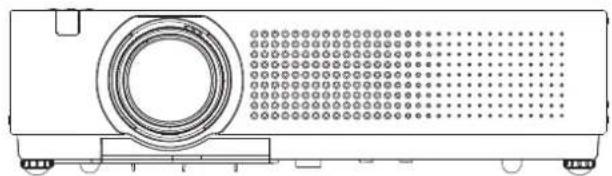
PANASONIC PT-VX400NTU - Video projector

PT-VX400NTU - Video projector PANASONIC - Free user manual and instructions

Find the device manual for free PT-VX400NTU PANASONIC in PDF.

📄 80 pages English EN Download 💬 AI Question 10 questions ⚙️ Specs
Notice PANASONIC PT-VX400NTU - page 1
Pick your language and provide your email: we'll send you a specifically translated version.
Product TypeVideo Projector
ModelPT-VX400NTU
BrandPanasonic
Display Technology3 LCD Panels (0.63" diagonal, 4:3 aspect ratio)
Native Resolution1024 x 768 pixels (XGA)
Lamp Type245 W UHM lamp
Light Output4000 lm
Contrast Ratio2000:1 (all white / all black)
Projection Size0.76 m - 7.62 m (30" - 300") diagonal
Throw Ratio1.6x manual zoom lens
Keystone CorrectionVertical (manual via menu)
Input TerminalsHDMI, COMPUTER IN 1/COMPONENT IN (D-sub 15), COMPUTER IN 2/MONITOR OUT (D-sub 15), VIDEO (RCA), S-VIDEO, AUDIO IN (M3 stereo, RCA), LAN (RJ-45), CONTROL PORT (RS-232C)
Output TerminalsAUDIO OUT (M3 stereo, variable)
Speaker1 x 3.7 cm round, 10 W output
Power SupplyAC 100 V - 240 V, 50 Hz/60 Hz
Power Consumption322 W (max), Standby: 0.48 W (Eco) / 12.5 W (Network)
Dimensions (W x H x D)350 mm x 97.0 mm x 276.9 mm (excluding protrusions)
WeightApprox. 3.5 kg (7.72 lbs)
Operating Noise≤ 70 dB (A) at operator position (ISO 7779)
Remote ControlWireless, operates up to 5 m, uses 2 x AAA batteries
Lamp LifeTypically decreases with usage; replace when indicator lights (approx. 2000-4000 hours depending on mode)
Direct Power OffAllows disconnecting power cord during projection for quick shutdown
Auto SetupPress button to enable Input search, Auto Keystone, and Auto PC adjustment
Network CapabilitiesWired LAN (RJ-45) for monitoring/control via software (PJLink compatible)
SecurityKensington lock slot, PIN code lock, password protection
FilterReplaceable filter unit (optional ET-RFV100)

Frequently Asked Questions - PT-VX400NTU PANASONIC

How do I turn on the Panasonic PT-VX400NTU projector?
Connect the power cord, open the lens cap, then press the POWER button on the remote control or the control panel. The indicator will turn green and the lamp will light.
What inputs does the PT-VX400NTU support?
It supports HDMI, Computer 1 (RGB/Component/Scart), Computer 2 (RGB), Video (composite), S-Video, and audio inputs (stereo mini jacks and RCA). For network control, use the LAN port.
How do I adjust the keystone distortion?
Press the KEYSTONE button on the remote control, then use the ▲▼ buttons to correct the vertical keystone. You can also adjust it from the Screen menu.
Can I use the projector without a screen?
Yes, you can project onto a wall. Use the Colorboard image mode to compensate for the wall color, selecting from preset colors close to your wall.
How do I replace the lamp?
Turn off the projector and disconnect the power cord. Wait at least 45 minutes for the lamp to cool. Open the lamp cover, remove the old lamp unit, install the new one (ET-LAV100), and close the cover.
What does the Direct Power Off function do?
It allows you to disconnect the power cord or flip the breaker off even during projection. The internal cooling fans continue using stored power.
How do I set the PIN code lock?
Go to the Setting menu, select Security, and choose PIN code lock. Enter a 4-digit code (default 1234). The projector will require this code to turn on.
Can I connect external speakers?
Yes, use the AUDIO OUT (VARIABLE) jack (M3 stereo mini) to connect external speakers. The volume can be adjusted.
What do the indicator lights mean?
POWER indicator: Red = standby, Green = projecting, Flashing green = power management mode. WARNING indicator: Flashing red indicates a problem (e.g., high temperature). LAMP REPLACE indicator: Yellow when lamp life is near end.
How do I clean the air filter?
Turn off the projector and unplug the power. Open the filter cover, remove the filter, and gently vacuum or wash it (if washable). Allow to dry completely before reinstalling. Replace every 100 hours or as needed.

User questions about PT-VX400NTU PANASONIC

0 question about this device. Answer the ones you know or ask your own.

Ask a new question about this device

The email remains private: it is only used to notify you if someone responds to your question.

No questions yet. Be the first to ask one.

Download the instructions for your Video projector in PDF format for free! Find your manual PT-VX400NTU - PANASONIC and take your electronic device back in hand. On this page are published all the documents necessary for the use of your device. PT-VX400NTU by PANASONIC.

USER MANUAL PT-VX400NTU PANASONIC

Operating Instructions

Projector Operations

LCD Projector

Commercial Use

Model No. PT-VW330E

PT-VX400E

PANASONIC PT-VX400NTU - Projector Operations - 1

natural_image Diagram of a projector with circular lens and perforated screen (no text or symbols)

PROYECTOR PANSONIC PROJECTOR

Thank you for purchasing this Panasonic Product.

■ Before operating this product, please read the instructions carefully and save this manual for future use.

For information on using the product via a network, refer to "Operating Instructions – Network Operations".

Read this first!

WARNING: THIS APPARATUS MUST BE EARTHED.

WARNING: To prevent damage which may result in fire or shock hazard, do not expose this appliance to rain or moisture.

Machine Noise Information Ordinance 3. GSGV, January 18, 1991: The sound pressure level at the operator position is equal or less than 70 dB (A) according to ISO 7779.

WARNING:

  1. Remove the plug from the mains socket when this unit is not in use for a prolonged period of time.
  2. To prevent electric shock, do not remove cover. No user serviceable parts inside. Refer servicing to qualified service personnel.
  3. Do not remove the earthing pin on the mains plug. This apparatus is equipped with a three prong earthing type mains plug. This plug will only fit an earthing-type mains socket. This is a safety feature. If you are unable to insert the plug into the mains socket, contact an electrician. Do not defeat the purpose of the earthing plug.

CAUTION: To assure continued compliance, follow the attached installation instructions, which includes using the provided power cord and shielded interface cables when connecting to computer or peripheral device. If you use serial port to connect PC for external control of projector, you must use optional RS-232C serial interface cable with ferrite core. Any unauthorized changes or modifications to this equipment will void the user's authority to operate.

WARNING: TO REDUCE THE RISK OF FIRE OR ELECTRIC SHOCK, DO NOT EXPOSE THIS PRODUCT TO RAIN OR MOISTURE.

WARNING: RISK OF ELECTRIC SHOCK, DO NOT OPEN.

PANASONIC PT-VX400NTU - WARNING: - 1

The lightning flash with arrowhead symbol, within an equilateral triangle, is intended to alert the user to the presence of uninsulated “dangerous voltage” within the product’s enclosure that may be of sufficient magnitude to constitute a risk of electric shock to persons.

PANASONIC PT-VX400NTU - WARNING: - 2

The exclamation point within an equilateral triangle is intended to alert the user to the presence of important operating and maintenance (servicing) instructions in the literature accompanying the product.

WARNING:

POWER

The wall outlet or the circuit breaker shall be installed near the equipment and shall be easily accessible when problems occur. If the following problems occur, cut off the power supply immediately.

Continued use of the projector in these conditions will result in fire or electric shock.

  • If foreign objects or water get inside the projector, cut off the power supply.
  • If the projector is dropped or the cabinet is broken, cut off the power supply.
  • If you notice smoke, strange smells or noise coming from the projector, cut off the power supply.
    Please contact an Authorized Service Center for repairs, and do not attempt to repair the projector yourself.

During a thunderstorm, do not touch the projector or the cable.

Electric shocks can result.

Do not do anything that might damage the power cord or the power plug.

If the power cord is used while damaged, electric shocks, short-circuits or fire will result.

- Do not damage the power cord, make any modifications to it, place it near any hot objects, bend it excessively, twist it, pull it, place heavy objects on top of it or wrap it into a bundle.

Ask an Authorized Service Center to carry out any repairs to the power cord that might be necessary.

Insert the power plug securely into the wall outlet.

If the plug is not inserted correctly, electric shocks or overheating will result.

  • Do not use anything other than the provided power cord.
  • Do not use the provided power cord for other electrical equipment.
  • Do not use plugs which are damaged or wall outlets which are coming loose from the wall.

Clean the power plug regularly to prevent it from becoming covered in dust.

Failure to observe this will cause a fire.

  • If dust builds up on the power plug, the resulting humidity can damage the insulation.
  • If not using the projector for an extended period of time, pull the power plug out from the wall outlet.
    Pull the power plug out from the wall outlet and wipe it with a dry cloth regularly.

Do not handle the power plug with wet hands.

Failure to observe this will result in electric shocks.

Do not overload the wall outlet.

If the power supply is overloaded (ex., by using too many adapters), overheating may occur and fire will result.

■ ON USE/INSTALLATION

Do not place liquid containers on top of the projector.

If water spills onto the projector or gets inside it, fire or electric shocks will result.

If any water gets inside the projector, contact an Authorized Service Center.

Do not place the projector on soft materials such as carpets or sponge mats.

Doing so will cause the projector to overheat, which can cause burns, fire or damage to the projector.

Do not set up the projector in humid or dusty places or in places where the projector may come into contact with oily smoke or steam, ex. a bathroom.

Using the projector under such conditions will result in fire, electric shocks or components deterioration.

Components deterioration (such as ceiling mount brackets) may cause the projector which is mounted on the ceiling to fall down.

Do not install this projector in a place which is not strong enough to take the full weight of the projector or on top of a surface which is sloped or unstable.

Failure to observe this will cause projector to fall down or tip over the projector, and severe injury or damage could result.

Do not place another projector or other heavy objects on top of the projector.

Failure to observe this will cause the projector to become unbalanced and fall, which could result in damage or injury. The projector will be damaged or deformed.

WARNING:

Installation work (such as ceiling mount bracket) should only be carried out by a qualified technician.

If installation is not carried out and secured correctly it can cause injury or accidents, such as electric shocks.

  • Do not use anything other than an authorized ceiling mount bracket.
  • Be sure to use the provided accessory wire with an eye bolt as an extra safety measure to prevent the projector from falling down. (Install in a different location to the ceiling mount bracket)

Do not cover the air inlet port or the air outlet port.

Doing so will cause the projector to overheat, which can cause fire or damage to the projector.

  • Do not place the projector in narrow, badly ventilated places such as closets or bookshelves.
  • Do not place the projector on cloth or papers, as these materials could be drawn into the air inlet port.

Do not place your hands or other objects close to the air outlet port.

Doing so will cause burns or damage your hands or other objects.

- Heated air comes out of the air outlet port. Do not place your hands or face, or objects which cannot withstand heat close to this port.

Do not look and place your skin into the lights emitted from the lens while the projector is being used.

Doing so can cause burns or loss of sight.

  • Strong light is emitted from the projector's lens. Do not look or place your hands directly into this light.
  • Be especially careful not to let young children look into the lens. In addition, turn off the power and disconnect the power plug when you are away from the projector.

Do not insert any foreign objects into the projector.

Doing so will cause fire or electric shocks.

- Do not insert any metal objects or flammable objects into the projector or drop them onto the projector.

Never attempt to remodel or disassemble the projector.

High voltages can cause fire or electric shocks.

- For any inspection, adjustment and repair work, please contact an Authorized Service Center.

Do not project an image with the lens cover attached.

Doing so can cause fire.

Do not allow metal objects, flammable objects, or liquids to enter inside of the projector. Do not allow the projector to get wet.

Doing so may cause short circuits or overheating, and result in fire, electric shock, or malfunction of the projector.

  • Do not place containers of liquid or metal objects near the projector.
  • If liquid enters inside of the projector, consult your dealer.
    ● Particular attention must be paid to children.

Use the ceiling mount bracket specified by Panasonic.

Defects in the ceiling mount bracket will result in falling accidents.

- Attach the supplied safety cable to the ceiling mount bracket to prevent the projector from falling down.

Be sure to ask authorized personnel or your supplier when mounting the product to a ceiling.

This requires an optional ceiling mount bracket.

Model No.: ET-PKV100H (for high ceilings), ET-PKV100S (for low ceilings), ET-PKV100B (Projector Mount Base).

WARNING:

ACCESSORIES

Do not use or handle the batteries improperly, and refer to the following.

Failure to observe this will cause burns, batteries to leak, overheat, explode or catch fire.

  • Do not use unspecified batteries.
  • Do not disassemble dry cell batteries.
  • Do not heat the batteries or place them into water or fire.
  • Do not allow the + and – terminals of the batteries to come into contact with metallic objects such as necklaces or hairpins.
  • Do not store batteries together with metallic objects.
  • Store the batteries in a plastic bag and keep them away from metallic objects.
  • Make sure the polarities (+ and -) are correct when inserting the batteries.
  • Do not use a new battery together with an old battery or mix different types of batteries.
  • Do not use batteries with the outer cover peeling away or removed.
  • Remove the empty batteries from the remote control at once.
    ● Insulate the battery using tape or something similar before disposal.

Do not allow children to reach the batteries (AAA/R03 or AAA/LR03 type).

● The battery can cause personal injury if swallowed.

- If swallowed, seek medical advice immediately.

If the battery fluid leaks, do not touch it with bare hands, and take the following measures if necessary.

● Battery fluid on your skin or clothing could result in skin inflammation or injury.
Rinse with clean water and seek medical advice immediately.
● Battery fluid coming in contact with your eyes could result in loss of sight.
In this case, do not rub your eyes. Rinse with clean water and seek medical advice immediately.

Do not disassemble the lamp unit.

If the lamp breaks, it could cause injury.

Lamp replacement

The lamp has high internal pressure. If improperly handled, an explosion and severe injury or accidents will result.

● The lamp can easily explode if struck against hard objects or dropped.
● Before replacing the lamp, be sure to disconnect the power plug from the wall outlet.
Electric shocks or explosions can result if this is not done.
- When replacing the lamp, turn the power off and allow the lamp it to cool for at least 45 minutes before handling it otherwise it can cause burns.

Do not allow infants or pets to touch the remote control unit.

- Keep the remote control unit out of the reach of infants and pets after using it.

Do not use the supplied power cord with devices other than this projector.

- Using the supplied power cord with devices other than this projector may cause short circuits or overheating, and result in electric shock or fire.

Remove the depleted batteries from the remote control promptly.

● Leaving them in the unit may result in fluid leakage, overheating, or explosion of the batteries.

CAUTION:

POWER

When disconnecting the power cord, be sure to hold the power plug and power connector.

If the power cord itself is pulled, the lead will become damaged, and fire, short-circuits or serious electric shocks will result.

When not using the projector for an extended period of time, disconnect the power plug from the wall outlet and remove the batteries from the remote control.

Disconnect the power plug from the wall outlet before carrying out any cleaning and replacing the unit.

Electric shocks can result if this is not done.

CAUTION:

■ ON USE/INSTALLATION

Do not put your weight on this projector.

You could fall or the projector could break, and injury will result.

- Be especially careful not to let young children stand or sit on the projector.

Do not place the projector in extremely hot locations.

Doing so will cause the outer casing or internal components to deteriorate, or result in fire.

● Take particular care in locations exposed to direct sunlight or near stoves.

Always disconnect all cables before moving the projector.

Moving the projector with cables still attached can damage the cables, which will cause fire or electric shocks to occur.

Never plug headphones and earphones into AUDIO OUT jack.

Excessive sound pressure from earphones and headphones can cause hearing loss.

ACCESSORIES

Do not use the old lamp unit.

If used it could cause lamp explosion.

If the lamp has broken, ventilate the room immediately. Do not touch or bring your face close to the broken pieces.

Failure to observe this will cause the user to absorb the gas which was released when the lamp broke and which contains nearly the same amount of mercury as fluorescent lamps, and the broken pieces will cause injury.

- If you believe that you have absorbed the gas or that the gas has got into your eyes or mouth, seek medical advice immediately.

- Ask your dealer about replacing the lamp unit and check the inside of the projector.

PANASONIC PT-VX400NTU - ACCESSORIES - 1

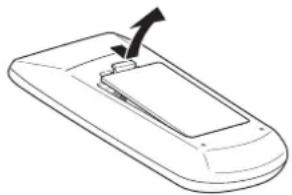
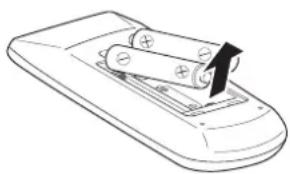
To remove the battery Remote Control Battery

  1. Press the guide and lift the cover. 2. Remove the batteries.

PANASONIC PT-VX400NTU - To remove the battery Remote Control Battery - 1

natural_image Line drawing of a device casing with an arrow pointing to a component (no text or symbols)

PANASONIC PT-VX400NTU - To remove the battery Remote Control Battery - 2

natural_image Line drawing of a remote control device with batteries and a battery cover (no text or symbols)

Trademarks

- HDMI, the HDMI logo and High-Definition Multimedia Interface is a trademark or registered trademark of HDMI

Licensing LLC.

PANASONIC PT-VX400NTU - Trademarks - 1

HIGH-DEFINITION MULTIMEDIA INTERFACE

- Other names, company names or product names used in these operating instructions are the trademarks or registered trademarks of their respective holders.

Please note that the operating instructions do not include the ® and TM symbols.

Illustrations in these operating instructions

- Note that illustrations of the projector and screens may differ from the ones you actually see.

Page references

- In these instructions, references to pages are indicated as: (→ page 00).

Term

- In these instructions, the "Wireless remote control unit" accessory is referred to as the "Remote control".

Auto Setup Function

This function enables Input search, Auto Keystone correction and Auto PC adjustment by pressing the button.

Direct Power Off Function

▶ With the Direct Power Off function, you can disconnect the power cord from the wall outlet or turn off the breaker even during projection.

Improved connectivity

The inclusion of an HDMI terminal provides support for high quality video and HDMI audio.

Useful Functions for Presentations

- The digital zoom function allows you to focus on the crucial information during a presentation. - The MIC function and 10W audio output allows you to make a presentation without any external audio equipment.

Quick steps

For details, see the corresponding pages.

  1. Set up your projector. (→page 19)

PANASONIC PT-VX400NTU - Quick steps - 1

  1. Connect with other devices. (→page 23)

PANASONIC PT-VX400NTU - Quick steps - 2

  1. Connect the power cord. (→page 24)

PANASONIC PT-VX400NTU - Quick steps - 3

  1. Power on. (→page 26)

PANASONIC PT-VX400NTU - Quick steps - 4

  1. Select the input signal. (→page 29)

PANASONIC PT-VX400NTU - Quick steps - 5

  1. Adjust the image. (→page 29)

Important Information

Read this first! 2

Contents 8

Precautions for Use.... 10

Cautions when transporting 10

Cautions when installing 10

Security 11

Disposal 11

Cautions on use 12

Accessories 13

Optional accessories 14

Preparation

About Your Projector 15

Remote control 15

Projector body 16

Control panel 17

Rear terminals 17

Using Remote control 18

Installing and Removing batteries 18

Setting Remote control ID numbers 18

Getting Started

Setting up 19

Projection method 19

Parts for ceiling mount (Optional) 19

Screen size and throw distance 20

Adjusting front adjustable feet 22

Connections 23

Before connecting to the projector 23

Connecting example 23

Basic Operation

Powering ON/OFF 24

Connecting the power cord 24

POWER indicator 25

Turning On the Projector 26

Enter a PIN code 27

PIN code Protection 27

Turning Off the Projector 28

Projecting 29

Selecting the image 29

How to adjust the state of the image 29

Basic operations by using the remote control.... 30

Using the AUTO SET function 30

Switching the input signal 30

Using the SCREEN button 30

Using the KEYSTONE button 31

Using the INFO. button 31

Using the FREEZE function 31

Using the AV MUTE function 32

Using the P-TIMER button 32

Using the LAMP button 32

Using the D.ZOOM buttons 32

Controlling the volume of the speaker 32

Using the IMAGE button 33

Using the P IN P button (PT-VW330E Only) 33

Using the MUTE button 33

Settings

Menu Navigation 34

Navigating through the menu 34

Main menu 35

Sub menu 35

Input menu 37

Computer 1: RGB/Component /RGB (Scart) ...... 37

Computer 2: RGB 37

HDMI 37

Video 37

S-video 37

AUTO PC adjust 39

AUTO PC adj. 39

Manual PC adjust.... 40

Fine sync 40

Total dots 40

Horizontal 40

Vertical 40

Current mode 41

Clamp 41

Display area H 41

Display area V 41

Reset 41

Mode free 41

Store 41

Image select 42

Dynamic 42

Standard 42

Real 42

Cinema 42

Blackboard(Green) 42

Colorboard 42

Contents

Image 1-4 42

Image adjust.... 43

Contrast 43

Brightness 43

Color 43

Tint 43

Color temp. 43

Red 44

Green 44

Blue 44

Sharpness 44

Gamma 44

Noise reduction 44

Progressive 45

Reset 45

Store 45

Screen 46

Normal 46

Full 46

Wide(16:9) 46

Zoom 46

True 46

Natural wide (PT-VW330E Only) 46

Custom 46

Custom adj. 47

Digital zoom +.... 47

Digital zoom - 47

Keystone 47

Ceiling 48

Rear 48

Screen aspect (PT-VW330E Only) 48

Reset 48

Sound 49

Volume 49

Mute 49

MIC 49

MIC gain 49

Standby MIC out 49

Setting 50

Language 50

Menu position 50

Auto setup 50

Background 51

Display 51

Logo 51

HDMI setup 52

Terminal 52

P IN P (PT-VW330E Only) 52

Power management 53

Direct on 53

Standby mode 53

P-timer 54

Closed caption 54

Lamp power 55

Remote control 55

Security 55

Fan 56

Fan control 56

Video delay control 56

Filter counter 56

Total power savings 57

Warning log 57

Factory default 57

Information 58

Input Source Information Display 58

Maintenance

LAMP REPLACE and WARNING Indicators.... 59

Managing the indicated problems 59

Replacement 60

Before replacing the unit 60

Maintenance 60

Replacing the unit 60

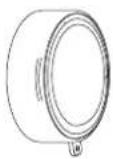
Attaching the Lens Cap 64

Troubleshooting 65

Appendix

Technical Information 67

Serial terminal 67

Other terminals 70

Two window display combination list (PT-VW330E Only) 71

List of compatible signals 72

Specifications 76

Dimensions 78

Ceiling mount bracket safeguards...... 78

Index 79

Precautions for Use

Cautions when transporting

  • When transporting the projector, hold it securely by its bottom and avoid excessive vibration and impacts. Doing so may damage the internal parts and result in malfunctions.
  • Do not transport the projector with the adjustable feet extended. Doing so may damage the adjustable feet.

Cautions when installing

■ Do not set up the projector outdoors.

● The projector is designed for indoor use only.

■ Do not use under the following conditions.

  • Places where vibration and impacts occur such as in a car or vehicle: Doing so may damage the internal parts and result in malfunctions.
  • Near the exhaust of an air conditioner or near lights (studio lamps, etc.) where temperature changes greatly (Operating environment ➤page 77): Doing so may shorten the life of the lamp or result in deformation of the outer case and malfunctions.
    ● Near high-voltage power lines or near motors: Doing so may interfere with the operation of the projector.

- Do not install the projector at elevations of 2700 m (8858 ft) or higher above sea level.

Failure to do so may shorten the life of the internal parts and result in malfunctions.

Do not use the projector installed vertically or tilted right or left ( → page 19 ).

Using the projector at a vertical angle that exceeds 40^ may reduce product life or result in malfunction.

- Be sure to ask a specialized technician when installing the product to a ceiling.

If the product is to be installed hanging from the ceiling, purchase an optional Ceiling Mount Attachment (Optional accessories ➤ page 14).

Please call a specialized technician or contact an Authorized Service Center for installation.

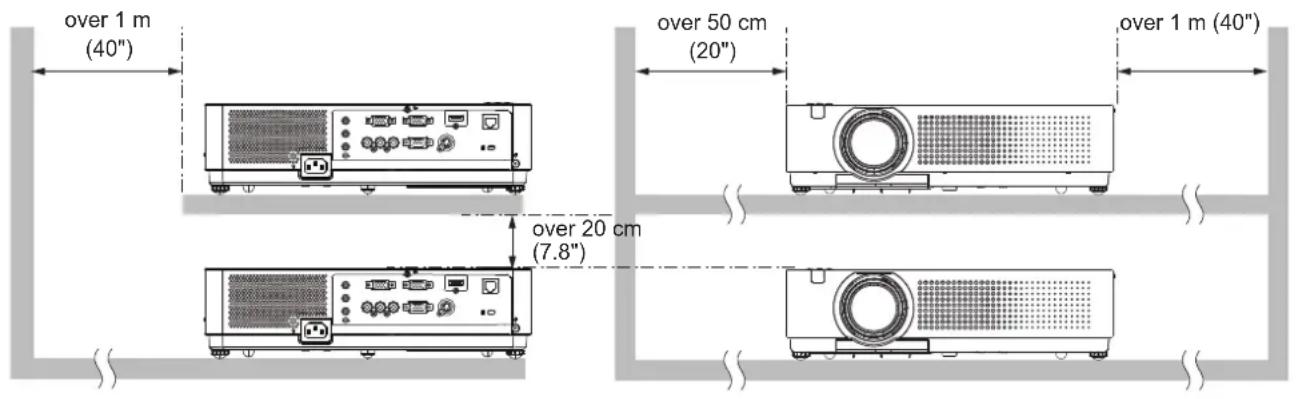
■ Cautions when setting the projectors

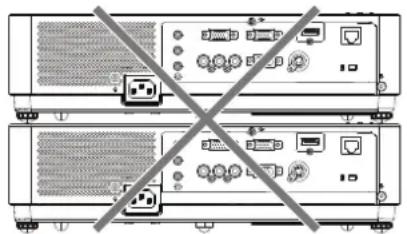
  • Do not stack the projectors.
  • Do not block the ventilation ports (intake and exhaust) of the projector.
  • Avoid heating and cooling air from the air conditioning system directly blow to the ventilation ports (intake and exhaust) of the projector.

PANASONIC PT-VX400NTU - ■ Cautions when setting the projectors - 1

natural_image Diagram of two server racks with no visible text, numbers, or symbols, crossed by a diagonal line (no text or labels)

over 1 m (40") over 50 cm (20") over 1 m (40") over 20 cm (7.8)

  • Do not place the projector in an enclosed space.
    If you need to place the projector in an enclosed space, additional air conditioning and ventilation system must be equipped. When ventilation is insufficient, remaining heat may trigger the protection circuit of the projector.

Security

■ Take safety measures against following incidents.

● Personal information being leaked via this product.
● Unauthorized operation of this product by a malicious third party.
- Interfering or stopping of this product by a malicious third party.

■ Security instruction (→page 55)

● Make your password as difficult to guess as possible.
- Change your password periodically.
- Panasonic or its affiliate company never inquires a password directly to a customer. Do not tell your password in case you receive such an inquiry.
● The connecting network must be secured by firewall or others.
- Set a password and restrict the users who can log in.

Disposal

When disposing of the product, ask your local authority or dealer about the correct methods of disposal. The lamp contains mercury. When disposing of the used lamp unit, ask your nearest local authorities or dealer about proper disposal of the unit. Dispose of used batteries according to the instructions or your local disposal rule or guidelines.

Cautions on use

In order to get the picture quality

  • Draw curtains or blinds over windows and turn off any lights near the screen to prevent outside light or light from indoor lamps from shining onto the screen.
  • Depending on where the projector is used, heated air from an exhaust port or warm or cold air from an air conditioner can cause a shimmering effect on screen.
    Avoid use in locations where exhaust or streams of air from projector, other devices and air conditioners flow between the projector and the screen.
  • The lens of projector is affected by the heat from the luminous source. Because of this, the focusing may not be stable right after the power is turned on. Focusing is stabled after projecting image for 30 minutes and longer.

- Do not touch the surface of the projector lens with your bare hand.

If the surface of the lens becomes dirty from fingerprints or anything else, this will be magnified and projected onto the screen.

LCD Panel

The display unit of this projector comprises three LCD panels. Although an LCD panel is a product of high-precision technology, some of the pixels on the projected image may be missing or constantly lit. Please note that this is not a malfunction.

Displaying a still image for a longer time may result in an after-image on the LCD panels. If this happens, display the all white screen in the test pattern for an hour or more.

■ Optical components

Operating the projector in an environment with high temperature or heavy exposure to dust or tobacco smoke will reduce the service life of the optical components, such as the LCD panel and polarizing plate, and may necessitate their replacement within less than one year of use. For details, consult your dealer.

Lamp

The luminous source of the projector is a mercury lamp with high internal pressure.

A high pressure mercury lamp has following characteristics.

● The brightness of the lamp will decrease by duration of usage.
● The lamp may burst with sound or shorten life by shock or chipping.
- The life of the lamp varies greatly depending on individual specificities and usage conditions. In particular, continuous use over 12 hours and frequent on/off switching of the power greatly deteriorate the lamp and affect the lamp life.
- In rare cases, the lamp burst shortly after the projection.
- The risk of bursting increases when the lamp is used beyond its replacement cycle. Make sure to replace the lamp unit consistently. ("When to replace the lamp unit" (→ page 62))
- If the lamp bursts, gas contained inside of the lamp is released in a form of smoke.
- It is recommended to store replacement lamps for contingency.
- It is recommended to have authorized engineer or your dealer replace the lamp unit.

Pursuant to at the directive 2004/108/EC, article 9(2)

Panasonic Testing Centre

Panasonic Service Europe, a division of Panasonic Marketing Europe GmbH

Winsbergring 15, 22525 Hamburg, F.R. Germany

Accessories

Make sure the following accessories are provided with your projector. Numbers in the brackets ( ) show the number of accessories.

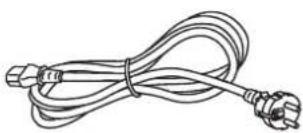
Remote control unit (x1)(6451048745)(6451048738)Power cord (x1)(6103580203)CD-ROM (x1)(6103591056)Batteries (AAA/R03 or AAA/LR03 type) (x2)
PANASONIC PT-VX400NTU - Accessories - 1 PANASONIC PT-VX400NTU - Accessories - 2PANASONIC PT-VX400NTU - Accessories - 3PANASONIC PT-VX400NTU - Accessories - 4PANASONIC PT-VX400NTU - Accessories - 5(for remote control unit)
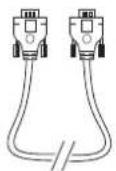
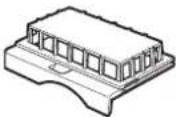
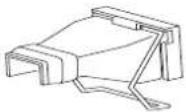
RGB signal cable (x1)(6103580425)Filter cover (x1)(6103568881)AC power cord holder(x1) (6103573700)(6103573694)Lens cap (x1)(6103545790)
PANASONIC PT-VX400NTU - Accessories - 6PANASONIC PT-VX400NTU - Accessories - 7PANASONIC PT-VX400NTU - Accessories - 8PANASONIC PT-VX400NTU - Accessories - 9
String (x1)(6103430249)PIN Code Label (x1)Soft Carrying Case (x1)(6103581620)
PANASONIC PT-VX400NTU - Accessories - 10PANASONIC PT-VX400NTU - Accessories - 11PANASONIC PT-VX400NTU - Accessories - 12

Attention

● After unpacking the projector, discard the power cord cap and packaging material properly.
- For lost accessories, consult your dealer.
● The part numbers of accessories and separately sold components are subject to change without notice.
- Store small parts in an appropriate manner, and keep them away from young children.

Precautions for Use

Contents of the supplied CD-ROM

The contents of the supplied CD-ROM are as follow. [

●: Instructions/List (PDF), ○: Software]

  • Operating Instructions – Projector Operations.
  • Operating Instructions – Network Operations.

○ Multi Projector Monitoring & Control Software 2.6(Windows)

- This software allows you to monitor and control multiple projectors connected to the LAN.

● Operation Manual Multi Projector Monitoring & Control Software 2.6

○Logo Transfer Software 2.0(Windows)

- This software allows you to create original images, such as company logos to be displayed when projection starts, and transfer them to the projector.

● Operation Manual Logo Transfer Software 2.0

●List of compatible projector models

- This is a list of projectors that are compatible with the software marked with the “○” symbols above, and their restrictions.

Optional accessories

Options Model No.
Ceiling Mount BracketET-PKV100H (for high ceilings), ET-PKV100S (for low ceilings)
Projector Mount BaseET-PKV100B
Replacement Lamp UnitET-LAV100
Replacement Filter UnitET-RFV100

About Your Projector

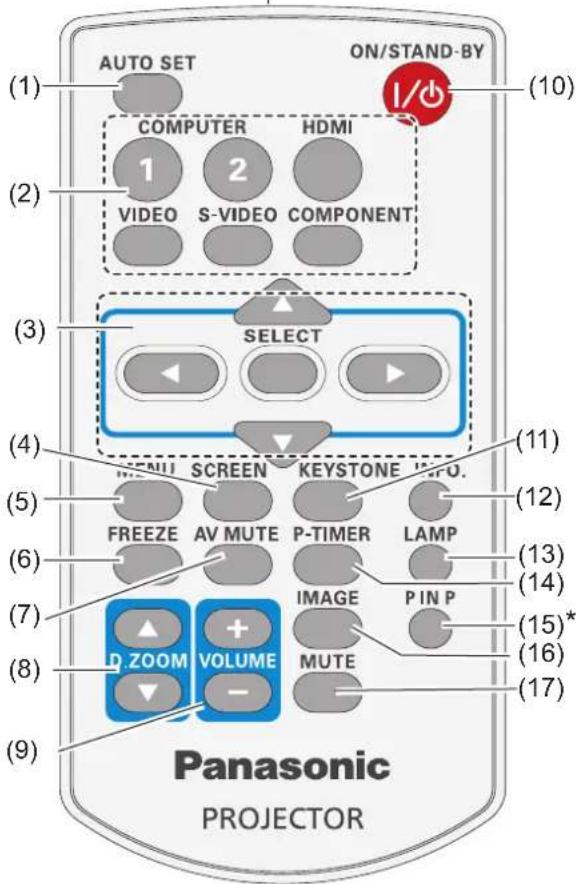
Remote control

(18)
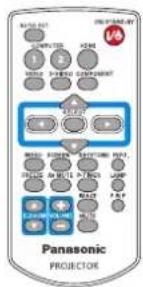
(1) AUTO SET ON/STAND-BY (10) COMPUTER HDMI 1 2 VIDEO S-VIDEO COMPONENT (2) (3) SELECT (4) MENU SCREEN KEYSTONE INFO. (5) FREEZE AV MUTE P-TIMER LAMP (6) (7) IMAGE PIN P (8) D ZOOM VOLUME MUTE (9) Panasonic PROJECTOR (11) (12) (13) (14) (15)* (16) (17)

\*

Button is only for PT-VW330E.

(1) Button

Execute the setting of Auto setup in the setting menu. (→page 50)

(2) Input Selection Buttons: , , ,

These buttons are used to select the input signal. (→page 30)

(3) ▲▼◀▶ Buttons,

Navigate the MENU display. (→page 34)

(4) Button

Select a screen mode. (→page 46)

(5)

Button

Open or close the On-Screen Menu. (→page 34)

(6) Button

Pauses the projected image and sound tentatively. (→page 31)

(7) Button

Temporarily turn off the image on the screen. (→page 32)

(8) Buttons

Zoom in and out the images.

(9) (+/-) Buttons

Adjusts the volume of the speaker. (→page 32)

(10) Button

Turn the projector on or off. (→page 26)

(11) Button

Correct keystone distortion. (→ page 31)

(12) Button

Operate the information function. (→page 31)

(13) Button

Select a lamp mode. (→page 32)

(14) Button

Operate the P-timer function. (→page 32)

(15)

Button (Only for PT-VW330E)

Operate the Picture In Picture function. (→page 33)

(16) Button

Select the image mode. (→page 33)

(17) Button

Mute the sound. (→page 33)

(18) Remote control signal emitter

Attention

- Do not drop the remote control.

- Avoid contact with liquids.

- Do not attempt to modify or disassemble the remote control.

Note

- The remote control can be used within a distance of about 5 m (16.4 ft) if pointed directly at the remote control signal receiver. The remote control can control at angles of up to ±30° vertically and ±30° horizontally, but the effective control range may be reduced.

- If there are any obstacles between the remote control and the remote control signal receiver, the remote control may not operate correctly.

- You can operate the projector by reflecting the remote control signal on the screen. The operating range may differ due to the loss of light caused by the properties of the screen.

- When the remote control signal receiver is lit with a fluorescent light or other strong light source, the projector may become inoperative. Set the projector as far from the luminous source as possible.

About Your Projector

Projector body

(6) (7) (1)(2)(3)(4) (5) (8)

(9) (10) (11) (12) Bottom view (13)

(1) Remote control signal receiver
(2) Focus Ring

Adjusts the focus.

(3) Projection Lens
(4) Zoom Lever

Adjusts the zoom.

(5) Air intake port
(6) Control Panel and Indicators (→page 17)
(7) Lamp cover ( page 63)

The lamp unit is located inside.

(8) Air outlet port

- Hot air is exhausted from the exhaust vent. Do not put heat-sensitive objects near this side.

(9) Speaker
(10) AC IN
(11) Terminals ( page 17)
(12) Air intake port / Air filter cover (→ page 60)
(13) Adjustable feet

Adjusts the projection angle.

WARNING:

  • Keep your hands and other objects away from the air exhaust port.
  • Keep your hand and face away.
  • Do not insert your finger.
  • Keep heat-sensitive articles away.

Heated air from the air exhaust port can cause burns or external damage.

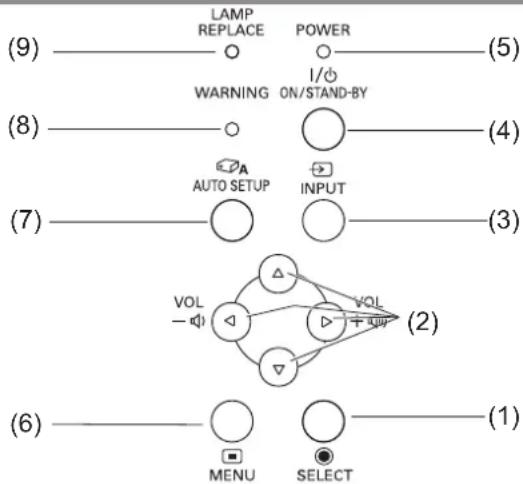
Control panel

PANASONIC PT-VX400NTU - Control panel - 1

flowchart
graph TD
    A["(9)"] --> B["LAMP REPLACE"]
    B --> C["POWER"]
    C --> D["(5)"]
    E["(8)"] --> F["WARNING ON/STAND-BY"]
    F --> G["(4)"]
    H["(7)"] --> I["AUTO SETUP"]
    I --> J["INPUT"]
    J --> K["(3)"]
    L["(6)"] --> M["VOL MENU SELECT"]
    M --> N["(1)"]

(1)

(2) ▲▼◀▶ (VOL -/+ ) buttons Navigate the MENU screen.

(3) button Selects the input signal. (→page 30)

(4) button Turn the projector on/off.

(5) indicator Indicate the power status.

(6)

button Displays the MENU screen. (→ page 34)

(7) button Execute the setting of Auto setup in the setting menu.

(8) indicator Indicate the abnormal conditions of the projector.

(9) indicator Lights yellow when the projection lamp reaches its end of life.

Rear terminals

(5) AUDIO OUT (VARIABLE) 1 COMPUTER AUDIO IN 2 MIC IN (12) COMPUTER IN 2 MONITOR OUT VIDEO IN AUDIO IN L (MON) R (10)(11) COMPONENT IN CONTROL PORT S-VIDEO IN (8)(9) (7) (6) (2) HDMI (1)

(1) LAN Connects to a LAN cable for network connection.

(2) HDMI Connects to HDMI input signals.

(3) COMPUTER IN 1/ COMPONENT IN Connects to COMPUTER IN 1/ COMPONENT IN input signals.

(4) COMPUTER IN 2/MONITOR OUT Connects to COMPUTER IN 2/MONITOR OUT input signals or outputs the analog RGB signals input the projector.

(5) AUDIO OUT (VARIABLE) Outputs the audio signals input to the projector.

(6) Security slot Attach the commercial shackle lock, manufactured by Kensington, to protect your projector. Compatible with the Kensington MicroSaver Security System.

(7) S-VIDEO IN Connects to S-VIDEO input signals.

(8) CONTROL PORT Connects to a computer via an RS-232C cable.

(9) AUDIO IN Connects to the audio input signals. AUDIO IN has right and left (L and R) terminals.

(10) VIDEO IN Connects to VIDEO input signals.

(11) COMPUTER AUDIO IN 1 Connects to the audio input signals.

(12) COMPUTER AUDIO IN 2 (MIC IN) Connects to the audio input signals. Or connect the MIC to this jack.

Attention

- When a LAN cable is directly connected to the projector, the network connection must be made indoors.

Using Remote control

Installing and Removing batteries

Open the cover1) Install batteries and close the cover2)

(Insert the - side first.)

PANASONIC PT-VX400NTU - Open the cover1) Install batteries and close the cover2) - 1

natural_image Line drawing of a device casing with an arrow indicating direction (no text or symbols)

PANASONIC PT-VX400NTU - Open the cover1) Install batteries and close the cover2) - 2

natural_image Line drawing of a remote control with battery and switch (no text or symbols)

- Remove the batteries in the reverse order of installation.

Setting Remote control ID numbers

When you use the system with multiple projectors, you can operate all the projectors simultaneously or each projector individually using single remote control, if unique ID number is assigned to each projector.

After setting the ID number of the projector, set the same ID number to the remote control.

There are 7 different ID codes (ALL, Code 1\~Code 6), the initial ID number is [ALL].

■ Setting the ID number

1) While holding down the

button, press the button. The number of times you press the button corresponds to the desired ID code number.
2) The number of times to press the button is as follows: Code 1= Once, Code 2= Twice, Code 3= 3 times, Code 4= 4 times Code 5= 5 times, Code 6= 6 times.
3) The ID code is changed when the button is released.
4) The ID code is reset to [ALL] (default) by pressing the button and button at the same time for 5 seconds or more.

Attention

  • If the button is pressed 7 times or more, the ID code cannot be changed (the operation is invalid).
  • The status of the ID code is not stored after replacing batteries.

Note

- For details, please refer to the [Remote control] of the [Setting] menu. (→ page 55)

AUTO SET ON/STAND-BY COMPUTER HDMI 1 2 VIDEO S-VIDEO COMPONENT SELECT MENU SCREEN KEYSTONE INFO. FREEZ AV MUTE P-TIMER LAMP IMAGE PIN P O ZOOM VOLUME MUTE MANAGE button Panasonic PROJECTOR

Setting up

Projection method

You can use the projector with any of the following 4 projection methods. To set the desired method in the projector.

■ Mounting on the ceiling and projecting forward

PANASONIC PT-VX400NTU - ■ Mounting on the ceiling and projecting forward - 1

natural_image Simple line drawing of a person sitting on a chair facing a projector screen, with no text or symbols present.

Setting on a desk/floor and projecting from rear

(Using translucent screen)

PANASONIC PT-VX400NTU - Setting on a desk/floor and projecting from rear - 1

natural_image Simple line drawing of a person sitting on a chair facing a transparent display case, with no text or symbols present.

■ Mounting on the ceiling and projecting from rear

(Using translucent screen)

PANASONIC PT-VX400NTU - ■ Mounting on the ceiling and projecting from rear - 1

natural_image Simple line drawing of a cabinet with a person sitting beside it (no text or symbols)

Setting on a desk/floor and projecting forward

PANASONIC PT-VX400NTU - Setting on a desk/floor and projecting forward - 1

natural_image Simple line drawing of a person viewing a projector on a stand (no text or symbols)

Attention

  • For optimum viewing quality, install the projector in a location where screen exposure to outside light, light from light fixtures or other light is at a minimum. Also draw the curtains, close blinds and turn off light fixtures.
  • Do not use the projector installed vertically or tilted right or left. Use under such conditions could result in equipment damage.
    ● The projector must be installed so that its inclination to the horizontal plane is ±40^ or less.
  • Installing the projector at an inclination that exceeds 40^ may reduce product life or result in malfunction.

+40° -40°

Parts for ceiling mount (Optional)

You can install the projector on the ceiling by using the optional ceiling mount bracket (ET-PKV100H: for high ceiling, ET-PKV100S: for low ceiling), and the optional projector mount base ET-PKV100B.

  • Use only the ceiling mount brackets specified for this projector.
  • Refer to the installation manual for the ceiling mount bracket when you install the bracket and the projector.

Attention

- To ensure projector performance and security, installation of the ceiling mount bracket must be carried by your dealer or a qualified technician.

Setting up

Screen size and throw distance

Place the projector referring to the diagram on the right and the figures of throwing distance. You can adjust the display size

Projected image SH SD SW

Screen L (LW/LT)

L (LW/LT) *Projection distance (m)
SH Height of the projection area (m)
SW Width of the projection area (m)
SD Diagonal length of the projection area (m)

LW : Minimum distance *1 :

LT : Maximum distance

SW Screen L (LW/LT)

Attention

- Before installing, please read "Precautions for Use" (→ pages 10 to 14).

■ Projection distance for PT-VW330E

(All measurements below are approximate and may differ slightly from the actual measurements.)

Projection size For 4:3 aspect ratio For 16:9 aspect ratio For 16:10 aspect ratio
Screen diagonal (SD)Minimum distance (LW)Maximum distance (LT)Minimum distance (LW)Maximum distance (LT)Minimum distance (LW)Maximum distance (LT)
0.76 m(30")0.8 m(2.76')1.4 m(4.50')0.8 m(2.49')1.2 m(4.07')0.7m(2.43')1.2 m(3.97')
1.02 m(40")1.1 m(3.71')1.8 m(6.04')1.0 m(3.35')1.7 m(5.48')1.0 m(3.25')1.6 m(5.32')
1.27 m(50")1.4 m(4.66')2.3 m(7.58')1.3 m(4.23')2.1 m(6.86')1.3 m(4.10')2.0 m(6.69')
1.52 m(60")1.7 m(5.61')2.8 m(9.12')1.6 m(5.09')2.5 m(8.27')1.5 m(4.95')2.5 m(8.04')
1.78 m(70")2.0 m(6.56')3.3 m(10.66')1.8m(5.94')3.0 m(9.68')1.8 m(5.77')2.9 m(9.42')
2.03 m(80")2.3 m(7.51')3.7 m(12.20')2.1 m(6.82')3.4 m(11.06')2.0 m(6.63')3.3 m(10.76')
2.29 m(90")2.6 m(8.47')4.2 m(13.75')2.3 m(7.68')3.8 m(12.47')2.3 m(7.48')3.7 m(12.11')
2.54 m(100")2.9 m(9.42')4.7 m(15.26')2.6 m(8.56')4.2 m(13.85')2.5 m(8.33')4.1 m(13.48')
3.05 m(120")3.5 m(11.35')5.6 m(18.34')3.1 m(10.27')5.1 m(16.63')3.1 m(10.01')4.9 m(16.21')
3.81 m(150")4.3 m(14.21')7.0 m(22.97')3.9 m(12.89')6.4 m(20.83')3.8 m(12.53')6.2 m(20.28')
5.08 m(200")5.8 m(18.96')-5.3 m(17.22')-5.1 m(16.73')-
6.35 m(250")7.2 m(23.75')-6.6 m(21.56')-6.4 m(20.96')-
7.62 m(300")--7.9 m(25.89')-7.7 m(25.16')-

Any other projection distance can be obtained according to the screen dimensions (m) using the following calculations.

The distance is shown in units of meters. (The calculated distance may contain a certain error.)

If the screen dimensions are written as "SD",

For 4:3 aspect ratioFor 16:9 aspect ratioFor 16:10 aspect ratio
Screen height (SH)= SD(m) × 0.6= SD(m) × 0.490= SD(m) × 0.530
Screen width (SW) = SD(m) × 0.8= SD(m) × 0.872= SD(m) × 0.848
Minimum distance (LW)= 1.1449 × SD(m) - 0.0335= 1.0395 × SD(m) - 0.0336= 1.0113 × SD(m) - 0.0336
Maximum distance (LT)= 1.8444 × SD(m) - 0.0317= 1.6745 × SD(m) - 0.0318= 1.6292 × SD(m) - 0.0318

Projection distance for PT-VX400E

(All measurements below are approximate and may differ slightly from the actual measurements.)

Projection size For 4:3 aspect ratio For 16:9 aspect ratio
Screen diagonal (SD)Minimum distance (LW)Maximum distance (LT)Minimum distance (LW)Maximum distance (LT)
0.76 m(30") 0.7 m(2.26') 1.1 m(3.74') 0.8 m(2.49') 1.2 m(4.07')
1.02 m(40") 0.9 m(3.05') 1.5 m(5.02') 1.0 m(3.35') 1.7 m(5.48')
1.27 m(50") 1.2 m(3.87') 1.9 m(6.30') 1.3 m(4.23') 2.1 m(6.89')
1.52 m(60") 1.4 m(4.66') 2.3 m(7.58') 1.6 m(5.09') 2.5 m(8.27')
1.78 m(70") 1.7 m(5.45') 2.7 m(8.86') 1.8 m(5.94') 3.0 m(9.68')
2.03 m(80") 1.9 m(6.23') 3.1 m(10.14') 2.1 m(6.82') 3.4 m(11.06')
2.29 m(90") 2.2 m(7.05') 3.5 m(11.42') 2.3 m(7.68') 3.8 m(12.47')
2.54 m(100") 2.4 m(7.84') 3.9 m(12.73') 2.6 m(8.53') 4.2 m(13.88')
3.05 m(120") 2.9 m(9.42') 4.7 m(15.29') 3.1 m(10.27') 5.1 m(16.67')
3.81 m(150") 3.6 m(11.81') 5.8 m(19.13') 3.9 m(12.86') 6.4 m(20.83')
5.08 m(200") 4.8 m(15.78') 7.8 m(25.52') 5.2 m(17.19') -
6.35 m(250") 6.0m(19.75') - 6.6 m(21.52') -
7.62 m(300") 7.2 m(23.72') - 7.9 m(25.85') -

Any other projection distance can be obtained according to the screen dimensions (m) using the following calculations.

The distance is shown in units of meters. (The calculated distance may contain a certain error.)

If the screen dimensions are written as "SD",

For 4:3 aspect ratioFor 16:9 aspect ratio
Screen height (SH)= SD(m) × 0.6= SD(m) × 0.490
Screen width (SW)= SD(m) × 0.8= SD(m) × 0.872
Minimum distance (LW)= 0.9531 × SD(m) - 0.0338= 1.0384 × SD(m) - 0.0337
Maximum distance (LT)= 1.5384 × SD(m) - 0.0327= 1.6756 × SD(m) - 0.0319

Setting up

Adjusting front adjustable feet

Lift the front of the projector and press the feet lock latches on both side of the projector.

Release the feet lock latches to lock the adjustable feet and rotate the adjustable feet to a proper height and tilt. You can turn the front adjustable feet to extend them. You can turn them in the opposite direction to contract them.

(You can adjust the projection angle vertically.)

Single vertically.) Feet Lock Latches

Adjustable range
Front adjustable feet : 41.2 mm(1.622")

Attention

  • Heated air comes out of the air exhaust port while the lamp is lit. Do not touch the air exhaust port directly when you adjust the front adjustable feet.
  • If keystone distortion occurs on the projected image, perform "KEYSTONE" from the "Screen" menu. (→page 47)

Note

● Screw up the adjustable feet, and an audible click will be heard as the limit.

Connections

Before connecting to the projector

  • Read carefully the instruction manual for the device to be connected.
  • Turn off the power switch of the devices before connecting cables.
  • If any connection cable is not supplied with the device, or if no optional cable is available for connection of the device, prepare a necessary system connection cable to suit the device.
  • Video signals containing too much jitter may cause the images on the screen to randomly wobble or wafture. In this case, a time base corrector (TBC) must be connected.
  • The projector accepts the following signals: VIDEO, S-VIDEO, analogue-RGB (with TTL sync. Level) and digital signal.
  • Some computer models are not compatible with the projector.
  • When using long cables to connect with each of equipment to the projector, there is a possibility that the image will not be output correctly unless a compensator is used.
  • For details on what video signals the projector supports, see "List of compatible signals". (→page 72)

Connecting example

PANASONIC PT-VX400NTU - Connecting example - 1

flowchart
graph TD
    A["Blue ray disk player with HDMI terminal"] --> B["Audio system"]
    B --> C["Computer"]
    C --> D["Video deck (TBC built-in)"]
    D --> E["Control computer"]
    E --> F["Computer"]
    A --> G["MIC"]
    G --> H["AC/DC"]
    H --> I["COMPUTER IN 2"]
    I --> J["COMPONENT IN CONTROL PORT"]
    J --> K["3-VIDEO IN"]
    K --> L["AC/DC"]
    L --> M["COMPUTER IN 1"]
    M --> N["COMPONENT IN CONTROL PORT"]
    N --> O["3-VIDEO IN"]
    O --> P["AC/DC"]
    P --> Q["COMPUTER IN 1"]
    Q --> R["COMPONENT IN CONTROL PORT"]
    R --> S["3-VIDEO IN"]
    S --> T["AC/DC"]
    T --> U["COMPUTER IN 1"]
    U --> V["COMPONENT IN CONTROL PORT"]
    V --> W["3-VIDEO IN"]
    W --> X["AC/DC"]
    X --> Y["COMPUTER IN 1"]
    Y --> Z["COMPONENT IN CONTROL PORT"]
    Z --> AA["3-VIDEO IN"]
    AA --> AB["AC/DC"]

Attention

  • When connecting with a video deck, be sure to use the one with a built-in time base corrector (TBC) or use a TBC between the projector and the video deck.
  • If nonstandard burst signals are connected, the image may be distorted. If this is the case, connect a TBC between the projector and the video deck.

Note

  • When using an HDMI cable, check that it is compliant with the HDMI standard. Using a cable that is not compliant with the HDMI standard may result in problems such as the image cutting out or not appearing.
    When connecting the 1080p signal using HDMI, use a cable compliant with 1080p signal.

● This projector does not support the Viera link (HDMI).

- For the specifications of the RGB signals that can be applied from the PC, refer to "List of compatible signals". (→ page 72)

- See “Network operation” in the instruction manual on the supplied CD-ROM for the details of wired LAN communication between the projector and the computer.

Powering ON/OFF

Connecting the power cord

Be sure to insert the attached power cord securely to its base to prevent it from coming off.

Power cord holder

A power cord holder is designed to prevent the AC power cord from coming off the projector.

Please insert the power cord into the power cord holder correctly as Picture (1) shown:

AC Power cord holder Clamp

Picture (1)

Attaching

Attach the AC power cord with the power cord clamp to the projector by following these steps.

Plug the power cord with the power cord holder to the projector as Picture (2) shown.1 )

2) Push the clamp at the AC Power cord holder downward to secure it to the projector. It is correctly attached until you hear the "CLICK" sound. See Picture (3) for correct attachment.

Bottom View Picture (2) Picture (3)

POWER indicator

The power indicator informs you the status of the power. Confirm the status of the indicator before operating the projector.

POWER indicator POWER I/O DIF/NO-PR LAMP REPLACE WARNING

Indicator status Status
No illumination or flashing The power cord is unplugged.
REDLitThe power cord is plugged.
The projector is in stand-by mode, after the cooling is completed.
FlashingThe projector cannot be turned on until the normal power-off processing for fan cooling is completing and theindicator stops blinking.
The temperature inside the projector is abnormally high. And theindicator also blinks in red (→page 59). The projector cannot be turned on until cooling is completing and theindicator stops blinking.
GREENLit Projecting.
Flashing The projector is in the Power management mode.

Turning On the Projector

PANASONIC PT-VX400NTU - Turning On the Projector - 1

natural_image Diagram of a computer interface showing ports and cables, no text or symbols present

LAMP REPLACE POWER I/ WARNING ON/STAND-BY ≤D_A AUTO SETUP INPUT VOL - VOL + MENU SELECT (3)

AUTO SET ON/STAND-BY COMPAN 1 VIDEO 2 S-VIDEO COMPONENT (3) SELECT MENU SCREEN KEY POTOM AV MUTE P-TIMER LAMP FREEZ IMAGE P-IN P R-ZOOM VOLUME MUTE Panasonic PROJECTOR

Complete peripheral connections (with a 1 computer, VCR, etc.) before turning on the projector.

Connect the projector's AC power cord into an 2) AC outlet. The indicator lights red. Open the lens cap.

Press the button to on the 3) control panel or on the remote control. The indicator lights green and the cooling fans start to operate. The preparation display appears on the screen and the count down starts.

After the countdown, the input source that was 4) selected the last time and the lamp power status icon appear on the screen.

If there is no signal input when start on the 5 ) projector, or the current signal is missed while operating the projector, the Video/Computer selection window will be displayed on the screen, please move the pointer to input source desired by pressing the ▲▼ and the

If the projector is locked with a PIN code, PIN code input dialog box will appear. Enter the PIN code as instructed on the next page.

06 Panasonic

The preparation display will disappear after 30 seconds.

Selected Input Source and Lamp power

PANASONIC PT-VX400NTU - Turning On the Projector - 5

Lamp power status

Video/Computer selection
Project Video Project Computer MENU Cancel Move SELECT Select

Note

  • When the [Logo select] function is set to [Off], the logo will not be shown on the screen (→page 51).
  • When [Countdown off] or [Off] is selected in the [Display] function, the preparation display will not be shown on the screen (→page 51).
  • When the [Input search] function is set to [On 2], the input signal will be searched automatically (→page 50).
  • When the [Direct on] function is set to [On], the projector will be turned on automatically by connecting the AC power cord to an AC outlet.

Enter a PIN code

Press ▲▼ to enter a number. Press ▶ to fix the number and move the red frame pointer to the next box. The number changes to *. If you fixed an incorrect number, use the ◀ button to move the pointer to the number you want to correct, and then enter the correct number.

Repeat this step to complete entering a four-digit number.

After entering the four-digit number, move the pointer to "Set". Press the

If you entered an incorrect PIN code, PIN code and the number (****) will turn red for a moment. Enter the correct PIN code all over again.

PIN Code Input Dialog Box
PIN code Set Clear MENU ---- Adjust Move SELECT ---- After the OK icon disappears, you can operate the projector. OK

Note

  • If the PIN code number is not entered or wrong PIN code number is entered within three minutes after the PIN code dialog box appeared, the projector will be turned off automatically.
  • The "1234" is set as the initial PIN code at the factory.

PIN code Protection

While the projector is locked with the PIN code.

Put the label below (supplied) on in a prominent place of the projector's body while it is locked with a PIN code.

the projector is locked with the PIN code. label below (supplied) on in a prominent place projector's body while it is locked with a PIN WARNING IN CODE PROTECTED

Turning Off the Projector

Press the button on the control 1) panel or on the remote control, and Power off? appears on the screen.

Press the button again to turn 2) off the projector. The indicator starts to blink red, and the cooling fans keep running. At this time, you can unplug the AC power cord even if the fans are still running.

When the projector has cooled down enough, 3) the indicator stops blinking and you can turn on the projector.

Note

  • Do not put the projector in a case before the projector is cooled enough.
  • While the indicator is blinking, the lamp is being cooled down and the projector cannot be turned on. Wait until the indicator stops blinking to turn on the projector again.
  • The projector can be turned on after the indicator turns red. The waiting time to restart will be shortened when the normal power-off processing for fan cooling is completed, compared with the time the AC power cord is immediately unplugged after the power-off.

Direct Power Off function

Even if you turn off the button during projection or just after the lamp turns off, the cooling fan will continue to rotate using internally stored power. In cases where the switch is not easily accessible, such as during ceiling mount, you can safely turn off the power by using the power breaker switch. This function also works if a power outage occurs or if the power cable is accidentally disconnected from the outlet right after turning the power off.

Note

  • When using the Direct power Off function, you can not restart the projector immediately after the power is disconnected. The lamp remains high temperature and needs to be cooled, so it sometimes takes longer time than usual for the lamp to light up again.
    ● While the cooling fan is operating, do not place the projector inside a box or bag.

Power off?

Power off? disappears after 4 seconds.

Projecting

Check the connections of the peripheral devices and connection of the power cord (→page 24) and switch on the power (→page 26) to start the projector. Select the image and adjust the state of the image.

Selecting the image

Select an input signal.

The image selected with the ,

, ,

or button is projected (→page 30).

Attention

  • Images may not be projected properly depending on the connected device and DVD, video tape, etc. to be played. Select a system format that is suitable for the input signal in [Component] or [RGB] in the [Input] menu (→page 37).
  • Check the aspect ratio of the screen and the image and select the optimum aspect ratio under the [Screen] menu (→ page 46).

How to adjust the state of the image

Adjust the projection angle.1)

- For details, see "Adjusting front adjustable feet" (→page 22).

Adjust the zoom and the focus.2)

Turn [Zoom lever] and [Focus ring] to adjust the image.

Focus Ring Zoom Lever

PANASONIC PT-VX400NTU - Adjust the zoom and the focus.2) - 1

natural_image Technical line drawing of a mechanical bearing assembly (no text or symbols)

Note

  • It is recommended that the images are projected continuously for at least 30 minutes before the focus is adjusted.
  • If you adjust the focus, you may need to adjust the size of the image by moving the zoom lever again.
  • If keystone distortion occurs, see "KEYSTONE" (→page 47).

Basic operations by using the remote control

AUTO SET ON/STAND-BY 1 2 COMPUTER HOA VIDEO S-VIDEO COMPONENT SELECT MENU SCREEN KEYSTONE INFO. FREEZ AV MUTE P-TIMER LAMP IMAGE P IN P D ZOOM VOLUME MUTE Panasonic PROJECTOR

Using the AUTO SET function

This function allows you to automatically adjust Input search, Auto Keystone correction and Auto PC adjustment during signal input from a computer.

AUTO SET

button

Press the button on the remote control.

Note

- For details, see "Setting" of Main menu. (→page 50)

Switching the input signal

You can switch the input signals to project.

COMPUTER 1 2 HDMI VIDEO S-VIDEO COMPONENT button

Press (,,,

COMPUTER 1Switches to Computer 1(RGB)/Computer 1(Scart)/Computer 1(Component) input.
COMPUTER 2Switches to Computer 2(RGB) input.
HDMISwitches to HDMI input.
VIDEOSwitches to Video input.
S-VIDEOSwitches to S-video input.
COMPONENTSwitches to Computer 1 (Component) input.

Note

- Each press of the button on the Control Panel of the main unit switches the settings as shown below. (→page 17)

PANASONIC PT-VX400NTU - Note - 1

flowchart
graph TD
    A["Computer 1 (RGB)/ Computer 1 (Scart)/ Computer 1 (Component)"] -->|*| B["Computer 2 (RGB)"]
    A --> C["S-video"]
    B --> D["HDMI"]
    C <--> E["Video"]
    E --> D

It depends on the item you selected in the *[Computer 1] submenu of the [Input] menu.

Using the SCREEN button

This function allows you to select screen mode or change the screen size.

SCREEN

button

Press the button on the remote control.

Note

- For details, see "Screen" of Main menu. (→page 46)

Basic operations by using the remote control

Using the KEYSTONE button

This function allows you to correct keystone distortion.

KEYSTONE

PANASONIC PT-VX400NTU - KEYSTONE - 1

button

If a projected picture still has keystone distortion after pressing the button, correct the image manually as follows:

Press the button on the remote control. The Keystone dialog box appears. Press

▲▼ to correct keystone distortion. The keystone adjustment can be stored (→page 47).

Operation Screen image
Reduce the upper width with press▲.PANASONIC PT-VX400NTU - button - 1
Reduce the lower width with press▼.PANASONIC PT-VX400NTU - button - 2

Note

● The white arrows indicate that there is no correction.
● A red arrow indicates the direction of correction.
- An arrow disappears at the maximum correction.
- If you press the button on the remote control once more while the keystone dialog box is being displayed, the keystone adjustment will be canceled (→ page 47).
- The adjustable range is limited depending on the input signal.

Using the INFO. button

This function allows you to display the information menu.

INFO.

PANASONIC PT-VX400NTU - Using the INFO. button - 1

button

Press button on the remote control.

Note

- For details, see "Input Source Information Display" in "Information" under Main menu (→ page 58).

Using the FREEZE function

You can freeze the projected image and stop the sound temporarily, regardless of the playing condition of the connected device.

FREEZE

PANASONIC PT-VX400NTU - Using the FREEZE function - 1

button

Press the button on the remote control to freeze the picture on the screen, meanwhile, volume is muted. To cancel the Freeze function, press the button again or press any other button.

Fig.1 will appear on the screen while the Freeze function is working.

Fig.1

PANASONIC PT-VX400NTU - button - 1

Basic operations by using the remote control

Using the AV MUTE function

AV MUTE
PANASONIC PT-VX400NTU - Using the AV MUTE function - 1

button

Press the button on the remote control to black out the image. To restore to normal, press the button again or press any button.

- When the Logo is not set, the screen changes each time you press the button as follows.

black out

PANASONIC PT-VX400NTU - button - 1

projected image

- The projected Logo (the logo can be set according to users' favorite) is transferred from computer to the projector by "Logo Transfer Software" on the supplied CD-ROM and is set as [User] in the Logo selection (→page 51), the screen changes each time you press the button as follows.

PANASONIC PT-VX400NTU - button - 2

flowchart
graph TD
    A["black out"] --> B["Logo"]
    B --> C["projected image"]
    C --> A

Note

- When use the button to release the [AV mute] function, the mute function can not be operated at the same time.

Using the P-TIMER button

Press the button on the remote control to operate the Count up/Count down function.

P-TIMER
PANASONIC PT-VX400NTU - Using the P-TIMER button - 1

button

Press button on the remote control.

Note

- To stop the count time, press the button. To cancel the [P-timer] function, press and hold the button. (→page 54)

Using the LAMP button

This function allows you to select the lamp mode for changing the brightness on the screen.

LAMP
PANASONIC PT-VX400NTU - Using the LAMP button - 1

button

Press button on the remote control.

Note

- For details, see "Lamp Power" of "Setting" under Main menu. (→page 55)

Using the D.ZOOM buttons

This function allows you to enter to the Digital zoom +/- mode.

PANASONIC PT-VX400NTU - Using the D.ZOOM buttons - 1

buttons

Press (▲/▼) buttons on the remote control.

Note

- For details, see "Screen" of Main menu. (→page 47)

Controlling the volume of the speaker

You can control the volume of the projector's speaker or audio output.

PANASONIC PT-VX400NTU - Controlling the volume of the speaker - 1

buttons

Press the (+/-) buttons on the control panel or on the remote control to adjust the volume. The volume dialog box appears on the screen for a few seconds.

Note

- For details, see "Volume" of "Sound" under Main menu. (→page 49)

Using the IMAGE button

This function allows you to select a desired image mode of the screen.

IMAGE

button

Press button on the remote control to select the desired image mode among [Dynamic], [Standard], [Real], [Cinema], [Blackboard (Green)], [Colorboard], [Image 1], [Image 2], [Image 3] and [Image 4].

Note

- For details, see "Image select" of Main menu. (→ page 42)

Using the P IN P button (PT-VW330E Only)

This function allows you to operate the Picture In Picture function.

P IN P

button

Press

button on the remote control.

Note

- For details, see "P IN P" of "Setting" under Main menu. (→ page 52)

Using the MUTE button

Press this button on the remote control to select On to temporarily turn off the sound.

MUTE

button

Press button on the remote control.

Note

- To turn the sound back on, press this button again to select [Off] or press the (+/-) buttons. (→page 49)

Operating procedure

Press the button.1)

The Main Menu screen appears.

Input PC adjust Image select Image adjust Screen Sound Setting Information Network Computer 1 Computer 2 HDMI Video 5-video System XGA 1 VDD Exit Move Next Next

Press ▲▼ to select the Main Menu 2 ) item.

Select the desired item from the 9 items: [Input], [PC adjust], [Image select], [Image adjust], [Screen], [Sound], [Setting], [Information] and [Network]. The selected item is highlighted with an orange cursor and the submenu of the selected item appears on the right.

[PT-VW330E ONLY]
Input PC adjust Image select Image adjust Screen Sound Setting Information Network Language Menu position Auto setup Background Display Logo HDMI setup Terminal P IN P Power management Direct on Standby mode P-timer English Blue On Computer 2 Ready Off Network Count up 1/2 VOUT Exit Move Next Next

[PT-VX400E ONLY]
Input PC adjust Image select Image adjust Screen Sound Setting Information Network Language Menu position Auto setup Background Display Logo HDMI setup Terminal Power management Direct on Standby mode P-timer Closed caption English Blue On Computer 2 Ready Off Network Count up 1/2 Move Next Next

Press ▶ or the

The submenu appears so that you can select the sub-menu item.

Input PC adjust Image select Image adjust Screen Sound Setting Information Network Language Menu position Auto setup Background Display Logo HDMI setup Terminal P IN P Power management Direct on Standby mode P-timer English Blue On Computer 2 Ready Off Network Count up 1/2 Exit Back Move Next Next

Press ▲▼ to select the desired sub-4) menu item.

Press the

Press ▲▼ ◀▶ to set or adjust the 6 ) parameter values.

Press ◀ to return the previous menu. 7) Press the

button to exit the menu display.

Note

  • Some items may not be adjusted or used for certain signal formats input to the projector. The MENU items that cannot be adjusted or used are shown in gray characters, and they cannot be selected.
  • Some items can be adjusted even if signals are not input.
  • See page 35 and 36 for details on the items of sub-menu.

The main menu consists of the following 9 menu items.

When a main menu item is selected, the screen changes to a submenu selection screen.

PANASONIC PT-VX400NTU - Main menu - 1Input
PANASONIC PT-VX400NTU - Main menu - 2PC adjust
PANASONIC PT-VX400NTU - Main menu - 3Image select
PANASONIC PT-VX400NTU - Main menu - 4Image adjust
PANASONIC PT-VX400NTU - Main menu - 5Screen
PANASONIC PT-VX400NTU - Main menu - 6Sound
PANASONIC PT-VX400NTU - Main menu - 7Setting
PANASONIC PT-VX400NTU - Main menu - 8Information
[2D2T]Network

The sub-menu screen of the selected main menu appears, and you can set and adjust the various items in the submenu.

PANASONIC PT-VX400NTU - Sub menu - 1

Input

PANASONIC PT-VX400NTU - Input - 1

Sub-menu itemFactory defaultPage
Computer 1 RGB 37
Computer 2 RGB 37
HDMI - 37
Video - 37
S-video - 37

PANASONIC PT-VX400NTU - Input - 2

PC adjust [ ]

Sub-menu itemFactory defaultPage
AUTO PC adj. - 39
Fine sync. - 40
Total dots - 40
Horizontal - 40
Vertical - 40
Current mode - 41
Clamp- 41
Display area H- 41
Display area V- 41
Reset- 41
Mode free - 41
Store- 41

Note

- This function will be available when the input source come from computer.

PANASONIC PT-VX400NTU - Note - 1

Image select

PANASONIC PT-VX400NTU - Image select - 1

Sub-menu itemFactory defaultPage
Dynamic- 42
Standard- 42
Real- 42
Cinema*1- 42
Blackboard(Green)- 42
ColorboardRed42
Image 1-4 - 42

*1: When input video signal to the projector, this function will be available.

Image adjust |
PANASONIC PT-VX400NTU - Menu Navigation - 1

Sub-menu item Factory default Page
Contrast 32 43
Brightness 32 43
Color*132 43
Tint*132 43
Color temp. Mid 43
Red 32 44
Green 32 44
Blue 32 44
Sharpness 8 44
Gamma 8 44
Noise reduction*1L1 44
Progressive*1L1 45
Reset-45
Store - 45

*1: When input video signal to the projector, these functions will be available.

PANASONIC PT-VX400NTU - Menu Navigation - 2

Screen [ ]
PANASONIC PT-VX400NTU - Menu Navigation - 3

Sub-menu item Factory default Page
Normal-46
Full-46
Wide (16:9)-46
Zoom-46
True*1-46
Natural wide*2-46
Custom-46
Custom adj.-47
Digital zoom + *1-47
Digital zoom - *1-47
KeystoneStore47
CeilingOff48
RearOff48
Screen aspect*2Default(16:10)48
Reset-48

*1: When input computer signal to the projector, these functions will be available.
*2 : PT-VW330E Only.

PANASONIC PT-VX400NTU - Menu Navigation - 4
Sound [ ]

Sub-menu itemFactory defaultPage
Volume3249
MuteOff49
MICOff49
MIC gain3249
Standby MIC outOff49

PANASONIC PT-VX400NTU - Menu Navigation - 5
Setting [ ♪ ]

Sub-menu itemFactory defaultPage
LanguageEnglish50
Menu positionCenter50
Auto setup-50
BackgroundBlue51
DisplayOn51
Logo-51
HDMI setup-52
TerminalComputer 252
P IN P * ^1 -52
Power managementShut down53
Direct onOff53
Standby modeEco53
P-timerCount up54
Closed captionOff54
Lamp powerAuto55
Remote controlALL55
Security-55
Fan L2 56
Fan control Off56
Video delay controlOff56
Filter counter-56
Total power savings-57
Warning log-57
Factory default-57

*1 : PT-VW330E Only.

PANASONIC PT-VX400NTU - Menu Navigation - 6
Information [i]

Sub-menu item Factory default Page
Input - 58
System-58
H-sync freq.-58
V-sync freq.-58
Screen - 58
Language-58
Lamp power-58
Lamp runtime-58
Power management-58
Key lock-58
PIN code lock-58
Remote control-58
Serial number-58
Total power savings-58

PANASONIC PT-VX400NTU - Menu Navigation - 7
Network [ ]
Refer to "Operating Instructions, Network operations".

Input menu

Select [Input] from the Main Menu (see "Navigating through the menu" on page 34), then select the item from the sub-menu.

Remote Control
COMPUTER 1 2 VIDEO S-VIDEO COMPONENT SELECT MENU SCREEN KEYSTONE INFO.

Control Panel
PANASONIC PT-VX400NTU - Input menu - 2

flowchart
graph TD
    A["AUTO SETUP"] --> B["VOL"]
    C["INPUT"] --> B
    D["VOL + VOL"] --> B
    E["MENU"] --> F["SELECT"]
    G["△"] --> B
    H["▽"] --> B

Computer 1: RGB/Component /RGB (Scart)

Press ▲▼ to select [Computer 1]. 1 )

Press ▶ to access the submenu.2)

Press ▲▼ to select RGB, Component 3) or RGB(Scart).

Press the

- When [Computer 1] is selected, [Component] or [RGB(Scart)] can be available.

Computer 2: RGB

Press ▲▼ to select [Computer 2 (RGB)] and then press the

■ Computer System Selection

This projector automatically tunes to various types of computers with its Multi-scan system and Auto PC Adjustment. If a computer is selected as a signal source, this projector automatically detects the signal format and tunes to project a proper image without any additional settings. (Signal formats provided in this projector are shown on pages 72-75.)

AUTO

When the projector can not recognize the connected signal conforming to the provided PC Systems, Auto is displayed on the System Menu box and the Auto PC adjustment function works to display proper images. If the image is not projected properly, a manual adjustment is required.

- - - - There is no signal input from the computer. Check the connection between your computer and the projector.

Mode 1 The preset system is manually adjusted in the PC adjust Menu. The adjusted data can be stored in Mode 1-10.

SVGA 1 PC Systems provided in this projector is chosen. The projector chooses a proper system provided in the projector and displays it.

* Mode 1 and SVGA 1 are examples.

Press ▲▼ to select [System].1)

Press ▶ or the

Press ▲▼ to select the desired system.3)

HDMI

Press ▲▼to select [HDMI] and then press the

Video

Press ▲▼ to select [Video] and then press the

S-video

Press ▲▼ to select [S-video] and then press the

■ Video System Selection

Video or S-video

Auto

The projector automatically detects an incoming video system, and adjusts itself to optimize its performance. When Video System is [PAL-M] or [PAL-N], select the system manually.

Input menu

PAL/SECAM/NTSC/NTSC4.43/PAL-M/PAL-N

If the projector cannot reproduce proper video image, select a specific broadcast signal format from among [PAL], [SECAM], [NTSC], [NTSC 4.43], [PAL-M] and [PAL-N].

Component

Auto

The projector automatically detects an incoming video signal, and adjusts itself to optimize its performance.

COMPONENT VIDEO SIGNAL FORMAT

If the projector cannot reproduce proper video image, select a specific component video signal format among [480i], [576i], [480p], [576p], [720p], [1035i] and [1080i].

Press ▲▼ to select [System].1)

Press ▶ or the

Press ▲▼ to select the desired system.3)

Note

  • When the [Input Search] function is set to [On1] or [On2] in the [Auto setup] function, the input signal will be searched automatically.
  • The AV System Menu cannot be selected when selecting [RGB (Scart)].

AUTO PC adjust

Select [PC adjust] from the Main Menu (see "Navigating through the menu" on page 34), then select the item from the sub-menu.

Remote Control
COMPUTER 1 2 VIDEO 3-VIDEO COMPONENT SELECT MENU SCREEN KEystone INFO.

Control Panel
PANASONIC PT-VX400NTU - AUTO PC adjust - 2

flowchart
graph TD
    A["AUTO SETUP"] --> B["△"]
    C["INPUT"] --> B
    D["VOL - φ"] --> E["◀"]
    F["VOL + φ"] --> G["▶"]
    H["MENU"] --> I["▼"]
    J["SELECT"] --> K["●"]

AUTO PC adj.

Auto PC adjustment function is provided to automatically adjust Fine sync, Total dots, Horizontal and Vertical positions to conform to your computer.

Press ▲▼ to select [AUTO PC adj.] and then press the

- Please wait... appears while the Auto PC adjustment is in process.

To store adjustment parameters

The adjusted parameters from the Auto PC adjustment can be stored in the projector. Once the parameters are stored, the setting can be done just by selecting a Mode (1–10) in the PC System Menu (see page 37). See also [Store] on page 41.

Attention

  • [Fine sync], [Total dots], [Horizontal] and [Vertical] position of some computers cannot be fully adjusted with the Auto PC adjustment function. When the image is not provided properly with this operation, manual adjustments are required (→ pages 40-41).
  • The Auto PC adjustment cannot be operated when [480i], [576i], [480p], [576p], [720p], [1035i] or [1080i] is selected in the PC System Menu (→ page 37), or when the signal is coming from the HDMI terminal.

Manual PC adjust

Select [PC adjust] from the Main Menu (see "Navigating through the menu" on page 34), then select the item from the sub-menu.

Remote Control
COMPUTER 1 2 HDMI VIDEO S-VIDEO COMPONENT SELECT MENU SCREEN KEYSTONE INFO.

Control Panel
PANASONIC PT-VX400NTU - Manual PC adjust - 2

flowchart
graph TD
    A["AUTO SETUP"] --> B["△"]
    C["INPUT"] --> B
    D["VOL"] --> E["▽"]
    F["VOL + △"] --> E
    G["MENU"] --> H["●"]
    I["SELECT"] --> J["●"]

Some computers employ special signal formats which may not be tuned by Multi-scan system of this projector. Manual PC adjustment enables you to precisely adjust several parameters to match those signal formats. The projector has 10 independent memory areas to store those parameters manually adjusted. It allows you to recall the setting for a specific computer.

Fine sync

Press ▲▼ to select [Fine sync].1)

Press the

Press ◀▶ to adjust the value.3)

● The value can be adjusted from 0 to 31.

Total dots

Press ▲▼ to select [Total dots].1)

Press the

Press ◀▶ to adjust the value.3)

Horizontal

Press ▲▼ to select [Horizontal].1)

Press the

Press ◀▶ to adjust the horizontal 3 ) picture position.

■ For horizontal (right and left) adjustment

Operation Adjustment
Press ◀.The picture position moves to the right.PANASONIC PT-VX400NTU - ■ For horizontal (right and left) adjustment - 1
Press ▶.The picture position moves to the left.PANASONIC PT-VX400NTU - ■ For horizontal (right and left) adjustment - 2

Vertical

Press ▲▼ to select [Vertical].1)

Press the

Press ◀▶ to adjust the vertical picture 3 ) position.

■ For vertical (up and down) adjustment

Operation Adjustment
Press ▶.The picture position moves up.PANASONIC PT-VX400NTU - ■ For vertical (up and down) adjustment - 1
Press ◀.The picture position moves down.PANASONIC PT-VX400NTU - ■ For vertical (up and down) adjustment - 2

Current mode

Press ▲▼ to select [Current mode].1)

Press ▶ or the

Reset

To reset the adjusted data, all adjustments will return to their previous figures.

Press ▲▼ to select [Reset].1)

Press the

● A confirmation box appears and then select [Yes].

Clamp

Press ▲▼ to select [Clamp].1)

Press the

Press ◀▶ to adjust the clamp level.3)

- When the image has dark bars, try this adjustment.

Mode free

Press ▲▼ to select [Mode free].1)

2) Press ▶ or the

- Move the highlight to the mode that you want to clear and then press the

Display area H

Press ▲▼ to select [Display area H].1)

Press the

Press ◀▶ to adjust the horizontal area 3) displayed by this projector.

Store

1 ) Press ▲▼ to select [Store].

2) Press ▶ or the

- Move the highlight to one of the Modes 1 to 10 in which you want to store, and then press the

Display area V

Press ▲▼ to select [Display area V].1)

Press the

Press ◀▶ to adjust the vertical area 3) displayed by this projector.

Image select

Select [Image select] from the Main Menu (see "Navigating through the menu" on page 34), then select the item from the sub-menu.

Remote Control
PANASONIC PT-VX400NTU - Image select - 1

Control Panel
PANASONIC PT-VX400NTU - Image select - 2

flowchart
graph TD
    A["AUTO SETUP"] --> B["○"]
    C["INPUT"] --> D["○"]
    E["VOL"] --> F["▽"]
    G["VOL + △"] --> H["○"]
    I["○"] --> J["○"]
    K["MENU"] --> L["●"]
    M["SELECT"] --> N["○"]

Dynamic

For viewing pictures in a bright room.

Press ▲▼ to select [Dynamic] and then press the

Standard

Normal picture mode preset on the projector.

Press ▲▼ to select [Standard] and then press the

Real

Picture mode with improved halftone for graphics.

Press ▲▼ to select [Real] and then press the

Cinema

Picture mode adjusted with fine tone.

Press ▲▼ to select [Cinema] and then press the

Blackboard(Green)

For the image projected on a blackboard.

Press ▲▼ to select [Blackboard(Green)] and then press the

- This mode helps enhance the image projected on a blackboard. This is mainly effective on a green colored board, not truly effective on a black colored board.

Colorboard

For the image projected on a colorboard.

Press ▲▼ to select [Colorboard].1)

Press ▶ or the

- At the time of simple projection on the colored wall, you can get the close color image to the color image projected on a white screen by selecting the similar color to the wall color from the preset four colors.

Image 1-4

For viewing with the user preset image mode in the Image adjust Menu. This Image memory is provided in each computer, component and video input source.

Press ▲▼ to select [Image 1-4] and then press the

Image adjust

Select [Image adjust] from the Main Menu (see "Navigating through the menu" on page 34), then select the item from the sub-menu.

Remote Control
PANASONIC PT-VX400NTU - Image adjust - 1

Control Panel
PANASONIC PT-VX400NTU - Image adjust - 2

flowchart
graph TD
    A["AUTO SETUP"] --> B["△"]
    C["INPUT"] --> D["▽"]
    E["VOL"] --> F["◀"]
    G["VOL"] --> H["+"]
    I["MENU"] --> J["○"]
    K["SELECT"] --> L["●"]

Contrast

Press ▲▼ to select [Contrast].1)

Press the

Press ◀▶ to adjust the setting value.3)

Operation AdjustmentAdjustment range
Press ▶. increase the contrastMaximum value 63
Press ◀.decrease the contrastMinimum value 0

Brightness

Press ▲▼ to select [Brightness].1)

Press the

Press ◀▶ to adjust the setting value.3)

Operation AdjustmentAdjustment range
Press ▶.increase the brightnessMaximum value 63
Press ◀.decrease the brightnessMinimum value 0

Color

Press ▲▼ to select [Color].1)

Press the

Press ◀▶ to adjust the setting value.3)

Operation AdjustmentAdjustment range
Press ▶.increase the intensity of the colorMaximum value 63
Press ◀.decrease the intensity of the colorMinimum value 0

Note

- When input video signal to the projector, [Color] will be available.

Tint

Press ▲▼ to select [Tint].1)

Press the

Press ◀▶ to adjust the tint value to 3) get a proper color balance.

- Adjustments can be made between 0 and 63.

Note

- When you select [NTSC] or [NTSC4.43] in System menu under Video input signal, [Tint] will be available.

Color temp.

Press ▲▼ to select [Color temp.].1)

Press the

Press ◀▶ to select the desired Color 3) temp. level.

- You can select the desired [Color temp.] from [XLow], [Low], [Mid] or [High].

Note

- [Color temp.] level displays [Blackbord] or [Colorboard] when the [Blackboard(Green)] or [Colorboard] is selected in the [Image select] menu.

Image adjust

Red

Press ▲▼ to select [Red].1)

Press the

Press ◀▶ to adjust the setting value.3)

Operation AdjustmentAdjustment range
Press ▶. deepen red toneMaximum value 63
Press ◀. lighten red toneMinimum value 0

Green

Press ▲▼ to select [Green].1)

Press the

Press ◀▶ to adjust the setting value.3)

Operation AdjustmentAdjustment range
Press ▶.deepen green toneMaximum value 63
Press ◀.lighten green toneMinimum value 0

Blue

Press ▲▼ to select [Blue].1)

Press the

Press ◀▶ to adjust the setting value.3)

Operation AdjustmentAdjustment range
Press ▶. deepen blue toneMaximum value 63
Press ◀. lighten blue toneMinimum value 0

Sharpness

Press ▲▼ to select [Sharpness].1)

Press the

Press ◀▶ to adjust the setting value.3)

Operation AdjustmentAdjustment range
Press ▶.increase the sharpness of the imageMaximum value 15
Press ◀.decrease the sharpness of the imageMinimum value 0

Gamma

Press ▲▼ to select [Gamma].1)

Press the

Press ◀▶ to adjust the gamma value 3) to obtain a better balance of contrast.

- Adjustments can be made between 0 and 15.

Noise reduction

Press ▲▼ to select [Noise reduction].1)

Press the

Press ◀▶ to select the desired item3)

OffDisabled
L1Lower reduction
L2Higher reduction
  • Noise interference on the screen can be reduced. Select one of the above options to get smoother images.
  • [Noise reduction] cannot be selected when [480p], [576p], [720p], [1035i] or [1080i] is selected.

Note

- When input video signal to the projector, [Noise reduction] will become available.

Progressive

Press ▲▼ to select [Progressive].1)

Press the

Press ◀▶ to select the desired item.3)

  • An interlaced video signal can be displayed in progressive mode. Select one of the following options.
  • [Progressive] cannot be selected when [480p], [576p], [720p], [1035i] or [1080i] is selected.
OffDisabled
L1For an active picture
L2For a still picture
FilmFor watching a film

Note

- When input video signal to the projector, [Progressive] will become available.

Reset

To reset the adjusted data, all adjustments will return to their previous figures.

Press ▲▼ to select [Reset].1)

Press the

- A confirmation box appears and then select [Yes].

Store

Press ▲▼ to select [Store].1)

Press ▶ or the

Press ▲▼ to select one from Image 1 3 ) to 4 and press the SELECT button.

- A confirmation box appears and then select [Yes].

Screen

Select [Screen] from the Main Menu (see "Navigating through the menu" on page 34), then select the item from the sub-menu.

Remote Control
SELECT MENU SCREEN KEYSTONE INFO. FREEZ AV MUTE P-TIMER LAMP IMAGE P IN P D.ZOOM VOLUME MUTE

Control Panel
PANASONIC PT-VX400NTU - Screen - 2

flowchart
graph TD
    A["AUTO SETUP"] --> B["△"]
    C["INPUT"] --> B
    D["VOL"] --> B
    E["VOL + △"] --> B
    F["MENU"] --> G["▽"]
    H["SELECT"] --> G
    B --> I["△"]
    B --> J["▽"]

Normal

Provide the image to fit the screen size while maintaining the aspect ratio of the input signal.

Press ▲▼ to select [Normal] and then press the

Full

Provide the full screen image.

Press ▲▼ to select [Full] and then press the

Wide(16:9)

Provide the image at the 16:9 wide screen ratio.

Press ▲▼ to select [Wide(16:9)] and then press the

Zoom

Scale the image proportionally to fit the entire screen. Either side of image may go over the screen.

Press ▲▼ to select [Zoom] and then press the

True

Provide the image in its original size. When the original image size is larger or smaller than the panel size (1280 x 800),* the projector enters to the panning mode automatically.

Press ▲▼ to select [True] and then 1) press the

Press ▲▼◀▶ to pan the image.2)

- When adjusted, the arrows will turn red. When reached to the correction limits, the arrows will disappear.

* Screen size (1280 x 800) is only for PT-VW330E. Screen size (1024 x 768) is for PT-VX400E.

Note

  • When input computer signal to the projector, [True] will be available.
  • [True] is disabled and cannot be displayed when [480i], [576i], [480p], [576p], [720p], [1035i] or [1080i] is selected in the PC System Menu.
  • When [True] is selected in the Screen menu, [Digital zoom +/-] can not be selected.

Natural wide (PT-VW330E Only)

Modify the 4:3 aspect ratio image to fit the screen size by stretching the image to make it look natural.

Press ▲▼ to select [Natural wide] and then press the

Note

- When input video signal to the projector, [Natural wide] will be available.

Custom

Provide the last stored aspect screen image.

Press ▲▼ to select [Custom] and press the

Custom adj.

Adjust the screen scale and position manually with this function.

Press ▲▼ to select [Custom adj.].1)

Press ▶ or the

Press ▲▼ to choose the item you 3 ) want to adjust.

- You can choose one from the items as below:

Scale H/VAdjust the Horizontal/Vertical screen scale.
H&VWhen set to [On], the aspect ratio is fixed.
Position H/VAdjust the Horizontal/Vertical screen position.
CommonSave the adjusted scale or position to all the inputs.
ResetReset the all adjusted values.

Digital zoom +

Zoom in the images.

Press ▲▼ to select [Digital zoom +] 1) and then press the

- The On-Screen Menu disappears and [D. zoom + ]appears.

Press the

- The Panning function can work only when the image is larger than the screen size. A projected image can be also expanded by pressing the or the

Digital zoom -

Zoom out the images.

Press ▲▼ to select [Digital zoom -] 1) and then press the

- The On-Screen Menu disappears and [D.zoom - ]appears.

Press the

- The projected image can be also compressed by pressing the or the

To exit the Digital zoom +/- mode, press any button except the ,

To return to the previous screen size, select a screen size from the Screen Size Adjustment Menu or select an input source from the Input Source Selection Menu (→ page 37) again, or adjust the screen size with the buttons.

Note

  • When input computer signal to the projector, this function will be available.
  • [Digital zoom +/-] cannot be selected when [True] is selected in the Screen aspect.
  • [Digital zoom +/-] are disabled and cannot be displayed when [480i], [576i], [480p], [576p], [720p], [1035i] or [1080i] is selected in the PC System Menu (→ page 38).

Keystone

This function is used to adjust keystone distortion of the projected image.

1 ) Press ▲▼ to select [Keystone].
2) Press ▶ or the

Press ▲▼ to choose the item you 3 ) want to adjust.

KeystoneTo correct keystone distortion
StoreTo store or reset the keystone correction

PANASONIC PT-VX400NTU - Keystone - 1

The following items are the submenus of [Store].

StoreKeep the keystone correction even when the AC power cord is unplugged.
ResetRelease the keystone correction when turn off the projector.

Screen

Ceiling

This function is used to project the image from a ceiling-mounted projector.

Press ▲▼ to select [Ceiling] and then 1 ) press the

Press ▲▼ to change the image.2)

- When this function is set to [On], the picture will be top/bottom and left/right reversed.

Reset

To reset the adjusted data, all adjustments will return to their previous figures.

Press ▲▼ to select [Reset] and then press the

- A confirmation box appears and then select [Yes].

Rear

This function is used to project the image from rear of the screen.

Press ▲▼ to select [Rear] and then 1 ) press the

Press ▲▼ to change the image.2)

- When this function is set to [On], the picture will be left/right reversed.

Screen aspect (PT-VW330E Only)

This function is used to project the image to a 4:3 or 16:9 projection screen.

Press ▲▼ to select [Screen aspect] 1) and then press the

Press ▲▼ to choose one from the 2 ) items as below.

Default(16:10)16:10 is the aspect of the LCD panel.
16:9Set to a 16:9 projection screen.
4:3Set to a 4:3 projection screen.

Attention

  • When the [4:3] function is selected, [Natural wide] is not available in the AV screen.
  • When the [16:9] function is selected, [Wide (16:9)] is not available in the AV screen.
    ● [Natural wide] is not available when [720p] , [1035i] or [1080i] is selected in the PC System Menu.

Sound

Select [Sound] from the Main Menu (see "Navigating through the menu" on page 34), then select the item from the sub-menu.

Remote Control
SELECT MENU SCREEN REystone INFO. FREEZ AV MUTE P-TIMER LAMP IMAGE PIN P VOLUME MUTE

Control Panel
PANASONIC PT-VX400NTU - Sound - 2

flowchart
graph TD
    A["AUTO SETUP"] --> B["△"]
    C["INPUT"] --> D["△"]
    B --> E["VOL -"]
    D --> F["VOL +"]
    E --> G["▽"]
    F --> H["▽"]
    G --> I["MENU"]
    H --> J["SELECT"]

Volume

Press ▲▼ to select [Volume] and then 1) Press the

Press ◀▶ to adjust the volume.2)

Operation AdjustmentAdjustment range
Press ▶.turn up the volumeMaximum value 63
Press ◀.turn down the volumeMinimum value 0

- You can also press (+/-) buttons on the remote control or control panel to adjust the volume.

Mute

Press ▲▼ to select [Mute] and then 1) Press the

Press the

- Press the button on the remote control to temporarily turn off the sound. To turn the sound back on, press the button again or press the (+/-) buttons.

MIC

Press ▲▼ to select [MIC] and then 1) Press the

Press ▲▼ to switch the MIC function 2) On/Off.

  • When [Off] is selected in [MIC] function, the [MIC gain] and [Standby MIC out] functions are not available.
  • If the [MIC] function is turned on when connecting PC audio to the AUDIO IN (a mini jack), loud sound may be output suddenly depending on the setting value of [MIC gain].

MIC gain

Press ▲▼ to select [MIC gain] and 1) then Press the

Press ◀▶ to adjust the MIC mixing 2) gain.

Operation AdjustmentAdjustment range
Press ▶.turn up the MIC mixing gainMaximum value 63
Press ◀.turn down the MIC mixing gainMinimum value 0

Standby MIC out

Press ▲▼ to select [Standby MIC out]1) and then Press the

Press ▲▼ to switch the Standy MIC 2) out function On/Off.

  • When setting the [Standby MIC out] function to [On] and in Standby mode status, only [MIC] input volume can be output.
  • Only the Standby mode is set to [Network], [Standby MIC out] can be selected.

Setting

Select [Setting] from the Main Menu (see "Navigating through the menu" on page 34), then select the item from the sub-menu.

Remote Control
PANASONIC PT-VX400NTU - Setting - 1

Control Panel
PANASONIC PT-VX400NTU - Setting - 2

flowchart
graph TD
    A["AUTO SETUP"] --> B["VOL -"]
    C["INPUT"] --> B
    D["VOL +"] --> B
    E["MENU"] --> F["SELECT"]
    G["△"] --> B
    H["▽"] --> B

Language

Press ▲▼ to select [Language].1)

Press ▶ or the

Press ▲▼ to select the desired 3) language.

Input PC adjust Image select Image adjust Screen Sound Setting Information Network Language Menu position Auto setup Background Display Logo HDMI setup Terminal P IN P Power management Direct on Standby mode P-timer Computer 2 Ready Off Network Count up 1/2 Exit Back Move Next Next

Input PC adjust Image select Image adjust Screen Sound Setting Information Network Language English Deutsch Français Italiano Espanol Portugues Nederlands Svenska Suomi Norsk Dansk Polski 1/2 Exit Back Move Select

● The language used in the On-Screen Menu is available in English, German, French, Italian, Spanish, Portuguese, Dutch, Swedish, Finnish, Norwegian, Danish, Polish, Hungarian, Romanian, Czech, Russian, Turkish, Arabic, Kazak, Vietnamese, Chinese, Korean, Japanese and Thai.

This function is used to change the position of the On-Screen Menu.

Press ▲▼ to select [Menu position].1)

Press the

- The Menu position changes each time you press

the center → the bottom left → the bottom right → the top left → the top right → the center.....

Auto setup

Press ▲▼ to select [Auto setup].1)

Press ▶ or the

Press ▲▼ to select these functions as 3) follows:

This function detects the input signal automatically. When a signal is found, the search will stop.

OffInput search will not work
On1Input search works*1
On2Input search works*2

*1 : • When pressing the button on the remote control or the button on the control panel.

*2 : • When turning on the projector by pressing the button on the remote control or control panel.

- When pressing the button on the remote control or the button on the control panel.

- When the current input signal is cut off.*

* If the AV mute or Freeze function is active, cancel it to activate the Input search. It is also unavailable when On-Screen menu is displayed.

■ Auto PC adj.

OnEnables Auto PC adjustment *1
OffDisables Auto PC adjustment

*1: When pressing the button on the remote control or the button on the control panel.

Auto keystone

AutoAlways works and corrects keystone distortion according to the projector's tilt.
ManualWorks only when pressing thebutton on the remote control or thebutton on the control panel.
OffDisables Auto Keystone.

Note

  • [Input search], [Auto PC adj.] and [Auto Keystone] cannot be set [Off] at the same time.
  • The [Auto Keystone] function cannot work when the [Ceiling] feature is set [On] in the Setting menu.

Background

Select the background screen for when no input signal is detected.

Press ▲▼ to select [Background].1)

Press the

Press ▲▼ to switch3 between each option as below.

BlueBlue colored background.
UserThe logo transferred by "Logo Transfer Software *1" is projected.
BlackBlack colored background.

"Logo Transfer Software" is included on the *1 : supplied CD-ROM.

Display

This function decides whether to display On-Screen Displays.

Press ▲▼ to select [Display].1)

Press the

Press ▲▼ to switch between each option as below.

OnShow all the On-Screen displays *1
Countdown offShow the input image instead of the countdown when turning on the projector *2
OffHide the On-Screen Displays *3

Use this function when you want to project *1 : images after the lamp becomes bright enough. The factory default setting is in this option.

Use this function when you want to project the *2 : image as early as possible even when the lamp is not bright enough.

Hide the On-Screen Displays except; *3 :

  • On-Screen Menu.
    • [Power off?]
    • [P-timer] display.
  • No signal for [Power management]
  • [Please wait ...]
  • Arrows for the True function in the Screen Menu.

This function allows you to customize the screen logo with [Logo select], [Logo PIN code lock] and [Logo PIN code change] functions.

Press ▲▼ to select [Logo].1)

Press ▶ or the

3) Press ▲▼ to choose the desired item.

Logo select

This function decides on the starting-up display from among following options.

OffShow the countdown display only.
DefaultShow the factory-set logo.
UserThe logo transferred by "Logo Transfer Software *1" is projected.

*1 : "Logo Transfer Software" is included on the supplied CD-ROM.

■ Logo PIN code lock

This function prevents an unauthorized person from changing the screen logo.

OffThe screen logo can be changed freely from the Logo Menu.
ONThe screen logo cannot be changed without a Logo PIN code.

Note

- If you want to change the Logo PIN code lock setting, press the

Setting

Logo PIN code change

Logo PIN code can be changed to your desired four-digit number.

Press ▲▼ to select [Logo PIN code 1) change].

Press the

- Current logo PIN code dialog box appears.

Press ▲▼ to enter the current code.3)

- The New Logo PIN code input dialog box appears. Set a new Logo PIN code, a confirmation box appears, choose [Yes] to set the new Logo PIN code.

Attention

- Be sure to note the new Logo PIN code and keep it on hand. If you lost the number, you could no longer change the Logo PIN code setting.

HDMI setup

This function is only used for HDMI input source.

Press ▲▼ to select [HDMI setup].1)

Press ▶ or the

- The names for the output setting of Digital R/G/B vary from equipment to equipment.

Image

NormalWhen the output of Digital R/G/B equipment is set to Standard.
EnhancedWhen the output of Digital R/G/B equipment is set to Enhanced.

Sound

HDMIWhen Digital input source is input, Sound is set to HDMI.
Computer 2When DVI input source is changed to HDMI input source, Sound is set to Computer 2.

Attention

- For details, refer to the operating instructions of your Digital R/G/B equipment.

Terminal

The COMPUTER IN 2/MONITOR OUT terminal on the back of the projector is switchable for computer 2 input or monitor output.

Press ▲▼ to select [Terminal] and 1) then press the

Press ▲▼ to switch the item.2)

Computer 2Computer input
Monitor outMonitor out

Note

- Terminal function is not available when selecting [Computer 2] to the input source. Change the input source to the others (HDMI or Computer 1 or Video) so that the Terminal function will be available.

P IN P (PT-VW330E Only)

This function is used to project two images simultaneously by placing a separate small sub screen within or next to the main screen.

Press ▲▼ to select [P IN P].1)

- You can also press the

button on the remote control to display [P IN P] menu

2) Press ▶ or

- Only the sound from the source of Main picture is valid, while the source of Sub picture cannot output the sound.

Mode

1) Press ▲▼ to select [Mode] and then press the

P IN PProvide the images of Main picture and Sub picture at the ratio of Screen aspect in the Screen Menu.
Side by SideProvide the images of Main picture and Sub picture at the ratio of 4:3.
OffTurn off the P IN P function.

Attention

- In [P IN P] the larger picture is main picture, and the smaller one is sub picture; in [Side by side], the left picture is main picture, and the right one is sub picture.

Subpicture size

Press ▲▼ to select [Subpicture size] 1) and then press the

Press ▲▼ to select one among the 2 ) items as below.

- You can change the subpicture size among Small, Middle and Large.

Subpicture position

Press ▲▼ to select [Subpicture 1) position] and then press the

Press ▲▼ to select one among the 2 ) positions as below.

- You can adjust the subpicture position. (the bottom right, the top right, the top left and the bottom left).

Attention

  • [Subpicture size] and [Subpicture position] works only under P IN P mode.
  • The P IN P function is not available depending on the input signals and the selected input terminals.
  • When the input signal(s) is/are incompatible, × mark will be displayed on the Main/Sub picture.

Power management

For reducing power consumption as well as maintaining the lamp life, the Power management function turns off the projection lamp when the projector is not operated for a certain period.

Press ▲▼ to select [Power 1) management].

Press ▶ or the

Mode

Press ▲▼ and then press the 1)

ReadyWhen the lamp has been fully cooled down, theindicator changes to green blinking. In this condition, the projection lamp will be turned on if the input signal is reconnected or any button on the control panel or remote control is pressed.
Shut downWhen the lamp has been fully cooled down, the power will be turned off.
Off[Power management] function is off.

Timer

Press ▲▼ to select [Timer] and then 1 ) press the

Press ▲▼ to set the Timer(1\~30min).2)

Direct on

Press ▲▼ to select [Direct on] and 1) then press the

Press ▲▼ to switch between On and 2) Off.

  • When this function is set to [On], the projector will be automatically turned on just by connecting the AC power cord to a wall outlet.
  • Be sure to turn off the projector properly. If the projector is turned off in the incorrect sequence, the [Direct On] function does not work properly.

Standby mode

This function can set the electric power when the projector is standing by.

1) Press ▲▼ to select [Standby mode] and then press the

2) Press ▲▼ to switch between the items as below.

EcoRestricts some functions in standby mode to reduce power consumption.
NetworkDoes not restrict functionality even in standby mode.

Note

  • When selecting [Network], the cooling fans may be running depending on the temperature inside the projector even if the projector is turned off.
  • Refer to "Operating Instructions - Network Operations".
  • If Standby mode is set to [Eco], you cannot use network functions when the projector is standing by. Also, you cannot use some RS-232C protocol commands.
  • If set to [Network], you can use network functions when the projector is standing by.

Setting

P-timer

This function allows you to change the setting of the P-timer and execute it.

Press ▲▼ to select [P-timer].1)

Press ▶ or

Mode

Press ▲▼ button to select one mode 1) among the items as below.

Count upThe P-timer display 000:00 appears on the screen and the count up starts (000:00-180:00).
Count downThe time set in the Timer setting appears on the screen and the countdown starts.

Timer

Press ▲▼ to select [Timer] and then 1 ) press the

Press ▲ ▼ to set the Timer.2 )

- Timer is available in [Count down] only. Factory default value is 10 Min.

Execute

Press ▲▼ to select one among the 1) items as below and then press the

StartIt executes the count up or count down function.* ^1
ResetReset the P-timer values.* ^2
ExitTo exit the P-timer operation.

Press the button at Stop on the screen menu, then the indication changes into Restart. Press the

Press the

Count up"000:00"
Count downTimer that you set

Attention

  • To stop the [P-timer] function, press the button.
  • To cancel the [P-timer], press and hold the button for a few seconds.

Closed caption

[Only for NTSC, 480i input]

Press ▲▼ to select [Closed caption].1)

Press ▶ or the

■ Closed caption

Press ▲▼ to select [Closed caption] 1) and then press the

Press ▲▼ to select Off, CC1, CC2, 2) CC3 or CC4.

Color

Press ▲▼ to select [Color] and then 1 ) press the

2) Press ▲▼ to select color or white.

Attention

  • The closed caption is mainly used in the north America. This function shows the text information contained in the image signal. Captions may not be displayed on some devices or software.
  • You can select [Closed caption] when [NTSC] or [480i] signals are input.
    ● Part of characters may not displayed when high compensation valued are set in [Keystone].
  • Closed captions are not displayed while the menu screen appears.

Lamp power

This function allows you to change brightness of the screen.

Press ▲▼ to select [Lamp power] and 1) then press the

Press ▲▼ to select one among the 2) modes as below.

- You can also press the button to display [Lamp power].

AutoBrightness according to the input signal.
NormalThe lamp power output is maximum.
1Eco1The lamp power output is 70% of the Normal mode.
2Eco2The lamp power output is 53% of the Normal mode.

Remote control

This switching function prevents remote control interference when operating several projectors or video equipment at the same time.

Press ▲▼ to select [Remote control].1)

Press ▶ or the

Press ▲▼ to select one among the 3 ) seven codes.

- This projector provides 7 different remote control codes: [ALL], [Code 1]\~[Code 6].

Attention

  • When operating the projector under [ALL] code, you can operate several projectors at the same time. If you want to operate the projector independently, you must switch to other code.
  • When different codes are set on the projector and on the remote control, any operation cannot be made. In that case, switch the code on the remote control to fit the code on the projector.
  • If the batteries are removed from the remote control for a long period of time, the remote control code will be reset.

Security

This function allows you to use the Key lock and PIN code lock function to set the security for the projector operation.

Press ▲▼ to select [Security].1)

Press ▶ or the

Key lock

This function locks the control panel and remote control buttons to prevent operation by unauthorized persons.

Press ▲▼ to select the desired items 1) as below.

PANASONIC PT-VX400NTU - Key lock - 1Unlocked.
PANASONIC PT-VX400NTU - Key lock - 2Lock the operation of the control panel. To unlock, use the remote control.
PANASONIC PT-VX400NTU - Key lock - 3Lock the operation of the remote control. To unlock, use the control panel.

PIN code lock

This function prevents the projector from being operated by unauthorized persons and provides the following setting options for security.

Press ▲▼ to select the desired items 1) as below.

OffUnlocked.
On1Enter the PIN code every time turning on the projector.
On2Enter the PIN code to operate the projector once the power cord is disconnected; as long as the AC power cord is connected, the projector can be operated without a PIN code.

Attention

- Whenever you change the PIN code lock setting or the PIN code (the four-digit number), you are required to enter the PIN code. The "1234" is set as the initial PIN code at the factory.

Setting

PIN code change

The PIN code can be changed to your desired four-digit number.

Press ▲▼ to select [PIN code change] 1) and then Press

- Current Pin code dialog box appears.

Press ▲▼ to enter the current code. 2 )

Press ▶ button to fix the number and move the red frame pointer to the next box.

- The New PIN code input dialog box appears.

Repeat these steps to set a new PIN 3) code.

Fan

Press ▲▼ to select [Fan] and then 1) Press

Press ▲▼ to select one option .2 )

- This function provides the following options in the cooling fans' operation when the projector is turned off.

L1Normal operation.
L2Slower and lower-sound than the normal operation (L1), but it takes more time to cool the projector down.

Fan control

Press ▲▼ to select [Fan control] and 1) then Press

Press ▲▼ to select one among 2) options as below.

- Choose the running speed of cooling fans from the following options according to the ground elevation under which you use the projector.

OffNormal speed.*1
On1Faster than Off mode.*2
On2Faster than On 1 mode.*3

Set this function to [Off] when using the projector *1 : in non-high altitude environment.

Select this mode when using the projector in high *2 : altitudes (about 1,200 meters or more above the sea level) where the fans have less cooling effect.

Select this mode when using the projector in *3 : higher altitudes ( than above where the fans have lesser cooling effect).

Note

● Failure to set the running speed of cooling fans properly may affect the projector life.
● The fan noise becomes louder in [On 1] and [On 2].

Video delay control

This function allows you to make a digital processing of a projected image faster.

Press ▲▼ to select [Video delay 1) control] and then Press the

2) Press ▲▼ to select one item between On and Off.

Note

- [Noise reduction] and [Progressive] can not be selected when [Video delay control] function is set to [On].

Filter counter

This function is used to set a frequency for the filter replacement.

1 ) Press ▲▼ to select [Filter counter].

Press ▶ or the

Filter counter

Show the total accumulated time of the filter use timer setting.

Timer

To set a timer. When the projector reaches the selected time the filter warning icon appears on the screen.

1) Press ▲▼ to select [Timer] and then press the

Press ▲▼ to set the Timer.2)

- Select from [Off/1000H/2000H/3000H/4000H/5000H/6000H] depending on the use environment.

Filter counter reset

After replacing the filter, be sure to reset the timer.

Press ▲▼ to select [Filter counter 1) reset].

Press the

- [Filter counter Reset?] appears. Select [Yes] to continue. Another confirmation dialog box appears, select [Yes] to reset the [Filter counter].

Total power savings

This function displays the saved amount of power and the exhausted CO2 of the projector.

Press ▲▼ to select [Total power 1) savings] and then press the

- Show the total accumulated power savings of the projector and display the total amount of CO2 exhausted from the projector.

Press the

- [Total power savings Reset?] appears. Select [Yes] to continue. Another confirmation dialog box appears, select [Yes] to reset the [Total power savings].

Warning log

This function records anomalous operations while the projector is in operation and use it when diagnosing faults.

Press ▲▼ to select [Warning log].1)

Press ▶ or the

- Up to 10 warning logs are displayed with the latest warning message at the top of the list, followed by previous warning messages in chronological order.

Attention

- When the [Factory default] function is executed, all the warning log records will be deleted.

Factory default

This function returns all setting values except for [PIN code lock], [Logo PIN code lock], [Lamp power], [Filter counter] and [Total power savings] to the factory default settings.

Press ▲▼ to select [Factory default].1)

Press the

- [Return to Factory default?] appears. Select [Yes] to continue. Another confirmation dialog box appears, select [Yes] to return to [Factory default].

Information

Select [Information] from the Main Menu (see "Navigating through the menu" on page 34), then select the item from the sub-menu.

Remote Control
PANASONIC PT-VX400NTU - Information - 1

Control Panel
PANASONIC PT-VX400NTU - Information - 2

flowchart
graph TD
    A["AUTO SETUP"] --> B["VOL -"]
    C["INPUT"] --> D["VOL +"]
    E["MENU"] --> F["SELECT"]
    G["△"] --> H["▽"]

Input Source Information Display

The Information Menu is used for checking the status of the image signal being projected and the operation of the projector.

You can also Press the button on the remote control to display the Information menu.

Input

The selected input source is displayed.

System

The selected system is displayed.

H-sync freq.

The selected H-sync freq. is displayed. The horizontal frequency of the input signal is displayed in KHz, or --- KHz when no signal.

V-sync freq.

The selected V-sync freq. is displayed. The vertical frequency of the input signal is displayed in Hz, or --- Hz when no signal. Numbers of Hz doubles when during Interlace.

Screen

The selected Screen size is displayed.

Language

The selected language is displayed.

Lamp power

The selected lamp mode is displayed.

Lamp runtime

The cumulative lamp operating time is displayed.

Power management

[Off], [Ready] or [Shut down], and [Timer] are displayed.

Key lock

The selected Key lock icon is displayed.

PIN code lock

[Off], [On 1] or [On 2] is displayed.

Remote control

The selected remote control code is displayed.

Serial number

The serial number of the projector is displayed. The serial number is used to service the projector.

■ Total power savings

The saved amount of power and the exhausted CO2 are displayed.

LAMP REPLACE and WARNING Indicators

Managing the indicated problems

If a problem should occur inside the projector, the , and/or indicators will inform you. Manage the indicated problems as follow.

CAUTION

  • Before you take a remedial measure, follow the procedure of switching the power off indicated in "Turning off the projector". (→ page 28)
  • If multiple indicators light or blink, verify the status of the projector by looking at each indicator.

Note

- Confirm the status of the power indicated on the indicator.

LAMP REPLACE indicator

IndicatorLighting in yellow
StatusThe projection lamp reaches its end of life.
CheckIs there a Lamp replacement icon appears on the screen?
RemedyReplace the lamp unit.(→page 63)

Note

- Contact your dealer for repair services when indicator persists to light after taking these measurements.

WARNING indicator

IndicatorLights in red. Blinks in red.
StatusThe projector detects an abnormal condition and cannot be turned on.The temperature inside the projector is abnormally high. The projector cannot be turned on. And theindicator also blinks in red.
CheckUnplug the AC power cord and plug it again to turn on the projector.- Did you provide appropriate space for the projector to be ventilated? Check the installing condition to see if the air vents of the projector are not blocked.- Has the projector been installed near an Air-Conditioning/ Heating Duct or Vent?- Are the filters clean?
RemedyIf the projector is turned off again, unplug the AC power cord and contact the dealer or the service center for service and checkup.- Provide good installing condition to your projector.- Move the installation of the projector away from the duct or vent.- Replace filters.

Note

  • If indicator persists to light or blink after taking these measurements, please contact your dealer for repair services. Do not leave the projector on. It may cause an electric shock or a fire hazard.
  • The projector detects an abnormal condition and cannot be turned on. Unplug the AC power cord and plug it again to turn on the projector. If the projector is turned off again, unplug the AC power cord and contact the dealer or the service center for service and checkup. Do not leave the projector on. It may cause an electric shock or a fire hazard.

Replacement

Before replacing the unit

  • When you perform maintenance or replacement of the parts, make sure to turn off the power and disconnect the power plug from the wall outlet. (→ pages 24, 28)
  • Be sure to observe the procedure “Turing off the projector” (→page 28) when performing power supply operation.

Maintenance

Outer Case

Wipe off dirt and dust using a soft dry cloth.

  • If the dirt is persistent, soak the cloth with water and wring it thoroughly before wiping. Dry off the projector with a dry cloth.
  • Do not use benzene, thinner, or rubbing alcohol, other solvents, household cleaners, or chemical treated dusters. Using them may cause deterioration of the outer case.

■Front glass surface of the lens

Wipe off the dirt and dust off the front surface of the lens with soft clean cloth.

  • Do not use a cloth that has an abrasive surface or a cloth that is moist, oily, or covered with dust.
  • Do not use excessive force when wiping the lens as it is fragile.

Attention

- The lens is made of glass. Impacts or excessive force when wiping may scratch its surface. Please handle with care.

Replacing the unit

Air filter units

Filter prevents dust from accumulating on the optical elements inside the projector. Should the filter become clogged with dust particles, it will reduce cooling fans' effectiveness and may result in internal heat buildup and adversely affect the life of the projector. If a "Filter warning" icon appears on the screen, replace the filters immediately.

■ Replacement of the air filter units

Remove the air filters.1)

- Turn over the projector and pull out the filter cover (bottom); pull up the handle and take out the whole filter (bottom). Press up the latches and pull out the filter cover (side); pull out the handle and take out the side filter.

Filter cover (bottom) Handle (pull up)

Filter cover (side) Latches (press up) Handle (pull out)

Replace the air filter units.2)

- Put new filters back into the position. Make sure that the filters are fully inserted to the projector.

■ Resetting the Filter Counter

Be sure to reset the Filter counter after replacing the filter. (→page 57" Filter counter reset")

Attention

  • Turn off the power before you replace the air filter unit.
  • When attaching the air filter unit, make sure that the projector is stable, and work in an environment that is safe, even in the event of the air filter unit dropping.
  • Do not operate the projector with the filters removed. Dust may accumulate on the optical elements degrading picture quality.
  • Do not put anything into the air vents. Doing so may result in malfunction of the projector.
  • Do not wash the filters with water or any other liquid matter. Otherwise the filters may be damaged.

■ Attaching the Filter Cover to the Projector

The supplied filter cover is designed for preventing dust accumulation on the filter when mounting the projector on the ceiling.

Turn over the projector.1)

Remove the filter cover (bottom). 2→ page 60)

Attaching the filter cover to the projector.3)

- Push the cover as the picture shown.

Attach the projector to the ceiling mount 4) in accordance with the instruction manuals which come with the ceiling mount.

To Ceiling Mount
Filter Cover (supplied) Projector

Attention

  • Please keep the filter cover (bottom) for later use.
  • If the Projector Mount Base ET-PKV100B is applied, the supplied filter cover is unnecessary.

Replacement

Lamp unit

The lamp unit is a consumable component. You can check the total usage time using Lamp runtime in the Information menu on page 58.

It is recommended to ask an authorized engineer to replace the lamp unit. Contact your dealer.

Consult your dealer to purchase a replacement lamp unit (ET-LAV100).

CAUTION:

■ Do not replace the lamp unit when it is hot. (Wait at least 45 minutes after use.)

The inside of the cover can become very hot, take care to avoid burn injuries.

Notes on the replacement of the lamp unit

  • The luminous source of the lamp is made of glass and may burst if you hit it against a hard surface or drop it. Please handle with care.
    ● A Phillips screwdriver is required for replacement of the lamp unit.
  • When replacing the lamp unit, be sure to hold it by the handle.
  • When replacing the lamp because it has stopped illuminating, there is a possibility that the lamp may be broken. If replacing the lamp of a projector which has been installed on the ceiling, you should always assume that the lamp is broken, and you should stand to the side of the lamp cover, not underneath it. Remove the lamp cover gently. Small pieces of glass may fall out when

PANASONIC PT-VX400NTU - Notes on the replacement of the lamp unit - 1

natural_image Line drawing of a mechanical assembly with hands holding a component (no text or symbols)

the lamp cover is opened. If pieces of glass get into your eyes or mouth, seek medical advice immediately.

- The lamp contains mercury. Consult your local municipality or your dealer about correct disposal of used lamp units.

Attention

  • Do not use other than designated lamp units.
    ● The part numbers of accessories and separately sold components are subject to change without notice.

When to replace the lamp unit

The lamp unit is a consumable component. Brightness decreases according to duration of usage, so periodical replacement of the lamp unit is necessary.

When the projection lamp of the projector reaches its end of life, the Lamp replacement icon appears on the screen and indicator lights yellow. Replace the lamp with a new one promptly.

Lamp runtimeOn screenLamp replacement icon[CAH]LAMP REPLACE indicator[23AK]
Over 3000 hours *The message is displayed for 10 seconds. If you press any button within the 10 seconds, the message disappears.Lights in yellow (even in stand-by mode).
Over 3200 hours *If the power is turned on without replacing the lamp, the power automatically turns off after approximately ten minutes to prevent the malfunction of the projector.

*3200 hours of use is a rough guideline, but is not a guarantee. The lamp runtime differs depending on the setting of "Lamp power" menu.

Note

- The Lamp replacement icon will not appear when the [Display] function is set to [Off] (→ page 51), or during "Freeze" (→ page 31), or "AV mute" (→ page 32).

■ Replacing the Lamp unit

CAUTION:

  • When the projector is mounted on a ceiling, do not work with your face close to the projector.
  • Attach the lamp unit and the lamp cover securely.
  • When you experience difficulty in installing the lamp, remove it and try again. If you use force to install the lamp, the connector may be damaged.

Turn off the Power by following the procedure in “Turning off the projector (→page 28). Unplug the AC power cord. Wait at least 45 minutes and make sure the lamp unit and surroundings are cool.

Use a Phillips screwdriver to loosen the 2 ) lamp cover fixing screw and remove the lamp cover.

- Remove the lamp cover by pulling it slowly toward the direction of the arrow.

Use a Phillips screwdriver to loosen the 3) three lamp unit fixing screws until the screws turn freely. Hold the used lamp unit by its handles, and pull it gently from the projector.

Insert the new lamp unit in correct 4) direction. Tighten the three lamp unit fixing screws securely with a Phillips screwdriver

Attach the lamp cover, and tighten the 5 ) lamp cover fixing screw securely with a Phillips screwdriver.

- Attach the lamp cover by pushing it slowly opposite the direction of the arrow.

1) Lamp cover Lamp cover fixing screw

Handles Lamp unit

Lamp unit fixing screws

Note

- When you replace the new lamp unit (ET-LAV100), the projector resets the total usage time of the lamp unit automatically.

Replacement

Attaching the Lens Cap

When moving this projector or while not using it over an extended period of time, attach the lens cap. Attach the lens cap according to the following procedures.

Thread the string (supplied) through 1) the hole on the lens cap.

Push the other end of the string into 2) the front part of the hook (as the picture shown) on the bottom of the projector.

PANASONIC PT-VX400NTU - Attaching the Lens Cap - 1

natural_image Line drawing of a projector module with a close-up inset showing internal components (no text or symbols)

Troubleshooting

Please check following points. For details, see the corresponding pages.

Problem CauseReference page
Power does not turn on.The power cord may not be connected.No electric supply is at the wall outlet.The circuit breakers have tripped.Is theindicator, indicator, or indicator lit or blinking?The lamp cover has not been securely installed.— — —25, 5963
No picture appears.The video signal input source may not be connected to a terminal properly.The input selection setting may not be correct.The [Brightness] adjustment setting may be at the minimum setting.The input source which is connected to the projector may have a problem.The [AV mute] function may be in use.233043—32
The picture is fuzzy.The lens focus may not have been set correctly.The projector may not be at the correct distance from the screen.The lens may be dirty.The projector may be tilted too much.292012—
The color is pale or grayish.[Color] or [Tint] adjustment may be incorrect.The input source which is connected to the projector may not be adjusted correctly.RGB cable is damaged.43—
No sound from the internal speakerThe input terminals may not have been correctly connected.The volume may have been set to the minimum level.The [AV mute] function may have been turned on.When the AUDIO OUT is plugged-in, the projector's built-in speaker is not available.The [Mute] function may have been turned on.2332, 49321733, 49
The remote control does not operate.The batteries may be weak.The batteries may not have been inserted correctly.The remote control signal receptor on the projector may be obstructed.The remote control unit may be out of the operation range.Strong light such as fluorescent shine onto the signal receptor.When different codes are set on the projector and on the remote control.—1815151555
The control buttons of the projector do not operate.The control panel is not available if the control panel is locked at [Key lock] under [Security] of [Setting] section.55
The picture does not display correctly.There may be a problem with the VCR or other signal source.A signal which is not compatible with the projector is being input.—72-75
Picture from a computer does not appear.The cable may be longer than the optional cable.The external video output from a laptop computer may not be correct.

Troubleshooting

Problem CauseReference page
Picture from a HDMI device does not appear or picture is not stable.● Is the HDMI cable securely connected?● Turn off the power of the projector and the connected devices. Then turn the power of the projector and the connected devices back on.● Isn't unsupported signal cable connected?23—72-75
No sound is output from a HDMI device.● Set the sound channel of the attached device to Linear PCM.● If no audio signal is output during HDMI cable connection, connect the audio cable to COMPUTER AUDIO IN 2 terminal and set to "Computer 2" in "Sound" of "Setting" menu.—52
The image is distorted or runs off.● Check [PC adj.] or [Screen] and adjust them.40, 46
The exclamation mark appears on the screen.● Your operation is invalid. Operate correctly.

Note

- If the problem persists, after confirming the contents of the table, please consult your dealer.

Technical Information

Serial terminal

The serial connector which is on the connector panel of the projector conforms to the RS-232C interface specification, so that the projector can be controlled by a personal computer which is connected to this connector.

Connection

PANASONIC PT-VX400NTU - Connection - 1

flowchart
graph TD
    A["D-Sub 9-pin (male)"] -->|Connecting terminals on projector| B["Computer"]
    C["D-Sub 9-pin (female)"] -->|Dissociation cable| B
    B -->|Communication cable| C

Pin assignments and signal names

D-Sub 9-pin (male) Outside view
⑥ → ⑨ ① → ⑤

Pin No. Signal name Contents

1NC
2RXD Received data
3TXD Transmitted data
4NC
5GND Earth
6NC
7NC
8NC
9NC

Communication conditions

Signal level RS-232C-compliant Character length 8 bits
Sync. method Asynchronous Stop bit 1 bit
Baud rate 19200 bps X parameterNone
ParityNone
S parameterNone

Note

- When [AMX D. D.] function is set to [On] under the [Network] menu, the Baud rate will change to 9600 bps automatically.

Technical Information

Basic format

Transmission from the computer begins with STX, then the command, parameter, and ETX are sent in this order. Add parameters according to the details of control.

PANASONIC PT-VX400NTU - Basic format - 1

flowchart
graph TD
    A["STX C1"] --> B["Start (1 byte)"]
    A --> C["C2 C3 : P1 P2 Pn"]
    C --> D["3 command characters (3 bytes)"]
    C --> E["Colon (1 byte)"]
    E --> F["Parameter (undefined length)"]
    F --> G["End (1 byte)"]
    H["ETX"] --> I[" "]
    I --> J["~"]
    J --> K[" "]

* When sending commands without parameters, a colon (:) is not necessary.:

■ Basic format (with sub command)

PANASONIC PT-VX400NTU - ■ Basic format (with sub command) - 1

flowchart
graph TD
    A["Same as basic format"] --> B["STX C1 C2 C3: ETX"]
    A --> C[" "]
    B --> D["S1 S2 S3 S4 S5 E P1 P2 P3 P4 P5 P6"]
    C --> D
    D --> E["Sub command (5 bytes)"]
    D --> F["Operation (1 byte)\n“=” (Value specified using parameter is set)"]
    F --> G["Parameter (6 bytes)\nSymbol “+” or “-” (1 byte) and set value or adjustment value (5 bytes)"]

* When transmitting a command which does not need a parameter, the operation (E) and parameter are not necessary.

Cable specifications

[When connected to a computer]

Projector
1 NC NC 1 2 3 4 NC NC 4 5 6 7 8 9

Computer (DTE specifications)

Control commands

When controlling the projector from a computer, the following commands are available:

[Projector control command]

Command Control contents Remarks
PON Power [ON]
POF Power [OFF]
IIS INPUT selection(Parameter)VID = VideoSVD = S-videoRG1 = Computer 1(RGB)RG2 = Computer 2(RGB)HD1 = HDMISCT = Computer 1(Scart)
OSH AV mute functionTurning off the projection and sound temporarily.Sending the command switches ON/OFF.Do not switch ON/OFF in a short period of time.
OFZ Freeze Sending the command switches ON/OFF.
AUU Volume up
AUD Volume down
DZU D. ZOOM up
DZD D. ZOOM down
QPW Power query000 = Standby001 = Power on
Q$SLamp condition query(Call back)0 = Stand-by1 = Lamp ON control active2 = Lamp ON3 = Lamp OFF control active

Other terminals

Pin assignments and signal names of terminal

Outside viewPANASONIC PT-VX400NTU - Other terminals - 1Pin No. Signal names
1GND (luminance signal)
2GND (color signal)
3Luminance signal
4Color signal

■ Pin assignments and signal names of terminal

Outside viewPANASONIC PT-VX400NTU - Other terminals - 2Pin No. Signal names
1 R/P_R
2G/G ·SYNC/Y
3 B/P_B
9+ 5 V
12DDC data
13HD/SYNC
14VD
15DDC clock

④: Not assigned
⑤ - ⑧, ⑩ GND terminals

■ Pin assignments and signal names of terminal

Outside viewPANASONIC PT-VX400NTU - Other terminals - 3Pin No. Signal names
1 R/P_R
2 G/G·SYNC/Y
3 B/P_B
13HD/SYNC
14VD

④, ⑨, ⑪ ⑫ Not assigned
⑤ - ⑧ :⑩ GND terminals

Pin assignments and signal names of terminal

Outside viewEven-numbered pins 20 18PANASONIC PT-VX400NTU - Other terminals - 419Pin No. Signal names Pin No. Signal names
1T.M.D.S data 2+ T.M.D.S clock shield
2T.M.D.S data 2 shield T.M.D.S clock-
3T.M.D.S data 2-13 CEC
4T.M.D.S data 1+ —14
5T.M.D.S data 1 shield SCL15
6T.M.D.S data 1-16 SDA
7T.M.D.S data 0+ DDC/CEC GN10
8T.M.D.S data 0 shield +5V18
9T.M.D.S data 0-19 Hot plug detection
10T.M.D.S clock +

Two window display combination list (PT-VW330E Only)

Main Window\Sub WindowComputer 1 Computer 2 HDMI Video S-video
Computer 1RGBComponent RGB(Scart) RGBHDMI VideoS-video
RGBxxxOOOO
ComponentxxxOOOO
RGB(Scart)xxxOOxx
Computer 2 RGBOOOxOOO
HDMI HDMIOOOOxOO
Video VideoOOxOOxx
S-videoS-videoOOxOOxx

o : Picture in Picture combinations are enabled.

x : Picture in Picture combinations are disabled

Note

When the input signal(s) is/are incompatible, ✗ mark will be displayed on the Main/Sub picture.

Depending on the frequency or signal type of PC/AV input, the display resolution may be lowered or images may not be displayed on the Main/Sub picture.

Inputting PC analog signals: Between 100-140 MHz

- Inputting PC analog signals: More than 140 MHz

- Inputting PC digital signals: More than 100 MHz

- Inputting AV analog signals: 1080p

- Inputting signal formats: SXGA 20, WUXGA 1, WUXGA 2, WSXGA+1, WXGA+2, UXGA 1, UXGA 2, UXGA 3, UXGA 4, D-1080p.

Technical Information

List of compatible signals

The following table specifies the types of signals compatible with the projectors.

Format: V = VIDEO, S = S-VIDEO, C = COMPUTER, Y = YBPR, H = HDMI

ModeDisplay resolution *1 (dots)Scanning frequencyDot clock frequency (MHz)Picture quality *2PnPFormat
H (kHz)V (Hz)PT-VW330EPT-VX400ECOMPUTERHDMI
480p 640 x 48031.47 59.88 25.2A AC/Y
480i 640 x 48015.734 60.00 12.2727
576p 768 x 57631.25 50.00 29.5A A
576i 768 x 57615.625 50.00 14.75 A A
720p 1280 x 72037.50 50.00 74.25
45.00 60.00 74.25
1035i1920 x 1035i33.7560.0074.25AA
1080/50i1920 x 1080i28.12550.0074.25AA
1080/60i1920 x 1080i33.7560.0074.25AA
VGA640 x 48031.4759.8825.149AAC
37.86 74.38 31.50A A
37.86 72.81 31.50A A
37.50 75.00 31.50A A
43.269 85.00 36.00A A
640 x 400 31.4770.0925.175A A
720 x 400 31.4770.0928.322A A
SVGA 800 x 60035.156 56.25 36.00A A
37.88 60.32 40.00A A
46.875 75.00 49.50A A
53.674 85.06 56.25A A
48.08 72.19 50.00A A
37.90 61.03 40.02A A
34.50 55.3836.432A A
38.00 60.5140.128A A
38.60 60.31 38.60A A
32.70 51.09 32.70A A
38.00 60.5140.128A A
MAC1280 x 96075.0075.08126.00AA
1280 x 102480.0075.08135.20AA
MAC 13640 x 48035.0066.6730.24AA
MAC LC13640 x 48034.9766.6031.33AA
MAC 16832 x 62449.7274.5557.283AA
MAC 191024 x 76860.2475.0880.01AA
MAC 211152 x 87068.6875.06100.00AA
SXGA+11400 x 105063.97060.190107.990
SXGA+21400 x 105065.35060.120122.850
SXGA+31400 x 105065.12059.900122.430

*1 : “i” added to the resolution value indicates an interlaced signal.
*2 : Picture quality is indicated by the following symbols.

AA: Maximum picture quality can be obtained.

A: Signals are converted by the image processing circuit.

ModeDisplayresolution *1 (dots)ScanningfrequencyDot clockfrequency(MHz)Picturequality *2PnPFormat
H (kHz)V(Hz)PT-VW330EPT-VX400ECOMPUTERHDMI
XGA1024 x 76848.36 60.00 65.00A AAC
68.677 84.977 94.5004 A AA ○ ○
60.023 75.03 78.75A AA ○ ○
56.476 70.07 75.00A AA ○ ○
60.31 74.92 79.252A AA
48.50 60.02 65.179A AA
44.00 54.58 59.129A AA
63.48 79.35 83.41A AA
62.04 77.07 84.375A AA
61.00 75.70 81.00A AA
46.90 58.20 63.03A AA
47.00 58.30 61.664A AA
58.03 72.00 74.745A AA
1024 x 768i36.00 87.17 47.30A AA
35.522 86.96 44.90A AA
SXGA1152 x 864 64.20 70.40 94.560 A A
1152 x 90061.20 65.20 92.00A A
71.40 75.60 105.10A A
61.85 66.00 94.50A A
1280 x 960 60.00 60.00 108.00 A A
1280 x 102462.50 58.60 108.00A A
63.90 60.00 107.35A A ○
63.34 59.98 108.18A A
63.74 60.01 109.497A A
71.69 67.19 17.004A A
81.13 76.107 135.008A A
63.98 60.02 108.00A A
79.976 75.025 135.00A A
63.37 60.01 111.520A A
76.97 72.00 130.08A A
63.79 60.18 108.19A A
91.146 85.024 1575 A A
1280 x 1024i50.00 86.00 80.00A A
50.00 94.00 80.00A A
46.43 86.70 78.745A A
D-VGA640 x 48031.47 59.94 25.175A AH
D-480p640 x 48031.4759.8825.2
D-576p768 x 57631.2550.0029.5
D-720p1280 x 72037.50 50.00 74.25
45.00 60.00 74.25
D-SVGA800 x 600 37.879 60.3240
D-XGA1024 x 76843.36360.0065
D-SXGA+1 1400 x 1050 63.97 60.19 107.99
D-SXGA+2 1400 x 1050 65.350 60.120 122.850

*1 : “i” added to the resolution value indicates an interlaced signal.
*2 : Picture quality is indicated by the following symbols.
AA: Maximum picture quality can be obtained.
A: Signals are converted by the image processing circuit.

Technical Information

ModeDisplay resolution *1 (dots)Scanning frequencyDot clock frequency (MHz)Picture quality *2PnPFormat
H (kHz)V (Hz)PT-VW330EPT-VX400ECOMPUTERHDMI
D-SXGA+3 1400x 1050 65.120 59.900 122.430H
UXGA 1600 x120075.00 60.00 162.00A A oC
81.25 65.00 175.50
87.5 70.00 189.00AA A o
93.75 75.00 202.50AA A
WXGA1280 x 76847.776 59.870 79.500 AA A
60.289 74.893 102250AA A oo
68.633 84.837117.500
1280 x 80049.600 60.050 79.360 AAA
41.200 50.000 68.557 AAA
49.702 59.810 83.500 AAA o o
63.980 60.020 108000
58.289 69.975 98.858
60.044 71.995 102795
62.790 74.928 106492
71.553 84.879 122498
55.993 69.991 94.964
57.675 72.004 97.817
1366 x 76848.3660.0086.67AAo
1360 x 76847.70 60.0086.67
56.16 72.00 100.19
1376 x 76848.36 60.0086.67
WSXGA+11680 x 1050 65290 59.954146.250
WXGA+11440 x 90055.935 59.887 106500
WXGA+21440 x 90074.918 60.000 161850
WUXGA1920 x 120074.556 59.885 193250A A o
74.038 59.950 154000A A
D-WXGA1360 x 76847.70060.00 86.670H
56.160 72.000 100190
1366 x 76846.500 50.000 67.400
48.36060.00 86.670
1376 x 76848.36060.00 86.670
1280 x 76847.776 59.870 79.500
60.289 74.893 102250
68.633 84.837117.500
1280 x 80049.572 59.870 83.282
41.200 50.000 68.557
49.702 59.810 83.500
63.980 60.020 108000
58.289 69.975 98.858
60.044 71.995 102795
62.790 74.928 106492
71.553 84.879 122498
55.993 69.991 94.964
57.675 72.004 97.817
D-SXGA 1280 x102463.98 60.02 108H
60.276 58.069 93.067
31.65 29.8 53.48
D-1035i 1920 x1035i 33.75 60.00 74.25
D-1080/50i 1920 x1080i 28.125 50.00 74.25
D-1080/60i 1920 x1080i 33.75 60.00 74.25
D-1080p 1920 x108067.5 60.00 148.5
56.25 50.00 148.5
D-WXGA+1 1440 x900 55.93559.887106.500
D-WSXGA+11680 x 105065.29059.954146.250
D-WUXGA 21920 x 120074.03859.950154.000

*1: "i" added to the resolution value indicates an interlaced signal.
*2 : Picture quality is indicated by the following symbols.
AA: Maximum picture quality can be obtained.
A: Signals are converted by the image processing circuit.

Note

  • The number of display dots is 1280 x 800 for the PT-VW330E and 1024 x 768 for the PT-VX400E. A signal with a different resolution will be projected after converting the resolution to match the projector display.
  • When interlaced signals are connected, flicker may occur on the projected image.

Specifications

Model No. PT-VW330EPT-VX400E
Power supplyAC100 V - 240 V 50 Hz/60 Hz
Power consumption100 V - 240 V 3.8 A-1.8 A 322 W
When [Standby mode] of [Setting] is set to [ECO]: 0.48W
When [Standby mode] of [Setting] is set to [Network]: 12.5WWhen [Standby mode] of [Setting] is set to [Network]: 10.0W
When [Standby MIC out] of [Sound] is set to [On]: Max.26 W
LCD panelPanel size1.5 cm(0.59") (aspect ratio 16 : 10)1.6 cm(0.63") (aspect ratio 4 : 3)
Display method3 transparent LCD panels (RGB)
Drive methodActive matrix method
Pixels1 024 000 (1 280 x 800) x 3 panels786 432 (1 024 x 768) x 3 panels
LensManual zoom (1.6x) / Manual focus F 1.65 to 2.33, f 15.47 mm to 24.53 mm
Luminous lamp245 W UHM lamp
Light output *13000 lm 4000 lm
Applicable scanning frequency *2for RGB signalHorizontal 15 kHz to 100 kHz, Vertical 50 Hz to 100 Hz
Dot clock frequency: 140 MHz or less
for YPBPR signal[525i(480i)] Horizontal 15.75 kHz, Vertical 60 Hz [525p(480p)] Horizontal 31.5 kHz, Vertical 60 Hz [750(720)/60p] Horizontal 45 kHz, Vertical 60 Hz [1125(1080)/60i] Horizontal 33.75 kHz, Vertical 60 Hz [625i(576i)] Horizontal 15.63 kHz, Vertical 50 Hz [625p(576p)] Horizontal 31.25 kHz, Vertical 50 Hz [750(720)/50p] Horizontal 37.5 kHz, Vertical 50 Hz [1125(1080)50i] Horizontal 28.13 kHz, Vertical 50 Hz • HD/SYNC and V terminals are not compliant with 3 value composite SYNC
for Video signal (including S-video)Horizontal 15.75 kHz / 15.63 kHz, Vertical 50 Hz / 60 Hz
for HDMI signal525p(480p), 625p(576p), 750(720)/60p, 750(720)/50p, 1125(1080)/60p, 1125(1080)/50p, 1125(1080)/60i, 1125(1080)/50i • Displayable resolution: VGA to WUXGA (non-interlace) • Dot clock frequency: up to 162 MHz
Color system7 (NTSC, NTSC4.43, PAL, PAL-N, PAL-M, SECAM, PAL60)
Projection size0.76 m -7.62 m (30"-300")
Screen aspect ratio16 : 10 4 : 3
Projection schemeFront / Rear / Mount on Ceiling / Floor (Menu setting system)
Speaker1 (3.7 cm round-type)
Maximum usable volume output10W
Contrast ratio *12000 : 1 (all white / all black)

Measurement, measuring conditions and method of notation all comply with ISO21118 international *1 : standards.

*2: For details of video signals that can be projected using this projector, refer to "List of compatible signals". (→page 72-75)

Model No. PT-VW330EPT-VX400E
TerminalsCOMPUTER IN 1/COMPONENT IN1 (D-sub 15 pin female)[RGB signal] 0.7 V [p-p] 75 Ω (When G-SYNC: 1.0 [p-p] 75 ΩHD/SYNC TTL high impedance, automatic positive/negative polarity compatibleVD TTL high impedance, automatic positive/negative polarity compatible[YPBPR signal] Y: 1.0 V [p-p] including synchronization signal, P BPR: 0.7 V [p-p] 75 Ω
COMPUTER IN 2/MONITOR OUTRGB signal] 0.7 V [p-p] 75 Ω (When G-SYNC: 1.0 [p-p] 75 ΩHD/SYNC TTL high impedance, automatic positive/negative polarity compatibleVD TTL high impedance, automatic positive/negative polarity compatible
VIDEO IN1 (RCA pin jack 1.0 V [p-p] 75 Ω)
S-VIDEO IN1 (Mini DIN 4 pin, Y 1.0 V [p-p], C 0.286 V [p-p] 75 Ω, S1 signal compatible)
HDMI IN1 (HDMI 19 pin, HDCP and Deep color compatible)
AUDIO IN2 (M3 stereo mini jack, 0.5 V [rms], input impedance 22 kΩ and more)1 (RCA pin jack x 2 (L-R), 0.5 V [rms], input impedance 22 kΩ and more)
AUDIO OUT1 (M3 stereo mini jack, stereo monitor output compatible,0 V [rms] to 2.0 V [rms] valuable, output impedance 2.2 kΩ and less)
CONTROL PORT1 (D-sub 9 pin, RS-232C compliant, for computer control use
LAN1 (for RJ-45 network connection, PJLink compatible,)
Power cable length2.0 m(78 3/4")
CabinetMolded plastic
DimensionsWidth: 350 mm (13.78")Height: 97.0 mm (3.82") (when front adjustable feet shortened)Depth: 276.9 mm (10.9") (excluding protractions)
WeightApprox.3.5 kg(7.72 lbs.) *3
Operating environmentOperating environment temperature : 5 °C (41 °F) to 35 °C (95 °F)Operating environment humidity: 20 % to 80 % (no condensation)
Remote controlPower supplyDC 3 V (battery (AAA/R03 or AAA/LR03 Type ) x 2)
Operating rangeApprox. 5 m (196.9") (when operated directly in front of receptor)
Weight67 g (2.36 ozs.) (including batteries)
DimensionsWidth : 52 mm (2.05"), Length : 110 mm (4.33"), Height : 18 mm (0.71")

This is an average value. It may differ depending on individual product.*3 :
- The part numbers of accessories and separately sold components are subject to change without notice.

Dimensions

(Unit : mm>

254.4 (10.0')

350.0 (13.78°) 3.6 (0.15°) 52.3 (2.04°) 61.03 (3.19°)

97.0 (3.82") 87.5 (3.44) 9.5 (0.58)

* Actual dimension may differ by product.:

Ceiling mount bracket safeguards

● Installation work of the ceiling mount bracket should only be carried by a qualified technician.
- Even if it is during guaranteed period, the manufacturer is not responsible for any hazard or damage caused by using a ceiling mount bracket which is not purchased from an authorized distributors, or environmental conditions.
- Remove an unused ceiling mount bracket promptly.
- Ensure to use a torque driver and do not use an electrical screwdriver or an impact screwdriver.
- For details, see the work instruction manual packed together with the ceiling mount bracket.
- The model Nos. of the accessories and the parts sold separately are subject to change without notice.
- Make sure the screws on the ceiling mount kit cannot touch the metal parts materials (metallic lath, wire or board) in the ceiling board. Otherwise it may result in fire hazard.

Bottom view

Model No. of ceiling mount bracket: ET-PKV100H (for high ceilings) ET-PKV100S (for low ceilings) Model No. of projector mount base: ET-PKV100B M4 x 0.7 12 mm(0.47") Torque:1.2 ± 0.1N·m

Index

A

About Your Projector......15

Accessories 13

Adjusting front adjustable feet .....22

Attaching the Lens Cap ....64

AUTO PC adjust ....39

Auto setup 50

AV MUTE 32

B

Background 51

Basic operations by using the remote control ....30

Blackboard(Green) 42

Brightness....43

C

Cautions on use....12

Cautions when installing .....10

Cautions when transporting .....10

CD-ROM 14

Ceiling....48

Cinema 42

Closed caption ....54

Color 43

Colorboard 42

Color temp. 43

Computer System Selection .....37

Connecting 23

Connecting the power cord.....24

Contrast 43

Control panel 17

Custom 46

Custom adj. 47

D

Digital zoom 47

Direct on ....53

Direct Power Off function .....28

Display 51

Disposal 11

Dynamic....42

F

Factory default ....57

Fan 56

Fan control....56

Filter counter....56

FREEZE 31

Full 46

G

Gamma 44

H

HDMI setup....52

How to adjust the state of the image ....29

|

ID numbers ......18

Image adjust ....43

Image select ....42

Information....58

Input menu....37

Input search ....50

Installing and Removing batteries ..18

K

Keystone....31, 47

L

Lamp power 55

LAMP REPLACE indicator .....59

Lamp unit 62

Language....50

List of compatible signals .....72

Logo....51

M

Main menu 35

Maintenance 60

Managing the indicated problems...59

Manual PC adjust 40

Menu Navigation....34

Menu position ....50

MIC 49

Mute....49

N

Natural wide....46

Noise reduction....44

Normal 46

0

Optional accessories 14

Other terminals 70

P

PIN code 27

PIN code Protection....27

P IN P 52

POWER indicator 25

Power management ....53

Precautions for Use 10

Progressive....45

Projecting....29

Projection distance .....20, 21

Projection method....19

Projector body 16

P-timer 54

R

Read this first!......2

Real 42

Rear 48

Rear terminals 17

Remote control 15, 55

Replacing the Lamp unit ......63

Replacing the unit 60

S

Screen 46

Screen aspect....48

Screen size and throw distance.....20

Security....11, 55

Selecting the image 29

Serial terminal....67

Setting 50

Setting the ID number....18

Setting up 19

Sharpness 44

Sound 49

Specifications 76

Standard 42

Standby mode ....53

Sub menu 35

Switching the input signal .....30

T

Terminal 52

Tint 43

Total power savings ....57

Troubleshooting 65

True 46

Turning Off the Projector .....28

Turning On the Projector .....26

V

Video delay control 56

Video System Selection ....37

Volume....49

W

WARNING indicator 59

Warning log ....57

Wide(16:9) 46

Z

Zoom 46

Information for Users on Collection and Disposal of Old Equipment and used Batteries

PANASONIC PT-VX400NTU - Information for Users on Collection and Disposal of Old Equipment and used Batteries - 1

These symbols on the products, packaging, and/or accompanying documents mean that used electrical and electronic products and batteries should not be mixed with general household waste. For proper treatment, recovery and recycling of old products and used batteries, please take them to applicable collection points, in accordance with your national legislation and the Directives 2002/96/EC and 2006/66/EC.

PANASONIC PT-VX400NTU - Information for Users on Collection and Disposal of Old Equipment and used Batteries - 2

By disposing of these products and batteries correctly, you will help to save valuable resources and prevent any potential negative effects on human health and the environment which could otherwise arise from inappropriate waste handling.

For more information about collection and recycling of old products and batteries, please contact your local municipality, your waste disposal service or the point of sale where you purchased the items.

Penalties may be applicable for incorrect disposal of this waste, in accordance with national legislation.

PANASONIC PT-VX400NTU - Information for Users on Collection and Disposal of Old Equipment and used Batteries - 3

For business users in the European Union

If you wish to discard electrical and electronic equipment, please contact your dealer or supplier for further information.

Information on Disposal in other Countries outside the European Union

These symbols are only valid in the European Union. If you wish to discard these items, please contact your local authorities or dealer and ask for the correct method of disposal.

Note for the battery symbol (bottom two symbol examples):

This symbol might be used in combination with a chemical symbol. In this case it complies with the requirement set by the Directive for the chemical involved.

Panasonic Corporation

Web Site : http://panasonic.net/avc/projector/

Table of contents Click a title to access it
Manual assistant
Powered by Anthropic
Waiting for your message
Product information

Brand : PANASONIC

Model : PT-VX400NTU

Category : Video projector