
iB22 - Earphones IHOME - Free user manual and instructions
Find the device manual for free iB22 IHOME in PDF.


| Type | Wireless In-Ear Earbuds |
| Driver Size | 10 mm |
| Frequency Response | 20 Hz - 20 kHz |
| Impedance | 32 Ω |
| Sensitivity | 100 dB |
| Bluetooth Version | 5.0 |
| Battery Capacity | 50 mAh (each earbud) |
| Battery Life | Up to 8 hours |
| Charging Time | Approx. 2 hours |
| Charging Port | Micro USB (cable included) |
| Controls | Multi-function button (play/pause, call, voice assistant) |
| Water Resistance | IPX4 (splash-proof) |
| Ear Tips Included | 3 sizes (S, M, L) |
| Weight | 0.2 oz (5.5 g) per earbud |
| Dimensions | 1.5 x 0.7 x 0.6 in (38 x 18 x 15 mm) |
| Compatibility | Smartphones, tablets, laptops with Bluetooth |
| Care Instructions | Clean with dry cloth; store in case when not in use |
| Safety Warnings | Avoid prolonged high volume to prevent hearing damage |
| Replaceable Parts | Ear tips (available for purchase) |
Frequently Asked Questions - iB22 IHOME
User questions about iB22 IHOME
0 question about this device. Answer the ones you know or ask your own.
Ask a new question about this device
Download the instructions for your Earphones in PDF format for free! Find your manual iB22 - IHOME and take your electronic device back in hand. On this page are published all the documents necessary for the use of your device. iB22 by IHOME.
USER MANUAL iB22 IHOME
Noise Isolation Earbuds with Interchangeable Ear Cushions

natural_image
Illustration of medical or diagnostic equipment including a bag, scale, and earpiece (no text or symbols)Cord Management
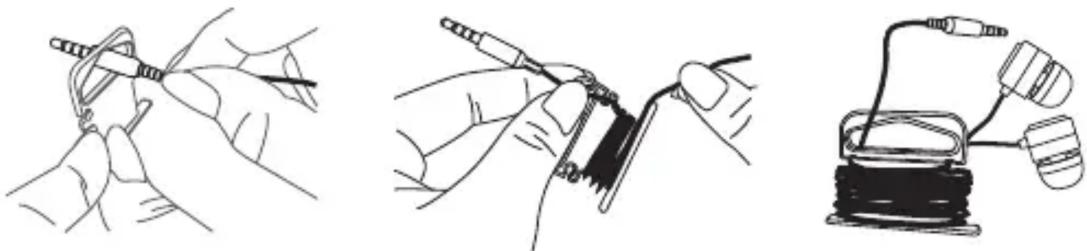
The hang tag at this top of the package also functions as a convenient cord management device. Pass the headphone plug through the opening in the hang tag as shown and then wind the headphone cord around the hang tag. This will keep your headphone cord tangle free and always ready to use.
natural_image
Three technical line drawings showing hands using tools to connect wires, a cable, and a wire coil (no text or symbols present)Using Your iHome Headphones
The earpieces are marked “L” and “R”. Place the “L” earpiece in your left ear and the “R” earpiece in your right ear for proper fit and best sound. If the earpieces are inserted incorrectly they will not fit properly in your ears and the sound quality will not be satisfactory.
Connect the headphone plug to the headphone jack of your music player. Be sure that the plug is fully inserted into the jack. If the plug is not fully inserted you may only hear sound from one earpiece.
NOTE: Your headphones are supplied with three different size silicon tips (S-M-L) for maximum comfort and to seal out unwanted noise. The “M” (medium) size tips were installed at our factory. If you find that the installed tips are too small or too large for your ears, you may remove them and replace them with the larger or smaller size accessory tips. To replace the tips simply pull them off the earpieces. To install different size tips, push them on to the earpieces and make sure they are fully seated on each earpiece so that they do not come off when you remove the earpiece from your ear. If one of the tips remains in your ear when you remove the headphones, remove the tip carefully and avoid pushing it further into your ear canal. Seek medical assistance if one of the tips becomes lodged in your ear and you are unable to remove it.
IMPORTANT! Listening at high volume for long periods of time can result in long-term hearing damage. For your safety, do not use headphones if they would prevent you from hearing warning sounds, such as while driving a car or motorcycle, riding a bike, etc.
NOTE: In extremely cold or dry air conditions you may notice a slight ‘tingling’ feeling in your ears when using in-ear headphones. This is the result of the build-up of static electricity in your body. This is normal and not an indication of any problem with your headphones.
Limited Lifetime Warranty
iHome Products, a division of SDI Technologies Inc. (hereafter referred to as SDI Technologies), warrants this product to be free from defects in workmanship and materials, under normal use and conditions, for the lifetime of the product from the date of original purchase.
Should this product fail to function in a satisfactory manner, it is best to first return it to the store where it was originally purchased. Should this fail to resolve the matter and service still be required by reason of any defect or malfunction during the warranty period, SDI Technologies will repair or, at its discretion, replace this product without charge (except for a \2.00 charge for handling, packing, return UPS/postage, and insurance). This decision is subject to verification of the defect or malfunction upon delivery of this product to the Factory Service Center listed below. The product must include proof of purchase, including date of purchase. The fee for service without proof of purchase is \4.00.
Before returning this product for service, please first replace the batteries (if applicable) with fresh ones, as exhausted or defective batteries are the most common cause of problems encountered.
If service is still required:
- Remove the batteries (if applicable) and pack the unit in a well padded, heavy corrugated box.
- Enclose a photocopy of your sales receipt, credit card statement, or other proof of the date of purchase, if within the warranty period.
- Enclose a check or money order payable to the order of SDI Technologies, for the sum of \2.00 (\4.00 without proof of purchase).
- Send the unit prepaid and insured, to the Factory Service Center listed below.
Consumer Repair Department
SDI Technologies Inc.
1330 Goodyear Drive
El Paso, TX 79936-6420
Disclaimer of Warranty
NOTE: This warranty is valid only if the product is used for the purpose for which it was designed. It does not cover (i) products which have been damaged by negligence or willful actions, misuse or accident, or which have been modified or repaired by unauthorized persons; (ii) cracked or broken cabinets, or units damaged by excessive heat; (iii) damage to digital media players, CD's or tape cassettes (if applicable); (iv) the cost of shipping this product to the Factory Service Center and its return to the owner.
This warranty is valid only in the United States of America and does not extend to owners of the product other than to the original purchaser. In no event will SDI Technologies or any of its affiliates, contractors, resellers, their officers, directors, shareholders, members or agents be liable to you or any third party for any consequential or incidental damages, any lost profits, actual, exemplary or punitive damages. (Some states do not allow limitations on implied warranties or exclusion of consequential damages, so these restrictions may not apply to you.) This warranty gives you specific legal rights, and you may also have other rights which vary from state to state.
Your acknowledgement and agreement to fully and completely abide by the above mentioned disclaimer of warranty is contractually binding to you upon your transfer of currency (money order, cashier's check, or credit card) for purchase of your SDI Technologies product.
© 2012 SDI Technologies, Inc. All rights reserved
Questions? Visit www.ihomeaudio.com or call 1-800-288-2792 Toll Free.
Brand : IHOME
Model : iB22
Category : Earphones