
RP2527 - Mp3 player RCA - Free user manual and instructions
Find the device manual for free RP2527 RCA in PDF.


| Product Type | MP3 Player |
| Brand | RCA |
| Model | RP2527 |
| Storage Capacity | 8 GB (internal) |
| Expandable Storage | microSD card slot up to 32 GB |
| Audio Formats Supported | MP3, WMA, WAV, FLAC |
| Display | 1.8-inch color TFT LCD |
| Battery Type | Rechargeable lithium-ion |
| Battery Life | Up to 12 hours of playback |
| Charging | USB cable (included) |
| Dimensions | 3.8 x 1.8 x 0.6 inches |
| Weight | 1.2 oz (34 g) |
| Playback Modes | Normal, Repeat, Shuffle, Intro |
| Equalizer Presets | Rock, Pop, Classic, Jazz, Normal |
| Radio | FM tuner with presets |
| Recording | Voice recording via built-in microphone |
| Connection | 3.5 mm headphone jack, USB 2.0 |
| Compatibility | Windows, Mac OS, Linux |
| Included Accessories | Earbuds, USB cable, quick start guide |
| Cleaning | Wipe with a soft dry cloth; avoid liquids |
| Safety | Do not disassemble; avoid extreme temperatures |
| Spare Parts & Repairability | Contact RCA support for service options |
| General Information | Portable digital audio player for music on the go |
Frequently Asked Questions - RP2527 RCA
User questions about RP2527 RCA
0 question about this device. Answer the ones you know or ask your own.
Ask a new question about this device
Download the instructions for your Mp3 player in PDF format for free! Find your manual RP2527 - RCA and take your electronic device back in hand. On this page are published all the documents necessary for the use of your device. RP2527 by RCA.
USER MANUAL RP2527 RCA
RP2525 EN 1/9/04 4:33 PM Page 2
RCA THOMSON
m a n u a l u s e r
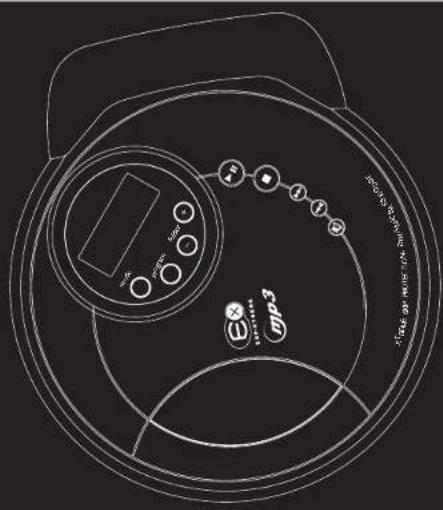
RP2520 RP2522 RP2525 RP2527 P2030U P2035U
IT IS IMPORTANT TO READ THIS INSTRUCTION BOOK PRIOR TO USING YOUR NEW PRODUCT FOR THE FIRST TIME. ES IMPORTANTE LEER ESTE MANUAL ANTES DE USAR POR VEZ PRIMERA SU EQUIPO.
IMPORTADOR
Marca(s) © Registrada(s)
www.rca.com/LatinAmerica
Printed In China / Impreso en China
55850010
EN
CAUTION!
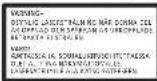
Invisible laser radiation when open. Avoid exposure to beam. Class I laser product. This system must be opened only by qualified technicians to prevent accidents caused by the laser beam.
LASER = 780 nm, P max = 5 mW Rating Information: At bottom of the unit this unit comply with the existing requirements
CE
In accordance with the rating plate of the unit, this unit complies with current standards concerning electrical safety and electromagnetic compatibility.


THE LIGHTNING FLASH AND ARROWHEAD WITHIN THE TRIANGLE IS A WARNING SIGN ALERTING YOU OF "DANGEROUS VOLTAGE" INSIDE THE PRODUCT.
CAUTION RISK OF ELECTRIC SHOCK DO NOT OPEN
CAUTION: TO REDUCE THE RISK OF ELECTRIC SHOCK, DO NOT REMOVE COVER (OR BACK), NO USER-SERVICEABLE PARTS INSIDE, REFER SERVICING TO QUALIFIED SERVICE PERSONNEL.

THE EXCLANATION POINT WITHIN THE TRIANGLE IS A WARNING SIGN ALERTING YOU OF IMPORTANT INSTRUCTIONS ACCOMPANYING THE PRODUCT.
WARNING: TO PREVENT FIRE OR ELECTRICAL SHOCK HAZARD, DO NOT EXPOSE THIS PRODUCT TO RAIN OR MOISTURE.
FCC InformationSafety Information
FCC Information
This device complies with Part 15 of the FCC Rules. Operation is subject to the following two conditions: (1) This device may not cause harmful interference, and (2) this device must accept any interference received, including interference that may cause undesired operation.
In accordance with FCC requirements, changes or modifications not expressly approved by
Thomson Inc. could void the user's authority to operate this product.
This device generates and uses radio frequency (RF) energy, and if not installed and used properly, this equipment may cause interference to radio and television reception.
If this equipment does cause interference to radio or television reception (which you can determine by unplugging the unit), try to correct the interference by one or more of the following measures:
- Re-orient the receiving antenna (that is, the antenna for the radio or television that is "receiving" the interference).
- Move the unit away from the equipment that is receiving interference.
- Plug the unit into a different wall outlet so that the unit and the equipment receiving interference are on different branch circuits. If these measures do not eliminate the interference, please consult your dealer or an experi
enced radio-television technician for additional suggestions. Also, the Federal Communications Commission has prepared a helpful booklet,
How To Identity and Resolve Radio TV Interference Problems. This booklet is available from the U.S. Government Printing Office.
Washington, DC 20402. Please specify stock number 004-000-00345-4 when ordering copies. This product complies with DHHS Rules 21 CFR Subchapter J. Applicable at the date of manufacture.
For Your Records
In the event that service should be required, you may need both the model number and the serial number. In the space below, record the date and place of purchase, and the serial number:
Date of Purchase Place of Purchase Serial No.
Service Information
This product should be serviced only by those specially trained in appropriate servicing techniques. For instructions on how to obtain service, refer to the warranty included in this Guide.
Technical specification
Product: Personal CDimp3 Player Brand: RCA / THOMSON Model: RP2520 / RP2522 / RP2525 / RP2527 / PDP2030U / PDP2035U
Electrical Consumption
2 x "AA" Batteries
IMPORTER
Before you begin .....2
CD Player
General Control 3
over Supply 4
AC Outlet Power Supply 4
Car DC Power Supply adapter .....4
Battery Power Supply ....4
Recharge function 4
The Display 5
Listening to Compact Disc ....5
Playback....5
Listening to a mp3 disc ....6
Folder selection 6
SkipSearch 6
Playmode....6
Resume 7
Skip/Search 7
Pause 7
Stop 7
Remain Time ....
Bass Boost/EQ. setting ....B
Program....8
Edit Program ....8
Cancel Program ....8
Exit Program Mode 8
Lock 8
More Information
Useful Advice 9
Notes on CD-R/RW Discs 9
Please Respect The Environment .....10
Headset Safety 10
Technical Specification ....10
U.S. Limited Warranty .....11
Canadian Limited Warranty .....13
Before you begin
Unpacking Your Unit
You should have the following:
- one main unit
• one remote control (RP2522 / RP2527
/ PDP2035U)
• AG/DC power adapter (PDP2030U)
PDP2035U)
Car kit (RP2525 / RP2527)
• one set of clip phones
- one user's guide
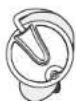
How to Use Your Clip Phones (The e.clipz)
The right ear clip phone is labeled R while the left ear clip phone is labeled L.
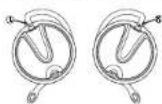
- Pull the ear hook away from the ear pad slightly. You will hear a click sound.
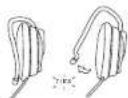
- Slide the ear hook behind the ear with the ear pad on the front of the ear. Rotate the clip phone so the ear pad fits closely with the ear.
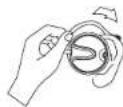
- Lock the clip phone in place by pushing down on the top of the ear hook until it locks.
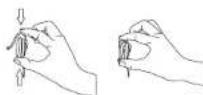
- For best sound quality, make sure the earpad fits closely with your ear.
EN
CD Player
EN
General Control
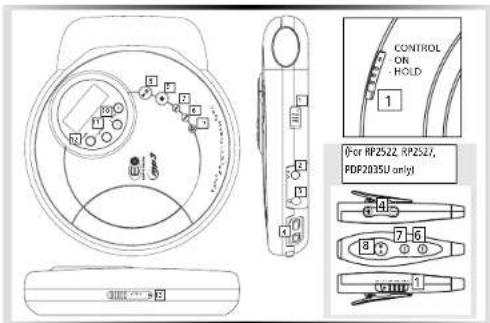
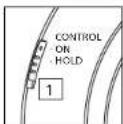
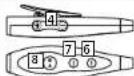
- Control switch - To lock or unlock the buttons
- DC jack - You can insert the adapter instead of batteries for indoor use.
- Line Out / 📄 Headphones Jack - Insert
your headphones here. - Volume buttons - To adjust the volume.
- Bass boost - Selects Bass Boost and
options. - -Skip / search backward track
- -Skip/ search forward track
B. ▶ II Play/pause button - Press to play or pause (D) -
■ Stop button- Press to stop CD playback, press and hold to turn off the unit.
-
Folder + / - - Selects folder.
- program button - Enters program mode
- Mode button - For different playmode selection.
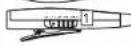
- Open switch - Slide to open CD door.
CD Player
Power Supply
| Model Number | AC/DC Adapter | Batteries |
| RP2520 / RP2522 / RP2525 / RP2527 | 5-4079B (not included) | “AA” x2 (Not Included) |
| PDP2030U / PDP2035U | LAD70CU (Included) (230V 50Hz) | 2 x 1.5V IEC R6 (UM3) (Included) |
AC Outlet Power Supply
(supplied with PDP2030U / PDP2035U only)
You can power your CD player with an AC/DC adapter. Refer to the table for details of the operating voltage.
AC/DC adapter is purposed for indoor use in dry rooms only. Remove the jack from the device to use it with the batteries.

Note:
Power is fed to the unit even
when it is not functioning. To
cut the power supply off, the AC/DC adapter must be unplugged.
Car (DC) Power Supply
adapter (For RP2525 / RP2527 only)
Plug the car (DC) power supply adapter into the DC in 4.5V jack at the rear/side of the CD player and then into the cigarette lighter receptacle in your car.
EN
Battery Power Supply
(supplied with PDP2030U / PDP2035U only)
Refer to the table for details of the batteries required to operate your unit.
Recharge function
(For PDP2030U/PDP2035U only)
To charge Ni-Cd batteries:
- Insert 2 rechargeable batteries into the battery compartment on the main unit.
- Connect the main adapter.
- Press stop on the unit to start recharging. An battery indicator will be displayed when recharging is in progress.
- Unplug the AC/DC adapter to stop recharge, or press PLAY to stop recharge and enter playback mode directly.
CD Player
EN
The display
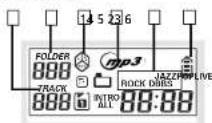
- Random Playback
- Displayed when different EQ. setting is set.
- Folder number
- Track number
- Displayed when in mp3 mode
6 Battery Indicator
* For different playmode icons, please refer to the playmode section.
Listening to a Compact Disc
Slide the open switch to the right to open the door. Insert a disc and press lightly on the centre to lock. Close the door.
Playback
Press play/pause button on the
main unit to start playback.
Rd DISC will appear on the display. Then, the total number of tracks and time of the CD will be displayed. If the disc compartment is empty or the disc cannot be read, No Disc will appear on the display.
The ELECTRONIC SHOCK PROTECTION*
system prevents sound interruptions
when impacts or vibrations occur
Electronic anti-shock consumes less power and increases the battery life. Therefore,
the ESP function is always ON.
After many successive impacts, the buffer might be emptied causing a brief sound interruption for the memory to reload.
ESP 45 seconds buffer - Press
play/pause on the main unit to
power on the unit. The display will show 45 sec.
ESP 10 seconds buffer - For better listening quality, press mode while pressing play/pause to turn the unit on. The display will show 10 sec.
CD Player
Listening to a mp3 Disc
Press play/pause button on the main unit to start playback.
Rd DISC will appear on the display. Then the total number of folders and files will be displayed. If the disc compartment is empty or the disc cannot be read, No Disc will appear on the display.
Folder selection
Press Folder - to skip to the previous
folder
Press Folder + to skip to the next folder.
Skip / Search
Press → to skip to the previous file. Press and hold to search backward in a file.
Press ➕ to skip to the next file.
Press and hold to search forward in a file.
Playmode
You can replay the entire CD or one track as many times as you wish as well as listen to the beginning of each track for 10 seconds.
In CD mode, press mode repeatedly to
■ Replay the current track.
Replay the entire CD.
• Play tracks randomly.
Play random track repeatedly.
-- Play the beginning of each track for 10 seconds.
In mp3 mode, press mode repeatedly to ▶ Replay the current file.
Replay the entire disc.
Replay the current folder.
Play all files randomly.
*Play all files in the current folder randomly.
Play random file repeatedly.
Play random file in the current folder repeatedly.
-- Play the beginning of each track for 10 seconds.
EN
CD Player
EN
Resume
When you power off the unit (without disconnecting power supply), resume is automatically activated. It stores the following settings and modes: Mode (Repeat/Repeat All/ Random) and EQ setting (Bass Boost). When play mode is on again, the unit resumes to the original settings.
To automatically store current track when you stop CD playback, press stop button twice.
Skip /Search
Press → to skip to the previous track. Press and hold to search backward in a track.
Press ➕ to skip to the next track. Press and hold to search forward in a track.
Pause
During playback, press play/pause ▶ on the main unit to pause playback. The minutes and seconds flash when interrupted.
Stop
Press stop on the main unit.

Note
To prevent excessive battery consumption, the unit
switches off automatically in all modes after 30s if no key has been activated.
CD Player
Bass Boost / EQ. setting
Press bass boost ♦ repeatedly to select NORMAL, DBBS, ROCK, JAZZ, POP and LIVE.
Program
This function lets you listen to the tracks you selected in the order you want. You can program up to 30 tracks. The CD player must be in Stop mode.
- Press program to enter program
mode. P icon will flash in the display.
-
Press Folder +1 - to select a folder. (mp3 dirc only)
-
Press ➞ or ➞ to select a track to store.
-
Press program to confirm your selection.
-
Repeat steps 2 and 3 to store another track.
-
Press play/pause to listen to your programming.
Select all files in a folder
- Press program to enter program
mode. P icon will flash in the display
- Press Folder +/ - to select a folder.
(mp3 disc only)
-
Press mode to select all files in the current folder.
-
Press program to confirm your selection.
-
Press play/pause to listen to your programming.
Cancel Program
To cancel your program, press and hold the mode key when you are in the stop mode or program mode. ERASE will appear in the display. The program will be automatically cancelled. (Program will also be cancelled when you change disc.)
Enter / Exit Program mode
To enter or exit program mode, press program in stop mode.
Lock
Slide control switch on the main unit to HOLD position to lock the button on the main unit to avoid accidental activation of unwanted functions.
"HOLd" will show on the display when the control is locked.

Note:
Remember to slide the
control switch to ON posi-
tion to activate the control again.
EN
More Information
EN
Clean the player with a soft cloth, or a damp chamois leather. Never use solvents.
Useful advice
- Do not store CDs in damp areas.
- Do not expose CDs to high temperatures.
- Do not put any tape or adhesives on either side of the disc.
- You should avoid leaving the CD door open. Dust is liable to impair performance of the laser optical unit.
- Do not use your set immediately after transport from a cold place to a warm place: there may be condensation problems.
- Do not touch the playing surface. Make sure that you keep your set away from water and high temperatures.
- If you do not use your set on battery power for more than one month, we advise you to take out all the batteries.
- To prevent personal injury, do not reverse any battery and do not mix battery types.
- Discard leaking batteries immediately. Leaking batteries can cause skin burns or other personal injury.
- This apparatus shall not be exposed to dripping and splashing.
- Prolonged use of the CD player at full volume can damage the user's ear.
SPC: Sound Pressure Control at 100dB maximum (only for Thomson models)
Notes on CD-R/RW Discs
- Do not affix any type of labels to either side (recordable or labeled side) of a CD-R/RW disc as this may result in the unit malfunctioning.
- To avoid damages to the CD-R/RW disc, do not open the disc compartment door while the disc is being read.
- Do not load an unrecorded CD-R/RW disc into the unit. This may take a longer time to read the disc.
- Playback capability for CD-RW discs may vary due to variations in the quality of the CD-RW disc and the recorder used to create the disc.
More Information
Please respect the environment!

Before throwing any batteries away, consult your distributor who may be able to take them back for specific recycling.
Headset Safety

Have a Blast- Just Not in Your Eardrums Make sure you turn down the volume on the unit before you put on
headphones. Increase the volume to the desired level only after headphone is in place.
- Do not play your headset at high volume. Hearing experts warn against extended high-volume play.
- If you experience ringing in your ears, reduce volume or discontinue use.
- You should use with extreme caution or temporarily discontinue use in potentially hazardous situations. Even if your headset is an open-air designed to let you to hear outside sounds, do not turn up the volume so high that you are unable to hear what is around you.
Technical specifications \* Frequency response: 20Hz to 20kHz
Power Supply
• 4.5V DC through AC/DC adapter
• 2 "AA" batteries
- 2 "AA" rechargeable Ni-cd batteries (Recharge function on Thomson models)
• 4.5V DC (through car DC adapter)
The descriptions and characteristics given in this document are given as a general indication and not as a guarantee. In order to provide the highest quality product possible, we reserve the right to make any improvement or modification without prior notice. The English version serves as the final reference on all products and operational details should any discrepancies arise in other languages.
EN
U.S. Limited Warranty
EN
What your warranty covers:
• Defects in materials or workmanship.
For how long after your purchase:
The warranty period for rental units begins with the first rental or 45 days from date of shipment to the rental firm, whichever comes first.
What we will do:
- Provide you with a new, or at our option, a refurbished unit. The exchange unit is under warranty for the remainder of the original product's warranty period.
- Proof of purchase in the form of a bill of sale or receipted invoice which is evidence that the product is within the warranty period must be presented to obtain warranty service. For rental firms, proof of first rental is also required.
How to make a warranty claim:
- Properly pack your unit. Include any cables, etc., which were originally provided with the product. We recommend using the original carton and packing materials.
- Include evidence of purchase date such as the bill of sale. Also print your name and address and a description of the defect. Send via standard UPS or its equivalent to:
Thomson Inc.
Product Exchange Center
11721 B Alameda Avenue
What your warranty does not cover:
- Insure your shipment for of loss or damage. Thomson accepts no liability in case of damage or loss en route to Thomson.
- Pay any charges billed to you by the Exchange Center for service not covered by the warranty.
- A new or refurbished unit will be shipped to you freight prepaid.
- Customer instruction. (Your Owner's Manual provides information regarding operating instructions and user controls. For additional information, ask your dealer.)
• Installation and setup service adjustments. - Batteries.
• Damage from misuse or neglect. - Products which have been modified or incorporated into other products.
- Products purchased or serviced outside the USA
- Acts of nature, such as but not limited to lightning damage.
U.S. Limited Warranty
Product Registration:
- Please complete and mail the Product registration Card packed with your unit. It will make it easier to contact you should it ever be necessary. The return of the card is not required for warranty coverage.
Limitation of Warranty:
• THE WARRANTY STATED ABOVE IS THE ONLY WARRANTY APPLICABLE TO THIS PRODUCT. ALL OTHER WARRANTIES, EXPRESS OR IMPLIED (INCLUDING ALL IMPLIED WARRANTIES OF MERCHANTABILITY OR FITNESS FOR A PARTICULAR PURPOSE) ARE HEREBY DISCLAIMED. NO VERBAL OR WRITTEN INFORMATION GIVEN BY THOMSON INC., ITS AGENTS OR EMPLOYEES SHALL CREATE A GUARANTY OR IN ANY WAY INCREASE THE SCOPE OF THIS WARRANTY. • REPAIR OR REPLACEMENT AS PROVIDED UNDER THIS WARRANTY IS THE EXCLUSIVE REMEDY OF THE CONSUMER. THOMSON INC. SHALL NOT BE LIABLE FOR INCIDENTAL OR CONSEQUENTIAL DAMAGES RESULTING FROM THE USE OF THIS PRODUCT OR ARISING OUT OF ANY BREACH OF ANY EXPRESS OR IMPLIED WARRANTY ON THIS PRODUCT. THIS DISCLAIMER OF WARRANTIES AND LIMITED WARRANTY ARE GOVERNED BY THE LAWS OF THE STATE OF INDIANA. EXCEPT TO THE EXTENT PROHIBITED BY APPLICABLE LAW, ANY IMPLIED WARRANTY OF MERCHANTABILITY OR FITNESS FOR A PARTICULAR PURPOSE ON THIS PRODUCT IS LIMITED TO THE APPLICABLE WARRANTY PERIOD SET FORTH ABOVE.
How state law relates to this warranty:
- Some states do not allow the exclusion nor limitation of incidental or consequential damages, or limitations on how long an implied warranty lasts, so the above limitations or exclusions may not apply to you.
- This warranty gives you specific legal rights, and you also may have other rights that vary from state to state.
If you purchased your product outside the USA:
• This warranty does not apply. Contact your dealer for warranty information.
EN

Canadian Limited Warranty
EN
Thomson multimedia Ltd. warrants to the purchaser or gift recipient that if any manufacturing defect becomes apparent in this product within 1 year from the original date of purchase, it will be replaced free of charge, including return transportation.
This warranty does not include damage to the product resulting from accidents, misuse or leaking batteries.
Should your product not perform properly during the warranty period, either:
- Return it to the selling dealer with proof of purchase for replacement,
OR
- Remove the batteries (where applicable), and pack product complete with accessories in the original carton (or equivalent).
— Mail prepaid (with proof of purchase) and insured to:
Thomson multimedia Ltd.
6200 Edwards Blvd.,
Mississauga, Ontario, L5T 2V7
Canada
The provisions of this written warranty are in addition to and not a modification of or subtraction from the statutory warranties and other rights and remedies contained in any applicable legislation, and to the extent that any such provisions purport to disclaim, exclude or limit any such statutory warranties and other rights and remedies, such provisions shall be deemed to be amended to the extent necessary to comply therewith.
If you are unable to find a qualified servicer for out of warranty service, you may write to:
Thomson Inc.
P.O.Box 0944
Indianapolis, Indiana, U.S.A., 46206-0944
Attach your sales receipt to this booklet for future reference. This information is required if service is needed during the warranty period.
PURCHASE DATE
NAME OF STORE
13

- RCA THOMSON
- EN
- CAUTION!
- CAUTION RISK OF ELECTRIC SHOCK DO NOT OPEN
- FCC InformationSafety Information
- FCC Information
- For Your Records
- Service Information
- Technical specification
- Electrical Consumption
- Before you begin
- CD Player
- General Control
- AC Outlet Power Supply
- Note:
- Car (DC) Power Supply
- Battery Power Supply
- Recharge function
- Listening to a Compact Disc
- Playback
- Listening to a mp3 Disc
- Folder selection
- Skip / Search
- Playmode
- Resume
- Skip /Search
- Pause
- Stop
- Note
- Bass Boost / EQ. setting
- Program
- Select all files in a folder
- Cancel Program
- Enter / Exit Program mode
- Lock
- More Information
- Useful advice
- Notes on CD-R/RW Discs
- Please respect the environment!
- Headset Safety
- Technical specifications \* Frequency response: 20Hz to 20kHz
- Power Supply
- U.S. Limited Warranty
- What your warranty covers:
- For how long after your purchase:
- What we will do:
- How to make a warranty claim:
- Thomson Inc.
- Product Exchange Center
- B Alameda Avenue
- What your warranty does not cover:
- Product Registration:
- Limitation of Warranty:
- How state law relates to this warranty:
- If you purchased your product outside the USA:
- Canadian Limited Warranty
Brand : RCA
Model : RP2527
Category : Mp3 player