
VCC8836V3B - Vacuum Cleaner SAMSUNG - Free user manual and instructions
Find the device manual for free VCC8836V3B SAMSUNG in PDF.


| Product Type | Canister Vacuum Cleaner |
| Model Number | VCC8836V3B |
| Brand | Samsung |
| Dimensions (L x W x H) | 435 x 285 x 220 mm |
| Weight | 5.2 kg |
| Power Consumption | 2000 W |
| Dust Capacity | 2.0 L |
| Cord Length | 6.0 m |
| Filtration System | HEPA H13 Filter |
| Suction Technology | Cyclonic |
| Noise Level | 75 dB(A) |
| Floor Types | Carpet, Hardwood, Tile |
| Accessories Included | Crevice Tool, Dusting Brush, Upholstery Tool |
| Filter Maintenance | Washable HEPA Filter |
| Dust Container | Transparent, Easy Empty |
| Safety Features | Automatic Shut-off, Thermal Protection |
| Spare Parts Available | Yes, Filters, Belts, Brushes |
| Warranty | 2 Years |
Frequently Asked Questions - VCC8836V3B SAMSUNG
User questions about VCC8836V3B SAMSUNG
0 question about this device. Answer the ones you know or ask your own.
Ask a new question about this device
Download the instructions for your Vacuum Cleaner in PDF format for free! Find your manual VCC8836V3B - SAMSUNG and take your electronic device back in hand. On this page are published all the documents necessary for the use of your device. VCC8836V3B by SAMSUNG.
USER MANUAL VCC8836V3B SAMSUNG
Vacuum Cleaner user manual
* Before operating this unit, please read the instructions carefully.
* For indoor use only.
English
imagine the possibilities
Thank you for purchasing a Samsung product.
To receive a more complete service,
please register your product at
www.samsung.com/register
SAMSUNG
safety information
SAFETY INFORMATION

- Before operating the appliance, please read this manual thoroughly and retain it for your reference.

- Because these following operating instructions cover various models, the characteristics of your vacuum cleaner may differ slightly from those described in this manual.
CAUTION/WARNING SYMBOLS USED
 | Indicates that a danger of death or serious injury exists. |
 | Indicates that a risk of personal injury or material damage exists. |
OTHER SYMBOLS USED
 | Represents something you must NOT do. |
 | Represents something you must follow. |
 | Indicates that you must disconnect the power plug from the socket. |

This vacuum cleaner is designed for domestic household use only. Do not use this vacuum cleaner to clear building waste or debris. Do not use this vacuum cleaner with any of the filters removed as this could cause damage to the internal components and void your warranty.
2_ safety information
safety information
IMPORTANT SAFEGUARDS
- Read all instructions carefully.
Before switching on, make sure that the voltage of your electricity supply is the same as that indicated on the rating plate on the bottom of the cleaner. - WARNING : Do not use the vacuum cleaner when rug or floor is wet. Do not use to suck up water.
- Close supervision is necessary when any appliance is used by or near children. Do not allow the vacuum cleaner to be used as a toy. Do not allow the vacuum cleaner to run unattended at any time. Use the vacuum cleaner only for its intended use as described in these instructions.
- Do not use the vacuum cleaner without a dust bin.
Empty the dust bin before it is full in order to maintain the best efficiency. - Do not use the vacuum cleaner to pick up matches, live ashes or cigarette butts. Keep the vacuum cleaner away from stoves and other heat sources. Heat can deform and discolour the plastic parts of the unit.
- Avoid picking up hard, sharp objects with the vacuum cleaner as they may damage the cleaner parts. Do not stand on the hose assembly. Do not put weight on the hose. Do not block the suction or the exhaust port.
- Switch the vacuum cleaner off on the body of the machine before unplugging from the electrical outlet. Disconnect the plug from the electrical outlet before emptying the dust bin. To avoid damage, please remove the plug by grasping the plug itself, not by pulling on the cord.
- This appliance is not intended for use by persons (including children) with reduced physical, sensory or mental capabilities, or lack of experience and knowledge, unless they have been given supervision or instruction concerning use of the appliance by a person responsible for their safety. Cleaning and user maintenance shall not be made by children without supervision.
- Children shall not play with the appliance. Cleaning and user maintenance shall not be made by children without supervision.
- The plug must be removed from the socket outlet before cleaning or maintaining the appliance.
- The use of an extension cord is not recommended.
- If your vacuum cleaner is not operating correctly, switch off the power supply and consult an authorized service agent.
- If the supply cord is damaged, it must be replaced by the manufacturer or its service agent or a similarly qualified person in order to avoid a hazard.
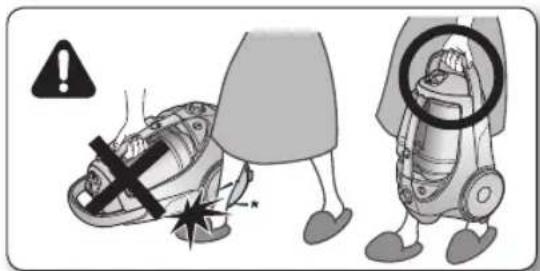
- Don't carry the vacuum cleaner by holding the hose.
Use the handle on the vacuum cleaner set. - Unplug the cleaner when not in use.
Turn off the power switch before unplugging.
ASSEMBLING THE CLEANER
05
05 Assembling the Cleaner
MAINTAIN TOOLS AND FILTER
08
08 Using accessory
09 Maintain floor tools
10 Emptying the dust bin
11 Cleaning the dust pack
13 Cleaning the outlet filter
13 Change the battery (optional)
TROUBLESHOOTING
14
4_ contents
assembling the cleaner

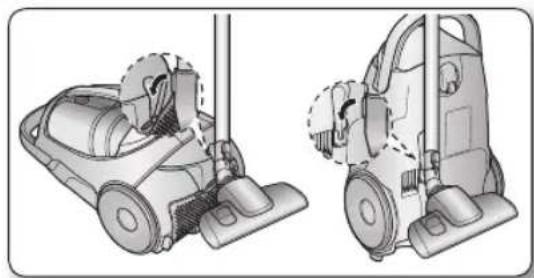
01 ASSEMBLING THE CLEANER

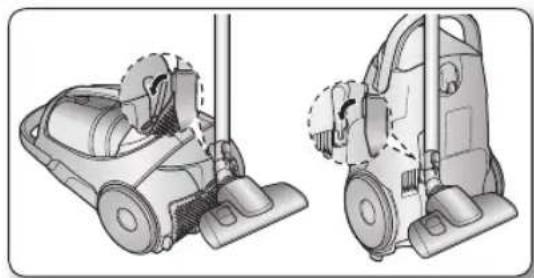
- Please do not push the button of dust bin handle when carrying machine.

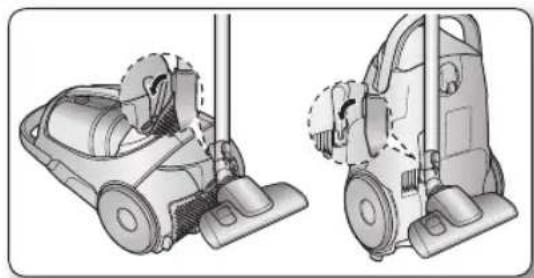
- For storage, park the floor nozzle.
natural_image
Technical illustration of a vacuum cleaner with two views (top and side), showing internal components without any text or symbols.assembling the cleaner
operating the cleaner
POWER CORD

natural_image
Illustration of a two-step robotic vacuum cleaner with attached power plug, showing body positioning and foot insertion (no text or symbols)
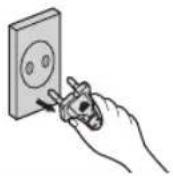
- When removing the plug from the electrical outlet, grasp the plug, not the cord.
ON/OFF SWITCH

POWER CONTROL
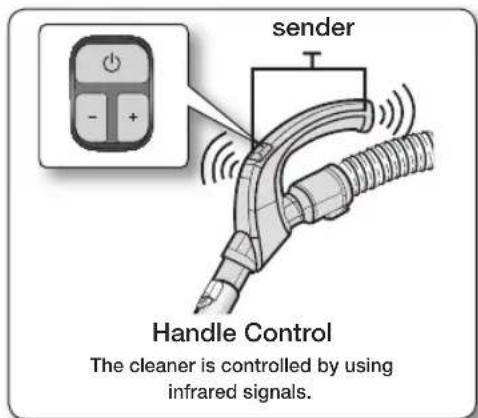
REMOTE-CONTROL TYPE (INFRARED CONTROL) (OPTIONAL)
- HOSE
1. Vacuum cleaner ON/OFF( ⏻
Press the ON/OFF button to operate the vacuum cleaner. Press again to stop the vacuum cleaner.
2. Vacuum cleaner (+, -)
Press the (+) button to operate the vacuum to high suction power. Press the (-) button to operate the vacuum to low suction power

Don't cover the handle sender when you use a handle control button.
6_ operating the cleaner
- BODY
Press the power ON/OFF button repeatedly to start and to stop the vacuum cleaner. (OFF → ON → OFF)

If the remote handle control is not working, the cleaner can be operated using the ON/OFF button on the body of the machine.
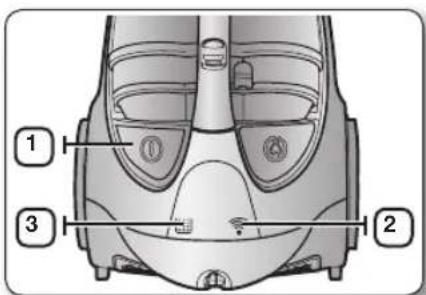
| 1 | The ON/OFF button operates the vacuum cleanser or stops it. |
| 2 | The INFRARED light indicates the part that receives the infra-red signal from the handle control. |
| 3 | The filter light is illuminated when the dust pack requires checking or emptying. An audio signal will also sound. |
BODY-CONTROL TYPE (OPTIONAL)
- HOSE
To reduce suction for leaning draperies, small rugs, and other light fabrics, pull the tap air until the hole is open.

natural_image
Diagram of a curved mechanical component with directional arrows indicating movement (no text or symbols)- BODY (VOLUME TYPE ONLY)
To control power level, just slide the power control bottom right and left.
MIN = For delicate fabrics, e.g. net curtains. MAX = For hard floors and heavily soiled carpets.

operating the cleaner _7
maintain tools and filter
USING ACCESSORY
PIPE
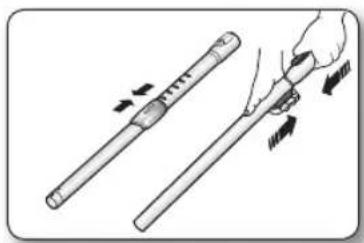
- Adjust the length of the telescopic pipe by sliding the length control button located in the center of the telescopic pipe back and forth.
natural_image
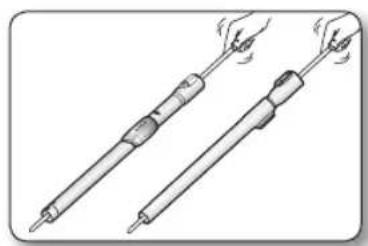
Illustration of a hand holding a pen with arrows indicating motion or movement (no text or symbols)- To check for blockages, separate the telescopic pipe and adjust to shorten. This allows for easier removal of waste clogging the tube.
natural_image
Illustration of two different types of soldering tools with visible heat dissipation (no text or symbols)ACCESSORY (OPTIONAL)
- Push the accessory on to the end of the hose handle.

natural_image
Diagram showing a mechanical component being inserted into a housing, with no visible text or symbols.- Pull out and turn the dusting brush for cleaning delicate areas.

natural_image
Diagram showing a mechanical component being rotated to form a folded panel (no text or symbols present)- To use the upholstery tool, push the accessory on to the end of the hose handle in the opposite direction.

natural_image
Diagram showing a cable connector being inserted into a car, with an inset close-up highlighting a component (no text or symbols present)8_ maintain tools and filter
MAINTAIN FLOOR TOOLS
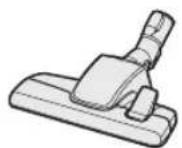
2-STEP BRUSH (OPTION)
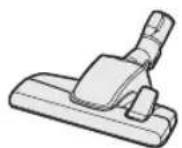


Carpet Cleaning Floor Cleaning
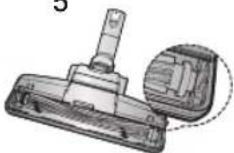
- Adjust the inlet lever according to the floor surface.
- Remove waste matter completely if the inlet is blocked.
POWER PET PLUS BRUSH (OPTION)

For improved pickup of pet hair and fibre on carpets.
123

natural_image
Mechanical component diagram showing a clamp or fixture with two views of the handle (no text or symbols present)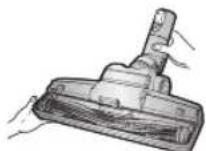

4

5

6
natural_image
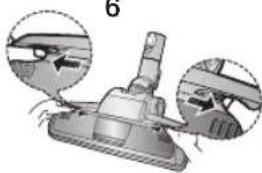
Technical illustration of a mechanical component with two views showing internal features (no text or symbols)Frequent vacuuming of hair or pet fur may cause a falling-off of the rotation due to matters tangled around the drum. In this case, clean the drum with care.
- Push the Open button of the transparent screen cover to separate the cover.
- Remove the brushbar from the transparent screen.
- Remove waste matter such as dust and hair tangled around the brushbar using scissors.
- Remove dust inside the brush housing using a dry duster or crevice tool.
- Insert brushbar into rotating belt and assemble.
- Click the transparent screen cover back into place to reassemble.
PARQUET MASTER BRUSH (OPTION)
• Vacuum dust in wide area at once.
- Remove waste matter completely if the inlet is blocked.

natural_image
Illustration of a hairdryer tool and its application in a manual setting (no text or symbols)maintain tools and filter
maintain tools and filter
EMPTYING THE DUST BIN
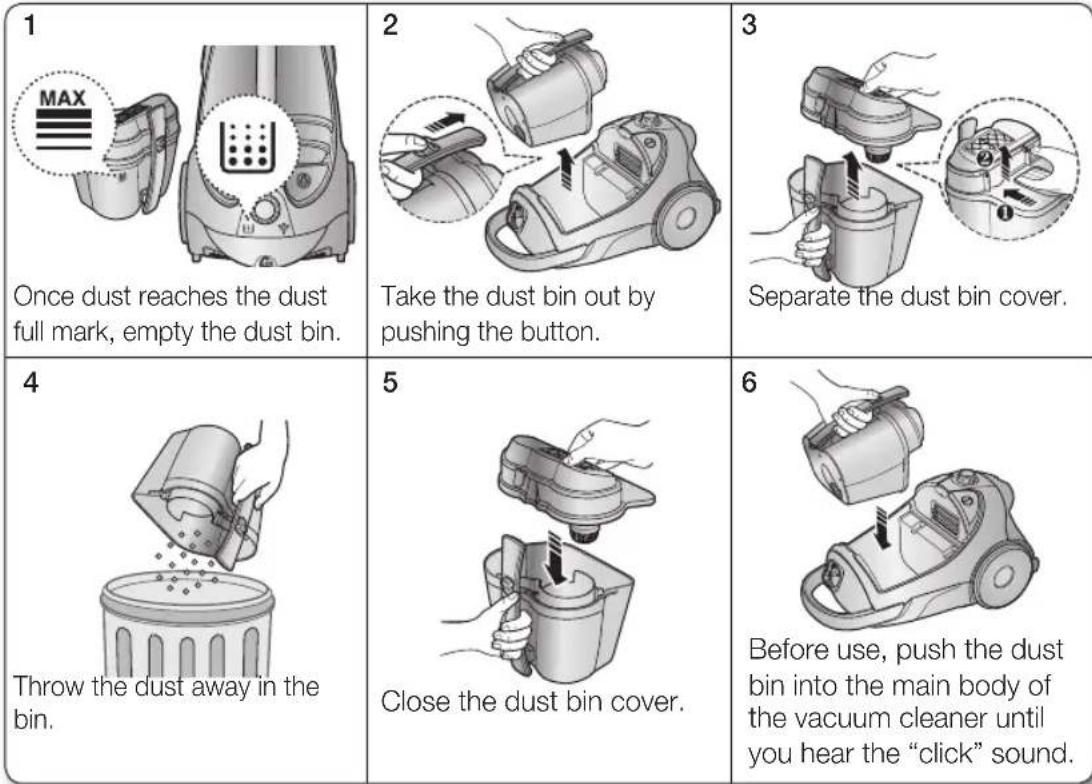
Once dust reaches the dust full mark, empty the dust bin.
Take the dust bin out by pushing the button.
Separate the dust bin cover.
Throw the dust away in the bin.
Close the dust bin cover.
Before use, push the dust bin into the main body of the vacuum cleaner until you hear the "click" sound.

- Empty into a plastic bag.
(recommended for asthma/allergy sufferers)
You may rinse the dust bin with cold water only.
maintain tools and filter
CLEANING THE DUST PACK
WHEN TO CLEAN THE DUST PACK
- The lamp will turn red when suction is reduced. If the light comes on, please clean the dust pack.

natural_image
Diagram showing two views of a washing machine head with indicator lights (no text or symbols present)- Turn the vacuum power to 'MAX'.

- If the filter check indicator turns red with the inlet floating 10cm above flat floor, clean the dust pack.

natural_image
Illustration of a mechanical clamp or fixture with a 10cm scale indicator (no text or symbols present)
When suction is noticeably reduced continuously or vacuum cleaner abnormally overheats, please clean the dust pack.
maintain tools and filter
CLEANING THE DUST PACK
1 Remove the dust bin. Remove the dust bin. | 2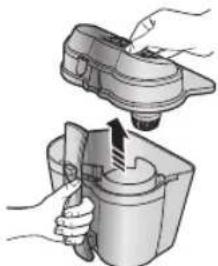 Separate the dust bin cover. Separate the dust bin cover. | 3 Remove the fixed frame of the dust pack cover. Remove the fixed frame of the dust pack cover. |
4 Separate the dust pack. Separate the dust pack. | 5 Remove the sponge and filter from the dust pack. Remove the sponge and filter from the dust pack. | 4 Wash the sponge and the filter of the dust pack with water. Wash the sponge and the filter of the dust pack with water. |
7 Let the sponge and filter dry in the shade for more than 12 hours. Let the sponge and filter dry in the shade for more than 12 hours. | 8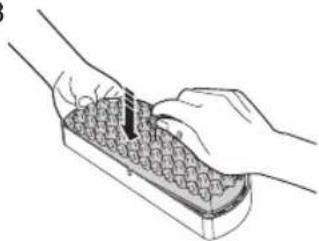 Put the sponge and filter into the dust pack. Put the sponge and filter into the dust pack. | 9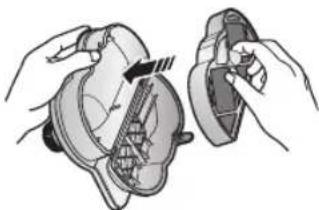 Put the assembled dust pack into the cover. Put the assembled dust pack into the cover. |
10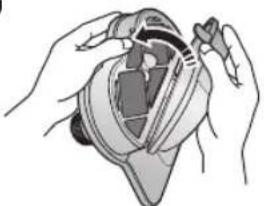 Before reassembly, align the dust pack cover and dust pack correctly. Before reassembly, align the dust pack cover and dust pack correctly. | 111^ Close the dust bin cover. Close the dust bin cover. | 10 Before use, push the dust bin into the main body of the vacuum cleaner until you hear the “click” sound. Before use, push the dust bin into the main body of the vacuum cleaner until you hear the “click” sound. |

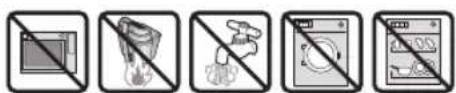
Make sure the filter is completely dry before putting it back into the vacuum cleaner. Allow 12 hours for it to dry.
12_ maintain tools and filter
maintain tools and filter
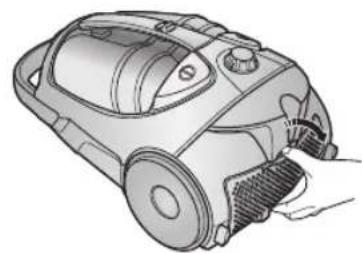
CLEANING THE OUTLET FILTER
1
natural_image
Line drawing of a vacuum cleaner with handle and control panel (no text or symbols)Press the fixed frame part at the back of the main body to remove.
2

natural_image
Illustration of a hand using a vacuum cleaner to adjust the component (no text or symbols visible)Remove the dust bin and HEPA Filter as shown.

natural_image
Illustration of a hand placing a tray with granular material into a cylindrical container (no text or symbols)Remove and replace the blocked outlet filter.

- When suction is noticeably reduced continuously or vacuum cleaner abnormally overheats, please clean the outlet filter. Note. Do not wash HEPA filter. If cleaning does not resolve the problem Please replace blocked out filter. - Replacement filters are available at your local Samsung distributor.
CHANGE THE BATTERY (OPTIONAL)

- When the vacuum cleaner dows not work, replace the batteries. If the problem persists, please contact our authorized dealer.
- Use 2 batteries of size AAA.

- Never disassemble or recharge the batteries.
- Never heat up the batteries or throw them into fire.
- Do not reverse (+), (-) poles
- Dispose of the batteries property.

natural_image
Technical illustration of a mechanical device with exploded view and internal components (no text or symbols)BATTERY TYPE : AAA Size

maintain tools and filter
troubleshooting
| PROBLEM SOLUTION | |
| Motor does not start | Check cable, pulg and socket.Leave to cool. |
| Suction force is gradually decreasing | Check for blockage and remove. |
| Cord does not rewind fully | Pull the cord out 2-3m and push down the cord rewind button. |
| Vacuum cleaner does not pick up dirt | Check hose and replace if required. |
| Low or decreasing suction | Please check filter and, if required, clean as illustrated in the instructions. if filters are out of condition change them to new ones. |
| Body overheating | Please check filters, If required clean as illustrated in the instruction. |
| Static electricity discharge | Please decrease power suction.This can also occur when air in the room is very dry.Please ventilate the room to air humidity become a normal. |
14_ troubleshooting
MEMO
MEMO
SC88** ซีรัส
เครื่อองดูดฝุ่น
คู่มีอผู้ไซ
natural_image
Technical illustration of a vacuum cleaner with two views (top and side), showing internal components without any text or symbols.natural_image
Illustration of a two-step robotic vacuum cleaner with attached power cord and foot, showing mechanical assembly and mounting instructions (no text or symbols)ข้อควรระวัง
การเปิด/ปิด
natural_image
Diagram of a curved mechanical component with directional arrows indicating movement (no text or symbols)natural_image
Illustration of a hand holding a pen with arrows indicating motion (no text or symbols)natural_image
Illustration of two soldering iron tools with visible terminals and heat dissipation (no text or symbols)natural_image
Diagram showing a mechanical assembly before and after transformation, with no visible text or symbols.natural_image
Diagram showing a mechanical assembly before and after transformation, with no visible text or symbols.natural_image
Diagram showing a cable connector being inserted into a device, with an arrow indicating the process (no text or symbols present)natural_image
Mechanical device with attached tubing and a handle, labeled '4' in the corner (no text or symbols on the device itself)
5


natural_image
Technical illustration of a mechanical component with two views showing internal components (no text or symbols)natural_image
Illustration of a hairdryer brush applying material to a surface (no text or symbols)natural_image
Diagram showing two views of a washing machine head with indicator lights (no text or symbols present)natural_image
Technical illustration of a mechanical clamp or fixture mounted on a base, with a 10cm scale indicator (no text or symbols present)
natural_image
Line drawing of a vacuum cleaner with handle and blade (no text or symbols)natural_image
Technical illustration of a vacuum cleaner with a close-up inset showing the component detail (no text or symbols present)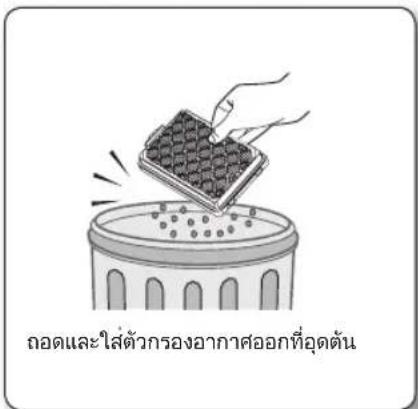
natural_image
Technical illustration of a handheld vacuum cleaner with internal components (no text or symbols)Hotline no : 1282 (for HHP)
0-2689-3233 (only for HHP)
0-2689-3232 (OTH products)
1800-29-3232 (Toll free)
www.samsung.com/th/support
บันทึก
SC88** series
natural_image
Technical illustration of two different vacuum cleaner designs (no text or symbols)natural_image
Illustration of a two-step robotic vacuum cleaner with attached power plug, showing body positioning and foot insertion (no text or symbols)CÂN TRỌNG
natural_image
Illustration of a hand using a foot on a vacuum cleaner with a warning symbol (no text or labels)BỘ ĐIỀU KHIỂN NGUỒN ĐIÊN
CÁC LOẠI ĐIỀU KHIỂN (ĐIỀU KHIỂN HỒNG NGOẠI) (TÙY CHỌN)
-- ŌNG
natural_image
Diagram of a curved mechanical component with directional arrows indicating movement (no text or symbols)- THÂN MÁY (DÀNH RIÊNG CHO LOẠI MÁY ĐIỀU KHIỂN ĐƯỢC MỨC ĐỘ)
natural_image
Illustration of a hand holding a tool with arrows indicating motion or force (no text or symbols)natural_image
Illustration of two soldering iron tools with visible tip and base, emitting steam (no text or symbols)PHỤ KIÊN (TÙY CHỌN)
natural_image
Diagram showing a mechanical component being inserted into a wire, with no visible text or symbols.natural_image
Diagram showing a mechanical component before and after assembly, with no visible text or symbolsnatural_image
Diagram showing a cable connector being inserted into a car body, with an arrow indicating the process (no text or symbols present)2-STEP BRUSH (OPTION) - ĐẦU HÚT 2-STEP


natural_image
Illustration of a vacuum cleaner with attached tubing and a handle (no text or symbols)

natural_image
Technical illustration of a mechanical component with a highlighted section (no text or symbols)

natural_image
Illustration of a mechanical component with two views showing different angles (no text or symbols)natural_image
Illustration of a hand using a tool to press or install a mechanical component (no text or symbols visible)natural_image
Illustration of three steps of a container being handled, showing different stages of pouring or handling (no text or symbols present)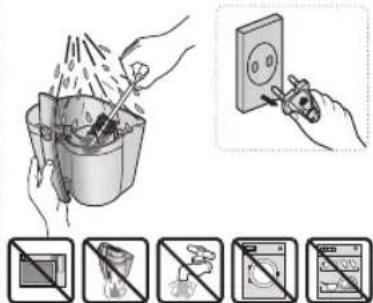

natural_image
Diagram showing two views of a washing machine head with indicator lights (no text or symbols)natural_image
Technical illustration of a mechanical clamp or fixture with a 10cm scale indicator (no text or symbols present)
natural_image
Line drawing of a vacuum cleaner with handle and blade (no text or symbols)natural_image
Technical illustration of a vacuum cleaner with a close-up inset showing the component detail (no text or symbols present)natural_image
Illustration of a hand placing a tray with granular material into a circular container (no text or symbols)THAY PIN (TÙY CHÌNH)

natural_image
Technical illustration of a mechanical device with exploded view and internal components (no text or symbols)Loại PIN: PIN AAA

- Vacuum Cleaner user manual
- imagine the possibilities
- safety information
- IMPORTANT SAFEGUARDS
- ASSEMBLING THE CLEANER
- MAINTAIN TOOLS AND FILTER
- TROUBLESHOOTING
- operating the cleaner
- POWER CORD
- ON/OFF SWITCH
- POWER CONTROL
- REMOTE-CONTROL TYPE (INFRARED CONTROL) (OPTIONAL)
- - HOSE
- Vacuum cleaner ON/OFF( ⏻
- Vacuum cleaner (+, -)
- - BODY
- BODY-CONTROL TYPE (OPTIONAL)
- - BODY (VOLUME TYPE ONLY)
- USING ACCESSORY
- PIPE
- ACCESSORY (OPTIONAL)
- MAINTAIN FLOOR TOOLS
- 2-STEP BRUSH (OPTION)
- POWER PET PLUS BRUSH (OPTION)
- PARQUET MASTER BRUSH (OPTION)
- EMPTYING THE DUST BIN
- CLEANING THE DUST PACK
- WHEN TO CLEAN THE DUST PACK
- CLEANING THE OUTLET FILTER
- CHANGE THE BATTERY (OPTIONAL)
- เครื่อองดูดฝุ่น
- คู่มีอผู้ไซ
- บันทึก
- BỘ ĐIỀU KHIỂN NGUỒN ĐIÊN
- - THÂN MÁY (DÀNH RIÊNG CHO LOẠI MÁY ĐIỀU KHIỂN ĐƯỢC MỨC ĐỘ)
- PHỤ KIÊN (TÙY CHỌN)
- 2-STEP BRUSH (OPTION) - ĐẦU HÚT 2-STEP
- THAY PIN (TÙY CHÌNH)
Brand : SAMSUNG
Model : VCC8836V3B
Category : Vacuum Cleaner