
MotoActv Golf Edition - Smartwatch MOTOROLA - Free user manual and instructions
Find the device manual for free MotoActv Golf Edition MOTOROLA in PDF.


| Product Type | Smartwatch (Golf Edition) |
| Brand | Motorola |
| Model | MotoActv Golf Edition |
| Dimensions (Case) | 45 x 45 x 12 mm |
| Weight | 50 g |
| Display | 1.6-inch color touchscreen |
| Battery | Rechargeable lithium-ion, 300 mAh |
| Charging | Proprietary charging cable |
| Connectivity | Bluetooth 4.0, GPS |
| Water Resistance | 5 ATM (50 meters) |
| Material | Polymer case, silicone strap |
| Golf Features | Preloaded golf courses, shot tracking, scorecard, distance measurement |
| Fitness Tracking | Step counter, heart rate monitor, calories burned |
| Notifications | Call, message, app alerts |
| Memory | 2 GB internal storage for music and apps |
| Operating System | Motorola Actv proprietary OS |
| Includes | Smartwatch, charging cable, quick start guide |
| Care Instructions | Wipe with soft dry cloth; avoid solvents; store in cool dry place |
| Safety | Consult physician before use; not a medical device; keep away from children |
| Spare Parts & Repairability | Contact Motorola support for strap and battery replacement |
| Operating Temperature | 0°C to 40°C |
Frequently Asked Questions - MotoActv Golf Edition MOTOROLA
User questions about MotoActv Golf Edition MOTOROLA
0 question about this device. Answer the ones you know or ask your own.
Ask a new question about this device
Download the instructions for your Smartwatch in PDF format for free! Find your manual MotoActv Golf Edition - MOTOROLA and take your electronic device back in hand. On this page are published all the documents necessary for the use of your device. MotoActv Golf Edition by MOTOROLA.
USER MANUAL MotoActv Golf Edition MOTOROLA
Introducing the MOTOACTV Golf Edition, a cutting-edge GPS golf tracker, virtual caddy, and online clubhouse. Track your golf game right from your wrist.
AT A GLANCE 2
GOLF COURSES.... 3
SET UP & GO 4
START A ROUND 5
GREENS & HAZARDS.... 6
TRACK YOUR SHOTS 7
BALL LIE & CLUBS 8
TRACK YOUR PUTTS 9
FINISH A HOLE.... 10
ADVANCE TO THE NEXT HOLE 11
END THE ROUND 12
ONLINE CLUBHOUSE....13
TIPS.... 14
WANT MORE?......15
AT A GLANCE
Tip: Use the main MOTOACTV guide to get set up, then check out this Golf Edition for all the best golf action.
Caution: Before charging or using your device for the first time, please read the important legal and safety information packaged with your product.

2 At a glance
GOLF COURSES
To manage your courses on the device, touch Workout > Golf > Courses, and then:
• To view courses on your device, touch My Courses.
- To update golf course data on your device, touch My Courses > Update when you're within Wi-Fi range.
• To delete courses, touch the course package you want to delete, scroll down, and touch Delete.
- To download new courses, make sure your device is connected to Wi-Fi, then touch Available for Download and select the course package.
Tip: For help with Wi-Fi, see your main MOTOACTV guide.

SET UP & GO
Set up your golf round before you start. Touch Workout > Golf > Settings :
- Play Mode: Select Fast Play, Simple Shot Tracking, or Detailed Shot Tracking mode for your round.
- Scoring Preference: Select scoring based on strokes or making par.
- Tee Location: Choose your tee location.
- Clubs Profile: Set your average club distances.
- Putt Distances: Customize your putt distance ranges.
Tip: These preferences remain set for every round you play until you change them.

START A ROUND
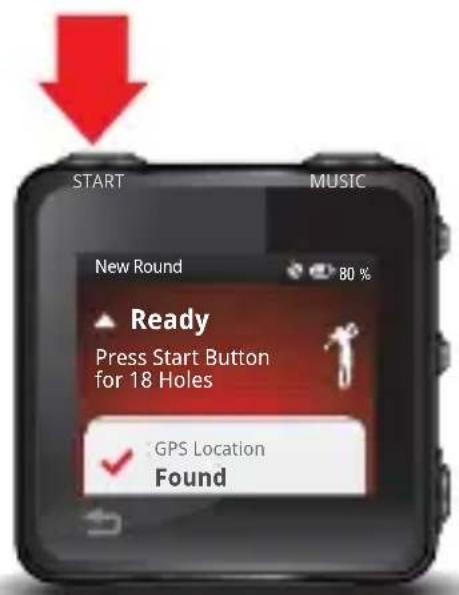
1 To start a round of golf, touch Workout > Golf > New Round and wait for MOTOACTV to acquire a GPS signal.
Note: When your device locates a GPS signal, it shows you a list of nearby courses. (GPS acquisition may take a couple of minutes. Stand in an open area with a clear view of the sky.)
2 Choose your course, confirm your tee location, select how many holes you are playing, and then press the Start key.

GREENS & HAZARDS
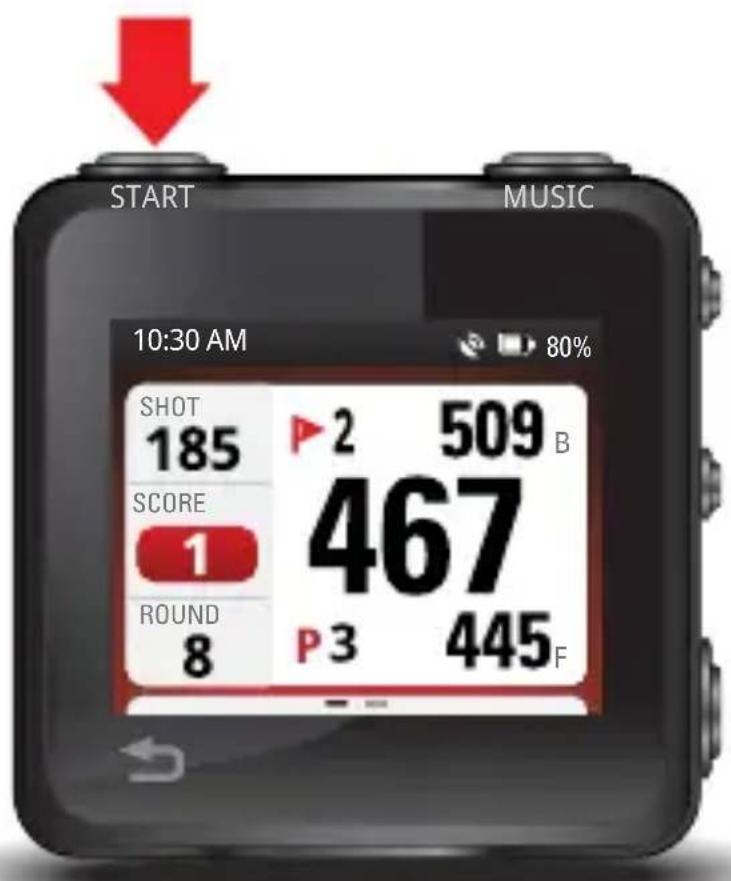
See your distance to the front, center, and back of the green. Swipe the screen to the left to check how far you are from hazards.


TRACK YOUR SHOTS
In Simple and Detailed Shot Tracking play modes, you can track GPS location of your shots.
1 When you're at the tee, press the Start key to mark your ball location. Then, make your shot.
2 Before each of your next shots, press the Start key to mark each ball location.
Note: When you mark your new ball location, MOTOACTV shows you the distance of your last shot.
Mark the ball location.
BALL LIE & CLUBS
To track ball lie and the club you use for each shot, set Play Mode to Detailed Shot Tracking. See “SET UP & GO” on page 4.
Press the Start key to mark your ball location and see what club MOTOACTV recommends for your next shot. Adjust it based on your preferences. You can also mark details of the ball lie.
Tip: To change the details of your last marked shot, double-press the Start key and reenter your shot info.

TRACK YOUR PUTTS
When you use Detailed Shot Tracking mode, you can track the details of your putts. The putts tracking screen appears automatically when you choose Putter for your club and Green for the ball lie. You can record your long, medium, short, and gimmie putts, as well as the distance of your final putt.


FINISH A HOLE
1 When you finish playing a hole, touch SCORE to see the hole scoring.
Tip: To make corrections, touch- or+.
2 When you're done, touch END HOLE or OK.

ADVANCE TO THE NEXT HOLE
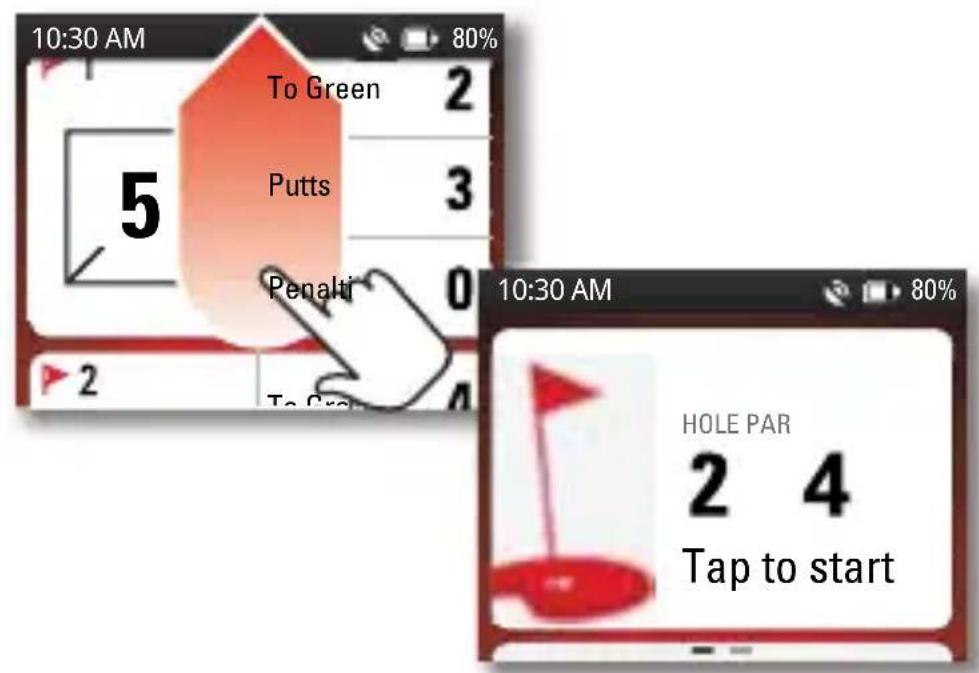
To advance to the next hole, drag the screen up.
Tap the screen to start a new hole.
Tip: Starting a new hole will automatically end and score the previous hole.
END THE ROUND
When you finish the last hole of your round, touch END ROUND to see your scorecard. Tap on a hole to view or edit the score details. If you want, record the weather conditions or your handicap.
Tip: To end the round at any time, press and hold the Start key.

ONLINE CLUBHOUSE
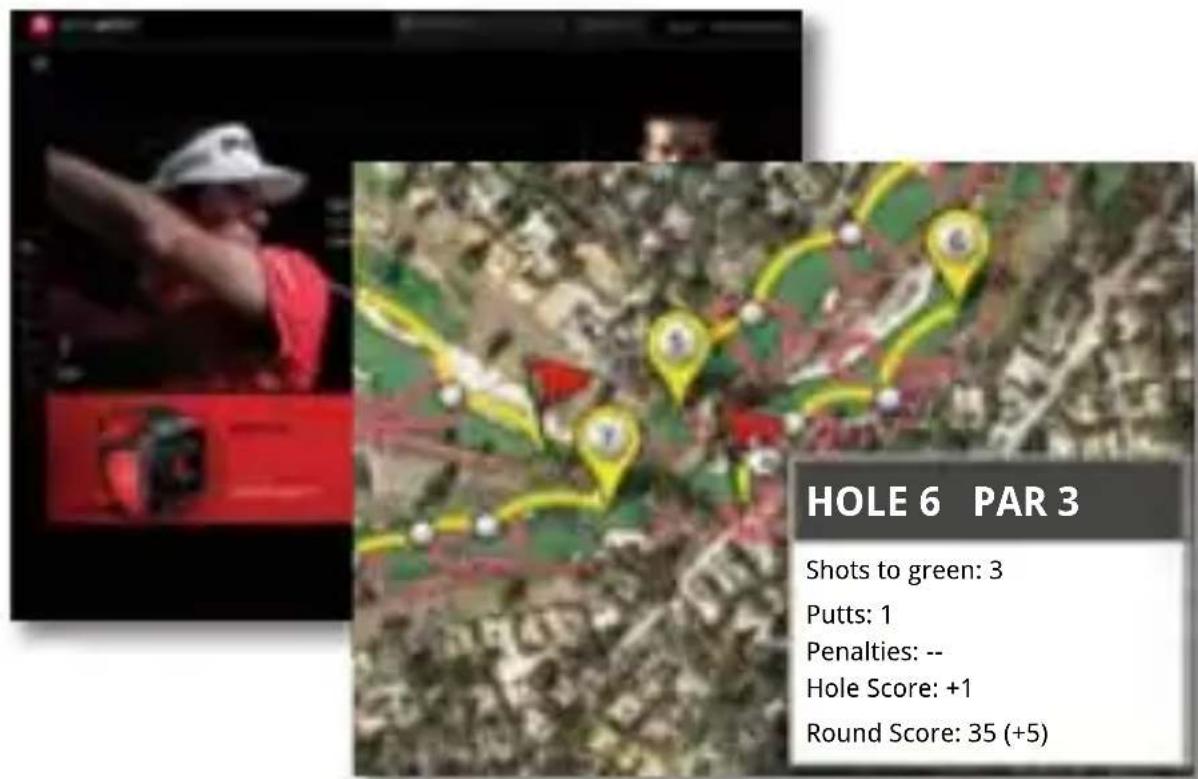
Sync your completed round to MOTOACTV.com for these great features:
• See a virtual representation of your game using a satellite view of the course.
- Move your mouse over the arc of the ball flight to see shot details.
• View and share a detailed scorecard for any of your games with your MOTOACTV friends.
- Compare your round to any of your previous rounds on the same course.
Tip: If you can't log on to MOTOACTV.com, see your main MOTOACTV Guide.
TIPS
- To review and make scoring adjustments, you can tap the screen for a completed hole at any time.
- To make sure MOTOACTV gives you the best club recommendations for your shots, keep your clubs profile up-to-date in Settings > Workout > Clubs Profile.
- During round setup, you can choose your play mode:
Fast Play: Use this mode if you want to see only distance to green and hazards during your round without tracking your shots. Choose Simple Scorecard to record par and score for each hole.
Simple Shot Tracking: Use this mode to record the GPS location of your shots when you press the Start key.
Detailed Shot Tracking: Use this mode to track all details of your round including GPS location of each shot, club selection, ball lie, putts information, and penalty shots.
WANT MORE?
Get what you need:
- Answers: User guides, online help: www.motorola.com/support
- Forums: https://forums.motorola.com
- Accessories: A wristband, arm band, bike clip, and more: www.motorola.com/products.
- Social: News, tips & tricks, videos:

YouTube™ www.youtube.com/motorola

Facebook™ www.facebook.com/motorola

Twitter www.twitter.com/motomobile
Certain features, services and applications are network dependent and may not be available in all areas; additional terms, conditions and/or charges may apply. Contact your service provider for details.
All features, functionality, and other product specifications, as well as the information contained in this guide, are based upon the latest available information and believed to be accurate at the time of printing. Motorola reserves the right to change or modify any information or specifications without notice or obligation.
Note: The images in this guide are examples only.
MOTOROLA and the Stylized M Logo are trademarks or registered trademarks of Motorola Trademark Holdings, LLC. All other product or service names are the property of their respective owners.
© 2012 Motorola Mobility, Inc. All rights reserved.
Product ID: MOTOACTV™ Golf Edition
Manual Number: 68016988001-B


Brand : MOTOROLA
Model : MotoActv Golf Edition
Category : Smartwatch