MBP50 - Baby monitor MOTOROLA - Free user manual and instructions
Find the device manual for free MBP50 MOTOROLA in PDF.


Pick your language and provide your email: we'll send you a specifically translated version.
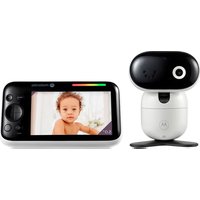
| Product Type | Baby Monitor |
| Brand | Motorola |
| Model | MBP50 |
| Category | Video Baby Monitor |
| Display Size | 5 inches |
| Display Type | Color LCD |
| Display Resolution | 480 x 272 pixels |
| Night Vision | Yes, automatic infrared night vision |
| Audio | Two-way talk-back with noise reduction |
| Temperature Sensor | Yes, room temperature display |
| Built-in Lullabies | Yes, selectable lullaby melodies |
| Wireless Technology | 2.4 GHz FHSS digital |
| Operating Range | Up to 300 m outdoors, 50 m indoors |
| Parent Unit Battery | Rechargeable lithium-ion battery |
| Battery Life | Approx. 5 hours (typical use) |
| Charging Time | Approx. 6 hours |
| Power Supply | AC adapters included for both units |
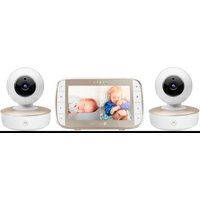
| Expandability | Can pair up to 4 cameras (additional cameras sold separately) |
| Camera Night Vision Range | Up to 5 meters |
| Included Items | Parent unit, camera, 2 AC adapters, user manual |
| Cleaning & Maintenance | Wipe with a soft dry cloth; do not use harsh chemicals |
| Security | Secure FHSS transmission with up to 99% privacy |
| Safety Compliance | FCC, IC, CE certified |
| Spare Parts | Available via Motorola customer support / authorized dealers |
Frequently Asked Questions - MBP50 MOTOROLA
How do I pair my Motorola MBP50 camera with the parent unit?
To pair your MBP50 camera, place the parent unit on its charging cradle and ensure the camera is plugged in. Within 30 seconds of powering on both devices, they should automatically pair. If not, press the PAIR key on the parent unit and then press the PAIR button on the camera. The connection is indicated by a solid video feed.
What should I do if the video connection keeps dropping?
Check the distance between the units and eliminate obstacles like walls or large metal objects. Ensure both units have sufficient power. Also, avoid interference from other 2.4 GHz devices (e.g., Wi-Fi routers, microwaves). Try changing the channel on the parent unit if available.
Can I add more than one camera to this monitor?
Yes, the MBP50 supports up to 4 cameras. You can purchase additional Motorola MBP50 cameras and pair them using the PAIR function. Use the CAMERA key on the parent unit to cycle through the connected cameras.
How do I turn off the night vision?
The MBP50 has automatic night vision that activates in low-light conditions. There is no manual override; the infrared LEDs will switch on when the room is dark and turn off in bright light.
What is the battery life of the parent unit?
The parent unit is equipped with a rechargeable lithium-ion battery that provides approximately 5 hours of continuous use on a full charge. Battery life may vary depending on usage and screen brightness.
How do I clean the monitor?
Clean the parent unit and camera with a soft, dry cloth. Do not use liquids, sprays, or abrasive cleaners. For stubborn dirt, slightly dampen the cloth with water. Always disconnect the devices from power before cleaning.
Does the MBP50 have a temperature sensor?
Yes, the camera unit includes a temperature sensor that measures the baby's room temperature. The current temperature is displayed on the parent unit screen, allowing you to monitor the environment comfortably.
Can I use the monitor without leaving it plugged in?
Yes, the parent unit can be used on battery power for up to 5 hours, while the camera must be plugged into an AC outlet to function. The parent unit also has an AC adapter for continuous power if desired.
What is the maximum range of the MBP50?
The MBP50 offers a 300-meter outdoor range and 50-meter indoor range. Actual range may be reduced by walls, doors, and other obstructions.
Is the video signal secure?
Yes, the MBP50 uses 2.4 GHz FHSS (Frequency Hopping Spread Spectrum) technology, which provides a secure and private connection. This greatly reduces the risk of signal interception compared to analog monitors.
User questions about MBP50 MOTOROLA
0 question about this device. Answer the ones you know or ask your own.
Ask a new question about this device
No questions yet. Be the first to ask one.
Download the instructions for your Baby monitor in PDF format for free! Find your manual MBP50 - MOTOROLA and take your electronic device back in hand. On this page are published all the documents necessary for the use of your device. MBP50 by MOTOROLA.
USER MANUAL MBP50 MOTOROLA


Manual assistant
Powered by Anthropic
Waiting for your message
Product information
Brand : MOTOROLA
Model : MBP50
Category : Baby monitor