
XWC-PC1 - Webcam Xcellon - Free user manual and instructions
Find the device manual for free XWC-PC1 Xcellon in PDF.


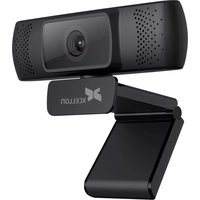
| Product Type | Webcam |
| Brand | Xcellon |
| Model | XWC-PC1 |
| Dimensions (approx.) | 80 x 60 x 50 mm |
| Weight (approx.) | 150 g |
| Power Supply | USB 2.0 (5V, 500mA) |
| Interface | USB 2.0 |
| Sensor | CMOS, 2 MP |
| Maximum Resolution | 1920 x 1080 (Full HD) |
| Frame Rate | 30 fps at 1080p |
| Built-in Microphone | Yes, mono |
| Focus Type | Fixed focus |
| Field of View | 70° |
| Compatible Operating Systems | Windows, macOS, Chrome OS, Linux |
| Cable Length | 1.5 m |
| Mounting | Clip-on (monitor or desk) |
| Maintenance & Cleaning | Clean lens with soft, lint-free cloth. Avoid liquids. |
| Safety Precautions | Do not expose to water or extreme temperatures. Unplug when not in use. |
| Spare Parts & Repairability | No user-serviceable parts. Contact support for issues. |
| General Information | Plug-and-play webcam for video calls, streaming, and recording. |
Frequently Asked Questions - XWC-PC1 Xcellon
User questions about XWC-PC1 Xcellon
0 question about this device. Answer the ones you know or ask your own.
Ask a new question about this device
Download the instructions for your Webcam in PDF format for free! Find your manual XWC-PC1 - Xcellon and take your electronic device back in hand. On this page are published all the documents necessary for the use of your device. XWC-PC1 by Xcellon.
USER MANUAL XWC-PC1 Xcellon
XWC-PC1 Privacy Cover for Select Xcellon Webcams

natural_image
Diagram showing a device being processed from a base to a camera, with no visible text or symbols.- Peel off the protective backing strip from the mounting tape.
- Align the Privacy Cover with the top of the webcam so the cover hangs over and is flush with the front of the webcam.
- Press down for at least three seconds, allowing the mounting tape to adhere to the webcam.
When you're ready to use your webcam, flip the cover up and out of the way.
The cover allows you to view your webcam's LED status light so you can see when your video camera is active.
One-Year Limited Warranty
For more information, visit www.xcellongear.com or call Customer Service at 212-594-2353. Xcellon is a registered trademark of the Gradus Group. © 2020 Gradus Group LLC.
All Rights Reserved.
Images are for illustrative purposes only.
Made in China
Brand : Xcellon
Model : XWC-PC1
Category : Webcam