
PMA-1 - Receiver Polsen - Free user manual and instructions
Find the device manual for free PMA-1 Polsen in PDF.


| Product Type | Stereo Receiver |
| Brand | Polsen |
| Model | PMA-1 |
| Dimensions (W x H x D) | 17.0 x 5.5 x 12.5 inches |
| Weight | 22 lbs |
| Power Output | 100 watts per channel (8 ohms, 20Hz-20kHz) |
| Total Harmonic Distortion | < 0.05% |
| Frequency Response | 20Hz - 20kHz ± 0.5dB |
| Input Sensitivity | 200mV (line), 2.5mV (phono MM) |
| Input Impedance | 47k ohms (line), 47k ohms (phono) |
| Signal-to-Noise Ratio | 90dB (line), 75dB (phono) |
| Audio Inputs | 4x RCA line, 1x phono (MM), 1x auxiliary (3.5mm) |
| Audio Outputs | Speaker terminals (A/B), 1x RCA pre-out, 1x headphone (6.3mm) |
| Radio Tuner | FM/AM with 30 presets |
| Power Consumption | 400W (max), 30W (standby) |
| Power Supply | 120V~, 60Hz |
| Remote Control | Included |
| Safety Certifications | FCC, CE |
| Operating Temperature | 41°F - 95°F (5°C - 35°C) |
| Warranty | 2 years limited |
Frequently Asked Questions - PMA-1 Polsen
User questions about PMA-1 Polsen
0 question about this device. Answer the ones you know or ask your own.
Ask a new question about this device
Download the instructions for your Receiver in PDF format for free! Find your manual PMA-1 - Polsen and take your electronic device back in hand. On this page are published all the documents necessary for the use of your device. PMA-1 by Polsen.
USER MANUAL PMA-1 Polsen
The PMA-1 personal headphone amplifier is perfect for monitoring your performance on stage or in the studio. The PMA-1 mixes a stereo or mono line-level signal from the aux out of a mixing board, sound card, or playback device. It allows you to blend or boost the volume of your performance independently from the rest of the track, and it lets you hear your performance with zero latency. The Mic gain adjusts the headphone volume of your microphone or instrument, while the input monitor controls the volume of the entire track. The result is the perfect personal headphone mix for an optimal performance.
PRECAUTIONS
- Please read and follow these instructions, and keep this manual in a safe place.
- Exposure to high sound levels can cause permanent hearing loss. Avoid listening at high volumes for extended periods of time.
- Use only the correct, recommended voltage.
- Use only the power adapter included with this product.
- Clean this product with only a soft, dry cloth.
- Make sure that this product is intact and that there are no missing parts.
- All images are for illustrative purposes only.
OVERVIEW
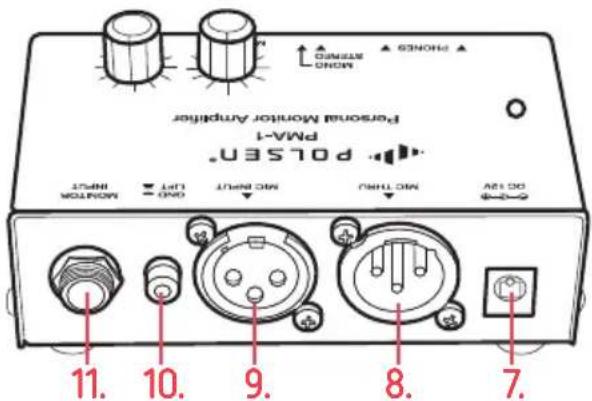
- Mic Gain knob
- Monitor Level knob
- Stereo/Mono switch
- 1/8 in. (3.5 mm) headphone output
- 1/4 in. headphone output
- Power indicator LED
- Power input
- Mic Thru (XLR male)
- Mic Input (XLR female)
-
Ground/Lift switch
-
Monitor Input (1/4 in. TRS stereo or TR mono)
Also Included:
DC 12 V / 500 mA power supply

POWERING THE PMA-1
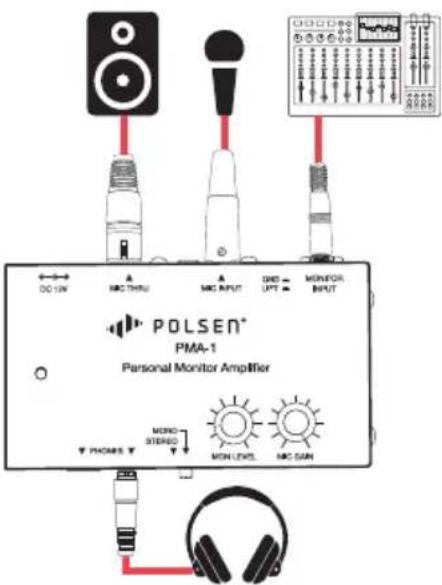
Plug the 12 V power cord into the power input, and plug the power adapter into an outlet. The LED will light up.
CONNECTING THE PMA-1
Mic Input
Connect the microphone to the Mic Input with a balanced XLR cable.
Mic Thru
Run a balanced XLR cable from the Mic Thru port to the mic input of a mixing console or sound board.
Note: For condenser microphones, the PMA-1 does not supply its own phantom power, but it will pass along phantom power from a mixing board.
Monitor Input
Use a balanced or unbalanced 1/4 in. cable to connect the Monitor Input with the aux out of a mixing board, computer sound card, or line output of a playback device.
Headphones
Connect headphones to the 1/4 or 1/8 in. headphone jack.
Note: Do not use both headphones jacks simultaneously.
OPERATING THE PMA-1
Mic Gain
The Mic Gain knob controls the microphone volume in your headphones. This will increase or decrease the headphone volume of the microphone without affecting the signal level that's sent to the mixing board.
Monitor Level
The volume of the Monitor Level knob controls the overall mix. If the microphone level is too low in the headphones, turn up the Mic Gain before increasing the Monitor Level.
Stereo/Mono Switch
Select stereo or mono, depending on the signal that's sent to the Monitor Input.
- If a TS (mono) connector is connected to the Monitor Input, select mono.
- If a TRS (stereo) connector is connected to the Monitor Input, select stereo.
Ground/Lift Switch
When the PMA-1 is connected to a mixing board, the Ground/Lift switch should be in the up (LIFT) position. This will prevent the introduction of interference into the signal chain.
If there is an audible hum or noise in the headphones, pressing the switch to the down (GND) position will eliminate it.
SPECIFICATIONS
| NUMBER OF CHANNELS 2 | |
| INPUT CONNECTORS | Mic input: XLRFMonitor input: 1/4 in. TRS or TS |
| OUTPUT CONNECTORS | Mic thru: XLRMHeadphone out: 1/4 in. TRS or TS, 1/8 in. (3.5 mm) TRS |
| FUNCTION CONTROLS | Volume knobs ( × 2 )Mono/stereo selectorGround/lift switch |
| MAXIMUM OUTPUT LEVEL | +10 dBu (60 mW) |
| MAXIMUM INPUT LEVEL | -18 dBu |
| FREQUENCY RESPONSE | Mic input: 50 Hz to 25 kHzMonitor input: 20 Hz to 25 kHz |
| GAIN | Mic input: 40 dBMonitor input: 10 dB |
| DISTORTION (THD) | 0.01% typ. (100 Ω loading) |
| S/N RATIO | -68 dBu @ 0 dBu, A-weighted |
| CMRR | Typically 40 dB / >50 dB @ 1 kHz |
| IMPEDANCE | Mic input: 2 kΩ (balanced)Headphone output: 3 kΩ (min |
| POWER | 12 V DC |
| DIMENSIONS (W × H × D) | 4.1 × 1.8 × 2.5 in. (10.4 × 4.7 × 6.4 cm) |
| WEIGHT | 8.5 oz. (240 g) |
TROUBLESHOOTING
| Problem Solution | |
| There's no sound in the headphones. | Make sure the headphones are completely plugged in.Make sure the volume levels are turned up.Make sure the Monitor Input is receiving a signal. |
| I can't hear my microphone in the headphones. | For condenser microphones, make sure the Mic Thru port is connected to a device that has 48 V phantom power, and the phantom power is engaged.Make sure the Mic Gain knob is turned up. |
| The LED light is not lit. | Make sure the 12 V DC adapter is plugged into an outlet, and the connector is completely inserted into the power input jack on the PMA-1. |
| I hear noise or a hum. | Press in the GND/LIFT button to break the ground connection between the PMA-1 and the mixing board. |
ONE-YEAR LIMITED WARRANTY
This Polsen product is warranted to the original purchaser to be free from defects in materials and workmanship under normal consumer use for a period of one (1) year from the original purchase date or thirty (30) days after replacement, whichever occurs later. The warranty provider's responsibility with respect to this limited warranty shall be limited solely to repair or replacement, at the provider's discretion, of any product that fails during normal use of this product in its intended manner and in its intended environment. Inoperability of the product or part(s) shall be determined by the warranty provider. If the product has been discontinued, the warranty provider reserves the right to replace it with a model of equivalent quality and function.
This warranty does not cover damage or defect caused by misuse, neglect, accident, alteration, abuse, improper installation or maintenance. EXCEPT AS PROVIDED HEREIN, THE WARRANTY PROVIDER MAKES NEITHER ANY EXPRESS WARRANTIES NOR ANY IMPLIED WARRANTIES, INCLUDING BUT NOT LIMITED TO ANY IMPLIED WARRANTY OF MERCHANTABILITY OR FITNESS FOR A PARTICULAR PURPOSE. This warranty provides you with specific legal rights, and you may also have additional rights that vary from state to state.
To obtain warranty coverage, contact the Polsen Customer Service Department to obtain a return merchandise authorization ("RMA") number, and return the defective product to Polsen along with the RMA number and proof of purchase. Shipment of the defective product is at the purchaser's own risk and expense.
For more information or to arrange service, visit www.polsenaudio.com or call Customer Service at 212-594-2353.
Product warranty provided by the Gradus Group.
www.gradusgroup.com
Polsen is a registered trademark of the Gradus Group. © 2018 Gradus Group LLC. All Rights Reserved.

POLSEN® A Gradus Group Brand
Brand : Polsen
Model : PMA-1
Category : Receiver