
VS721MULTI - Cables for Computers and Peripherals StarTech.com - Free user manual and instructions
Find the device manual for free VS721MULTI StarTech.com in PDF.


| Product Type | VGA Video Splitter |
| Brand | StarTech.com |
| Model | VS721MULTI |
| Input Interface | 1 x VGA (HD-15) Female |
| Output Interface | 2 x VGA (HD-15) Female |
| Max Resolution | 1920 x 1200 @ 60Hz |
| Supported Resolutions | 640x480, 800x600, 1024x768, 1280x1024, 1600x1200, 1920x1200 |
| Housing Material | Metal |
| Power Source | External power adapter (included) |
| Input Voltage | 5V DC |
| Operating Temperature | 0°C to 45°C |
| Dimensions (LxWxH) | 2.4 x 1.1 x 0.9 in (61 x 28 x 23 mm) |
| Weight | 0.1 lbs (45 g) |
| Features | Splits a single VGA signal to two displays; plug-and-play; no software required |
| Maintenance | Clean with dry cloth; avoid liquids |
| Safety | Use only included power adapter; do not expose to moisture |
| Spare Parts | Power adapter available separately |
| Repairability | Not user-serviceable; contact support |
| General Information | For connecting a computer to two VGA monitors or projectors |
Frequently Asked Questions - VS721MULTI StarTech.com
User questions about VS721MULTI StarTech.com
0 question about this device. Answer the ones you know or ask your own.
Ask a new question about this device
Download the instructions for your Cables for Computers and Peripherals in PDF format for free! Find your manual VS721MULTI - StarTech.com and take your electronic device back in hand. On this page are published all the documents necessary for the use of your device. VS721MULTI by StarTech.com.
USER MANUAL VS721MULTI StarTech.com
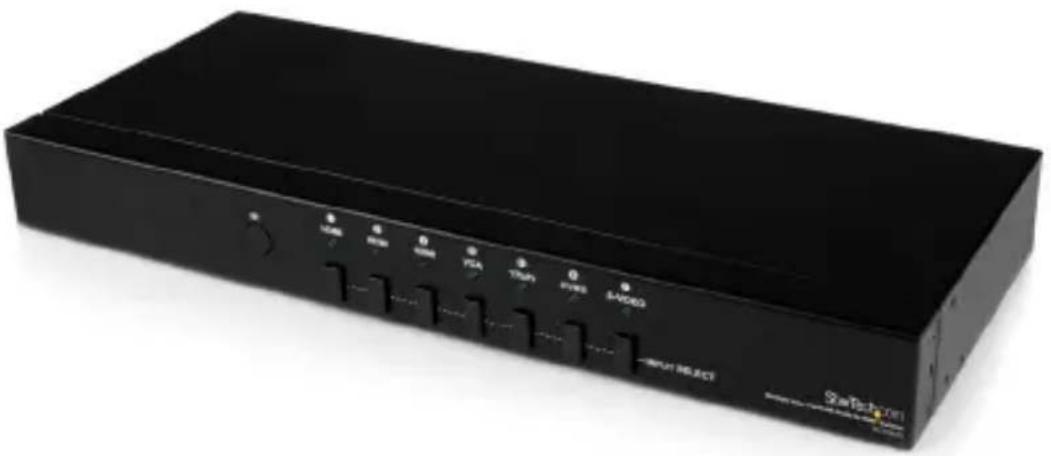
Multiple Video Input with Audio to HDMI® Switcher
natural_image
Black rectangular electronic device with labeled buttons (no readable text or symbols beyond branding)Actual product may vary from photos
User Manual
SKU#: VS721MULTI
For the latest information and specifications visit
www.startech.com/VS721MULTI
Compliance Statements
FCC Compliance Statement
This equipment has been tested and found to comply with the limits for a Class B digital device, pursuant to part 15 of the FCC Rules. These limits are designed to provide reasonable protection against harmful interference in a residential installation. This equipment generates, uses and can radiate radio frequency energy and, if not installed and used in accordance with the instructions, may cause harmful interference to radio communications. However, there is no guarantee that interference will not occur in a particular installation. If this equipment does cause harmful interference to radio or television reception, which can be determined by turning the equipment off and on, the user is encouraged to try to correct the interference by one or more of the following measures:
• Reorient or relocate the receiving antenna
- Increase the separation between the equipment and receiver
- Connect the equipment into an outlet on a circuit different from that to which the receiver is connected
- Consult the dealer or an experienced radio/TV technician for help
Industry Canada Statement
This Class B digital apparatus complies with Canadian ICES-003.
For the State of California

WARNING: Cancer and Reproductive Harm
www.P65Warnings.ca.gov
To view manuals, videos, drivers, downloads, technical drawings, and more visit www.startech.com/support
Use of Trademarks, Registered Trademarks, and other Protected Names and Symbols
This manual may make reference to trademarks, registered trademarks, and other protected names and/or symbols of third-party companies not related in any way to StarTech.com. Where they occur these references are for illustrative purposes only and do not represent an endorsement of a product or service by StarTech.com, or an endorsement of the product(s) to which this manual applies by the third-party company in question. Regardless of any direct acknowledgement elsewhere in the body of this document, StarTech.com hereby acknowledges that all trademarks, registered trademarks, service marks, and other protected names and/or symbols contained in this manual and related documents are the property of their respective holders.
To view manuals, videos, drivers, downloads, technical drawings, and more visit www.startech.com/support
Safety Statements
Safety Measures
- Wiring terminations should not be made with the product and/or electric lines under power.
- Product installation and/or mounting should be completed by a certified professional as per the local safety and building code guidelines.
- Cables (including power and charging cables) should be placed and routed to avoid creating electric, tripping or safety hazards.
Mesures de sécurité
To view manuals, videos, drivers, downloads, technical drawings, and more visit www.startech.com/support
Säkerhetsåtgärder
• Make sure to assemble this product according to the instructions. Failure to do so might result in personal injury or property damage.
- Never use this product if parts are missing or damaged.
Table of Contents
Compliance Statements....1
Safety Statements....3
Warning Statements 4
Product Diagram (VS721MULTI)....6
Product Information....7
Packaging Contents 7
System Requirements....7
Hardware Installation......8
Hardware Operation....8
Specifications....11
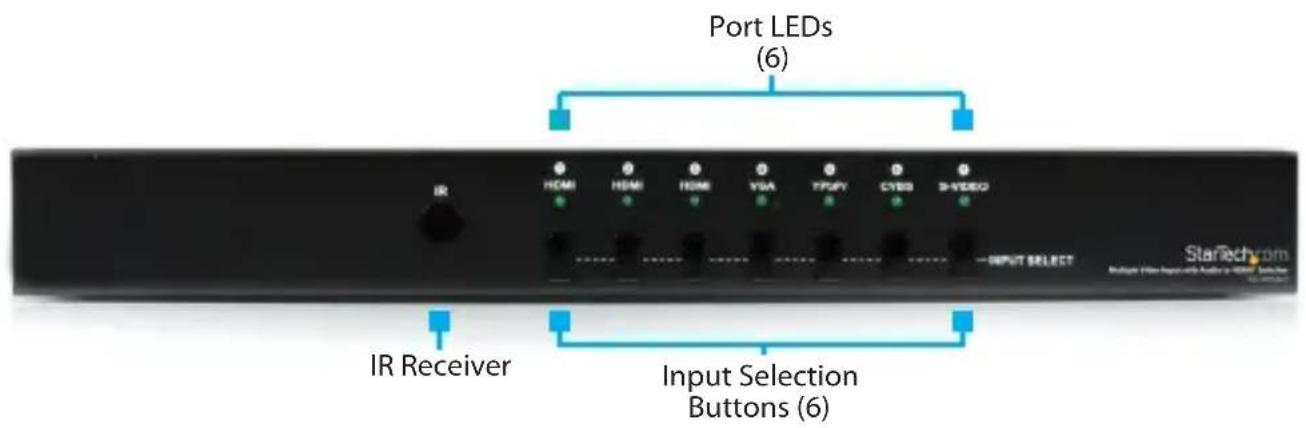
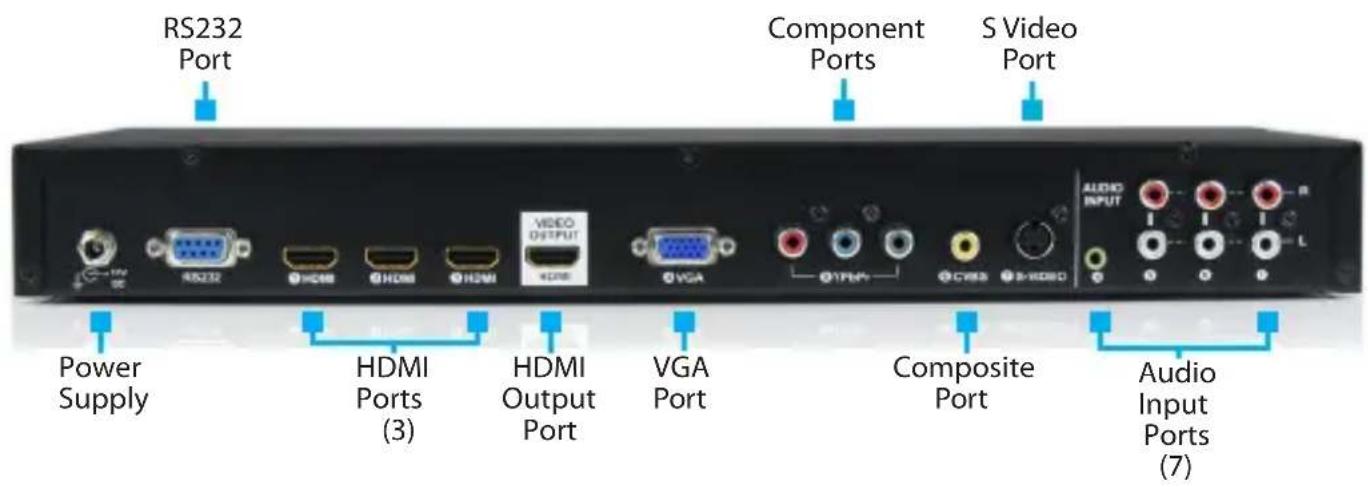
Product Diagram (VS721MULTI)
To view manuals, videos, drivers, downloads, technical drawings, and more visit www.startech.com/support
Product Information
Packaging Contents
- Multiple Format to HDMI® Audio Video Switch x 1
- IR Remote Control x 1
- Mounting Kit x 1
• RS232 Serial Cable - 6 ft x 1
• RS-232 Control Software CD x 1
• Universal Power Adapter (NA/UK/EU) x 1 - User Manual x 1
System Requirements
For the latest requirements, please visit www.startech.com/VS721MULTI.
• Video source devices (i.e. computer, Blu-ray Player)
- HDMI® enabled display device (i.e. television, projector)
• Desired Audio Video Input Cables
- HDMI® x 3
- VGA x 1,
- Component YPbPr x 1
• Composite CVBS x 1 - S-Video x 1
• 3.5MM Audio VGA x 1 - RCA Audio x 3
- HDMI® Output Cable
To view manuals, videos, drivers, downloads, technical drawings, and more visit www.startech.com/support
Hardware Installation
- Connect the Desired Audio Video Input Cables (sold separately) from each video source device (i.e. computer, Blu-ray Player) to the Video Input Ports (3 x HDMI®, 1 x VGA, 1x Component YPbPr, 1 x Composite CVBS, 1 x S-Video) on the Switcher.
- Connect an HDMI® cable (sold separately) from the HDMI® enabled display device (i.e. television, projector) to the HDMI® Output Port on the Switcher.
- Turn on the display device, followed by the video source devices.
- (Optional) For RS232 Remote Serial control, connect the included RS232 Serial Cable from a computer to the RS232 Serial port on the Switcher.
Hardware Operation
-
Manual Port Selection
-
Press the Input Selection Button that corresponds with the video source device you would like displayed.
-
The selected Active Port LED Indicator will light, and the desired video source device will be displayed on the HDMI® enabled display device.
-
Remote Control Port Selection
- Press the desired 1 - 7 key on the remote control that corresponds with the number above the Active Port LED Indicator.
To view manuals, videos, drivers, downloads, technical drawings, and more visit www.startech.com/support
- The selected Active Port LED Indicator will light, and the desired video source device will be displayed on the HDMI® enabled display device.
- Use the button to power on/off the VS721MULTI.
Note: The arrow buttons on the remote can also be used to switch the Active Port LED Indicator to the adjacent left or right video source device.
- Remote Serial Control Using The Matrix Application Software
Note: Ensure Step 4. of Hardware Installation has been completed.
- Download the latest software from the StarTech.com website (recommended), or insert the included Software CD into your CD-ROM drive.
- Launch AV Matrix(.msi). This file will be located in the root directory on the downloaded folder, or the Software CD.
- The Matrix Application software will quickly install. Upon completion Click to open the software.
- Click the "options" button and configure the communication protocol to the following specifications: Baud rate 9600bps, no odd or even calibration bit address, 8bit transmission address, 1bit stop address, PC Port 001.
Note: The COM port on your computer will require the same configuration. Consult your computer user documentation for further details.
- Click the "Scan" button. The numbers near the bottom of the table will now represent and correspond with the numbers above each Active Port LED Indicator, and the number 001 on the left side of the table will represent the HDMI® display Device.
- Click the icon that corresponds with the desired video source device, and that device will now be displayed on the HDMI® equipped display.
Specifications
| Ports 7 | |
| AV Input | HDMI S-Video Composite VGA Component YCbCr |
| Output Signal HDMI | |
| Industry Standards High | Speed HDMI®, HDCP |
| LED Indicators | 1x HDMI - 11x HDMI - 21x HDMI - 31x VGA - 41x YPbPr - 51x CVSB - 61x S-VIDEO - 7 |
| Max Resolution 1920 x 1200 | |
| Maximum Analog Resolutions | VGA: 1920x1200YPbPr: 1920x1080 |
To view manuals, videos, drivers, downloads, technical drawings, and more visit www.startech.com/support
| Maximum Digital Resolutions | 1600x1200 |
| Supported Resolutions | Support VGA mode640x480, 720x400, 800x600, 848x480, 1024x768, 1152x864, 1280x720, 1280x768, 1280x800, 1280x960, 1280x1024, 1360x768, 1400x1050, 1440x900, 1440x1050, 1600x1200, 1680x1050, 1920x1080, 1920x1200Support YPbPR mode720x480, 720x576, 720x480, 720x576, 1280x720, 1920x1080, 1920x1080 |
To view manuals, videos, drivers, downloads, technical drawings, and more visit www.startech.com/support
Warranty Information
This product is backed by a two-year warranty.
For further information on product warranty terms and conditions, please refer to www.startech.com/warranty.
Limitation of Liability
In no event shall it be the liability of StarTech.com Ltd. and StarTech.com USA LLP (or their officers, directors, employees or agents) for any damages (whether direct or indirect, special, punitive, incidental, consequential, or otherwise), loss of profits, loss of business, or any pecuniary loss, arising out of or related to the use of the product exceed the actual price paid for the product.
Some states do not allow the exclusion or limitation of incidental or consequential damages. If such laws apply, the limitations or exclusions contained in this statement may not apply to you.
Hard-to-find made easy. At StarTech.com, that isn't a slogan. It's a promise.
StarTech.com is your one-stop source for every connectivity part you need. From the latest technology to legacy products — and all the parts that bridge the old and new — we can help you find the parts that connect your solutions.
We make it easy to locate the parts, and we quickly deliver them wherever they need to go. Just talk to one of our tech advisors or visit our website. You'll be connected to the products you need in no time.
Visit www.startech.com for complete information on all StarTech.com products and to access exclusive resources and time-saving tools.
StarTech.com is an ISO 9001 Registered manufacturer of connectivity and technology parts. StarTech.com was founded in 1985 and has operations in the United States, Canada, the United Kingdom and Taiwan servicing a worldwide market.
Reviews
Share your experiences using StarTech.com products, including product applications and setup, what you love about the products, and areas for improvement.
StarTech.com Ltd.
45 Artisans Cres.
London, Ontario
N5V 5E9
Canada
StarTech.com LLP
2500 Creekside Pkwy.
Lockbourne, Ohio
43137
U.S.A.
StarTech.com Ltd.
Unit B, Pinnacle
15 Gowerton Rd., Brackmills
Northampton
NN4 7BW
United Kingdom
FR: fr.startech.com
DE: de.startech.com
ES: es.startech.com
NL: nl.startech.com
IT: it.startech.com
JP: jp.startech.com
- Multiple Video Input with Audio to HDMI® Switcher
- Compliance Statements
- FCC Compliance Statement
- Industry Canada Statement
- For the State of California
- WARNING: Cancer and Reproductive Harm
- Use of Trademarks, Registered Trademarks, and other Protected Names and Symbols
- Safety Statements
- Safety Measures
- Mesures de sécurité
- Säkerhetsåtgärder
- Table of Contents
- Product Diagram (VS721MULTI)
- Product Information
- Packaging Contents
- System Requirements
- Hardware Installation
- Hardware Operation
- Warranty Information
- Limitation of Liability
- Hard-to-find made easy. At StarTech.com, that isn't a slogan. It's a promise.
- Reviews
Brand : StarTech.com
Model : VS721MULTI
Category : Cables for Computers and Peripherals