
BDR-XD07S - External Blu-ray Burner PIONEER - Free user manual and instructions
Find the device manual for free BDR-XD07S PIONEER in PDF.


| Product type | External Blu-ray burner |
| Brand | Pioneer |
| Model | BDR-XD07S |
| Dimensions (L x W x H) | 135 x 135 x 15 mm |
| Weight | 230 g |
| Power supply | Via USB port (bus power) |
| Interface | USB 3.0 (compatible USB 2.0) |
| Main functions | Burning and reading of BD-R/RE, DVD±R/RW, CD-R/RW; Blu-ray playback |
| BD-R burning speed | Up to 6x |
| DVD±R burning speed | Up to 8x |
| CD-R burning speed | Up to 24x |
| Compatible disc formats | BD-ROM, BD-R, BD-RE, DVD-ROM, DVD±R, DVD±RW, CD-ROM, CD-R, CD-RW |
| Maintenance and cleaning | Wipe with a soft, dry cloth; avoid abrasive products |
| Safety | Do not expose to moisture, shocks, or extreme temperatures |
| Spare parts and repairability | Repair by a professional; parts available through after-sales service |
| Provided software | CyberLink Power2Go 8 (or equivalent) |
| Compatible operating system | Windows 10/11, macOS (recent version) |
| Power consumption | 5 V, 1.5 A maximum |
Frequently Asked Questions - BDR-XD07S PIONEER
User questions about BDR-XD07S PIONEER
0 question about this device. Answer the ones you know or ask your own.
Ask a new question about this device
Download the instructions for your External Blu-ray Burner in PDF format for free! Find your manual BDR-XD07S - PIONEER and take your electronic device back in hand. On this page are published all the documents necessary for the use of your device. BDR-XD07S by PIONEER.
USER MANUAL BDR-XD07S PIONEER
Thank you for buying this Pioneer product. Before using the drive, read all warnings, cautions, notices and other important safety information contained in these Operating Instructions. Please read the entire manual before using this drive as it contains important information, such as regulatory data, software license agreement(s), product registration details, service instructions and guidelines.
WARNING
This equipment is not waterproof. To prevent a fire or shock hazard, do not place any container filled with liquid near this equipment (such as a vase or flower pot) or expose it to dripping, splashing, rain or moisture. D3-4-2-1-3 B. En
Precautions Regarding Use
- Pioneer may not be held liable for the loss of any data or any other direct or indirect damage suffered as the result of the use or breakdown of this product. It is strongly recommended to regularly back up all critical data.
- Care must be taken not to infringe copyright restrictions under the laws of each country. If this device is used to record copyrighted materials, approval must be obtained from the respective copyright holders. The recording of copyrighted materials without the express approval of the respective copyright holders may result in legal penalties. Pioneer disclaims any and all responsibility for any legal damages resulting from the use of this device in the unauthorized copying of copyrighted materials.
- All names of corporations, products, and systems listed herein, even when the (TM) or (®) symbols are omitted, are considered the registered trademarks of the respective owners.
DANGER – VISIBLE AND INVISIBLE LASER RADIATION WHEN OPEN. AVOID DIRECT EXPOSURE TO BEAM.
IMPORTANT

The lightning flash with arrowhead symbol, within an equilateral triangle, is intended to alert the user to the presence of uninsulated "dangerous voltage" within the product's enclosure that may be of sufficient magnitude to constitute a risk of electric shock to persons.
CAUTION
RISK OF ELECTRIC SHOCK DO NOT OPEN
CAUTION:
TO PREVENT THE RISK OF ELECTRIC SHOCK, DO NOT REMOVE COVER (OR BACK). NO USER-SERVICEABLE PARTS INSIDE. REFER SERVICING TO QUALIFIED SERVICE PERSONNEL.

The exclamation point within an equilateral triangle is intended to alert the user to the presence of important operating and maintenance (servicing) instructions in the literature accompanying the appliance.
D3-4-2-1-1_A1_En
CAUTION
This product is a class 1 laser product, but this product contains a laser diode higher than Class 1. To ensure continued safety, do not remove any covers or attempt to gain access to the inside of the product. Refer all servicing to qualified personnel.
The following caution label appears on your unit. Location: bottom of the unit
CLASS 1 LASER PRODUCT
CAUTION CLASS 3B VISIBLE AND INVISIBLE LASER RADIATION WHEN OPEN. AVOID EXPOSURE TO THE BEAM.
ATTENTION RADIATIONS LASER VISIBLES ET INVISIBLES DE CLASSE 3B QUAND OUVERT. ÉVITEZ TOUT EXPOSITION AU FISCEAU.
ADVARSEL KLASSE 3B SYN LIG OG USYN LIG LASERSTRÅLING VED ÅBNING. UNDGÅ UDSÆTTELSE FOR STRÅLING.
AVATTAESSA OLET ALTTIINA NÄKYVÄLLE JA VARO! NÄKYMÄTTÖMÄLLE LUOKAN 3B LASERSÄTEILYLLE. ÄLÄ KATSO SÄTEESEEN.
WARNING KLASS 3B SYNLIG OCH OSYNLIG LASERSTRÅLNING NÄR DENNA DEL ÄR ÖPPNAD. UNDVIK ATT UTSÄTTA DIG FÖR STRÅLEN. BEI GEÖFFNETER ABDECKUNG IST SICHTBARE UND UNSICHTBARE
CAUTION : USE OF CONTROLS OR ADJUSTMENTS OR PERFORMANCE OF PROCEDURES OTHER THAN THOSE SPECIFIED HEREIN MAY RESULT IN HAZARDOUS RADIATION EXPOSURE.
CAUTION: THE USE OF OPTICAL INSTRUMENTS WITH THIS PRODUCT WILL INCREASE EYE HAZARD. D6-8-2-1_En
For PLUGGABLE EQUIPMENT, the socket-outlet shall be installed near the equipment and shall be easily accessible.
IMPORTANT NOTICE
RECORD THE MODEL NUMBER AND SERIAL NUMBERS OF THIS EQUIPMENT BELOW. THE NUMBERS ARE ON THE BOTTOM.
MODEL NO. BDR-XD07S SERIAL NO.
KEEP THESE NUMBERS FOR FUTURE USE.
D1-4-2-6-2*_A1_En
Operating Environment
Operating environment temperature and humidity: +5 °C to +35 °C (+41 °F to +95 °F); less than 85 %RH (cooling vents not blocked) Do not install this unit in a poorly ventilated area, or in locations exposed to high humidity or direct sunlight (or strong artificial light)
D3-4-2-1-7c*A1_En
Machine Noise Information Regulation 3.
GPSGV: The highest sound-pressure level is 70 dB(A) or less in accordance EN ISO 7779.
Information to User
Alterations or modifications carried out without appropriate authorization may invalidate the user's right to operate the equipment. D8-10-2_A1_En
NOTE:
This equipment has been tested and found to comply with the limits for a Class B digital device, pursuant to Part 15 of the FCC Rules. These limits are designed to provide reasonable protection against harmful interference in a residential installation. This equipment generates, uses, and can radiate radio frequency energy and, if not installed and used in accordance with the instructions, may cause harmful interference to radio communications. However, there is no guarantee that interference will not occur in a particular installation. If this equipment does cause harmful interference to radio or television reception, which can be determined by turning the equipment off and on, the user is encouraged to try to correct the interference by one or more of the following measures:
— Reorient or relocate the receiving antenna.
— Increase the separation between the equipment and receiver.
— Connect the equipment into an outlet on a circuit different from that to which the receiver is connected.
— Consult the dealer or an experienced radio/TV technician for help.
D8-10-1-2_A1_En
CAUTION
This product satisfies FCC regulations when shielded cables and connectors are used to connect the unit to other equipment. To prevent electromagnetic interference with electric appliances such as radios and televisions, use shielded cables and connectors for connections. D8-10-3b_A1
FEDERAL COMMUNICATIONS COMMISSION DECLARATION OF CONFORMITY
This device complies with part 15 of the FCC Rules. Operation is subject to the following two conditions: (1) This device may not cause harmful interference, and (2) this device must accept any interference received, including interference that may cause undesired operation.
Product
BN/DAVCD/CD
WRITER
Model
NBDxD07S
Responsible Party Name: PIONEER ELECTRONICS (USA) INC.
Address: 2050 W. 190th Street, Suite 100, Torrance, CA 90504
Phone:
1-800-421-1404
URL:
https://www.pioneerelectronics.com/PUSA/
D8-10-4*_C1_En
This product was classified under the Safety of laser products, IEC 60825-1:2014

is a trademark of Blu-ray Disc Association.

is a trademark of DVD Format/Logo Licensing Corporation.
Safety instructions
To ensure your personal safety and to maximize the full operating potential of your unit, read and follow these safety instructions.
Read & Retain Instructions – Read all operating and user information provided with this drive.
Cleaning – Use a damp cloth to clean the exterior housing. Avoid using any fluids including liquid, aerosol or alcohol-based cleaning products.
Water or Moisture – Avoid operating or locating this drive near water or other sources of fluid.
Accessories – Do not place this product on an unstable cart, stand, or table. The product may fall and be seriously damaged.
Ventilation – Slots and openings in the chassis are for cooling and proper operation of the unit. Do NOT block or cover the openings. Do NOT place this unit on a bed, rug, etc. as this can block the openings. This unit should not be placed in a built-in installation unless properly ventilated.
Operation - Avoid moving, lifting or reorienting this drive while a disc is rotating inside.
Environment – Avoid installing this drive in a location with exposure to large quantities of dust, high temperatures, high humidity, or subject to excessive vibrations or shocks.
Power Sources – Operate this drive only from the recommended power sources. If you are unsure of the power source, consult an authorized Pioneer representative.
Power-Cord Protection – When unplugging the unit, pull on the plug – not on the cord. Do not handle the cord or plug with wet hands; doing so could cause an electric short or shock. Do not allow anything to pinch or rest on the power cord and do not place in a walkway.
Object & Liquid Entry – Never push inappropriate objects into the device. Avoid spilling any liquids into or on the outside of the drive.
Condensation – Moisture can form in the operating section of the product if the drive is taken from cool surroundings to a room with a warmer temperature. Let the drive stand for one to two hours in the new location before turning it ON.
Servicing – Opening or removing the cover exposes you to possible electrical shock or other danger. Contact a Pioneer authorized service representative for repairing this drive (refer to the enclosed Service & Support Card).
Damage Requiring Service – Unplug the unit and refer servicing to qualified service personnel in the following situations:
- When the power cord, plug, or chassis is damaged.
• If liquid has been spilled. - If the product has been exposed to rain or water.
- If the product does not operate normally when the operating instructions are followed. Adjust only those controls that are covered by the operating instructions. Improper adjustment of other controls may result in damage and can require extensive work by a qualified technician to restore the unit to its normal operation.
- When the product exhibits a distinct change in performance – this indicates a need for service.
About DualDisc Playback – DualDisc is a two-sided disc with one side containing DVD video/audio/etc. content and the opposite side containing non-DVD content such as digital audio material. The non-DVD audio side is not compliant with the CD Audio Specification; therefore, may not play. The DVD side of DualDisc media plays in this unit. For more details about the DualDisc specification, please refer to the disc manufacturer or your retailer.
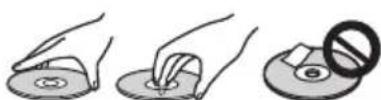
- Avoid touching or scratching the signal surface (shiny side) of the disc.
- Hold the disc by the edges or by the center hole and one edge.
- Do not affix paper or labels to the disc.
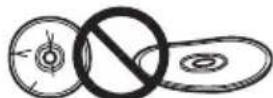
- Discard warped or cracked discs as they may cause damage to the drive.
- Avoid specially shaped discs such as hearts or polygons.
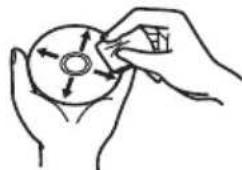
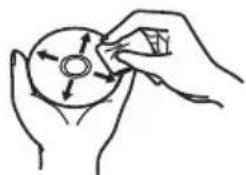
- Remove dust or lint from the disc with a soft cloth by wiping from the inside to the outside edge rather than in a circular motion.
- Do not use record-cleaning or anti-static agents as the solutions may cause damage to a disc.
Always be sure to store your discs in proper disc storage cases when not in use, and always be sure to check for dirt or dust on discs (especially on the signal surface) before use.

natural_image
Hand holding a circular object with arrows indicating direction, no text or symbols present
Note
Some discs may not be playable due to different recording formats or the physical condition of the disc at the time of recording or playback.
Features
Maximum Write Speed* Maximum Read Speed*
| BD-R | 6X | BD-ROM SL/DL | 6X |
| BD-R DL | 6X | BD-R | 6X |
| BD-R TL | 4X | BD-R DL | 6X |
| BD-R QL | 4X | BD-R TL/QL | 4X |
| BD-R (LTH) | 6X | BD-R(LTH) | 6X |
| BD-RE | 2X | BD-RE | 6X |
| BD-RE DL | 2X | BD-RE DL | 6X |
| BD-RE TL | 2X | BD-RE TL | 4X |
| M-DISC BD-R SL/TL | 4X | M-DISC BD-R SL/DL | 6X |
| M-DISC BD-R DL | 6X | M-DISC BD-R TL | 4X |
| DVD-R | 8X | DVD-ROM | 8X |
| DVD-R DL | 6X | DVD-ROM DL | 8X |
| DVD-RW | 6X | DVD-R | 8X |
| DVD+R | 8X | DVD-R DL | 8X |
| DVD+R DL | 6X | DVD-RW | 8X |
| DVD+RW | 8X | DVD+R | 8X |
| DVD-RAM | 5X | DVD+R DL | 8X |
| M-DISC(DVD) | 4X | DVD+RW | 8X |
| DVD-RAM | 5X | ||
| CD-R | 24X | M-DISC(DVD) | 8X |
| CD-RW | 24X | ||
| CD-ROM, CD-R, CD-RW | 24X |
* When using a USB 2.0 port, BD writing/reading speed doesn't achieve 6X.
Buffer Memory Size Interface
4 MBytes (Read/Write) USB 3.0 & 2.0
Disc Format
• BD-ROM(Single/Dual layer)
• BD-R(Single/Dual/Triple/Quadruple layer)
• BD-RE(Single/Dual/Triple layer)
• M-DISC BD-R (Single/Dual/Triple layer)
- DVD-ROM (Single/Dual layer)
- DVD-Video (Single/Dual layer)
• D V D - R • D V D - R W
• D V D + R • D V D + R W
• DVD-RAM (Non-cartridge), ver2.0&2.1&2.2
• M - D I S C ( D V D )
- CD-ROM Mode 1&2
• CD-ROM XA Mode 2 (form 1, form 2)
• KODAK Photo CD (Single and Multi-session)
• CD-Extra (CD PLUS)
• C D t e x t - C D - R
• CD-RW (MS/HS/US/US+)
• C D - D A
• Video CD
RAM2 media is supported only reading.

Note
- A specific application software is necessary to write the formats listed above.
• Supported media required for specific BD, DVD and CD writing speeds.
•Average writing speed may decrease when multiple discs are written during the same session.
•The Pioneer's Drive Utility is needed to configure the Quiet Drive and PureRead features. https://pioneer.jp/support/download/index-e.html
Interface
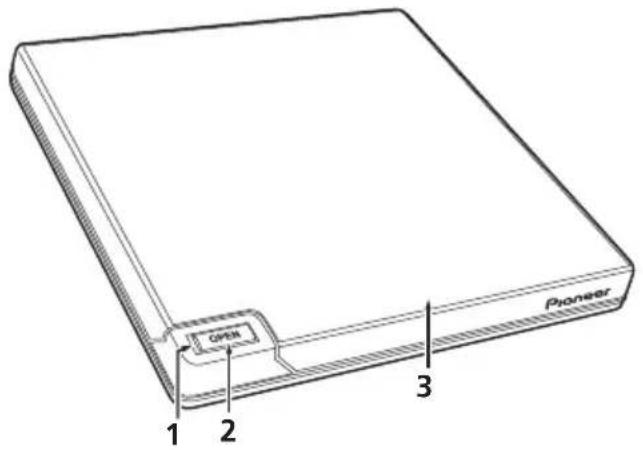
Front/Top view
1 Power/Busy Indicator
Operation status is indicated as follows: During Power ON: Lights dimly During reading/writing: Lights During disc cover open/close: Lights dimly
2 OPEN Button
Press to open the disc cover. * If this device is connected to Mac, you will not be able to use this function due to the specifications of macOS.
3 Disc Cover
Press the OPEN button to open the disc cover then place only a BD, DVD or CD disc onto the tray with the label facing up. Close the disc cover gently.
Do not manually force open the disc cover. Use the Forced Open Lever to open the disc cover during POWER OFF.
Rear/Bottom view
4 USB 3.0
USB 3.0 Micro-B Connector
5 D C ⊕ ⊖ A
AC Adapter Connector Some computers may not provide enough power through a USB port to operate the drive. An AC adapter (not included) can be connected to the drive through the DC IN connector to provide power. For more details, visit or contact https://www.pioneerelectronics.com/PUSA/Phone: 1-800-421-1404
Do not connect any AC adapter other than specified by Pioneer.

6 Forced Open Lever
Use to open the disc cover when the drive is not powered. If the disc cover fails to open when the Open button is pressed, turn the power to the drive OFF and wait approximately one minute until the disc stops spinning before trying to open the disc cover. During normal operation, the Open button should be used to open the disc cover.

Caution
About Region codes
- The region code can only be changed five (5) times, including the initial setting. Please be aware that the fifth change becomes PERMANENT. Therefore, avoid changing the region code unless absolutely necessary.
- Region codes are part of the DVD Standard. However, region codes on DVD discs are optional. DVD discs with no specified region code can be played on all compliant players and/or application.
Connection
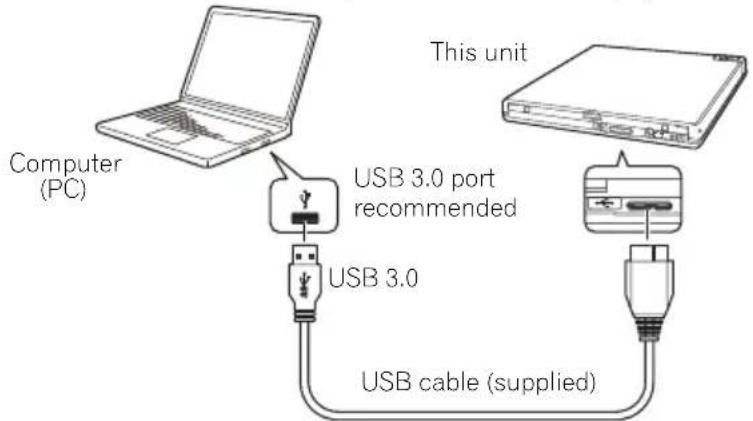
This is a hot-plug unit. Connect the unit to the supplied USB cable.
1 Confirm that your computer (PC) has available USB port.
2 With your Windows® or Mac operating system running, use the supplied USB cable to connect this unit to the PC.

Caution
- Do not disconnect the USB cable during data transfers.
- Do not disconnect the USB cable during the PC start nor any operation with the unit.

Note
- Connection to a USB 3.0 port is recommended, since when a USB 3.0 cable is connected to a USB 2.0 port, the connection will be limited to USB 2.0 performance standards.
- This unit can operate with USB 1.1 but will not provide optimum performance.
- Connecting this unit through a USB HUB or using unspecified cables may not guarantee proper operation.
- If power is insufficient when using a USB port, connect an AC adapter (not included) through the DC IN connector on the unit's rear panel and plug into a wall outlet to deliver power. Connect the USB cable (included) after connecting the AC adapter for proper operation. For more details about the AC adapter connection, visit or contact https://www.pioneerelectronics.com/PUSA/ Phone: 1-800-421-1404
- Do not connect any AC adapter other than specified by Pioneer.
- This unit is for use only with compatible UL Listed personal computers that have Installation Instructions detailing user installation of USB accessories.
- UL Listed, Class 2 AC Adapter (Output 5 V, min. 1.0 A) shall be used.
Operations
The unit writes to disc when the supplied software application is installed on your PC. Writing fails if the PC or operating system does not support the software.
Begin writing to disc
1 Connect the supplied USB cable.
2 Turn on the PC.
3 Press the OPEN button, and gently lift the disc cover by hand.
* If this device is connected to Mac, you will not be able to use this function due to the specifications of macOS.
4 Place the disc in the tray with the label facing up.
5 Close the disc cover gently.
6 Start the disc burning application.
End the writing session
1 Quit the disc burning application.
2 Press the OPEN button, and gently lift the disc cover by hand.
* If this device is connected to Mac, you will not be able to use this function due to the specifications of macOS.
3 Remove the disc.
4 Close the disc cover gently.
5 Shut down the PC.
- When the lock mechanism is released, the disc cover needs to be fully opened in order to close again.
Manual disc cover open
Use the Forced Open Lever to remove discs if the disc cover fails to open and all other methods have been exhausted.
1 Shut down the PC.
2 Wait for the disc to stop spinning.
3 Slide the Forced Open Lever to open the disc cover.
4 Gently open the disc cover and remove the disc.

Warning
To prevent injury and damage to the unit, do NOT force the disc cover to open while the disc is spinning.

natural_image
Diagram of a device's front panel showing a circular button and a pointer (no text or symbols)Specifications
| Orientation | This drive is horizontal use. |
| Disc Size | 4.72 inch/3.15 inch (12 cm/8 cm)(Drive does not support non-standard shapes such as business cards, diamond, etc.) (Drive does not support 8 cm adapter.) |
Data Transfer Rate* Media that is dirty or damaged can affect the transfer rate.
| Data Read (sustained) | BD | Max. 21.06 MBytes/sec. |
| DVD | Max. 8.64 MBytes/sec. | |
| CD | Max. 3.24 MBytes/sec. | |
| Data Write (sustained) | BD | Max. 21.06 MBytes/sec. (6X BD-R) |
| DVD | Max. 8.64 MBytes/sec. (8X DVD-R) | |
| CD | Max. 3.24 MBytes/sec. (24X CD-R) |
Access Time/Seek Time (Random Averages)
| Access Time | BD-ROM | 210 ms |
| DVD-ROM | 200 ms | |
| CD-ROM | 190 ms | |
| Seek Time | BD-ROM | 190 ms |
| DVD-ROM | 180 ms | |
| CD-ROM | 170 ms |
Power
Standby....0.5 W
DC IN Connector
Power Supply....DC +5 V, 1.0 A (AVE)
Physical Information
Dimensions (excluding foot pad) 5.19 inch (W) x 5.19 inch (D) x 0.58 inch (H)/133 mm (W) x 133 mm (D) x 14.8 mm (H)
Weight (Drive only) 0.51 lbs/0.23 kg (Typ.)
Operation Temperature....+41 °F to +95 °F (+5 °C to +35 °C)
Operation Humidity....5% to 85% (no condensation)
Storage Temperature. -40°F to +140°F (-40°C to +60°C)
Storage Humidity. 5% to 90% (no condensation)
Accessories
Instruction manual (This document)
USB Cable (TypeA) 1
Warranty card 1

Note
Specifications and designs are subject to possible modifications without notice, due to improvements.
© 2019 PIONEER CORPORATION.
All rights reserved.
natural_image
Illustration showing three steps of a hand holding a circular object, with a magnified inset showing a disc and a prohibition symbol (no text or labels)

natural_image
Hand holding a CD or DVD disc with arrows indicating direction (no text or symbols)
Remarque
4 Mo (Lecture/Écriture) USB 3.0 & 2.0
Format du Disque
• DVD-RAM (Non-cartridge), ver2.0&2.1&2.2
• M - D I S C ( D V D )
- Mode CD-ROM 1 & 2
• CD-ROM XA Mode 2 (form 1, form 2)
• KODAKPhotobM@ti-Session)ingle
• CD-Extra (CD PLUS) - C D t e x t
- C D - R
• CD-RW (MS/HS/US/US+)
• C D - D A
• Video CD
natural_image
Diagram of a smartphone door handle with a circular button and an arrow pointing to the button (no text or symbols)Specifications
Dimensions (talon non compris) 133 mm (L) x 133 mm (P) x 14.8 mm (H)
© 2019 PIONEER CORPORATION.
CLASS 3B VISIBLE AND INVISIBLE LASER RADIATION WHEN OPEN. AVOID EXPOSURE TO THE BEAM.
ATTENTION
RADIATIONS LASER VISIBLES ET INVISIBLES DE CLASSE 3B QUAND OUVERT. ÉVITEZ TOUT EXPOSITION AU FAISCEAU.
ADVARSEL
KLASSE 3B SYNLIG OG USYNLIG LASERSTRÅLING VED ÅBNING. UNDGÅ UDSÆTTELSE FOR STRÅLING.
VARO!
AVATTAESSA OLET ALTTIINA NÄKYVÄLLE JA NÄKYMÄTTÖMÄLLE LUOKAN 38 LASERSÄTEILYLLE. ÄLÄ KATSO SÄTEESEEN.
WARNING
KLASS 3B SYN LIG OCH OSYN LIG LASERSTRÄLNING NÄR DENNA DEL ÄR ÖPPNAD. UNDWK ATT UTSÄTTA DIG FÖR STRÄLEN. BEI GEÖFFNETER ABDECKUNG IST SICHTBARE UND UNSICHTBARE LASERSTRAHLUNG DER KLASSE 3B IM GERÄTEINNEREN VORHANDEN. NICHT DEM LASERSTRAHL AUSSETZEN!
VORSICHT
natural_image
Illustration showing three steps of a hand holding a circular object, with a magnified inset showing a disc and a prohibition symbol (no text or labels)


natural_image
Hand holding a CD or DVD disc with arrows indicating rotation (no text or symbols)
Nota
• M - D I S C ( D V D )
- Modo CD-ROM 1 y 2
• CD-ROM XA Modó 2 (forma 1, forma 2)
• KODAK Photo CD (Sencillo y Multisesión)
• CD Extra (CD PLUS)
• C D t e x t o
• C D - R - CD-RW (MS/HS/US/US+)
- CD-DA
• Video CD
Vista posterior/inferior
4 U S B 3 . 0
Conector USB 3.0 Micro-B
natural_image
Diagram of a smartphone door handle with a circular button and an arrow pointing to the center (no text or symbols)Especificaciones
© 2019 PIONEER CORPORATION.
AFTER SALES SERVICE FOR PIONEER PRODUCTS
Please contact the dealer or distributor where you purchased this product for its after-sale service (including warranty conditions) or any other information. In case the necessary information is not available, please contact the Pioneer's subsidiarity (regional service headquarters) listed below.
PIONEER ELECTRONICS (USA) INC. P.O.BOX 1720, Long Beach, California 90801 U.S.A.
® PIONEER CORPORATION
© 2019 PIONEER CORPORATION.
All rights reserved.
© 2019 PIONEER CORPORATION.
28-8, Honkomagome 2-chome, Bunkyo-ku, Tokyo 113-0021, Japan
PIONEER ELECTRONICS (USA) INC.
P.O.BOX 1720, Long Beach, California 90801 U.S.A.
For BDR-XD07S support, go to:
https://www.pioneerelectronics.com/PUSA/
Printed in China/Imprimé en Chine/Impreso en China
- WARNING
- Precautions Regarding Use
- IMPORTANT
- CAUTION
- CAUTION:
- CLASS 1 LASER PRODUCT
- IMPORTANT NOTICE
- Operating Environment
- Information to User
- NOTE:
- FEDERAL COMMUNICATIONS COMMISSION DECLARATION OF CONFORMITY
- Safety instructions
- Note
- Features
- Buffer Memory Size Interface
- MBytes (Read/Write) USB 3.0 & 2.0
- Disc Format
- Interface
- Front/Top view
- Power/Busy Indicator
- OPEN Button
- Disc Cover
- Rear/Bottom view
- USB 3.0
- D C ⊕ ⊖ A
- Forced Open Lever
- About Region codes
- Connection
- Operations
- Begin writing to disc
- End the writing session
- Manual disc cover open
- Power
- DC IN Connector
- Physical Information
- Accessories
- Remarque
- Mo (Lecture/Écriture) USB 3.0 & 2.0
- Format du Disque
- Specifications
- Nota
- Vista posterior/inferior
- Especificaciones
- AFTER SALES SERVICE FOR PIONEER PRODUCTS
Brand : PIONEER
Model : BDR-XD07S
Category : External Blu-ray Burner