
SLSX469 - Headphones PANASONIC - Free user manual and instructions
Find the device manual for free SLSX469 PANASONIC in PDF.


| Product Type | Portable CD player with FM/AM tuner |
| Dimensions (L × H × D) | 128 × 25.1 × 131 mm |
| Weight (with batteries) | 218 g |
| Power supply | DC 4.5 V via AC adaptor, 2 AAA batteries (LR03), 2 AA batteries (LR6), rechargeable Ni-MH battery or external battery case for 2 AA batteries |
| Compatible disc formats | Audio CD (Compact Disc logo) |
| CD playback functions | Normal play, program (24 tracks), random, repeat (1 track/all), resume, skip/search, pause |
| Anti-shock | Yes, up to 40 seconds of memory |
| Radio tuner | FM 87.50-108.00 MHz (step 0.05 MHz), AM 522-1629 kHz (step 9 kHz) / 520-1630 kHz (step 10 kHz) depending on region |
| Number of radio presets | 30 (20 FM, 10 AM) |
| Audio enhancement | S-XBS (enhanced bass), FM mono mode |
| Headphone output | Ω jack (3.5 mm), max. 9 mW + 9 mW at 16 Ω |
| Battery life (approximate) | CD anti-shock off/on: 9/12 h (AAA alkaline batteries), 22/28 h (AA alkaline batteries), 6/8 h (rechargeable batteries). Radio: 27 h (AAA), 66 h (AA), 18 h (rechargeable) |
| Supplied accessories | AC adaptor, wired remote control, stereo headphones, soft case, external battery case for AA batteries, rechargeable Ni-MH batteries with case |
| Safety | Class 1 laser product, do not open or repair yourself, avoid exposure to rain and moisture |
| Maintenance and cleaning | Wipe with a soft, dry cloth. For the lens, use a cotton swab or a cleaning kit (SZZP1038C) |
Frequently Asked Questions - SLSX469 PANASONIC
User questions about SLSX469 PANASONIC
0 question about this device. Answer the ones you know or ask your own.
Ask a new question about this device
Download the instructions for your Headphones in PDF format for free! Find your manual SLSX469 - PANASONIC and take your electronic device back in hand. On this page are published all the documents necessary for the use of your device. SLSX469 by PANASONIC.
USER MANUAL SLSX469 PANASONIC
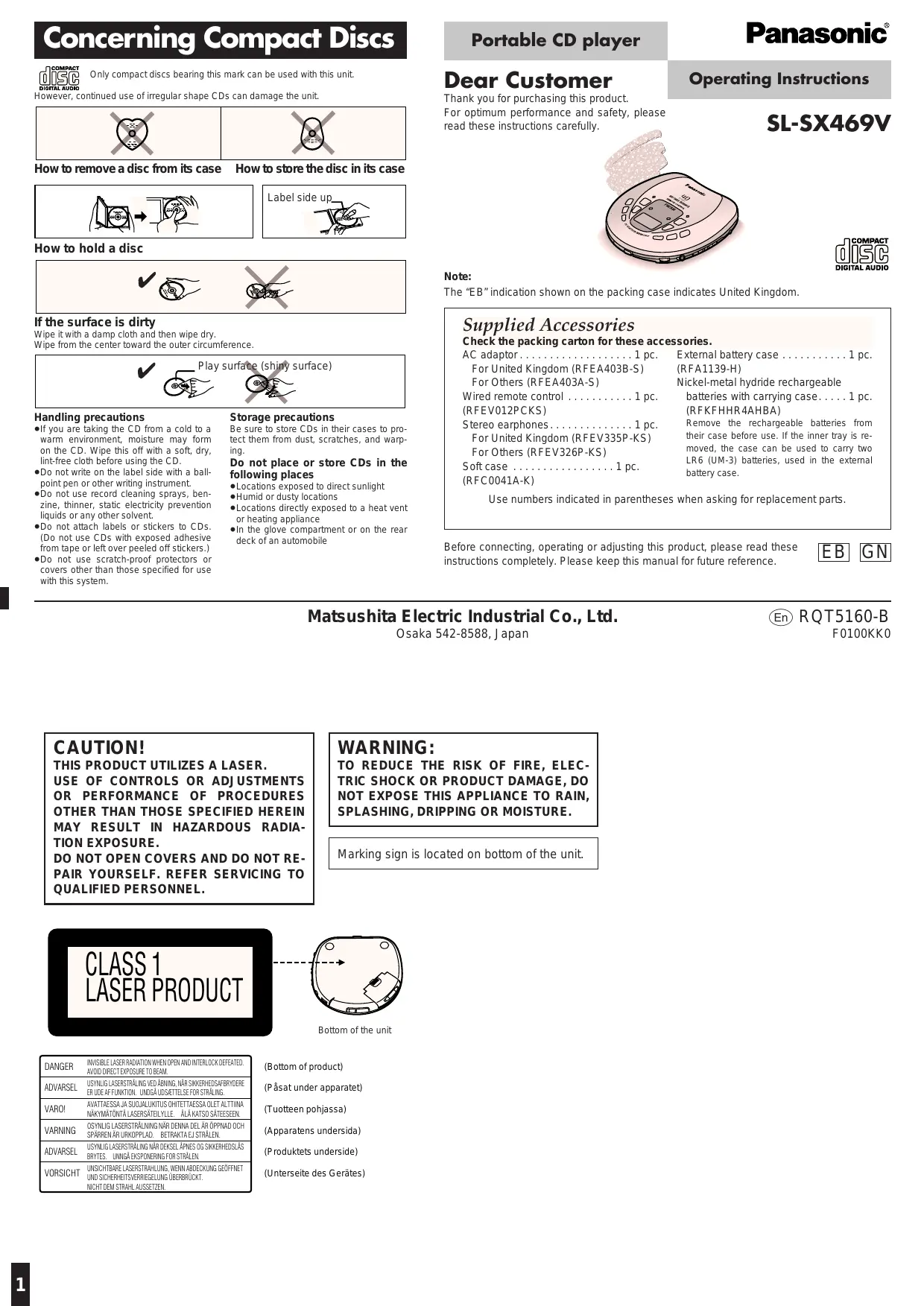
Concerning Compact Discs

Only compact discs bearing this mark can be used with this unit.
However, continued use of irregular shape CDs can damage the unit.

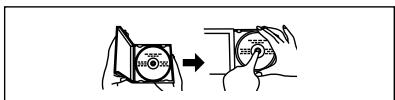
How to remove a disc from its case How to store the disc in its case
Label side up
How to hold a disc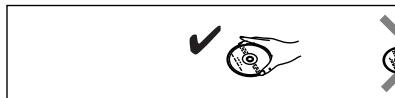

If the surface is dirty
Wipe it with a damp cloth and then wipe dry.
Wipe from the center toward the outer circumference.
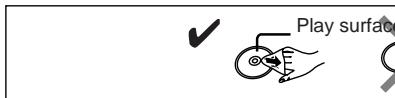
Storage precautions
Handling precautions
- If you are taking the CD from a cold to a warm environment, moisture may form on the CD. Wipe this off with a soft, dry, lint-free cloth before using the CD.
- Do not write on the label side with a ball-point pen or other writing instrument.
- Do not use record cleaning sprays, benzine, thinner, static electricity prevention liquids or any other solvent.
- Do not attach labels or stickers to CDs. (Do not use CDs with exposed adhesive from tape or left over peeled off stickers.)
- Do not use scratch-proof protectors or covers other than those specified for use with this system.
Be sure to store CDs in their cases to protect them from dust, scratches, and warping.
Do not place or store CDs in the following places:
- Locations exposed to direct sunlight ● Humid or dusty locations
- Locations directly exposed to a heat vent or heating appliance
- In the glove compartment or on the rear deck of an automobile
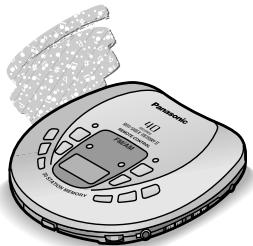
Portable CD player
Panasonic®
Dear Customer
Thank you for purchasing this product.
For optimum performance and safety, please read these instructions carefully.
Operating Instructions
SL-SX469V

Note:
The “EB” indication shown on the packing case indicates United Kingdom.
Supplied Accessories
Check the packing carton for these accessories.
AC adaptor....1 pc.
For United Kingdom (RFEA403B-S)
For Others (RFEA403A-S)
Wired remote control ..... 1 pc.
(RFEV012PCKS)
Stereo earphones....1 pc.
For United Kingdom (RFEV335P-KS)
For Others (RFEV326P-KS)
Nickel-metal hydride rechargeable
batteries with carrying case.....1 pc.
(RFKFHHR4AHBA)
Remove the rechargeable batteries from their case before use. If the inner tray is removed, the case can be used to carry two LR6 (UM-3) batteries, used in the external battery case.
Use numbers indicated in parentheses when asking for replacement parts.
Before connecting, operating or adjusting this product, please read these instructions completely. Please keep this manual for future reference.
Matsushita Electric Industrial Co., Ltd.
Osaka 542-8588, Japan

RQT5160-B
F0100KK0
CAUTION!
THIS PRODUCT UTILIZES A LASER.
USE OF CONTROLS OR ADJUSTMENTS OR PERFORMANCE OF PROCEDURES OTHER THAN THOSE SPECIFIED HEREIN MAY RESULT IN HAZARDOUS RADIATION EXPOSURE.
DO NOT OPEN COVERS AND DO NOT REPAIR YOURSELF. REFER SERVICING TO QUALIFIED PERSONNEL.
WARNING:
TO REDUCE THE RISK OF FIRE, ELECTRIC SHOCK OR PRODUCT DAMAGE, DO NOT EXPOSE THIS APPLIANCE TO RAIN, SPLASHING, DRIPPING OR MOISTURE.
Marking sign is located on bottom of the unit.

Bottom of the unit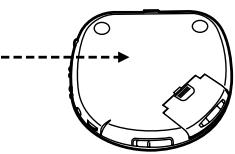
| DANGER | INVISIBLE LASER RADIATION WHEN OPEN AND INTERLOCK DEFEATED. AVOID DIRECT EXPOSURE TO BEAM. |
| ADVARSEL | USYNLIG LASERSTRÄLING VED ABNING, NÄR SIKKERHEDSAFBRYDERE ER UDE AF FUNKTION. UNDGÅ UDSÆTTELSE FOR STRÅLING. |
| VARO! | AVATTAESSA JA SUOJAL UKITUS OHITETTAESSA OLET ALTTINA NÄKYMÅTÖNTÄ LASERSÄTEILYLE. ÄLÅ KATSO SÄTEESEEN. |
| VARNING | OSYNLIG LASERSTRÄLNING NÄR DENNA DEL ÄR ÖPPNAD OCH SPÄRREN AR URKOPPLAD. BETRAKTA EJ STRÅLEN. |
| ADVARSEL | USYNLIG LASERSTRÄLING NÄR DEKSEL. ÅPNES OG SIKKERHEDSLÄS BRYTES. UNNGÅ EKSPONERING FOR STRÅLEN. |
| VORSICHT | UNSICHTBARE LASERSTRAHLLING, WENN ABDECKUNG GEÖFFNET UND SICHERHEITSVERRIEGELUNG ÜBERBRÜCKT. NICHT DEM STRAHL AUSETZEN. |
(Bottom of product)
(Påsat under apparatet)
(At the bottom of the product)
(At the bottom of the device)
(At the bottom of the product)
Power Supply Preparations
Refer to the specifications (page 8) for information on operating times when using rechargeable batteries or dry-cell batteries.
Using the AC adaptor
Connect the AC adaptor supplied. DC IN jack ( ◇-●-⊕ DC IN 4.5 V)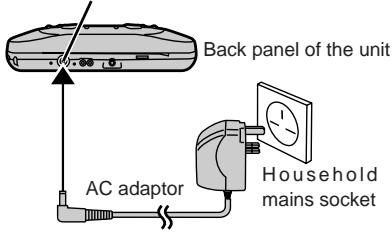
Note
- The configuration of the AC adaptor differs according to the area.
- The unit is in the standby condition when the AC adaptor is connected. The primary circuit is always "live" as long as the AC adaptor is connected to an electrical outlet.
- Turn the unit off before connecting or disconnecting the AC adaptor.
Using the rechargeable batteries
Make sure to recharge the batteries before using them. The unit cannot be used to charge rechargeable batteries other than those specifically designed for it.
●Supplied batteries (HHR4AHEBA1) - Optional batteries For United Kingdom: (HHR-4AHE/2B) For others: (HHR-4AHT/2B)
Recharging procedure 1 Insert the special rechargeable batteries into the unit.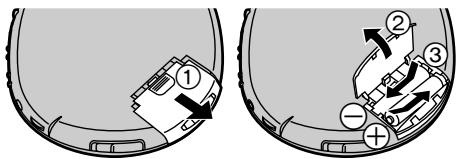
2 Connect the AC adaptor.
Refer to "Using the AC adaptor" for connection instructions.
Recharging starts and the “-C” charging indicator flashes on and off on the unit’s display.
When the rechargeable batteries are fully re-charged the charging indicator disappears.
3 When recharging is complete, unplug the AC adaptor from the household mains socket and the DC IN jack.
Note
- Rechargeable batteries have a service life of approximately 300 charge-discharge cycles. If the operating time on one full charge becomes noticeably shorter than it used to be, the battery has reached the end of its service life and should be replaced.
- Recharging may only be performed when the unit is powered off.
- The AC adaptor and rechargeable batteries may become warm while recharging is in progress. This is not a malfunction.
- The rechargeable batteries should be changed when the unit is off.
If the battery lid comes loose Slide the lid back into place horizontally.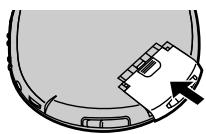
Removing batteries Push up on the battery in the direction indicated by the arrow. Then lift it out.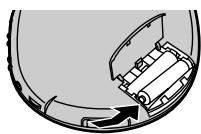
Using dry-cell batteries (not included)
After disconnecting the AC adaptor, insert two LR03 (UM-4) alkaline batteries.
The procedure for inserting and removing dry-cell batteries is identical to that for rechargeable batteries.
Note
The dry cell batteries should be changed when the unit is off.
When the battery indicator flashes
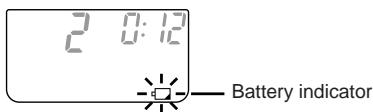
Power is cut off a short while later. Recharge the rechargeable batteries or replace the dry cell batteries with new ones.
Note
- How long the unit continues to operate after the battery indicator starts flashing depends on the type of batteries and on whether you are using the unit to play CDs or the radio.
- The battery indicator may not flash if rechargeable batteries, other than those designated by Panasonic, are used.
Using the car adaptor (not included)
Be sure to obtain the car adaptor (SH-CDC9), available as an optional accessory. The car adaptor can be used to recharge the unit's batteries while in the car.
Using the external battery case
The external battery case allows you to extend the maximum playing time of the unit by loading an additional two LR6 (UM-3) (not included) alkaline batteries.
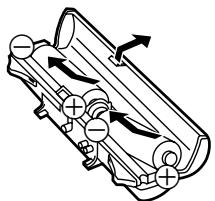
1 Open the cover of the battery case and insert the batteries.
Insert the end marked (−) first.
2 Mount the battery case on the unit body.
Insert the protrusions on the battery case into the three indentations in the unit body.
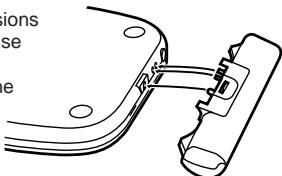
Secure in place with the screw.
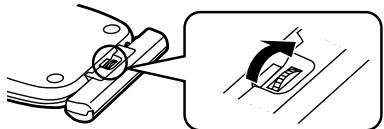
Reverse the above procedure to remove the external battery case.
For your reference:
●The unit can be powered by the batteries in the external battery case alone. Batteries do not need to be loaded in the unit. - The maximum playing time will differ depending on the type of batteries (rechargeable/dry-cell) loaded in the unit body.
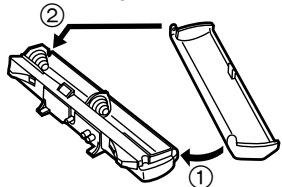
If the cover of the battery case comes loose: ②
Insert the protrusions into the holes on either end of the case.
Note
- Though you can use rechargeable batteries in the battery case, it does not recharge them. (Use dry cell batteries if possible.)
- When using rechargeable batteries in the unit body, and dry-cell batteries in the battery case, be sure to use fully charged rechargeable batteries and new dry-cell batteries.
- When using four dry-cell batteries, do not mix new and old batteries.
If the unit malfunctions or freezes during use, disconnect the power sources (the AC adaptor or external battery case). Re-connect the power source or continue operation.
HOLD Function
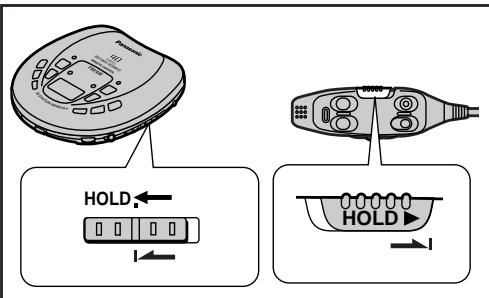
This function causes the unit to ignore short, accidental button presses. (The disc lid can still be opened and closed.)
HOLD function prevents the following:
- Powering on the unit accidentally (which can cause the batteries to go dead).
- Play being cut off unexpectedly in the middle of a selection.
To use HOLD function
Set [HOLD] to the HOLD position.
The unit and wired remote control have [HOLD] switches, each of which works independently.
(The hold indicator turns green when the remote control is in hold position.)
"hold" Indication
When the unit is in HOLD status, pressing any operation button causes the indication " h0 l0 " to appear on the display.
When the unit is powered off:
The “ h0 / d ” indication appears only when [▶III] or [RADIO/BAND] is pressed.
![graph TD A["Label must face upward"] --> B["Close the lid"] B --> C["POWER OFF"] C --> D["HOLD"] D --> E["RESUME RANDOM NORMAL"] E --> F["Play/stop/off button (Beep)"] F --> G["Elapsed playing time of each track"] G --> H["Track number in play"] I["VOLUME"] --> J["6 5 4"] J --> K["Play/stop/off butt…](/content/2019/11/105248/images/23771a873dd8f9e7857b549f0492e0f9f36ff3f9b173c8e1ef15be8fdb807049.jpg)
1 Slide [OPEN] to open the lid, and insert the disc. 2 Release hold. 3 Set the play mode selector to [NORMAL]. 4 Connect the wired remote control and the stereo earphones to [Ω]. (Plug in firmly.) 5 Press [▶II] (main unit) or press the play/stop/off button (remote control) to start play.
(Play stops automatically when all the tracks have been played.)
6 Adjust the volume.
If the unit has been connected to the car audio system, adjust the volume level between 4 and 6 on the unit, then adjust the volume level on the system.
■ To pause play (Available only from the main unit)
Press during play. (Press again to restart play.)

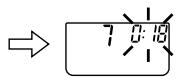
■ To stop play
Press during play.
Stop mode
Main unit Remote control Total number of tracks

(Beep...Beep) Total playing time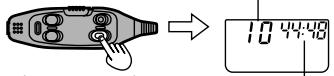
■ To turn off the unit Off mode
Press during stop mode (main unit) or press and hold during play or stop mode (remote control).
Main unit Remote control

(Beep...Bee..p)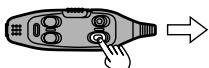
■ Skip / Search function
Skip function : Press during play.
Search function : Press and hold during play.
Main unit Remote control
Forward Backward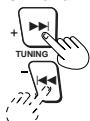
Forward Backward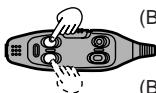
(Beep Beep) (Beep Beep Beep)
- During program play (page 4), these buttons are used to skip forward or back through the programmed sequence of tracks.
- During random play (page 4), the skip buttons cannot be used to skip back to tracks that were played previously in the random sequence.
- During program play, random play or 1-track repeat play (page 4), search operation is limited to the current track only.
Operation confirmation tones of the remote control
When an operation button is pressed, a confirmation tone sounds. Refer to the parentheses in the illustration for the different types of confirmation tones.
For your reference:
"no disc" indication
This indication appears for about 30 seconds if [▶■] is pressed when no disc is loaded in the unit or if the disc is not completely seated.
"OPEN" indication
This indication appears for about 10 minutes when the cover is opened. (However, the indication does not appear when the unit is powered off.)
Auto power off function
If the unit is left in stop or paused status for approximately 10 minutes, the unit powers itself off automatically in order to prevent the batteries from running down.
(If no disc is loaded in the unit it powers itself off in 30 seconds.)
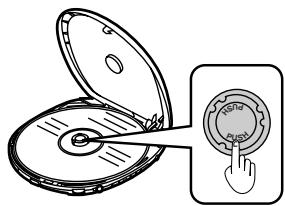
Removing discs
1 Press [■, POWER OFF] to stop play and disc rotation. 2 Slide [OPEN] to open the lid. 3 Press [PUSH] to release the disc.
Do not stop the disc by hand or try to remove it before it stops rotating. This can damage CDs.
Note
Never insert foreign objects into the unit body.
The letters such as Ⓐ in the various illustrations refer to the descriptions in the “Location of Controls” section.
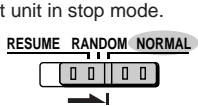
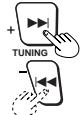
Skip play
The disc plays from the specified track through to the end, then play stops automatically.
Preparation: Put unit in stop mode.
1

2

3


Program play
Up to 24 tracks can be entered in the programmed sequence.
Preparation: Put unit in stop mode.
1

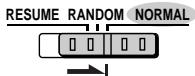
2
Select the desired track.

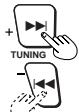
3
Register in sequence.
(The indication "M" and the programmed sequence appear on the display.)
MEMORY/RECALL

4
Repeat steps 2 and 3 to program all the desired tracks.
5


■ To program the same track in the sequence more than once
After step 3, press [MEMORY/RECALL] the desired number of times.
■ If “F” is displayed
No more tracks can be programmed.
■ To confirm the contents of the program
Press [MEMORY/RECALL] while the disc is playing. (The numbers of the programmed tracks appear on the display in sequence.)
■ To delete the entire programmed sequence
Press [■, POWER OFF].
Random play
1

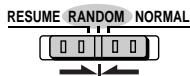
2


Release

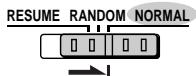
For your reference:
- It is also possible to press [TUNING, +, ▶▶] while the unit is in stop mode to change the first track to be played. (All tracks are played eventually, regardless of which is played first.)
- Program play is not possible in the random mode.
Resume play
This function allows you to listen from the beginning of the track where play stopped because the unit was powered off (or switched to stop mode). It is useful when listening to CDs in the car, etc.

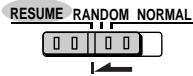
Release

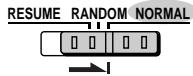
For your reference:
- If [RESUME, RANDOM, NORMAL] is put in the [RESUME] position, the all-track repeat function will be activated automatically as soon as the unit is powered on.
- If power is cut off near the end of a track (off mode), playback may resume from the beginning of the next track.
- If the unit is powered off while a disc was playing and then a new disc is inserted, play will begin from the middle of the new disc because the unit remembers the position where play stopped on the previous disc.
Repeat function
Press during play or stop mode. ©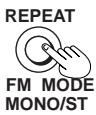
Each time the button is pressed: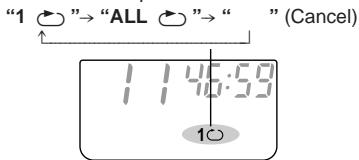
1 (1-track repeat)
One track is repeated.
ALL (All-track repeat)
All the tracks on the disc are repeated.
For your reference:
If "ALL ➤" is selected during program play, only the tracks in the program are repeated.
(The indication "ALL" is not displayed.)
Changing the sound quality
Press during play or stop mode. F
Each time the button is pressed: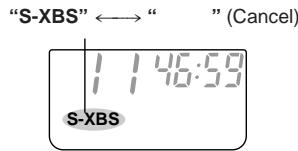
S-XBS:
Select this setting to boost the low-range response.
Note
This function is not available when using the OUT jack.
Location of Controls
A
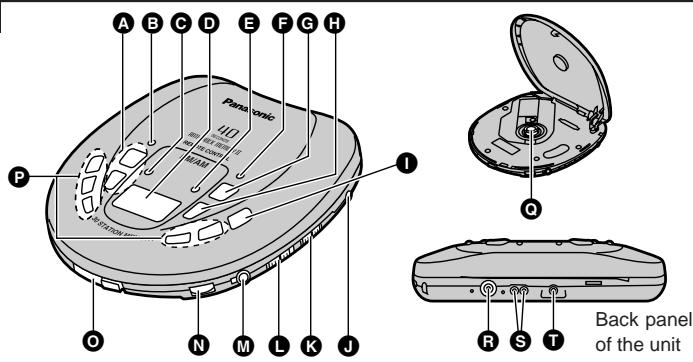
B
Main unit A
A Tuning/skip/search buttons (TUNING, +, -, ►► |, |◄◄) B Memory/recall button (MEMORY/RECALL) C Repeat, monaural/stereo button (REPEAT, FM MODE, MONO/ST) D Display E Anti-shock, sensitivity control button (A. SHOCK, FM RECEPT, CITY/NOR) F S-XBS button (S-XBS) G Play/pause button (▶II) H Stop/operation off button (■, POWER OFF) I Tuner on/band select button (RADIO/BAND) J Out jack (OUT) K Hold switch (HOLD) L Play mode selector (RESUME, RANDOM, NORMAL)
M Headphone jack (Ω) N Headphone volume control (VOLUME) O Open switch (OPEN) P Preset channel buttons (1, 2, 3, 4, 5) Q CD release button (PUSH) R DC in jack ( ◇-●-◆ DC IN 4.5 V ) S Connection terminal for external battery case T Hole for car insulator mounting screw/external battery case
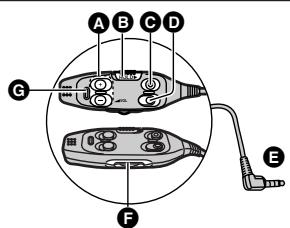
Wired remote control B
A Tuning/skip/search buttons (+,−) B Hold switch (HOLD) C Tuner on/off/band select button (RADIO) D Play/stop/off button E Plug F Volume control (VOL) G Hold indicator
The letters such as Ⓐ in the various illustrations refer to the descriptions in the “Location of Controls” section (See page 4.) .
The anti-shock function works by reading audio data and storing it in memory (up to 40 seconds worth). The unit then fills in interruptions caused by bumps and vibrations with data from the memory. This unit also incorporates a powerful anti-shock mechanism that prevents skipping caused when play speed is changed by swinging of the unit.
Press during play or stop mode.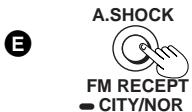
The following indicator appears on the display.
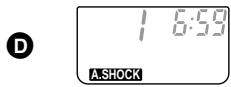
When bumps continue repeatedly
The following indicator appears on the display and sound is interrupted.
D
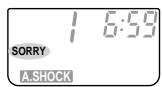
To cancel the anti-shock function
Press [A.SHOCK, FM RECEPT, ● CITY/NOR] again.
Note
- The anti-shock setting can be changed during play, but this may cause a slight interruption in the sound because the disc's rotational speed changes.
- During anti-shock operation, the disc rotates at a higher rate than usual to collect extra audio data. This could result in a slight increase in disc rotation noise.
Using the unit with an audio system
The anti-shock function uses digital signal compression technology. It is recommended that the anti-shock function be canceled if the unit is connected to a home audio system.
Using the Unit with Optional Accessories
Using the unit with an audio system
Using the stereo connection cable (not included), you can listen to CDs on your audio system.
- Turn off the amplifier power and connect the cable.
- Do not connect the cable to the PHONO jacks on the amplifier.
- Obtain the optional connecting cable if the amplifier comes with mini-phone jacks.
- Adjust the volume on the amplifier.
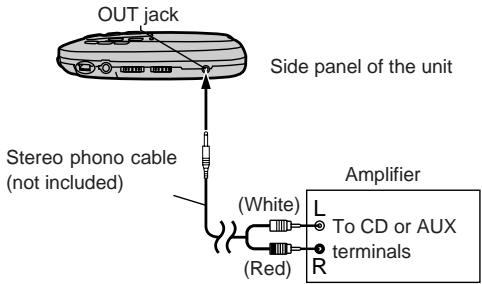
Using the unit with a car audio system
Items to be purchased
For connection to the car audio system:
Car stereo cassette adaptor (SH-CDM10A)
Connect the car stereo cassette adaptor to the unit's headphone jack. (When doing this, keep the unit's VOLUME at a setting between 4 and 6.)
For securing the unit and connecting the power supply:
●Car adaptor (SH-CDC9) ●Car mounting kit (SH-CDF7) Car mounting arm, Car insulator
Note
- It may not be possible to use the unit with some types of car stereo owing to restrictions imposed by the construction of the car stereo cassette adaptor.
- Move the unit away from the car adaptor if noise interferes with the radio.
For further details, refer to the instructions of the part concerned.
Maintenance
If the surfaces are dirty
To clean this unit, wipe with a soft, dry cloth.
If the surfaces are extremely dirty, use a soft cloth dipped in a soap-and-water solution or a weak detergent solution.
- Never use alcohol, paint thinner or benzine to clean this unit.
- Before using chemically treated cloth, read the instructions that came with the cloth carefully.
Maintaining the lens
Open the lid and clean the lens as shown in the figure. Use a cotton swab to gently wipe off any fingerprints. Recommended product: Lens cleaner kit (SZZP1038C)
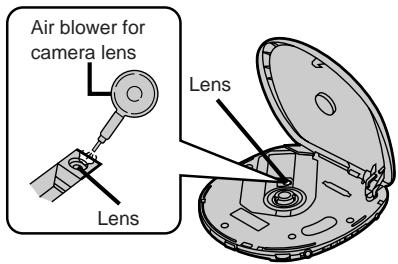
![graph TD A["1: Panasonic"] --> B["2: R L"] B --> C["3.5: RADIO/BAND"] C --> D["4.6: Power OFF"] D --> E["7: VOLUME"] E --> F["+ TUNING / (Beep)"] F --> G["+ 5V/4V/4V/4V/4V/4V/4V/4V/4V/4V/4V/4V/4V/4V/4V/4V/4V/4V/4V/4V/4V/4V/4V/4V/4V/4V/4V/4V/4V/4V/4V/4V/4V/4V/4A"] style A fill:#f9f,stroke:#333 style…](/content/2019/11/105248/images/4dd9437abed0eec9464497d9999731448d8c657ba116cce3665b54d14b9cd5b7.jpg)
![graph TD A["1: Smartphone"] --> B["2: Radio/Band"] B --> C["3: Display with Monitor"] D["1: Broadcast frequency"] --> E["2: Band number"] E --> F["3: Memory number"]](/content/2019/11/105248/images/4c7ecca7e93e6e997bd903799008109452df412b92cdcef92e55ffa64f9b6e04.jpg)
Listening Operation
The letters such as Ⓐ in the various illustrations refer to the descriptions in the “Location of Controls” section (See page 4.) .
You can tune directly to the station in Free Mode by finding the station's frequency, or you can store the station in Memory Mode to make tuning simpler.
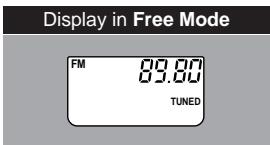
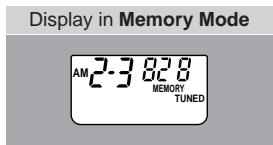
Free Mode
A
1 Release hold. 2 Connect the wired remote control and the stereo earphones to [Ω]. (Plug in firmly.) 3 Press [RADIO/BAND] (main unit) or [RADIO] (remote control) to turn on the radio. 4 Press [TUNING, +, -, ▶▶▶, |◀◀] to set to Free Mode. (Available only from the main unit)
5 Press [RADIO/BAND] (main unit) or [RADIO] (remote control) to change the band.
Each time the button is pressed:
FM ↔ AM
6 Press [TUNING, +, -, ►►|, |◄◄] (main unit), or [+] or [-] (remote control) to select the frequency of the station.
+ : increases frequency
- : decreases frequency
+ : increases frequency - : decreases frequency
For your reference:
- Press for over 1.5 seconds to make the frequency change rapidly.
- “TUNED” is displayed when a station is tuned.
- Press for over 1.5 seconds to make the frequency change rapidly. - "TUNED" is displayed when a station is tuned.
7 Adjust the volume.
■ To turn off the radio
Press [■, POWER OFF] (main unit) or press and hold [RADIO] (remote control).
Memory Mode
Putting stations into the channels B
Frequencies of up to 30 stations can be stored; 20 FM and 10 AM.
(Available only from the main unit)
Preparation:
- Connect the earphones as they act as an FM antenna.
- Use Free Mode to tune to the station you want to store.
- Connect the earphones as they act as an FM antenna. - Use Free Mode to tune to the station you want to store.
1 Press [MEMORY/RECALL].
The band number and frequency number flash.
2 Within 10 seconds
Press [RADIO/BAND] to select a band number to store the station.
Each time the button is pressed:
When storing an FM station
FM1→ FM2→ FM3→ FM4
↑
When storing an AM station
AM1←→ AM2
For your reference:
You can change the frequency by pressing
[TUNING, +, -, ▶▶|, |◀◀].
3 Within 10 seconds
Press a preset channel button ( [1] [2], [3], [4], [5] ) to store the station.
Recalling preset stations
Preparation:
Perform step 1 - 3 of the Free Mode.
1 Press a numbered button to switch to Memory Mode.
(Available only from the main unit)
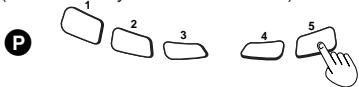
2 Press to select the band number.
Main unit
Remote control
I
RADIO/BAND

(Beep)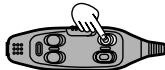
Each time the button is pressed:
FM1→ FM2→ FM3→ FM4→ AM1→ AM2
3 Press a numbered button (main unit), or [+] or [-] (remote control) to select the channel.
Main unit
Remote control
P
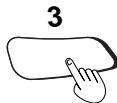
(Beep)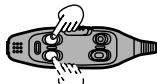
e.g. channel "3"
+ : memory number up
- : memory number down
4 Adjust the volume.
Main unit
Remote control

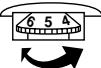
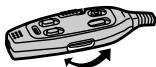
■ To turn off the radio
Press [■, POWER OFF] (main unit) or press and hold [RADIO] (remote control).
The letters such as Ⓐ in the various illustrations refer to the descriptions in the “Location of Controls” section (See page 4.) .
To obtain good reception
AM
Try various directions to obtain optimum reception.
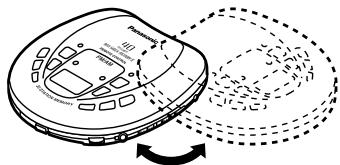
Note
The AM antenna is located in the rear of the unit so noise may increase if the unit is held. This is not a malfunction.
FM
The earphone cord is also the FM antenna, so extend it rather than leaving it coiled.
■ How to receive an FM broadcast clearly
(Available only from the main unit)
Press for more than 1.5 seconds during FM reception.
E →
Each time the button is pressed:
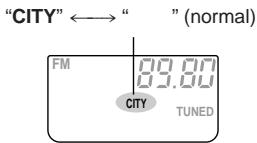
Leave off under normal conditions. Set to “CITY” if reception is poor or if there is interference from another station.
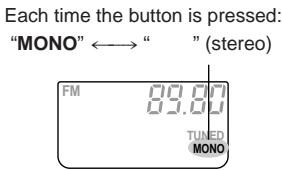
To select stereo or monaural FM
(Available only from the main unit)
Press during FM reception.
©
→
■ When there is noise during FM reception
Select "MONO".
Sound becomes monaural, but noise is reduced.
When using overseas (Except for United Kingdom)
(Available only from the main unit)
Change the frequency step according to the area.
Preparation: Press [RADIO/BAND] to switch on the power.
1 Press for more than 5 seconds to display the step.
I
2
Within 10 seconds
Press to select the step.
A →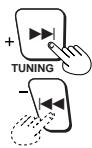
Each time the button is pressed
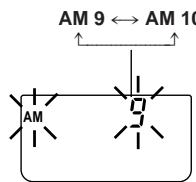
AM 9 (original setting) : AM 9 kHz
AM 10 : AM 10 kHz
3
Within 10 seconds
Press and hold until the frequency is displayed to confirm the step.
B
MEMORY/RECALL

■ To return to the previous frequency step
Repeat the above procedure.
Note
Converting the allocation erases the stations previously stored in memory.
Changing the sound quality
The operation is the same as when playing CDs.
(See page 4.)
Selection and care of rechargeable /dry cell batteries
Selection
As a safety precaution, the portable CD players made by Panasonic are constructed so it is impossible to recharge ordinary batteries.
Only batteries especially designed for this unit can be recharged.
Special nickel-metal hydride rechargeable batteries:
For United Kingdom:
HHR-4AHE/2B (set of 2)
For others:
HHR-4AHT/2B (set of 2)
For details, check with your dealer.
Special rechargeable batteries
Ordinary dry cell batteries/rechargeable batteries
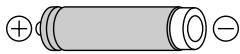
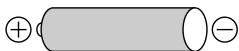
- If rechargeable battery play time is short after recharging, the batteries have reached the end of their service life. Replace them with the recommended replacements.
- Play time may be shorter than usual after recharging batteries for the first time or after they have been unused for a long time. Repeatedly recharge and discharge the batteries if this occurs to restore them to normal.
Care
To prevent battery damage, electrolyte leakage and short-circuiting, heed the following points.
- Do not peel off the covering on batteries and do not use if the covering has been peeled off.
- Align the poles ⊕ and ⊖ correctly when inserting the batteries.
- Do not mix different types or makes of batteries or old and new batteries.
- Remove the batteries if you do not intend to use the unit for a long time.
- Do not throw into fire, short-circuit, disassemble, or subject to excessive heat.
- Do not attempt to recharge dry cell batteries.
- Do not allow metal objects to touch the battery terminals as this may cause short-circuiting which is dangerous.
- When carrying batteries in a pocket or bag, ensure no metal objects such as necklaces are placed together with them. Contact with metal may cause short-circuiting which can cause a fire. For safety, carry the batteries in the battery carrying case.
When driving a car
In the interest of traffic safety, do not operate the unit while driving.
AC adaptor
- Handle the AC adaptor carefully. Improper handling is dangerous.
- Do not touch it with wet hands.
- Do not place heavy objects on top of it.
- Do not forcibly bend it.
- Be sure to connect only the AC adaptor provided with the unit.
- Disconnect the AC adaptor from the power outlet if the unit is not going to be used for a long time.
Unit
No altering or remodeling
This can cause malfunctioning.
No dropping or strong impacts
This may damage the unit.
Locations to be avoided
Avoid using the unit in the following locations since they can cause malfunctioning.
- Bathrooms and other moisture-prone places
- Warehouses and other dusty places
- Very hot places near heating appliances, etc.
Do not leave the unit exposed to direct sunlight for long periods of time
This may deform or discolor the cabinet and may also cause malfunctioning.
Precautions for Listening with the Headphones or Earphones
- Do not play your headphones or earphones at a high volume. Hearing experts advise against continuous extended play.
- If you experience a ringing in your ears, reduce volume or discontinue use.
- Do not use while operating a motorized vehicle. It may create a traffic hazard and is illegal in many areas.
- You should use extreme caution or temporarily discontinue use in potentially hazardous situations.
- Even if your headphones or earphones are the open-air type designed to let you hear outside sounds, don't turn up the volume so high that you can't hear what's around you.
Specifications
CD SECTION
■Audio (Anti-shock off)
No. of channels: 2 (left and right, stereo)
Frequency
response:
20 to 20,000 Hz
(+0.5 dB to
-1.5 dB)
Output voltage: 0.6 V (50 kΩ)
S/N:
More than 96 dB
Wow and flutter: Below measurable limit
DA converter:
1 bit, MASH
Headphone
output level:
Max. 9 mW+9 mW/
16Ω (adjustable)
Pickup
Light source:
Semiconductor laser
Wavelength:
780 nm
RADIO SECTION
Frequency
Radio frequency:
(For United Kingdom)
FM; 87.50–108.00 MHz
(0.05 MHz steps)
AM; 522–1629 kHz
(9 kHz steps)
(For Others)
FM; 87.50–108.00 MHz
(0.05 MHz steps)
AM; 522–1629 kHz
(9 kHz steps)
520–1630 kHz
(10 kHz steps)
GENERAL
Power supply: DC 4.5 V
Power consumption:
| Power source | CD (Anti shock off/on) /RADIO |
| AC adaptor | 2.8 W/3.0 W/2.4 W |
Dimensions
(W×H×D): 128×25.1×
131 mm
Mass:
218 g (with batteries)
196 g
(without batteries)
Operational temperature
range: 0°C–40°C
Rechargeable temperature
range: 5°C–40°C
Play time:
[Approximate operating time in hours (in hold mode, at 25°C on a flat, stable surface)]
| Batteries used | CD (Anti-shock off/on) | RADIO |
| 2 “AAA” (LR03) alkaline batteries | 9 / 12 | 27 |
| 2 “AA” (LR6) alkaline batteries | 22 / 28 | 66 |
| Rechargeable batteries | 6 / 8 | 18 |
| 4 alkaline batteries | 33 / 43 | 100 |
| 2 rechargeable and 2 alkaline batteries | 28 / 36 | 84 |
The play time may be less depending on the operating conditions.
Recharging time: About 3 hours
Note:
Specifications are subject to change without notice.
Mass and dimensions are approximate.
Troubleshooting Guide
Before requesting service for this unit, check the chart below for a possible cause of the problem you are experiencing. Some simple checks or a minor adjustment on your part may eliminate the problem and restore proper operation. If you are in doubt about some of the check points, or if the remedies indicated in the chart do not solve the problem, refer to the directory of Authorized Service Centers (enclosed with this unit) to locate a convenient service center, or consult your dealer for instructions.
| Problem | Check this |
| Cannot close cover. | Is the disc properly secured in place? |
| Cannot play discs. | ●Is the unit in HOLD status?●Is the disc properly secured in place?●Is there moisture on the lens?(Wait for about an hour and then try again.) |
| Cannot remove disc. | Did you press [PUSH] to release the disc? |
| Tracks on disc do not play in order, starting with the first track. | Is [RESUME, RANDOM, NORMAL] in [NORMAL] position? |
| Cannot hear music—too noisy. | ●Have the earphone and wired remote control plug inserted all the way?●Is the plug dirty? (Wipe away dirt on plug.)●Separate the unit from mobile phones. |
| TV picture is distorted. Radio reception is noisy. | Are you using the unit body too near a TV or tuner?(If the TV or tuner is connected to a simple indoor antenna, connect it to an outdoor antenna.) |
| (Except for United Kingdom) No reception.The AM frequency range is different. | Has the frequency step been set for your area? |
- CONCERNING COMPACT DISCS
- IF THE SURFACE IS DIRTY
- STORAGE PRECAUTIONS
- HANDLING PRECAUTIONS
- DO NOT PLACE OR STORE CDS IN THE FOLLOWING PLACES
- PORTABLE CD PLAYER
- PANASONIC®
- DEAR CUSTOMER
- OPERATING INSTRUCTIONS
- SL-SX469V
- SUPPLIED ACCESSORIES
- CHECK THE PACKING CARTON FOR THESE ACCESSORIES
- MATSUSHITA ELECTRIC INDUSTRIAL CO., LTD
- CAUTION
- WARNING
- POWER SUPPLY PREPARATIONS
- USING THE AC ADAPTOR
- NOTE
- USING THE RECHARGEABLE BATTERIES
- CONNECT THE AC ADAPTOR
- USING DRY-CELL BATTERIES (NOT INCLUDED)
- WHEN THE BATTERY INDICATOR FLASHES
- USING THE CAR ADAPTOR (NOT INCLUDED)
- USING THE EXTERNAL BATTERY CASE
- OPEN THE COVER OF THE BATTERY CASE AND INSERT THE BATTERIES
- MOUNT THE BATTERY CASE ON THE UNIT BODY
- SECURE IN PLACE WITH THE SCREW
- FOR YOUR REFERENCE
- HOLD FUNCTION
- HOLD FUNCTION PREVENTS THE FOLLOWING
- TO USE HOLD FUNCTION
- HOLD" INDICATION
- WHEN THE UNIT IS POWERED OFF
- OPERATION CONFIRMATION TONES OF THE REMOTE CONTROL
- AUTO POWER OFF FUNCTION
- REMOVING DISCS
- SKIP PLAY
- PROGRAM PLAY
- RESUME PLAY
- REPEAT FUNCTION
- CHANGING THE SOUND QUALITY
- LOCATION OF CONTROLS
- MAIN UNIT A
- WIRED REMOTE CONTROL B
- WHEN BUMPS CONTINUE REPEATEDLY
- TO CANCEL THE ANTI-SHOCK FUNCTION
- USING THE UNIT WITH AN AUDIO SYSTEM
- USING THE UNIT WITH OPTIONAL ACCESSORIES
- USING THE UNIT WITH A CAR AUDIO SYSTEM
- ITEMS TO BE PURCHASED
- FOR CONNECTION TO THE CAR AUDIO SYSTEM
- MAINTENANCE
- IF THE SURFACES ARE DIRTY
- MAINTAINING THE LENS
- LISTENING OPERATION
- FREE MODE
- A
- TO TURN OFF THE RADIO
- MEMORY MODE
- PUTTING STATIONS INTO THE CHANNELS B
- PREPARATION
- PRESS [MEMORY/RECALL]
- WITHIN 10 SECONDS
- WHEN STORING AN FM STATION
- RECALLING PRESET STATIONS
- PRESS TO SELECT THE BAND NUMBER
- MAIN UNIT
- REMOTE CONTROL
- I
- RADIO/BAND
- PRESS A NUMBERED BUTTON (MAIN UNIT), OR [+] OR [-] (REMOTE CONTROL) TO SELECT THE CHANNEL
- P
- ADJUST THE VOLUME
- TO OBTAIN GOOD RECEPTION
- AM
- FM
- HOW TO RECEIVE AN FM BROADCAST CLEARLY
- PRESS FOR MORE THAN 1.5 SECONDS DURING FM RECEPTION
- TO SELECT STEREO OR MONAURAL FM
- PRESS DURING FM RECEPTION
- WHEN THERE IS NOISE DURING FM RECEPTION
- WHEN USING OVERSEAS (EXCEPT FOR UNITED KINGDOM)
- PRESS FOR MORE THAN 5 SECONDS TO DISPLAY THE STEP
- TO RETURN TO THE PREVIOUS FREQUENCY STEP
- SELECTION AND CARE OF RECHARGEABLE /DRY CELL BATTERIES
- SELECTION
- SPECIAL NICKEL-METAL HYDRIDE RECHARGEABLE BATTERIES
- HHR-4AHE/2B (SET OF 2)
- HHR-4AHT/2B (SET OF 2)
- CARE
- WHEN DRIVING A CAR
- AC ADAPTOR
- UNIT
- NO ALTERING OR REMODELING
- NO DROPPING OR STRONG IMPACTS
- LOCATIONS TO BE AVOIDED
- DO NOT LEAVE THE UNIT EXPOSED TO DIRECT SUNLIGHT FOR LONG PERIODS OF TIME
- PRECAUTIONS FOR LISTENING WITH THE HEADPHONES OR EARPHONES
- SPECIFICATIONS
- CD SECTION
- AUDIO (ANTI-SHOCK OFF)
- PICKUP
- RADIO SECTION
- FREQUENCY
- GENERAL
- TROUBLESHOOTING GUIDE
Brand : PANASONIC
Model : SLSX469
Category : Headphones