
ALA-036 - Motion detector Steren - Free user manual and instructions
Find the device manual for free ALA-036 Steren in PDF.


| Product Type | Motion Detector |
| Brand | Steren |
| Model | ALA-036 |
| Detection Method | Passive Infrared (PIR) |
| Detection Range | Up to 12 meters |
| Detection Angle | 120 degrees |
| Power Supply | 9V DC battery (6LR61 or equivalent) |
| Battery Life | Approximately 6–12 months (depending on usage) |
| Operating Temperature | -10°C to 50°C |
| Dimensions | 10 x 6 x 4 cm (approx) |
| Weight | 150 g (approx) |
| Material | ABS plastic |
| LED Indicator | Red LED (lights during alarm) |
| Alarm Output | Built-in buzzer, 85 dB |
| Installation | Wall mount or surface mount (screws included) |
| Sensitivity Adjustment | Yes (potentiometer on rear) |
| Time Delay Adjustment | Yes (adjustable from 10 seconds to 5 minutes) |
| Low Battery Indicator | Yes (intermittent beep) |
| Weatherproof | Indoor use only |
| Compliance | CE, RoHS |
| Maintenance | Clean with dry cloth; avoid water and solvents |
| Safety | Keep out of reach of children; do not disassemble |
| Spare Parts | Batteries (9V), mounting screws |
| Repairability | Not user-serviceable; contact a qualified technician |
Frequently Asked Questions - ALA-036 Steren
User questions about ALA-036 Steren
0 question about this device. Answer the ones you know or ask your own.
Ask a new question about this device
Download the instructions for your Motion detector in PDF format for free! Find your manual ALA-036 - Steren and take your electronic device back in hand. On this page are published all the documents necessary for the use of your device. ALA-036 by Steren.
USER MANUAL ALA-036 Steren
natural_image
Product illustration of a white and blue handheld device with a smaller open lid (no text or symbols visible)V0.0 / 0717v
MANUAL DE INSTRUCCIONES
IMPORTANTE
2





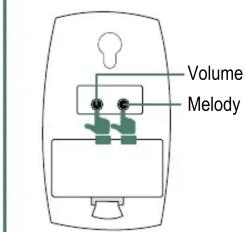

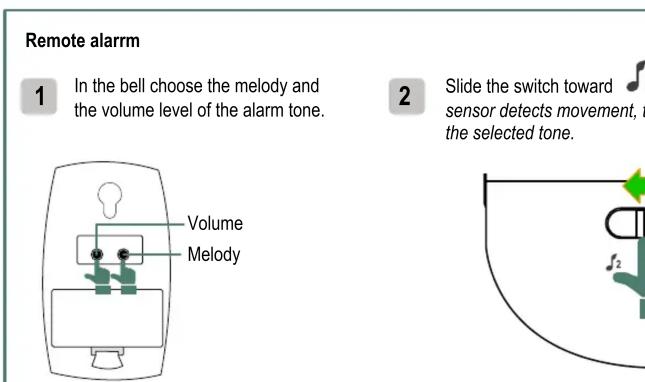


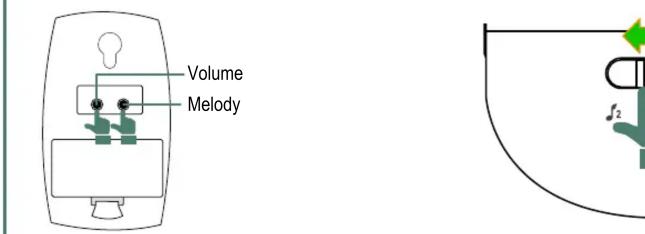
Remote alarm 1 In the bell choose the melody and the volume level of the alarm tone. Volume Melody 2 Slide the switch toward sensor detects movement, to the selected tone.
Remote alarm 1 In the bell choose the melody and the volume level of the alarm tone. Volume Melody 2 Slide the switch toward sensor detects movement, to the selected tone.
Remote alarm 1 In the bell choose the melody and the volume level of the alarm tone. Volume Melody 2 Slide the switch toward sensor detects movement, to the selected tone.
Remote alarm 1 In the bell choose the melody and the volume level of the alarm tone. Volume Melody 2 Slide the switch toward sensor detects movement, to the selected tone.
Remote alarm 1 In the bell choose the melody and the volume level of the alarm tone. Volume Melody 2 Slide the switch toward sensor detects movement, to the selected tone.


Volume Melody
Remote alarm 1 In the bell choose the melody and the volume level of the alarm tone. Volume Melody 2 Slide the switch toward sensor detects movement, to the selected tone.
Remote alarm 1 In the bell choose the melody and the volume level of the alarm tone. Volume Melody 2 Slide the switch toward sensor detects movement, to the selected tone.
Remote alarm 1 In the bell choose the melody and the volume level of the alarm tone. Volume Melody 2 Slide the switch toward sensor detects movement, to the selected tone.

Remote alarm
1 In the bell choose the melody and the volume level of the alarm tone.
Volume
Melody
2 Slide the switch toward sensor detects movement, to the selected tone.
Remote alarm
1 In the bell choose the melody and the volume level of the alarm tone.
Volume
Melody
2 Slide the switch toward sensor detects movement, to the selected tone.
Remote alarm
1 In the bell choose the melody and the volume level of the alarm tone.
Volume
Melody
2 Slide the switch toward sensor detects movement, to the selected tone.
Remote alarm
1 In the bell choose the melody and the volume level of the alarm tone.
Volume
Melody
2 Slide the switch toward sensor detects movement, to the selected tone.
Remote alarm
1 In the bell choose the melody and the volume level of the alarm tone.
Volume
Melody
2 Slide the switch toward sensor detects movement, to the selected tone.

Brand : Steren
Model : ALA-036
Category : Motion detector