
SF-AE80 - Flash Drive Impact - Free user manual and instructions
Find the device manual for free SF-AE80 Impact in PDF.


| Product Type | Flash Unit |
| Brand | Impact |
| Model | SF-AE80 |
| Guide Number | 80 (m at ISO 100) |
| Coverage | 24-105mm (auto zoom) |
| Recycling Time | 0.1-5 seconds |
| Number of Flashes | 200-1500 (per battery set) |
| Power Source | 4x AA batteries (Ni-MH recommended) |
| Flash Modes | TTL, Manual, Multi |
| Sync Modes | High-speed sync, Rear curtain sync |
| Swivel/Tilt | 360° swivel, 90° tilt |
| Wireless | Optical slave, compatible with Impact triggers |
| Weight | 380 g (without batteries) |
| Dimensions | 190 x 75 x 55 mm |
| Color | Black |
| Material | ABS plastic |
| Display | LCD panel |
| Bounce Card | Included |
| Diffuser | Built-in wide panel |
| Warranty | 2 years |
| Included Accessories | Flash stand, carrying case |
Frequently Asked Questions - SF-AE80 Impact
User questions about SF-AE80 Impact
0 question about this device. Answer the ones you know or ask your own.
Ask a new question about this device
Download the instructions for your Flash Drive in PDF format for free! Find your manual SF-AE80 - Impact and take your electronic device back in hand. On this page are published all the documents necessary for the use of your device. SF-AE80 by Impact.
USER MANUAL SF-AE80 Impact
natural_image
White remote light bulb mounted on a stand against a yellow background (no text or symbols visible)AC Slave Flash
INSTRUCTIONS
Light stand, socket and
umbrella mount not included
unless purchased as a kit.
Thank you for choosing Impact.
Congratulations on the purchase of your Impact Slave Flash. This AC strobe slave fires immediately when it detects the master flash. Remarkably adaptable, you can use this light for a number of jobs in both the studio and on location: it can function as a main, fill, or accent light, and can be used as a master unit by connecting it to your camera's PC terminal with the included PC sync cord. You can also manually engage the flash by pressing the test button.
The flash's small size makes it very portable, so it's easy to stash it in a small bag, along with all your other essential photography and lighting equipment.
Though ideal for use up to 5–10 feet away at ISO 200, you can vary your results with the Impact Slave Flash by adjusting your distance or ISO setting.
Note: Ambient light and direct sunlight can affect the distance at which your slave strobe will be most effective. Be sure to assess your locale before shooting.

natural_image
White SF-AE56 light bulb with attached black cable and terminal connector (no text or symbols on device body)The Slave Flash comes with a 15-ft sync cord. If you purchased this AC Slave Flash as a kit, you may also have a ceramic socket, umbrella mount, light stand, or other accessories. To see all of our accessories, please visit our website: www.impactstudiolighting.com.
All images in this manual are for illustrative purposes only. Your unit may differ slightly from the one pictured.
Warning
- Please read and follow these instructions, and keep this manual in a safe place.
- Keep this unit away from water and any flammable gases or liquids. Do not use your flash in an environment where flammable vapors are present.
- Do not attempt to disassemble or repair the equipment — doing so will void the warranty, and Impact Studio Lighting will not be responsible for any damage.
- Always switch off the power and disconnect the power cord before removing or installing this device from a socket.
- Do not stare into the strobe when it is flashing.
- Never use damaged equipment. If the unit is dropped or damaged, have it checked by a professional repair service before using.
- Due to the high-voltage circuitry inside this device, do not attempt to disassemble or repair the unit yourself.
- Clean the unplugged device with a soft, dry cloth.
- Keep out of the reach of children.
- Handle the unit with care.
WARNING: To reduce the risk of fire or shock hazard, do not expose this product to rain or moisture.

CAUTION
RISK OF ELECTRIC SHOCK DO NOT OPEN DEVICE

DO NOT DISASSEMBLE DEVICE. NO USER-SERVICEABLE PARTS INSIDE. HAVE PRODUCT SERVICED BY QUALIFIED PERSONNEL ONLY TO REDUCE THE RISK OF ELECTRIC SHOCK.
Using the light as a Slave Flash

natural_image
Hand holding a white light bulb with a red indicator light, being inserted into a mechanical component (no text or symbols visible)Screw the Slave Flash into an unplugged floodlight socket. (SF-AE56 shown)
natural_image
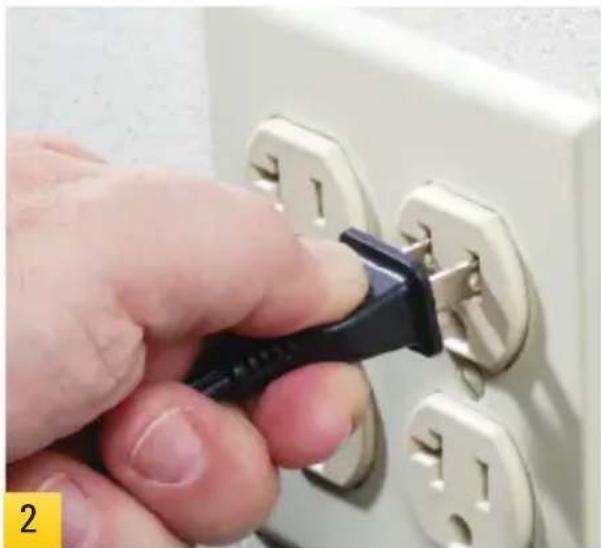
Hand inserting a black plastic plug into an open electrical socket (no text or symbols visible)Plug in the lighting fixture and turn it on.
natural_image
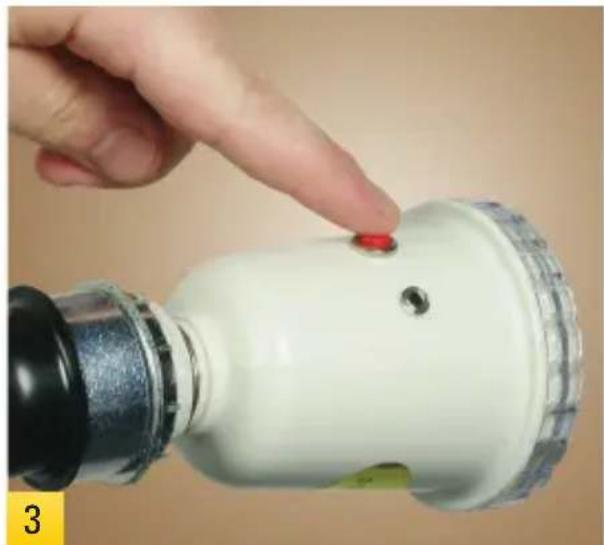
Hand pointing at a red button on a white cylindrical device (no text or symbols visible)You can fire a test shot by pressing the red button on the side of the SF-AE56. The test button is located on the back of the SF-AE80.

natural_image
Close-up of a white and yellow handheld device with a red button, against a plain beige background (no text or symbols visible)The Slave Flash will fire upon detecting any master flash.
Using the light as a Master Flash

natural_image
Hand holding a white light bulb with a red button, next to a mechanical device (no text or symbols visible)Screw the Slave Flash into an unplugged floodlight socket.

natural_image
Hand inserting a black plastic plug into an open electrical socket (no text or symbols visible)Plug the lighting fixture and turn it on.

natural_image
Close-up of a hand using a handheld device to adjust a light bulb (no visible text or symbols)Plug the 3.5mm miniplug end of the included PC sync cord into the sync terminal on the side of the SF-AE56. The sync terminal is located on the back of the SF-AE80.

natural_image
Close-up of a camera's dial and connector with a finger pointing to the button (no readable text or symbols)Plug the other end of the sync cord into your camera's PC terminal. Your Slave Flash will now fire immediately when you trigger your camera's shutter.
Specifications
| Model SF-AE56 | SF-AE80 | |
| Operating Voltage | 110V AC – 130V AC, 60 Hz | |
| Guide Number ^1 56 | 80 | |
| Recycling Time ~2 seconds | ||
| Color Temperature | 5500 – 6000 °K | |
| Flash Duration | 1/800 second | |
| Connection | Standard E26 Edison screw3.5 mm miniplug sync cable | |
| Sync Cable | 15 ft | |
| Indicator Lights | Green (ready) and Orange (recycling) | |
| Built-in Slave Cell | Yes | |
| Flash Tube | Permanent (not user-replaceable) | |
| Weight | 0.6 lb (0.27 kg) | |
Accessories

natural_image
Photograph of a portable impact camera setup with tripod stand (no visible text or symbols)Impact Porcelain Socket
The Impact SP-UM Porcelain Socket with Umbrella Mount is a cost-effective way to utilize the wide variety of E26 (Edison) based lamps for photo and video work. This highly versatile product has an adjustable metal mount with a 5/8" receiver for light stands and an 8 mm umbrella receptacle. The Floodlight Socket tilts and locks in place at the desired angle by grasping the stay-cool wooden handle and releasing the locking knob. Services the Slave Flashes and lamps up to 500W.
Impact Light Stand
The Impact LS-6B Light Stand is one of the most economical light stands available. It extends to a maximum height of 6 ft, and has a standard 5/8" stud on top with a 1/4"-20 thread.
Other Accessories
• Umbrella Bracket with adjustable shoe (9101880)
• Digital Flash Umbrella Mount Kit (DFUMK)
• Rapid Adapter with 1/4"-20 male thread (CA-101)
• Two-Section Backlight Stand (LS-3S)
• 5-in-1 Collapsible Circular Reflector Disc (R1142)
• Impact Collapsible Reflector Holder (ME-109)
To see these accessories and all of our lighting equipment, please see your lighting dealer or visit our website:
www.impactstudiolighting.com
Limited One Year Warranty
Impact Studio Lighting provides a limited warranty that this product is free from defects in materials and workmanship to the original purchaser under normal use for a period of one (1) year from the original purchase date or thirty (30) days after replacement whichever occurs later. Our responsibility with respect to this limited warranty shall be limited solely to repair or replacement, at its option, of any product which fails during normal consumer use.
To obtain warranty coverage during the Warranty Period, contact your place of purchase (“Seller”) to obtain a return merchandise authorization (“RMA”) number, and return to Seller the defective product along with proof of purchase and the RMA number.
This warranty does not extend to damage or failure which results from misuse, neglect, accident, alteration, abuse, improper installation or maintenance. EXCEPT AS PROVIDED HEREIN, IMPACT STUDIO LIGHTING MAKES NEITHER ANY EXPRESS WARRANTIES NOR ANY IMPLIED WARRANTIES, INCLUDING BUT NOT LIMITED TO ANY IMPLIED WARRANTY OF MERCHANTABILITY OR FITNESS FOR A PARTICULAR PURPOSE. This warranty provides you with specific legal rights, and you may also have additional rights which vary from state to state.
©Copyright 2012 Gradus Group
To see all of our lighting equipment, please visit our website.
impact
www.impactstudiolighting.com

Brand : Impact
Model : SF-AE80
Category : Flash Drive