Stedi-Eye Mariner - Binoculars Fraser Optics - Free user manual and instructions
Find the device manual for free Stedi-Eye Mariner Fraser Optics in PDF.


| Product Type | Binoculars |
| Brand | Fraser Optics |
| Model | Stedi-Eye Mariner |
| Magnification | 7x |
| Objective Lens Diameter | 50 mm |
| Prism Type | Porro |
| Glass Material | BAK-4 |
| Lens Coating | Fully Multi-Coated |
| Field of View (at 1000 yds) | 375 ft |
| Close Focus | 15 ft |
| Eye Relief | 18 mm |
| Exit Pupil | 7.1 mm |
| Focus System | Center focus with diopter adjustment |
| Waterproof / Fogproof | Yes, nitrogen purged |
| Body Material | Rubber armored polycarbonate |
| Dimensions (L x W x H) | 7.5 x 6.5 x 2.8 in |
| Weight | 32 oz (907 g) |
| Power Source | None (manual) |
| Included Accessories | Neck strap, carrying case, lens covers, cleaning cloth |
| Warranty | Limited lifetime warranty |
| Maintenance | Clean lenses with microfiber cloth; store in dry place |
| Repairability | Serviceable by authorized Fraser Optics centers |
Frequently Asked Questions - Stedi-Eye Mariner Fraser Optics
User questions about Stedi-Eye Mariner Fraser Optics
0 question about this device. Answer the ones you know or ask your own.
Ask a new question about this device
Download the instructions for your Binoculars in PDF format for free! Find your manual Stedi-Eye Mariner - Fraser Optics and take your electronic device back in hand. On this page are published all the documents necessary for the use of your device. Stedi-Eye Mariner by Fraser Optics.
USER MANUAL Stedi-Eye Mariner Fraser Optics
THE MARINER SERIES
14x40mm Gyro-Stabilized Binocular
Engineered with STEDI-EYE® Technology

FRASER OPTICS The Clear Advantage


The Mariner Series 14x40mm Gyro-Stabilized Binocular Engineered with STEDI-EYE® Technology
For the big-game angler, yachtsman, harbor patrolman, or industry professional whose success depends upon crystal clear stable vision, Fraser Optics' Mariner Series 14x40mm Gyro-Stabilized Binocular delivers the clear advantage. Our gyro-stabilized binocular removes up to 98% of image motion caused by hand or platform movement and is engineered using Fraser Optics' patented STEDI-EYE® Technology. This binocular is designed for the serious user and proven to perform in the most extreme conditions.
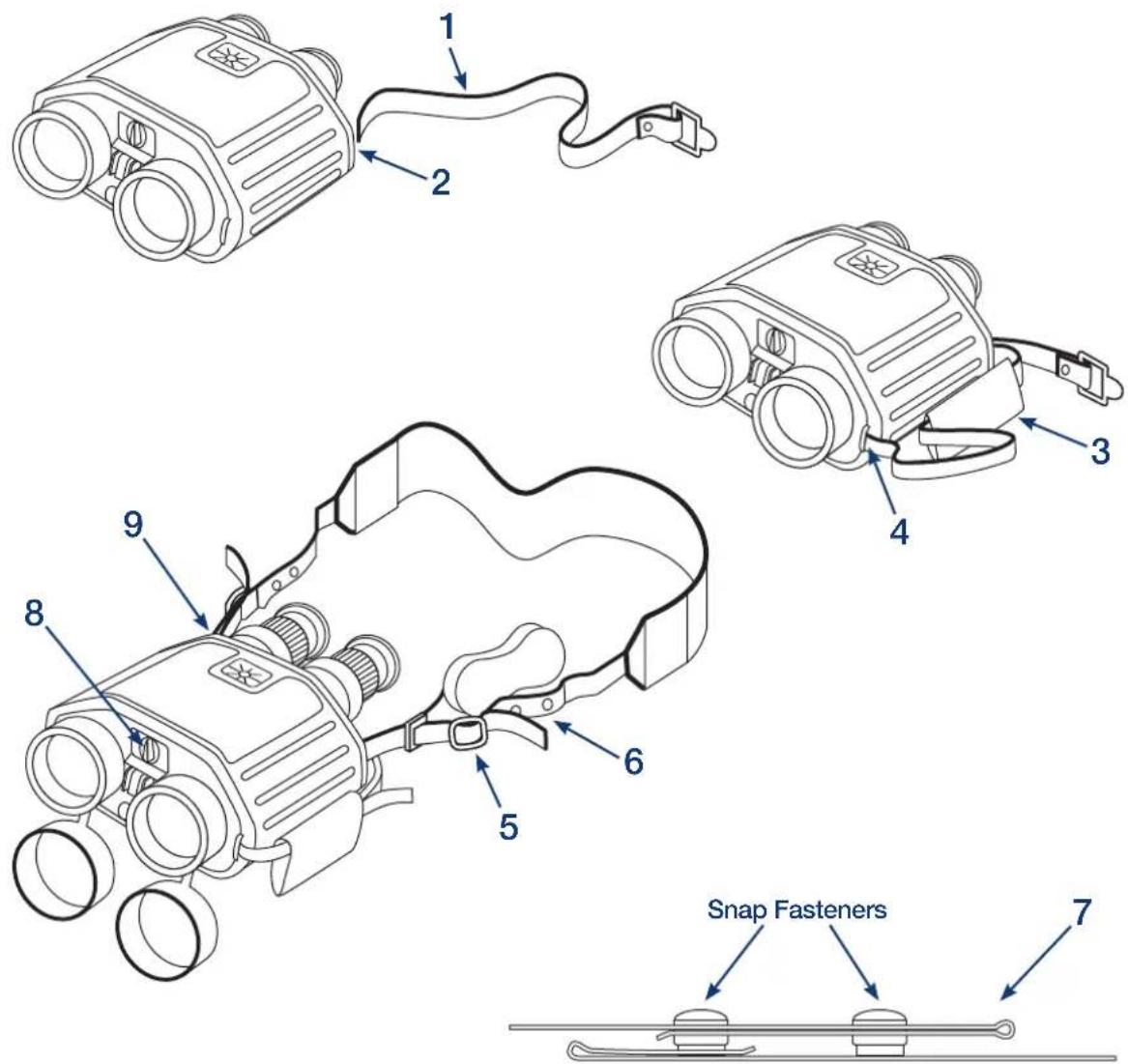
Getting Started
- Slide plain end of webbing strap (1) through eyepiece strap hook (2).
NOTE: Hand strap may be installed on opposite side of the binocular for a left-handed user. - With exterior side of pad facing binocular, lace webbing strap through hand pad (3).
Insert webbing strap under objective lens strap hook and pull webbing strap through strap hook. Webbing strap should not be pulled tight against binocular. Lace end of webbing strap securely through fastener (4). With webbing strap inside hand pad, fasten Velcro closure. - Using fasteners on webbing strap (5), adjust neck strap length so binocular hangs halfway
between shoulders and waist. WARNING: The neck strap of the binocular may become tangled during an emergency. To facilitate quick removal, the neck strap incorporates a quick disconnect feature (6) activated by a pull release system (7). - Open battery cover (8) on the front of the stabilized binocular. Insert two new batteries in the orientation indicated on inside of battery cover and replace the battery cover.
- Turn the control knob (9) to AUTO. Allow the motor to run for approximately 30 seconds to get to full speed.
- Turn the control knob to LOCK.
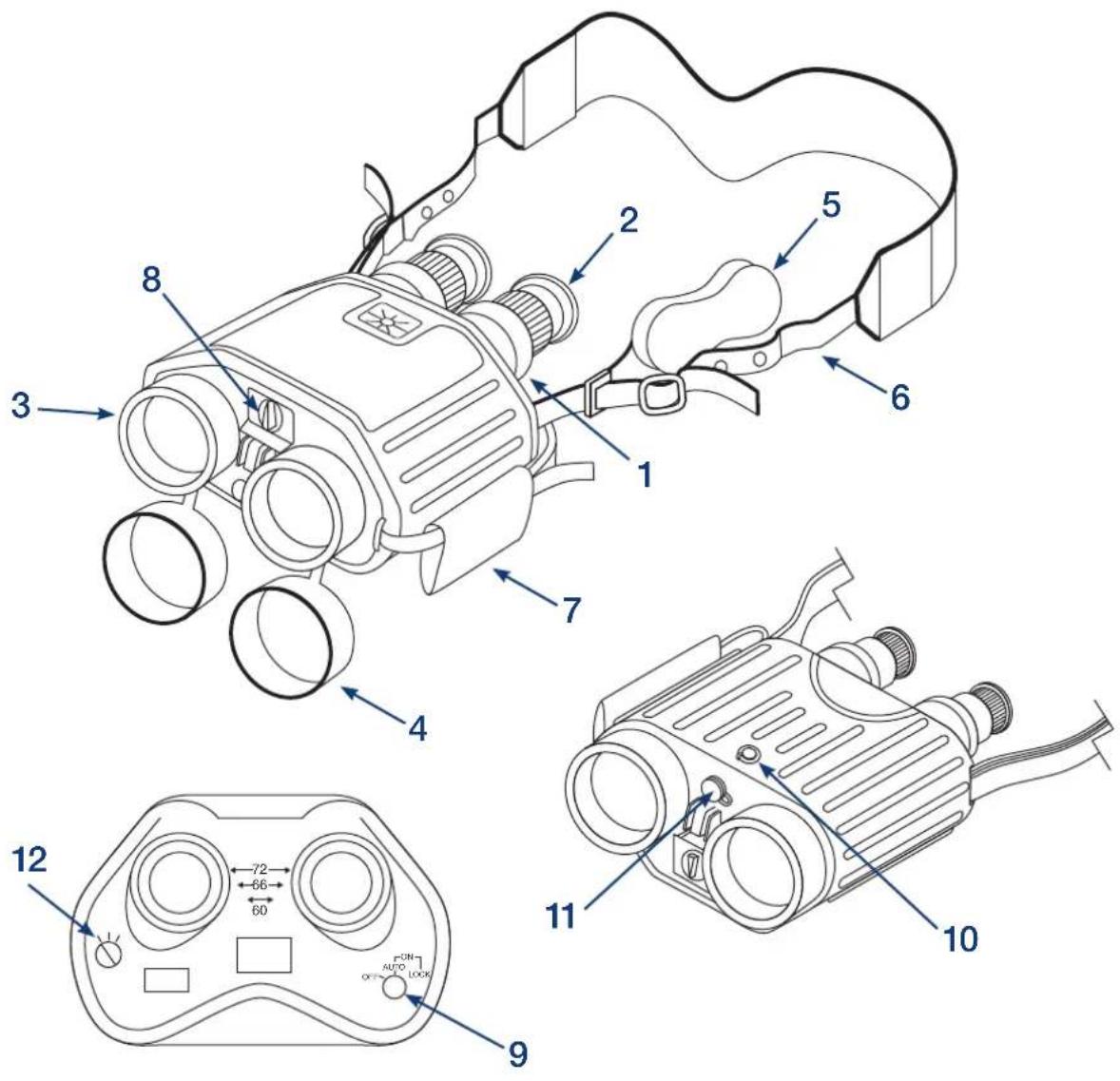
Location and Description of Major Components
The Mariner Series 14x40mm Gyro-Stabilized Binocular is gyroscopically stabilized. The gyro is driven electrically by a small motor, powered by two AA batteries or external power, in the range of 6 to 30 VDC. The Vehicle Power Cord adapter provides external power by connecting the unit to the vehicle cigarette lighter.
- EYEPIECE. Two detachable pieces used to look through binocular. These adjust for individual diopter (focus) and eye spacing.
- EYECUP. Rubber end on eyepiece. Folds back for viewing with eyeglasses.
- OBJECTIVE LENS. Located on each side of battery box.
- OBJECTIVE LENS CAP. Covers for protection of objective lens when stabilized binocular is not in use.
- EYEPIECE LENS CAP. Cover for protection of eyepiece lenses when stabilized binocular is not in use.
- NECK STRAP. Allows user to carry binocular around neck.
- HAND STRAP. Adjustable to allow for easy operation with one hand.
- BATTERY BOX. Houses two AA batteries required to supply power to use gyro-stabilization feature.
- CONTROL KNOB. Turns the unit power on and activates stabilization.
- TRIPOD MOUNTING HOLE. 1/4"-20 threaded hole located on the bottom of binocular for securing device to a tripod.
- VEHICLE POWER CORD PORT. Connects to binocular for use with external power source.
- BATTERY METER. Indicates battery power.
natural_image
Line drawing of a dual-camera optical device with no text or symbols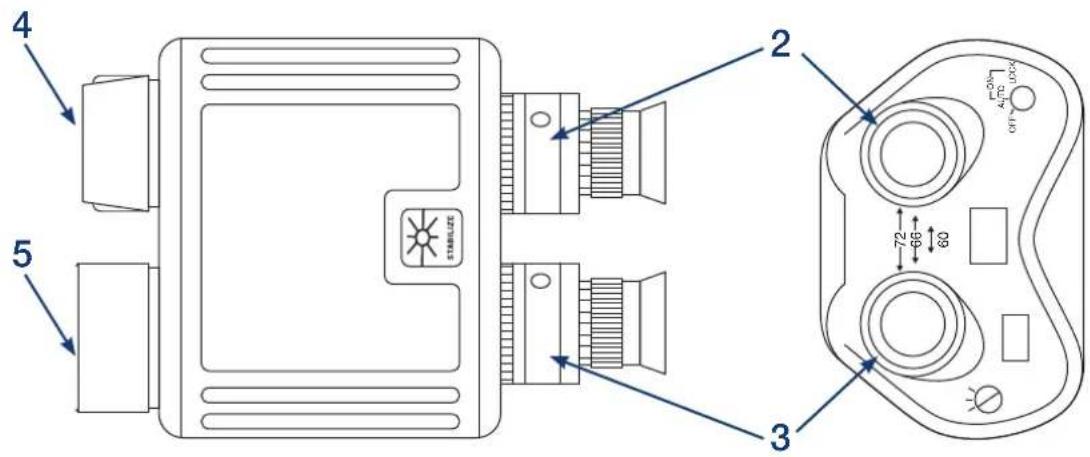
Using Your Mariner Series Binocular
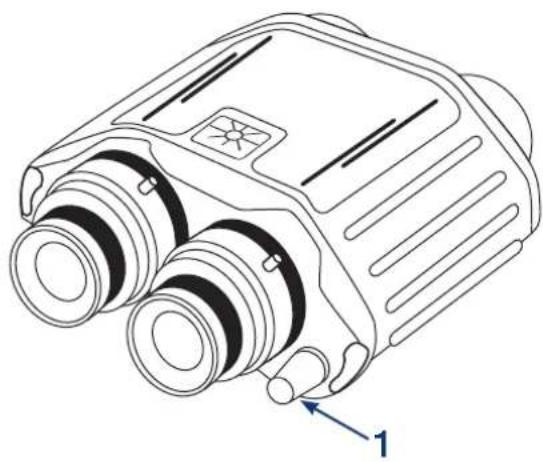
To use your binocular, turn the power to the ON position on the Control Knob (1). Wait approximately 30 seconds for the gyro to reach full speed. To activate gyro-stabilization, return the power switch to the LOCK position. Stabilization will remain active until the power switch is returned to the ON position.
To Focus Your Binocular
- Set the Interpupillary Adjustment by holding the eyepieces (2 and 3) and manually moving them toward the center or outward, to accommodate the spacing of your eyes.
- No further eye spacing adjustments should be needed during use of the device and the noted settings may be used for future initialization.
- Remove the right lens cap (4), leaving the left one on.
- Using the right eye, view through the right eyepiece (2) at a distant target. Slowly rotate the right eyepiece until the target is brought into sharp focus.
- Replace the right lens cap and remove the left one (5).
- Using the left eye, view through the left eyepiece (3) at the same distant target. Slowly rotate the left eyepiece until the target is brought into sharp focus.
- Remove the right lens cap. The stabilized binocular is now focused for your eyes.
NOTE: Rotating the eyepiece further than necessary in the clockwise direction could reduce the depth of field that can be achieved without refocusing.
Cleaning Procedures
To clean the lenses:
- Using Fraser Optics retractable brush, remove as much dust and dirt as possible from the exposed lens surface.
- Brush across the surface with light, quick strokes, flicking after each stroke to dislodge the dust.
- When all visible particles of dust and dirt have been removed, use Fraser Optics lens cleaning solution or pre-moistened cleaning cloths and gently wipe over the surface.
NOTE: Microcleaning kit supplied with standard model does not contain the above items.
The Advanced kit sold separately does contain the items referenced.
CAUTION: Never wipe dry or dirty lenses with a dry cloth. Clean the exterior of the binocular (not the lenses) with a clean Fraser Optics microfiber cloth. Remove grease and soil with soap and water and a damp clean cloth. Dry with a clean, lint free cloth. Blow dirt and lint from case interiors.
Equipment Specifications
Magnification 14x
Objective diameter 40mm
Exit pupil 3mm
Field of view (74m @ 1,000m) ..... 4.3°
Resolution (day) 4.3 Arc seconds
Stabilization freedom ±8^
Focus adjustment .... ±5 diopters
Scan rate 8°/sec
Interpupillary adjustment 60-75mm
Power (internal) 2 AA cells
Power (external) 6-30 VDC
Weight (day). 4.5 lbs. (2.04kg)
Dimensions
Length (day) 8.25" (210mm)
Width 7.5" (190mm)
Height 3.5" (89mm)
| Environmental Operational Storage | ||
| High temperature 120°F (49°C) | 160°F (71°C) | |
| Low temperature | -25.6°F (-32°C) | -50.8°F (-46°C) |
| Waterproof | 1 meter depth | N/A |
Troubleshooting Procedures
All internal maintenance on the Mariner STEDI-EYE® stabilized binocular is to be accomplished by Fraser Optics. Opening binocular, or attempting any repair beyond that which is outlined in this manual, may void warranty and/or cause damage to, or degrade performance. If, after troubleshooting, there are deficiencies that cannot be corrected, please return to the manufacturer. Contact information is provided at the end of this manual.
| MALFUNCTION TEST OR INSPECTION CORRECTIVE ACTION | ||
| Not functioning 1. | Check to see if control knob is in the ON position. | Turn ON control knob. |
| 2. Inspect battery power indicator. If battery power indicator shows red, replace batteries. | ||
| No battery power | 1. Check to see if batteries are present. If batteries are missing, install new batteries properly. | |
| 2. Check for low or dead batteries. Install new batteries properly. | ||
| 3. Check to see that batteries are properly installed. | Install batteries properly. | |
| 4. Check to see if battery cap contact is bent, broken, or corroded. | Contact Fraser Optics. | |
| 5. Failure to respond to items 1 through 4 above. | Contact Fraser Optics. | |
Return for Service Instructions
If your Fraser Optics product fails to perform in any way, please contact a customer service representative by calling (215) 443-5240. If the product needs to be sent to Fraser Optics for service, the customer service representative will provide you with a repair number (RMA).
Please follow these steps when sending any product to Fraser Optics Product Service:
- Please remove the lens caps, mounts, straps, mounting rings, covers, and all other accessories from the product.
- Record the serial number of the product and keep it where you can find it if needed.
- Include a note with the product indicating a detailed reason the product is being sent and clearly print the repair number on the outside of the package.
- Make certain that your name, shipping address, telephone number, and e-mail (if applicable) are included in the note.
If the product was purchased in the US, insure your product for the appropriate dollar value and send it to:
Fraser Optics c/o Product Service 1025 Thomas Drive Warminster, PA 18974-2892
We will not be held liable for damages incurred to unit(s) during transit.
Repair Process
When your unit is received, it will be evaluated to determine what repairs are needed and whether or not warranty coverage will be applicable. It is our option to repair or replace your unit. If your unit is covered under warranty, you will be notified via our customer service. If your unit is NOT covered under warranty, an estimate for repair or replacement will be communicated to you via our customer service.
You will have 20 days to respond, either accepting or declining the recommendation. If you accept the recommendation for repair or replacement, you will need to provide payment. Payment can be in the form of a check, or if you prefer, by MasterCard, VISA, or American Express. If the repair or replacement is covered under warranty, you will receive no additional correspondence. Your repaired unit, or a comparable replacement of equal value and function, will be shipped to you via UPS.
Product Maintenance, Service and Repair
For products that require repair or servicing (after the warranty period or when the warranty is void), customers should contact Fraser Optics Customer Service (215) 443-5240.
* INTERNATIONAL PURCHASES: Please contact Customer Service (215) 443-5240 for instructions.
CAUTION: To avoid possible damage in transit, always use the original storage case when shipping your STEDI-EYE® stabilized binoculars. If the storage case is missing or damaged, contact Fraser Optics for special shipping instructions.
Manufacturer's Liability
Fraser Optics is not responsible and assumes no liability for indirect, special or consequential damages, personal injury, property damage, or loss of property, income, or life arising from the use of its products. Users are responsible for proper training and usage of Fraser Optics products. Fraser Optics is not liable for claims of performance or product failure under any theory of tort, contract, or commercial law.


natural_image
Abstract blue geometric logo resembling a stylized globe or interwoven ring (no text or symbols)FRASER OPTICS
The Clear Advantage
1025 Thomas Dr, Warminster, PA 18974 • Phone: (215) 443-5240 • Fax: (215) 443-0966
E-mail: info@fraseroptics.com • www.fraseroptics.com

Made in the USA