
SL-SX290P - CD Player PANASONIC - Free user manual and instructions
Find the device manual for free SL-SX290P PANASONIC in PDF.
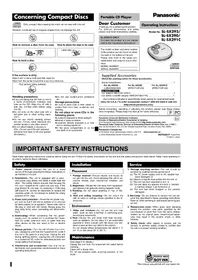


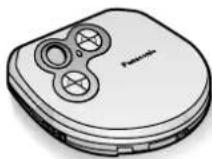
| Product Type | Portable CD Player |
| Brand | Panasonic |
| Model | SL-SX290P |
| Dimensions (W x H x D) | 130 x 30 x 130 mm |
| Weight | 300 g (including batteries) |
| Power Supply | 2x AA batteries or AC adapter (not included) |
| Playable Discs | CD-DA, CD-R, CD-RW |
| Anti-Shock Protection | 40 seconds Anti-Skip Memory |
| Playback Modes | Normal, Repeat, Random, Program |
| Audio Output | 3.5 mm stereo headphone jack |
| Battery Life | Approximately 20 hours (alkaline batteries) |
| Accessories Included | Earbuds, carrying pouch, user manual |
| Maintenance | Clean lens with a soft, dry cloth |
| Safety Precautions | Do not expose to moisture, extreme temperatures, or strong magnetic fields |
| Repairability | Not user-serviceable; contact Panasonic support for repairs |
Frequently Asked Questions - SL-SX290P PANASONIC
User questions about SL-SX290P PANASONIC
0 question about this device. Answer the ones you know or ask your own.
Ask a new question about this device
Download the instructions for your CD Player in PDF format for free! Find your manual SL-SX290P - PANASONIC and take your electronic device back in hand. On this page are published all the documents necessary for the use of your device. SL-SX290P by PANASONIC.
USER MANUAL SL-SX290P PANASONIC
Concerning Compact Discs

Only compact discs bearing this mark can be used with this unit.
However, continued use of irregular shaped CDs can damage the unit.


How to remove a disc from its case
How to store the disc in its case
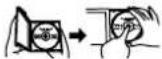
Label side up.

How to hold a disc


If the surface is dirty
Wipe it with a damp cloth and then wipe dry.
Wipe from the center toward the outer circumference.
Play surface (shiny surface)


Handling precautions
- If you are taking the CD from a cold to a warm environment, moisture may form on the CD. Wipe this off with a soft, dry, lint-free cloth before using the CD.
- Do not write on the label side with a ball-point pen or other writing instrument.
- Do not use record cleaning sprays, benzine, thinner, static electricity prevention liquids or any other solvent.
- Do not attach labels or stickers to CDs. (Do not use CDs with exposed adhesive from tape or left over peeled off stickers.)
- Do not use scratch-proof protectors etc.
Storage precautions
Be sure to store CDs in their cases to protect them from dust, scratches, and warping.
Do not place or store CDs in the following places
- Locations exposed to direct sunlight
- Humid or dusty locations
- Locations directly exposed to a heat vent or heating appliance
- In the glove compartment or on the rear deck of an automobile
Portable CD Player
Dear Customer
Thank you for purchasing this product. For optimum performance and safety, please read these instructions carefully.
SL-SX291C ONLY
To install this product in a car, please refer to the "Installation Instructions".
The model number and serial number of this product can be found on either the back or the bottom of the unit.
Please note them in the space provided below and keep for future reference.
MODEL NUMBER
SERIAL NUMBER
Panasonic®
Operating Instructions
Model No. SL-SX293/
SL-SX290/
SL-SX291C

Supplied Accessories
Check the packing carton for these accessories.
Stereo headphones....1
For SL-SX293
For SL-SX290
For SL-SX291C
(LOBAD0000160)
(RFEV715P-KS)
(RFEV715P-SS)
SL-SX291C ONLY
Car adaptor (SH-CDC12PEY) 1
Car stereo cassette adaptor (SHCDM10B1PYK) 1
Use numbers indicated in parentheses when asking for replacement parts.
(Only for U.S.A.) To order accessories contact 1-800-332-5368 or web site
(http://www.panasonic.com).
Before connecting, operating or adjusting this product, please read these instructions completely. Please keep this manual for future reference.
Panasonic Consumer Electronics Company,
Division of Matsushita Electric Corporation of America
One Panasonic Way Secaucus, New Jersey 07094 http://www.panasonic.com
Panasonic Sales Company, Division of Matsushita Electric of Puerto Rico, Inc. ("PSC")
Ave. 65 de Infanteria, Km. 9.5 San Gabriel Industrial Park, Carolina, Puerto Rico 00985
Panasonic Canada Inc.
5770 Ambler Drive, Mississauga, Ontario L4W 2T3 www.panasonic.ca
© 2002 Matsushita Electric Industrial Co., Ltd.
RQT6580-P F0402TH0
Printed in Japan
IMPORTANT SAFETY INSTRUCTIONS
Read these operating instructions carefully before using the unit. Follow the safety instructions on the unit and the safety precautions listed below. Keep these operating instructions handy for future reference.
Safety
- Power source—Connect the unit to a power source of the type described in these instructions or as marked on the unit.
- Polarization—The unit is equipped with a polarized power plug where one blade is wider than the other. This safety feature ensures that the plug fits into your household AC outlet only one way. If the plug doesn't fit one way, try reversing it. If the plug still doesn't fit, contact an electrician to replace the obsolete outlet. Do not attempt to defeat the safety purpose of the plug.
- Power cord protection—Route the AC power supply cord so that it will not be walked on or pinched by items placed on or against it. Never take hold of the plug or cord with wet hands. Always grasp the plug body firmly when connecting and disconnecting it.
- Overloading—When connecting the AC power supply cord, be careful not to overload the household AC outlet, extension cord, or outlet from any other device as this can result in fire or electric shock.
- Nonuse periods—Turn the unit off when it is not in use. Unplug the unit from the household AC outlet if it is not to be used for a long time. Unplug the unit during lightning storms. Leaving the unit connected to a household AC outlet for extended periods can cause battery fluid leakage.
- Attachments and accessories—Use only the attachments and accessories recommended in these operating instructions.
Installation
Placement
- Foreign material—Ensure objects and liquids do not get into the unit. Avoid exposing the unit to excessive smoke, dust, mechanical vibration, and shock.
- Magnetism—Situate the unit away from equipment and devices that generate strong magnetic fields.
- Stacking—Do not place anything on top of this unit.
- Wall and ceiling mounting—Do not mount the unit on walls or ceilings unless specified in the instructions.
Environment
- Water and moisture—Do not use the unit near water, such as near a bathtub or swimming pool. Avoid damp basements.
- Heat—Situate the unit away from heat sources, such as radiators. Do not leave it in an automobile exposed to direct sunlight with the doors and windows closed as this may deform the cabinet. Do not situate where temperatures fall below 5 °C (41 °F) or rise above 35 °C (95 °F).
Maintenance
(See page 6 for details.) Unplug the unit from the household AC outlet before cleaning. Clean with a damp cloth. Do not use abrasive pads, scouring powders, or solvents.
Service
- Damage requiring service—The unit should be serviced by qualified service personnel if: (a) The AC power supply cord or AC adaptor has been damaged; or (b) Objects or liquids have gotten into the unit; or (c) The unit has been exposed to rain; or (d) The unit does not operate normally or exhibits a marked change in performance; or (e) The unit has been dropped or the cabinet damaged.
- Servicing—Do not attempt to service the unit beyond that described in these operating instructions. Refer all other servicing to authorized servicing personnel.
- Replacement parts—When parts need replacing ensure the servicer uses parts specified by the manufacturer or parts that have the same characteristics as the original parts. Unauthorized substitutes may result in fire, electric shock, or other hazards.
- Safety check—After repairs or service, ask the servicer to perform safety checks to confirm that the unit is in proper working condition.

This manual was printed with soy based ink.
Power Supply Preparations
Refer to the specifications (page 6) for information on operating times when using dry cell batteries.
Using dry cell batteries (not included)
Insert two "LR6, AA, UM-3" alkaline batteries.
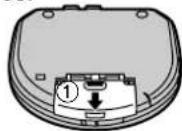
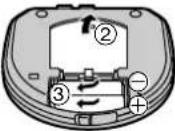
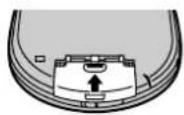
If the battery lid comes loose
Slide the lid back into place horizontally.
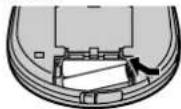
Removing batteries Push up on the battery in the direction indicated by the arrow. Then lift it out.
Note
The dry cell batteries should be changed when the unit is off.
Using rechargeable batteries (not included)
- If rechargeable batteries are to be used, rechargeable batteries manufactured by Panasonic are recommended.
- This unit cannot recharge batteries. The battery indicator will not function correctly when using rechargeable batteries.
Using the AC adaptor (not included)
Use only the recommended AC adaptor. Use of other AC adaptors can damage the unit.
For U.S.A.
To order the optional AC adaptor RP-AC46 contact 1-800-332-5368 or web site (http://www.panasonic.com).
For Canada
Be sure to obtain the optional AC adaptor RP-AC46. It is available through your Panasonic dealer.
Connect the AC adaptor.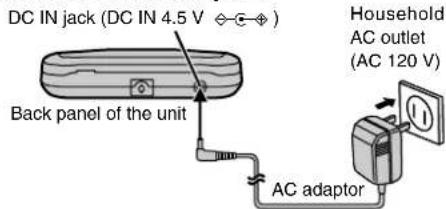
Conserving power
To save power when the unit is not to be used for a long time, unplug the AC adaptor from the household AC outlet. Reprogram tracks if necessary before use.
Note
Turn the unit off before connecting or disconnecting the AC adaptor.
If the unit malfunctions or freezes during use, disconnect the power source (the AC adaptor or batteries).
Re-connect the power source and continue operation.
Battery indicator
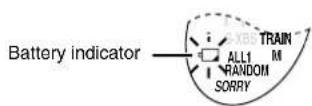
This indicator flashes when the batteries are almost out of power. Power is cut off completely a short while later. Replace batteries with new ones.
Note
The length of time the unit will continue to operate between when the battery indicator starts flashing and when the power is cut off differs depending on the type of batteries used.
Using the car adaptor
SL-SX291C includes a car adaptor. Refer to the separate "Installation Instructions".
For SL-SX293 and SL-SX290, obtain the car adaptor (SH-CDC9) available as an optional accessory.
Use only the recommended car adaptor. Use of other car adaptors can damage the unit.
CAUTION:
Use only car adaptor, Model: SH-CDC9 manufactured by Matsushita Electric Industrial Co., Ltd.
Location of Controls
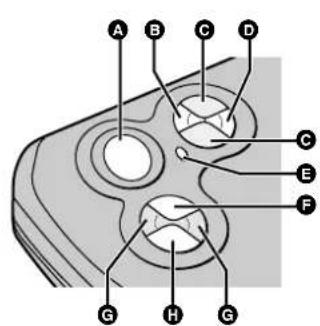
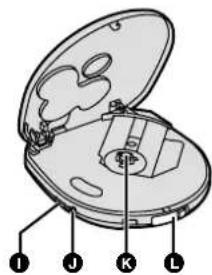
Back panel of the unit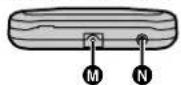
A Display B Memory/recall button (MEMORY/RECALL) ● Headphone volume control buttons (VOL +, -) D EQ button (EQ) E Mode button (MODE) F Play/pause button (▶II) © Skip/search buttons H Stop/operation off button (■,OPR OFF)
① Hold switch (HOLD) J Headphone jack (💡) K CD release button (PUSH) L Open switch (OPEN ▶) M Hole for car mounting base N DC IN jack
(DC IN 4.5 V - ⊙ - ⊕)
HOLD Function
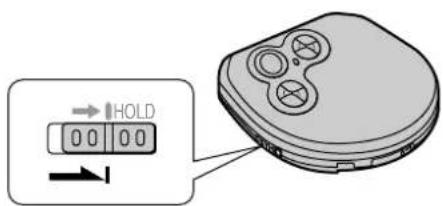
HOLD mode
This function causes the unit to ignore short, accidental button presses. (The disc lid can still be opened and closed.)
The HOLD function prevents the following:
- The unit is powered on accidentally when not in use, causing the batteries to run down.
- A button is accidentally pressed during play, interrupting the operation.
To use the HOLD function
Set [HOLD] to the HOLD position.
"hold" indication
When the unit is in HOLD mode, pressing any button causes the indication "ho / d" to appear on the display.
When the unit is powered off
The "hold" indication appears only when [▶■] is pressed.
Before operating the buttons
Be sure to move [HOLD] to release the unit from the HOLD mode.
Sequential Play Basic Play
![graph TD A["1 OPEN"] --> B["2 CLOSE"] B --> C["3 PLUG TYPE: 3.5 mm (1/8 in.) stereo"] C --> D["4 Change: VOL + VOLT → S-XBS"] D --> E["5 Decrease: Open, Open Off, Drop Off"] E --> F["6 Increase: Vol 10, S-XBS"] F --> G["7 Elapsed playing time of each track: R L, L"] G --> H["8 Track number in play:…](/content/2026/05/1052316/images/87040f13fcbfafd50d062e359dc769e46326b39ac4387fb3103a2d487f999ddd.jpg)
Follow steps 1–5.
In step 3: Connect the stereo headphones to the headphone jack [☐]. (Plug in firmly.) In step 5: The volume range is 0-25. Press and hold to change the volume successively. The volume changes when pressed while the level is displayed. If any other display is shown, it changes to show the current level. (The volume returns to 10 when you disconnect the power source.) - Play stops automatically when all the tracks have been played. - If the unit has been connected to the car audio system, set this unit's volume to 10, then adjust the volume level on the system.
| Operation | Button Display/reference | |
| To pause play | Press during play.  | Press again to restart play.  |
| To stop play Stop mode | Press during play. 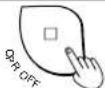 Resume functionPlay starts from the beginning of the current track the next time you press [▶III]. Resume functionPlay starts from the beginning of the current track the next time you press [▶III]. | Total number of tracks  Total playing time Total playing time |
| To turn off the unit Off mode | Press during stop mod 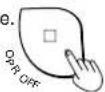 The resume function remains active. The resume function remains active. | No indicator is shown.  |
| Skip forward/ backward (skip function) | Press during play. (Press [◀◀] twice to skip to the beginning of the previous tracks.)Backward ForwardPress and hold during play. | ●During program play (page 4), these buttons are used to skip forward or backward through the programmed sequence of tracks.●You cannot skip to tracks that have been played in random or random repeat play (page 4).●During program play, 1-track repeat play, random play and random repeat play (page 4), search operation is limited to the current track only. |
| Rapid forward/ backward (search function) | ||
Resume function notes
- Opening the lid while in the stop mode or replacing the disc while in the off mode cancels the function. (It may remain active if you replace a disc in the off mode.)
- Play may resume from the beginning of the next track if you stopped play near the end of a track.
- The resume function works automatically and cannot be turned off.
For your reference:
"no disc" indication
This indication appears for about 30 seconds if [▶■] is pressed when no disc is loaded in the unit or if the disc is not properly secured.
"OPEN" indication
This indication appears for about 10 minutes when the cover is opened. (However, the indication does not appear when the unit is powered off.)
Removing discs
1 Press [■, OPR OFF] to stop play and disc rotation. 2 Slide [OPEN ▶] to open the lid. 3 Press [PUSH] to release the disc.
Do not stop the disc by hand or try to remove it before it stops rotating. This can damage CDs.
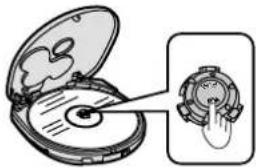
Note
Never insert foreign objects into the unit.
Auto power off function
If the unit is left in stop mode for approximately 10 minutes, the unit powers itself off automatically in order to prevent the battery from running down.
(If no disc is loaded in the unit, it powers itself off in about 30 seconds.)
Note on CD-R and CD-RW
This unit can play CD-DA format audio CD-R and CD-RW that have been finalized* upon completion of recording. It may not be able to play some CD-R or CD-RW due to the condition of the recording. *Finalizing is a process that enables CD-R/CD-RW players to play audio CD-R and CD-RW.
Anti-Skip System
This system deals with skipping in a variety of ways:
- An anti-skip mechanism prevents skipping caused when play speed changes due to swinging of the unit.
- A recovery system immediately returns the laser pick-up to its original position if it is knocked off the track by a strong shock.
- The 40-second anti-shock memory fills in interruptions caused by bumps and vibrations.
The anti-skip system works automatically while the
When bumps continue repeatedly
The message "SORRY" appears on the display and sound is interrupted.
A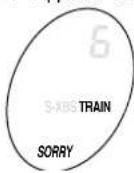
Note
- While the system is on, the disc rotates at a higher rate than usual in collecting extra audio data. This could result in a slight increase in disc rotation noise. ●The anti-skip memory compresses digital signals.
Other Play Methods
The letters such as Ⓐ in the various illustrations refer to the descriptions in the “Location of Controls” section (see page 2).
Skip play
The disc plays from the specified track through to the end, then play stops automatically.
Preparation: Put unit in stop mode.
1 Select the desired track.
G 2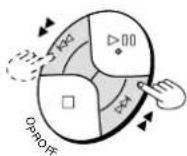
F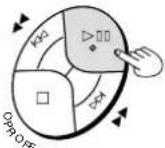
Changing the sound quality
Press during play or stop mode.
The setting switches in the sequence indicated below each time [EQ] is pressed.
S-XBS→TRAIN→Cancel (no indicator is shown)
S-XBS:
Select this setting to boost the low frequency range response.
TRAIN:
Select this setting to avoid annoying other passengers with noise from your headphones while riding on the train, or to reduce fatigue when listening for a long period of time.
Note
The setting returns to S-XBS when you disconnect the power source.
Program play
Up to 24 tracks can be entered in the programmed sequence.
Preparation: Put unit in stop mode.
1 Select the desired track.
2 Register in sequence.
(The indication "M" and the programmed sequence appear on the display.)
B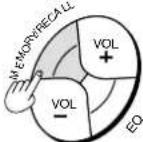
3. Repeat steps 1 and 2 to program all the desired tracks.
4. F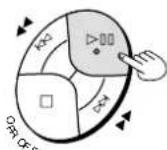
■ To program the same track in the sequence more than once
After step 2, press [MEMORY/RECALL] the desired number of times.
■ If “F” is displayed
No more tracks can be programmed.
■ To confirm the contents of the program
Press [MEMORY/RECALL] while the disc is playing. (The numbers of the programmed tracks appear on the display in sequence.)
■ To delete the entire programmed sequence
Press [■, OPR OFF].
Note
The repeat and random play modes are canceled after steps 1 and 2.
Repeat play/Random play
Press during play or stop mode.
E
The setting is switched in the sequence indicated below each time [MODE] is pressed.
1-track repeat (1 ↗)
One track is repeated.
All-track repeat ( ↗ )
All the tracks on the disc are repeated.
Random (RANDOM)
The tracks play once each in random order and then play stops.
Random repeat (RANDOM,
The tracks play repeatedly in random order.
Cancel (no indicator is shown)
When pressed during program play
The setting is switched in the sequence indicated below each time [MODE] is pressed.
1-track repeat (1 ⬇ M)
One track is repeated.
Memory repeat ( ⬇ M)
The programmed tracks are repeated.
Cancel (M)
Note
- You can select the first track to play in random play and random repeat play by pressing [▶▶] while the disc is stopped. All the tracks are played.
- You cannot select random play or random repeat play during program play.
- The resume function does not work when random or random repeat are on.
- The mode is canceled when you disconnect the power source.
Using the Unit with Optional Accessories
Using the unit with an audio system
Using stereo connection cable (not included), you can listen to CDs on your audio system.
- Turn off this unit and the other equipment before connection.
- Do not connect the cable to the PHONO jacks on the amplifier.
- Obtain the optional connecting cable if the other equipment comes with mini-phone jacks.
- Adjust the volume on the other equipment.
- Set this unit's volume to 10.
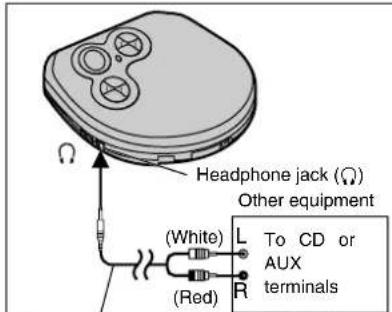
Stereo connection cable (not included)
Using the unit with a car audio system
Use only the supplied or recommended car stereo cassette adaptor and car adaptor. Use of other car adaptors can damage the unit.
SL-SX291C comes with a car stereo cassette adaptor and car adaptor. Refer to the "Installation Instructions" (attached sheet).
For SL-SX293 and SL-SX290, obtain the following, available as optional accessories (part numbers are indicated in parentheses).
For connection to the car audio system
Car stereo cassette adaptor (SH-CDM10A)
Connect the car stereo cassette adaptor to [Ω] on the unit. (When doing this, set this unit's volume to 10.)
For securing the unit and connecting the power supply:
• Car adaptor (SH-CDC9)
●Car mounting kit (SH-CDF20)
Note when using the car mounting kit (SH-CDF20)
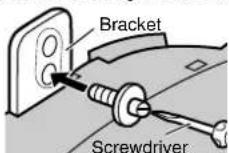
①Remove the screw from the bracket at the rear of the car mounting base. ②Replace the screw in the lower hole of the bracket.
Note
- When you switch off the car, volume and sound quality may return to the original settings and the resume function may work even if you change the disc.
- It may not be possible to use the unit with some types of car stereos owing to restrictions imposed by the construction of the car stereo cassette adaptor.
For further details, refer to the instructions of the part concerned.
Panasonic Limited Warranty
Panasonic Consumer Electronics Company or Panasonic Sales Company (collectively referred to as "the Warrantor") will repair or replace this product with new or refurbished parts or equivalent product, free of charge in the U.S.A. or Puerto Rico, in the event of a defect in materials or workmanship as follows (all time periods commence from the date of original purchase):
For one (1) year—Radio, Clock Radio, Radio with Tape Player or Recorder, Speaker, IC Recorder
For ten (10) days—Batteries—(when applicable)—New rechargeable batteries in exchange for defective rechargeable batteries. Non-rechargeable batteries are not warranted.
For ninety (90) days—SD Memory Card—New SD card of the same memory capacity in exchange for a defective SD Card for ninety (90) days.
For assistance in the U.S.A. in obtaining repairs contact:
Panasonic Services Company Panasonic PLUS Department
20421 84th Avenue South Kent, WA 98032 Phone: 1-800-833-9626 FAX: 1-800-237-9080
If repair is needed during the warranty period the purchaser will be required to furnish a sales receipt/proof of purchase indicating date of purchase. Also, the purchaser will be responsible for shipping the unit to the above address. This warranty is extended only to the original purchaser.
For assistance in Puerto Rico contact, Panasonic Sales Company. Tel. (787) 750-4300 Fax. (787) 768-2910
This warranty only covers failures due to defects in materials or workmanship which occur during normal use and does not cover damage which occurs in shipment or failures which are caused by products not supplied by the warrantor or failures which result from accident, misuse, abuse, neglect, mishandling, misapplication, faulty installation, set-up adjustments, improper maintenance, alteration, improper antenna, inadequate signal pickup, maladjustment of consumer controls, modification, line power surge, or commercial use of the product, or damage that is attributable to acts of God, or service by anyone other than a PANASONIC SERVICES COMPANY Factory Servicenter.
LIMITS AND EXCLUSIONS
There are no express warranties except as listed above. THE WARRANTOR SHALL NOT BE LIABLE FOR INCIDENTAL OR CONSEQUENTIAL DAMAGES RESULTING FROM THE USE OF THIS PRODUCT, OR ARISING OUT OF ANY BREACH OF THIS WARRANTY, INCLUDING WITHOUT LIMITATION, DAMAGE TO TAPES, RECORDS OR DISCS. ALL EXPRESS AND IMPLIED WARRANTIES, INCLUDING THE WARRANTIES OF MERCHANTABILITY, ARE LIMITED TO THE APPLICABLE WARRANTY PERIOD SET FORTH ABOVE. Some states do not allow the exclusion or limitation of incidental or consequential damages, or limitations on how long an implied warranty lasts, so the above exclusions or limitations may not apply to you. This warranty gives you specific legal rights and you may also have other rights which vary from state to state. If you have a problem with this product that is not handled to your satisfaction, then write to the Consumer Affairs Department at the Company address indicated above.
If you ship the product
Carefully pack and send it prepaid, adequately insured and preferably in the original carton. Attach a postage-affixed letter, detailing the complaint, to the outside of the carton. Do NOT send the product to the Executive or Regional Sales offices. They are NOT equipped to make repairs.
Product Service
- Damage requiring service—The unit should be serviced by qualified service personnel if:
(a) The AC power supply cord or AC adaptor has been damaged; or (b) Objects or liquids have gotten into the unit; or (c) The unit has been exposed to rain; or (d) The unit does not operate normally or exhibits a marked change in performance; or (e) The unit has been dropped or the cabinet damaged.
- Servicing—Do not attempt to service the unit beyond that described in these operating instructions. Refer all other servicing to authorized servicing personnel.
- Replacement parts—When parts need replacing ensure the servicer uses parts specified by the manufacturer or parts that have the same characteristics as the original parts. Unauthorized substitutes may result in fire, electric shock, or other hazards.
- Safety check—After repairs or service, ask the servicer to perform safety checks to confirm that the unit is in proper working condition.
Product information
For product information or assistance with product operation:
In the U.S.A., contact the Panasonic Customer Call Center at 1-800-211-7262, or e-mail consumerproducts@panasonic.com, or web site (http://www.panasonic.com). In Canada, contact Panasonic Canada Inc. Customer Care Centre at 905-624-5505, web site (www.panasonic.ca), or an authorized Servicentre closest to you.
User memo:
DATE OF PURCHASE
DEALER NAME
DEALER ADDRESS
TELEPHONE NUMBER
Marking sign is located on bottom of the unit.
CAUTION!
THIS PRODUCT UTILIZES A LASER.
USE OF CONTROLS OR ADJUSTMENTS OR PERFORMANCE OF PROCEDURES OTHER THAN THOSE SPECIFIED HEREIN MAY RESULT IN HAZARDOUS RADIATION EXPOSURE.
DO NOT OPEN COVERS AND DO NOT REPAIR YOURSELF. REFER SERVICING TO QUALIFIED PERSONNEL.
WARNING:
TO REDUCE THE RISK OF FIRE, ELECTRIC SHOCK OR PRODUCT DAMAGE, DO NOT EXPOSE THIS APPARATUS TO RAIN, MOISTURE, DRIPPING OR SPLASHING AND THAT NO OBJECTS FILLED WITH LIQUIDS, SUCH AS VASES, SHALL BE PLACED ON THE APPARATUS.
THE FOLLOWING APPLIES ONLY IN THE U.S.A.:
CAUTION:
This equipment has been tested and found to comply with the limits for a Class B digital device, pursuant to Part 15 of the FCC Rules.
These limits are designed to provide reasonable protection against harmful interference in a residential installation. This equipment generates, uses and can radiate radio frequency energy and, if not installed and used in accordance with the instructions, may cause harmful interference to radio communications. However, there is no guarantee that interference will not occur in a particular installation. If this equipment does cause harmful interference to radio or television reception, which can be determined by turning the equipment off and on, the user is encouraged to try to correct the interference by one or more of the following measures:
● Reorient or relocate the receiving antenna. - Increase the separation between the equipment and receiver. - Connect the equipment into an outlet on a circuit different from that to which the receiver is connected. - Consult the dealer or an experienced radio/TV technician for help.
Any unauthorized changes or modifications to this equipment would void the user's authority to operate this device.
This device complies with Part 15 of the FCC Rules. Operation is subject to the following two conditions: (1) This device may not cause harmful interference, and (2) this device must accept any interference received, including interference that may cause undesired operation.
Specifications Troubleshooting G
Audio
No. of channels: 2 (left and right, stereo)
Frequency response: 20 to 20,000 Hz
(+0 dB to -7 dB)
DA converter: 1 bit, MASH
Headphone
output level: RMS max. 8 mW+8 mW/
16 Ω(adjustable)
Pickup
Light source: Semiconductor laser
Wavelength: 780 nm
General
Operating temperature
range: 0 °C–40 °C
(32 °F–104 °F)
Power supply:
DC input (via optional AC
adaptor RP-AC46):
DC 4.5 V
Play time:
[When used in hold mode with EQ canceled, at 25 °C (77 °F), on a flat, stable surface]
| Batteries used | Play time |
| 2 alkaline batteries | About 35 hours |
- The play time may be less depending on the operating conditions.
- Play time will be considerably reduced when playing CD-RW.
Dimensions
(W×H×D): 128×25.9×131.5 mm
(5 1/16" × 1 1/32" × 5 3/16")
Mass: 235 g (8.2 oz.) (with batteries)
187 g (6.6 oz.) (without batteries)
Note:
Specifications are subject to change without notice.
Mass and dimensions are approximate.
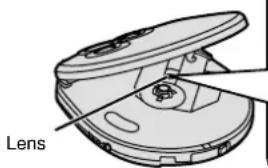
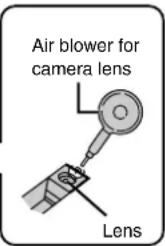
Maintaining the Lens
Open the lid and clean the lens as shown in the figure.
Use a cotton swab to gently wipe off any fingerprints.
Recommended product: Lens cleaner kit (SZZP1038C)
Before requesting service, make the below checks. If you are in doubt about some of the check points, or if the remedies indicated in the chart do not solve the problem: In the U.S.A., contact the Panasonic Customer Call Center at 1-800-211-7262, or e-mail consumerproducts@panasonic.com, or web site (http://www.panasonic.com).
In Canada, contact Panasonic Canada Inc. Customer Care Centre at 905-624-5505, web site (www.panasonic.ca), or an authorized Servicentre closest to you.
| Problem | Check this |
| Cannot close the cover. | Is the disc properly secured in place? |
| Cannot play discs. | ●Is the unit in HOLD mode?●Is the disc properly secured in place?●Is there condensation on the lens?(Wait for about an hour and then try again.)●Is the disc dirty or scratched? |
| Tracks on disc do not play in order, starting with the first track. | ●Is the random play mode on?●Did you stop play in the middle of the disc last time? |
| Cannot hear music—too noisy. | ●Has the headphone plug inserted firmly?●Is the plug dirty? (Wipe away dirt on plug.)●Separate the unit from mobile phones. |
| TV picture is distorted.Radio reception is noisy. | Are you using the unit too near a TV or tuner?(Keep the unit away from the TV or tuner.) |
Cautions
Listening caution


Do not play your headphones or earphones at a high volume. Hearing experts advise against continuous extended play.
If you experience a ringing in your ears, reduce volume or discontinue use.
Do not use while operating a motorized vehicle. It may create a traffic hazard and is illegal in many areas.
You should use extreme caution or temporarily discontinue use in potentially hazardous situations.
Even if your headphones or earphones are the open-air type designed to let you hear outside sounds, don't turn up the volume so high that you can't hear what's around you.
Sound can be deceiving. Over time your hearing "comfort level" adapts to higher volumes of sound. So what sounds "normal" can actually be loud and harmful to your hearing.
Guard against this by setting your equipment at a safe level BEFORE your hearing adapts.
To establish a safe level:
- Start your volume control at a low setting.
- Slowly increase the sound until you can hear it comfortably and clearly, and without distortion.
Once you have established a comfortable sound level:
- Set the dial and leave it there.
Discontinue use if you experience discomfort with the headphones or any other parts that directly contact your skin. Continued use may cause rashes or other allergic reactions.
Care of dry cell batteries
To prevent battery damage, electrolyte leakage and short-circuiting, heed the following points.
- Do not peel off the covering on batteries and do not use if the covering has been peeled off.
- Align the poles ⊕ and ⊖ correctly when inserting the batteries.
- Do not mix different types of batteries or old and new batteries.
- Remove the batteries if you do not intend to use the unit for a long time.
- Do not throw into fire, short-circuit, disassemble, or subject to excessive heat.
- Do not attempt to recharge dry cell batteries.
- Do not allow metal objects to touch the battery terminals as this may cause short-circuiting which is dangerous.
- When carrying batteries in a pocket or bag, ensure no metal objects such as necklaces are placed together with them. Contact with metal may cause short-circuiting which can cause a fire.
When driving a car
In the interest of traffic safety, do not operate the unit while driving.

- CONCERNING COMPACT DISCS
- IF THE SURFACE IS DIRTY
- HANDLING PRECAUTIONS
- STORAGE PRECAUTIONS
- DO NOT PLACE OR STORE CDS IN THE FOLLOWING PLACES
- PORTABLE CD PLAYER
- DEAR CUSTOMER
- SL-SX291C ONLY
- PANASONIC®
- OPERATING INSTRUCTIONS
- SUPPLIED ACCESSORIES
- PANASONIC CANADA INC
- IMPORTANT SAFETY INSTRUCTIONS
- SAFETY
- INSTALLATION
- PLACEMENT
- ENVIRONMENT
- MAINTENANCE
- SERVICE
- POWER SUPPLY PREPARATIONS
- USING DRY CELL BATTERIES (NOT INCLUDED)
- NOTE
- USING RECHARGEABLE BATTERIES (NOT INCLUDED)
- USING THE AC ADAPTOR (NOT INCLUDED)
- CONSERVING POWER
- BATTERY INDICATOR
- USING THE CAR ADAPTOR
- CAUTION
- LOCATION OF CONTROLS
- HOLD FUNCTION
- THE HOLD FUNCTION PREVENTS THE FOLLOWING
- TO USE THE HOLD FUNCTION
- WHEN THE UNIT IS POWERED OFF
- BEFORE OPERATING THE BUTTONS
- SEQUENTIAL PLAY BASIC PLAY
- FOLLOW STEPS
- RESUME FUNCTION NOTES
- FOR YOUR REFERENCE
- REMOVING DISCS
- AUTO POWER OFF FUNCTION
- NOTE ON CD-R AND CD-RW
- ANTI-SKIP SYSTEM
- WHEN BUMPS CONTINUE REPEATEDLY
- OTHER PLAY METHODS
- SKIP PLAY
- CHANGING THE SOUND QUALITY
- S-XBS
- TRAIN
- PROGRAM PLAY
- REPEAT PLAY/RANDOM PLAY
- USING THE UNIT WITH OPTIONAL ACCESSORIES
- USING THE UNIT WITH AN AUDIO SYSTEM
- USING THE UNIT WITH A CAR AUDIO SYSTEM
- PANASONIC LIMITED WARRANTY
- LIMITS AND EXCLUSIONS
- IF YOU SHIP THE PRODUCT
- PRODUCT SERVICE
- PRODUCT INFORMATION
- WARNING
- SPECIFICATIONS TROUBLESHOOTING G
- AUDIO
- PICKUP
- GENERAL
- MAINTAINING THE LENS
- CAUTIONS
- LISTENING CAUTION
- CARE OF DRY CELL BATTERIES
- WHEN DRIVING A CAR
Brand : PANASONIC
Model : SL-SX290P
Category : CD Player