
W701 - Docking Station AXIS - Free user manual and instructions
Find the device manual for free W701 AXIS in PDF.


| Product Type | Docking Station |
| Brand | AXIS |
| Model | W701 |
| Dimensions (approx.) | 20 x 10 x 5 cm (7.9 x 3.9 x 2.0 in) |
| Weight (approx.) | 0.5 kg (1.1 lb) |
| Power Supply | AC 100-240V, 50/60Hz; Output: 12V DC, 3A |
| Connectivity | USB 3.0, USB-C, HDMI, Ethernet (RJ45), Audio out |
| Compatible Devices | Laptops with USB-C or Thunderbolt 3 port |
| Supported Display | Up to 4K @ 30Hz via HDMI |
| Charging Capability | PD (Power Delivery) up to 60W |
| Operating Temperature | 0°C to 40°C (32°F to 104°F) |
| Storage Temperature | -20°C to 60°C (-4°F to 140°F) |
| Humidity | 0% to 85% RH (non-condensing) |
| Material | Aluminum alloy & plastic |
| Maintenance | Wipe with a dry, soft cloth. Avoid liquids. |
| Security | Keep away from water and excessive heat. |
| Spare Parts | Power adapter, USB cable (included); available from AXIS support. |
| Warranty | 1 year limited warranty |
Frequently Asked Questions - W701 AXIS
User questions about W701 AXIS
0 question about this device. Answer the ones you know or ask your own.
Ask a new question about this device
Download the instructions for your Docking Station in PDF format for free! Find your manual W701 - AXIS and take your electronic device back in hand. On this page are published all the documents necessary for the use of your device. W701 by AXIS.
USER MANUAL W701 AXIS
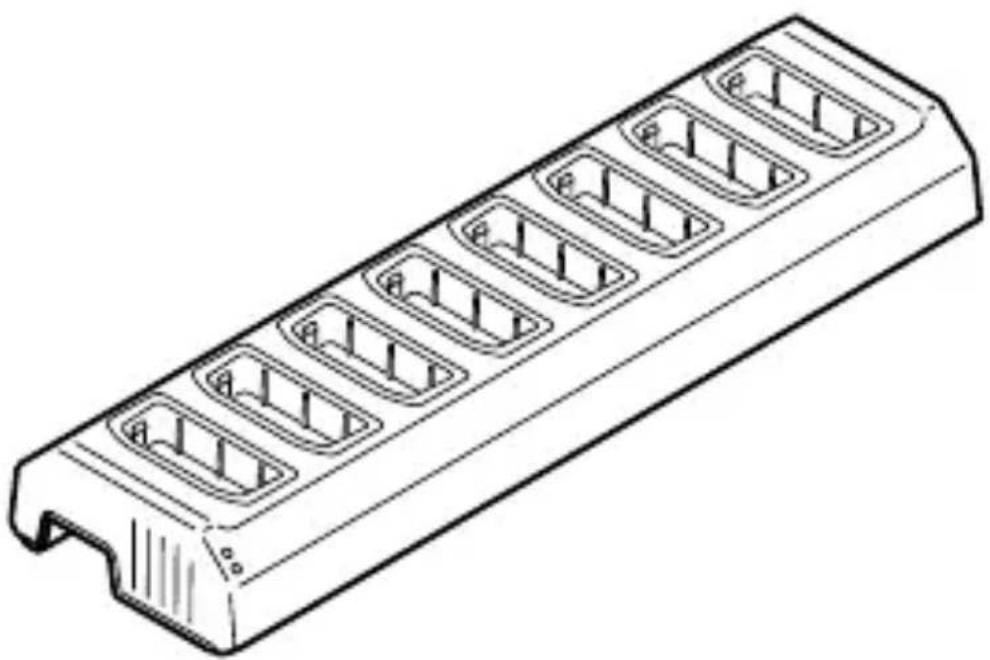
AXISW701 DockingStation8Bay
natural_image
Line drawing of a rectangular electronic component with multiple internal slots (no text or symbols)InstallationGuide
Legalconsiderations
Videoandaudiosurveillancecanberegulatedbylawsthat varyfromcountrytocountry.Checkthelawsinyourlocal regionbeforeusingthisproductforsurveillancepurposes.
Liability
Everycarehasbeentakeninthepreparationofthis document.PleaseinformyourlocalAxisofficeof anyinaccuraciesoromissions.AxisCommunications ABcannotbeheldresponsibleforanytechnical or typographicalerrorsandreservestherighttomake changestotheproductandmanualswithoutpriornotice.AxisCommunicationsABmakesnowarrantyofany kindwithregardtothematerialcontainedwithinthis document,including,butnotlimitedto,theimplied warrantiesofmerchantabilityandfitnessforaparticular purpose.AxisCommunicationsABshallnotbelieable norresponsibleforincidentalorconsequentialdamages inconnectionwiththefurnishing,performanceoruse ofthismaterial.Thisproductisonlytobeusedforits intendedpurpose.
Intellectualpropertyrights
AxisABhasintellectualpropertyrightsrelatingto technologyembodiedintheproductdescribedinthis document.Inparticular,andwithoutlimitation,these intellectualpropertyrightsmayincludeoneormoreof thepatentslistedataxis.com/patentandoneormore additionalpatentsorpendingpatentapplicationsinthe USandothercountries.
ThisproductcontainssourcecodecopyrightApple Computer,Inc.,underthetermsofApplePublicSource
License2.0(seeopensource.apple.com/apsl).Thesource codeisavailablefromdeveloper.apple.com/bonjour/.
Equipmentmodifications
Thisequipmentmustbeinstalledandusedin strictaccordancewiththeinstructionsgiveninthe userdocumentation. Thisequipmentcontainsno user-serviceablecomponents.Unauthorizedequipment changesormodificationswillinvalidateallapplicable regulatorycertificationsandapprovals.
Trademarkacknowledgements
AXISCOMMUNICATIONS, AXISandVAPIXareregistered trademarksortrademarkapplicationsofAxisABinvarious jurisdictions. All other company names and products are trademarksorregistered trademark sof their respective companies.
Apple,Apache,Bonjour,Ethernet,InternetExplorer,Linux,Microsoft,Mozilla,Real,SMPTE,QuickTime,UNIX,Windows,andWWWareregisteredtrademarksoftherespectiveholders.JavaandallJava-basedtrademarksandlogosaretrademarksorregisteredtrademarksofOracleand/oritsaffiliates.TheUPnPWordMarkandUPnPLogoaretrademarksofOpenConnectivityFoundation,Inc.intheUnitedStatesorothercountries.
Regulatoryinformation
Europe

ThisproductcomplieswiththeapplicableCEmarking directivesandharmonizedstandards:
- ElectromagneticCompatibility(EMC)Directive 2014/30/EU.SeeElectromagneticcompatibility(EMC) onpage4.
- LowVoltageDirective(LVD)2014/35/EU.SeeSafety onpage5.
- RestrictionofHazardousSubstances(RoHS)Directive 2011/65/EUand2015/863,includinganyamendments, updatesorreplacements.SeeDisposalandrecycling onpage6.
Acopyoftheoriginaldeclarationofconformitymaybe obtainedfromAxisCommunicationsAB.SeeContact informationonpage6.
Electromagneticcompatibility(EMC)
Thisequipmenthasbeendesignedandtestedtofulfill applicablestandardsfor:
- Radiofrequencyemissionwheninstalledaccordingto theinstructionsandusedinitsintendedenvironment.
- Immunitytoelectricalandelectromagneticphenomena wheninstalledaccordingtotheinstructionsandused initsintendedenvironment.
USA
Thisequipmenthasbeentestedusinganunshielded networkcable(UTP)andfoundtocomplywiththelimits foraClassAdigitaldevice,pursuanttopart15ofthe FCCrules. Thisequipmenthasalsobeentestedusinga shieldednetworkcable(STP)andfoundtocomplywith thelimitsforaClassAdigitaldevice,pursuanttopart 15oftheFCCrules.Theselimitsaredesignedtoprovide reasonableprotectionagainsttharmfulinterferencewhen theequipmentisoperatedinacommercialenvironment. Thisequipmentgenerates,uses,andcanradiateradio
frequencyenergyand,ifnotinstalledandusedin accordancewiththeinstructionmanual,maycause harmfulinterferencetoradiocommunications.Operation ofthisequipmentinaresidentialareaislikelytocause harmfulinterferenceinwhichcasetheuserwillbe requiredtocorrecttheinterferenceathisownexpense.
Canada
ThisdigitalapparatuscomplieswithCANICES-3(ClassA). Theproductshallbeconnectedusingashieldednetwork cable(STP).Cetappareilnumériqueestconformeà lanormeNMBICES-3(classeA).Leproduitdoitêtre connectéal'aided'uncâbleréseaublindé(STP).
Europe
ThisdigitalequipmentfulfillstherequirementsforRF emissionaccordingtotheClassAlimitofEN55032.The productshallbeconnectedusingashieldednetworkcable (STP).Notice!ThisisaClassAproduct.Inadomestic environmentthisproductmaycauseRFinterference,in whichcasetheusermaybereiredtotakeadequate measures.
Australia/NewZealand
Thisdigitalequipmentfulfillstherequirements forRFemissionaccordingtotheClassAlimitof AS/NZSCISPR32.Theproductshallbeconnectedusing ashieldednetworkcable(STP).Notice!ThisisaClass Aproduct.Inadomesticenvironmentthisproductmay causeRFinterference,inwhichcasetheusermaybe requiredtotakeadequatemeasures.
Safety
ThisproductcomplieswithIEC/EN/UL60950-1,Safetyof InformationTechnologyEquipment.
Disposalandrecycling
Whenthisproducthasreachedtheendofitsusefullife, disposeofitaccordingtolocallawsandregulations. For informationaboutyournearestdesignatedcollection point,contactyourlocalauthorityresponsibleforwaste disposal.Inaccordancewithlocallegislation,penalties maybeapplicableforincorrectdisposalofthiswaste.
Europe

Thissymbolmeansthattheproductshallnotbe disposedoftogetherwithhouseholdorcommercialwaste. Directive2012/19/EUonwasteelectricalandelectronic equipment(WEEE)isapplicableintheEuropeanUnion memberstates.Topreventpotentialharmtohuman healthandtheenvironment,theproductmustbedisposed ofinanapprovedandenvironmentallysaferecycling process.Forinformationaboutyournearestdesignated collectionpoint,contactyourlocalauthorityresponsible forwastedisposal.Businessesshouldcontacttheproduct supplierforinformationabouthowtodisposeofthis productcorrectly.
Thisproductcomplieswiththerequirements of Directive201 1/65/EU and 2015/863 on therestriction of the use of certain hazardous substances in electrical and electronic equipment (RoHS).
Contactinformation
AxisCommunicationsAB Emdalavägen14 22369Lund Sweden
Tel:+46462721800
Fax:+4646136130
axis.com
Support
Shouldyourequireanytechnicalassistance,please contactyourAxisreseller.Ifyourquestionscannotbe answeredimmediately,yourresellerwillforwardyour queriesthroughtheappropriatechannelstoensurearapid response.Ifyouareconnectedtothelnternet,youcan:
- visitaxiscompanion.com/manualsforacompletesetof productspecificusermanualsandsysteminstallation guides
- downloaduserdocumentationandsoftwareupdates
•findanswerstoresolvedproblemsintheFAQdatabase, searchbyproduct, category, orphrase
•reportproblemstoAxissupportstaffbylogginginto yourprivatesupportarea - chatwithAxissupportstaff
- visitAxisSupportataxis.com/support
Learnmore!
VisitAxislearningcenteraxis.com/academyforuseful trainings, webinars, tutorialsandguides.

i
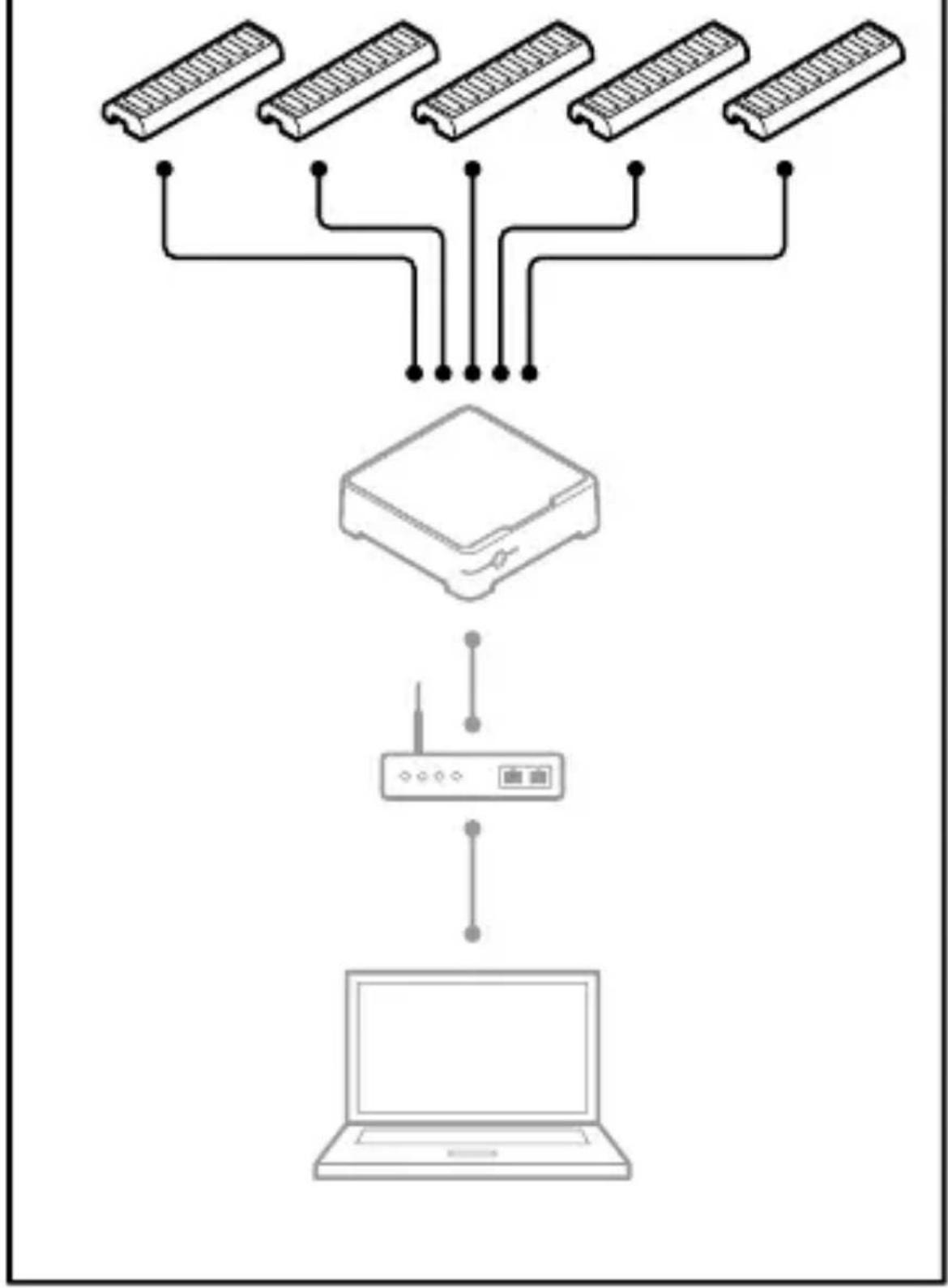
flowchart
graph TD
    A["Rectangular Module 1"] --> D["Device"]
    B["Rectangular Module 2"] --> D
    C["Rectangular Module 3"] --> D
    E["Rectangular Module 4"] --> D
    F["Rectangular Module 5"] --> D
    G["Rectangular Module 6"] --> D
    H["Laptop"] --> I["Wireless Network"]
    style A fill:#f9f,stroke:#333
    style B fill:#f9f,stroke:#333
    style C fill:#f9f,stroke:#333
    style E fill:#f9f,stroke:#333
    style F fill:#f9f,stroke:#333
    style G fill:#f9f,stroke:#333
    style H fill:#ccf,stroke:#333
    style I fill:#ccf,stroke:#333
1.1

flowchart
graph TD
    A["Input Data"] --> B["Battery"]
    B --> C["Network Network"]
    C --> D["Device"]
natural_image
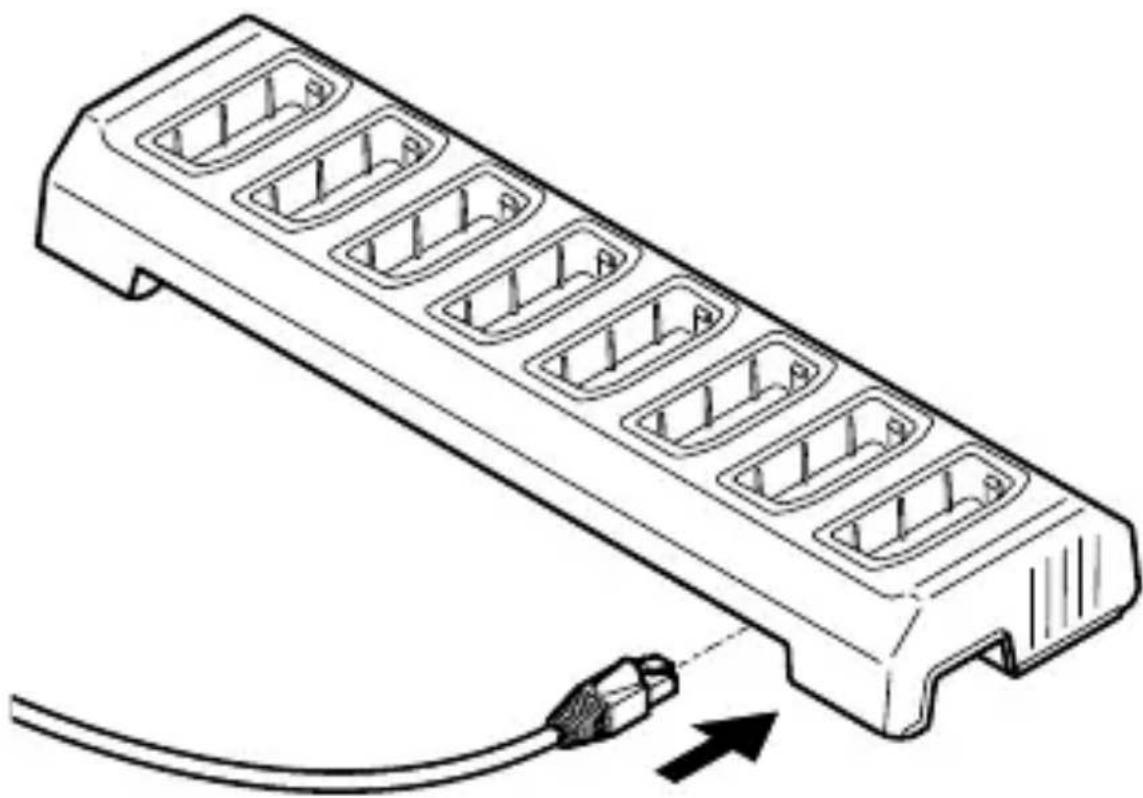
Line drawing of a multi-pin power strip with a cable inserted, showing internal socket arrangement (no text or symbols)1.2



English
Safetyinformation Hazardlevels

DANGER
Indicatesahazardoussituationwhich,ifnotavoided,will resultindeathorseriousinjury.

WARNING
Indicatesahazardoussituationwhich,ifnotavoided, couldresultindeathorseriousinjury.

CAUTION
Indicatesahazardoussituationwhich,ifnotavoided, couldresultinminorormoderateinjury.
NOTICE
Indicatesasituationwhich,ifnotavoided,couldresultin damagetoproperty.
Othermessagelevels
Important
Indicatessignificantinformationwhichisessentialforthe producttofunctioncorrectly.
Note
Indicatesusefulinformationwhichhelpsingettingthe mostoutoftheproduct.
Safetyinstructions
NOTICE
- TheAxisproductshallbeusedincompliancewith localawsandregulations.
- UseonlyapplicabletoolswheninstallingtheAxis product.Usingexcessiveforcewithpowertoolscould causedamagetotheproduct.
- Donotusechemicals, causticagents, or aerosol cleaners.
- Useacleanclothdampenedwithpurewaterfor cleaning.
- Useonlyaccessoriesthatcomplywiththetechnical specificationofyourproduct.Thesecanbeprovided byAxisorathirdparty.Axisrecommendsusing Axispowersourceequipmentcompatiblewithyour product.
- Useonly spare parts provided by or recommended by Axis.
- Donotattempttorepairtheproductyourself.Contact AxissupportoryourAxisresellerforservicematters.
Transportation
NOTICE
- WhentransportingtheAxisproduct, usetheoriginal packagingorequivalenttopreventdamagetothe product.
Français
©AxisCommunicationsAB,2020
Ver.M2.2
Date:June2020
PartNo.2185433
- AXISW701 DockingStation8Bay
- InstallationGuide
- Legalconsiderations
- Liability
- Intellectualpropertyrights
- Equipmentmodifications
- Trademarkacknowledgements
- Regulatoryinformation
- Electromagneticcompatibility(EMC)
- USA
- Canada
- Europe
- Australia/NewZealand
- Safety
- Disposalandrecycling
- Contactinformation
- Support
- Learnmore!
- 1.1
- 1.2
- English
- Safetyinformation Hazardlevels
- DANGER
- WARNING
- CAUTION
- NOTICE
- Othermessagelevels
- Safetyinstructions
- Transportation
- Français
Brand : AXIS
Model : W701
Category : Docking Station