ZDWR240NBS - Fridge Monogram - Free user manual and instructions
Find the device manual for free ZDWR240NBS Monogram in PDF.


| Product Type | Built-in Drawer Refrigerator |
| Brand | Monogram |
| Model | ZDWR240NBS |
| Dimensions (H x W x D) | 87.6 x 60.6 x 61 cm |
| Net Weight | 54.4 kg |
| Total Capacity | 127 liters |
| Voltage/Frequency | 115 V ~ 60 Hz |
| Climate Class | SN (normal temperate) to T (tropical) |
| Refrigerant | R600a (isobutane) |
| Defrost Type | Automatic (No Frost) |
| Lighting | Interior LED |
| Temperature Control | Touch Electronic |
| Vacation Mode | Yes, eco mode |
| Open Door Alarm | Yes |
| Child Lock | Yes |
| Shelf Material | Tempered Glass |
| Activated Carbon Filter | Yes, replaceable |
| Installation | Built-in under counter |
| Noise Level | 32 dB(A) |
| Annual Energy Consumption | 280 kWh/year |
| Repairability Index | 7.5/10 |
Frequently Asked Questions - ZDWR240NBS Monogram
User questions about ZDWR240NBS Monogram
0 question about this device. Answer the ones you know or ask your own.
Ask a new question about this device
Download the instructions for your Fridge in PDF format for free! Find your manual ZDWR240NBS - Monogram and take your electronic device back in hand. On this page are published all the documents necessary for the use of your device. ZDWR240NBS by Monogram.
USER MANUAL ZDWR240NBS Monogram
| Wine Reserve | ||
| Introduction | Your new Monogram wine reserve makes an eloquent statement of style, convenience and kitchen planning flexibility. Whether you chose it for its purity of design or the assiduous attention to detail, you will find that your Monogram wine reserve's superior blend of form and function will delight you for years to come.The information on the following pages will help you operate and maintain your wine reserve properly.If you have any other questions, visit our Website at: monogram.com | |
| Contents | Care and Cleaning......10Consumer Services......16Controls and Features......6Model and Serial Numbers......2Problem Solver......12 | Repair Service......3, 16Safety Instructions......4Warranty......15 |
| Before using your wine reserve | Read this manual carefully. It is intended to help you operate and maintain your new wine reserve properly.Keep it handy for answers to your questions. | If you don't understand something or need more help, there is a list of toll-free consumer service numbers included in the back section of this manual.ORVisit our Website at: monogram.com |
| Write down the model & serial numbers | You will find them on a label on the ceiling inside the wine reserve. | Please write these numbers here: |
| Model Number | ||
| Serial NumberUse these numbers in any correspondence or service calls concerning your wine reserve. | ||
ATTENTION CONSUMER!
This unit is designed for storing and cooling beverages.
Do not store perishable foods in this unit.
Consumer Information
| Wine Reserve | ||
| If you received a damaged appliance | The warranty does not cover damage caused after delivery. | Immediately contact the dealer (or builder) that sold you the wine reserve. |
| Save time & money | Before you request service, check the Problem Solver in the back of this manual. | It lists causes of minor operating problems that you can correct yourself. |
| Remove packaging | Before using, be sure all packing materials and tape have been removed.To assure no damage is done to the finish of the product, the safest way to remove the adhesive left from packaging tape on new | appliances is an application of household liquid detergent. Apply with a soft cloth and allow to soak. Wipe dry and then apply an appliance polish to thoroughly clean and protect the surface. |
| If you need service | To obtain service, see the Consumer Services page in the back of this manual.We are proud of our service and want you to be pleased. If for some reason you are not happy with the service you receive, here are steps to follow for further help.For customers in the USA:FIRST, contact the people who serviced your appliance. Explain why you are not pleased.In most cases, this will solve the problem.NEXT, if you are still not pleased, write all the details—including your phone number—to:Manager, Customer RelationsMonogramAppliance ParkLouisville, KY 40225 | For customers in Canada:FIRST, contact the people who serviced your appliance. Explain why you are not pleased.In most cases, this will solve the problem.NEXT, if you are still not pleased, write all the details—including your phone number to:Manager, Consumer RelationsMabe Canada Inc.1 Factory Lane, Suite 310Moncton, N.B. E1C 9M3 |
| After installation is completed | Promptly inspect your new Monogram wine reserve. If it has been damaged, contact the Installer or Dealer immediately.This wine reserve must be properly leveled to ensure correct door alignment and door closure. Contact the Installer if the unit is not level.The unit should be centered in the opening. The front face of the door should be 1" forward of adjacent cabinetry. Contact the installer if clearance is not correct. | Test the door swing. Carefully open and close the door. The door should not rub or catch on adjacent cabinetry. Notify the installer if the door makes contact with cabinetry.Please Contact the Installer or Dealer if you experience any of these problems.Your wine reserve is shipped with a black toekick on the front of the unit. For shipping purposes, an optional stainless steel toekick is secured to the back of the unit. That toekick should have been removed and installed, or given to you. Keep the unused toekick and other unused or removed parts for possible future use. |
WARNING
To reduce the risk of fire, explosion, electric shock, or injury when using your refrigerator, follow these basic safety precautions:
■ Use this appliance only for its intended purpose as described in this Owner's Manual.
■ This refrigerator must be properly installed and located in accordance with the Installation Instructions before it is used.
■ Unplug the refrigerator before making repairs, replacing a light bulb, or cleaning.
NOTE: Power to the refrigerator cannot be disconnected by any setting on the control panel.
NOTE: Repairs must be performed by a qualified Service Professional.
■ Replace all parts and panels before operating.
■ Do not store or use gasoline or other flammable vapors and liquids in the vicinity of this or any other appliance.
■ Do not store explosive substances such as aerosol cans with a flammable propellant in this appliance.
■ Do not use an extension cord.
■ To prevent suffocation and entrapment hazards to children, remove the fresh food and freezer doors from any refrigerator before disposing of it or discontinuing its use.
■ To avoid serious injury or death, children should not stand on, or play in or with the appliance.
■ Children and persons with reduced physical, sensory or mental capabilities or lack of experience and knowledge can use this appliance only if they are supervised or have been given instructions on safe use and understand the hazards involved.
This appliance is intended to be used in household and similar applications such as: staff kitchen areas in shops, offices and other working environments; farm houses; by clients in hotels, motels, bed & breakfast and other residential environments; catering and similar non-retail applications.
CAUTION
To reduce the risk of injury when using your refrigerator, follow these basic safety
precautions.
- Do not clean glass shelves or covers with warm water when they are cold. Glass shelves and covers may break if exposed to sudden temperature changes or impact, such as bumping or dropping. Tempered glass is designed to shatter into many small pieces if it breaks.
- Keep fingers out of the “pinch point” areas; clearances between the doors and between the doors and cabinet are necessarily small. Be careful closing doors when children are in the area.
■ This unit is designed for storing and cooling beverages. Do not store perishable foods in this unit.
CONNECTING ELECTRICITY
WARNING

Electrical Shock Hazard
Do not, under any circumstances, cut or remove the third (ground) prong from the power cord. For personal safety, this appliance must be properly grounded.
The power cord of this appliance is equipped with a 3-prong (grounding) plug which mates with a standard 3-prong (grounding) wall outlet to minimize the possibility of electric shock hazard from this appliance.
Have the wall outlet and circuit checked by a qualified electrician to make sure the outlet is properly grounded.
Where a standard 2-prong wall outlet is encountered, it is your personal responsibility and obligation to have it replaced with a properly grounded 3-prong wall outlet.
The appliance should always be plugged into its own individual electrical outlet which has a voltage rating that matches the rating plate. This provides the best performance and also prevents overloading house wiring circuits which could cause a fire hazard from overheated wires.
Never unplug an appliance by pulling on the power cord. Always grip the plug firmly and pull straight out from the outlet.
Immediately discontinue use of a damaged supply cord. If the supply cord is damaged, it must be replaced by a qualified service professional with an authorized service part from the manufacturer.
When moving the appliance, be careful not to roll over or damage the power cord.
PROPER DISPOSAL OF YOUR OLD APPLIANCE
WARNING
SUFFOCATION AND ENTRAPMENT HAZARD
Failure to follow these disposal instructions can result in death or serious injury
IMPORTANT: Child entrapment and suffocation are not problems of the past. Junked or abandoned refrigerator/freezers are still dangerous even if they will sit for "just a few days." If you are getting rid of your old refrigerator/freezer, please follow the instructions below to help prevent accidents.
Before You Throw Away Your Old Appliance
■ Take off the door.
■ Leave the shelves in place so that children may not easily climb inside.
Refrigerant and Foam Disposal:
Dispose of appliance in accordance with Federal and Local Regulations. Flammable insulation material used requires special disposal procedures. Contact your local authorities for the environmentally safe disposal of your appliance.
READ AND SAVE THESE INSTRUCTIONS
Temperature control
The temperature range of the wine reserve is from 40^ F ( 4.4^ C) to 65^ F ( 18.3^ C).
Do not install the wine reserve where the temperature will go below 55^ F ( 12.8^ C) or above 90^ F ( 32.2^ C).
The temperature display shows the actual temperature of the wine reserve. The actual temperature may vary slightly from the set temperature based on factors such as door openings, amount of wine and room temperature. After making adjustments, allow 12 to 24 hours for the wine reserve to reach the temperature you have set and before making any further adjustments. The factory setting is the RED WINE setting (55°F [12.8°C]).
Note: On all three temperature selections, the light beside the pad will remain lit, indicating the selection made.
The RED WINE setting will provide a storage temperature of approximately 55^ F ( 12.8^ C), which is optimum for the storage of red wine. Press the RED WINE pad to display 55^ F ( 12.8^ C). Several seconds after the RED WINE pad is pressed, the actual temperature will be displayed while the wine reserve temperature moves toward 55^ F ( 12.8^ C).
The WHITE WINE setting will provide a storage temperature of approximately 45^ F ( 7.2^ C), which is optimum for white wine. Press the WHITE WINE pad to display 45^ F ( 7.2^ C). Several seconds after the WHITE WINE pad is pressed, the actual temperature will be displayed while the wine reserve temperature moves toward 45^ F ( 7.2^ C).
The CUSTOM TEMP. setting will provide a storage temperature range of 40^ F ( 4.4^ C) to 65^ F ( 18.3^ C). This setting provides the ability to customize the temperature to the optimum setting for the particular wine. To change the temperature setting, press and hold the CUSTOM TEMP. pad until the display begins to flash the set temperature. Then press the + or – pads until you reach the desired set temperature. Once you reach the desired temperature, stop pressing the pads. After several seconds, the display will return to the actual temperature. The actual temperature will be displayed while the wine reserve moves toward the set temperature.
In general, temperatures at the bottom of the cabinet will be cooler than temperatures at the top of the cabinet.
Position your wine inventory accordingly (i.e., white wines in the cooler zones and red wines in the warmer zones).
Child control lockout
This child control lockout feature prevents unwanted changes to your temperature settings.
After the desired temperature is set, the temperature can be locked. To lock, press both the + and - pads at the same time for five seconds. To unlock, press both + and - pads for five seconds.
Wine Reserve
Interior light and light pad
The interior light makes it easy to view your wine labels and enhances the display of your collection.
When the light pad is pressed and the word ON is displayed, the light will remain on for one hour before automatically turning off. When the light pad is pressed and the word OFF is displayed, the light will come on only when the door is opened.
For best viewing, do not store a bottle on the top shelf directly under the light. Remember to turn off the light when it is no longer needed.
Removing full extension drawers
All of the full extension drawers pull out so bottles can be conveniently added or removed. Any of the full extension drawers can be removed to store larger bottles.
To remove:
- Pull the full extension drawer out to the STOP position.
- Push the tab on right drawer guide down while pulling the tab on left guide up, and pull the drawer out.
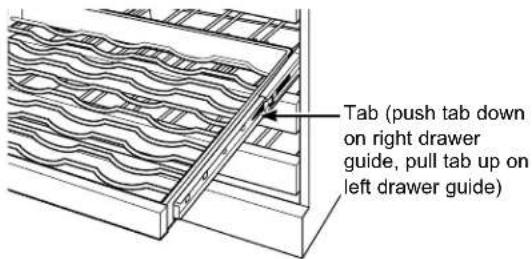
To replace:
- Push the drawer slide arm back into the unit.
- Pull the small slide sub-assembly completely forward.
- Insert the sides of the drawer back into the guides.
- Push until the tabs lock into place.
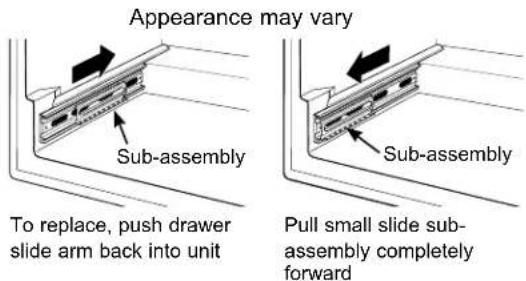
NOTE: Make sure the tabs on the full extension drawer guides are fully engaged before loading any bottles. Pull the drawers out all the way to the STOP position and push back in several times to make sure locking tabs are properly engaged.
Controls and Features
Wine Reserve
Insert wine bottles
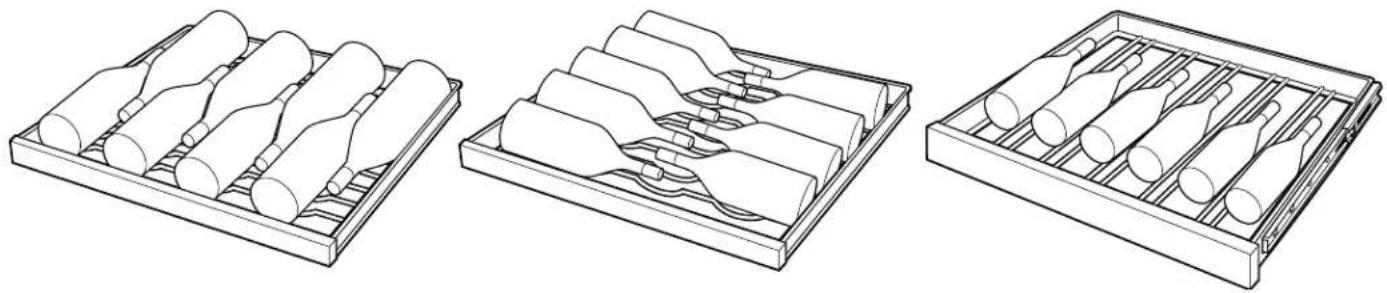
The top five full extension drawers each hold eight bottles, two deep with the necks alternating front to back or nine bottles, alternating with necks pointing inward.
The bottom two full extension drawers hold six bottles each and are loaded with necks facing the rear. Tall bottles should not be loaded on the bottom drawer because they may prevent the door from closing.
natural_image
Three technical line drawings of cylindrical objects arranged in trays, showing different arrangements (no text or symbols)8 bottle arrangement 9 bottle arrangement Bottom drawer
Loading tips and suggestions
- The bottles on the top full extension drawer, directly under the light, will be exposed to a slightly higher temperature when the light is on. Position your wines accordingly and remember to turn off the light when it is no longer needed.
- Keep wines that you plan to use for everyday drinking and entertaining on the front half of the full extension drawers where labels are completely visible. Place wines for aging or longer term storage in the rear.
- Do not allow children to climb, stand or hang on the wine reserve full extension drawers. They could seriously injure themselves and possibly cause damage to the wine reserve.
- In general, temperatures at the bottom of the cabinet will be cooler than temperatures at the top of the cabinet.
- Position your wine inventory accordingly (i.e., white wines in the cooler zones and red wines in the warmer zones).
Wood drawer fronts
The full extension drawer fronts on the wine reserve are unfinished cherry wood. During use, oil from hands may accumulate and stain the wood.
- The drawer fronts may be stained and sealed to match adjacent cabinetry. The tinted glass will make the stained wood appear darker. A true color match can be seen only when the door is opened.
- Apply the stain and sealer according to the manufacturer's instructions. To avoid unpleasant odor, keep the door open to ventilate and allow the stain/sealer to dry completely before using the product.
NOTE: Natural wood may vary slightly in grain and color.
Sabbath Mode
The Sabbath Mode was designed for use on the Jewish Sabbath and Holidays. The Sabbath Mode feature makes it possible for observant Jews to use the wine reserve during the duration of the holiday.
The Sabbath Mode feature can be set to override typical reactions caused by your interaction with the wine reserve. While in the Sabbath Mode, your appliance will still operate. However, it will not respond to your actions.
While in the Sabbath Mode, you may notice the fan running when the door is opened, however, this is not a result of your actions. The compressor and fan will operate at predetermined times.
ON/OFF - To activate the Sabbath Mode, press and hold down the Red Wine and Light buttons on the control panel for at least 7 seconds. SAb will be displayed on the control. SAb will remain in the display and all the control settings will be frozen and stay on the last mode before entering Sabbath Mode.
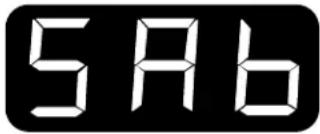
Controls and lights will not work until the Red Wine and Light buttons are held again for 7 seconds. The display will show "out" for 1 second and then resume the last operating mode.
For your safety
WARNING

Electrical Shock Hazard.
Unplug the wine reserve before cleaning. If the unit is in a built-in location, remove power at the circuit breaker.
Cleaning the inside
Unplug the wine reserve before cleaning. If the unit is in a built-in location, remove power at the circuit breaker. Use a slightly damp cloth or sponge when cleaning around switches, lights or controls.
Use warm water and baking soda solution—about a tablespoon (15 ml) of baking soda to a quart (1 liter) of water. This both cleans and neutralizes odors. Thoroughly rinse and wipe dry.
Other parts of the wine reserve center unit—including the door gaskets, and full extension drawers—can be cleaned the same way.
Drain hole
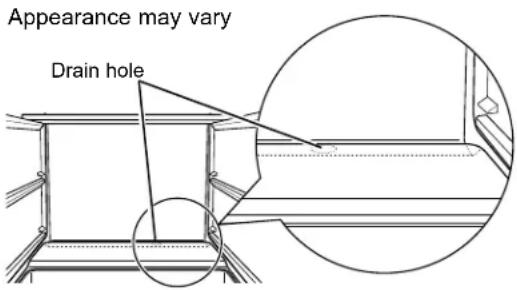
Periodically check the drain hole and channel for any debris. If the drain is blocked, condensation will not drain properly.
To check and clean the drain hole, remove the third and fourth drawers (see instructions on Removing full extension drawers). Sweep a damp cloth along the channel in the back of the wine reserve. Use a finger to sweep away any debris from the drain hole.
Cleaning the outside
CAUTION
The exterior surfaces can
be washed with mild soap and water. Rinse thoroughly with clear water. Never use abrasive scouring powders.
Do not use scouring pads, powdered cleaners, bleach or cleaners containing bleach because these products can scratch and damage the finish.
Warranty does not cover damage due to improper cleaning methods.
Care and Cleaning
| Wine Reserve | ||
| Glass door | Use a glass cleaner or mild soap and water and a soft cloth to clean the glass door.Do not use any abrasive powders. | |
| ⚠️CAUTIONDo not clean glass shelves with warm water when they are cold. Glass shelves may break if exposed to sudden temperature changes or impact, such as bumping or dropping. Tempered glass is designed to shatter into many small pieces if it breaks. | ||
| Door gasket | The vinyl gasket may be cleaned with mild soap and water, a baking soda solution or a mild scouring powder. Rinse well. | After cleaning the door gasket, apply a thin layer of paraffin wax or petroleum jelly to the door gasket at the hinge side. This helps keep the gasket from sticking and bending out of shape. |
| Light bulb replacement | ⚠️WARNINGElectrical ShockHazard. Unplug the wine reserve before replacing the light bulb. If the unit is in a built-in location, remove power at the circuit breaker. | To remove the light shield, push in the tab on the left side of the shield and lower it. Replace with a 15 watt appliance bulb or 4.5 watt UL Listed LED Lamp or call 800.GE.CARES (800.432.2737) during normal business hours to order service parts. |
| In the event of a power failure | If the power fails, open the door as infrequently as possible to maintain the temperature. A gradual rise in temperature should not have any adverse effect on the wine. | If it is extremely hot, you may want to move the wine to the coolest location you can find until power is restored. |
| Preparing to move | Secure all loose items such as drawers by taping them securely in place to prevent damage. | Be sure the wine reserve stays in an upright position during moving. |
Normal operating sounds
Newer appliances sound different from older appliances. Modern appliances have more features and use newer technology.
Do you hear what I hear? These sounds are normal.
HUMMM...
WHOOSH...
•The new high efficiency compressor may run faster and longer than your old appliance and you may hear a high-pitched hum or pulsating sounds while it is operating.
- Sometimes the appliance runs for an extended period, especially when the doors are opened frequently.
- You may hear a whooshing sound when the doors close. This is due to pressure equalizing within the appliance.
WHIR!

- You may hear the fans spinning at high speeds. This happens when the appliance is first plugged in, when the door is opened frequently or when large amounts of beverages are added to the appliance. The fans help maintain desired temperatures.
- If the door is open for over 3 minutes, you may hear a fan come on in order to cool the appliance.
- The fans change speeds in order to provide optimal cooling and energy savings.
CLICKS, POPS, CRACKS and CHIRPS
- You may hear cracking or popping sounds when the appliance is first plugged in. This happens as the appliance cools to the correct temperature.
- Expansion and contraction of cooling coils during and after defrost can cause cracking or popping sounds.
- The electronic control board may cause a clicking sound when relays activate to control appliance components.
WATER SOUNDS

- The flow of refrigerant through the appliance cooling coils may make a gurgling noise like boiling water.
- A water dripping noise may occur as water from the evaporator flows into the drain pan.
- Closing the door may cause a gurgling sound due to pressure equalization.
Questions? Use this problem solver!
PROBLEM POSSIBLE CAUSE
| APPLIANCE DOES NOT OPERATE | ·Appliance is so quiet that most of the time you will hear low or no operating noise.·Appliance may be in defrost cycle when compressor motor does not operate for up to 2 hours.·If interior light is not on, appliance may not be plugged in at wall outlet. Push the plug completely into the wall outlet.·The fuse is blown/circuit breaker is tripped. Replace fuse or reset the breaker. |
| VIBRATION OR RATTLING (Slight vibration is normal.) | ·Adjust the leveling legs as shown in the Installation Instructions. |
| COMPRESSOR MOTOR OPERATES FOR LONG PERIODS OR CYCLES ON AND OFF FREQUENTLY | ·Normal when appliance is first plugged in. Wait 24 hours for the appliance to completely cool down.·Often occurs when large amounts of beverages are placed in appliance. This is normal.·Door left open or package holding door open.·Hot weather or frequent door openings. This is normal.·Temperature control set at the coldest setting. See Temperature Control. Allow 24 hours for temperature to change. |
| COMPARTMENT TOO WARM | ·Temperature control not set cold enough. See Temperature Control. Allow 24 hours for temperature to change.·Warm weather or frequent door openings.·Door left open for long time.·Package may be holding door open. |
| APPLIANCE HAS ODOR | ·Interior needs cleaning. See Care and Cleaning.·Keep open box of baking soda in appliance; replace every 3 months. |
| DOOR NOT CLOSING PROPERLY | ·Door gasket is sticking or folding over. Apply petroleum jelly or paraffin wax to the face of the gasket.·The door is hitting an internal component inside the appliance. Adjust interior components to prevent interference. |
| MOISTURE FORMS ON OUTSIDE OF APPLIANCE | ·Not unusual during periods of high humidity. If bothersome, wipe surface dry; otherwise, moisture will evaporate in time.·Door left open or package holding door open. |
| FROST OR MOISTURE COLLECTS INSIDE | ·Too frequent or too long door openings.·In humid weather, air carries moisture into appliance when door is opened. Unit will dissipate moisture in time. If bothersome, wipe surface dry.·Temperature control set at coldest setting. |
Questions?
Use this problem solver!
| PROBLEM POSSIBLE CAUSE | |
| INTERIOR LIGHT DOES NOT WORK | No power at outlet.Light bulb needs replacing. See Care and Cleaning.The Sabbath Mode may be operating. Turn off Sabbath Mode. |
| HOT AIR FROM BOTTOM OF APPLIANCE | Normal air flow cools the motor. In the refrigeration process, it is normal that heat be expelled in the area under the appliance. Some floor coverings are sensitive and will even discolor at these safe and normal temperatures. |
| APPLIANCE NEVER SHUTS OFF BUT TEMPERATURES ARE OK | Adaptive defrost keeps compressor running during door openings. This is normal. The appliance will cycle off after the door remains closed for two hours.Normal operation in extreme temperatures. |
| TEMPERATURE WILL NOT ADJUST | Temperature may be in lockout mode. Press both + and – pads for 5 seconds to unlock the temperature. |
YOUR MONOGRAM WINE RESERVE WARRANTY
Staple sales slip or canceled check here. Proof of original purchase date is needed to obtain service under warranty.
WHAT IS COVERED
From the Date of the Original Purchase
LIMITED TWO-YEAR WARRANTY
For two years from date of original purchase, we will provide, free of charge, parts and service labor in your home to repair or replace any part of the unit that fails because of a manufacturing defect.
LIMITED THIRD THROUGH FIFTH-YEAR WARRANTY
For the third through fifth years from date of original purchase, we will provide, free of charge, parts and service labor in your home to repair or replace any part of the sealed refrigerating system (the compressor, condenser, evaporator and all connecting tubing) that fails because of a manufacturing defect.
This warranty is extended to the original purchaser and any succeeding owner for products purchased in Canada for ordinary home use in Canada. In-home warranty service will be provided in areas where it is available and deemed reasonable by Monogram to provide.
Proof of original purchase date is needed to obtain service under the warranty.
All warranty service will be provided by our Factory Service Centers or by our authorized Customer Care® servicers during normal working hours.
Should your appliance need service, during warranty period or beyond, call Monogram Preferred at 888-880-3030. Please have serial number and model number available when calling for service.
WHAT IS NOT COVERED
• Service trips to your home to teach you how to use the product.
- Replacement of house fuses or resetting of circuit breakers.
- Damage to the product caused by accident, fire, floods or acts of God.
- Failure of the product if it is used for other than its intended purpose or used commercially.
• Damage caused after delivery.
- Improper installation, delivery or maintenance. If you have an installation problem, contact your dealer or installer. You are responsible for providing adequate electrical, plumbing and other connecting facilities.
- Replacement of the light bulbs, if included.
- Loss of food due to spoilage (in the USA only).
- Incidental or consequential damage caused by possible defects with this appliance.
- Product not accessible to provide required service.
- Damage to finish, such as surface rust, tarnish, or small blemishes not reported within 48 hours of delivery.
EXCLUSION OF IMPLIED WARRANTIES—Your sole and exclusive remedy is product repair as provided in this Limited Warranty. Any implied warranties, including the implied warranties of merchantability or fitness for a particular purpose, are limited to one year or the shortest period allowed by law.
Some provinces do not allow the exclusion or limitation of incidental or consequential damages, so the above limitation or exclusion may not apply to you. This warranty gives you specific legal rights, and you may also have other rights which vary from province to province. To know what your legal rights are in your province, consult your local or provincial consumer affairs office.
Warrantor: MC Commercial, Burlington, ON, L7R 5B6
Consumer Support
| Wine Reserve | |
| With the purchase of your new Monogram appliance, receive the assurance that if you ever need information or assistance from Monogram, we will be there. All you have to do is call! | |
| Register Your Appliance | Register your new appliance on-line at your convenience! Timely product registration will allow for enhanced communication and prompt service under the terms of your warranty, should the need arise. You may also mail in the pre-printed registration card included in the packing material.In the US: Monogram.comIn Canada: https://service.geappliances.ca/servicio/en_CA/ |
| Schedule Service | Expert Monogram repair service is only one step away from your door. Get on-line and schedule your service at your convenience any day of the year.In the US: Monogram.com or call 800.444.1845 during normal business hours.In Canada: https://service.geappliances.ca/servicio/en_CA/ or call 888.880.3030 |
| Extended Warranties | Purchase a Monogram extended warranty and learn about special discounts that are available while your warranty is still in effect.In the US: Monogram.com or call 800.444.1845 during normal business hours.In Canada: Monogram.ca or call 888.880.3030. |
| Remote Connectivity | For assistance with wireless network connectivity (for models with remote enable), visit our website at Monogram.com or call 800.444.1845 in the US only. |
| Parts and Accessories | Individuals qualified to service their own appliances can have parts or accessories sent directly to their homes (VISA, MasterCard and Discover cards are accepted). Order on-line today 24 hours every day.In the US: Monogram.com or by phone at 800.444.1845 during normal business hours.Instructions contained in this manual cover procedures to be performed by any user. Other servicing generally should be referred to qualified service personnel. Caution must be exercised, since improper servicing may cause unsafe operation.Customers in Canada should consult the nearest MC COMMERCIAL INC. service center, visit our website at Monogram.ca or call 888-880-3030. |

MONOGRAM
MANUEL DE
L'UTILISATEUR
Cellier
natural_image
Technical line drawing of a structural panel with wavy internal layers and a wooden beam (no text or symbols)natural_image
Three technical line drawings of cylindrical objects arranged in trays, showing different arrangements (no text or symbols)BOURDONNEMENTS... APPELS D'AIR...
PROBLÈME CAUSE POSSIBLE
Garant : MC Commercial, Burlington, ON, L7R 5B6
- ATTENTION CONSUMER!
- WARNING
- CAUTION
- precautions.
- CONNECTING ELECTRICITY
- Electrical Shock Hazard
- PROPER DISPOSAL OF YOUR OLD APPLIANCE
- SUFFOCATION AND ENTRAPMENT HAZARD
- Refrigerant and Foam Disposal:
- READ AND SAVE THESE INSTRUCTIONS
- Temperature control
- Child control lockout
- Interior light and light pad
- Removing full extension drawers
- To remove:
- To replace:
- Controls and Features
- Insert wine bottles
- Loading tips and suggestions
- Wood drawer fronts
- Sabbath Mode
- For your safety
- Electrical Shock Hazard.
- Cleaning the inside
- Drain hole
- Cleaning the outside
- Normal operating sounds
- Do you hear what I hear? These sounds are normal.
- HUMMM...
- WHOOSH...
- WHIR!
- CLICKS, POPS, CRACKS and CHIRPS
- WATER SOUNDS
- Questions?
- Use this problem solver!
- YOUR MONOGRAM WINE RESERVE WARRANTY
- Staple sales slip or canceled check here. Proof of original purchase date is needed to obtain service under warranty.
- WHAT IS COVERED
- LIMITED TWO-YEAR WARRANTY
- LIMITED THIRD THROUGH FIFTH-YEAR WARRANTY
- WHAT IS NOT COVERED
- MANUEL DE
- L'UTILISATEUR
- BOURDONNEMENTS... APPELS D'AIR...
Brand : Monogram
Model : ZDWR240NBS
Category : Fridge