USER MANUAL X-HM22 PIONEER
Operating Instructions
Mode d'emploi
Bedienungsanleitung
This equipment is not waterproof. To prevent a fire or shock hazard, do not place any container filled with liquid near this equipment (such as a vase or flower pot) or expose it to dripping, splashing, rain or moisture.
D3-4-2-1-3_A1_En
WARNING
To prevent a fire hazard, do not place any naked flame sources (such as a lighted candle) on the equipment.
D3-4-2-1-7a_A1_En
VENTILATION CAUTION
When installing this unit, make sure to leave space around the unit for ventilation to improve heat radiation (at least 25 cm at top, 10 cm at rear, and 5 cm at each side).
WARNING
Slots and openings in the cabinet are provided for ventilation to ensure reliable operation of the product, and to protect it from overheating. To prevent fire hazard, the openings should never be blocked or covered with items (such as newspapers, table-cloths, curtains) or by operating the equipment on thick carpet or a bed.
D3-4-2-1-7b*_A1_En
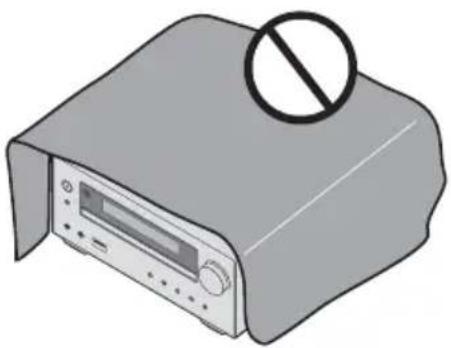
Operating Environment
Operating environment temperature and humidity: +5 °C to +35 °C (+41 °F to +95 °F); less than 85 %RH (cooling vents not blocked)
Do not install this unit in a poorly ventilated area, or in locations exposed to high humidity or direct sunlight (or strong artificial light).
D3-4-2-1-7c * _A2_En
WARNING
Store small parts out of the reach of children and infants. If accidentally swallowed, contact a doctor immediately.
D41-6-4_A1_En
This product is for general household purposes. Any failure due to use for other than household purposes (such as long-term use for business purposes in a restaurant or use in a car or ship) and which requires repair will be charged for even during the warranty period.
K041_A1_En
CAUTION
The ⬆STANDBY/ON switch on this unit will not completely shut off all power from the AC outlet. Since the power cord serves as the main disconnect device for the unit, you will need to unplug it from the AC outlet to shut down all power. Therefore, make sure the unit has been installed so that the power plug can be easily unplugged from the AC outlet in case of an accident. To avoid fire hazard, the power cord should also be unplugged from the AC outlet when left unused for a long period of time (for example, when on vacation).
D3-4-2-2-2a * _A1_En
CAUTION
This product is a class 1 laser product classified under the Safety of laser products, IEC 60825-1:2007.
CLASS 1 LASER PRODUCT
D58-5-2-2a_A1_En
POWER-CORD CAUTION
Handle the power cord by the plug. Do not pull out the plug by tugging the cord and never touch the power cord when your hands are wet as this could cause a short circuit or electric shock. Do not place the unit, a piece of furniture, etc., on the power cord, or pinch the cord. Never make a knot in the cord or tie it with other cords. The power cords should be routed such that they are not likely to be stepped on. A damaged power cord can cause a fire or give you an electrical shock. Check the power cord once in a while. When you find it damaged, ask your nearest PIONEER authorized service center or your dealer for a replacement.
S002 * A1 En
Do not install your speakers overhead on the ceiling or wall. The grill is designed to be detachable, and as such it may fall and cause damage or personal injury if installed overhead.
SGK004_A1_En
(Symbol for equipment)

(Symbol examples) for batteries

These symbols on the products, packaging, and/or accompanying documents mean that used electrical and electronic products and batteries should not be mixed with general household waste.
For proper treatment, recovery and recycling of old products and used batteries, please take them to applicable collection points in accordance with your national legislation.
By disposing of these products and batteries correctly, you will help to save valuable resources and prevent any potential negative effects on human health and the environment which could otherwise arise from inappropriate waste handling.
For more information about collection and recycling of old products and batteries, please contact your local municipality, your waste disposal service or the point of sale where you purchased the items.
These symbols are only valid in the European Union.
For countries outside the European Union:
If you wish to discard these items, please contact your local authorities or dealer and ask for the correct method of disposal.
K058a_A1_En
Radio wave caution
This unit uses a 2.4 GHz radio wave frequency, which is a band used by other wireless systems (Microwave ovens and Cordless phones, etc.). In this event noise appears in your television image, there is the possibility this unit (including products supported by this unit) is causing signal interference with the antenna input connector of your television, video, satellite tuner, etc. In this event, increase the distance between the antenna input connector and this unit (including products supported by this unit).
- Pioneer is not responsible for any malfunction of the compatible Pioneer product due to communication error/malfunctions associated with your network connection and/or your connected equipment. Please contact your Internet service provider or network device manufacturer.
- A separate contract with/payment to an Internet service provider is required to use the Internet.
For Norway customers
For Sweden customers
Thank you for buying this Pioneer product.
Please read through these operating instructions so that you will know how to operate your model properly. After you have finished reading the instructions, put them in a safe place for future reference.
Contents
01 Before you start
What's in the box 5
Loading the batteries in the remote control ..... 5
Using the remote control 5
02 Part names and functions
Remote control 6
Speaker system 7
Front panel 8
Top panel 9
Display 9
03 Connections
Speaker connection 10
Connecting antennas 11
Using external antennas 11
Plugging in 11
04 Getting started
To turn the power on 12
Setting the clock 12
General control 12
Input function.... 12
Display brightness control 12
Volume auto set-in. 12
Volume control.... 12
Muting....12
Sound controls 13
Equalizer.... 13
P.BASS control 13
Bass/treble control 13
Setting the wake-up timer 13
Calling the wake-up timer 14
Cancelling the wake-up timer.... 14
Using the wake-up timer.... 14
Using the sleep timer 14
Using Headphones 14
05 iPod/iPhone/iPad playback
Confirming what iPod/iPhone/iPad models are supported 15
Connecting your iPod/iPhone/iPad 15
Connecting iPod/iPhone to the top panel 16
Close the iPod/iPhone connector port.... 16
Connecting iPod/iPhone/iPad using supplied stand . . 16
Playing iPod/iPhone 17
Playing iPad 17
06 Disc playback
Playing discs or files 18
Advanced CD or MP3/WMA disc playback ..... 19
Direct track search 19
Repeat play.... 19
Random play 19
Programmed play (CD or MP3/WMA) 20
About downloading MP3/WMA 20
About folder playback order 20
Specify the folder to play.... 21
Switch the display contents 21
07 USB playback
Playing USB storage devices 22
Repeat play.... 22
Random play 22
Specify the folder to play. 23
Switch the display contents 23
Playing in the desired order (Programmed Play) . . . . 23
08 Using the tuner
Listening to the radio broadcasts 24
Tuning....24
Saving station presets.... 24
To recall a memorised station 25
To scan the preset stations. 25
To erase entire preset memory. 25
Using the Radio Data System (RDS) 25
An introduction to RDS. 25
Searching for RDS programs. 25
Information provided by RDS 26
Using the Auto Station Program Memory (ASPM).... 26
Notes for RDS operation.... 26
09 Other connections
Connecting auxiliary components 27
10 Bluetooth® Audio playback
Music playback using Bluetooth wireless technology 28
Remote control operation 28
Pairing with the unit (Initial registration) 28
Listen to music on the unit from a Bluetooth capable
device 29
BT STANDBY 29
Radio wave caution 30
Scope of operation 30
Radio wave reflections 30
Precautions regarding connections to products supported by this unit 30
Troubleshooting 31
Playable discs and formats 33
Regarding copy protected CDs 33
Supported audio file formats 33
Cautions on use 34
When moving this unit 34
Place of installation.... 34
Do not place objects on this unit 34
About condensation 34
Cleaning the product. 34
Cleaning the lens. 34
Handling discs 34
Storing 34
Cleaning discs 34
About specially shaped discs. 35
About iPod/iPhone/iPad 35
Auto power off setting 35
Restoring all the settings to the defaults ..... 35
Specifications 36
Chapter 1:
Before you start
What's in the box
Please confirm that the following accessories are in the box when you open it.
- Remote Control
- AAA batteries (R03) x 2
- AM loop antenna
- FM wire antenna
- Power cord
- iPhone/iPad stand
- Warranty card
- Operating instructions (this document)
Loading the batteries in the remote control
1 Open the rear lid and load the batteries as illustrated below.

2 Close the rear lid.


CAUTION
- When inserting the batteries, make sure not to damage the springs on the battery's terminals. This can cause batteries to leak or over heat.
- Do not use any batteries other than the ones specified. Also, do not use a new battery together with an old one.
-
When loading the batteries into the remote control, set them in the proper direction, as indicated by the polarity marks (⊕ and ⊖).
-
Do not heat batteries, disassemble them, or throw them into flames or water.
- Batteries may have different voltages, even if they are the same size and shape. Do not use different types of batteries together.
- To prevent leakage of battery fluid, remove the batteries if you do not plan to use the remote control for a long period of time (1 month or more). If the fluid should leak, wipe it carefully off the inside of the case, then insert new batteries. If a battery should leak and the fluid should get on your skin, flush it off with large quantities of water.
- When disposing of used batteries, please comply with governmental regulations or environmental public institution's rules that apply in your country/area.
- WARNING
Do not use or store batteries in direct sunlight or other excessively hot place, such as inside a car or near a heater. This can cause batteries to leak, overheat, explode or catch fire. It can also reduce the life or performance of batteries.
Using the remote control
The remote has a range of about 7 m at an angle of about 30° from the remote sensor.

Keep in mind the following when using the remote control:
- Make sure that there are no obstacles between the remote and the remote sensor on the unit.
- Remote operation may become unreliable if strong sunlight or fluorescent light is shining on the unit's remote sensor.
- Remote controllers for different devices can interfere with each other. Avoid using remotes for other equipment located close to this unit.
- Replace the batteries when you notice a fall off in the operating range of the remote.
Chapter 2:
Part names and functions
Remote control

1 ⏻ STANDBY/ON
Switches the receiver between standby and on (page 12).
Use to select the input source to this receiver (pages 17, 18, 22, 24, 27).
BT AUDIO
Use to set up or play the audio file using the Bluetooth network (pages 28).
Use for setting the clock, as well as for setting and checking the timers (page 12).
SLEEP
See Using the sleep timer on page 14.
Use to enter the number (page 19).
5 CLEAR
Use to clear the programmed play (page 20).
Press to change the display for songs playing back from CD or USB (page 21).
FOLDER
Use to select the folder of the MP3/WMA disc or USB mass storage device (page 21).
Use to access the menu.
MEMORY/PROGRAM
Use to memory or program CD or the MP3/WMA disc or USB mass storage device (page 20).
7 ↑/↓/←/→ (TUNE +/-), ENTER
Use to select/switch system settings and modes, and to confirm actions.
Use TUNE +/- can be used to find radio frequencies (page 24).
8 PRESET +/-
Use to select preset radio stations (page 24).
9 MUTE
Mutes/unmutes the sound (page 12).
Use to control each function after you have selected it using the input function buttons (page 18).
Use to switch the sound mode between stereo and monaural. (page 24)
RDS ASPM
Use to search for RDS Auto station program memory (page 26).
RDS PTY
Use to search for RDS program types (page 25).
RDS DISPLAY
Press to change the RDS display for information mode (page 26).
12 OPEN/CLOSE
Use to open or close the disc tray (page 18).
Adjust the sound quality (page 13).
14 RANDOM
Randomize order of track playback from a CD, iPod or USB (page 19).
15 REPEAT
Press to change the repeat play setting from a CD, iPod or USB (page 19).
Use to set the listening volume (page 12).
17 DIMMER
Dims or brightens the display. The brightness can be controlled in four steps (page 12).
Speaker system

2 W o o f e r
3 Bass Reflex Duct
Important
• Make sure nothing comes into contact with the speaker diaphragms when you remove the speaker grilles.
Front panel
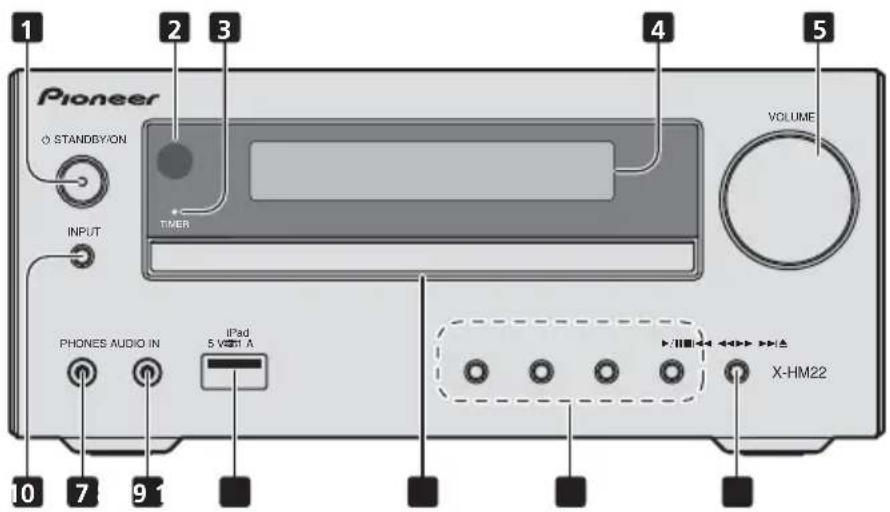
Switches the receiver between standby and on (page 12).
2 Remote sensor
Receives the signals from the remote control.
3 T I Medic&torR
Lights when the unit power is off but when the timer setting is activated.
4 Character display
See Display on page 9.
5 Volume control
Use to set the listening volume (page 12).
Selects the input source.
7 Headphone socket
Use to connect headphones. When the headphones are connected, there is no sound output from the speakers (page 14).
8 AUDIO IN socket
Use to connect an auxiliary component using a stereo minijack cable (page 27).
9 USB terminal
Use to connect your USB mass storage device or Apple iPod/iPhone/iPad as an audio source (page 22).
10 Disc tray
Place the disc, label side up (page 18).
Select the desired track or file to be played back. Stop current playback. Stop playback or resume playback from the point where it was paused.
Use to open or close the disc tray (page 18).
Top panel

1 iPod/iPhone connector port
To connect the iPod/iPhone, press the PUSH OPEN tab (page 15).
Display

1

Lights when the sound is muted.

Note
- The mute icon will be displayed in red.
2

Start playback.
311
Pause playback.
4

Timer function is set.
5 Character display
Displays various system information.
Chapter 3:
Connections

CAUTION
- Be sure to turn off the power and unplug the power cord from the power outlet whenever making or changing connections.
- Connect the power cord after all the connections between devices have been completed.
Speaker connection
- Push open the tabs and insert exposed wire.
- Connect the black wire to (−) terminal, and the red wire to the (+) terminal.
![graph TD A["Right speaker"] --> B["Speaker Panel"] C["Left speaker"] --> B B --> D["Line IN R-L"] D --> E["Device Icon with Arrow"]](/content/2026/05/1051866/images/05a227a9ed9466bbc5563d0d702ff9b09607773a46fb586e03c1190c12f1dd97.jpg)

CAUTION
• These speaker terminals carry HAZARDOUS LIVE voltage. To prevent the risk of electric shock when connecting or disconnecting the speaker cables, disconnect the power cord before touching any uninsulated parts.
- Do not connect any speakers other than those supplied to this system.
- Do not connect the supplied speakers to any amplifier other than the one supplied with this system. Connection to any other amplifier may result in malfunction or fire.
- Do not attach these speakers to the wall or ceiling. They may fall off and cause injury.
• These speakers are magnetically shielded. However, depending on the installation location, color distortion may occur if the speaker system is installed extremely close to the screen of a television set. If this happens, turn off the television set, and then turn it on after 15 to 30 minutes. If the problem persists, move the speaker system away from the television set.
- Make sure that the speaker cable cores do not become exposed and make contact with other cable cores. This may cause malfunction of the product.
- Do not allow the speaker cable core to come into contact with the receiver body.
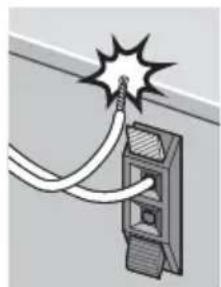
- If the speaker cable core comes into contact with any metal portion of the receiver's body, it may damage the speakers and cause smoke and fire.
Insert speaker cables securely into the terminals and check that the cable does not come out of easily.

Note
• There is no difference between L and R speakers.
Connecting antennas
Connect the AM loop antenna and the FM wire antenna as shown below. To improve reception and sound quality, connect external antennas (see Using external antennas below).

1 Connect the AM antenna wires.
Hold the terminal part of the wire when connecting.
2 Fix the AM loop antenna to the attached stand.
To fix the stand to the antenna, bend in the direction indicated by the arrow (fig. a) then clip the loop onto the stand (fig. b).
3 Place the AM antenna on a flat surface and in a direction giving the best reception.
4 Connect the FM wire antenna into the FM antenna socket.
For best results, extend the FM antenna fully and fix to a wall or door frame. Don't drape loosely or leave coiled up.
Using external antennas
To improve FM reception
Use a PAL connector (not supplied) to connect an external FM antenna.

Plugging in
CAUTION
- Do not use any power cord other than the one supplied with this unit.
- Do not use the supplied power cord for any purpose other than that described below.
Before making or changing the connections, switch off the power and disconnect the power cord from the AC outlet. After you've finished making all connections, plug the unit into an AC outlet.

Chapter 4:
Getting started
To turn the power on
Press the Ⓧ STANDBY/ON to turn the power on.
After use:
Press the Ⓧ STANDBY/ON to enter the power stand-by mode.

Note
- In standby mode, if iPod/iPhone/iPad is connected, the unit turns charge mode.
Setting the clock
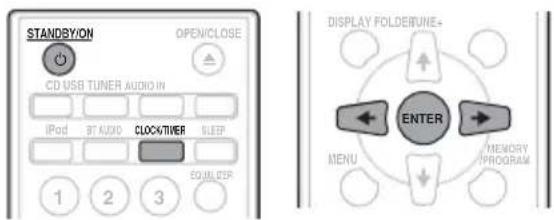
1 Press ⏻ STANDBY/ON to turn the power on.
2 Press CLOCK/TIMER on the remote control.
"CLOCK" is shown on the main display.
3 Press ENTER.
4 Press ←/→ to set the day, then press ENTER.
5 Press ←/→ to set the hour, then press ENTER.
6 Press ←/→ to set the minute, then press ENTER to confirm.
7 Press ENTER.
To confirm the time display:
When the power is ON:
Press the CLOCK/TIMER. The time display will appear for about 10 seconds.
When it is on standby:
Press the CLOCK/TIMER. The time display will appear for about 10 seconds.
Press any button other than ⏻ STANDBY/ON or ▲ on the unit. The time display will appear for about 10 seconds.
To readjust the clock:
Perform "Setting the clock" from step 1.

Note
- When power supply is restored after unit is plugged in again or after a power failure, reset the clock.
General control
When the INPUT on main unit is pressed, the current function will change to different mode. Press the INPUT repeatedly to select desired function.

Display brightness control
Press DIMMER to dims the display brightness. The brightness can be controlled in four steps.
Volume auto set-in
If you turn off and on the main unit with the volume set to 31 or higher, the volume starts at 30 and sets in to the last set level.
Volume control
Turn the VOLUME on the unit or press VOLUME +/- on the remote control to increase or decrease the volume.

CAUTION
- The sound level at a given volume setting depends on speaker efficiency, location, and various other factors. It is advisable to avoid exposure to high volume levels. Do not turn the volume on to full at switch on. Listen to music at moderate levels. Excessive sound pressure from earphones and headphones can cause hearing loss.
Muting
The volume is muted temporarily when pressing the MUTE on the remote control. Press again to restore the volume.
Sound controls
Equalizer
When the EQUALIZER is pressed, the current mode setting will be displayed. To change to a different mode, press the EQUALIZER repeatedly until the desired sound mode appears.
![graph TD A["FLAT A flat and basic sound."] --> B["ACTIVE"] B --> C["DIALOGUE"] C --> D["NIGHT"] B --> E["A powerful sound that emphasizes low and high tones"] C --> F["A sound that allows the radio or vocals to be heard more easily."] D --> G["A sound that can be enjoyed at night even with lower vol…](/content/2026/05/1051866/images/45846c6c5d2ff636cb902f4e36a950cf1fa0b9bb85ab03dbfc8755590c4626e9.jpg)
P.BASS control
When the power is first turned on, the unit will enter the P.bass mode which emphasises the bass frequencies. To cancel the P.bass mode, press the P.BASS on the remote control.
Bass/treble control
Press the BASS/TREBLE, then press ↔/→ to adjust the bass or treble.

Note
- The EQUALIZER and P.BASS cannot operate simultaneously. The most recently selected of these two functions will be the one used.
- BASS/TREBLE can operate alongside either the EQUALIZER or P.BASS.
When one of the above two functions is selected, the function that is not selected will be displayed as follows.
1 When P.BASS setting (ON/OFF) is changed
• EQUALIZER : FLAT
2 When EQUALIZER setting is changed
• P.BASS : OFF
Setting the wake-up timer
Used to change the existing timer setting, or to set a new timer.
1 Press ⏻ STANDBY/ON to turn the power on.
2 Press and hold CLOCK/TIMER.
3 Press ←/→ to select "ONCE" or "DAILY", then press ENTER.
ONCE – Works once only at a preset time.
DAILY – Works at the preset time on a preset day.
4 Press ←/→ to select "TIMER SET", then press ENTER.
5 Press ←/→ to select the timer playback source, then press ENTER.
- CD, FM, AM, USB/IPOD and IPOD can be selected as the playback source.
6 Press ←/→ to select the timer day, then press ENTER.
7 Press ←/→ to set the hour, then press ENTER.
8 Press ←/→ to set the minute, then press ENTER.
- Set the time to finish as in steps 7 and 8 above.
9 Adjust the volume press VOLUME +/-, then press ENTER.
10 Press ⏻ STANDBY/ON to enter the power standby mode.
• The TIMER indicator lights up.
Calling the wake-up timer
An existing timer setting can be reused.
1 As well as steps 1 to 3 in "Setting the wake-up timer".
2 Press ←/→ to select "TIMER ON", then press ENTER.
Cancelling the wake-up timer
Turn off the timer setting.
1 As well as steps 1 to 3 in "Setting the wake-up timer".
2 Press ←/→ to select "TIMER OFF", then press ENTER.
Using the wake-up timer
1 Press ⏻ STANDBY/ON to turn the power off.
2 At the wake-up time, this unit will turn on automatically and play the selected input function.

Note
- If at the wake-up time iPod/iPhone/iPad is not connected to the unit or a disc is not inserted, the unit will be turned on but will not play back the track.
- Some discs may not be played automatically at the wake-up time.
- When setting the timer set at least one minute between the start and end time.
Using the sleep timer
The sleep timer switches off the unit after a specified time so you can fall asleep without worrying about it.
1 Press SLEEP repeatedly to select a switch off time.
Choose between 10 min, 20 min, 30 min, 60 min, 90 min, 120 min, 150 min, 180 min or OFF. The newly set value displays for 3 seconds, and then the setting is completed.

Note
- The sleep timer can be set by pressing SLEEP while the remaining time is displayed.
Using Headphones
Connect to the jack plug of the headphones.
When the headphones are connected, there is no sound output from the speakers.

- Do not turn the volume on to full at switch on and listen to music at moderate levels. Excessive sound pressure from earphones and headphones can cause hearing loss.
- Before plugging in or unplugging the headphone, reduce the volume.
- Be sure your headphone has a 3.5 mm diameter plug and impedance between 16 Ω and 50 Ω. The recommended impedance is 32 Ω.
Chapter 5:
iPod/iPhone/iPad playback
Merely by connecting your iPod/iPhone/iPad to this unit, you can enjoy high-quality sound from your iPod/iPhone/iPad.
Confirming what iPod/iPhone/iPad models are supported
The iPod/iPhone/iPad playable on this unit are shown below.
| iPod/iPhone/iPad | Lightning connector | USB Terminal |
| iPod nano 3G/4G/5G/6G — √ | | |
| iPod nano 7G √ | √ | |
| iPod touch 1G/2G/3G/4G — √ | | |
| iPod touch 5G √ | √ | |
| iPhone — √ | | |
| iPhone 3G — √ | | |
| iPhone 3GS — √ | | |
| iPhone 4 — √ | | |
| iPhone 4s | — √ | |
| iPhone 5 | √ | √ |
| iPhone 5c | √ | √ |
| iPhone 5s | √ | √ |
| iPad mini | — √ | |
| iPad mini with Retina display | — √ | |
| iPad | — √ | |
| iPad 2 | — √ | |
| iPad (3rd generation) | — √ | |
| iPad (4th generation) | — √ | |
| iPad Air | — √ | |

Note
- Pioneer does not guarantee that this unit plays iPod/iPhone/iPad models other than the ones specified.
- Some functions may be restricted depending on the model or software version.
- iPod/iPhone/iPad is licensed for reproduction of non-copyrighted materials or materials the user is legally permitted to reproduce.
-
Features such as the equalizer cannot be controlled using this system, and we recommend switching the equalizer off before connecting.
-
Pioneer cannot under any circumstances accept responsibility for any direct or indirect loss arising from any inconvenience or loss of recorded material resulting from iPod/iPhone/iPad failure.
- For detailed instructions on using the iPod/iPhone/iPad, please refer to the manual supplied with the iPod/iPhone/iPad.
- This system has been developed and tested for the software version of iPod/iPhone/iPad indicated on the website of Pioneer (http://pioneer.jp/homeav/support/ios/eu/).
- Installing software versions other than indicated on the website of Pioneer to your iPod/iPhone/iPad may result in incompatibility with this system.
- This unit cannot be used to record CD, tuner or other content on an iPod/iPhone/iPad.
Connecting your iPod/iPhone/iPad

CAUTION
- When connecting iPod/iPhone/iPad devices, use the iPod/iPhone/iPad cable provided with iPod/iPhone/iPad devices, or a commercially available iPod/iPhone/iPad cable designed to support iPod/iPhone/iPad.
- An iPod/iPhone/iPad cable is not supplied with this unit.

Important
- If you are mounting the protective cover of a commercially available iPod/iPhone/iPad, you may not be able to connect iPod/iPhone/iPad to this unit.
Connecting iPod/iPhone to the top panel
1 Press the PUSH OPEN.

2 Open the iPod/iPhone connector port.

3 Connect your iPod/iPhone.

Close the iPod/iPhone connector port
- While pull the PULL CLOSE knob (1), close the iPod/iPhone/iPad connector port firmly (2).
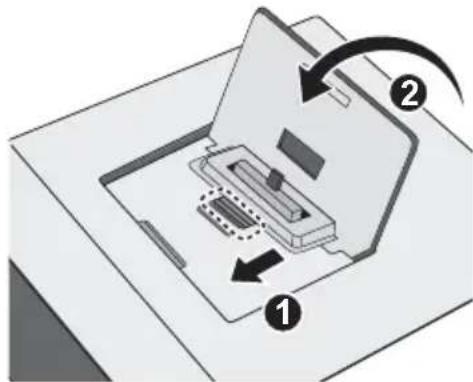
- When iPod/iPhone is not connected to the unit, close the iPod/iPhone connector port firmly.

Connecting iPod/iPhone/iPad using supplied stand
1 Connect the unit to an iPod/iPhone/iPad with the iPod/iPhone/iPad cable.

2 Set up to stand the iPod/iPhone/iPad.
When using an iPod/iPhone
Make sure the iPod/iPhone cable is aligned along the groove for it on the back of the stand that comes with the unit.
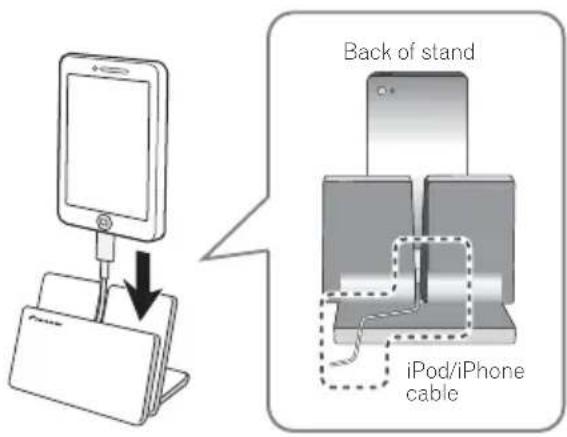
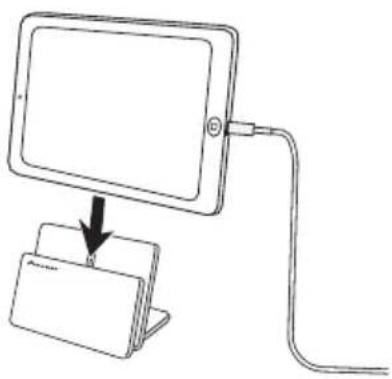
When using iPad
Make sure to place the iPad in a horizontal direction on the stand.
Playing iPod/iPhone
1 Connect your iPod/iPhone.
If an iPod/iPhone is connected when this unit is on, playback of the iPod/iPhone will not begin.
" iPod" or "USB/iPod" is shown on the main display.
3 When the recognition is completed, will begin playing automatically.
Playing iPad
1 Connect your iPad.
If an iPad is connected when this unit is on, playback of the iPad will not begin.
"USB/iPod" is shown on the main display.
3 When the recognition is completed, will begin playing automatically.
CAUTION
- When your iPod/iPhone/iPad is connected to this unit and you wish to operate the iPod/iPhone/iPad directly, be sure to steady the iPod/iPhone/iPad with the other hand to prevent malfunctions due to faulty contacts.

Note
- For detailed instructions on using the iPod/iPhone/iPad, please refer to the manual supplied with the iPod/ iPhone/iPad.
- iPod/iPhone/iPad recharging occurs whenever an iPod/iPhone/iPad is connected to this unit. (This function is supported in standby mode as well.)
- When input is switched from iPod to another function, iPod/iPhone/iPad playback is temporarily stopped.
- When iPod/iPhone/iPad is not playing and no operations have been performed for more than 20 minutes, the unit will automatically power off. In this case it is required that the Auto power off is switched to ON.
• Auto power off can be switched to ON/OFF (page 35).
Important
- If this unit cannot play your iPod/iPhone/iPad, perform the following troubleshooting checks:
- Check whether the iPod/iPhone/iPad is supported by this unit.
- Reconnect the iPod/iPhone/iPad to the unit. If this doesn't seem to work, try resetting your iPod/iPhone/iPad.
- Check the iPod/iPhone/iPad software is supported by this unit.
- If the iPod/iPhone/iPad cannot be operated, check the following items:
- Is the iPod/iPhone/iPad connected correctly? Reconnect the iPod/iPhone/iPad to the unit.
- Is the iPod/iPhone/iPad experiencing a hangup? Try resetting the iPod/iPhone/iPad, and reconnect it to the unit.
Chapter 6:
Disc playback
This system can play back a standard CD, CD-R/RW in the CD format and CD-R/RW with MP3 or WMA files, but cannot record on them. Some audio CD-R and CD-RW discs may not be playable due to the state of the disc or the device that was used for recording.
MP3:
MP3 is a form of compression. It is an acronym which stands for MPEG Audio Layer 3. MP3 is a type of audio code which is processed by significant compression from the original audio source with very little loss in sound quality.
• This system supports MPEG-1/2 Audio Layer 3 (Sampling rates: 8 kHz to 48 kHz; Bit rates: 32 kbps to 320 kbps).
- During VBR file playback, time counter in the display may differ from its actual playback time.
WMA:
WMA (Windows Media Audio) files are Advanced System Format files that include audio files which are compressed with Windows Media Audio codec. WMA is developed by Microsoft as an audio format file for Windows Media Player.
• This system supports WMA (Sampling rates: 32 kHz/44.1 kHz/48 kHz; Bit rates: 64 kbps to 320 kbps).
- During VBR file playback, time counter in the display may differ from its actual playback time.
Playing discs or files
1 Press ⏻ STANDBY/ON to turn the power on.
2 Press CD on the remote control or INPUT repeatedly on the main unit to select CD input.
3 Press ▲ OPEN/CLOSE to open the disc tray.
4 Place the disc on the disc tray, label side up.

5 Press ▲ OPEN/CLOSE to close the disc tray.
6 Press ▶/II to start playback.
After the last track is played, the unit will stop automatically.
CAUTION
- Do not place two discs in one disc tray.
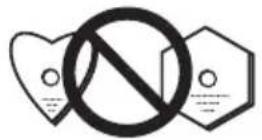
- Do not play discs of special shapes (heart, octagon, etc). It may cause malfunctions.
- Do not push the disc tray whilst it is moving.
- If the power fails whilst the tray is open, wait until the power is restored.
- Be sure to place 8 cm disc in the middle of the disc tray.
Note
- Due to the structure of the disc information, it takes longer to read an MP3/WMA disc than a normal CD (approximately 20 to 90 seconds).
- When the beginning of the first track is reached during fast reverse, the unit will enter the playback mode (only for CD).
- Rewritable multi-session discs with unfinished writing, can still be played.
- If TV or radio interference occurs during CD operation, move the unit away from the TV or radio.
Tip
- When no operation has done in CD mode and the audio file is not played for more than 20 minutes, the power will automatically turn off. In this case it is required that the Auto power off is switched to ON.
• Auto power off can be switched to ON/OFF (page 35).
Various disc functions
| Function | Main unit | Remote control | Operation |
| Play | | | Press in the stop mode. |
| Stop | | | Press in the playback mode. |
| Pause | | | Press in the playback mode. Press ▶II to resume playback from the paused point. |
| Track up/ down | | | Press in the playback or stop mode. If you press the button in the stop mode, press ▶II to start the desired track. |
| Fast forward/ reverse | | | Press and hold down in the playback mode. Release the button to resume playback. |
Advanced CD or MP3/WMA disc playback
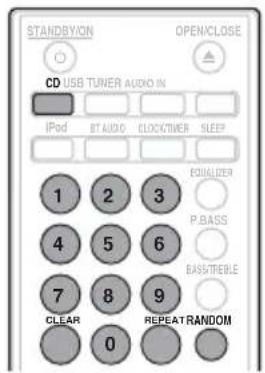
Direct track search
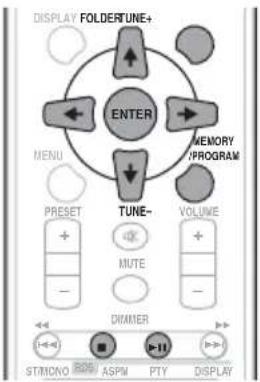
By using the numeric buttons, the desired tracks on the current disc can be played.
Use the numeric buttons on the remote control to select the desired track whilst playing the selected disc.

Note
- A track number higher than the number of tracks on the disc cannot be selected.
To stop playback:
Press ■
Repeat play
Repeat play can play one track, all tracks or a programmed sequence continuously.
To repeat one track:
Press REPEAT repeatedly until "REPEAT ONE" appears. Press ENTER.
To repeat all tracks:
Press REPEAT repeatedly until "REPEAT ALL" appears. Press ENTER.
To repeat desired tracks:
Perform steps 1 to 5 in "Programmed play (CD or MP3/WMA)" section on next page and then press REPEAT repeatedly until "REPEAT ALL" appears. Press ENTER.
To cancel repeat play:
Press REPEAT repeatedly until "REPEAT OFF" appears. Press ENTER.

Note
• After performing repeat play, be sure to press ■. Otherwise, the disc will play continuously.
- During repeat play, random play is not possible.
Random play
The tracks on the disc can be played in random order automatically.
To random play all tracks:
Press RANDOM repeatedly until "RANDOM ON" appears. Press ENTER.
To cancel random play:
Press RANDOM repeatedly until "RANDOM OFF" appears. Press ENTER.

Note
- In random play, the unit will select and play tracks automatically. (You cannot select the order of the tracks.)
- During random play, repeat play is not possible.
Programmed play (CD or MP3/WMA)
You can choose up to 32 selections for playback in the order you like.
1 Whilst in the stop mode, press MEMORY/PROGRAM on the remote control to enter the programming save mode.
2 Press |◀◀▶▶| or the numeric buttons on the remote control to select the desired tracks.
3 Press ENTER to save folder and track number.
4 Repeat steps 2 to 3 for other folder/tracks. Up to 32 tracks can be programmed.
- If you want to check the programmed tracks, press MEMORY/PROGRAM.
- If you make a mistake, the last programmed tracks will be canceled by pressing CLEAR.
5 Press ▶/II to start playback.
To cancel the programmed play mode:
To cancel the programmed play, press ■ twice on the remote control. The display will show "PRG CLEAR" and all the programmed content will be cleared.
Adding tracks to the program:
Press the MEMORY/PROGRAM. Then follow steps 2 to 3 to add tracks.

Note
- When a disc is ejected, anything programmed is cleared.
- If you press the Ⓧ STANDBY/ON to enter the standby mode or change the function from CD to another, the programmed selections will be cleared.
- During the program operation, random play is not possible.
About downloading MP3/WMA
There are many music sites on the internet that you can download MP3/WMA music files. Follow the instructions from the website on how to download the music files. You can then play back these downloaded music files by burning them to a CD-R/RW disc.
- Your downloaded song/files are for personal use only. Any other usage of the song without owner's permission, is against the law.
About folder playback order
If MP3/WMA files are recorded in several folders, a folder number will be set to each folder automatically.
These folders can be selected by the FOLDER on the remote control. If there is no supported file formats inside the selected folder, the folder is skipped and the next folder will be selected.
Example: How the folder numbers are assigned if MP3/WMA format files are recorded are as shown below.
1 ROOT folder is set as FOLDER 1.
2 As for folders inside ROOT folder (FOLDER A and FOLDER B), the folder which is recorded earlier on the disc will be set as FOLDER 2 and FOLDER 3.
3 As for folder inside FOLDER A (FOLDER C and FOLDER D), the folder which is recorded earlier on the disc will be set as FOLDER 4 and FOLDER 5.
4 FOLDER E that is inside FOLDER D will be set as FOLDER 6.
- The folder and file order information which is recorded on the disc depends on the writing software. There maybe possibilities that this unit will playback the files not according to our expected playback order.
- From a disc with MP3/WMA files up to 255 folders and 999 files (including non playable files) can be read.
![graph TD A["ROOT (FOLDER 1)"] --> B["FOLDER A (FOLDER 2)"] A --> C["FOLDER B (FOLDER 3)"] B --> D["FOLDER C (FOLDER 4)"] B --> E["FOLDER D (FOLDER 5)"] C --> F["FOLDER E (FOLDER 6)"] C --> G["FOLDER F (FOLDER 7)"] C --> H["FOLDER G (FOLDER 8)"] C --> I["FOLDER H (FOLDER 9)"] C --> J["FOLDER I (FOLDE…](/content/2026/05/1051866/images/b1b82b42ebd1447c5e9c4cfde2d29e8a3e79eb169d647d462c9439b9949a8ae1.jpg)
Specify the folder to play
To specify the folder to play, do the following steps.

1 Press CD, and load an MP3/WMA disc.
2 Press FOLDER, and press ↑/↓ to select desired playback folder.
3 Press ENTER.
Playback will start from the first song of the selected folder.
- Even if it is stopped, it is possible to press / , to select a folder.
Switch the display contents
1 Press DISPLAY.
If the title, artist and album name has been written to the file, that information will be displayed. (You can view this unit is only alphanumeric characters. Non-alphanumeric character are displayed in the "*".)
![graph TD A["Number of track, playback time display"] --> B["Title/Artist/Album display"] C["Kind of file display"] --> D["Number of folder/track display"] B --> D](/content/2026/05/1051866/images/b54430c70c83f19f633296298b872ce49b90a3395290aa9c067f9362263fa380.jpg)

Note
- "Copyright protected WMA files" or "Not supported playback file" cannot be played back. In these case the files will be skipped automatically.
- There may be cases where no information can be displayed.
- Displaying title, artist and album name is only supported for MP3 files.
Chapter 7:
USB playback
Playing USB storage devices
It is possible to listen to two-channel audio using the USB interface on the front of this receiver.
- Pioneer does not guarantee that any file recorded on a USB storage device will play or that power will be supplied to a USB storage device. Also note that Pioneer will accept no responsibility whatsoever for loss of files on USB storage devices caused by connection to this unit.
"USB/IPOD" is shown on the main display.
2 Connect the USB storage device.
The number of folders or files stored on the connected USB storage device appear on the main display automatically.
• This receiver does not support a USB hub.

3 When the recognition is completed, press II to start playback.
When changing to a different input source, stop the USB memory playback first before changing.
4 Disconnect USB storage device from the USB terminal.
Turn the power off before removing the USB storage device.

Note
- This unit may not recognize a USB storage device, play files or supply power to a USB storage device. For details, see When a USB storage device is connected on page 32.
- When a USB storage device is not playing and the unit has not been operated for 20 minutes or more, the power will automatically turn off. In this case it is required that the Auto power off is switched to ON (page 35).
Repeat play
Repeat play can play one track, all tracks or a programmed sequence continuously.
To repeat one track:
Press REPEAT repeatedly until "REPEAT ONE" appears. Press ENTER.
To repeat all tracks:
Press REPEAT repeatedly until "REPEAT ALL" appears. Press ENTER.
To repeat desired tracks:
Perform steps 1 to 5 in "Programmed play (CD or MP3/WMA)" section on next page and then press REPEAT repeatedly until "REPEAT ALL" appears. Press ENTER.
To cancel repeat play:
Press REPEAT repeatedly until "REPEAT OFF" appears. Press ENTER.

Note
• After performing repeat play, be sure to press ■. Otherwise, the file of USB storage device will play continuously.
- During repeat play, random play is not possible.
Random play
The file of USB storage device can be played in random order automatically.
To random play all tracks:
Press RANDOM repeatedly until "RANDOM ON" appears. Press ENTER.
To cancel random play:
Press RANDOM repeatedly until "RANDOM OFF" appears. Press ENTER.

Note
- In random play, the unit will select and play tracks automatically. (You cannot select the order of the tracks.)
- During random play, repeat play is not possible.
Specify the folder to play
To specify the folder to play, do the following steps.
1 Press USB, and connect the USB storage device.
2 Press FOLDER, and press ↑/↓ to select desired playback folder.
3 Press ENTER.
Playback will start from the first song of the selected folder.
- In case of stop, press / , and the folder can be selected.
Switch the display contents
The unit can display the information recorded in the USB storage device. For details, see Switch the display contents on page 21.
Playing in the desired order (Programmed Play)
- This unit can play repeatedly folders stored in the USB storage device.
- From a USB storage device with MP3/WMA files up to 255 folders and 999 files (including non playable files) can be read.
Chapter 8:
Using the tuner
Listening to the radio broadcasts
The following steps show you how to tune in to FM and AM radio broadcasts using the automatic (search) and manual (step) tuning functions. Once you are tuned to a station you can memorize the frequency for recall later. See Saving station presets below for more on how to do this.
Tuning
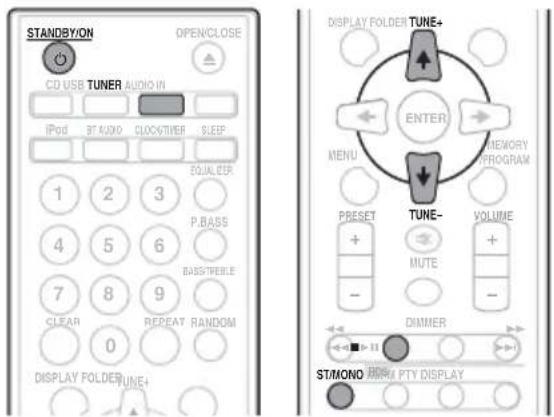
1 Press the ⏻ STANDBY/ON to turn the power on.
2 Press TUNER repeatedly to select desired frequency band (FM or AM).
3 Press TUNE +/- on the remote control to tune in to the desired station.
Automatic tuning:
Press and hold TUNE +/- , scanning will start automatically and the tuner will stop at the first receivable broadcast station.
Manual tuning:
Press the TUNE +/- repeatedly to tune in to the desired station.

Note
- When radio interference occurs, automatic tuning may stop automatically at that point.
• Automatic tuning will skip weak signal stations.
• To stop the automatic tuning, press ■
- When an RDS (Radio Data System) station is tuned in, the frequency will be displayed first. Finally, the station name will appear.
• Full auto tuning can be achieved for RDS stations using Auto Station Program Memory (ASPM) mode, see page 26.
To receive an FM stereo transmission:
Press ST/MONO to select stereo mode and "AUTO" will be displayed.
Improving poor FM reception:
1 Press ST/MONO repeatedly to select MONO.
This will change the tuner from stereo to mono and usually improve the reception.
Saving station presets
If you often listen to a particular radio station, it's convenient to have the receiver store the frequency for easy recall whenever you want to listen to that station (Preset tuning). This saves the effort of manually tuning in each time. This unit can memorize up to 45 stations.
(FM 30 stations/AM 15 stations)
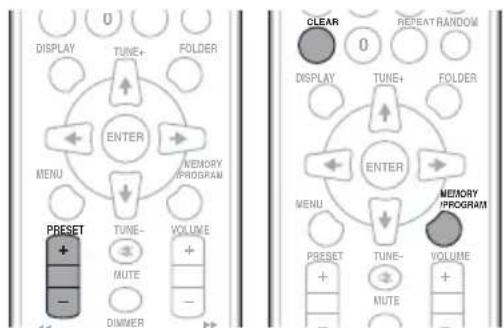
1 Tune to a station you want to memorize.
See Tuning above for more on this.
2 P r MEMORYs/PROGRAM.
The preset number will flash.
3 P r PRESET +/b- to select the preset channel number.
4 P r MEMGRYS/PROGRAM to store that station in memory.
If the preset number has changed from flashing to lighting, before the station is memorised, repeat the operation from step 2.
- Repeat steps 1 to 4 to set other stations, or to change a preset station. When a new station is stored in the memory, the station previously memorised for that preset channel number will be erased.

Note
- The backup function protects the memorised stations for a few hours should there be a power failure or the AC power cord become disconnected.
To recall a memorised station
1 Press PRESET +/- to select the desired station.
To scan the preset stations
The stations saved in the memory can be scanned automatically. (Preset memory scan)
1 Press and hold PRESET +/-.
The preset number will appear and the programmed stations will be tuned in sequentially, for 5 seconds each.
2 Press PRESET +/- again when the desired station is located.
To erase entire preset memory
1 Press TUNER on the remote control.
2 Press CLEAR until "MEMORY CLEAR" appears.

Note
- All stations will be erased.
Using the Radio Data System (RDS)
An introduction to RDS
Radio Data System (RDS) is a system used by most FM radio stations to provide listeners with various kinds of information—the name of the station and the kind of show they're broadcasting, for example.
One feature of RDS is that you can search by type of program. For example, you can search for a station that's broadcasting a show with the program type, JAZZ.
You can search the following program types:
News – News
Current Affairs – Current Affairs
Information – General Information
Sport – Sport
Education – Educational Drama – Radio plays, etc
Cultures – National or regional culture, theater, etc.
Science – Science and technology
Varied Speech – Usually talk-based material, such as quiz shows or interviews.
Pop Music – Pop music
Rock Music – Rock music
Easy Listening – Easy listening
Light Classics M – 'Light' classical music
Serious Classics – 'Serious' classical music
Other Music – Music not fitting above categories
Weather & Metr – Weather reports
Finance – Stock market reports, commerce, trading, etc.
Children's Progs – Programs for children
Social Affairs – Social affairs
Religion – Programs
concerning religion
Phone In – Public expressing their views by Phone
Travel & Touring – Holiday-type travel rather than traffic announcements
Leisure & Hobby – Leisure interests and hobbies
Jazz Music – Jazz
Country Music – Country music
National Music – Popular music in a language other than English
Oldies Music – Popular music from the '50s and' 60s
Folk Music – Folk music
Documentary – Documentary
Alarm Test – Broadcasting when testing emergency broadcast equipment or receivers.
Alarm - Alarm!
Searching for RDS programs
You can search a program type listed above.
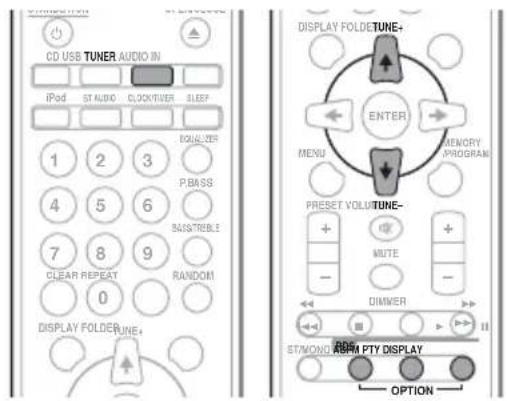
1 Press TUNER on the remote control.
RDS is only possible in the FM.
2 Press RDS PTY on the remote control.
"SELECT" will appear for about 6 seconds.
3 Press ←/→ to select the program type you want to hear.
Each time the button is pressed, the program type will appear. If the button is held down, the program type will appear continuously.
4 Whilst the selected program type is displayed (within 6 seconds), Press RDS PTY again.
After the selected program type has been lit for 2 seconds, "SEARCH" will appear, and the search operation will start.

Note
- If the display has stopped flashing, start again from step 2. If the unit finds a desired program type, the corresponding channel number will be lit for about 8 seconds, and then the station name will be displayed.
- If you want to listen to the same program type of another station, press the RDS PTY whilst the channel number or station name is flashing. The unit will look for the next station.
- If no station can be found, "NOT FOUND" will appear for 4 seconds.
Each time the RDS DISPLAY is pressed, the display will switch as follows:
![graph LR A["Station name (PS)"] --> B["Programme type (PTY)"] B --> C["Frequency"] C <--> D["Radio text (RT)"]](/content/2026/05/1051866/images/6b700be2d6c68ab58d374d21ab40b0ee8cb0a90ffcfb7c97f6dad7b4e827e843.jpg)
When tuning in to a station other than an RDS station or to an RDS station which sends weak signal, the display will change in the following order:
![graph TD A["No RDS"] --> B["FM 98.80 MHz"] B --> A](/content/2026/05/1051866/images/452f90b6a92aa6d2c5591520f2f0c565964fae2ab1da8d4609608c40a9f5417b.jpg)
Using the Auto Station Program Memory (ASPM)
Whilst in the ASPM operation mode, the tuner will automatically search for new RDS stations. Up to 30 stations can be stored.
If you have already stored some stations in memory, the number of new stations you can store will be less.
1 Press TUNER on the remote control.
2 Press and hold down RDS ASPM on the remote control.
After "ASPM" has flashed for about 4 seconds, scanning will start (87.5 MHz to 108 MHz).
After scanning, the number of stations stored in memory will be displayed for 4 seconds, and then "END" will appear for 4 seconds.
To stop the ASPM operation before it is complete:
Press ■ whilst it is scanning for stations. The stations which are already stored in memory will be kept there.

Note
- If the same station is broadcasting on different frequencies, the strongest frequency will be stored in memory.
- Any station which has the same frequency as the one stored in memory will not be stored.
- If 30 stations have already been stored in memory, the scan will be aborted. If you want to redo the ASPM operation, erase the preset memory.
- If no station have been stored in memory, "END" will appear for about 4 seconds.
- If the RDS signals are very weak, station names may not be stored in memory.
- The same station name can be stored in different channels.
- In a certain area or during certain time periods, the station names may temporarily be different.
Notes for RDS operation
If any of the following events occur, it does not mean that the unit is faulty:
- "PS", "NO PS" and a station name appear alternately, and properly.
- If a particular station is not broadcasting properly or a station is conducting tests, the RDS reception function may not work properly.
- When you receive an RDS station whose signal is too weak, information like the station name may not be displayed.
- "NO PS", "NO PTY" or "NO RT" will flash for about 5 seconds, and then the frequency will be displayed.
Notes for radio text:
- The first 16 characters of the radio text will appear and then they will scroll across the display.
- If you tune in to an RDS station which is not broadcasting any radio text, "NO RT" will be displayed when you switch to the radio text position.
- Whilst radio text data is received or when the text contents change, "RT" will be displayed.
Chapter 9:
Other connections

CAUTION
- Before making or changing the connections, switch off the power and disconnect the power cord from the AC outlet.
Connecting auxiliary components
Connect the front panel AUDIO IN mini-plug jack to your auxiliary playback component.
- This method can be used to play music on this unit from iPod/iPhone/iPad that do not support use of an iPod/ iPhone connector and USB terminal.

When AUDIO IN is selected "AUDIO IN" will be displayed on the main display.

Note
- If the AUDIO IN mini-plug jack is connected to auxiliary phones jack, the volume of the unit will be adjusted by the volume on the playback component. If the sound is distorted after you lower the volume of the unit, try lowering the volume on the auxiliary playback component.
Connect the rear panel LINE IN audio jacks to your auxiliary playback component.

When LINE is selected "LINE" will be displayed on the main display.
Chapter 10:
Bluetooth® Audio playback
Music playback using Bluetooth wireless technology
![graph TD A["Bluetooth wireless technology enabled device: Cell phone"] --> B["Device not equipped with Bluetooth wireless technology: Digital music player + Bluetooth® audio transmitter (commercially available)"] C["Bluetooth wireless technology enabled device: Digital music player"] --> B D["+"] --…](/content/2026/05/1051866/images/2d79134db81726eae14438dccaee598b1b0aacc14b5d10a162e806f0b076710a.jpg)
The unit is capable of playing back music stored on Bluetooth capable devices (cell phones, digital music players etc.) wirelessly. You can also use a Bluetooth audio transmitter (sold separately) to enjoy music from devices that do not have Bluetooth functionality. Please refer to the user's manual for your Bluetooth capable device for more details.

Note
- The Bluetooth mark and logos are registered trademarks owned by Bluetooth SIG, Inc. and any use of such marks by PIONEER CORPORATION is under license. Other trademarks and trade names are those of their respective owners.
- The Bluetooth wireless technology enabled device must support A2DP profiles.
- Pioneer does not guarantee proper connection and operation of this unit with all Bluetooth wireless technology enabled devices.
Remote control operation
The remote control supplied with this unit allows you to play and stop media, and perform other operations.

Note
- The Bluetooth wireless technology enabled device must support AVRCP profiles.
- Remote control operations cannot be guaranteed for all Bluetooth wireless technology enabled devices.
Pairing with the unit (Initial registration)
In order for the unit to playback music stored on a Bluetooth capable device, pairing must first be performed. Pairing should be performed when first using the unit with the Bluetooth capable device, or when the pairing data on the device has been erased for any reason.
Pairing is a step required to allow communication using Bluetooth wireless technology to be carried out.
- Pairing is only performed the first time that you use the unit and the Bluetooth capable device together.
- In order to allow communication using Bluetooth wireless technology to take place, pairing must be performed on both the unit and the Bluetooth capable device.
- After pressing the BT AUDIO and switching to BT AUDIO input, perform the pairing procedure on the Bluetooth capable device. If pairing has been performed correctly, you will not need to perform the pairing procedures for the unit as shown below.
Please refer to the user's manual for your Bluetooth capable device for more details.
1 Press the ⏻ STANDBY/ON and turn the power to the unit on.
2 Press the BT AUDIO.
The unit switches to BT AUDIO and "PAIRING" will be displayed.
3 Turn on the power to the Bluetooth capable device that you wish to pair with, and perform pairing procedure on it.

Note
- This unit will be displayed as "X-HM22" on all Bluetooth capable devices that you have.
Pairing will start.
- Place the Bluetooth capable device close to the unit
- Please refer to the user's manual for your Bluetooth capable device for details on when pairing can be performed and the procedures required for pairing.
- When PIN code entry is requested, enter "0000." (This unit does not accept any PIN code setting other than "0000.")
4 Confirm on the Bluetooth capable device that pairing has been completed.
If pairing with the Bluetooth capable device has been completed correctly, the name of the Bluetooth capable device will be displayed on the front panel of the unit. (Only single-byte alphanumeric characters can be displayed. Any character that cannot be displayed will be indicated by a "*".)
Listen to music on the unit from a Bluetooth capable device
1 Press the BT AUDIO.
The unit will switch to BT AUDIO input.
2 A Bluetooth connection will be created between the Bluetooth capable device and the unit.
Procedures for connecting to the unit should be performed from the Bluetooth capable device.
- Please refer to the user's manual for your Bluetooth capable device for details of the connection procedures.
3 Playback music from the Bluetooth capable device.

Note
- When Bluetooth capable devise is not connected and no operations have been performed for more than 20 minutes, the unit will automatically power off. In this case it is required that the Auto power off is switched to ON.
• Auto power off can be switched to ON/OFF (page 35).
BT STANDBY
- The following can be done when the unit is on standby with the BT STANDBY switched ON.
- By selecting a Bluetooth capable device that already has a connection history (pairing has already been unit. conducted) with this unit, this unit will automatically turn on with the BT AUDIO function.
BT STANDBY settings
- Switch ON/OFF by long pressing the INPUT button located on the unit for 3 seconds.
- When the power is ON, long press the INPUT button. This cannot be operated if the power is not on.
- The setting operation can only be performed by using the INPUT button on the unit. The setting cannot be performed using the remote control.

Note
- When the BT STANDBY is ON, "BT STANDBY ON" is displayed on the main display.
- When the BT STANDBY is OFF, "BT STANDBY OFF" is displayed on the main display.
Connection while in BT STANDBY mode with Bluetooth capable device
When connection history (pairing has already been conducted) with a Bluetooth capable device exists for the unit during BT STANDBY, the unit can receive a connection request directly from the connection history.
The unit will start using the BT AUDIO function, and connect with a Bluetooth capable device.
Even devices that have already been paired with this unit will not connect during BT STANDBY in the following cases. In such cases, delete pairing history from the Bluetooth wireless technology device and perform pairing again.
- Up to 8 pairing history can be recorded with this unit. If connecting to a Bluetooth wireless technology device over 8 units, the oldest pairing history will be deleted.
- If the settings are reset to the factory setting, all pairing history will be deleted.
Radio wave caution
This unit uses a 2.4 GHz radio wave frequency, which is a band used by other wireless systems (see list below). To prevent noise or interrupted communication, do not use this unit nearby such devices, or make sure these devices are switched off during use.
- Cordless phones
- Cordless facsimiles
- Microwave ovens
• Wireless LAN devices (IEEE802.11b/g)
- Wireless AV equipment
• Wireless controllers for game systems
• Microwave-based health aids
- Some baby monitors
Other, less common, equipment that may operate on the same frequency:
- Anti-theft systems
• Amateur radio stations (HAM)
- Warehouse logistic management systems
• Discrimination systems for train or emergency vehicles

Note
- In the event noise appears in your television image, there is the possibility that a Bluetooth wireless technology enabled device or this unit (including products supported by this unit) are causing signal interference with the antenna input connector of your television, video, satellite tuner, etc. In this event, increase the distance between the antenna input connector and the Bluetooth wireless technology enabled device or this unit (including products supported by this unit).
- If there is something obstructing the path between this unit (including devices supported by this unit) and the device equipped with Bluetooth wireless technology (such as a metal door, concrete wall, or insulation containing tinfoil), you may need to change the location of your system to prevent signal noise and interruptions.
Scope of operation
Use of this unit is limited to home use. (Transmission distances may be reduced depending on communication environment).
In the following locations, poor condition or inability to receive radio waves may cause the audio to be interrupted or stopped:
- In reinforced concrete buildings or steel framed or iron-framed buildings.
• Near large metallic furniture.
• In a crowd of people or near a building or obstacle.
- In a location exposed to the magnetic field, static electricity or radio wave interference from radio communication equipment using the same frequency band (2.4 GHz) as this unit, such as a 2.4 GHz wireless LAN device (IEEE802.11b/g) or microwave oven.
- If you live in a heavily populated residential area (apartment, townhouse, etc.) and if your neighbor's microwave is placed near your system, you may experience radio wave interference. If this occurs, move your unit to a different place. When the microwave is not in use, there will be no radio wave interference.
Radio wave reflections
The radio waves received by this unit include the radio wave coming directly from the device equipped with Bluetooth wireless technology (direct wave) and waves coming from various directions due to reflections by walls, furniture and building (reflected waves). The reflected waves (due to obstacles and reflecting objects) further produce a variety of reflected waves as well as variation in reception condition depending on locations. If the audio cannot be received properly due to this phenomenon, try moving the location of the device equipped with Bluetooth wireless technology a little. Also note that audio may be interrupted due to the reflected waves when a person crosses or approaches the space between this unit and the device equipped with Bluetooth wireless technology.
Precautions regarding connections to products supported by this unit
- Complete connections for all devices supported by this unit, including all audio cords and power cables before connecting them to this unit.
• After completing connections to this unit, check the audio and power cables to confirm that they not twisted together.
- When disconnecting this unit, confirm that you have sufficient working space in the surrounding area.
- When changing connections of audio or other cables for products supported by this unit, confirm that you have sufficient working space in the surrounding area.
Chapter 11:
Troubleshooting
Incorrect operations are often mistaken for trouble and malfunctions. If you think that there is something wrong with this component, check the points below. Sometimes the trouble may lie in another component. Investigate the other components and electrical appliances being used. If the trouble cannot be rectified even after exercising the checks listed below, ask your nearest Pioneer authorized service center or your dealer to carry out repair work.
- If the unit does not operate normally due to external effects such as static electricity disconnect the power plug from the outlet and insert again to return to normal operating conditions.
General problem
Problem Check Remedy
| Settings you have made have been cleared. | Was the power cord unplugged? When power cord is unplugged, the settings you have made is cleared. Please set the clock again. If you do not want to clear the settings, do not unplug the power cord. |
| Difference in volume between CDs, MP3, WMA, iPod/iPhone/iPad, Tuner, AUDIO IN and LINE. | This is not a problem with this unit. The volume may sound differently depending on the input source and recording format. |
| This unit cannot be operated with the remote control. | Are you operating from far away? Operate within 7 m, 30° of the remote sensor on the front panel (page 5). |
| Is the remote control sensor exposed to direct sunlight or strong artificial light from a fluorescent bulb, etc.? | The remote control signals may not be received properly if the remote control sensor is exposed to direct sunlight or strong artificial light from a fluorescent bulb, etc. |
| Are the batteries dead? Replace the batteries (page 5). |
| Disc cannot be played or disc is ejected automatically. | Is the disc scratched? Scratched discs may not play. |
| Is the disc dirty? Wipe the dirt off the disc (page 34). |
| Is this unit placed in a humid location? | There could be condensation inside. Wait a while for the condensation to evaporate. Do not place this unit near an air-conditioner, etc. (page 34). |
| Folder or file names are not recognized (WMA, MP3). | Have you exceeded the maximum number of folder or file names this unit can recognize? | Up to 255 folders can be recognized on one disc. Up to 999 files can be recognized within one folder. Depending on the folder structure, however, this unit may not be able to recognize certain folders or files. |
| The unit turns off automatically. | | If no play back and no operation has done for 20 minutes or more, the unit turns off automatically.In this case it is required that the Auto power off is switched to ON (page 35). |
When a USB storage device is connected
| Problem Check Remedy |
| USB storage device is not recognized. | Is the USB storage device properly connected? | Connect the device securely (all the way in). |
| Is the USB storage device connected via a USB hub? | This unit does not support USB hubs. Connect the USB storage device directly. |
| This unit only supports USB mass storage class devices. |
| This unit supports portable flash memory and digital audio playback devices. |
| Only the FAT16 and FAT32 file systems are supported. Other file systems (exFAT, NTFS, HFS etc.) are not supported. |
| This device does not support the use of external hard disc drives. |
| This is not a problem with this unit. Turn the power off then back on. |
| Some USB storage devices may not be recognized properly. |
| File cannot be played. Is the file copyright-protected (by DRM)? | Copyright-protected files cannot be played. |
| This is not a problem with this unit. Files stored on a computer cannot be played. |
| It may not be possible to play some files. |
| Folder or file names are not displayed or are not properly displayed. | Do the folder or file names contain more than 30 characters? | The maximum number of characters displayable for the folder and file names is 30. |
| Folder or file names are not displayed in alphabetical order. | This is not a problem with this unit. The order in which the folder and file names are displayed depends on the order in which the folders or files were recorded on the USB storage device. |
| Much time is required to recognize the USB storage device. | What is the USB storage devices capacity? | Some time may be required to load the data when large capacity USB storage devices are connected (this could take several minutes). |
| Power is not supplied to the USB storage device. | Is AUTH ERROR displayed on the front panel display? No power is supplied if the power consumption is too high. | Turn the power off then back on. |
| Turn the power off, then disconnect and reconnect the USB storage device. |
| Press INPUT to switch to the other mode, then switch again to the USB mode. |
When an iPod/iPhone/iPad is connected
| Problem Remedy |
| Can't operate the iPod/iPhone/iPad by the remote control. | Make sure the iPod/iPhone/iPad is connected correctly (refer to Connecting your iPod/iPhone/iPad on page 15). |
| Can't operate the iPod/iPhone/iPad. Make sure the iPod/iPhone/iPad is connected correctly (refer to Connecting your iPod/iPhone/iPad on page 15).If the iPod/iPhone/iPad is experiencing a hangup, try resetting the iPod/iPhone/iPad, and reconnect it to the unit. |
When the Bluetooth wireless technology device is connected or operated
Problem Remedy
| TheBluetoothwireless technology device cannot be connected or operated.Sound from theBluetoothwireless technology device is not emitted or the sound is interrupted. | Check that no object that emits electromagnetic waves in the 2.4 GHz band (microwave oven, wireless LAN device orBluetoothwireless technology apparatus) is near the unit. If such an object is near the unit, set the unit far from it. Or, stop using the object emitting the electromagnetic waves. |
| Check that theBluetoothwireless technology device is not too far from the unit and that obstructions are not set between theBluetoothwireless technology device and the unit. Set theBluetoothwireless technology device and the unit so that the distance between them is less than about 10 m* and no obstructions exist between them.* The distance given is to be used as a rough guide. The actual allowable distance between devices may vary depending on conditions in the surrounding environment. |
| TheBluetoothwireless technology device may not be set to the communication mode supporting theBluetoothwireless technology. Check the setting of theBluetoothwireless technology device. |
| Audio CD | • Commercially available audio CDs• CD-R/ -RW/ -ROM discs containing music recorded in the CD-DA format |
| WMA | WMA files recorded on CD-R/ -RW/ -ROM discs or USB storage devices |
| MP3 | MP3 files recorded on CD-R/ -RW/ -ROM discs or USB storage devices |
- Only the discs that have been finalized can be played.
- Discs recorded in packet write mode (UDF format) are not compatible with this unit.
- Only discs recorded in ISO9660 Level 1, Level 2 and Joliet can be played.
- Files protected by DRM (Digital Rights Management) cannot be played.
- Corporation and product names mentioned herein are trademarks or registered trademarks of the respective corporations.

Note
- This unit does not support multisession discs or multiborder recording.
- Multisession/multiborder recording is a method in which data is recorded on a single disc in two or more sessions/borders. A “session” or “border” is one recording unit, consisting of a complete set of data from lead-in to lead-out.
Regarding copy protected CDs
This unit is designed to conform to the specifications of the audio CD format. This unit does not support the playback or function of discs that do not conform to these specifications.
- This unit does not support lossless encoding.
Cautions on use
When moving this unit
When moving this unit, be sure to first check that there is no disc loaded and disconnect the iPod/iPhone/iPad. Then press Ⓧ STANDBY/ON, wait for "STAND BY" disappears on main display to turn off, then unplug the power cord. Damage may occur if the unit is transported or moved with a disc inserted, or when another device is connected to the USB terminal or AUDIO IN mini-plug jack.
Place of installation
- Choose a stable place near the TV or stereo system being used with this unit.
- Do not place this unit on top of a TV or color monitor. Also install it away from cassette decks and other devices easily affected by magnetic forces.
Avoid the following locations:
- Places exposed to direct sunlight
• Humid or poorly ventilated places
• Extremely hot places
- Places exposed to vibrations
- Places in which there is much dust or cigarette smoke
- Places exposed to soot, steam or heat (kitchens, etc.)
Do not place objects on this unit
Do not place any objects on top of this unit.
Do not obstruct the ventilation holes.
Do not use this unit on shaggy rugs, beds, sofas, etc., or wrapped in cloth, etc. Doing so will prevent the heat from dispersing, leading to damage.
Do not expose to heat.
Do not place this unit on top of an amplifier or other component that generates heat. When rack mounting it, to avoid the heat given off by the amplifier or other audio component, place it on a shelf below the amplifier.
- Turn off the unit's power when not using it.
- Depending on signal conditions, striped patterns may appear on a TV screen and noise may enter the sound of radio broadcasts when the unit's power is on. If this happens, turn the unit's power off.
About condensation
If this unit is moved suddenly from a cold place into a warm room (in winter, for example) or if the temperature in the room in which this unit is installed rises suddenly due to heater operation, etc., water droplets (condensation) may form inside (on operating parts and the lens). When condensation is present, this unit will not operate properly and playback is not possible. Let this unit stand at room temperature for 1 or 2 hours with the power turned on (the time depends on the extent of condensation). The water droplets will dissipate and playback will become possible. Condensation can also occur in the summer if this unit is directly exposed to the air flow from an air-conditioner. If this happens, move this unit to a different place.
Cleaning the product
- Unplug the power cord from the power outlet when cleaning this unit.
- Clean this unit using a soft cloth. For tough dirt, apply some neutral detergent diluted in 5 to 6 parts water to a soft cloth, wring out thoroughly, wipe off the dirt, then wipe again with a soft, dry cloth.
- Alcohol, thinner, benzene, insecticides, etc., could cause the print or paint to peel off. Also, leaving rubber or vinyl products in contact with this unit for long periods of time could mar the cabinet.
- When using chemical-impregnated wipes, etc., read the cautions included with the wipes carefully.
Cleaning the lens
- This unit's lens should not become dirty in normal use, but if for some reason it should malfunction due to dust or dirt, consult your nearest Pioneer authorized service center. Although lens cleaners for players are commercially available, we advise against using them since some may damage the lens.
Handling discs
Storing
• Always place discs in their cases and store them vertically, avoiding hot, humid places, places exposed to direct sunlight and extremely cold places.
- Be sure to read the cautions included with the disc.
Cleaning discs
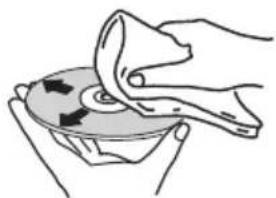
• Discs may not play if there are fingerprints or dust on them. In this case, use a cleaning cloth, etc., to gently wipe the disc from the inside towards the outside. Do not use dirty cleaning cloths.

About specially shaped discs
Specially shaped discs (heart-shaped, hexagonal, etc.) cannot be played on this unit. Do not attempt to play such discs, as they could damage this unit.
About iPod/iPhone/iPad
Made for

iPod

iPhone

iPad
"Made for iPod," "Made for iPhone," and "Made for iPad" mean that an electronic accessory has been designed to connect specifically to iPod, iPhone, or iPad, respectively, and has been certified by the developer to meet Apple performance standards. Apple is not responsible for the operation of this device or its compliance with safety and regulatory standards. Please note that the use of this accessory with iPod, iPhone, or iPad may affect wireless performance.
iPad, iPhone, iPod, iPod nano, iPod touch, and Retina are trademarks of Apple Inc., registered in the U.S. and other countries.
iPad Air, iPad mini, and Lightning are a trademark of Apple Inc.
Auto power off setting
Long press the ■ on the unit for 3 seconds to switch auto power off setting ON/OFF.
- The operation can be conducted using only the ■ on the unit.
- No need to set this using the remote control.
- Initial setting is set to ON.

Note
- When the auto power off is set to ON, "APD ON" will be displayed on the main display.
- When the auto power off is set to OFF, "APD OFF" will be displayed on the main display.
Restoring all the settings to the defaults
Use the steps below to restore the all settings to their defaults.
1 Press ⏻ STANDBY/ON to turn the power on.
2 Press CD on the remote control or INPUT on the main unit repeatedly to select CD input.
3 Press ▲ OPEN/CLOSE to open the disc tray.
4 Press ⏻ STANDBY/ON on the unit for
3 seconds while pressing ■.
- "DEFAULT" is displayed while the settings are being restored. Power is turned off.
- No need to set this using the remote control.
Specifications
- Amplifier section
RMS Power Output: 15 W + 15 W
(1 kHz, 10 %, T.H.D., 8 Ω)
- Tuner section
Frequency Range (FM) 87.5 MHz to 108 MHz
Antenna Input (FM)....75 Ω unbalanced
Frequency Range (AM)....522 kHz to 1620 kHz
Antenna (AM) Loop antenna
- Bluetooth
Version. Bluetooth Specification Ver. 3.0
Output Bluetooth Specification Class 2
Estimated line-of-sight transmission distance*
About 10 m
Frequency range 2.4 GHz
Modulation
FH-SS (Frequency Hopping Spread Spectrum)
Supported Bluetooth profiles....A2DP, AVRCP
Supported Codec .... SBC (Subband Codec)
Supported contents protection . . . . . . . . . . . . . SCMS-T
* The line-of-sight transmission distance is an estimate.
Actual transmission distances supported may differ
depending on surrounding conditions.
- Miscellaneous
iPod/iPhone connector port. 5 V, 1 A
USB terminal. 5 V, 2.1 A
Power source. . . . . . . . . . AC 220 V to 240 V, 50 Hz/60 Hz
Power consumption
Power on 38 W
Power stand-by 0.5 W or less
Power stand-by (BT STANDBY ON)....0.5 W or less
Dimensions ..... 215 mm (W) x 95 mm (H) x 315 mm (D)
Weight (without package) 2.0 kg
- Speaker
Magnetically shieled speaker system
Type
2-way type speaker system
5 cm Tweeter
10 cm Woofer
Maximum input power 15 W
Impedance....8Ω
Dimensions . . . . 130 mm (W) x 211.5 mm (H) x 240 mm (D)
Weight 2.0 kg/each
- Accessories
Remote control 1
AAA batteries (R03) 2
AM loop antenna....1
FM wire antenna 1
Power cord
iPhone/iPad Stand
Warranty card
Operating instructions (This document)

Note
- The specifications are applicable when the power supply is 230 V.
- Specifications and the design are subject to possible modifications without notice, due to improvements.
- iOS is a trademark on which Cisco holds the trademark right in the US and certain other countries.
© 2014 PIONEER HOME ELECTRONICS CORPORATION.
All rights reserved.
ATTENTION
POUR ÉVITER TOUT RISQUE D'ÉLECTROCUTION, NE PAS ENLEVER LE COUVERCLE (NI LE PANNEAU ARRIÈRE). AUCUNE PIÈCE RÉPARABLE PAR L'UTILISATEUR NE SE TROUVE À L'INTÉRIEUR. CONFIER TOUT ENTRETIEN À UN PERSONNEL QUALIFIÉ UNIQUEMENT.
D3-4-2-1-1_B1_Fr
AVERTISSEMENT
ATTENTION
1 Prise de connexion iPod/iPhone
2 Placez l'iPod/iPhone/iPad sur le support.
(30 stations FM / 15 stations AM)
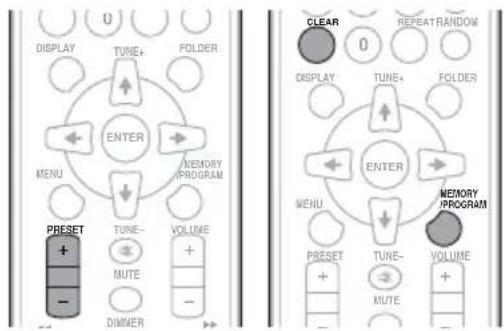
Education – Éducation
Drama – Pièces radiophoniques, etc.
Betriebsumgebung

ACHTUNG
1 iPod/iPhone-Port
Children's Progs – Kindersendungen
Social Affairs – Soziale
Themen
© 2014 PIONEER HOME ELECTRONICS CORPORATION.

ATTENZIONE
Education – Programmi educativi
Varied Speech – Talk show, quali quiz o interviste.
Pop Music – Musica pop
Rock Music – Musica rock
Easy Listening – Musica
leggera
Antenna AM a telaio....1
Antenna FM a filo....1
© 2014 PIONEER HOME ELECTRONICS CORPORATION.
Gebruiksomgeving
KLASSE 1 LASERPRODUCT
D58-5-2-2a_A1_NI
WAARSCHUWING NETSNOER
Auto Power Off-instelling 35
Alle instellingen op de beginstand terugzetten ..... 36
Specifications 36
Hoofdstuk 1:
Voordat u begint
Inhoud van de doos
WAARSCHUWING
(FM 30 stations/AM 15 stations)
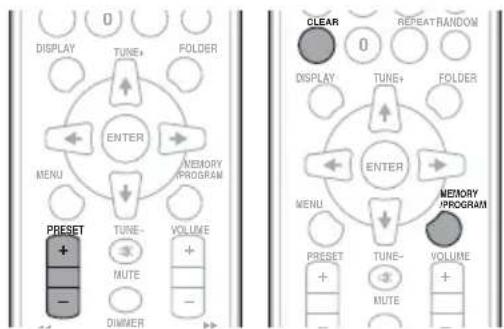
Education – Educatief
Drama – Hoorspelen e.d.
Cultures – Nationale of regionale cultuur, theater enz.
Science – Wetenschap en technologie
Varied Speech – Meestal praatprogramma's, zoals quizzen of interviews.
Auto Power Off-instelling
© 2014 PIONEER HOME ELECTRONICS CORPORATION.

PRECAUCIÓN
1 Puerto del conector del iPod/iPhone
3 Conecte el iPod/iPhone.
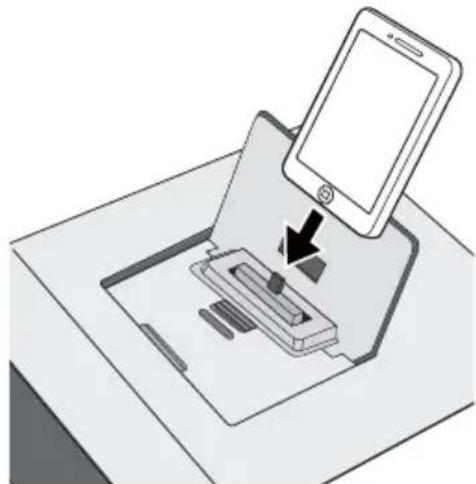
5 P u ▲ OPEN/©LOSE para cerrar la bandeja del disco.
Education – Material educativo
Drama – Radionovelas, etc.
Cultures – Cultura nacional o regional, teatro, etc.
Children's Progs – Programas infantiles
Social Affairs – Asuntos sociales
© 2014 PIONEER HOME ELECTRONICS CORPORATION.
ПРЕДУПРЕЖДЕНИЕ
3 Подключите ваш iPod/iPhone.

© PIONEER HOME ELECTRONICS CORPORATION, 2014.
Все права защищены.
Manufacturer:
PIONEER HOME ELECTRONICS CORPORATION
1-1, Shin-ogura, Saiwai-ku, Kawasaki-shi, Kanagawa 212-0031, Japan
EU Representative's:
Pioneer Europe NV
Haven 1087, Keetberglaan 1, 9120 Melsele, Belgium
http://www.pioneer.eu
[*] X-HM22-K, X-HM22-S
English:
Hereby, Pioneer, declares that this [*] is in compliance with the essential requirements and other relevant provisions of Directive 1999/5/EC.
Suomi:
http://www.pioneer.co.uk
http://www.pioneer.fr
http://www.pioneer.de
http://www.pioneer.it
http://www.pioneer.nl
http://www.pioneer.be
http://www.pioneer.es
http://www.pioneer-rus.ru
http://www.pioneer.eu
© 2014 PIONEER HOME ELECTRONICS CORPORATION.
All rights reserved.
© 2014 PIONEER HOME ELECTRONICS CORPORATION.
PIONEER HOME ELECTRONICS CORPORATION
1-1, Shin-ogura, Saiwai-ku, Kawasaki-shi, Kanagawa 212-0031, Japan
PIONEER ELECTRONICS (USA) INC.
P.O. BOX 1540, Long Beach, California 90801-1540, U.S.A. TEL: (800) 421-1404
PIONEER ELECTRONICS OF CANADA, INC.
340 Ferrier Street, Unit 2, Markham, Ontario L3R 2Z5, Canada TEL: 1-877-283-5901, 905-479-4411
PIONEER EUROPE NV
Haven 1087, Keetberglaan 1, B-9120 Melsele, Belgium TEL: 03/570.05.11
PIONEER ELECTRONICS ASIACENTRE PTE. LTD.
253 Alexandra Road, #04-01, Singapore 159936 TEL: 65-6472-7555
PIONEER ELECTRONICS AUSTRALIA PTY. LTD.
5 Arco Lane, Heatherton, Victoria, 3202, Australia, TEL: (03) 9586-6300
PIONEER ELECTRONICS DE MEXICO S.A. DE C.V.
Blvd.Manuel Avila Camacho 138 10 piso Col.Lomas de Chapultepec, Mexico, D.F. 11000 TEL: 55-9178-4270
K002*_B5_Ru
Сделано в Китае



