Blake TBL.14645 - Watch Timberland - Free user manual and instructions
Find the device manual for free Blake TBL.14645 Timberland in PDF.


Pick your language and provide your email: we'll send you a specifically translated version.
| Brand | Timberland |
| Model | Blake TBL.14645 |
| Product Type | Analog Watch |
| Movement | Quartz (battery-powered) |
| Case Material | Stainless steel |
| Case Diameter | 42 mm |
| Case Thickness | 10 mm |
| Band Material | Leather or silicone (depending on variant) |
| Band Width | 20 mm |
| Crystal | Mineral glass |
| Water Resistance | 50 meters (5 ATM) |
| Dial Color | Black or blue (typical) |
| Display | Analog with hour, minute, second hands |
| Date Function | Date window at 3 o'clock |
| Weight | Approximately 100 g |
| Power Source | Battery (SR626SW or equivalent) |
| Warranty | 2 years (manufacturer) |
| Care Instructions | Clean with soft cloth; avoid water contact with leather strap; replace battery when needed. |
| Safety | Not suitable for diving; avoid exposure to extreme temperatures. |
| Replacement Parts | Battery, strap, and buckle available from authorized service centers. |
Frequently Asked Questions - Blake TBL.14645 Timberland
How do I set the time on my Timberland Blake TBL.14645 watch?
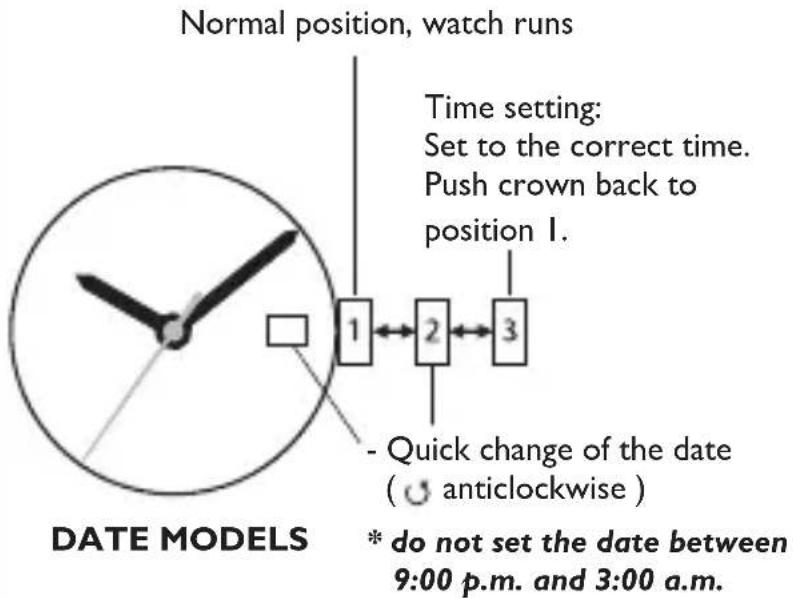
Pull the crown out to the first click. Turn it to adjust the time. Push back in to secure. For precise setting, ensure the crown is fully pushed in when done.Note: Avoid setting the date between 9 PM and 3 AM to prevent damage.
How do I change the battery?
We recommend taking the watch to a professional. If you have experience, use a case opener to remove the back cover. Replace with a SR626SW battery. Ensure proper sealing to maintain water resistance.
Is my Timberland watch water-resistant?
Yes, it has a water resistance rating of 50 meters (5 ATM). Suitable for splashes, rain, and hand washing, but not for swimming, diving, or showering.
How do I adjust the bracelet?
If it has a leather or silicone strap, use the buckle holes. For a metal bracelet, remove links using a pin pusher. Refer to the manual or visit a jeweler.Do not force the adjustment.
My watch loses time. What should I do?
First, check if the crown is fully pushed in. If still inaccurate, the battery may need replacement. Quartz movements are typically accurate to ±20 seconds per month. If excessive, consult a service center.
Can I wear my watch while exercising?
Yes, as it is water-resistant and durable. However, avoid heavy impact or exposure to sweat for long periods. Clean it after exercise with a dry cloth.Replace the strap if it becomes worn.
How do I clean my Timberland watch?
Use a soft, damp cloth to wipe the case and crystal. Avoid chemicals. For leather straps, use a leather cleaner. Dry thoroughly before wearing.Never immerse if the crown is pulled out.
What is the warranty period?
Timberland offers a 2-year warranty against manufacturing defects. It does not cover battery, strap wear, or damage from misuse. Keep your proof of purchase.
Why is the second hand not moving?
The battery may be dead. Open the case or have it replaced. If the battery is new, the movement could be jammed. Do not shake the watch. Contact support.
Where can I find replacement parts?
Visit an authorized Timberland dealer or service center. You can order straps, buckles, and batteries online. Ensure parts match the model Blake TBL.14645.
User questions about Blake TBL.14645 Timberland
0 question about this device. Answer the ones you know or ask your own.
Ask a new question about this device
No questions yet. Be the first to ask one.
Download the instructions for your Watch in PDF format for free! Find your manual Blake TBL.14645 - Timberland and take your electronic device back in hand. On this page are published all the documents necessary for the use of your device. Blake TBL.14645 by Timberland.
USER MANUAL Blake TBL.14645 Timberland