Timberland

Blanchard TBL.15270 - Watch Timberland - Free user manual and instructions

Find the device manual for free Blanchard TBL.15270 Timberland in PDF.

📄 10 pages English EN Download 💬 AI Question 10 questions ⚙️ Specs
Notice Timberland Blanchard TBL.15270 - page 1
Pick your language and provide your email: we'll send you a specifically translated version.
Product Type Watch
Brand Timberland
Model Blanchard TBL.15270
Movement Quartz
Display Analog
Case Material Stainless steel
Case Diameter 42 mm
Case Thickness 10 mm
Band Material Leather or stainless steel
Band Width 20 mm
Clasp Buckle
Dial Color Black or blue
Crystal Mineral
Water Resistance 50 meters
Calendar Date display
Battery Type SR920SW
Functions Hours, minutes, seconds, date
Weight Approx. 80 g
Warranty 2 years
Included Accessories Watch, user manual

Frequently Asked Questions - Blanchard TBL.15270 Timberland

How do I set the time on my Timberland Blanchard TBL.15270 watch?
Pull the crown out to the second position. Rotate the crown clockwise or counterclockwise to set the desired time. Push the crown back in to start the watch.
How do I adjust the date on my watch?
Pull the crown out to the first position. Turn the crown to change the date. Note: avoid setting the date between 9 PM and 3 AM to prevent damage.
Is the Timberland Blanchard TBL.15270 water-resistant?
Yes, it is water-resistant up to 50 meters (5 ATM). Suitable for swimming and showering, but not for diving.
What type of battery does this watch use and how do I replace it?
It uses a SR920SW battery. Replacement should be done by a professional to maintain water resistance.
Can I adjust the bracelet length?
Yes, if the band has removable links (metal) or holes (leather). For metal bands, use a pin removal tool. For leather, use a buckle adjustment.
How do I clean my Timberland watch?
Use a soft, damp cloth to wipe the case and band. Avoid chemicals. For leather bands, keep dry and avoid excessive water.
What is the warranty period for this watch?
Timberland offers a 2-year international warranty against manufacturing defects. Keep your proof of purchase.
Why is my watch running slow or fast?
Quartz watches are highly accurate; if it runs significantly off, the battery may be low or the movement may need servicing.
How can I download the user manual for the Blanchard TBL.15270?
You can download the manual from notice-facile.com in PDF format for free.
Does this watch have a chronograph or other complications?
The Blanchard TBL.15270 is a three-hand quartz watch with a date display. It does not include a chronograph function.

User questions about Blanchard TBL.15270 Timberland

0 question about this device. Answer the ones you know or ask your own.

Ask a new question about this device

The email remains private: it is only used to notify you if someone responds to your question.

No questions yet. Be the first to ask one.

Download the instructions for your Watch in PDF format for free! Find your manual Blanchard TBL.15270 - Timberland and take your electronic device back in hand. On this page are published all the documents necessary for the use of your device. Blanchard TBL.15270 by Timberland.

USER MANUAL Blanchard TBL.15270 Timberland

Timberland and are trademarks of TBI. Licensing LLC, 2016 × TBI. Licensing LLC. All rights reserved.

Timberland

Timberland Blanchard TBL.15270 - 1

VH63

INSTRUCTION MANUAL

Size: 170 x 55mm

Color: PMS 448c

Timberland Blanchard TBL.15270 - 2

natural_image Two adjacent solid gray rectangular panels with no text, numbers, or symbols.
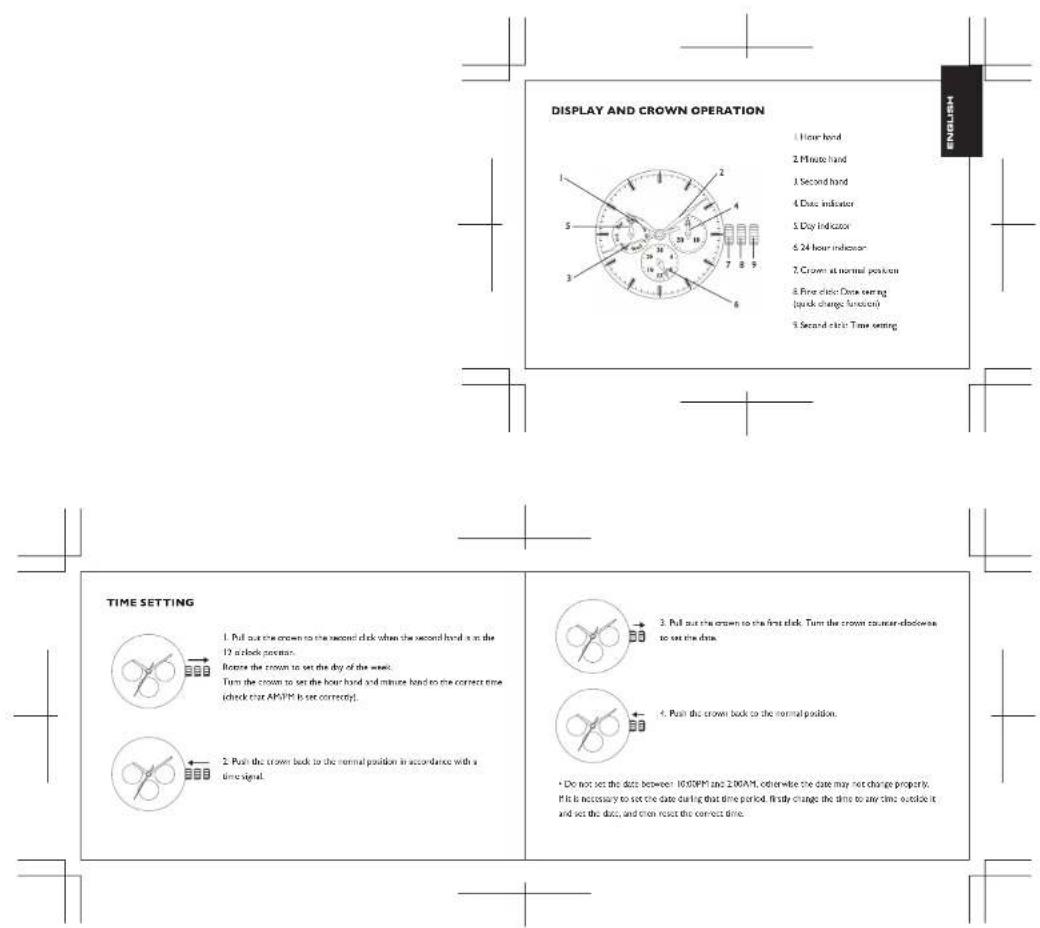
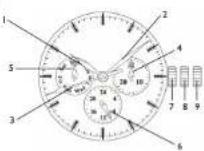
DISPLAY AND CROWN OPERATION 1 Hour hand 2 Minute hand 3 Second hand 4 Date indicator 5 Day indicator 6 24 hour indicator 7 Crown at normal position 8 Five clinic Data setting (quick change function) 9 Second clinic Time setting TIME SETTING 1. Pull out the crown to the second clock when the second hand is on the 12 a clock position. Before the crown to set the day of the week. Turn the crown to set the hour hand and minute hand to the correct time (check that AP/PM is set correctly). 2. Push the crown back to the normal position in accordance with a time signal. 3. Pull out the crown to the first clock. Turn the crown counter clockwise to set the data. 4. Push the crown back to the normal position. • Do not set the data between 10,00PM and 2,00AM, otherwise the date may not change properly. If it is necessary to set the date during that time period, firstly change the time to any time outside it and set the data, and then reset the correct time.

Timberland Blanchard TBL.15270 - 4

  1. Pull out the crown to the second clock when the second hand is on the 12 o'clock noon.

Notice the crown to set the dry of the week.

Turn the crown to set the hour hand and minute hand to the correct time (check that AP/PM is set correctly).

Timberland Blanchard TBL.15270 - 5

  1. Push the crown back to the normal position in accordance with a time signal.

Timberland Blanchard TBL.15270 - 6

  1. Pull out the crown to the first clock. Turn the crown caurer-clockwise to set the data.

Timberland Blanchard TBL.15270 - 7

  1. Push the crown back to the normal position

The image is too blurry to recognize any text content.
Timberland Blanchard TBL.15270 - 8

Timberland Blanchard TBL.15270 - 9

  1. Estrarse la corona al primo scato. Grarse la corona in serad antonio para impostore la abo.

Timberland Blanchard TBL.15270 - 10

目目

1.2.3.2017-12.31, 1965, 10:48, 10:48, 10:48, 10:48, 10:48, 10:48, 10:48, 10:48, 10:48, 10:48, 10:48, 10:48, 10:48, 10:48, 10:48,

Timberland Blanchard TBL.15270 - 11

natural_image Pure geometric diagram with a rectangle and surrounding lines, no text or symbols present
Manual assistant
Powered by Anthropic
Waiting for your message
Product information

Brand : Timberland

Model : Blanchard TBL.15270

Category : Watch