
LR8 S1 F S - Freezer INDESIT - Free user manual and instructions
Find the device manual for free LR8 S1 F S INDESIT in PDF.


| Product Type | Chest Freezer |
| Brand | Indesit |
| Model | LR8 S1 F S |
| Total Capacity | 200 L (approx. 7 cu ft) |
| Energy Class | A+ |
| Climate Class | N-T (16°C to 38°C) |
| Defrost Type | Manual |
| Control Type | Mechanical (dial) |
| Noise Level | 40 dB(A) |
| Freezing Capacity | 10 kg/24h |
| Temperature Range | -18°C to -24°C (adjustable) |
| Fast Freeze Function | Yes (switch on/off) |
| Door Opening | Removable door hinge |
| Interior Light | No |
| Overall Dimensions (H x W x D) | 850 x 1100 x 650 mm |
| Net Weight | 38 kg |
| Power Supply | 220-240 V, 50 Hz |
| Power Cord Length | 1.5 m |
| Refrigerant | R600a (isobutane) |
| Door Lock | Yes (key included) |
| Adjustable Feet | Yes (2 front) |
| Included Accessories | User manual, ice scraper, lock keys |
Frequently Asked Questions - LR8 S1 F S INDESIT
User questions about LR8 S1 F S INDESIT
0 question about this device. Answer the ones you know or ask your own.
Ask a new question about this device
Download the instructions for your Freezer in PDF format for free! Find your manual LR8 S1 F S - INDESIT and take your electronic device back in hand. On this page are published all the documents necessary for the use of your device. LR8 S1 F S by INDESIT.
USER MANUAL LR8 S1 F S INDESIT
THANK YOU FOR PURCHASING AN INDESIT PRODUCT
To receive more comprehensive help and support, please register your product at http://www.indesit.com/register/indesit.html

You can download the Safety Instructions and the Use and Care Guide by visiting our website www.indesit.eu and following the instructions on the back of this booklet.

Before using the appliance, carefully read the Health and Safety guide.
PRODUCT DESCRIPTION
APPLIANCE
Refrigerator compartment
- Fan
- Fan cover
- Electronic control panel / light unit
- Shelves
- Rating plate with commercial name
- Fruits and vegetables crisper
- Door reversibility kit
- Door trays
- Egg tray
- Bottle separator
- Bottle balcony
- Door seal
Freezer compartment
- Door seal
- Freezer drawers
- Shelves
- Bottom drawer: coolest zone best for freezing fresh food
- Ice tray
CONTROL PANEL
B. Thermostat Knob
A. Light bulb B. Thermostat knob C. Thermostat setting indicator D. Light button
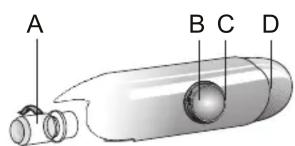
TEMPERATURE SETTING
Thermostat set to MIN: low cooling intensity Thermostat set between MIN and MAX: cooling intensity can be adjusted according to the preferences. Thermostat set to MAX: maximum refrigeration intensity.
For the best food conservation, the MED position is recommended. When the thermostat is set to •, cooling and lighting are off. Note: The displayed set points correspond to the average temperature throughout the entire refrigerator.
ACCESSORIES
EGG TRAY, BOTTLE HOLDER, ICE TRAY


FIRST TIME USE
HOW TO START THE APPLIANCE
After plugging the appliance into the mains, turn the thermostat knob to switch it on: cooling and light will switch on; set the knob to the desired power (see "Control panel" on page 1).
After starting the appliance, wait at least 4-6 hours before placing food into the fridge and the freezer compartment.
REFRIGERATOR LIGHT
To remove the light bulb, turn it anticlockwise as shown in the picture:

Check the bulb. If necessary, unscrew the broken bulb and replace it with a LED bulb of the same type, available only at our After-sales Service Centers or authorized dealers. The refrigerator compartment light switches on when the refrigerator door is opened.
SOME OF THE FUNCTIONAL SOUNDS YOU MIGHT HEAR
A hissing sound when switching on the appliance for the first time or after a long pause.

Buzzing sound when the water valve or fan starts working.

A gurgling sound when refrigerant fluid enters the pipes.

A cracking sound when the compressor starts.

BRRR sound is from the compressor running.

The CLICK is from the thermostat which adjusts how often the compressor is running.

Problem Possible Cause Solution
| THE APPLIANCE IS NOT WORKING There may be an appliance power supply problem. | >Check if power cable plugged into a live socket with the proper voltage.>Check if the protection devices and fuses of the electrical system in your home | |
| THERE IS WATER IN THE DEFROST PAN | This is normal in hot, damp weather.The pan can even be half full. | >Make sure the appliance is level so that the water does not overflow. |
| THE EDGES OF THE APPLIANCE CABINET, WHICH COME IN CONTACT WITH THE DOOR SEAL, ARE WARM TO THE TOUCH | This is not a defect.This is normal in hot weather and when the compressor is running. | |
| THE LIGHT DOES NOT WORK The light may need replacing.The appliance may be in On/Stand-by model | >Make sure if the protection devices and fuses of the electrical system in your home work well.>Check if the power cable is plugged into a live socket with the proper voltage>In case the LEDs are broken the user must call the Service for exchange of the same type available only at our After-sales Service Centers or authorized dealers. | |
| THE MOTOR SEEMS TO RUN TOO MUCH | Motor running time depends on different things: number of door openings, amount of food stored, temperature of the room, setting of the temperature controls. | >Make sure that the appliance controls are correctly set.>Check if there is not a large amount of food been added to the appliance.>Check that the door is not opened too often.>Check that the door close properly. |
| THE APPLIANCE TEMPERATURE IS TOO HIGH | There could be various causes (see “Solutions”) | >Make sure that the condenser (back the appliance) is free of dust and fluff.>Make sure that the door properly closed.>Make sure that the door seals properly fitted.>On hot days or if the room is warm, the motor naturally runs longer.>If the appliance door has been left open for a while or if large amounts of food have been stored, the motor will run longer in order to cool down the interior of the appliance. |
| THE DOORS DO NOT OPEN AND CLOSE PROPERLY | There could be various causes (see “Solutions”) | >Check that food packages are not blocking the door.>Check that the internal parts or automatic ice maker are not out of position.>Check that the door seals are not dirty or sticky.>Ensure the appliance is level. |
HOW TO STORE FOOD AND BEVERAGE

Legend TEMPERATE ZONE
Suggested for the storage of tropical fruit, cans, drinks, eggs, sauces, pickles, butter, jam
COOL ZONE
Suggested for storage of cheese, milk, dairy food, delicatessen, yogurt
FRUIT & VEGETABLE DRAWER
NORMAL FREEZER DRAWERS
FREEZING ZONE DRAWER
(MAX COOL ZONE) Suggested to freeze fresh/cooked food
Note: The Grey tone of the legend doesn't match with the color of drawers
FRIDGE COMPARTMENT
Use recyclable plastic, metal, aluminum and glass containers and cling film to wrap foods.
Always use closed containers for liquids and for food that may give off or be tainted by odor or flavor transfer, or cover them.
If you have a small quantity of food to store in the refrigerator, we recommend using the shelves above the crisper for fruits and vegetables, since this is the coolest area of the compartment.
Foods that give off a large amount of ethylene gas and those that are sensitive to this gas, such as fruit, vegetables, and salad, should always be separated or wrapped so as not to reduce the storage life; for example, do not store tomatoes together with kiwi fruits or cabbage.
To avoid bottles falling over, you can use the bottle holder (available on selected models).
Do not store food too close together to enable sufficient air circulation.
FREEZER COMPARTMENT
The freezer is the ideal storage location for store-bought frozen food, making ice cubes, and freezing fresh food in the freezer compartment.
The maximum number of kilograms of fresh food that can be frozen within a 24-hour period is indicated on the rating plate (...kg/24h).
If you have a small quantity of food to store in the freezer, we recommend using the coldest areas of your freezer compartment, corresponding to the bottom area.
PRODUCT FICHE
The product fiche with energy data of this appliance can be downloaded from the Indesit website www.indesit.eu
HOW TO OBTAIN THE USE AND CARE GUIDE
Download the Use and Care Guide from our website www.indesit.eu (you can use this QR Code), specifying the product's commercial code.
Alternatively, contact our Client After-sales Service.

CONTACTING OUR AFTER-SALES SERVICE
You can find our contact details in the warranty manual. When contacting our Client After-Sales Service, please state the codes provided on your product's identification plate.


Printed in Italy
- THANK YOU FOR PURCHASING AN INDESIT PRODUCT
- PRODUCT DESCRIPTION
- REFRIGERATOR COMPARTMENT
- FREEZER COMPARTMENT
- CONTROL PANEL
- TEMPERATURE SETTING
- ACCESSORIES
- FIRST TIME USE
- HOW TO START THE APPLIANCE
- REFRIGERATOR LIGHT
- SOME OF THE FUNCTIONAL SOUNDS YOU MIGHT HEAR
- HOW TO STORE FOOD AND BEVERAGE
- FRIDGE COMPARTMENT
- PRODUCT FICHE
- HOW TO OBTAIN THE USE AND CARE GUIDE
- CONTACTING OUR AFTER-SALES SERVICE
Brand : INDESIT
Model : LR8 S1 F S
Category : Freezer