
LLB992 - CD Player Lauson - Free user manual and instructions
Find the device manual for free LLB992 Lauson in PDF.


| Product Type | CD Player |
| Brand | Lauson |
| Model | LLB992 |
| Dimensions (W x H x D) | Approx. 280 x 90 x 240 mm |
| Weight | Approx. 2.5 kg |
| Power Supply | AC 220-240V, 50/60Hz or DC 12V (battery optional) |
| Playback Formats | Audio CD, CD-R, CD-RW |
| Functions | Play/Pause, Stop, Next/Previous, Repeat, Shuffle, Program |
| Output Power | 2 x 10W RMS |
| Connectivity | Headphone jack (3.5mm), Line Out (RCA) |
| Display | LED screen with track number and time |
| Control | Buttons on device and remote control |
| Protection Features | Anti-shock protection for portable use |
| Maintenance | Clean with soft dry cloth; avoid liquids; keep away from dust |
| Safety Precautions | Do not expose to moisture; use only supplied adapter; avoid extreme temperatures |
| Spare Parts & Repairability | Contact Lauson support for replacement parts; limited user-serviceable parts |
| General Information | Designed for home and personal use; compatible with standard audio CDs |
Frequently Asked Questions - LLB992 Lauson
User questions about LLB992 Lauson
0 question about this device. Answer the ones you know or ask your own.
Ask a new question about this device
Download the instructions for your CD Player in PDF format for free! Find your manual LLB992 - Lauson and take your electronic device back in hand. On this page are published all the documents necessary for the use of your device. LLB992 by Lauson.
USER MANUAL LLB992 Lauson
INSTRUCTION MANUAL
WARNINGS AND PRECAUTIONS

This symbol, located on the back or bottom of the unit, is intended to alert the user to the presence of uninsulated "dangerous voltage" within the Product's enclosure that may constitute a risk of electric shock to persons.

This symbol, located on the back or bottom of the unit, is intended to alert the user to the presence of important operating and maintenance(servicing) instructions in the literature Accompanying the appliance.

This product utilizes a Class 1 laser to read Compact Discs. This laser Compact Disc Player is equipped with safety switches to avoid exposure when the CD door is opened and the CD player's lid is damaged. Invisible laser radiation is present when the CD player is open and the system's interlock has failed or has been damaged. It is very important that you avoid direct exposure to the laser beam at all times. Please do not attempt to damage or bypass the safety switches.
CAUTION: TO PREVENT ELECTRIC SHOCK, ENSURE TO INSERT 2 PIN PLUG CORRECTLY INTO THE MATCHING SOCKET OR ADAPTOR.
To reduce the risk of electric shock, do not remove cover(or back). There are no user-serviceable parts inside. Please refer any servicing to qualified service personnel.
WARNING: Changes or modifications to this unit not approved by the party responsible for compliance could void the user's authority to operatic the equipment.
WARNING: To prevent fire or shock hazards, do not expose this unit to rain or moisture.
CAUTION: Danger of explosion if battery is incorrectly replaced, Replace only with the same or equivalent type.
Do not mix old and new batteries.
DO not mix alkaline, standard (carbon-zinc), or rechargeable (ni-cad, ni-mh, etc) batteries.
NOTE: This equipment has been tested and found to comply with the limits for a class B digital device, pursuant to part 15 of the FCC Rules. These limits are designed to provide reasonable protection against harmful interference in a residential installation. This equipment generates, uses, and can radio frequency energy and, if not installed and used in accordance with the instructions, may cause harmful interference to radio communications. However, there is no guarantee that interference will not occur in a particular installation. If this equipment does cause harmful interference to radio or television reception, which can be determined by turning the turning the equipment off and on, the user is encouraged to try to correct the interference by one or more of the following measures:
• Re-position or relocate the receiving antenna.
- Increase the separation between the equipment and receiver.
- Connect the equipment into an outlet on a circuit different form that to which the receiver is connected.
- Consult the dealer or an experienced radio/TV technician for help.
POWERING THE UNIT
AC Power
Plug the AC cord into a standard AC outlet (100-240V\~ 50/60Hz)
Battery Power
Requires 4 C batteries, not included.

natural_image
Line drawing of a portable radio with a control panel and power outlet (no text or symbols)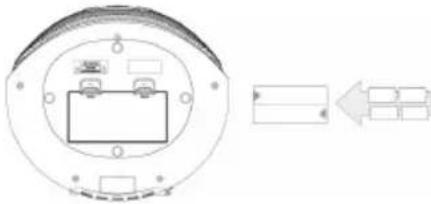
natural_image
Diagram of a circular device with internal components and an arrow indicating leftward movement (no text or symbols)TUNING THE FM RADIO
- Step 1: Adjust the Mode Button to FM mode. Extend the FM antenna to improve FM radio reception.
- Step 2: Short press PREV or NEXT to jump to the previous or next available station.
PLAYING A CD
• Step 1: Open the CD door, place a CD or CD-R/RW INTO THE PLAYER.
• Step 2: Adjust the Mode to CD mode.
• Step 3: Press the Play/Pause Button to begin playing the loaded CD.
USING THE AUXILIARY INPUT
- Step 1: Connect a mini-phone 3.5mm Cable (not included) to the Auxiliary. Input on the unit and the audio output on an MP3 player.
- Step 2: Adjust the Mode to AUX IN mode. Audio played through the connected MP3 player will now be heard through the unit.
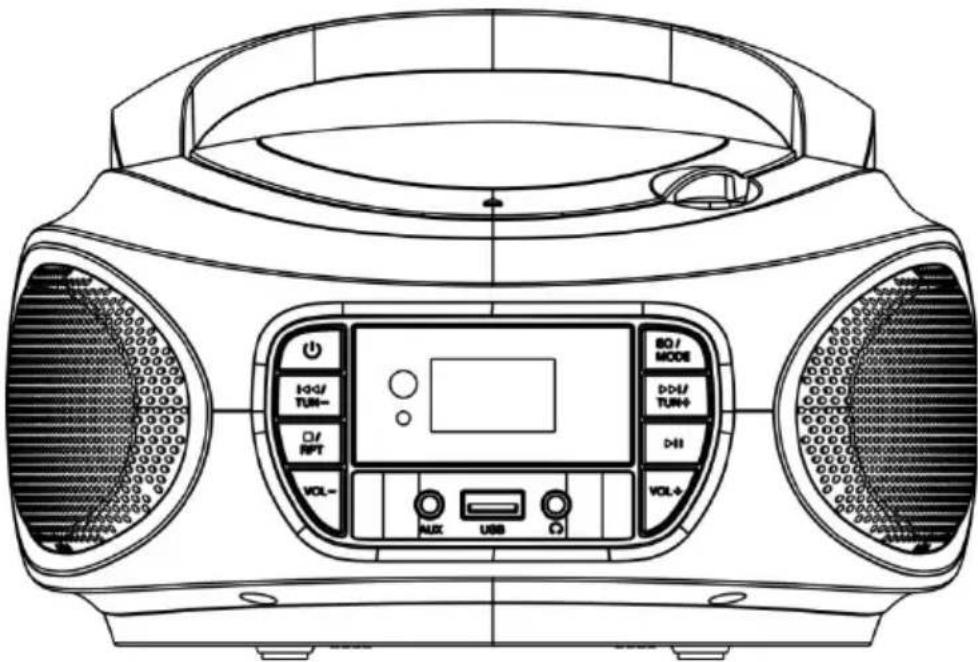
LOCATIONS OF CONTROLS

natural_image
Technical line drawing of a mechanical component with concentric and rounded layers (no text or symbols)
-
Open/Close
-
POWER: Under Standby mode, short press the boot, boot default FM, short press the power off.
-
PREV/TUN-,NEXT/TUN+
- In FM mode :One short press ,The frequency move towards or backwards. Long press Frequency scan FM station towards or backwards.
- In CD/USB Mode: One short press is for Pre or next program; Long press is for Fast backwards and towards.
• In AUX Mode: This keys no function
- STOP/REP/MEM:
- In FM mode: one time short press is for memorized frequency, maximum can memorize 20 frequency.
- In CD/USB Mode: in play mode, one time press for one music repeat ,press again for all program repeat ,one time short press delete this function and long press seconds stop play. In AUX mode: The key no function .
- VOL+/VOL-
- Short press one for Volume up or down one step, long press for Volume up and down continues. Maximum Volume is 32.
- AUX
Use the Auxiliary input to connect an external audio source (MP3 player) to the unit.
- USB Direct
Press mode key on unit or remote control to select USB mode, and
plug USB to playback music file.
8. EQ/MODE
- Long press EQ key for FLAT/CLASS/JAZZ/ROCK/POP mutual change ;
- In working mode :short press for Radio/CD/USB/AUX mutual change .
9. PLAY/PAUSE/P+/SCAN
- In FM mode: one time short press for sourcing frequency which memory; long press for 2 seconds for auto scan FM frequency.
- In CD/USB mode :first short press for Pause ,short press again for play ; In AUX mode :The key no function.
10. PHONES
11. AC Power Input
Use the AC Power Input to connect the unit to an AC power source.

DISPOSAL
This marking indicates that this product should not be disposed with other household wastes throughout the EU. To prevent possible harm to the environment or human health from uncontrolled waste disposal recycle it responsibly to promote the sustainable reuse of material resources
WARRANTY CONDITIONS
Thank you for purchasing this product. Lauson guarantees the proper functioning of its products for a period of 2 YEARS from the date of purchase, being responsible for any lack of conformity that manifests within this period, including the repair of the defects or the replacement of the product within the Union European
CLAIM PROCEDURE
The holder of the guarantee may contact the technical service by telephone at the number (00) 34 934 536 222 or visiting our Lauson website: www.lauson.es or by going directly to the purchasing center. Before claiming your rights as a consumer, make sure that the product meets the following requirements:
- The guarantee will be valid if it is presented duly completed with the reference of the model, serial number, date of purchase and establishment data. Being an essential requirement that is accompanied by the purchase ticket.
- In case of sending to repair the equipment, it must be in the same conditions (packaging, accessories, manuals ...) in which it was purchased, except for natural deterioration due to use. The guarantee does not cover damages caused by transportation due to inadequate packaging.
- Lauson reserves the right to refuse the guarantee in the event that some of the requested information is not specified, is not legible or is damaged.
- Damages or malfunctions caused by catastrophic causes, falls and blows due to incorrect use by the user, as well as erroneous feeding by energy sources or parts subject to natural wear and tear due to improper use are not covered by this guarantee.
- This product will lose its guarantee if it is handled by technicians or workshops outside our company.
- This guarantee is valid only in scope of the European community. The warranty terms contained in this certificate do not exclude, restrict or modify the rights that legally correspond to the buyer by application to Royal Legislative Decree 1/2007 of November 16.
lauson
RADIO CD
natural_image
Line drawing of a portable radio with a control panel and power outlet (no text or symbols)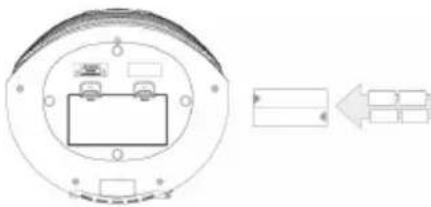
natural_image
Technical diagram of a circular mechanical component with internal components and an arrow indicating direction (no text or symbols)SINTONIZANDO LA RADIO FM
natural_image
Technical line drawing of a mechanical component with concentric and rounded features (no text or symbols)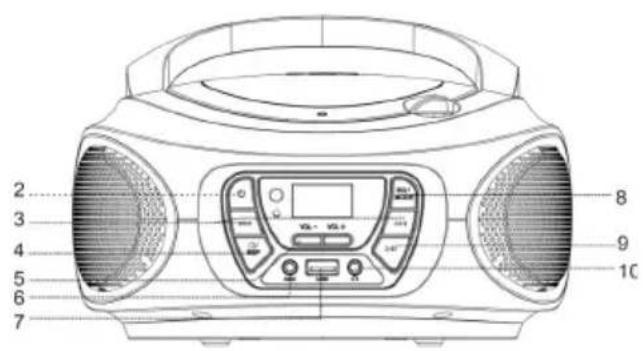
1. Abrir / Cerrar
Use the Auxiliary input to connect an external audio source (MP3 player) to the unit.
6. USB Directo
BEDIENUNGSANLEITUNG
WARNINGS AND PRECAUTIONS

natural_image
Line drawing of a portable electronic device with a control panel and power outlet (no text or symbols)Batterieleistung
natural_image
Diagram of a circular electronic component with internal components and an arrow indicating direction (no text or symbols)UKW-RADIO ABSTIMMEN
natural_image
Technical line drawing of a mechanical component with concentric and rounded features (no text or symbols)
DECLARATION OF CONFORMITY
Declares that the product listed below:
Product Type: Portable CD Audio system
Model Number: LLB992/ LLB993/ LLB994/ LLB995/ LLB996/ LLB997/ LLB998/ LLB999
LLB792/ LLB793/ LLB794/ LLB795/ LLB796/ LLB797/ LLB798/ LLB799
NXT962/ NXT963/ NXT964/ NXT965/ NXT762/ NXT763/ NXT764/ NXT765
I, the undersigned, under our responsibility, declare that the equipment specified above conforms to 2009/125/EC 2012/27/EU 2013/12/EU 2014/30/EU 2014/35/EU
Company Representant: Marc Solanas
Position: General Manager
Signature:
LAUSON, S. L.
C/ Viladomat, 291, 7º - 2ª
08029 Barcelona
N.I.F. B=60421062
Date: AUG, 2019

Lauson products are subject to high quality and design inspections. As a result, our products have very low failure rates. For this reason, we are the only brand in the sector that offers a 5-year free warranty.
In order to enjoy this guarantee extension, the producto must be registered on our website www.lauson.es before the 30-day period from the date of purchase. Once registered your product will be covered with our 5 year warranty.
We thank you for the trust placed in us and we are sure that you will be 100% satisfied.


- INSTRUCTION MANUAL
- WARNINGS AND PRECAUTIONS
- POWERING THE UNIT
- AC Power
- Battery Power
- TUNING THE FM RADIO
- PLAYING A CD
- USING THE AUXILIARY INPUT
- LOCATIONS OF CONTROLS
- EQ/MODE
- PLAY/PAUSE/P+/SCAN
- PHONES
- AC Power Input
- DISPOSAL
- WARRANTY CONDITIONS
- CLAIM PROCEDURE
- lauson
- RADIO CD
- SINTONIZANDO LA RADIO FM
- Abrir / Cerrar
- USB Directo
- BEDIENUNGSANLEITUNG
- Batterieleistung
- UKW-RADIO ABSTIMMEN
- DECLARATION OF CONFORMITY
Brand : Lauson
Model : LLB992
Category : CD Player