
KMS-10 - Microphone DENVER - Free user manual and instructions
Find the device manual for free KMS-10 DENVER in PDF.


| Product Type | Dynamic Microphone |
| Model | Denver KMS-10 |
| Polar Pattern | Cardioid |
| Frequency Response | 50 Hz - 15 kHz |
| Impedance | 600 ohms |
| Connector | XLR (3-pin male) |
| Cable Length | 5 meters (16.4 ft) |
| Dimensions (approx.) | 170 x 50 mm (6.7 x 2.0 in) |
| Weight | 300 g (10.6 oz) |
| Color | Black with silver grille |
| Power Requirement | No external power (passive) |
| On/Off Switch | Yes, on microphone body |
| Included Accessories | Microphone clip, windscreen, carrying pouch |
| Maintenance | Clean with dry cloth; avoid moisture |
| Safety | Keep away from extreme temperatures and humidity |
| Spare Parts | Contact Denver support for replacement cables or grilles |
| Repairability | No user-serviceable parts; refer to authorized service |
| General Use | Ideal for karaoke, home vocal recording, and PA systems |
Frequently Asked Questions - KMS-10 DENVER
User questions about KMS-10 DENVER
0 question about this device. Answer the ones you know or ask your own.
Ask a new question about this device
Download the instructions for your Microphone in PDF format for free! Find your manual KMS-10 - DENVER and take your electronic device back in hand. On this page are published all the documents necessary for the use of your device. KMS-10 by DENVER.
USER MANUAL KMS-10 DENVER
DENVER KMS-10 INSTRUCTION MANUAL
WWW.DENVER-ELECTRONICS.COM
Please read this instruction manual carefully before start using the product.
Product Overview
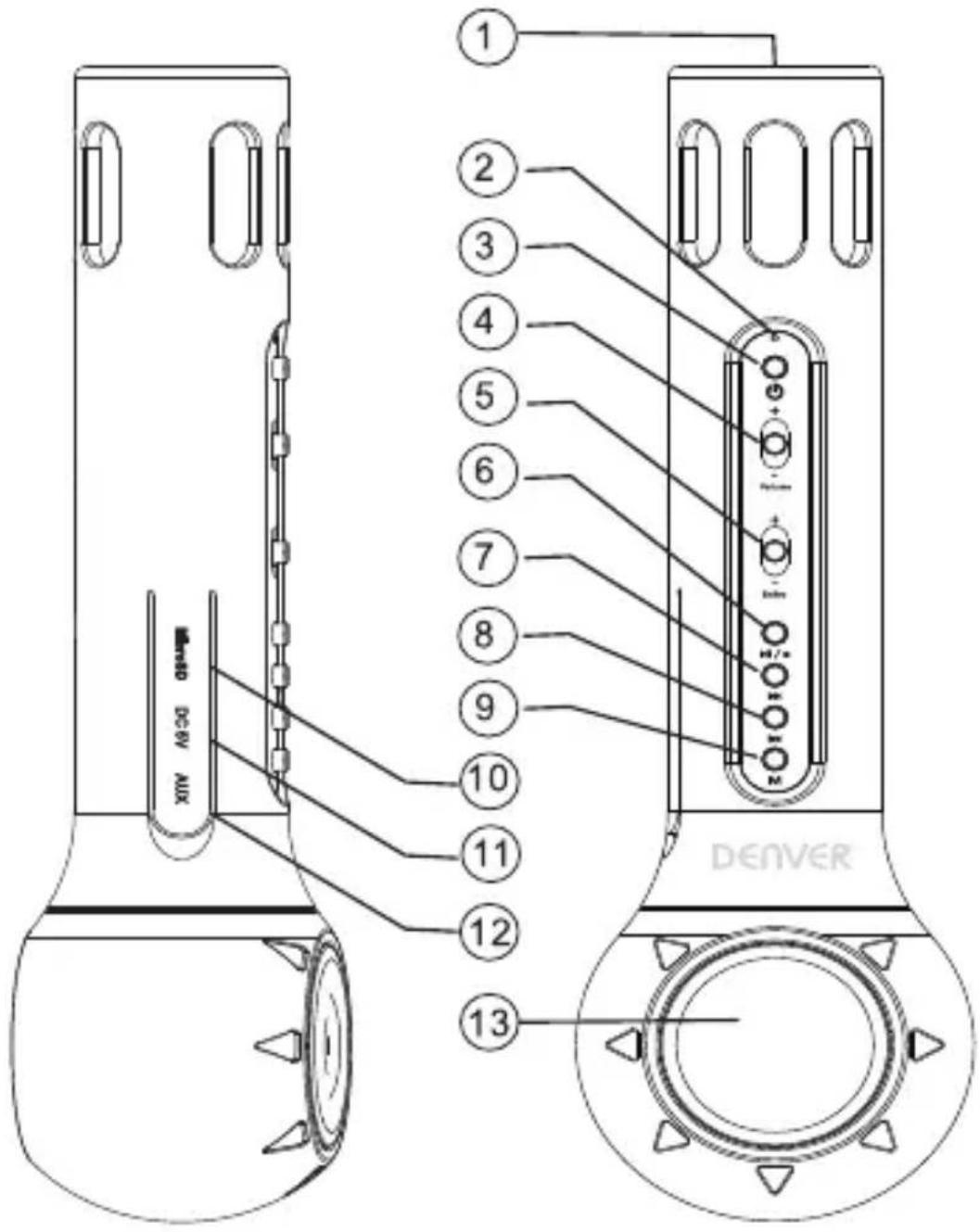
| 1. Microphone | |
| 2. Indicator | 1) Bluetooth mode: Blue LED blinks fastly when bluetooth searching; Blinks solid when bluetooth connected successfully; Blinks slowly when playing, blinks solid when pause.2) TF card mode: Blue LED blinks slowly when playing, blinks solid when pause.3) AUX mode: Blue LED blinks solid4) Charging mode: Red LED lights on when charging, lights off when fully charged. |
| 3. Power on/off | Keep pressing the key 2 seconds to turn on/off the microphone. The blue indicator on when the unit powers on |
| 4. Volume up/down | Increase (*) or decrease (-) the volume which is played. In the control set to OFF (total to -) the music is muted. |
| 5. Echo | Set echo effect (-more echo) / (- less echo) |
| 6. Play/Pause | Press the Play/Pause button to play music. |
| 7. Next track | Short press to move to next track |
| 8. Last track | Short press to go back to last track |
| 9. Mode | Short press to switch TF card and bluetooth mode |
| 10.MicroSD | |
| 11. USB charging port(DC/SV) | |
| 12. AUX | |
| 13. Loudspeaker |
TF Card Mode
Turn on the microphone, plug MicroSD in the slot, it begins streaming music. Press the key “/” to play/pause; press the key “◀◀” to go back to last track; press the key “▶◀” to move on to next track.
Bluetooth Mode
Turn on microphone, bluetooth works spontaneously, searching previous pairing Bluetooth device. If the microphone fails to link, it starts pairing other Bluetooth devices. In this case, turn on your Bluetooth device to search the microphone. The PIN code is "0000". Music streams after pairing successfully.
LINE-IN Mode
Plug one end of 3.5mm cable into AUX slot of the speaker and the other end into audio slot of Mobile Phone, Notebook, Tablet PC, MP3/MP4 Player etc. After that, it will be able to be in music mode. User could starting singing follow music. Short press the key "▶/||" to play/pause, Long press ▶/||" to change mode.
Karaoke Mode
Under any mode, enjoy your mobile karaoke time with friends and families
Indicator
2) Bluetooth mode: Blue LED blinks fastly when bluetooth searching; Blinks solid when bluetooth connected successfully; Blinks slowly when playing, blinks solid when pause.
2) TF card mode: Blue LED blinks slowly when playing, blinks solid when pause.
3) AUX mode: Blue LED blinks solid
4) Charging mode: Red LED lights on when charging, lights off when fully charged.
Charging Mode
Plug the MICRO USB into Micro USB slot of microphone, USB slot of PC or other USB slot of chargers to get charged. When the microphone is being charged, red LED lights on. Once it is fully charged, the indicator light turns off. (We'd suggest the users turning off while charging. It takes longer time to get fully charged if it works when being charged.)
Specification
| Bluetooth version | 4.2 |
| Microphone system | Mono |
| Adjusting way | Button |
| Power supply | DC 5V, lithium battery |
| Battery capacity | 3.7V 2000MAH |
| Maximum sound pressure level | >115db 1khz THD<1% |
| Diameter of Loudspeaker | 52mm |
| Loudspeaker Impedance | 4Ω/3W |
| Antimagnetic function | Available |
| Material | PC+ABS+silicone |
| Function | Mobile karaoke, meeting, family KTV |
ALL RIGHTS RESERVED, COPYRIGHT DENVER ELECTRONICS A/S
DENVER®
www.denver-electronics.com


Electric and electronic equipment and included batteries contains materials, components and substances that can be hazardous to your health and the environment, if the waste material (discarded electric and electronic equipment and batteries) is not handled correctly.
Electric and electronic equipment and batteries is marked with the crossed out trash can symbol, seen below. This symbol signifies that electric and electronic equipment and batteries should not be disposed of with other household waste, but should be disposed of separately.
As the end user it is important that you submit your used batteries to the appropriate and designated facility. In this manner you make sure that the batteries are recycled in accordance with legislature and will not harm the environment.
All cities have established collection points, where electric and electronic equipment and batteries can either be submitted free of charge at recycling stations and other collection sites, or be collected from the households. Additional information is available at the technical department of your city.
Hereby, Inter Sales A/S declares that the radio equipment type KMS-10 is in compliance with Directive 2014/53/EU. The full text of the EU declaration of conformity is available at the following internet address: http://www.denver-electronics.com/denver-KMS-10Blue/ http://www.denver-electronics.com/denver-KMS-10Pink/ http://www.denver-electronics.com/denver-KMS-10White/ Operating Frequency Range: 100Hz-10KHz
Imported by:
DENVER ELECTRONICS A/S
Omega 5A, Soeften
DK-8382 Hinnerup
Denmark
www.facebook.com/denverelectronics
DENVER®
natural_image
Three Denver-branded audio recording devices with visible sound waves and control knobs (no text or symbols on device body)▶/II "for at skifle tilstand.
Karaoketilstand
Du kan nyde mobil karøketid med venner og familie I alle tilstande
Indikator
natural_image
Three Denver-branded audio recording devices with colorful knobs and buttons, no visible text or symbols on the devices themselves.natural_image
Three Denver-branded audio recording devices with colorful knobs and buttons, displayed side by side (no text or symbols on device body)natural_image
Three Denver-branded audio synthesizer devices shown in grayscale, pink, and blue colors (no text or symbols visible on devices)natural_image
Three Denver-branded audio recording devices shown in different colors (white, gray, pink, blue) with no visible text or symbols on the devices themselves.BLUETOOTH KARAOKE MICROPHONE SPEAKER
DENVER KMS-10
BEDIENUNGSANLEITUNG
WWW.DENVER-ELECTRONICS.COM
natural_image
Three Denver-branded audio synthesizer devices shown in grayscale, pink, and blue colors with no visible text or symbols on the devices themselves.BLUETOOTH KARAOKE MICROPHONE SPEAKER
DENVER KMS-10
MANUALE DI ISTRUZIONI
WWW.DENVER-ELECTRONICS.COM
natural_image
Three Denver-branded digital devices with colorful buttons and display screens (no visible text or symbols on the devices themselves)BLUETOOTH KARAOKE MICROPHONE SPEAKER
DENVER KMS-10
BRUKSANVISNING
WWW.DENVER-ELECTRONICS.COM
natural_image
Three Denver-branded digital devices with colorful handles and control knobs, displayed side by side (no visible text or symbols on the devices themselves)natural_image
Three Denver-branded audio synthesizer devices with colorful knobs and buttons (no visible text or symbols on the devices themselves)MANUAL DE INSTRUÇÕES
WWW.DENVER-ELECTRONICS.COM
natural_image
Three Denver-branded digital devices with colorful buttons and a central circular button, shown from different angles (no text or symbols on the devices themselves)BLUETOOTH KARAOKE MICROPHONE SPEAKER
DENVER KMS-10
MANUAL DE INSTRUCCIONES
WWW.DENVER-ELECTRONICS.COM
natural_image
Three Denver-branded digital devices with colorful buttons and speaker lights, displayed side by side (no text or symbols on the devices themselves)BLUETOOTH KARAOKE MICROPHONE SPEAKER
DENVER KMS-10
BRUKSANVISNING
WWW.DENVER-ELECTRONICS.COM
Brand : DENVER
Model : KMS-10
Category : Microphone