X350 - 3D Printer German RepRap - Free user manual and instructions
Find the device manual for free X350 German RepRap in PDF.


Pick your language and provide your email: we'll send you a specifically translated version.
| Product Type | 3D Printer |
| Brand | German RepRap |
| Model | X350 |
| Build Volume (X × Y × Z) | 350 × 350 × 350 mm |
| Filament Diameter | 1.75 mm |
| Supported Filaments | PLA, ABS, PETG, TPU, Nylon, Polycarbonate |
| Layer Resolution | 50 to 300 microns |
| Extruder Type | Single direct drive |
| Nozzle Diameter | 0.4 mm (interchangeable) |
| Print Bed | Heated aluminum plate with build surface |
| Max Bed Temperature | 120 °C |
| Connectivity | USB, SD card, Ethernet, Wi-Fi (optional) |
| Software | Repetier-Host, Simplify3D, Cura |
| Dimensions (W × D × H) | 600 × 600 × 700 mm |
| Weight | 35 kg |
| Power Supply | 110-240 VAC, 50/60 Hz |
| Power Consumption | 500 W max |
| Operating Temperature | 15 to 35 °C |
| Safety Features | Thermal runaway protection, covered electronics, filament runout sensor |
| Maintenance | Clean nozzle, lubricate rails, check belt tension, level bed regularly |
| Spare Parts Availability | Nozzles, build plates, belts, hotend assemblies sold separately |
| Repairability | Modular design; user replaceable parts with basic tools |
Frequently Asked Questions - X350 German RepRap
How do I level the print bed on the German RepRap X350?
Use the auto-leveling function via the menu, or manually adjust the four corners using a piece of paper until there is slight friction between the nozzle and the bed.
What filament types are compatible with the X350?
The X350 supports a wide range of 1.75 mm filaments including PLA, ABS, PETG, TPU, Nylon, and Polycarbonate. Always consult the manual for temperature settings.
How do I change the nozzle on the X350?
Heat the hotend to 200°C, then carefully unscrew the old nozzle using a wrench. Insert the new nozzle and tighten gently. Allow to cool before use.
Why is my print not sticking to the bed?
Ensure the bed is level, the first layer height is correct, and the bed temperature is appropriate (e.g., 60°C for PLA). Clean the bed with isopropyl alcohol to remove oils.
How do I update the firmware on the X350?
Download the latest firmware from the German RepRap website, copy it to an SD card, insert into the printer, and follow the on-screen update procedure.
What slicer software should I use?
The X350 is compatible with Repetier-Host, Cura, and Simplify3D. Configure the printer settings with the appropriate build volume and filament diameter.
How do I clean the extruder?
Heat the extruder to 230°C, then use a cleaning filament or a nylon brush to remove debris. Perform cold pulls if clogs are stubborn.
The printer is making unusual noises. What should I do?
Check that the belts are properly tensioned, the linear rails are lubricated, and no obstructions exist. Tighten any loose screws.
Can I print with flexible filaments?
Yes, the X350's direct drive extruder handles flexible filaments like TPU well. Use a slower print speed and higher temperature for best results.
How do I replace the build plate?
Remove the clips or screws holding the current plate. Clean the heater bed and apply a new build surface (e.g., PEI sheet). Re-secure and level the bed.
User questions about X350 German RepRap
0 question about this device. Answer the ones you know or ask your own.
Ask a new question about this device
No questions yet. Be the first to ask one.
Download the instructions for your 3D Printer in PDF format for free! Find your manual X350 - German RepRap and take your electronic device back in hand. On this page are published all the documents necessary for the use of your device. X350 by German RepRap.
USER MANUAL X350 German RepRap
natural_image
Exterior view of a modern 3D printer with visible internal structure and branding (no text or symbols on the device itself)natural_image
Close-up of a metallic screw head with a red circle highlighting the component (no text or symbols visible)
natural_image
Close-up of a mechanical testing setup with two circular components and a red oval highlight (no text or symbols visible)Abfallbehälter
natural_image
Close-up of a 3D printer's internal structure with a highlighted connector (no readable text or symbols)Einstellrad
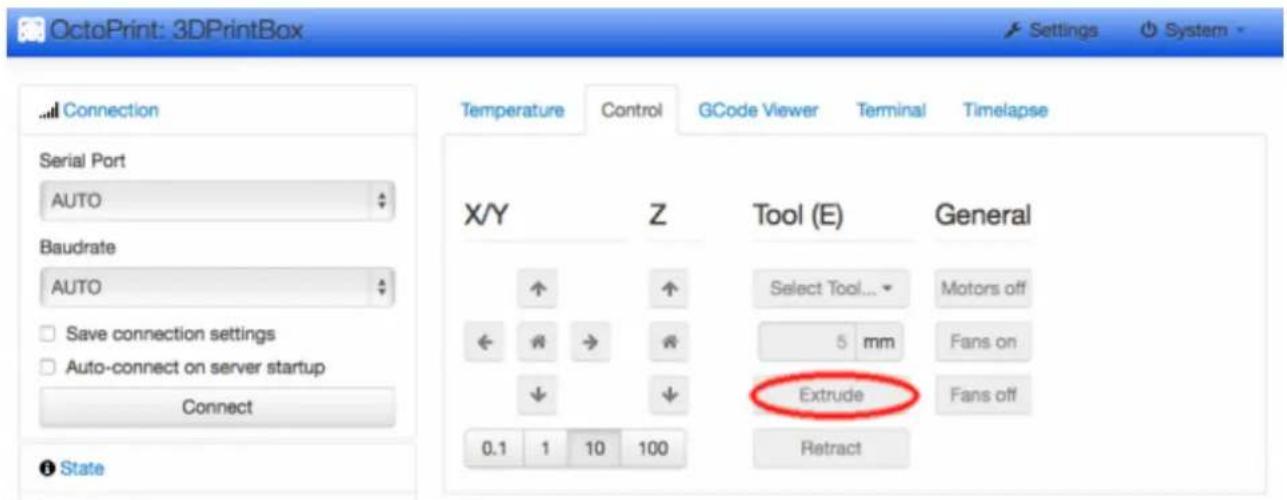

Manuelle Extrusion
Filament entnehmen
Manueller Retract
Filamentwechsel
Support-Tickets / E-Mail
FAQ - Frequently asked Questions