P125 - Receiver Russound - Free user manual and instructions
Find the device manual for free P125 Russound in PDF.


| Product Type | Stereo Power Amplifier |
| Brand | Russound |
| Model | P125 |
| Power Output | 125 Watts per channel (8 ohms) |
| Total Harmonic Distortion | <0.03% |
| Frequency Response | 20 Hz – 20 kHz (±0.5 dB) |
| Input Sensitivity | 1.2V (RCA) |
| Input Impedance | 47 kΩ |
| Speaker Impedance | 4 – 8 ohms |
| Signal-to-Noise Ratio | >95 dB |
| Dimensions (W x H x D) | 17.0 x 3.5 x 12.5 inches |
| Weight | 12.5 lbs |
| Power Supply | 120V AC, 60 Hz |
| Power Consumption | 500W max |
| Inputs | 1 pair RCA, 1 pair balanced XLR |
| Outputs | 2 pairs binding posts (left/right) |
| Trigger Input | 12V DC |
| Cooling | Convection, internal fan |
| Protection Features | Short circuit, thermal, overcurrent |
| Recommended Use | Home audio, multi-room systems |
| Cleaning Instructions | Wipe with dry cloth; do not use liquids |
| Spare Parts Availability | Contact Russound customer support |
| Repairability Index | 7/10 (serviceable by technician) |
Frequently Asked Questions - P125 Russound
User questions about P125 Russound
0 question about this device. Answer the ones you know or ask your own.
Ask a new question about this device
Download the instructions for your Receiver in PDF format for free! Find your manual P125 - Russound and take your electronic device back in hand. On this page are published all the documents necessary for the use of your device. P125 by Russound.
USER MANUAL P125 Russound
WARNING: TO REDUCE THE RISK OF FIRE OR ELECTRIC SHOCK, DO NOT EXPOSE THIS APPLIANCE TO RAIN OR MOISTURE.

CAUTION: TO REDUCE THE RISK OF ELECTRIC SHOCK, DO NOT REMOVE THE COVER. NO USER-SERVICEABLE PARTS INSIDE. REFER SERVICING TO QUALIFIED SERVICE PERSONNEL.
The lightning flash with arrowhead symbol, within an equilateral triangle, is intended to alert the user to the presence of uninsulated dangerous voltage within the product's enclosure that may be of sufficient magnitude to constitute a risk of electric shock to persons.
The exclamation point within an equilateral triangle is intended to alert the user to the presence of important operating and maintenance (servicing) instructions in the literature accompanying the appliance.
Safety Instructions
- Read Instructions - All the safety and operating instructions should be read before the appliance is operated.
- Retain Instructions - The safety and operating instructions should be retained for future reference.
- Heed Warnings - All warnings on the appliance in the operating instructions should be adhered to.
- Follow Instructions - All operating and user instructions should be followed.
-
Water and Moisture - The appliance should not be used near water; for example, near a bathtub, washbowl, kitchen sink, laundry tub, in a wet basement, or near a swimming pool. The apparatus shall not be exposed to dripping or splashing liquids and no objects filled with liquids, such as vases, shall be placed on the apparatus.
-
Carts and Stands - The appliance should be used only with a cart or stand that is recommended by the manufacturer. An appliance and cart combination should be moved with care. Quick stops, excessive force and uneven surfaces may cause the appliance and cart combination to overturn.
- Location of the Amplifier - Do not mount this unit under a kitchen cabinet. Do not expose the amplifier to direct sun light or heating units as the amplifier internal components' temperature may rise and shorten the life of the components. Avoid damp and dusty places.
- Ventilation - The appliance should be situated so that its location or position does not interfere with its proper ventilation. For example, the appliance should not be situated on a bed, sofa, rug, or similar surface that may block the ventilation openings, or placed in a built-in installation, such as a bookcase or cabinet that may impede the flow of air through the ventilation openings.
- Heat - The appliance should be situated away from heat sources such as radiators, heat registers, stoves, or other appliances (including amplifiers) that produce heat.
- Power Sources - The appliance should be connected to a power supply only of the type described in the operating instructions or as marked on the appliance.
- Grounding or Polarization - Precaution should be taken so that the grounding or polarization means of an appliance is not defeated.
- Power Cord Protection - Power supply cords should be routed so that they are not likely to be walked on or pinched by items placed upon or against them, paying particular attention to cords at plugs, receptacles, and the point where they exit from the appliance.

- Main Power Disconnect - The power switch is a single-pole switch. When the switch is in the "Off" position, the appliance is not completely disconnected from the main power. The main power plug is used as the disconnect device and shall remain readily operable. When installing the product, ensure that the plug is easily accessible.
- Cleaning - The appliance should be cleaned only as recommended by the manufacturer.
- Non-Use Periods - The power cord of the appliance should be unplugged from the outlet when left unused for a long period of time. To remove all power (supply mains) from the appliance, remove the plug from the wall outlet.
- Object and Liquid Entry - Care should be taken so that objects do not fall and liquids are not spilled into the enclosure through the openings.
- Servicing - The user should not attempt to service the appliance beyond that described in the operating instructions. All other servicing should be referred to qualified service personnel.
- Damage Requiring Service - The appliance should be serviced by qualified service personnel when:
A. The power supply cord or the plug has been damaged.
B. Objects have fallen, liquid has been spilled into the appliance;
C. The appliance has been exposed to rain; or
D. The appliance does not appear to operate normally; or
E. The appliance has been dropped or the enclosure is damaged.

When installing the P125 Amplifier, the clearances shown here MUST be kept for proper ventilation of the amplifier.
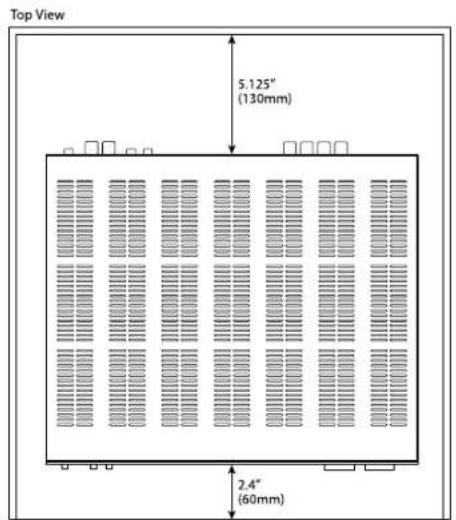
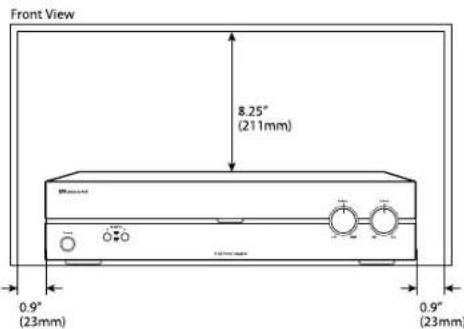
Table of Contents Clearance Requirements
Safety Instructions....2
Product Overview 4
Front and Rear Panels 5
System Configuration - Stereo Mode....6
System Diagram - Stereo Mode....7
System Configuration - Bridged Mode 8
System Configuration - Basic Speaker Connection....9
System Configuration - External Volume Control....9
Technical Specifications....10
Warranty 11
PRODUCT OVERVIEW
Introduction
The Russound P125 is 2-channel dual source power amplifier with auto-source switching. Features Primary and Secondary audio line inputs with a loop out to another zone, receiver, or device from the secondary source. A speaker-level input can be connected and assigned as either the primary or secondary source. This amplifier can be used for power upgrades in zones for large speaker selector or volume control systems.
The P125 is rated at 125 watts per channel into 4 ohms, and 80 watts into 8 ohms. Output channel incorporates robust protection circuitry for reliability and safety under extreme circumstances.
With the Stereo/Bridge Mono switch in the Bridge Mono position, channels are combined for a higher powered mono output. In Bridge mode the P125 is rated at 250 watts of power into a single 8 ohm load.
The 12V Trigger In/Out allows each amplifier to be activated by other devices or to activate other electronics via a 3.5 mm mini phone plug cable, with 100mA current capability.
Thermal Protection
The P125 is designed with special circuitry to safeguard the amplifier under a thermal overload condition. Thermal protection mode will only engage when the unit has been run at high volume for extended periods of time without adequate ventilation and/or when speaker impedances are below the minimum levels for the amplifier. In thermal protection mode the amplifier will automatically stop output. If this fault occurs, turn off the amplifier, and check that the speaker impedance rating is above the minimum rating. Also check for adequate ventilation around the amplifier and make adjustments if necessary. Once the unit has cooled to safe operating temperatures, the amplifier may be powered back on.
Protection Circuitry
Special circuitry has been designed into the amplifier to safeguard under a short-circuit condition. A faulty speaker can also cause a short circuit condition. If this fault condition occurs, turn off the amplifier and check speakers for short circuit conditions when appropriate. The amplifier power must be cycled for the unit to return to normal operation.
Installation
The P125 amplifier can be placed on a shelf in an equipment rack or on a table or cabinet. Be sure to follow the required clearances shown on page 3 to allow for ventilation and heat dissipation.
Front Panel Controls
On the front panel of the P125 amplifier is the power button plus speaker selector, balance and volume adjustment.
Power - the front panel switch will manually switch the power on or off.
Speaker selector - select speaker pair A (main) or speaker pair B (auxiliary) for audio output. You can use speakers A and B together, as long as the speakers are at a minimum 8-ohm impedance.
Power LED indicator - RED = ON, RED = Standby. AMBER = 12V Trigger switched on.
Balance - adjust speaker output balance between right and left channels. The default setting is at center.
Volume - adjust the speaker output volume. If using Bridged mode, set the volume at minimum, then adjust to the desired level.
Power On - Manual, Auto, Remote
The P125 amplifier can be turned on manually or automatically by setting a switch on the rear panel. For manual power on or off, set the switch to Normal and press the Power button on the front panel. For automatic power on, set the switch to Auto On. When music is sensed on any input, the amplifier's signal sensing sends a command for it to power on. Once the signal ends, the amplifier turns off in about 4 minutes. To turn the amplifier on remotely, set the switch to Trigger and connect a 3.5mm phone plug remote triggering wire from the device to the 12V Trigger In on the amplifier.
NOTE: The front panel Power button must be in the "On" position for the 12V trigger and Auto On features to work.
Speaker Cable
When connecting speakers to the amplifiers, use a minimum 16 gauge and maximum 12 gauge stranded copper cable. Avoid leaving stray strands and keep polarity consistent.
FRONT AND REAR PANEL
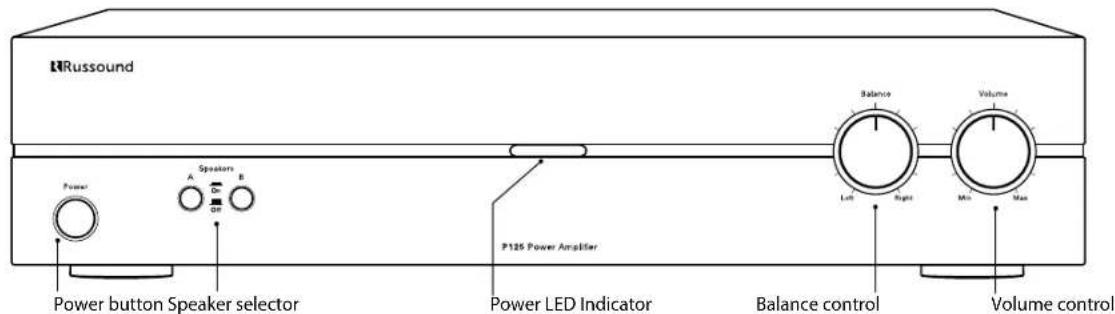
P125 Front Panel
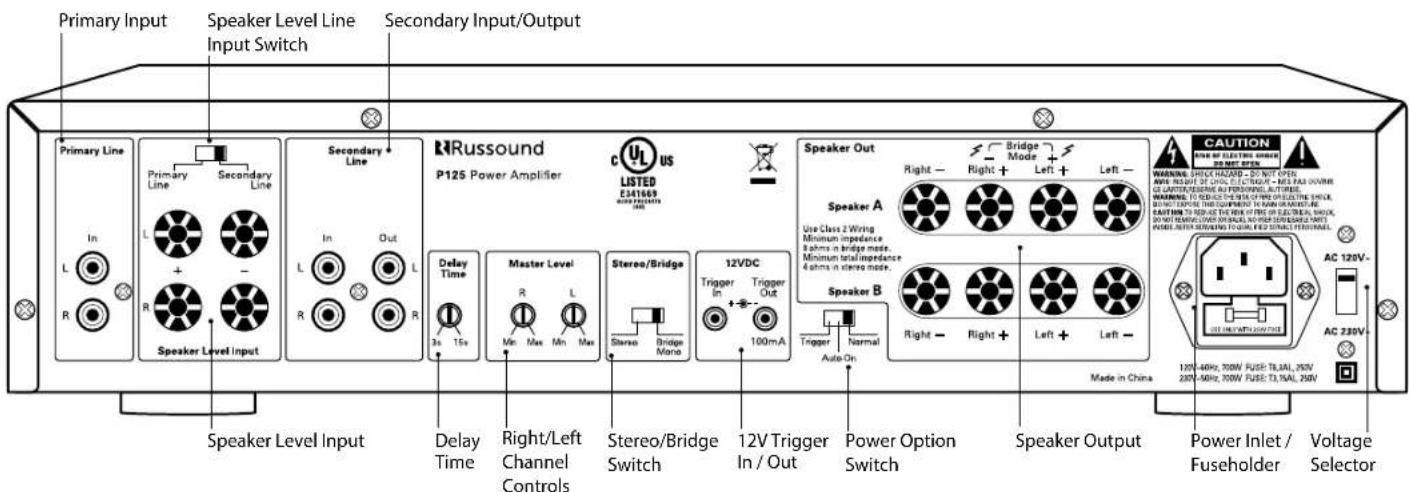
P125 Rear Panel
The P125 can be configured as a power upgrade for specific zones, for use with large speaker selectors, and for long parallel speaker runs (outdoor zones). For a single source connection:
- Unplug the amplifier.
- Set the Stereo/Bridge switch to Stereo.
- Connect the audio line output from a stereo preamplifier or source to the left and right Secondary input jacks of the amplifier. If the output is only available as speaker level see "Speaker Level Signal" section below.
- Connect your speakers to the terminals, observing proper polarity.
- Restore power to the amplifier. Both channel levels can be adjusted with the corresponding channel level adjustments.
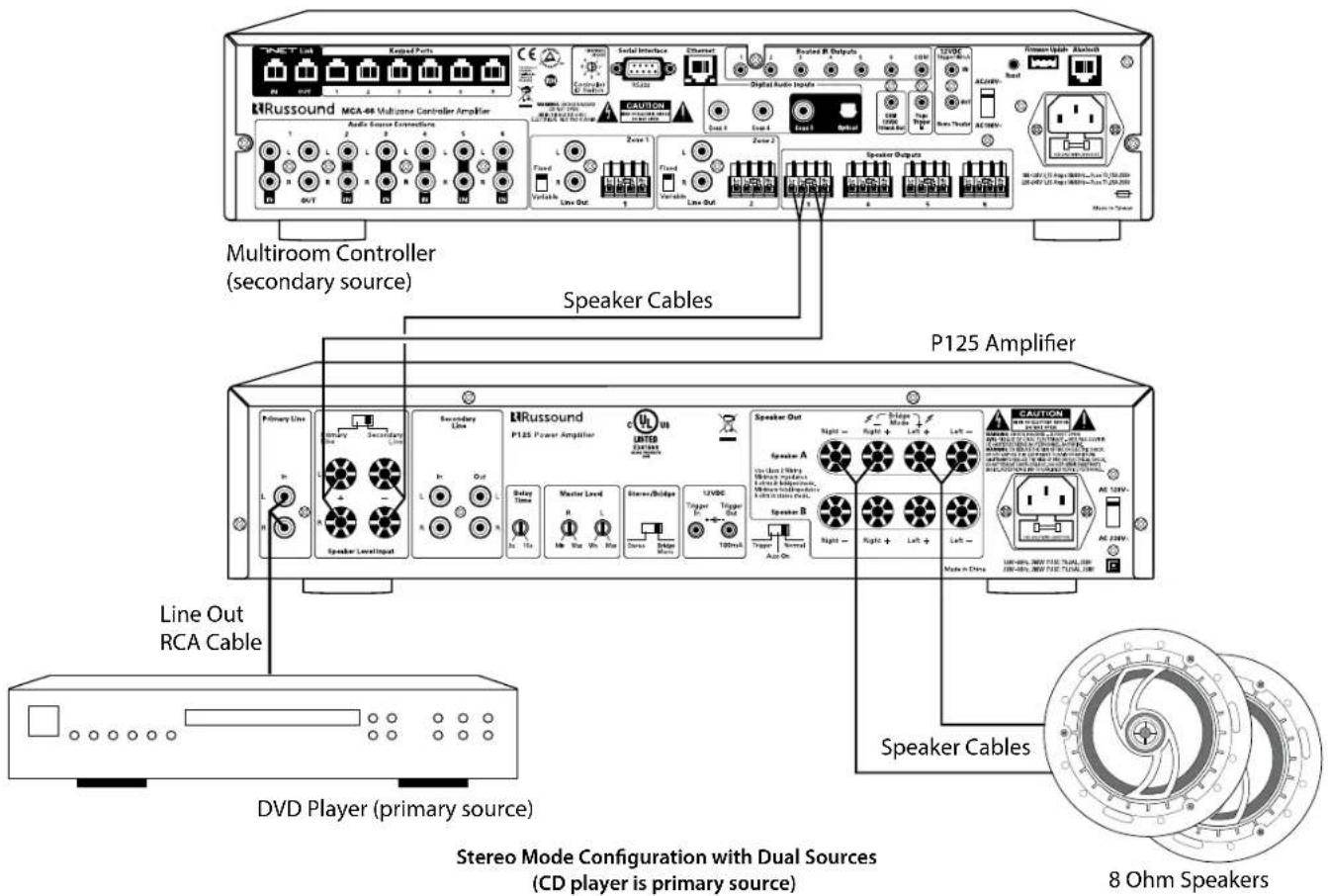
Dual source connections
The P125 has dual source capability. If two sources are used, connect the source you want to take temporary priority to the Primary input and the other constant source to the Secondary input.
Whenever the primary source becomes active, that signal will take priority over the distributed audio signal on the secondary line. The signal is still active on the secondary line but will not be heard, and once the primary audio signal is muted or turned off the amplifier will automatically switch back to the secondary audio signal. For dual source connections:
- Connect the source audio outputs to both Primary and Secondary inputs as instructed above.
- Set the switching delay with the Delay Time knob. This adjustment determines the length of time it takes to switch back to the secondary signal. For example, if the primary source is a CD changer, increasing the delay time will prevent a switch back to the secondary source while the disc is changing.
Note: This works with all incoming signals, line level or speaker level.
Speaker Level Signal
If you have a source that is only available as a speaker level signal, connect it to the Speaker Level Input terminals, using the 5-way binding posts and observing proper polarity. Only one set of speaker level inputs can be utilized and assigned by the selector switch.
Set the switch to Primary or Secondary. This forces the input to act as either the primary or secondary input.
Only one type of input (speaker or line) should be assigned to each input. When using the Speaker Level Input, and it is switched to the Secondary position, the high-level signal will not pass to the Secondary Line RCA output.
SYSTEM CONFIGURATION - BRIDGED MODE
Bridged Mode
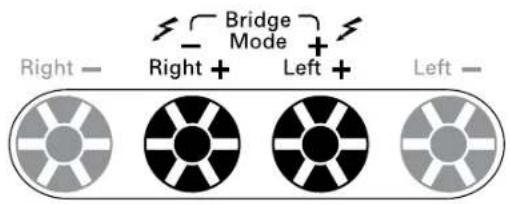
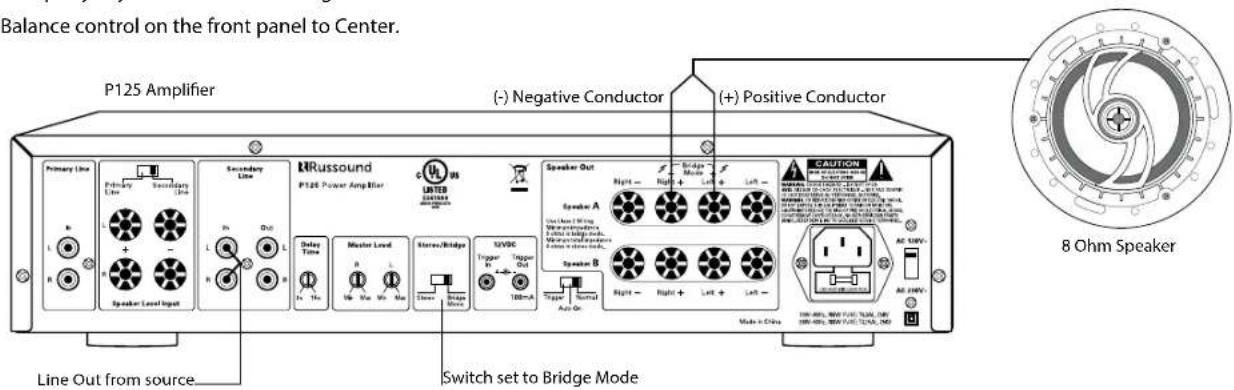
In this mode both the left and right channels are combined for a higher power mono output. For proper operation, the Master Level left and right channel adjustment on the back panel should be set to the center position to start and then adjusted appropriately from there.
- Unplug the amplifier.
- Set the Stereo/Bridge switch to Bridge Mono.
- Connect the line out from a preamplifier or source to the Left and Right econdary input jacks of the amplifier. The P125 will sum the two channels into a mono signal.
-
Connect the negative lead (-) of the speaker cable to the R(+) terminal. Connect the positive lead (+) of the speaker cable to the L(+) terminal. (See the markings above the terminals on the rear panel). An 8 Ohm minimum load is recommended.
-
Restore power to the amplifier.
-
Be sure to equally adjust the Master Level right and left.
-
Set the Balance control on the front panel to Center.
Bridged Mode Connection Detail
Bridge Mode Configuration
System Configuration Using Speaker A and B Connection
The P125 amplifier has a minimum 4 ohm load in stereo mode. Connect up to one pair of 8ohm speakers on A and one pair of 8 ohm speakers on B.
System Configuration with External Volume Control
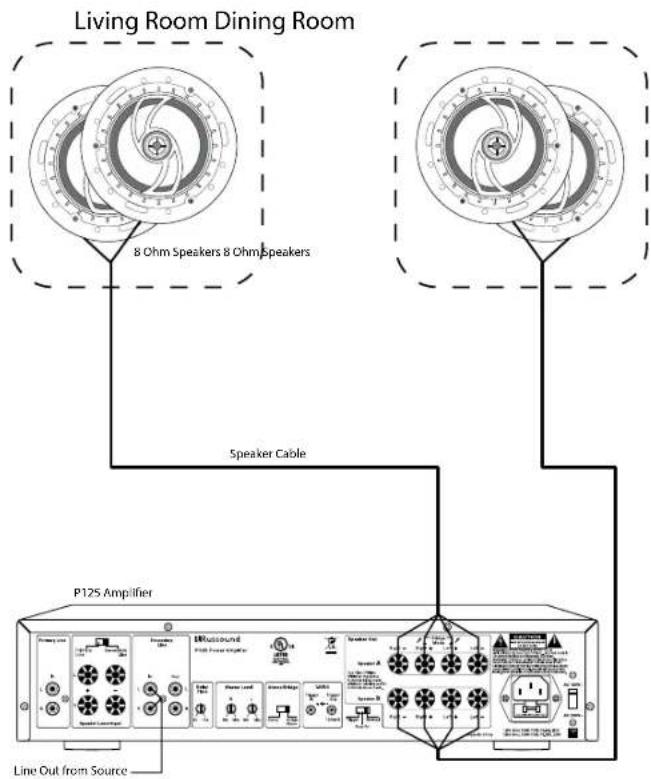
The P125 amplifier can be used for multiple pairs of speakers with impedance matching volume controls and/or speaker selectors. In this configuration, connect up to eight (total) impedance matching volume controls to the amplifier on speaker A connection only.
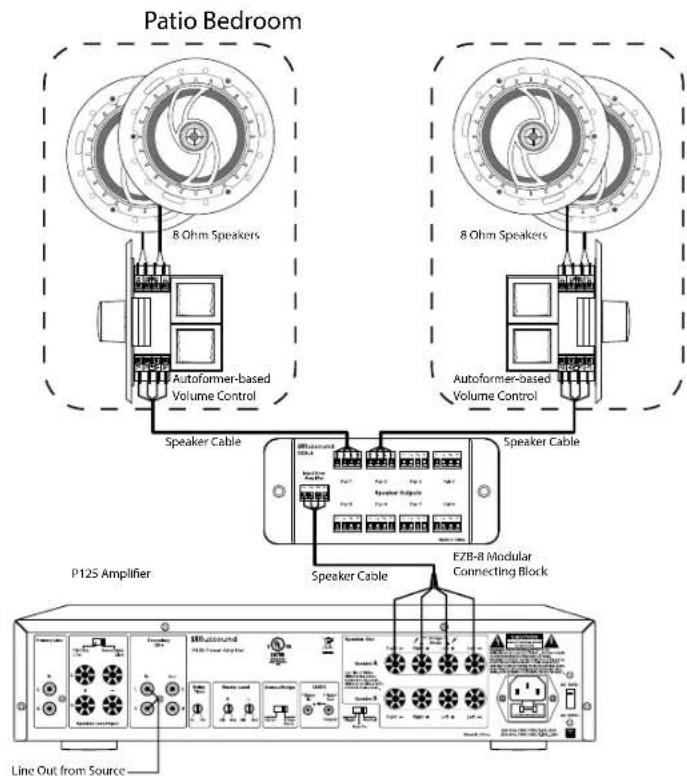
flowchart
graph TD
    A["Patio Bedroom"] --> B["8 Ohm Speakers"]
    A --> C["8 Ohm Speakers"]
    B --> D["Autoformer-based Volume Control"]
    C --> E["Autoformer-based Volume Control"]
    D --> F["Speaker Cable"]
    E --> G["Speaker Cable"]
    F --> H["P125 Amplifier"]
    G --> I["E7B-8 Modular Connecting Block"]
    H --> J["Line Out from Source"]
    I --> J
    style A fill:#f9f,stroke:#333
    style B fill:#ccf,stroke:#333
    style C fill:#ccf,stroke:#333
    style H fill:#dfd,stroke:#333
    style I fill:#dfd,stroke:#333
Configuration with Autoformer Volume Control
TECHNICAL SPECIFICATIONS
P125 Amplifier
Continuous Output Power: 80W per channel at 8 ohms
(<0.2% THD+N) 125W per channel at 4 ohms
250W bridged mono at 8 ohms
Signal-to-Noise Ratio: >93dB A-weighted
Crosstalk: >70dB @ 1 kHz, ref. to rated power @ 8 ohms
Frequency Response: 20Hz to 20kHz +0.0dB/- 0.5dB @ 8 ohms, 1W
Input Sensitivity: 500mV for 80W at 8 ohms
Power Requirements: 120VAC 60Hz 5.8A
230VAC 50Hz 3A
IEC 320 type connector with 3 terminal detachable power cord.
Dimensions: 16.5"W x 13.75"D x 3.5"H
(41.9 x 34.9 x 8.9 cm)
Weight: 25.6 lbs. (11.52 kg)
Warranty
The Russound P125 Amplifier is guaranteed against all defects in materials and workmanship for one (1) year from the date of purchase. During this period, Russound will replace any defective parts and correct any defect in workmanship without charge for either parts or labor.
For this warranty to apply, the unit must be installed and used according to its written instructions. If service is necessary, it must be performed by Russound. The unit must be returned to Russound at the owner's expense and with prior written permission. Accidental damage and shipping damage are not considered defects, nor is damage resulting from abuse or from servicing by an agency or person not specifically authorized in writing by Russound.
This Warranty does not cover:
- Damage caused by abuse, accident, misuse, negligence, or improper installation or operation
• Power surges and lightning strikes
• Normal wear and maintenance - Products that have been altered or modified
- Any product whose identifying number, decal, serial number, etc. has been altered, defaced or removed.
Russound sells products only through authorized Dealers and Distributors to ensure that customers obtain proper support and service. Any Russound product purchased from an unauthorized dealer or other source, including retailers, mail order sellers and online sellers will not be honored or serviced under existing Russound warranty policy. Any sale of products by an unauthorized source or other manner not authorized by Russound shall void the warranty on the applicable product.
Damage to or destruction of components due to application of excessive power voids the warranty on those parts. In these cases, repairs will be made on the basis of the retail value of the parts and labor. To return for repairs, the unit must be shipped to Russound at the owner's expense, along with a note explaining the nature of service required. Be sure to pack the unit in a corrugated container with at least three (3) inches of resilient material to protect the unit from damage in transit.
Before returning a unit for repair, call Russound at (603) 659-5170 for a Return Authorization number. Write this number on the shipping label and ship to:
Russound
ATTN: Service
1 Forbes Road
Newmarket, NH 03857
Due to continual efforts to improve product quality as new technology and techniques become available, Russound/FMP, Inc. reserves the right to revise system specifications without notice.
RRussound®
P125 Dual Source Power Amplifier
Installation Manual
©2016 Russound. All rights reserved.
All trademarks are the property of their respective owners.
Specifications are subject to change without notice.
Russound, Inc.
1 Forbes Road, Newmarket, NH 03857
tel 603.659.5170 • fax 603.659.5388
email: tech@russound.com www.russound.com
28-1388 11.21.16, Rev.2