
SA-W55X - Pregnant SONY - Free user manual and instructions
Find the device manual for free SA-W55X SONY in PDF.


| Product Type | Active Subwoofer |
| Brand | Sony |
| Model | SA-W55X |
| Dimensions (W x H x D) | Approx. 350 x 400 x 450 mm |
| Weight | Approx. 15 kg |
| Power Output | 150 W RMS |
| Frequency Response | 30 Hz – 200 Hz |
| Impedance | 8 ohms |
| Driver | 12-inch (30 cm) cone type |
| Enclosure Type | Bass reflex |
| Inputs | Line input (RCA), Speaker level input |
| Controls | Volume, Phase switch (0°/180°), Crossover frequency |
| Auto Standby | Yes |
| Power Supply | AC 120 V / 220 V, 50/60 Hz (switchable) |
| Power Consumption | 200 W (max) |
| Cleaning and Maintenance | Wipe with a soft, dry cloth. Do not use solvents. |
| Safety Precautions | Do not expose to rain or moisture. Place on a stable surface. |
| Spare Parts and Repairability | Contact Sony authorized service center for replacement parts. |
| Included Accessories | Power cord, Audio cable (RCA), User manual |
| General Information | High-quality subwoofer for home theater systems. |
Frequently Asked Questions - SA-W55X SONY
User questions about SA-W55X SONY
0 question about this device. Answer the ones you know or ask your own.
Ask a new question about this device
Download the instructions for your Pregnant in PDF format for free! Find your manual SA-W55X - SONY and take your electronic device back in hand. On this page are published all the documents necessary for the use of your device. SA-W55X by SONY.
USER MANUAL SA-W55X SONY
Operating Instructions
Before operating the unit, please read this manual thoroughly and retain it for future reference.
Owner's Record
The model and serial numbers are located at the rear.
Record the serial number in the space provided below.
Refer to these numbers whenever you call upon your Sony dealer regarding this product.
Model No. SA-W55X
Serial No.
WARNING
For the customers in U.S.A.
To prevent fire or shock hazard, do not expose the unit to rain or moisture.
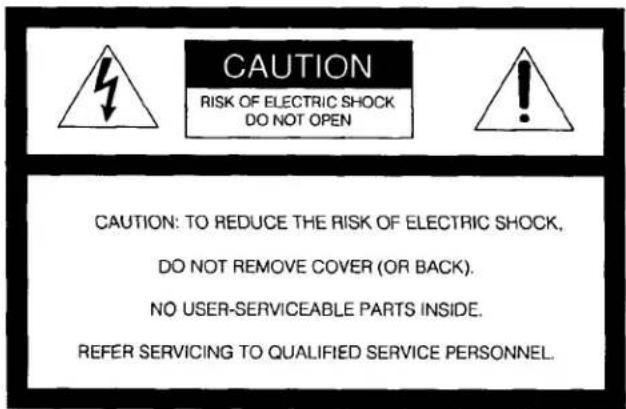
This symbol is intended to alert the user to the presence of uninsulated "dangerous voltage" within the product's enclosure that may be of sufficient magnitude to constitute a risk of electric shock to persons.
This symbol is intended to alert the user to the presence of important operating and maintenance (servicing) instructions in the literature accompanying the appliance.
CAUTION: Use of this appliance with some systems may present a shock or fire hazard.
Do not use with any units which have the following marking located near output, "WARNING!
HAZARDOUS ENERGY!......"
NOTICE FOR THE CUSTOMERS IN THE UNITED KINGDOM
IMPORTANT
The wires in this mains lead are coloured in accordance with the following code:
Blue: Neutral
Brown: Live
As the colours of the wires in the mains lead of this apparatus may not correspond with the coloured markings identifying the terminals in your plug proceed as follows: The wire which is coloured blue must be connected to the terminal which is marked with the letter N or coloured black. The wire which is coloured brawn must be connected to the terminal which is marked with the letter L or coloured red. Do not connect either wire to the earth terminal in the plug which is marked by the letter E or by the safety earth symbol 12 or coloured green or green-and-yellow.
Connections
Notes on Connection
- The power cord should be connected last of all, after making sure that the POWER switch is turned off.
- The cable connectors should be fully inserted into the jacks. Loose connection may cause hum and noise.
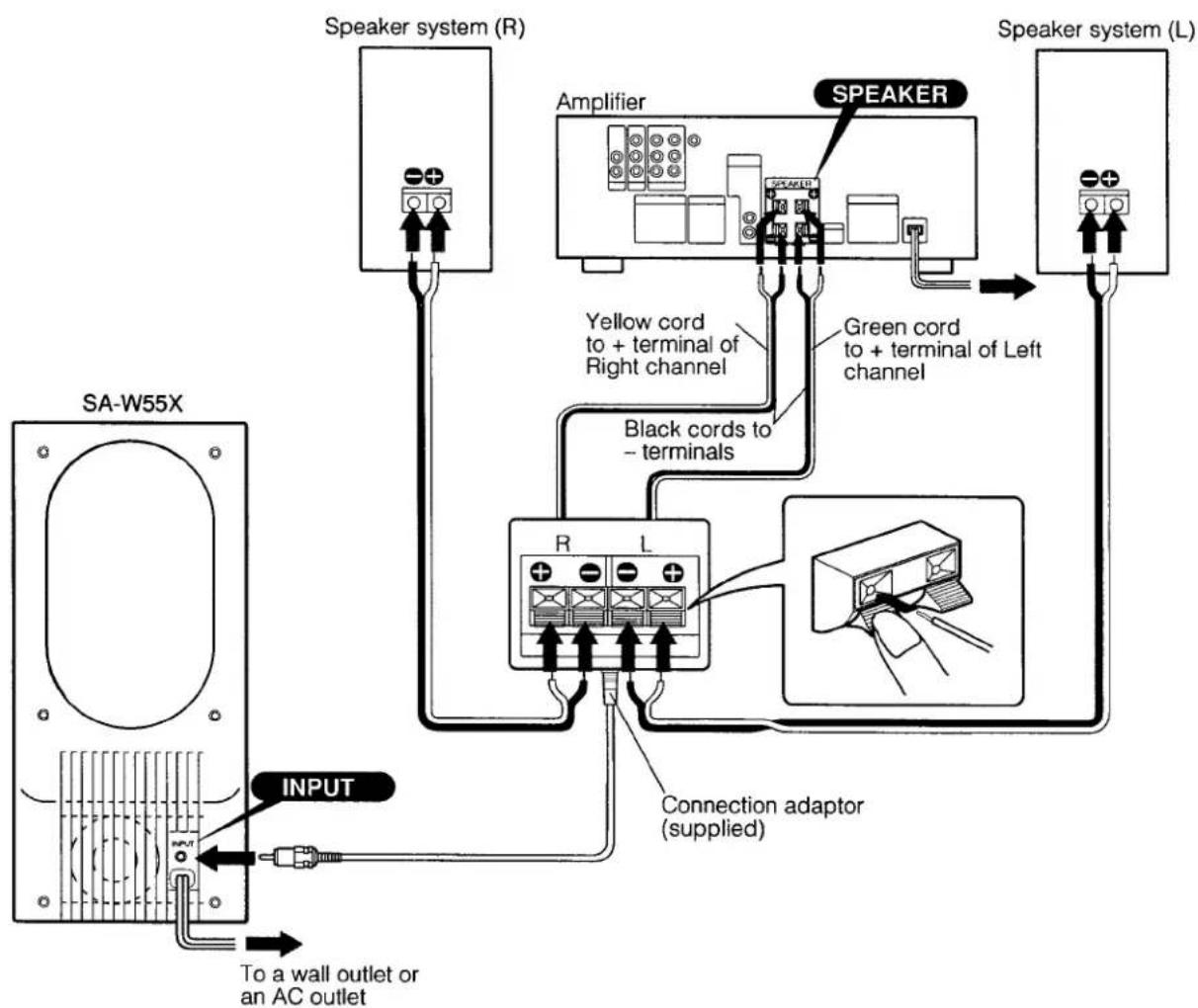
- The + and - cords of the connection adaptor should be correctly connected to the + and - terminals of the amplifier respectively to avoid damaging to each units.
When Connecting the Amplifier Having a Super Woofer Output Terminal with the Audio Cord
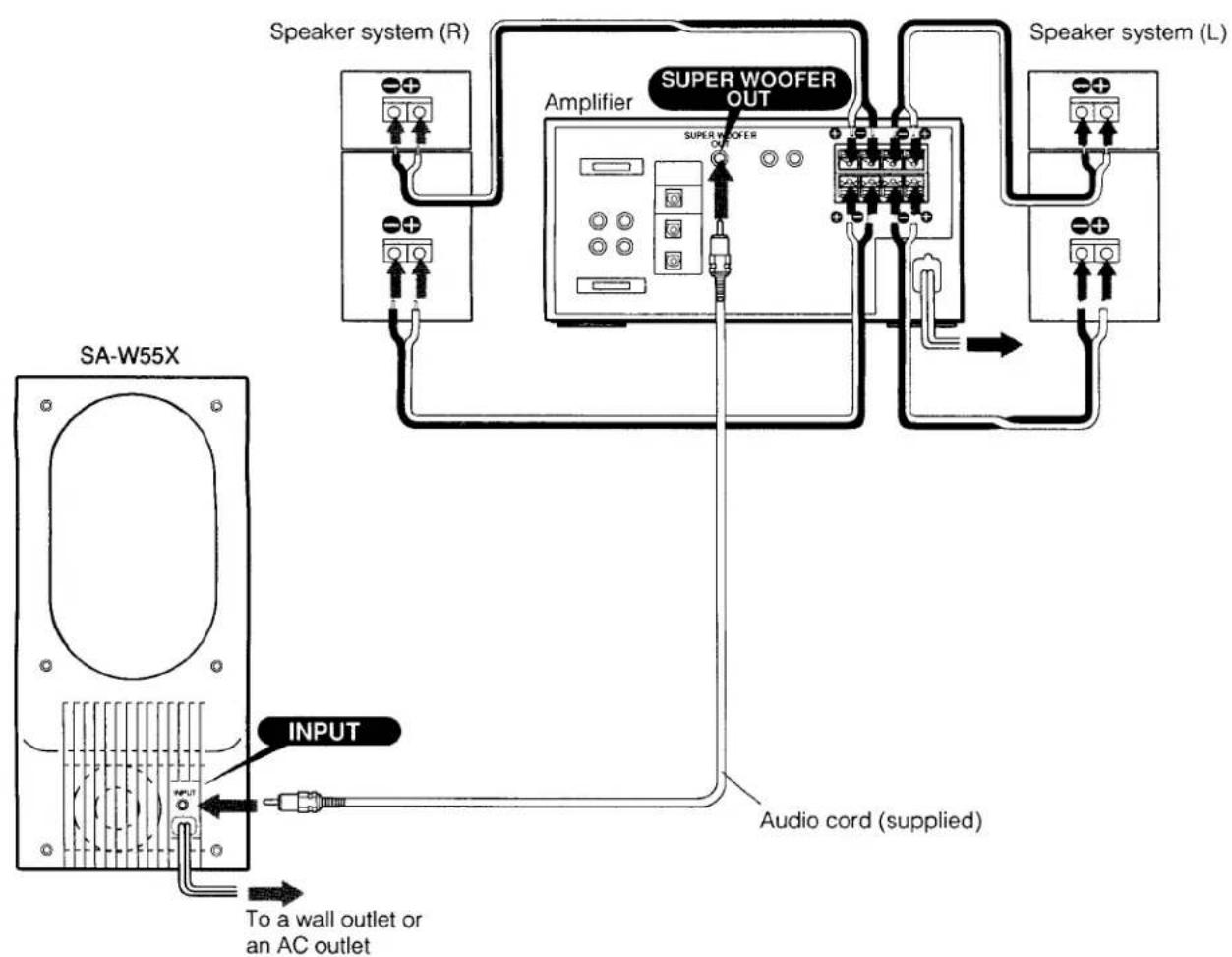
When Connecting to the Speaker Terminals of the Amplifier with the Connection Adaptor
Location and Function of Controls
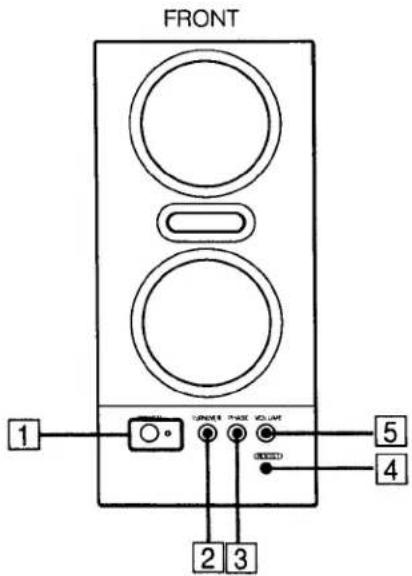
1 POWER button and indicator
When the button is pressed, the indicator lights up, and the unit is set in power stand-by mode – the internal power amplifier is automatically turned on when receiving any input signals. When not receiving input signal during a few minutes, the amplifier is automatically turned off. Depress the POWER button again when the unit is not used.
② TURNOVER frequency selector
Select the turnover frequency among 60 Hz, 90 Hz, and 120 Hz so that the highest frequency of the unit may smoothly contact with the lowest frequency of the front speaker system.
When the front speaker system has a large size woofer, set the selector to 60 Hz. When the front speaker system has a medium size woofer, set the selector to 90 Hz. When the front speaker system has a small size woofer, set the selector to 120 Hz.
③ PHASE selector
Set the phase to NORMAL or REVERSE according to the phase of the front speakers.
4 BOOST button
To boost the bass sound, depress the button.
5 VOLUME control
Adjust the control to balance the volume of this unit with that of the front speaker system.
To increase the volume, turn the control clockwise. To decrease the volume, turn the control counterclockwise.
When connecting to the compact audio system, MHC-6600, MHC-5600, MHC-3600, or MHC-2600, of Sony
| TURNOVER | PHASE | VOLUME |
| 90 Hz | NORMAL | Center |
Notes
- Do not drive the unit with an extremely high input power to avoid damaging the speaker system.
- Before operating the power switch and the controls of the amplifier, set the VOLUME control to minimum to avoid damaging the speaker system by switching noise.
- If howling occurs, decrease the volume or keep the unit away from the turntable system.
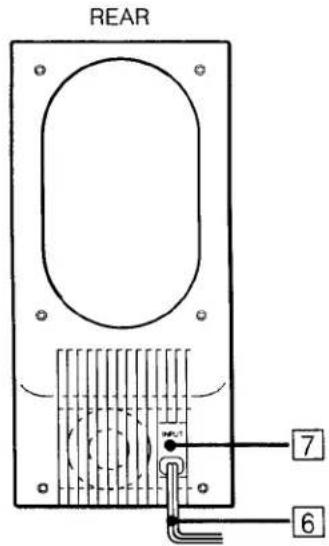
6 Power cord
7 INPUT terminal
Connect to the connection adaptor or the SUPER WOOFER (or CENTER) OUT terminal of the amplifier.
To prevent possible damage caused by the magnets
Keep personal credit cards, watches, recorded tapes away from the unit.
In case color irregularity is observed on nearby TV screen
With the anti-magnetism design of the unit, the speakers can be installed near a TV set. However, color irregularity may still be observed on the TV screen depending on the type of your TV set.
If color irregularity is observed...
Turn off the TV set once, then turn it on after 15 to 30 minutes.
If color irregularity is observed again...
Place the unit more apart from the TV set.
Precautions
Features
On safety
- Before connecting the unit to the power at the operating voltage of your unit is the same as the local power line voltage.
| Where purchased | Operating voltage |
| U.S.A. | 120 V AC, 60 Hz |
| United Kingdom | 240 V AC, 50/60 Hz |
- Unplug the unit from the wall outlet if it is not to be used for an extended period of time. To disconnect the cord, pull it out by grasping the plug. Never pull the plug out by the cord.
- Should any liquid or solid object fall into the unit, unplug the unit and have the unit checked by qualified personnel before operating it any further.
- AC power cord must be changed only at the authorized Sony Service Station.
On installation
- Do not install the unit near heat sources such as radiators or air ducts, or in a place subject to direct sunlight, excessive dust, mechanical vibration or shock.
- Good ventilation is essential to prevent internal heat build-up in the unit. Place the unit in a location with adequate air circulation. Do not place the unit on a soft surface and closely near a wall to avoid obstructing the ventilation hall of the back.
On cleaning the cabinet
Clean the cabinet, panel and controls with a soft cloth lightly moistened with a mild detergent solution. Do not use any type of abrasive pad, scouring powder or solvent such as alcohol or benzine.
For the customers in the USA
For detailed safety precautions, see the leaflet "IMPORTANT SAFEGUARDS"
If you have any question or problem concerning your unit that is not covered in this manual, please consult your nearest Sony dealer.
SA-W55X is an active super woofer for compensating the bass sound of the front speaker systems.
- SA-W55X has a 65-W (U.S.A. model) or 75-W (U.K. model) amplifier which can be automatically turned on and off by sensing the input signal.
- The turnover frequency can be selected among 60 Hz, 90 Hz, and 120 Hz.
- The phase can be changed in phase or opposite phase with the front speakers.
- With the anti-magnetism design of the speaker system, SA-W55X has very little affect on a TV.
Specifications
AUDIO POWER SPECIFICATIONS
(for U.S.A. model)
POWER OUTPUT AND TOTAL HARMONIC DISTORTION:
With 12 ohm load, from 20 – 120 Hz; rated 65 watts per minimum RMS power, with no more than 0.5% total harmonic distortion from 250 milliwatts to rated output.
Amplifier section
Continuous RMS power output
U.S.A. model: 65 W
U.K. model: 75 W
Harmonic distortion
U.S.A. model: Less than 0.5% at rated output
U.K. model: Less than 5% at
at 70 Hz, 12 ohms
Inputs
| Input jack | Jack type | Sensitivity | Impedance |
| INPUT | Phono | 150 mV (at 70 Hz) | 10 kohms |
Phase control
NORMAL, REVERSE
Turnover frequencies
60 Hz, 90 Hz, 120 Hz
Speaker section
| Speaker units | 10 cm (4 inches) cone type woofer (4) |
| Enclosure | Bass reflex |
General
| Power requirement | U.S.A. model: 120 V AC, 60 Hz |
| U.K. model: 240 V AC, 50/60 Hz | |
| Power consumption | U.S.A. model: 90 W |
| U.K. model: 190 W | |
| Dimensions | Approx. 160 x 365 x 315 mm(6 ^5 / _16 x 14 ^3 / _8 x 12 ^3 / _8 inches)(w/h/d) |
| Weight | Approx. 9 kg (19 lb. 13 oz.) |
| Accessories | Audio cord (1) |
| Connection adaptor (1) |
Design and specifications subject to change without notice.
This appliance conforms with EEC Directives 76/889 and 82/499 regarding interference suppression.
Troubleshooting Guide
Before going through the check list below, first refer back to the connection and operating procedures.
Should any problem persist after you have made these checks, consult your nearest Sony dealer.
| Trouble | Remedy |
| No audio | Check power cord connection.Check input connections.Adjust VOLUME control. |
| Lack of bass sound partially | Adjust the PHASE and TURNOVER selectors. |
| Severe hum or noise | Keep the audio components further away from the TV.Keep the connecting cords away from transformer, motors, fluorescent lights, or computers.Fully insert connecting cord plugs.Clean any dirty plugs and jacks with a cloth lightly moistened with alcohol. |
- Operating Instructions
- Owner's Record
- WARNING
- For the customers in U.S.A.
- NOTICE FOR THE CUSTOMERS IN THE UNITED KINGDOM
- IMPORTANT
- Connections
- Notes on Connection
- When Connecting to the Speaker Terminals of the Amplifier with the Connection Adaptor
- Location and Function of Controls
- POWER button and indicator
- ② TURNOVER frequency selector
- ③ PHASE selector
- BOOST button
- VOLUME control
- Notes
- Power cord
- INPUT terminal
- To prevent possible damage caused by the magnets
- In case color irregularity is observed on nearby TV screen
- If color irregularity is observed...
- If color irregularity is observed again...
- Precautions
- Features
- On safety
- On installation
- On cleaning the cabinet
- For the customers in the USA
- Specifications
- AUDIO POWER SPECIFICATIONS
- POWER OUTPUT AND TOTAL HARMONIC DISTORTION:
- Amplifier section
- Troubleshooting Guide
Brand : SONY
Model : SA-W55X
Category : Pregnant