
FXTHL5NLSSNM017 - Câbles pour ordinateurs et périphériques Panduit - Free user manual and instructions
Find the device manual for free FXTHL5NLSSNM017 Panduit in PDF.


| Type de produit | Câble de transition fibre optique |
| Marque | Panduit |
| Modèle | FXTHL5NLSSNM017 |
| Usage | Intérieur, data center |
| Type de connecteur principal | MPO (PanMPO) |
| Type de connecteur secondaire | LC Uniboot |
| Fonctionnalités | Changement de genre PanMPO, Changement de polarité LC Uniboot, Support Tak-Ty |
| Alimentation | Aucune (passif) |
| Entretien | Nettoyer les connecteurs avec un kit de nettoyage fibre optique adapté |
| Sécurité | Éviter les pliures excessives, protéger les extrémités des connecteurs |
| Installation | Clipser, utiliser Tak-Ty pour fixation sur rack |
| Réparabilité | Connecteurs remplaçables via instructions |
| Contenu du carton | 1 câble de transition |
| Matériau de la gaine | Plastique renforcé |
| Polarité | Changeable via instructions |
| Support de câble | Tak-Ty (attache) pour fixation |
| Guide d'installation | Inclus sur page 2 de FS041* |
| Assistance technique | www.panduit.com/resources/install_maintain.asp |
Frequently Asked Questions - FXTHL5NLSSNM017 Panduit
User questions about FXTHL5NLSSNM017 Panduit
0 question about this device. Answer the ones you know or ask your own.
Ask a new question about this device
Download the instructions for your Câbles pour ordinateurs et périphériques in PDF format for free! Find your manual FXTHL5NLSSNM017 - Panduit and take your electronic device back in hand. On this page are published all the documents necessary for the use of your device. FXTHL5NLSSNM017 by Panduit.
USER MANUAL FXTHL5NLSSNM017 Panduit
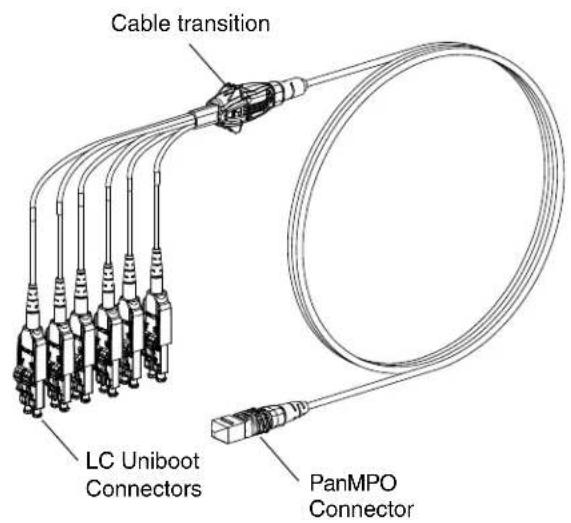
Cable Transition Usage
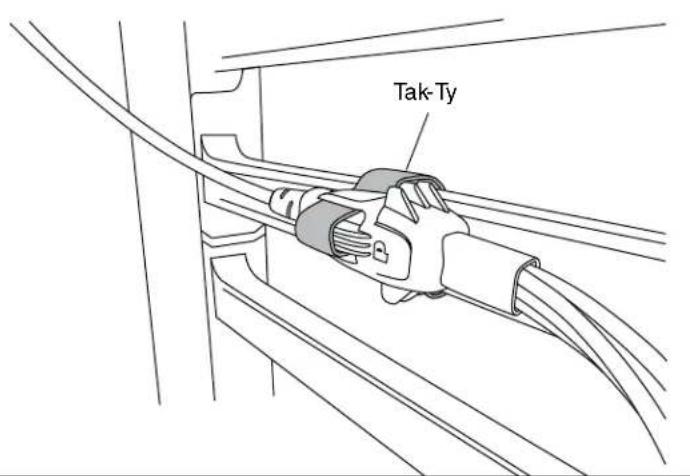
Tak-Ty Option
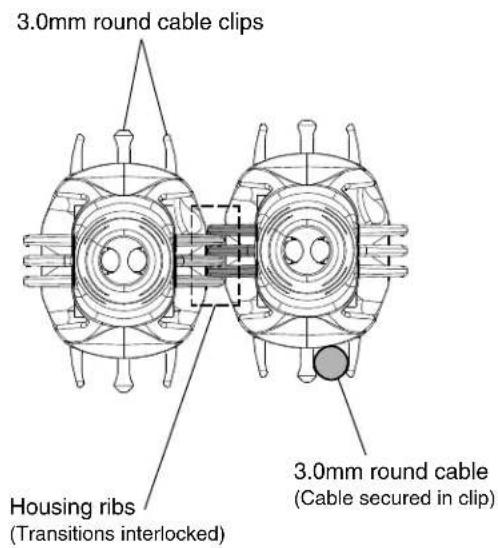
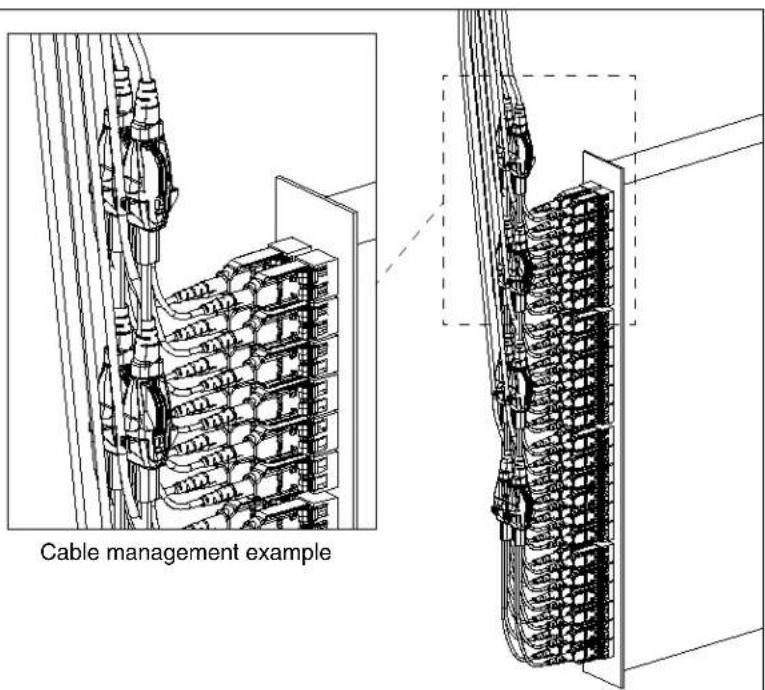
Slot features in the cable transition allows for the use of a Tak-Ty to either secure the cable harness to a rack feature, such as cable management fingers, or to more robustly secure multiple cable transitions that are interlocked together.
Cable Clips & Housing Ribs Option
PanMPO Gender Changeover
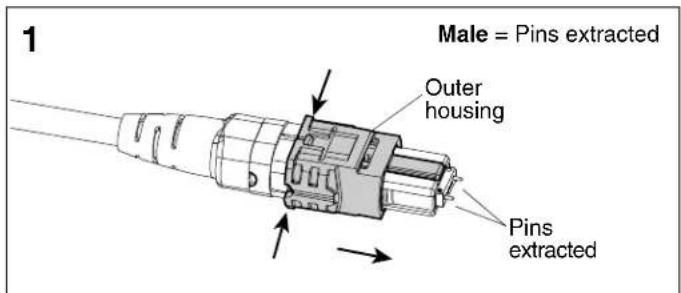
Squeeze both sides of the outer housing at the back end evenly until you hear an audible click. Pull off connector to remove.
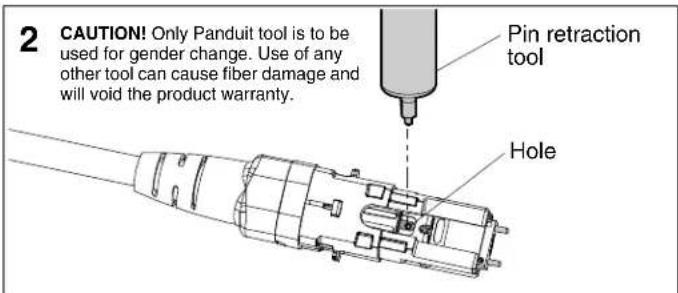
Locate hole in the inner housing on the slotted side and position pin retraction tool over the hole.
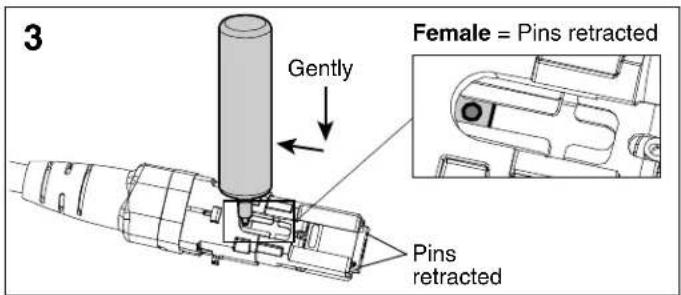
Insert tool into hole, press down gently, and push backward to retract connector pins to the female state. Repeat process in opposite direction to extract pins for male state.
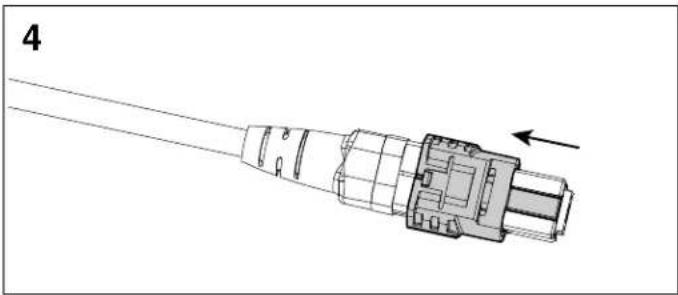
natural_image
Technical line drawing of a connector with an arrow indicating direction (no text or symbols present)Re-install the outer housing. Ensure the key is in the proper orientation. See PanMPO polarity changeover instructions on page 2 of FS041* for more details.
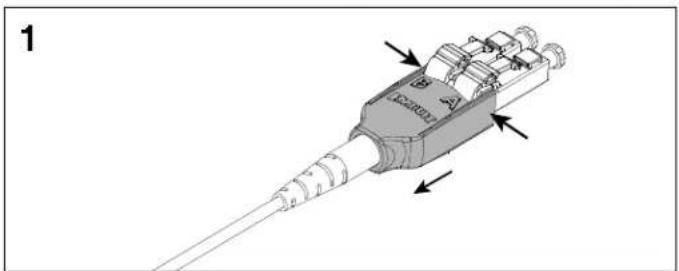
LC Uniboot Polarity Changeover - Pair Flipping
natural_image
3D diagram of a mechanical component with labeled parts and directional arrows (no readable text or symbols)Squeeze both sides of the LC Uniboot cover evenly and pull back to disengage the tab on the opposite side.
natural_image
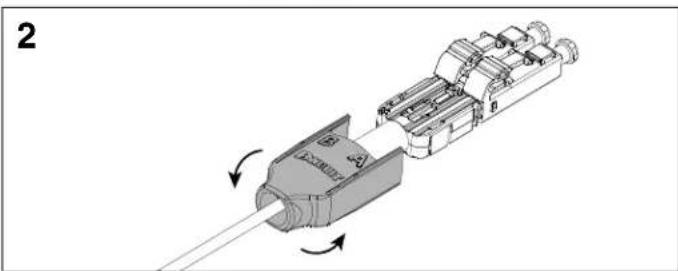
Mechanical assembly diagram showing a component being inserted into a housing, with arrows indicating direction of motion (no text or symbols present)Slide the LC Uniboot cover back away from connectors and rotate 180°.
natural_image
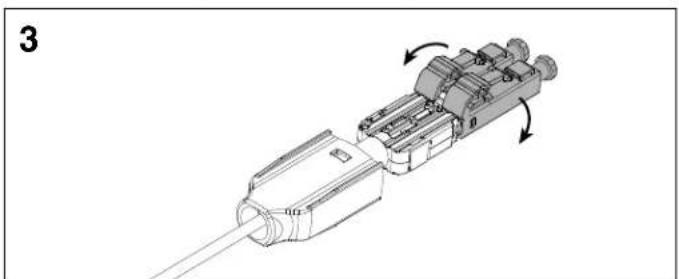
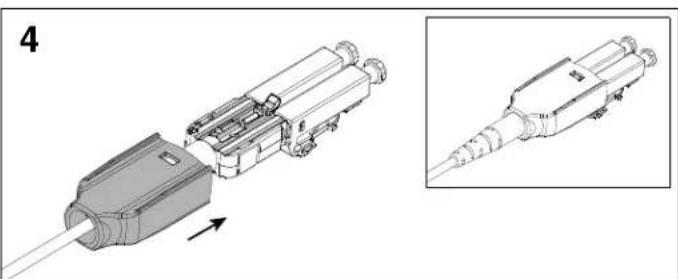
Mechanical assembly diagram showing a connector with internal components and directional arrows (no text or symbols)Rotate each LC connector downward 180°. Re-install the LC Uniboot cover until you hear an audible click.
natural_image
Technical illustration of a mechanical connector assembly with an inset showing detailed detail (no text or symbols)*Denotes instruction sheet revision letter.
For Instructions in Local Languages and Technical Support:
www.panduit.com/resources/install_maintain.asp
PANDUIT
www.panduit.com
E-mail:
Brand : Panduit
Model : FXTHL5NLSSNM017
Category : Câbles pour ordinateurs et périphériques