
M-M5812 - LCD Screen Macrom - Free user manual and instructions
Find the device manual for free M-M5812 Macrom in PDF.


| Product Type | TFT LCD Monitor |
| Brand | Macrom |
| Model | M-M5812 |
| Display Size | 5.8 inches (16:9 aspect ratio) |
| Resolution | 400 × RGB × 234 pixels |
| Power Supply | DC 12V |
| Video Input | Dual video input |
| Audio Input | One audio input |
| TV System | PAL/NTSC auto switching |
| Control Method | Remote control and OSD menu |
| Special Features | Blue screen when no signal |
| Dimensions (approx.) | 150 × 100 × 30 mm (estimate) |
| Weight (approx.) | 0.5 kg (estimate) |
| Main Functions | Video monitoring, OSD adjustment, remote control operation |
| Maintenance | Clean with soft dry cloth; avoid moisture and hard objects |
| Safety Precautions | Rotate or turn off display while driving; do not dismantle; high voltage inside |
| Spare Parts | Contact manufacturer for spare parts |
| Repairability | Only authorized personnel should repair |
Frequently Asked Questions - M-M5812 Macrom
User questions about M-M5812 Macrom
0 question about this device. Answer the ones you know or ask your own.
Ask a new question about this device
Download the instructions for your LCD Screen in PDF format for free! Find your manual M-M5812 - Macrom and take your electronic device back in hand. On this page are published all the documents necessary for the use of your device. M-M5812 by Macrom.
USER MANUAL M-M5812 Macrom
5.8" TFT LCD monitor

ALDINET Spa
Viale C: COlombo, 8
20090 Trezzano s. Naviglio (MI)
IYALY
INSTRUCTION MANUAL
MONITOR:
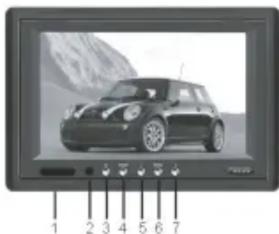
natural_image
Black and white photo of a car on a screen with numbered buttons below (no readable text or symbols)- Indicator Light
- R/C Window
- Power
- Mode
- Negative Decrease
- Menu
- Positive Increase
CAUTION:
For your safety, please rotate the angle of the display or turn off the display while driving.
SPECIAL STATEMENT:
LCD may have a few bright dots, which is normal for the matrix display technology, and doesn't indicate defects of faults
NOTICE:
- Please operate instruction manual completely before use;
- The unit is manufactured with precision elements pay attention to protection against dampeness;
- Prevent the hard object from scratching LCD surface;
- High voltage inside non-technical authorized person is not allowed to dismantle the unit.

REMOTE CONTROL
- Power
- V1/V2 Change
- Positive Increase
- Menu
- Negative Decrease
- Mode Selection
Connection

MONITOR ONLY
SPECIFICATIONS:
● Display size: 5.8 inch (16:9)
● Resolution: 400*RGB*234
● Power supply: DC 12V
- Input: Dual video input; One audio input
● System: PAL/NTSC auto switching
● All functions are controlled by remote control; OSD menu
● Blue screen when no signal
Brand : Macrom
Model : M-M5812
Category : LCD Screen