JA-85P - Security Camera Joblotron - Free user manual and instructions
Find the device manual for free JA-85P Joblotron in PDF.


| Product Type | Security Camera |
| Brand | Joblotron |
| Model | JA-85P |
| Dimensions (approx.) | 10 x 6 x 6 cm |
| Weight (approx.) | 300 g |
| Power Supply | 12V DC, 1A |
| Resolution | 1920 x 1080 (Full HD) |
| Night Vision | Up to 10 m, IR LEDs |
| Field of View | 90° |
| Connectivity | Wi-Fi (2.4 GHz) |
| Storage | MicroSD card up to 128 GB (not included) |
| Weather Resistance | IP65 (outdoor use) |
| Motion Detection | Yes, with push notifications |
| Two-Way Audio | Yes, built-in microphone and speaker |
| Mounting Type | Bracket mount (screws included) |
| Operating Temperature | -10°C to 50°C |
| Maintenance | Clean lens with soft dry cloth; check cables regularly |
| Safety | Indoor/outdoor use; do not expose to water jets |
| Spare Parts & Repairability | Contact Joblotron support for replacements |
Frequently Asked Questions - JA-85P Joblotron
User questions about JA-85P Joblotron
0 question about this device. Answer the ones you know or ask your own.
Ask a new question about this device
Download the instructions for your Security Camera in PDF format for free! Find your manual JA-85P - Joblotron and take your electronic device back in hand. On this page are published all the documents necessary for the use of your device. JA-85P by Joblotron.
USER MANUAL JA-85P Joblotron
The JA-85B mini-size wireless glass-break detector
The JA-85B is a component of Jablotron's Oasis 80 alarm system. The glass-break detector uses the analysis of air pressure variations combined with the characteristic sound of glass breaking and it is designed for indoor use in buildings or in cars. The battery-powered detector communicates via OASIS radio protocol.
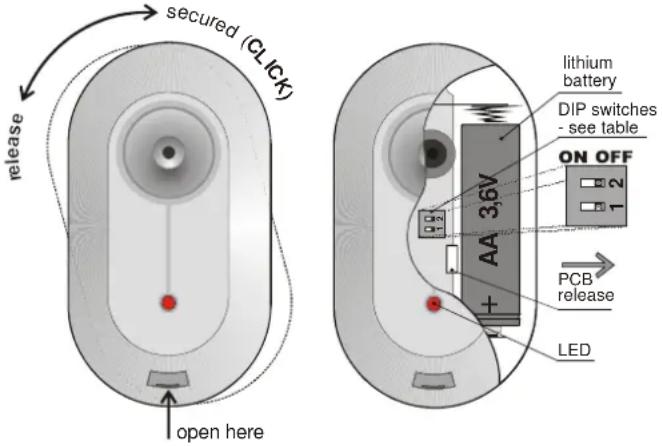
Installation
Installation shall only be undertaken by technicians holding a certificate issued by an authorized distributor. The detector can be installed on a wall or on a ceiling. In a car it can be under a dashboard. Because of its sensitivity to air pressure changes and sounds it should not be located close to air conditioning or ventilation outlets. There should be no sources of vibration or audible sounds in the protected area. There should also be no obstacles blocking the detector's "listening" to the protected area. Keep the detector away from metal objects which could interfere with radio communication.
Warning: The most frequent cause of false alarms is bad detector-positioning.
Do not set (arm) this detector if there are any people or pets moving within the protected area.
- Release the detector installation bracket (by turning it clockwise)
- Attach the bracket to the desired place and reinstall the detector onto the bracket.
- Open the detector cover by pressing the tab
- Remove the internal board held by an internal tab.
- Set the detector DIP switches (see the "DIP switches" section below)
- Return the board into the plastic cover.
- Leave the battery disconnected and the detector open and then follow the receiver (or control panel or car alarm) manual. The detector enrolls by connecting up its battery while the receiver is in enrollment mode.
- After detector enrollment, close its cover, wait until its indicator turns off and then test its functionality and adjust its sensitivity.
To enroll a detector after having already connected the battery, first disconnect the battery, wait 30 seconds and reconnect it.
The detector can also be installed without the rear holder. In this case remove the magnet from the holder (push it out using a thin tool) and push it into a prefabricated hole in the detector's rear plastic cover.
DIP switches
| # | OFF | ON |
| 1* | Radio comms. supervision off | Radio comms. supervision on |
| 2** | Delayed natural reaction | Instant natural reaction |
* Radio communication supervision should be switched off if a detector installed in a car is enrolled to an Oasis control panel in a house (to avoid lost detector indication when the car drives away).
** This DIP switch has an effect if the detector is used with a CA car alarm or with an Oasis control panel which has a natural reaction assigned to the JA-85B's address. It has no effect when used with a UC-8x or AC-8x receiver.
Testing the detector
15 minutes after closing the detector cover, the LED shows detector triggering as follows:
Short flash = air pressure change (glass deformation)
Long flash = glass-break detection (alarm)
Adjusting the sensor:
- Using a suitable tool or a hand protected by gloves, one by one, knock all the windows that should be under the detector's protection. A visible deformation of the glass should occur but without any damage.
- The deformation of glass causes a change in the air pressure of the room which makes the LED on the detector flash quickly.
- Sensitivity to air pressure changes can be adjusted by a potentiometer on the PCB. Turning clockwise increases sensitivity. Avoid selecting too high a sensitivity as this can cause a short battery lifetime.
- The complete function of the detector can be tested with a GBT-212 glass-break simulator. After knocking the glass, this simulator will automatically generate the characteristic sound of breaking glass to create the conditions for detector triggering.
- If there are any devices in the detector's protected area generating sound such as air conditioning, heating, fax machines, refrigerators, etc., check that they are not triggering alarms by emitting sounds like breaking glass.
Battery replacement
The detector battery is regularly checked. If the battery has expired, then the user or installer is informed. The detector continues to work and each air pressure change is shown by a brief LED flash. The battery should be replaced within two weeks by a qualified technician.
After battery replacement, the detector needs two minutes to stabilise during which the LED is permanently lit. After battery replacement, test the functioning of the detector. An expired battery should not be thrown into the garbage, but disposed of according to local regulations.
Detection characteristics of the sensor
The directional response of the glass-break sensor has a near-spherical characteristic and it is possible to detect breaking glass up to 9 metres away as can be seen in the below diagram. The size of glass should be at least 60 by 60 cm. For smaller sizes the detection range can be shorter. Only breaking glass forming part of the walls within the protected area can be detected. All kinds of glass can be protected including windows covered with unbreakable folio.
Warning: This type of detector is not suited to sensing holes being cut through glass by glass cutters. For this reason, valuables near windows should be covered by PIR sensors.
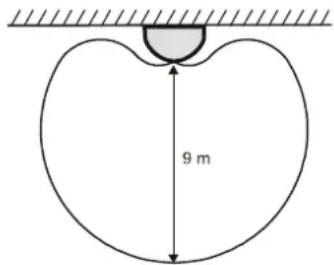
Detector relative directional sensitivity
Technical specifications
| Voltage | Lithium battery type LS(T)14500 (3.6V AA) |
| Calculated battery lifetime | approx. 3 years (sleep time 5 min.) |
| Communication band: | 868 MHz, Oasis protocol |
| Communication range: | approx. 100m (open area) |
| Detection range: | up to 9 m |
| Operational environment according to EN 50131-1 | II. internal space |
| Operational temperature range | -10 to +40 °C |
| Dimensions | 88 x 46 x 22 mm |
| EN 50131-1, CLC/TS 50131-2-2, EN 50131-5-3 classification: | grade 2 |
| Complies with ETSI EN 300220, ETS 300683, EN 60950 | |
| Can be operated according to ERC REC 70-03 | |
FCC ID VL6JA85B

Jablotron Ltd. hereby declares that the JA-85B is in compliance with the essential requirements and other relevant provisions of Directive 1999/5/EC and complies with part 15 of the FCC rules. Operation is subject to the following two conditions: 1. This device may not cause harmful interference, and 2. This device must accept any interference received, including interference that may cause undesired operation.
CAUTION: Changes or modifications no expressly approved by Jablotron could void the user's authority to operate the equipment. The original of the conformity assessment can be found on the web site www.jablotron.com, Technical Support section.

Note: Although this product does not contain any harmful materials we suggest you return the product to the dealer or directly to the manufacturer after use.

Jablotron Ltd., Pod Skalkou 33 466 01 Jablonec nad Nisou Czech Republic
Tel: +420 483 559 911
fax: +420 483 559 993
Internet: www.jablotron.com