
NVR-826 STBS - Docking Station NEVIR - Free user manual and instructions
Find the device manual for free NVR-826 STBS NEVIR in PDF.


| Product Type | Docking Station / Tablet Speaker Stand |
| Brand | NEVIR |
| Model | NVR-826 STBS |
| Dimensions | 208 mm x 199 mm x 51.5 mm |
| Power Supply | Built-in rechargeable lithium battery or USB cable |
| Output Power | 8 W |
| Signal-to-Noise Ratio | >80 dB |
| Frequency Range | 50 Hz - 20 KHz |
| Wireless Range | Up to 20 meters |
| Bluetooth | Yes |
| NFC | Yes |
| Audio Inputs | Bluetooth, AUX-IN (3.5 mm) |
| Microphone | Yes |
| Compatible Devices | iPhone, iPad, Smartphone, Notebook, MP3, MP4 |
| Tablet Size Compatibility | Up to 10 inches |
| Battery Type | Lithium-ion rechargeable |
| Charging Time (First Use) | At least 8 hours |
| LED Indicators | Green (flashing: pairing, solid: paired), Red (solid: charging), Off (fully charged) |
| Maintenance | Clean with soft cloth or damp chamois leather, never use solvents |
| Safety | Keep away from moisture, magnets; do not disassemble; battery precautions |
| Disposal | WEEE compliant; separate collection for electronics and batteries |
Frequently Asked Questions - NVR-826 STBS NEVIR
User questions about NVR-826 STBS NEVIR
0 question about this device. Answer the ones you know or ask your own.
Ask a new question about this device
Download the instructions for your Docking Station in PDF format for free! Find your manual NVR-826 STBS - NEVIR and take your electronic device back in hand. On this page are published all the documents necessary for the use of your device. NVR-826 STBS by NEVIR.
USER MANUAL NVR-826 STBS NEVIR
natural_image
Close-up of a smartwatch with a black strap and display screen (no visible text or symbols)ÍNDICE
Fuentes de audio: Tablets, Smartphones, Notebook, MP3, MP4, etc
natural_image
Line drawing of two hands holding a curved object with an arrow indicating direction (no text or symbols)natural_image
Line drawing of two hands holding a rectangular object with arrows indicating motion (no text or symbols)natural_image
Line drawing of hands holding a mechanical component with directional arrows indicating motion (no text or symbols)natural_image
Three identical mechanical devices with angled blades, shown from different angles (no text or symbols visible)- Conecte su tabletvía Bluetooth o Aux-in.

natural_image
Yellow Bluetooth smartwatch with black strap and screen (no visible text or symbols)
natural_image
Yellow and black electronic device with a screen showing a red sensor or sensor, labeled 'AUX-IN' in the top left corner (no other text or symbols visible)

AVISO
natural_image
Simple line drawing of a desk with a book and a cup (no text or symbols)
natural_image
Simple line drawing of a hand holding an object (no text or symbols)
natural_image
Line drawing of a pair of headphones with a smartphone, no text or symbols presentnatural_image
Smartwatch with wrist strap and smartphone displaying app interface (no visible text or symbols)User's manual
Contents
- Introduction 2
- Battery Precaution ...... 3
- Getting Started 4
- Installation Operation....5
- Cable Connection 6
- Bluetooth Connection 6
- NFC Connection ...... 7
- Microphone usage 8
- LED Display Status 8
- Battery Charging 8
- Product Care....8
Please read the following safety warning and precaution before using your device.
Specification
NVR-826 STBS
Output Power: 8W
S/N: >80dB
Frequency range: 50Hz-20KHz
Power supply: Lithium battery or USB cable
Audio source: iPhone, iPad, Smartphone, Notebook, MP3, MP4, etc
Function spec: Bluetooth, Microphone, Line-in
Size: 208mm x 199mm x 51.5mm
Rechargeable battery with charging option from USB cable
Operating rang up to 20 meters
1. Introduction
Thank you for purchasing the iStage Theater audio system, an innovative portable tablet stand, speaker and amplifier. This device can be easily connected with audio or video devices for your travel and daily needs. The iStage Theater supports both Bluetooth and Aux-in function.
2. Battery Precaution
The device can be powered by a built-in rechargeable lithium battery. Please charge the battery for at least 8 hours before your first use of device.
- If the device is not used for a long period of time, the battery may be out of power. Please charge the battery.
- Rechargeable batteries are only to be charged under adult supervision.
- Use only the supplied USB micro cable to recharge the battery. Improper charging may damage the battery and the device.
- Do not attempt to open the rechargeable battery or battery pack. There is not serviceable part inside.
- Should a battery leak, the device may become damaged. Clean the battery compartment immediately, avoiding to touch your skin.
- Keep the battery out of reach of children. If swallowed, consult a physician immediately.
- Avoid storing the battery in extremely hot or cold environment. A device with a hot or cold battery may not work temporarily, even when the battery is fully charged.
- Do not dispose batteries in a fire as they may explode. Batteries may also explode if damaged. Please dispose them according to local regulation. Do not dispose them as household waste.
3. Getting Started

4. Installation Operation
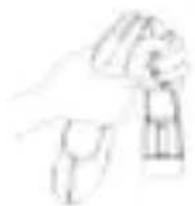
- Unfold the speaker 2. Stretch two arms to
fit big size tablet pc

natural_image
Line drawing of hands holding a device with an arrow indicating motion (no text or symbols)- Put your tablet on the stand

natural_image
Illustration of hands holding a mechanical component with directional arrows indicating motion (no text or symbols)- Adjust the angle to desired position

natural_image
Illustration of two hands holding a rectangular object with a curved arrow indicating rotation or movement (no text or symbols)
natural_image
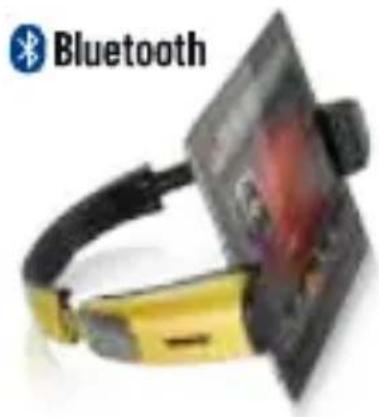
Three identical mechanical devices with angled blades, shown from different angles (15°, 40°, 90°) without any text or symbols.- Connect your tablet via Bluetooth or Aux-in
natural_image
Bluetooth smartwatch with black strap and gold-colored headband (no visible text or symbols)
natural_image
Close-up of a yellow electronic device with black cable and a mounted screen (no visible text or symbols)WARNING:
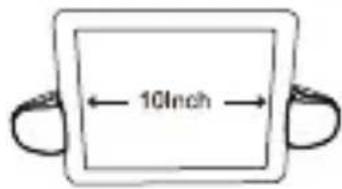
- The Speaker Suits Tablet PC Within 10 Inches
- Please Pull Out the Speaker's Extension Strap When Using Your Tablet Horizontally
- It's Normal the Speaker Deforms Slightly After Being Used Several Times. Please Twist It Slightly to Natural Shape.
①23

natural_image
Simple line drawing of a tray with a blank sheet, no text or symbols presentO

natural_image
Line drawing of a hand holding a tool or device (no text or symbols)O
5. Cable Connection

6. Bluetooth Connection
Pairing iStage to your tablet (tablet should be away from your speaker within 10 meters)
- Activate pairing mode on iStage by switching "ON/OFF" button to "ON". The LED will flash in green color.
-
On your tablet, navigate to the Bluetooth function (refer to the tablet owner's manual to locate Bluetooth function).
-
Select "Set Up" Bluetooth or turn "ON" Bluetooth.
- Select "Search" or "Discover" devices.
- Select "NVR-826 STBS".
- If requested type the password 0000
- Press the Enter key.
After completing the steps above, a message on your tablet will appear to confirming that your device is now paired/connected.
In case of unsuccessful pairing, Push to "OFF" and restart it to "ON".
If you turn off the device, but the Bluetooth on your tablet remains open, when you restart the device, the Bluetooth will be connected automatically.
7. NFC Connection

natural_image
Line drawing of a pair of headphones with a smartphone and earphone (no text or symbols)NFC: Near Field Communication, is a set of standard for Smartphone and this speaker to establish Bluetooth radio communication with each other by touching them together or bringing them into close proximity, usually no more than a few centimeters.
Please activate the NFC function (subjects to tablets own setting) of your bluetooth device. Bring your bluetooth device close to speaker, as above picture.
Your bluetooth device will ask you whether you need to pair the speaker, confirm by "Yes" or "OK", then the pairing process is completed.
8. Microphone usage
When a phone call comes in, you could talk through the microphone on speaker.
9. LED Display Status
| LED Display | Light indication | |
| Green Light | Flash quickly and Du...Du... | Low battery |
| Flash slowly | It's ready to pair | |
| Stay solid | It's paired | |
| Red Light | Stay solid | Charging in process |
| OFF | Fully charged |
10. Battery Charging
The device has a built-in rechargeable lithium battery that can be charged by connecting to the USB port of your computer or into an AC adapter which contains a USB port. When charging is completed, the red light will go off.
11. Product care
Your device is designed to be light, compact and durable. As an electronic device, must be treated carefully. Putting unnecessary pressure on it or striking the device against other objects may cause damage.
- Do not drop, crush, bend or apply excessive force to the device.
- Do not expose your device to moisture, extreme or prolonged heat, cold, humidity, or other adverse conditions. Avoid storing it in damp, humid or wet places. It is not waterproof.
- Clean the unit with a soft cloth or damp chamois leather. Never use solvents.
- The Unit can Only be opened by qualified person.
- This device contains magnets. Keep magnetic field sensitive products such as credit cards and video screen away from this device to avoid damage or malfunction.

The European Directive 2002/96 /EC on Waste Electrical and Electronic Equipment (WEEE) required that old household electrical appliances must not be disposed of in the normal unsorted municipal waste stream. Old appliances must be collected separately in order to optimize the recovery and recycling of the material they contain, and reduce the impact on human health and the environment. The crossed out “wheeled bin” symbol on the product remind you of your obligations that when you dispose of the appliance, it must be separately collected.
Besides that, waste batteries and/or accumulator must be removed prior to delivery of WEEE, thought the separated collection channels provided for this purpose (distributors and/or facilities from Local Authorities)
Brand : NEVIR
Model : NVR-826 STBS
Category : Docking Station