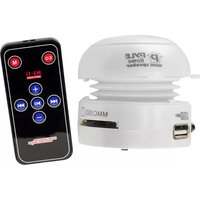
PMSU1W - Docking Station Pyle - Free user manual and instructions
Find the device manual for free PMSU1W Pyle in PDF.


| Product Type | Bluetooth Docking Station with AM/FM Radio |
| Model | PMSU1W |
| Brand | Pyle |
| Bluetooth Version | 5.0 |
| Wireless Range | Up to 30 feet |
| Radio Bands | AM/FM |
| Playback Sources | Bluetooth, USB, SD Card, AUX, Radio |
| Speaker Output Power | 2 x 5W |
| Display | LED digital display |
| Controls | Buttons on unit and remote control included |
| Power Supply | AC 100-240V, 50/60Hz (adapter included) |
| Dimensions (W x H x D) | 6.3 x 4.7 x 6.3 inches |
| Weight | 2.2 lbs |
| Material | Plastic with metallic finish |
| Compatible Devices | Smartphones, tablets, MP3 players via Bluetooth or AUX |
| Additional Features | Clock, alarm, sleep timer, equalizer presets |
| Cleaning Instructions | Unplug device, wipe with soft dry cloth. Avoid liquids. |
| Safety Warnings | Do not expose to rain or moisture. Keep away from heat sources. |
| Repairability | Contact Pyle customer service for parts and repairs. |
| Warranty | 1 year limited |
Frequently Asked Questions - PMSU1W Pyle
User questions about PMSU1W Pyle
0 question about this device. Answer the ones you know or ask your own.
Ask a new question about this device
Download the instructions for your Docking Station in PDF format for free! Find your manual PMSU1W - Pyle and take your electronic device back in hand. On this page are published all the documents necessary for the use of your device. PMSU1W by Pyle.
USER MANUAL PMSU1W Pyle
PMSU1 MINI SPEAKER www.pyleaudio.com
Introduction
Please take a few moments to read through this manual to gain important information about using the Pop Up Speaker.
This portable speaker has a compact casing with an innovative opening and closing design that provides extra bass resonance. When closed, treble sounds will be enhanced and when open, bass sounds are enhanced. Its palm size is convenient for carrying and outdoor use.
With the latest technology built-in rechargeable Lithium ion battery, the speaker greatly amplifies sound. A high fidelity speaker gives crystal clear audio.
The speaker is equipped with a standard audio jack to connect to many devices such as a PC, laptop, iPod, MP3 and MP4 player, PSP, portable DVD player and mobile phone provided they have a standard 3.5mm audio output socket (such as those used for earphones).
Charge the speaker by connecting the USB cable to any USB port on a PC, laptop or DC charger. The high capacity battery allows for long play time even at loud volumes.
This Pop Up Speaker allows you to appreciate music from your audio device without requiring extra wires for power. Share your music with those around you wherever you are: at home, on outings or even while you walk.
INCLUDED ITEMS
Pop Up Speaker
USB charging/audio data retractable cable
⑦ User Guide
RUN TIME
- The battery discharge time will depend on the play volume.
• Typical run time values for medium volume are approximately 8 hours and loud volume 2 hours.
CABLE FUNCTIONAL DIAGRAM AND DESCRIPTION

- Pictures in this manual may differ from actual product in shape and colour.
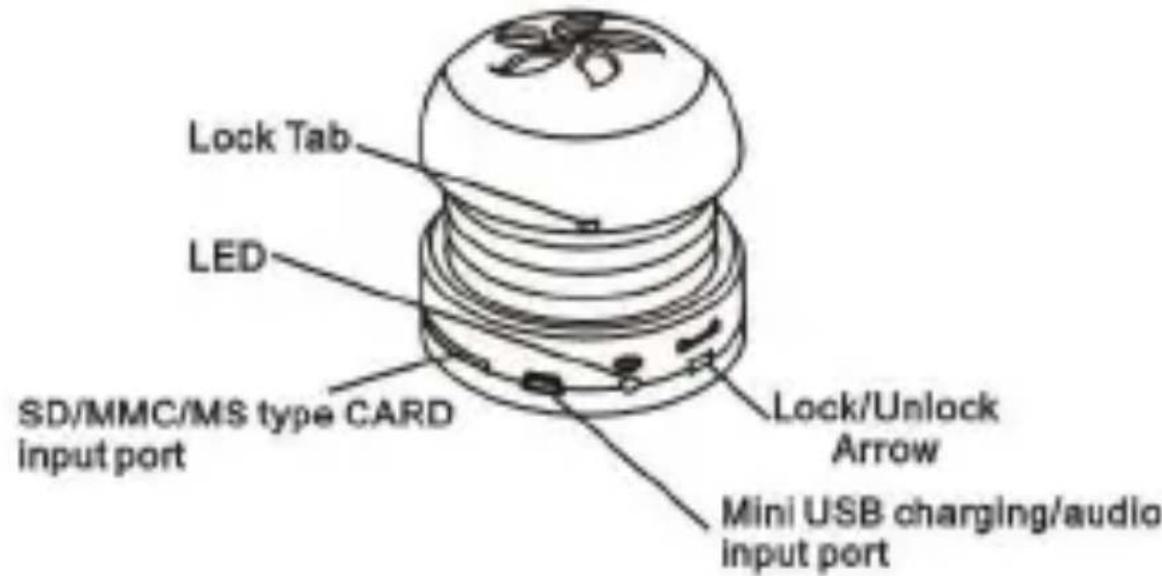


natural_image
Close-up of a black remote control device with multiple function buttons (no visible text or symbols)Operation mode shift button
OFF/POP/JAZZ/ROCK/CLASSIC/RANDB/BASSBOOST
Volume up
Volume down
PLAY/PAUSE
⊗ Next/Channel select downward button
Previous/Channel select upward button

Connect the USB plug to a USB port on computers, laptops and other USB charging port on AC/DC adaptors and chargers.
The speaker has a built-in rechargeable Lithium ion battery pack of 300mAh.Battery charging time from AC/DC 5V charger is approximately 2.5 hours and from the USB port is 4 hours.

flowchart
graph TD
    A["Device"] --> B["mobile phone"]
    A --> C["PC"]
    A --> D["PSP"]
    A --> E["ipod"]
    A --> F["Laptop"]
    A --> G["MP3/MP4"]
    style A fill:#f9f,stroke:#333
    style B fill:#ccf,stroke:#333
    style C fill:#cfc,stroke:#333
    style D fill:#fcc,stroke:#333
    style E fill:#cff,stroke:#333
    style F fill:#ffc,stroke:#333
    style G fill:#cfc,stroke:#333
TECHNICAL SPECIFICATIONS
Power output : 2.2W
Speaker : D(36mm)
SNR ≥ 89dB
Lithium ion battery voltage : 3.7V
Lithium ion battery input voltage : 5V
Charge voltage : 4.2V
Battery capacity : 300mAh
Dimensions :D(54mm) x H(≈41-64mm)
Operating temperature : 0°C-40°C
Net weight : 60g
Charge time: 2.5 hours (DC5V), 4 hours (USB)
Runtime : 8 hours ( medium volume), 2 hours ( loud volume )
Battery life cycle : 300-500 times

WARNINGS
Charge and operate only as indicated in this manual as improper use may result in damage to the product or injury.
Do not exceed the volume of the speaker as it may cause permanent damage.
Do not expose this product to damp, wet or high temperature areas.
Do not short out this product or disassemble by yourself to avoid danger or shocks.
Do not insert any objects into the sound box.
Keep out of reach of children and maintain supervision if young children are using.
Avoid over-extending the speaker and cable. Do not pull the speaker and cable with force.

natural_image
Close-up of hands holding a white cylindrical object with a large 'no' symbol nearby (no text or symbols on the object itself)


Brand : Pyle
Model : PMSU1W
Category : Docking Station