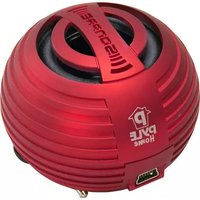
Pyle PMS8R - Docking Station

PMS8R - Docking Station Pyle - Free user manual and instructions

Find the device manual for free PMS8R Pyle in PDF.

📄 2 pages English EN Download 💬 AI Question 10 questions ⚙️ Specs
Notice Pyle PMS8R - page 1
Pick your language and provide your email: we'll send you a specifically translated version.
Product Type Portable Docking Station / Speaker
Brand Pyle
Model PMS8R
Power Supply Internal rechargeable battery
Charging Method USB (standard USB controller)
Audio Input 3.5mm audio plug
Charging Indicator Red LED when charging
Compatible Devices Mobile phones, tablets, MP3 players, computers
Material Plastic and metal
Color Black
Dimensions (Approx.) 3.2 x 3.2 x 3.5 inches
Weight (Approx.) 0.5 lbs
Battery Type Lithium-ion
Charging Time 2-3 hours
Playback Time Up to 6 hours
Package Contents Speaker, USB charging cable, 3.5mm audio cable, protective fluid? (as per manual)
Safety Features Internal power supply, read manual before use
Maintenance Clean with dry cloth, avoid moisture
Reparability Not user-serviceable; contact Pyle support

Frequently Asked Questions - PMS8R Pyle

How do I charge the Pyle PMS8R speaker?
Connect the USB charging cable to the speaker and a computer or USB power adapter. The red LED will indicate charging.
How do I connect my phone to the speaker?
Use the 3.5mm audio cable to connect your phone's headphone jack to the speaker's audio input.
What does the red light mean?
The red light indicates that the speaker is charging. It may turn off when fully charged.
Can I use the speaker while charging?
Yes, you can use the speaker while it is connected to a power source via USB.
How long does the battery last?
The battery lasts up to 6 hours of playback, depending on volume and usage.
What devices are compatible with this speaker?
The speaker works with any device that has a 3.5mm audio output, such as smartphones, tablets, and MP3 players.
How do I clean the speaker?
Use a soft dry cloth to wipe the exterior. Avoid moisture and abrasive cleaners.
The speaker is not turning on. What should I do?
Ensure the speaker is charged. Connect to USB and wait a few minutes. If still no power, contact support.
Is the speaker waterproof?
No, the Pyle PMS8R is not waterproof. Keep it away from water and moisture.
Where can I find the user manual?
The manual is available for free download at Notice-Facile.com or the Pyle website.

User questions about PMS8R Pyle

0 question about this device. Answer the ones you know or ask your own.

Ask a new question about this device

The email remains private: it is only used to notify you if someone responds to your question.

No questions yet. Be the first to ask one.

Download the instructions for your Docking Station in PDF format for free! Find your manual PMS8R - Pyle and take your electronic device back in hand. On this page are published all the documents necessary for the use of your device. PMS8R by Pyle.

USER MANUAL PMS8R Pyle

PYLE®
Pocket speaker
PMS8
Pyle PMS8R - 1
User Manual
Please read this manual carefully before operating the speaker system

www.PyleAudio.com

Opening The Packing

Please check the speaker Model number marked on the packing carton. Please contact the seller as soon as possible if you find the speaker is the incorrect model or has sustained shipping damage.

Packing list:
- 1 x Stereo Speaker
- 1 x User Manual - 1 x USB connector
• 1 x OBB connector • 1 x Protecting Poud
Pyle PMS8R - Opening The Packing - 1

Pyle PMS8R - Opening The Packing - 2

Pyle PMS8R - Opening The Packing - 3

Pyle PMS8R - Opening The Packing - 4
This cable is not compatible for data connectivity with silver devices, except for this product only.

Pyle PMS8R - Opening The Packing - 5
Warning
This device contains an internal power supply. Please read the manual carefully before usage

Charging

Charge introduction
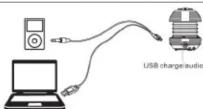
① Standard USB connectors
①. Standard USB connector ②. 3.5mm audio plug.
④. USB charge/ audio input
Pyle PMS8R - Charging - 1

Pyle PMS8R - Charging - 2
(1). ① Connect speaker and ③ connect with computer for charge;
(2). when the light become to red, it is charging, become blue, the battery is full charge:
This cable is not compatible for data connectivity with
other devices except for this product only.

(3). Through 3.5mm aud

3.5mm audio plug.

Diagram and Function Description

(1). Coiling the 3.5mm audio plug on the bottom when is not working, (2). Put out the 3.5mm audio plug when the is working

①. Bottom of the speaker

Pyle PMS8R - Diagram and Function Description - 1

Pyle PMS8R - Diagram and Function Description - 2

Pyle PMS8R - Diagram and Function Description - 3

[Non-Text]
ose the resonator
m = 311
m = 311
③. Open the resonator
Pyle PMS8R - Diagram and Function Description - 4

Pyle PMS8R - Diagram and Function Description - 5

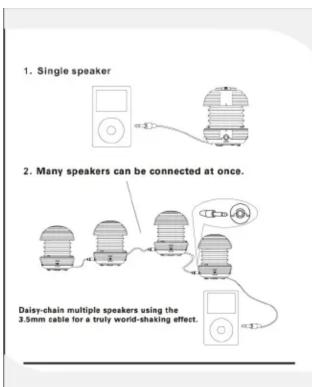
1. Single speaker 2. Many speakers can be connected at once. Daisy-chain multiple speakers using the 3.5mm cable for a truly world-shaking effect.

Patented vacuum-bass system

How to open/close the speaker resonator Step 1 Hold speaker firmly by its base and top cap. Step 2 Turn top cap anti-clockwise (5mm). Step 3 Loosen, the top cap will spring up to expand resonator. Step 4 Hold speaker firmly by its base & press top cap toward speaker base. Step 5 Turn top cap clockwise (5mm).

Specifications MODEL: PMS8 Dimensions: 2.55" X 2.17" X 1.26" Net Weight: 3 oz Speaker ( $ ) 40MM Input:L/R320mV Power Output: 10 W S/N: >60dB AMP Frog Range: 180Hz-18KHz Charge Voltage: 5V±0.5V Suitable Temperature: 0°C~40°C Charging Time: 2.5hours Please don't pull extendable resonance of the bassbox forcibly. It will be damaged by this!

PYLE® www.PyleAudio.com

Table of contents Click a title to access it
Manual assistant
Powered by Anthropic
Waiting for your message
Product information

Brand : Pyle

Model : PMS8R

Category : Docking Station