
MediaPad M3 Lite 10.1 - Tablet HUAWEI - Free user manual and instructions
Find the device manual for free MediaPad M3 Lite 10.1 HUAWEI in PDF.


| Product Type | Tablet |
| Model | MediaPad M3 Lite 10.1 (BAH-L09) |
| Display Size | 10.1 inches |
| Dimensions | Approx. 241.3 x 171.5 x 7.1 mm |
| Weight | Approx. 460 g |
| Operating System | Android (version as released) |
| Processor | Qualcomm Snapdragon (typical) |
| RAM | 4 GB (typical) |
| Storage | 32 GB (typical), expandable via microSD |
| Connectivity | Wi-Fi 802.11 a/b/g/n/ac (2.4/5 GHz), Bluetooth 4.2, LTE (BAH-L09 model) |
| Battery | Lithium polymer, model HB26A5I0EBC, typical capacity 6600 mAh |
| Charger | Adapter HW-050200X01 (5V, 2A) |
| Cameras | Front and rear (specs typical for tablet) |
| SAR Value | 0.94 W/kg (body worn) |
| Operating Temperature | 0°C to 35°C |
| Storage Temperature | -40°C to 70°C |
| Cleaning Instructions | Wipe with a soft, dry cloth; avoid liquids |
| Safety Precautions | Avoid high volume, keep from pacemakers, avoid heat and moisture |
| Spare Parts Available | Adapter, battery, earphones (optional) |
| Repair Information | Contact Huawei support or authorized service center |
| Certification | CE, ENERGY STAR, Wi-Fi, Bluetooth |
| Manufacturer | Huawei Technologies Co., Ltd. |
| Release Year | 2017 |
Frequently Asked Questions - MediaPad M3 Lite 10.1 HUAWEI
User questions about MediaPad M3 Lite 10.1 HUAWEI
0 question about this device. Answer the ones you know or ask your own.
Ask a new question about this device
Download the instructions for your Tablet in PDF format for free! Find your manual MediaPad M3 Lite 10.1 - HUAWEI and take your electronic device back in hand. On this page are published all the documents necessary for the use of your device. MediaPad M3 Lite 10.1 by HUAWEI.
USER MANUAL MediaPad M3 Lite 10.1 HUAWEI
HUAWEI MediaPadM3 Lite 10
Quick Start Guide
Note: Remember the Google account your device last logged in to.
During an untrusted factory settings restoration or microSD card-based update, Google's anti-theft mechanism requires you to enter the Google account your device last logged in to on the startup navigation screen for identity authentication. Your device can properly power on only after the identity authentication passes.
Your device at a glance
Before you start, let's take a look at your new device.
- To power on your device, press and hold the power button until the screen turns on.
- To power off your device, press and hold the power button, and then touch ⏻


- To force your device to restart, press and hold the power button until your device vibrates.
Getting Started
Follow the instructions in the following figures to set up your device.


- Do not insert or remove the SIM card when your device is powered on.
- Ensure that the card is correctly aligned and that the card tray is level when you insert it into your device.

Be careful not to scratch your device or hurt yourself when using the eject pin. Store the eject pin out of the reach of children to prevent accidental swallowing or injury.

Do not use cut or modified SIM or microSD cards with your device as these may not be recognized and could damage the card tray.
For more information
If you encounter any problems while using your device, you can obtain help from the following resources:
Log on to the official Huawei website. You can:
- Visit http://consumer.huawei.com/en/ to download user guides, view frequently asked questions and other information.
- Visit http://consumer.huawei.com/en/support/hotline for the most up-to-date contact information for your country or region.
Go to 🙏 Settings and touch About tablet >Legal information to view legal information for your product.
Go to 📄 Settings and touch About tablet > Legal information > Safety information to view safety information for your product.
Go to 📄 Settings and touch About tablet > Authentication info to view regulatory information for your product.
Go to Settings and touch About tablet > Certification logos to view more information on certification logos for your product.

All pictures and illustrations in this guide, including but not limited to the product color, size, and display content, are for your reference only. The actual product may vary. Nothing in this guide constitutes a warranty of any kind, express or implied.
Safety Information
Please read all of the safety information carefully before using your device to ensure its safe and proper operation and to learn how to dispose of your device properly.
Operation and safety

natural_image
Warning symbol with a triangle containing an ear and sound waves (no text or numbers)• To prevent possible hearing damage, do not listen at high volume levels for long periods.
- Using an unapproved or incompatible power adapter, charger, or battery may damage your device, shorten its lifespan, or cause a fire, explosion, or other hazards.
- Ideal operating temperatures are 0 °C to 35 °C. Ideal storage temperatures are -40 °C to +70 °C.
- Pacemaker manufacturers recommend that a minimum distance of 15 cm be maintained between a device and a pacemaker to prevent potential interference with the pacemaker. If using a pacemaker, hold
the device on the side opposite the pacemaker and do not carry the device in your front pocket.
- Keep the device and the battery away from excessive heat and direct sunlight. Do not place them on or in heating devices, such as microwave ovens, stoves, or radiators.
- Observe local laws and regulations while using the device. To reduce the risk of accidents, do not use your wireless device while driving.
- While flying in an aircraft or immediately before boarding, only use your device according to instructions provided. Use of a wireless device in an aircraft may disrupt wireless networks, present a hazard to aircraft operation, or be illegal.
- To prevent damage to your device's parts or internal circuits, do not use it in dusty, smoky, damp, or dirty environments or near magnetic fields.
- When charging the device, make sure the power adapter is plugged into a socket near the devices and is easily accessible.
- Unplug the charger from electrical outlets and the device when not in use.
- Do not use, store or transport the device where flammables or explosives are stored (in a gas station, oil depot, or chemical plant, for example). Using your device in these environments increases the risk of explosion or fire.
- Dispose of this device, the battery, and accessories according to local regulations. They should not be disposed of in normal household waste. Improper battery use may lead to fire, explosion, or other hazards.
Disposal and recycling information
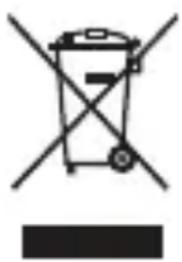
natural_image
Symbol of a trash bin crossed with no text or numbers, representing waste sorting or disposal (no text present)The crossed-out wheeled-bin symbol on your product, battery, literature or packaging reminds you that all electronic products and batteries must be taken to separate waste collection points at the end of their working lives; they must not be disposed of in the normal waste stream with household garbage. It is the responsibility of the user to dispose of the equipment using a designated collection point or service for separate recycling of waste electrical and electronic equipment (WEEE) and batteries according to local laws.
Proper collection and recycling of your equipment helps ensure electrical and electronic equipment (EEE) waste is recycled in a manner that conserves valuable materials and protects human health and the environment, improper handling, accidental breakage, damage, and/or improper recycling at the end of its life may be harmful for health and environment. For more information about where and how to drop off your EEE waste, please contact your local authorities, retailer or household waste disposal service or visit the website http://consumer.huawei.com/en/
Reduction of hazardous substances
This device and any electrical accessories are compliant with local applicable rules on the restriction of the use of certain hazardous substances in electrical and electronic equipment, such as EU REACH, RoHS and Batteries (where included) regulations, etc. For declarations of conformity about REACH and RoHS, please visit our web site http://consumer.huawei.com/certification.
EU regulatory conformance
Body worn operation
The device complies with RF specifications when used at a distance of 0.50 cm from your body. Ensure that the device accessories, such as a device case and device holster, are not composed of metal components. Keep the device away from your body to meet the distance requirement.
The highest SAR value reported for this device type when tested in portable exposure conditions is 0.94 W/kg.
Statement
Hereby, Huawei Technologies Co., Ltd. declares that this device is in compliance with the essential requirements and other relevant provisions of Directive 2014/53/EU.
The most recent and valid version of the DoC (Declaration of Confirmation) can be viewed at http://consumer.huawei.com/certification.
This device may be operated in all member states of the EU.
Observe national and local regulations where the device is used.
This device may be restricted for use, depending on the local network.
Restrictions in the 2.4 GHz band:
Norway: This subsection does not apply for the geographical area within a radius of 20 km from the centre of Ny-Ålesund.
Restrictions in the 5 GHz band:
According to Article 10 (10) of Directive 2014/53/EU, the packaging shows that this radio equipment will be subject to some restrictions when placed on the market in Belgium (BE), Bulgaria (BG), the Czech Republic (CZ), Denmark (DK), Germany (DE), Estonia (EE), Ireland (IE), Greece (EL), Spain (ES), France (FR), Croatia (HR), Italy (IT), Cyprus (CY), Latvia (LV), Lithuania (LT), Luxembourg (LU), Hungary (HU), Malta (MT), Netherlands (NL), Austria (AT), Poland (PL), Portugal (PT), Romania (RO), Slovenia (SI), Slovakia (SK), Finland (FI), Sweden (SE), the United Kingdom (UK), Turkey (TR), Norway (NO), Switzerland (CH), Iceland (IS), and Liechtenstein (LI).
The WLAN function for this device is restricted to indoor use only when operating in the 5150 to 5350 MHz frequency range.
Frequency Bands and Power
(a) Frequency bands in which the radio equipment operates: Some bands may not be available in all countries or all areas. Please contact the local carrier for more details.
(b) Maximum radio-frequency power transmitted in the frequency bands in which the radio equipment operates: The maximum power for all bands is less than the highest limit value specified in the related Harmonized Standard.
The frequency bands and transmitting power (radiated and/or conducted) nominal limits applicable to this radio equipment are as follows:
GSM900:37dBm; GSM1800:34dBm; WCDMA 900/2100:25.7dBm, LTE B1/
3/7/8/20/38/40:25.7dBm;Wi-Fi 2.4G: 20 dBm,Bluetooth: 20 dBm,Wi-Fi 5G: 5150-5350: 23 dBm, 5470-5725 30dBm.
Accessories and Software Information
Some accessories are optional in certain countries or regions. Optional accessories can be purchased from a licensed vendor as required. The following accessories are recommended:
Adapters: HW-050200X01 (X represents the different plug types used, which can be either C, U, J, E, B, A, I, R, Z or K, depending on your region) Batteries: HB26A5I0EBC
Earphones: NA12, EMC309-001, MEMD1632B580C00, 1311-3291-3.5mm-229
The product software version is BAH-L09C001B006SP01-log. Software updates will be released by the manufacturer to fix bugs or enhance functions after the product has been released. All software versions released by the manufacturer have been verified and are still compliant with the related rules.
All RF parameters (for example, frequency range and output power) are not accessible to the user, and cannot be changed by the user.
For the most recent information about accessories and software, please see the DoC (Declaration of Confirmation) at http://consumer.huawei.com/certification.
Legal Notice
Trademarks and Permissions

HUAWEI, HUAWEI and are

trademarks of Huawei Technologies Co., Ltd.
Android ^TM is a trademark of Google Inc.
LTE is a trademark of ETSI.
The Bluetooth ^® word mark and logos are registered trademarks owned by Bluetooth SIG, Inc. and any use of such marks by Huawei Technologies Co., Ltd. is under license.
Wi-Fi ^® , the Wi-Fi CERTIFIED logo, and the Wi-Fi logo are trademarks of Wi-Fi Alliance.
ENERGY STAR® MARK
For information related to ENERGY STAR ^® , please visit the website www.energystar.gov.
Privacy Policy
To better understand how we protect your personal information, please see the privacy policy at http://consumer.huawei.com/privacy-policy.
Copyright © Huawei Technologies Co., Ltd. 2017. All rights reserved.
THIS DOCUMENT IS FOR INFORMATION PURPOSE ONLY, AND DOES NOT CONSTITUTE ANY KIND OF WARRANTIES.


- HUAWEI MediaPadM3 Lite 10
- Your device at a glance
- Getting Started
- For more information
- Safety Information
- Operation and safety
- Disposal and recycling information
- Reduction of hazardous substances
- EU regulatory conformance
- Body worn operation
- Statement
- Restrictions in the 2.4 GHz band:
- Restrictions in the 5 GHz band:
- Frequency Bands and Power
- Accessories and Software Information
- Legal Notice
- Trademarks and Permissions
- Privacy Policy
- Copyright © Huawei Technologies Co., Ltd. 2017. All rights reserved.
Brand : HUAWEI
Model : MediaPad M3 Lite 10.1
Category : Tablet