559 - Hi-Fi System MERIDIAN - Free user manual and instructions
Find the device manual for free 559 MERIDIAN in PDF.


| Product Type | Multi-Channel Power Amplifier |
| Brand | Meridian |
| Model | 559 |
| Number of Channels | 5 |
| Power Output per Channel | 200 W into 8 ohms (all channels driven) |
| Frequency Response | 20 Hz - 20 kHz (±0.1 dB) |
| Total Harmonic Distortion | <0.01% |
| Signal-to-Noise Ratio | >120 dB (A-weighted) |
| Inputs | 5 x Balanced XLR, 5 x Unbalanced RCA |
| Outputs | 5 x Binding posts (bi-wire capable) |
| Dimensions (H x W x D) | 175 mm x 440 mm x 400 mm |
| Weight | 25 kg |
| Power Consumption | Standby: <0.5 W, Maximum: 1500 W |
| Mains Voltage | 100-240 V AC, 50/60 Hz |
| Protection Circuits | Overcurrent, overvoltage, overtemperature, DC offset |
| Cooling | Fan-assisted, temperature controlled |
| Chassis Finish | Black anodized aluminum |
| Remote Control | IR input, RS-232 for system integration |
| Warranty | 2 years (parts and labor) |
| Repairability | Modular design, serviceable by authorized technicians |
Frequently Asked Questions - 559 MERIDIAN
User questions about 559 MERIDIAN
0 question about this device. Answer the ones you know or ask your own.
Ask a new question about this device
Download the instructions for your Hi-Fi System in PDF format for free! Find your manual 559 - MERIDIAN and take your electronic device back in hand. On this page are published all the documents necessary for the use of your device. 559 by MERIDIAN.
USER MANUAL 559 MERIDIAN
Meridian 559 Two Channel Power Amplifier
Meridian 559 Stereo Power Amplifier User Guide
Sales and service in the UK
Meridian Audio Ltd
Stonehill
Stukeley Meadows
Cambs
PE29 6EX
England
Tel (01480) 445678
Fax (01480) 445686
World Wide Web
http://www.meridian-audio.com
Sales and service in the USA
Meridian America Inc
3800 Camp Creek Parkway
Building 2400
Suite 122
Atlanta
GA 30331
Tel (404) 344 7111
Fax (404) 346 7111
Designed and
manufactured in the UK by
Meridian Audio Ltd
Stonehill
Stukeley Meadows
Cambs
PE29 6EX
England
Copyright © 1993–2001 Meridian Audio Ltd
Part no: 559/1
This guide was produced by
Human-Computer Interface Ltd,
http://www.interface.co.uk
Contents
Introduction 1
Introduces the 559 Stereo Power Amplifier, and provides an overview of the other products available in the Meridian 500 Series.
The Meridian 500 Series ...... 2
Sample configurations 3
Specification and accessories .... 5
Setting up the stereo power amplifier 7
Describes how to unpack, install, and use the stereo power amplifier, and explains what you should do if it requires servicing.
Unpacking 8
Connecting the stereo power amplifier.. 9
Connecting a source.... 12
Connecting speakers 13
Troubleshooting 17
Provides suggested solutions to typical problems.
Troubleshooting 18
Maintenance 19
Service and guarantee 20
Index 21
| # Preface |
Introduction
In choosing the 559 Stereo Power Amplifier you have acquired a component that combines major advances in audio and engineering design.
The 559 Stereo Power Amplifier uses a unique feedback topology and precision local error correction system. It includes two massive toroidal transformers, and the unit has full thermal, load, and DC protection.
The 559 Stereo Power Amplifier can also be operated in bridge mode, for over three times the power output to a single loudspeaker.
This guide is designed to enable you to obtain the best possible results from the unit in conjunction with the other units in your system.
The Meridian 500 Series
The Meridian 500 Series is a unique system of digital, analogue, and video components designed to meet the demand for absolute quality, ease of use, and lasting value.
The flexibility of the Meridian 500 Series is such that you can assemble a system as simple or as complex as you need, perfectly suited to your musical and environmental requirements, and with the ability to add to it or change it at a later date should your requirements change. The 500 Series is also compatible with the existing Meridian 200 Series and 600 Series components.
Each Meridian 500 Series source or controller is housed in a matching slim line case. Front panel controls provide access to the most important functions, and the full range of functions is available from the Meridian System Remote using a simple and intuitive control interface.
500 Series communications
The Meridian 500 Series includes a sophisticated communications link, to ensure that any configuration of units will work together as a fully integrated system.
The 500 Series communications system allows you to control any combination of units using a single remote, and ensures that your commands from the remote are interpreted unambiguously. The communications system also allows you to extend your hi-fi system into two or three rooms, with the ability to control the sources in one room from the controller in another room.
Professional features
The 500 Series also provides features for professional users, including RS232 computer control, and balanced connections.
The following pages give examples of two suggested configurations incorporating the 559 Stereo Power Amplifier, to illustrate the flexibility of the Meridian 500 Series.
Sample configurations
Meridian Analogue Theatre
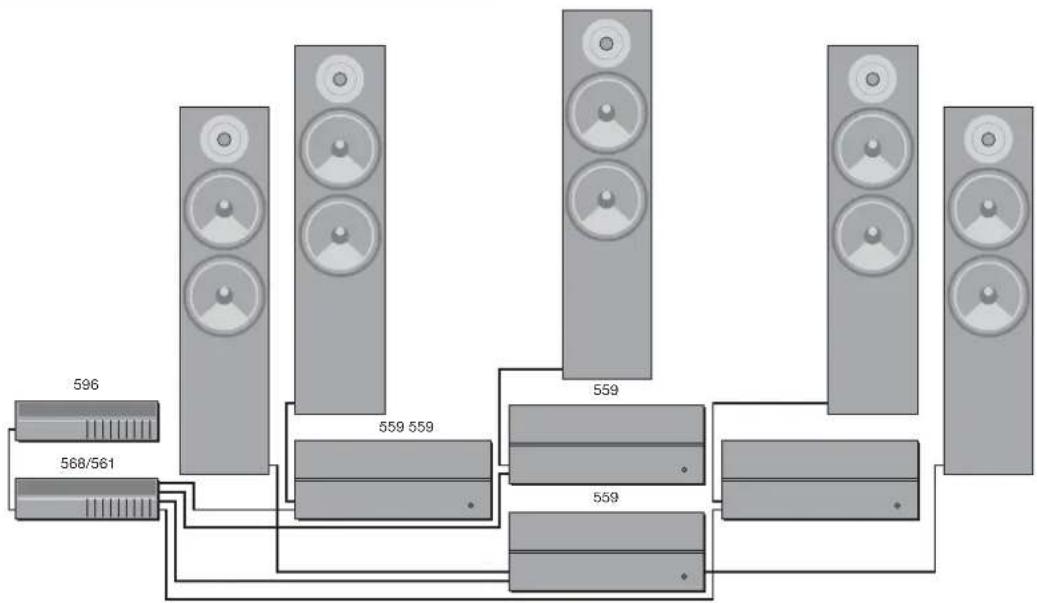
flowchart
graph TD
    A["596"] --> B["568/561"]
    B --> C["559 559"]
    C --> D["559 559"]
    D --> E["559"]
    E --> F["559"]
    F --> G["..."]
    G --> H["..."]
    H --> I["..."]
559 Stereo Power Amplifiers are ideal for use with the Meridian 561 Digital Surround Controller or the 568 Digital Surround Processor, to drive five passive loudspeakers in a high-quality surround system. The recommended configuration, shown above, uses three 559 Stereo Power Amplifiers operating in
bridge mode to drive the three front loudspeakers, and a fourth 559 to drive the two rear loudspeakers. The 568 provides balanced outputs for the front left, right, and centre channels, and so is ideal for use with the balanced inputs of the 559.
588 Compact Disc Player
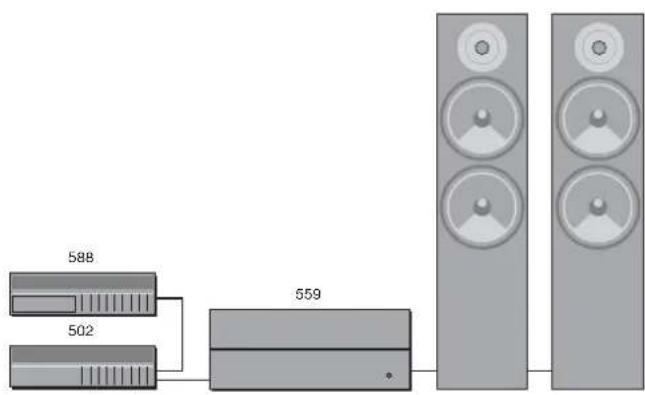
The 588 Compact Disc Player is ideally suited for use with the Meridian 559 Stereo Power Amplifier and passive loudspeakers, with control over the volume and source selection provided by the 502 Analogue Controller. These units provide balanced inputs and outputs, allowing a completely balanced system to be created.
Specification and accessories
Specification
Input 1.65V RMS.
Output (stereo) Greater than 300W per channel into 8Ω. Greater than 500W per channel into 4Ω.
Output (bridge) Greater than 600W into 16Ω. Greater than 1000W into 8Ω. Greater than 1600W into 4Ω.
Distortion Less than 0.05%.
Noise Less than -90dB.
Finish Black textured enamel and anodised front extrusion.
Dimensions 442mm x 174mm x 450mm (17.4" x 6.8" x 17.7") (W x H x D).
Weight 42kg.
Consumption 30VA quiescent, 1200VA max.
Trigger input 5 to 30VDC or
5 to 30VAC peak to peak.
Polarity independent.
Meridian Audio reserves the right to amend product specifications at any time.
Available accessories
The following accessories are available from your dealer:
○ Power cord Europe.
○ Power cord Canada and USA.

Setting up the stereo power amplifier
This chapter explains how to install the 559 Stereo Power Amplifier. It describes what you should find when you unpack the amplifier, how you should connect it to your other audio equipment, and the siting constraints.
You should not make any connections to the 559 Stereo Power Amplifier or to any other component in your system whilst the AC power supply is connected and switched on.
Unpacking
The 559 Stereo Power Amplifier comes in a box containing the following components:
○ 559 Stereo Power Amplifier.
○ 1 power cord.
○ 1 bridge mode link.
○ This manual.
You are advised to retain the packing in case you need to transport the unit.
The 559 Stereo Power Amplifier weighs 42kg. Do not attempt to lift it without assistance.
Before connecting power
Before you begin installation you should ensure that your stereo power amplifier is set to the correct voltage for your local AC supply. If it is not, do not try to install the unit, and contact your dealer.
Do not make connections, or insert or remove plugs, while the unit is connected to the supply and switched on, as the transients generated could damage the loudspeakers.
Safety warnings
- Do not expose the stereo power amplifier to dripping or splashing.
Do not place any object filled with liquid, such as a vase, on the stereo power amplifier.
○ Do not place naked flame sources, such as lighted candles, on the stereo power amplifier.
To avoid overheating
During normal operation the internal heatsinks may become quite hot. The stereo power amplifier should therefore be positioned to allow a free flow of air through the cooling vents from the base to the top.
Do not place the stereo power amplifier:
○ In direct sunlight.
○ Near heat sources, eg a radiator.
- Stacked with any other audio products, as the heat it generates may damage the other products.
Do not restrict airflow through the top and bottom vents.
Connecting the stereo power amplifier
Back panel
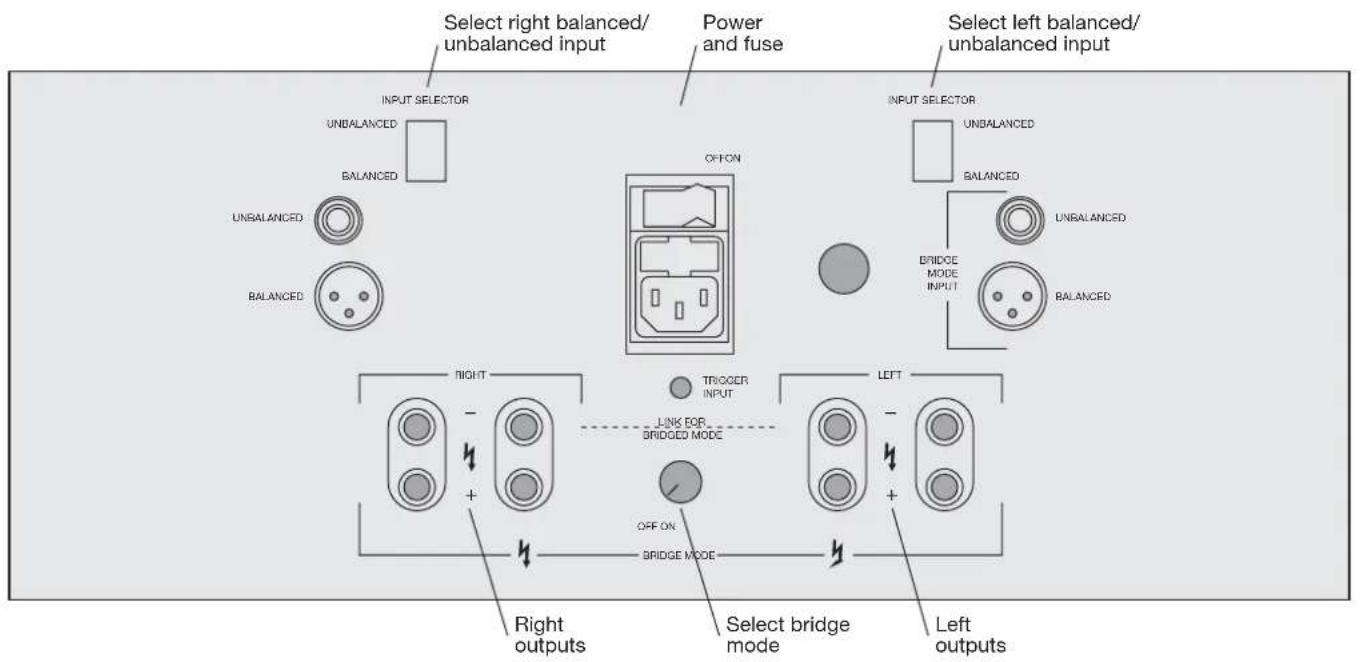
Outputs
The following table gives details of the output connections:
Use this output To connect to this
| LEFT, RIGHT | Loudspeakers of 2 to 16 , using either plug or bare wire connections. |
| BRIDGE MODE | A loudspeaker of 2 to 16 ; see To wire to a passive loudspeaker in bridge mode, page 14. |
Each channel of the 559 Stereo Power Amplifier provides twin outputs for bi-wiring. This allows separate connections to be made to the bass/mid and tweeter units on speakers that allow bi-wiring, for optimum sound quality.
Alternatively, for loudspeakers providing a single pair of inputs, either of the output terminals can be used.
Inputs
The following two alternative audio inputs are provided:
Use this input To connect to this
UNBALANCED A preamplifier, using phono connectors and high-quality screened cable.
BALANCED A balanced analogue output, using XLR connectors:
1 (Green) = GND
2 (Red) = +ve
3 (Black) = -ve
Select the appropriate input using the INPUT SELECTOR for each channel.
Standby
Once set up, the stereo power amplifier can be left in standby as it consumes negligible power in this mode.
To bring the amplifier out of standby press the button on the front panel. Alternatively, the 559 can be brought out of standby automatically using the TRIGGER INPUT; see below.
If you are not going to use the stereo power amplifier for a period of several days you should switch the unit completely off, at the back panel, and disconnect it from the AC power supply.
Trigger input
The TRIGGER INPUT can be used to bring the stereo power amplifier out of standby by applying a signal from a control unit.
The trigger input should be an AC or DC signal of between 5 and 30V. Suitable trigger signals are provided by the Meridian 561, 562, 800, and 861.
Connecting a source
To connect to a stereo preamplifier (eg Meridian 501)
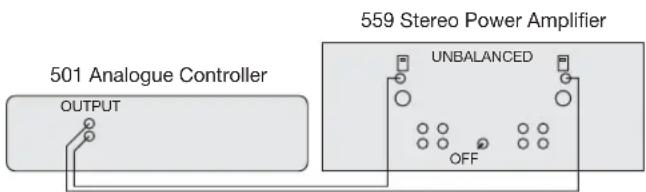
- Switch the BRIDGE MODE switch to the OFF position.
- Connect the sockets marked UNBALANCED on the back panel of the stereo power amplifier to the outputs from your preamplifier.
- Switch the INPUT SELECTOR switches to the UNBALANCED position.
You should either use a twin-screened audio cable, or a pair of single-screened audio cables. These cables can have a considerable effect on the quality of the sound, and you are advised to seek your dealer's advice on the best type of cables for your system.
To connect to each channel of a 568 Digital Surround Processor
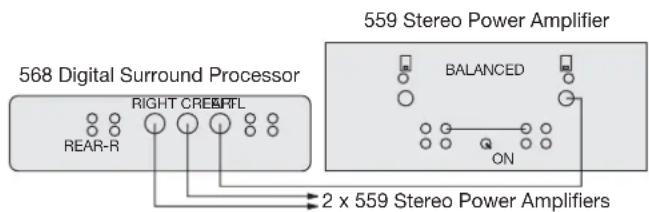
Three 559 Stereo Power Amplifiers can be used in bridge mode for each of the front channels of a 568 Digital Surround Processor, which are provided as balanced outputs.
- Switch the BRIDGE MODE switches to the ON position.
- Fit the supplied bridge mode link between the left and right negative terminals.
- Connect the LEFT, RIGHT, and CENTRE balanced outputs from the 568 to the BRIDGE MODE inputs on the 559.
- Switch the INPUT SELECTOR switches to BALANCED.
Connecting speakers
To connect to passive loudspeakers
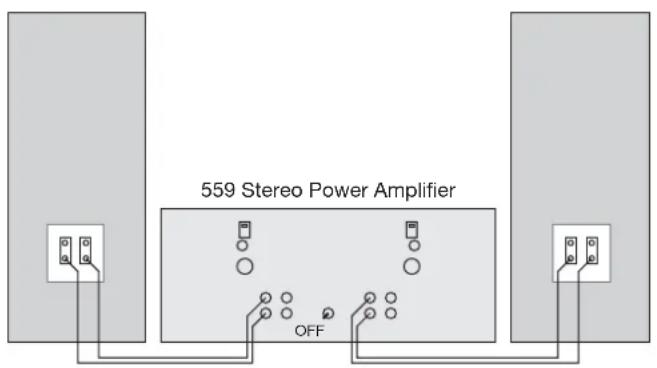
- Set the BRIDGE MODE switch to the OFF position.
- Connect one of each pair of the red and black terminals from the appropriate channel of the 559 Stereo Power Amplifier to the red and black terminals on the passive loudspeakers.
To bi-wire to passive loudspeakers
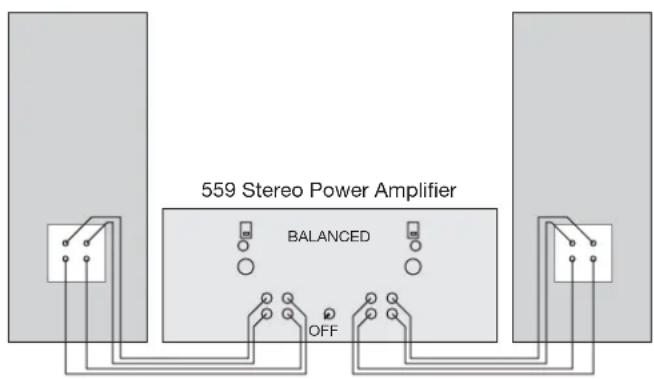
- Set the BRIDGE MODE switch to the OFF position.
- Remove the links bridging the LF and HF terminals on the back of each loudspeaker.
- Connect the LF red and black terminals from each loudspeaker to the red and black terminals on the appropriate channel of the 559 Stereo Power Amplifier, using twin loudspeaker cable.
- Connect the HF red and black terminals from each loudspeaker to the other pair of red and black terminals on the appropriate channel of the 559 Stereo Power Amplifier.
To wire to a passive loudspeaker in bridged mode
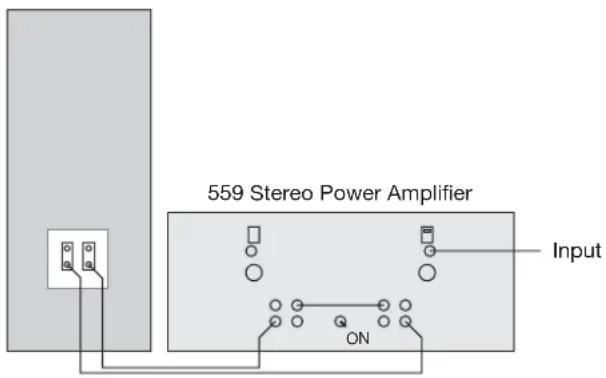
You can use the 559 as a mono power amplifier, to obtain more than three times the power output, by wiring it in bridge mode.
- Switch the BRIDGE MODE switch to the ON position.
- Fit the supplied bridge mode link between the left and right negative terminals.
- Connect the audio inputs to the BALANCED or UNBALANCED BRIDGE MODE input, as appropriate.
- Connect the loudspeaker between the BRIDGE MODE terminals.
You can bi-wire in bridge mode by using the other pair of BRIDGE MODE terminals to connect separately to the loudspeaker treble unit.
To bi-amp to two passive loudspeakers
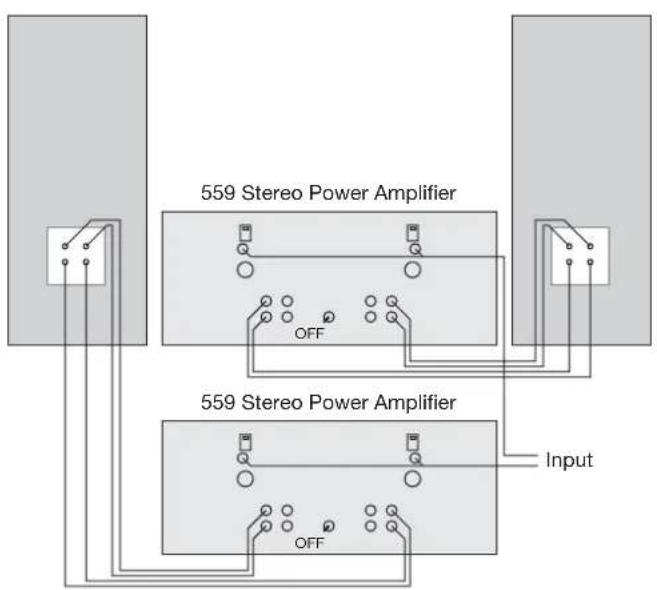
Extremely high sound quality can be achieved using two separate 559 Stereo Power Amplifiers, one to drive each loudspeaker. The two channels in each 559 Stereo Power Amplifier are used to drive the LF and HF units in each loudspeaker.
- Switch the BRIDGE MODE switch on both amplifiers to the OFF position.
- Connect the left audio output from the preamplifier to both inputs on one amplifier.
- Connect the right audio output from the preamplifier to both inputs on the other amplifier.
- Remove the links bridging the LF and HF terminals on the back of each loudspeaker.
- Connect the red and black terminals from the LF and HF units on one loudspeaker to the red and black terminals on each channel of one stereo amplifier.
- Likewise, connect the LF and HF units from the other loudspeaker to the red and black terminals on each channel of the other stereo amplifier.
Troubleshooting
This chapter provides suggested solutions to typical problems that may occur when setting up or using the 559 Stereo Power Amplifier.
If you are still not able to resolve a difficulty with the help of this guide and the suggestions in the following pages, please contact your Meridian dealer or Meridian Audio Ltd.
Troubleshooting
No front panel indicator is shown
○ Check that your AC power supply is connected correctly.
- Check that the ON OFF switch on the back panel is in the ON position.
- Check that the fuse on the stereo power amplifier back panel and the fuse in the unit's power plug have not blown; see To change the mains fuse, page 19.
The sound has cut out
The 559 Stereo Power Amplifier includes a thermal shutdown, which mutes the output if the amplifier becomes too hot. The Standby LED will also become red.
○ Leave the amplifier for a few minutes to cool down, the Standby LED will turn green.
The amplifier can then be taken out of standby using the front panel button or the TRIGGER INPUT.
The 559 Stereo Power Amplifier also includes a power circuit breaker to protect the loudspeakers. This is also triggered if the mains supply is interrupted.
○ Check the system for the cause of the cut out.
○ Switch off, wait 5 seconds, then switch on to reset the power.
Maintenance
Cleaning
When cleaning the stereo power amplifier bear in mind that the front of the unit is brushed aluminium and the case is metal.
Disconnect the power cord before cleaning the unit.
Note: Do not use abrasive cleaners on any part of the stereo power amplifier.
To clean the case
- Use a slightly damp cloth.
Ensure that no water is allowed to get inside the case, and do not reconnect the power until you are certain that the stereo power amplifier is completely dry.
To clean the audio connections
The audio sockets on the back of the stereo power amplifier are gold-plated and need no cleaning if gold-plated phono plugs are used. Otherwise, it is recommended that you unplug and reconnect the plugs at least once a year. A proprietary contact cleaner can be used to some advantage.
To change the mains fuse
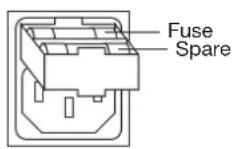
- Remove the mains connector, and pull out the drawer next to the power input to access the fuses.
Before replacing a blown fuse, if possible ascertain the cause of the failure.
The fuse drawer includes a spare fuse. This should be replaced by one of the same rating.
Service and guarantee
Service
The Meridian 500 Series of hi-fi components have been carefully designed to give years of untroubled service. There are no user-serviceable parts inside the case, nor do the units require any form of maintenance.
In the unlikely event that your stereo power amplifier fails to function correctly, it should be returned, in its original packaging, to your Meridian dealer.
In case of difficulty within the UK or USA please contact the appropriate sales and service address shown on page ii.
In case of difficulty outside the UK or USA, contact the importing agent for the territory. A list of Meridian agents abroad is available from Meridian Audio.
No responsibility can be accepted for the stereo power amplifier whilst in transit to the factory or an agent, and customers are therefore advised to insure the unit.
When seeking service under guarantee, proof of the date of purchase will be required.
Guarantee
The 559 Stereo Power Amplifier is guaranteed against defects in material and workmanship for two years from the date of purchase.
The guarantee is void if the 559 Stereo Power Amplifier has been subject to misuse, accident, or negligence, or has been tampered with or modified in any way without the written authorisation of Meridian Audio Limited. Attempted servicing by unauthorised people may also invalidate this guarantee. Labour and carriage charges are not covered unless by local agreement.
Outside the UK, local warranty liability is restricted to equipment purchased within the territory. Our agents abroad are only under contractual obligation to service under guarantee equipment sold through them. They are entitled to make a non-refundable charge for any service carried out on other equipment.
This guarantee does not limit your statutory rights within the United Kingdom.
Index
A accessories 5
B bi-amp connection 15 bi-wire connection 10, 13 bridge mode 10, 14
C cleaning 19 the audio connections 19 the case 19 components 8 connecting to a 502 Analogue Controller 4 a 568 Digital Surround Processor 12 a stereo preamplifier 12 passive loudspeakers 13, 14 two passive loudspeakers 15
F fuse, replacing 19
G guarantee 20
H heat during use 8
I inputs 10 installing 8 introduction 1
L lifting the 559 8
M maintenance 19 Meridian 500 Series 2 588 Compact Disc Player 4 communications 2 Meridian Analogue Theatre 3 Meridian System Remote 2
○ overheating 8, 18
P positioning 8
S safety warnings 8 service 20 sound has cut out 18 specification 5 switching on 11
T thermal protection 18 trigger input 11 troubleshooting 17
U unpacking 8
X XLR connectors 10
| Index |
| 22 |