T-350 Express - Washing machine DEXTER - Free user manual and instructions
Find the device manual for free T-350 Express DEXTER in PDF.


| Product Type | Washing Machine |
| Brand | Dexter |
| Model | T-350 Express |
| Capacity | 35 kg |
| Dimensions (H x W x D) | 1400 mm x 900 mm x 1100 mm |
| Weight | 500 kg |
| Power Supply | 400V, 3-phase, 50/60 Hz |
| Power Consumption | 10 kW |
| Water Connection | Hot and cold water, 3/4" hose |
| Max Spin Speed | 500 rpm |
| Control System | Microprocessor with digital display |
| Functions | Pre-wash, main wash, rinse, spin, multiple programs |
| Drum Material | Stainless steel |
| Safety Features | Door interlock, emergency stop, overload protection |
| Maintenance | Clean filter monthly, descale as needed |
| Spare Parts Availability | Available through Dexter dealers |
| Warranty | 2 years parts and labor |
Frequently Asked Questions - T-350 Express DEXTER
User questions about T-350 Express DEXTER
0 question about this device. Answer the ones you know or ask your own.
Ask a new question about this device
Download the instructions for your Washing machine in PDF format for free! Find your manual T-350 Express - DEXTER and take your electronic device back in hand. On this page are published all the documents necessary for the use of your device. T-350 Express by DEXTER.
USER MANUAL T-350 Express DEXTER
Please read this information and retain for reference.
WARNING - THIS WASHER IS EQUIPPED WITH DEVICES AND FEATURES RELATING TO ITS SAFE OPERATION. TO AVOID INJURY OR ELECTRICAL SHOCK, DO NOT PERFORM ANY SERVICING UNLESS QUALIFIED TO DO SO.
IT IS THE RESPONSIBILITY OF THE OWNER TO CHECK THIS EQUIPMENT ON A FREQUENT BASIS TO ASSURE ITS SAFE OPERATION.
A machine should not be allowed to operate if any of the following occur:
- Excessively high water level.
- If machine is not connected to a properly grounded circuit.
- If the door does not remain securely locked during the entire cycle.
- Vibration or shaking from an inadequate mounting or foundation.
WARNING - FOR SAFETY
- Always shut off power and water supply before servicing.
- Do not overload the washer.
- Do not open door when cylinder is in motion or it contains water.
- Do not bypass any safety devices of this washer.
- Do not use volatile or flammable substances in or near this washer.
- Keep all panels in place. They protect against shock and injury and add rigidity to the washer.
PREVENTIVE MAINTENANCE REQUIREMENTS
DAILY
- Check that the loading door remains securely locked and cannot be opened during the entire cycle.
- Check the water connections for leaks.
- Clean the top and sides of the cabinet to remove residue.
- Clean the soap dispenser and lid and check that all dispenser mounting screws are in-place and tight.
- Check the drain valve for leaking and that it opens properly.
- Check the loading door for leaks. Clean the door seal of all foreign matter.
- Leave the loading door open to aerate the washer when not in use.
QUARTERLY
- Make sure the washer is inoperative by switching off the main power supply.
- Check the V-belts for wear and proper tension.
- Clean lint and other foreign matter from around motor.
- Check all water connections for leaks.
- Wipe and clean the inside of the washer and check that all electrical components are free of moisture and dust.
- Remove and clean water inlet hose filters. Replace if necessary.
- Check anchor bolts - retighten if necessary
IMPORTANT: Replace any and all panels that were removed to perform daily and/or quarterly maintenance.
8514-224-001 REV A page 1
TABLE OF CONTENTS
| Page No. | |
| Washer Specifications | 2 |
| Mounting Dimensions | 3 |
| Installation Instructions | 4 |
| Operating Instructions | 8 |
| Programming the Washer Control | 10 |
| Displayed Washer Faults | 24 |
| Servicing and Troubleshooting | 30 |
| Accessories and Contact Information | 34 |
WASHER SPECIFICATIONS
| MODEL | T-350 EXPRESS 20 LB. WASHER |
| CAPACITY | 20 LBS/2.7 CUBIC FT. (9.1 kg/76.5L) |
| CYLINDER SIZE | 21” DIA X 13 1/2” DEEP (53cm X 34cm) |
| ELECTRICAL | 208-240 VAC, 60 HZ, 1 OR 3 PHASE |
| DRIVE SYSTEM | SOFT START REVERSING INVERTER DRIVE, 1 HP MOTOR |
| WASH SPEED | 55 RPM |
| INTERMEDIATE EXTRACT | 449 RPM (60 G'S) |
| FINAL EXTRACT | 819 RPM (200 G'S) |
| MACHINE CONTROL | PROGRAMMABLE COMPUTER |
| WATER INLET | 2 SOLENOID OPERATED VALVESFLOW RATE: 9 GAL/MIN EACH, 30-120 PSI |
| DRAIN VALVE | 2 1/4” DIAMETER (5.7 cm) |
T-350 COMMERCIAL WASHER
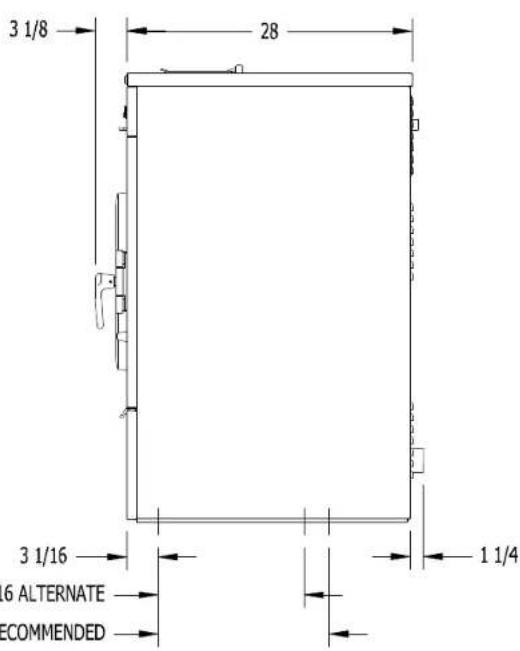
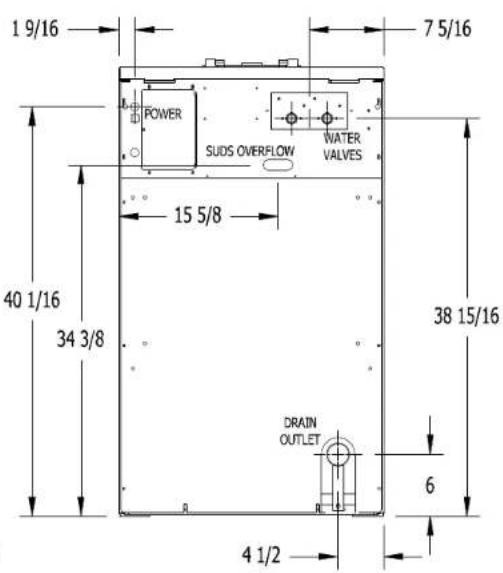
MOUNTING DIMENSIONS

text_image
26 43 7/8 14 7/8 20 7/8 ALTERNATE 23 1/4 RECOMMENDED 14FRONT
text_image
3 1/8 28 3 1/16 1 1/4 16 ALTERNATE ECOMMENDEDSIDE
text_image
1 9/16 7 5/16 POWER SUDS OVERFLOW WATER VALVES 15 5/8 40 1/16 34 3/8 38 15/16 DRAIN OUTLET 6 4 1/2REAR
INSTALLATION INSTRUCTIONS
All washers must be installed in accordance with all local, state and national building, electrical, plumbing and other codes in effect in the area.
WARNING - THESE INSTALLATION AND SERVICING INSTRUCTIONS ARE FOR USE BY QUALIFIED PERSONNEL ONLY. TO AVOID INJURY AND ELECTRICAL SHOCK DO NOT PERFORM ANY SERVICING OTHER THAN THAT CONTAINED IN THE OPERATING INSTRUCTIONS, UNLESS QUALIFIED.
FOUNDATION REQUIREMENTS
This machine is designed for use on or over bare concrete floor - not to be used above combustible flooring. The washer must be securely bolted and grouted to a substantial concrete floor, or mounted and grouted upon a suitable base that is securely bolted and grouted to a substantial concrete floor. CARE MUST BE STRESSED WITH ALL FOUNDATION WORK TO INSURE A STABLE UNIT INSTALLATION, ELIMINATING POSSIBILITIES OF EXCESSIVE VIBRATION. All installations must be made on sound concrete floors, 6 inches (150mm) or thicker. Anchor bolts or expansion anchors must be of a quality grade and a minimum of 5/8 inch (16 mm) diameter.
MOUNTING
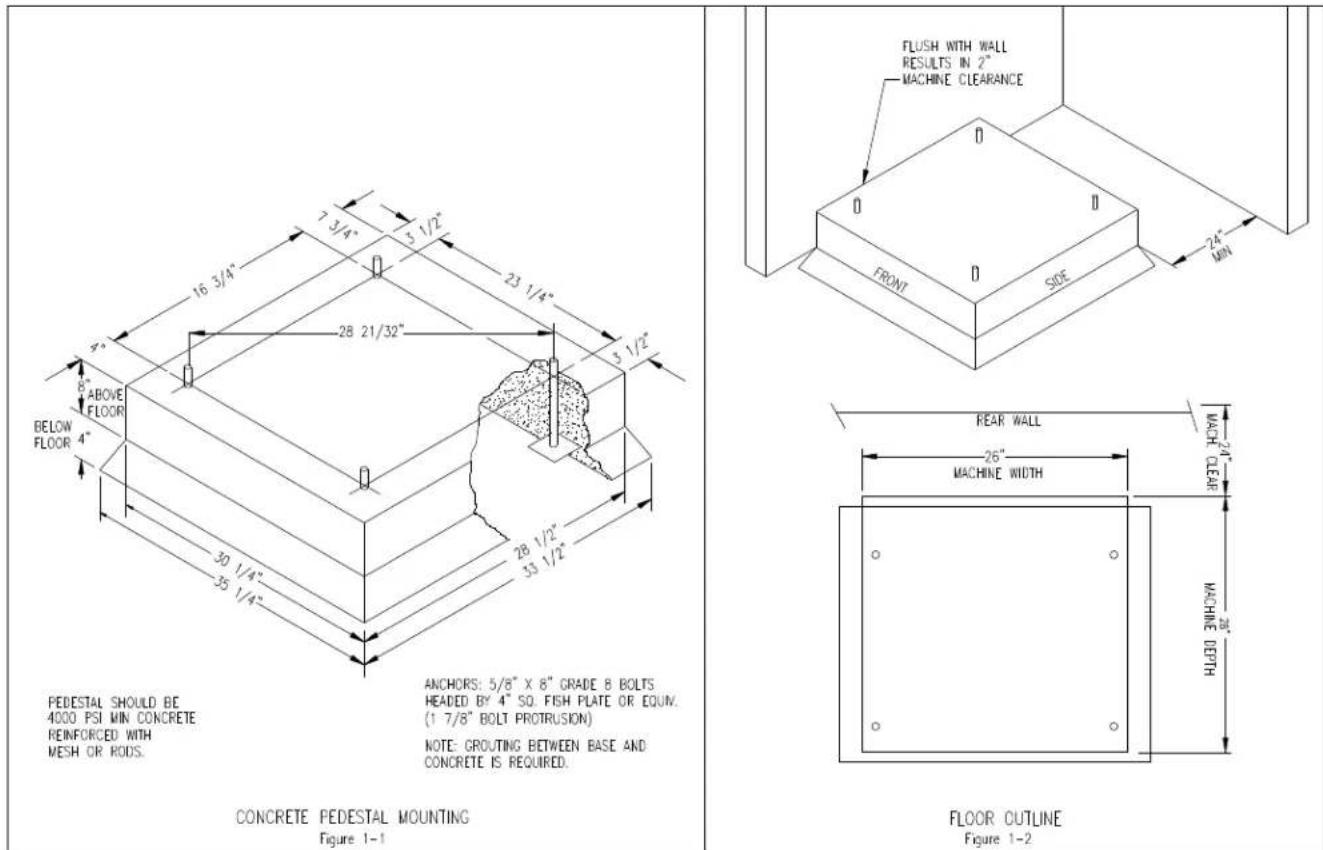
A concrete pedestal or steel-mounting base that elevates the machine approximately 8 inches (200 mm) above the floor level is recommended to provide easy access to the loading door. Allow a minimum of 24 inches (600mm) of clearance behind the rear of the machine, to provide access for motor removal. Refer to Fig. 1-1 and 1-2 for machine bolt-down dimensions.
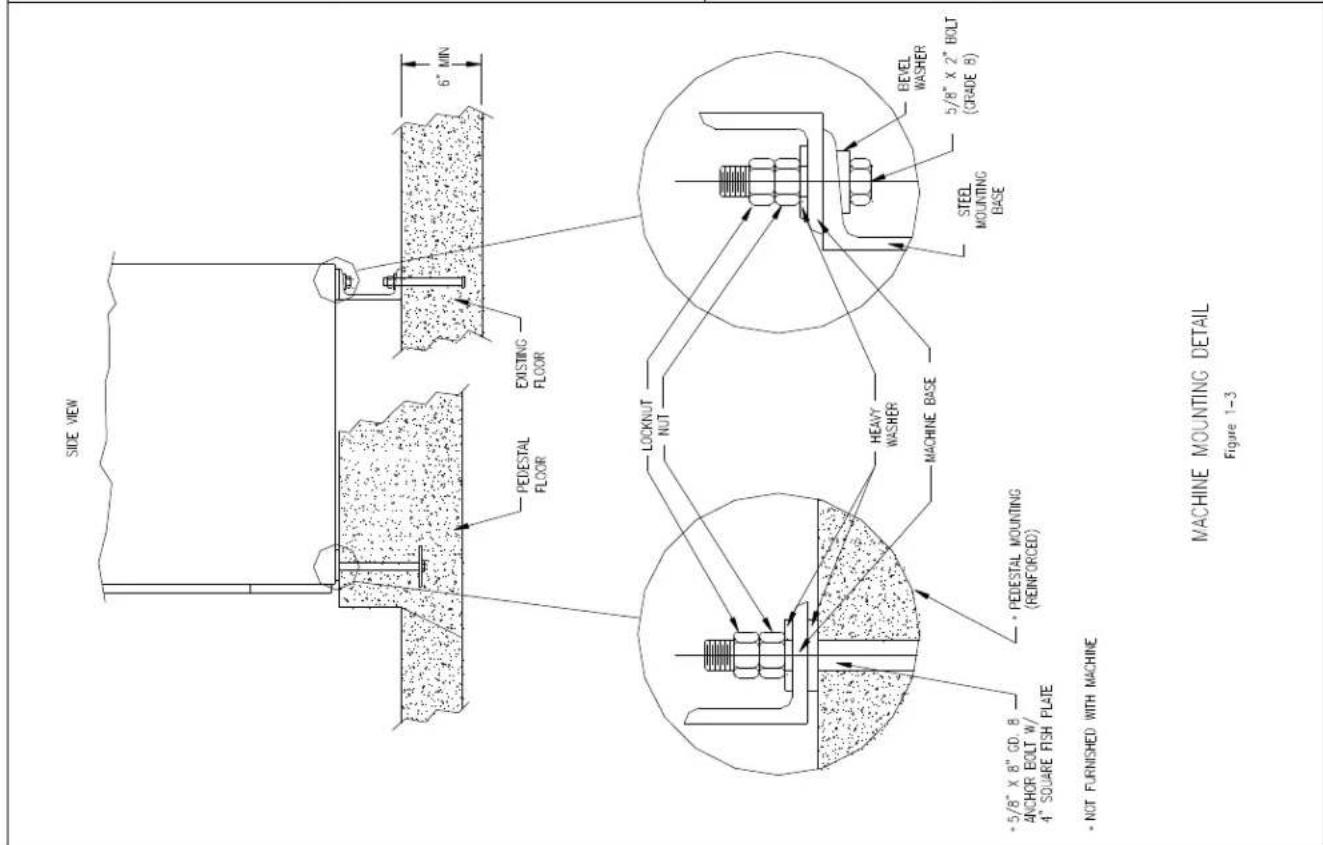
If an elevated concrete pedestal is desired, it should be embedded into the existing floor. Anchor bolts should be 5/8" x 8" (16 mm x 200 mm), grade 8 or better, headed by a 4 inch (10 cm) square fish plate and should protrude 1 7/8" (48 mm) above the finished surface of the pedestal. EXPANSION ANCHORS ARE NOT RECOMMENDED FOR USE IN CONCRETE PEDESTALS, BECAUSE THE ANCHORS ARE TOO CLOSE TO AN EDGE, CAUSING IT TO BREAK OUT. (See Fig. 1-1 and 1-3.)
text_image
SIDE VIEW 6" MIN EXISTING FLOOR PEDESTAL FLOOR LOCKNUT NUT HEAVY WASHER MACHINE BASE LEVEL WASHER 5/8" X 2" BOLT (GRADE 8) STEEL MOUNTING BASE * FEDESTAL MOUNTING (REINFORCED) * 5/8" X 8" GD. 8 ANCHOR BOLT W/ 4 SQUARE FISH PLATE * NOT FURNISHED WITH MACHINE MACHINE MOUNTING DETAIL Figure 1-3PLUMBING
Water supply hoses are furnished with each machine. The threaded connections on the hoses are 34 -11 12 NHT.
Separate hot and cold water lines must be provided, maintaining 30 psi to 120 psi (207 kPa to 827 kPa) water flow pressure. A 140F (60C) degree hot water supply is recommended for best washing results. Do not exceed 180F (82C) degree water temperature.
DRAIN
The drain outlet tube at the rear of the machine is 2 14 inches (57 mm) in diameter. Any drain hose used must be lower than the drain valve to assure proper draining.
ELECTRICAL
WARNING SHUT OFF POWER AND WATER BEFORE OPENING ANY SERVICE PANELS.
The Dexter T-350 single/three-phase 208-240VAC 60 Hz washing machines are intended to be permanently installed appliances. No power cord is provided. The machine should be connected to an individual branch circuit not shared by lighting or other equipment. The connection should be sheathed in liquid tight flexible conduit, or equivalent, with conductors of the proper size and insulation. A qualified technician should make such connections in accordance with the wiring diagram. (Suggest a minimum wire size of 12 ga.)
TO MAKE ELECTRICAL CONNECTIONS: Disconnect all power to the washer. Remove the top panel of the washer and locate the power terminal block near the back of the control compartment.
If power is 208-240-3PH-60Hz, connect L1, L2, L3 and ground. If there is a high leg it must be connected to L3.
If power is 208-240-1PH-60Hz, connect L1, L2 and Ground.
NOTE: It is important that the grounding screw next to the power terminal block TB-1 be connected to a good external ground.
FUSING REQUIREMENTS:
SINGLE- and THREE -PHASE 208-240VAC MODELS - 15 AMP TIME-DELAY (DUAL ELEMENT) FUSE (or equivalent circuit breaker)
CONTROLS TRANSFORMER
The controls transformer is located inside the control trough and steps a range of 208 to 240 volts down to 115 volts. There are two terminals on the controls transformer for the primary (incoming) power. Use the terminal marked "208V" for power supplies between 208 and 219 volts. Use the terminal marked "240V" for power supplies between 220 and 240 volts.
CONTROL TRANSFORMER CONNECTIONS

text_image
C 208 240BLACK/BLUE WIRE DO NOT MOVE OR REMOVE THIS WIRE. BLACK/RED WIRE CHOOSE THIS TERMINAL FOR 208V TO 219V BLACK/RED WIRE CHOOSE THIS TERMINAL FOR 220V TO 240V
CHECKOUT
After all mounting, plumbing and electrical work is completed; the washer should be run through a cycle and checked for water leaks and proper functioning.
The cylinder should turn in a counterclockwise direction (viewed from the front of the machine) during intermediate spin and final spin. If spin is clockwise, the T1 and T2 motor wires going to T1 and T2 on the variable frequency drive should be swapped. Remove power to the machine before swapping wires.
OPERATING INSTRUCTIONS - STARTING THE WASHER
A. Load the clothes into the cylinder and latch the door securely. Be sure clothing does not get caught between the door gasket and tub front when closing the door. Maximum load is 20 pounds clothes, dry weight. Do not load the washer with more than 20 lbs.
B. Select the appropriate cycle temperatures for the load being washed.
C. Add low sudsing powdered detergent into the "detergent" compartment of the automatic dispenser on the top of the washer. If desired add fabric softener to the "fabric softener" compartment. Use the amount of fabric softener as recommended by the manufacturer.
If liquid wash products are used in the "detergent" compartment, they must be added at the beginning of the wash cycle.
If the machine is set for pre-wash, washing products can be added to the round opening of the dispenser or put in with the clothes when loading the washing machine.
D. Insert coins, tokens or debit card to meet the displayed vend price. The display will count down the amount needed to meet the vend price. Once the vend price is met, the display will read "PRESS START" and the start button LED will blink. If the door is not closed and latched, the display will read "CLOSE DOOR" and the control will wait until the door is latched to continue. Pressing the start button will begin the cycle and activate the ON light. The display will show the remaining cycle time in minutes. The clothes door will lock and remain locked until the end of the cycle.
END OF CYCLE
When the cycle is complete a 3-second tone will sound and the display will read "CYCLE DONE THANK YOU" until the door is opened. The door can now be opened. Leave the clothes door open when the machine is not in use.
This machine is equipped with a Safety Door Lock that locks the door closed from when the cycle is started until the cycle is complete. The door lock prevents opening the door for up to 3 minutes if the power is interrupted during the cycle.
The Emergency Stop button pauses the washer and allows the door to be opened during the cycle after the Safety Door Lock releases. When the Emergency Stop button is pressed an alarm will sound and the display will begin counting down and read "STOP 3", "STOP 2", "STOP 1". If the button is released before 3 seconds elapse, the alarm will stop and the cycle will continue normally. If the Emergency Stop is held down for 3 seconds, the display will count down and the washer will begin stopping movement and water flow and begin draining water from inside the washer. Though the machine may stop wash movement quickly, it may take up to 3 minutes for the door to unlock.
During that time the alarm will continue to sound and the display will read "STOPPING".
When the alarm stops, the door may be opened. The washer may be restarted by closing and latching the door, and pressing the Start button. If the washer was stopped more than once before the final extract, the cycle will be cancelled. If the washer was stopped during final extract, the cycle will be ended. If the washer is stopped for more than 1 hour, the cycle will be terminated.
PROGRAMMING THE WASHER CONTROL
The washer control can be programmed to prompt the user for alternate vend prices, change washer cycle times, temperatures and many other options. This can be accomplished in two ways:
- Manual programming utilizing the "Start", "Hot", "Warm" and "Cold" buttons
- USB download of a customizable User File. For instructions on using the USB download feature, please contact your local Dexter distributor or visit dexterlive.com.
MANUAL PROGRAMMING:
The washer must be in idle mode for the manual programming menus to be accessed. Idle mode is when the washer is not actively running a wash cycle and the vend price is displayed on the screen.
To enter the manual programming mode, the top of the washer must be unlocked and lifted slightly (it may be necessary to remove the screws for the soap box). The programming button is then pressed for 1 second. The control should display "PROGRAMMING".
See the figure below for the location of the programming button in relation to the USB port (The USB port is exposed when the washer top is lifted).

text_image
USB PORT SHOWN WITH WASHER TOP LIFTED CONTROL PROGRAMMING BUTTON (SHOWN IN CUT-AWAY VIEW, ACTUAL LOCATION IS INSIDE THE CONTROL PANEL) Quarters OnlyWhen manual programming mode is entered, the "Start", "Hot", "Warm" and "Cold" buttons perform alternate functions.
| Button Name | Alternate Function in Programming Mode |
| Start | Becomes the action to accept the displayed option or the “Enter” key |
| Hot | Becomes the action to move UP through displayed options (Press & hold for accelerated scrolling) |
| Warm | Becomes the action to move DOWN through displayed options (Press & hold for accelerated scrolling) |
| Cold | Becomes the action to move back a step (1 press) or EXIT from programming mode (press for 3 seconds) |
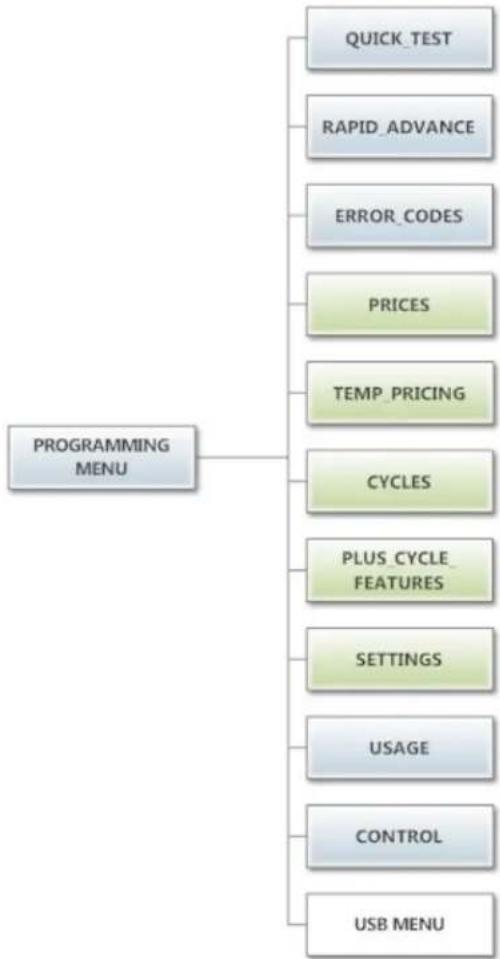
These alternate functions allow the user to move through a menu of options to choose various programmable settings. The figure below shows the top level menu. Choosing an option from the top level menu will then display the next level of options (the sub menu).
flowchart
graph TD
    A["PROGRAMMING MENU"] --> B["QUICK_TEST"]
    A --> C["RAPID_ADVANCE"]
    A --> D["ERROR_CODES"]
    A --> E["PRICES"]
    A --> F["TEMP_PRICING"]
    A --> G["CYCLES"]
    A --> H["PLUS_CYCLE_FEATURES"]
    A --> I["SETTINGS"]
    A --> J["USAGE"]
    A --> K["CONTROL"]
    A --> L["USB MENU"]
Quick Test Option:
When the Quick Test Option is chosen, the washer will begin a shortened wash cycle without the displayed vend price being met. The purpose of this shortened cycle is to test all major components for proper operation.
Error Codes should all function normally during this test. The display will show customer prompts in a similar way to a normal wash cycle. Exceptions to this are that the "ADD BLEACH" prompt will not occur because of reduced cycle time. Final Extract speed is specific to the customer's programming.
Rapid Advance Option:
Similar to the Quick Test, when the Rapid Advance Option is chosen, the washer will begin a wash cycle without the displayed vend price being met. However, in this case, it will be a normal default cycle with an additional feature available. The "Start" button LED will flash, prompting the user that, when pressed, the washer shall rapid advance to the next step in the cycle. The display will show "ADVANCE" when the cycle is advancing. The water level needs to be empty before this advance occurs. During the time waiting for the tub to empty, the "ADVANCE" prompt will be held on the display and the start pushbutton LED stops flashing. The Rapid Advance shall allow the tub to empty of water and the tub to stop before beginning either spin or the next bath.
The Rapid Advance mode can be exited by pressing the programming button. This will end the cycle. When the Rapid Advance mode is used, the cycle time will no longer be correct. By skipping steps with Rapid Advance, the door may not open immediately at the end of the cycle.
Error Code Historical Log:
The last five occurring error codes will be stored in the control with a time and date stamp. The purpose of this option is only to observe the history of these code occurrences (no changes can be made).
The time is based off the Real Time Clock, but potentially shifted by the user's manual programming changes (Shift Hours option) and/or network time override. As additional error codes occur, the oldest of the five logged codes is cleared from memory.
Prices Option:
This option allows the user to set values for coin acceptor inputs and to set the vend price. It also allows the user to return the values to factory defaults. After changing prices using the "Up" or "Down" buttons, the "Enter" button must be pressed again for the control to store the changes that have been made.
- "RIGHT COIN" and "LEFT COIN" are the two possible inputs from coin acceptors.
- "SET VEND" is the actual Base Vend Price (or Vend Price A) that is shown on the control display.
To reset either the coin acceptor inputs or the vend price to factory default, press "Enter" when the "DEFAULT" prompt is shown. Press "Enter" again when the "RESET" prompt is shown to confirm the action.
The figure below shows the sub menu options for Prices:

flowchart
graph TD
    A["PRICES"] --> B["COIN_VALUE"]
    A --> C["VEND_PRICE"]
    B --> D["RIGHT_COIN"]
    B --> E["LEFT_COIN"]
    B --> F["DEFAULT"]
    C --> G["SET_VEND"]
    C --> H["DEFAULT"]
    D --> I["00.01-99.99 (00.01 increments)"]
    E --> J["00.01-99.99 (00.01 increments)"]
    F --> K["RESET"]
    G --> L["FREE - 00.01-99.99 (00.01 increments)"]
    H --> M["RESET"]
Temp Pricing Option:
The Temperature Pricing option allows for the user to prompt the customer for varying vend prices based on the water temperature the customer selects. If a value other then 0 is programmed for either the "WARM ADDER" or "HOT ADDER", the feature becomes active. The programmed value is added to the base vend price when that particular water temperature is chosen.
When the customer adds coins to meet the adjusted vend price and starts the washer, the temperature selections available to the customer are limited to those with vend prices equal to or less than the amount entered.
The figure below shows the sub menu options for Temp Pricing:

flowchart
graph TD
    A["TEMP_PRICING"] --> B["WARM_ADDER"]
    A --> C["HOT_ADDER"]
    B --> D["FREE - 00.01-99.99 (00.01 increments)"]
    C --> E["FREE - 00.01-99.99 (00.01 increments)"]
Cycles Option:
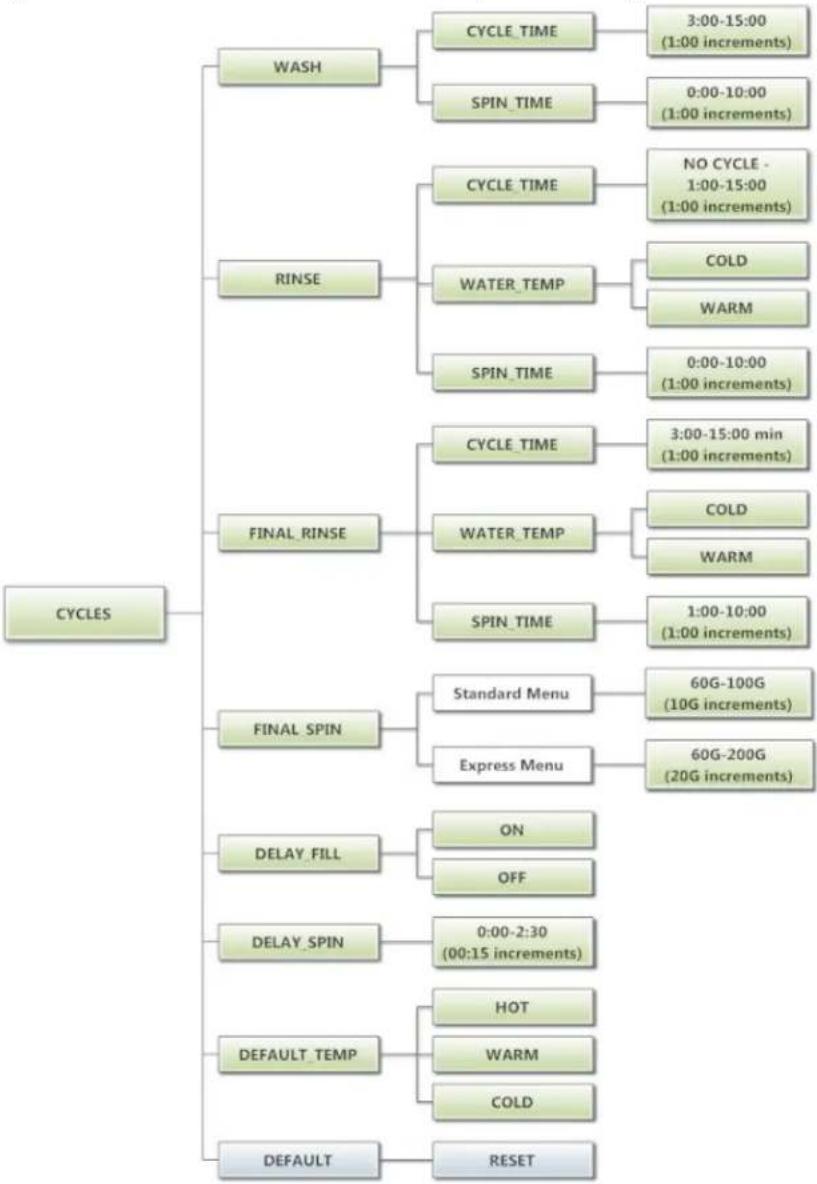
This option allows the user to set the bath time and spin time for the "Wash" bath. It also allows the user to set bath time, water temperature and spin time for "Rinse" and "Final rinse" baths. (Water temperature for the "Wash" bath is chosen by the customer using the "Hot", "Warm" and "Cold" buttons on the front of the machine). For the "Final Spin" it also allows the user to set the spin speed (see additional description below).
It also allows the user to return the values to factory defaults. To reset all values in the Cycles option to factory default, press "Enter" when the "DEFAULT" prompt is shown. Press "Enter" again when the "RESET" prompt is shown to confirm the action.
- "Final Spin" is the spin that occurs after all selected baths & intermediate spins have been completed. It is a higher spin speed than previously occurring intermediate spins. The benefit of this higher spin speed is that more water is extracted from the wash load, which minimizes the drying time needed. However, in some cases, if the Dexter installation guidelines are not followed properly, it may be necessary to reduce the spin speed of the "Final Spin".
The "Final Spin" can be adjusted in increments of 10 G for washers with a 100G maximum spin speed and increments of 20 G for washers with a 200G maximum spin speed. The factory default "Final spin" speeds are the maximum values.
| Model | Adjustable Final Spin Range |
| T-300 | 60G to 100G |
| T-350 | 60G to 200G |
| T-400 | 60G to 100G |
| T-450 or T-450 SWD | 60G to 200G |
| T-600 | 60G to 100G |
| T-750 | 60G to 200G |
| T-900 | 60G to 100G |
| T-950 | 60G to 200G |
| T-1200 | 60G to 100G |
| T-1450 | 60G to 200G |
- "Delay Fill" is meant to be used in applications where the amount of available water pressure is limited. In these cases, the washer may not be able to fill the tub in sufficient time to allow for effective washing performance.
When the "Delay Fill" option is "On", the water valves shall be turned on, the washer shall agitate, but the cycle time shall be paused. The washer shall continue in this state until the proper water level is reached. Once the proper water level is reached, the cycle shall continue. A single selection of "On" or "Off" shall apply to all baths in the cycle. The factory default setting is "Off".
- "Delay Spin" is meant to be used in applications where the amount of drain capacity is limited. In these cases the washer cannot empty the tub in sufficient time to allow for a spin cycle to occur.
When a time value (other than 0) is programmed for the "Delay Spin" option, the end of each bath will be extended by the selected time. Therefore, extra time will be allowed for the drain valve to be open and compensate for slow drain capacity. The factory default setting is 0 seconds.
- "Default Temp" allows the user to choose which water temperature ("Hot", "Warm", or "Cold") will be active during Idle mode. The customer can, of course, choose other temperatures for the wash bath based on other options described in this manual.
The figure below shows the sub menu options for Cycles:
flowchart
graph TD
    A["CYCLS"] --> B["WASH"]
    A --> C["RINSE"]
    A --> D["FINAL_RINSE"]
    A --> E["FINAL_SPIN"]
    A --> F["DELAY_FILL"]
    A --> G["DELAY_SPIN"]
    A --> H["DEFAULT_TEMP"]
    A --> I["DEFAULT"]

    B --> J["CYCLE_TIME"]
    B --> K["SPIN_TIME"]

    J --> L["3:00-15:00 (1:00 increments)"]
    K --> M["0:00-10:00 (1:00 increments)"]

    C --> N["CYCLE_TIME"]
    C --> O["WATER_TEMP"]
    C --> P["SPIN_TIME"]

    N --> Q["NO CYCLE - 1:00-15:00 (1:00 increments)"]
    O --> R["COLD"]
    O --> S["WARM"]

    D --> T["CYCLE_TIME"]
    D --> U["WATER_TEMP"]
    D --> V["SPIN_TIME"]

    T --> W["3:00-15:00 min (1:00 increments)"]
    U --> X["COLD"]
    U --> Y["WARM"]

    E --> Z["Standard Menu"]
    E --> AA["Express Menu"]

    Z --> AB["60G-100G (10G increments)"]
    AA --> AC["60G-200G (20G increments)"]

    F --> AD["ON"]
    F --> AE["OFF"]

    G --> AF["0:00-2:30 (00:15 increments)"]

    H --> AG["HOT"]
    H --> AH["WARM"]
    H --> AI["COLD"]

    I --> AJ["RESET"]
Plus Cycle Options:
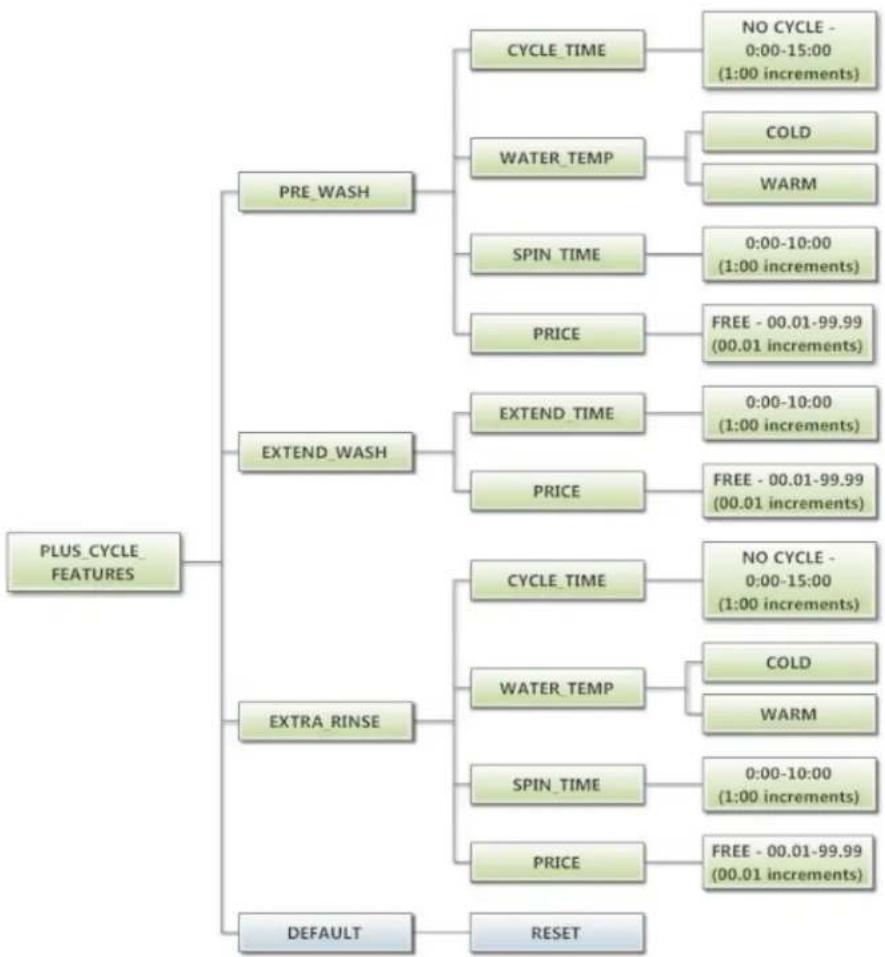
The "Plus Cycle" options allow for the user to prompt the customer for varying vend prices based on additional wash baths chosen. In general, the user can program the additional wash baths in a similar manner to what was described in the "Cycles" Options section.
It also allows the user to return the programmable values to the factory default setting. No plus cycle options are active using the factory default. To reset all values in the Plus Cycles option to factory default, press "Enter" when the "DEFAULT" prompt is shown. Press "Enter" again when the "RESET" prompt is shown to confirm the action.
- "Pre-Wash"- If the user programs a "Cycle Time" for "Pre-Wash" other than 0 ("No Cycle"), the feature becomes active. However, the customer will not be prompted to pay an additional vend price for "Pre-Wash" unless the user programs the Price to a value other than 0 ("Free"). With the "Pre-Wash" feature active, an additional bath and, optionally, an additional spin, will occur before the standard Wash bath described in the Cycles Options section.
With the "Pre-Wash" feature active and a "Price" value programmed, the customer will be prompted to add additional coins if they wish to purchase the "Pre-Wash" feature. This will occur after they have entered coins to meet the Base Vend price. If the customer does not meet the vend price of the "Pre-Wash" feature, the prompt will time out and the "Pre-Wash" bath will not occur.
- "Extend Wash"- If the user programs an "Extend Time" for "Extend Wash" other than 0, the feature becomes active. However, the customer will not be prompted to pay an additional vend price for "Extend Wash" unless the user programs the Price to a value other than 0 ("Free").
With the "Extend Wash" feature active, the standard Wash bath described in the Cycles section will be extended for the additional time selected. With the "Extend Wash" feature active and a "Price" value programmed, the customer will be prompted to add additional coins if they wish to purchase the "Extend Wash" feature. This will occur after they have pressed the "Start" button to begin the normal Wash cycle. If the customer does not meet the vend price of the "Extend Wash" feature, the prompt will time out and the additional time will not be added to the Wash bath.
- "Extra Rinse"- If the user programs a "Cycle Time" for "Extra Rinse" other than 0 ("No Cycle"), the feature becomes active. However, the customer will not be prompted to pay an additional vend price for "Extra Rinse" unless the user programs the Price to a value other than 0 ("Free").
With the "Extra Rinse" feature active, an additional bath and, optionally, an additional spin, will occur after the standard "Final Rinse" bath described in the Cycles Options section. With the "Extra Rinse" feature active and a Price value programmed, the customer will be prompted to add additional coins if they wish to purchase the "Extra Rinse" feature. This prompt will occur during the standard
"Final Rinse" bath. If the customer does not meet the vend price of the "Extra Rinse" feature, the prompt will time out and the "Extra Rinse" bath will not occur.
The figure below shows the sub menu options for Plus Cycle Options:
flowchart
graph TD
    A["PLUS_CYCLE_FEATURES"] --> B["PRE_WASH"]
    A --> C["EXTEND_WASH"]
    A --> D["EXTRA_RINSE"]
    A --> E["DEFAULT"]

    B --> F["CYCLE_TIME"]
    B --> G["WATER_TEMP"]
    B --> H["SPIN_TIME"]
    B --> I["PRICE"]

    F --> J["NO CYCLE - 0:00-15:00 (1:00 increments)"]
    G --> K["COLD"]
    G --> L["WARM"]

    C --> M["EXTEND_TIME"]
    C --> N["PRICE"]

    M --> O["0:00-10:00 (1:00 increments)"]
    M --> P["FREE - 00.01-99.99 (00.01 increments)"]

    N --> Q["0:00-10:00 (1:00 increments)"]
    N --> R["FREE - 00.01-99.99 (00.01 increments)"]

    D --> S["CYCLE_TIME"]
    D --> T["WATER_TEMP"]
    D --> U["SPIN_TIME"]
    D --> V["PRICE"]

    S --> W["NO CYCLE - 0:00-15:00 (1:00 increments)"]
    S --> X["COLD"]
    S --> Y["WARM"]

    T --> Z["0:00-10:00 (1:00 increments)"]
    T --> AA["FREE - 00.01-99.99 (00.01 increments)"]

    U --> AB["0:00-10:00 (1:00 increments)"]
    U --> AC["FREE - 00.01-99.99 (00.01 increments)"]

    V --> AD["FREE - 00.01-99.99 (00.01 increments)"]

    E --> AE["RESET"]
Settings:
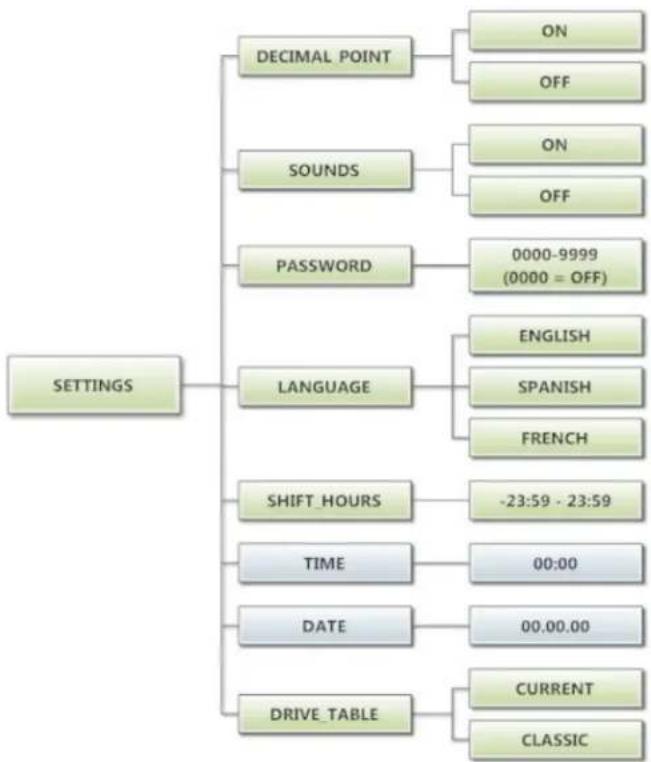
The "Settings" options allow for the user to make various programming changes to change how the control operation affects the customer. See below for detailed information on each next level option.
- "Decimal Point"- If the user programs the Decimal Point to "OFF", control display will not show a decimal point on any vend price values. The factory default is "ON".
- "Sounds"- If the user programs the Sounds to "OFF", the control will not sound the enunciator at the end of a wash cycle. The factory default is "ON".
- "Password"- If the user programs the password to any value other then 0000, the control will prompt the user to enter a password (the programmed value) before manual programming can be accessed. The factory default is "0000" (no password).
a. Note that if the user forgets the Password, it can be reset to factory default (no password), by performing a hard reset on the control. Please refer to the appropriate section of this manual to understand how to perform a hard reset.
b. The individual digits of the Password can be set by using the "Up" or "Down" buttons to change the number that is flashing. Once the desired number is chosen for a single digit, press the "Enter" button to move to the next one. Once all four desired digits are chosen, the "Enter" button must be held down for 3 seconds to confirm that the complete password should be set.
- "Language"- The control uses English for the default language of the customer prompts. Alternatively, the user can choose Spanish or French for the customer display prompts. However, all other prompts, such as Manual Programming, USB Programming and any Error Codes will still display in English.
- "Shift Hours"- This feature allows the user to shift the time used by the control from the time kept internally by the control. The control uses a Real Time Clock (RTC) to internally track the time and date. The RTC continues operation even if the control loses external power. The RTC is set for Central Standard Time and no daylight savings. Because the machine may be located in another time zone, the user can choose to create an alternate time & date that tracks in parallel to the RTC. When this alternate time is chosen, or shifted from the RTC, the alternate time will be used to, for example, track error code occurrences and set time-of-day pricing changes.
a. The hours in "SHIFT HOURS" can be set by using the "Up" or "Down" buttons to change the number that is flashing. Once the desired hour shift is chosen, press the "Enter" button to move to the minutes. Once the hours and minute shift are both chosen, the "Enter" button must be held down for 3 seconds to confirm that the complete shifted time is set.
- "Time"- The control uses a Real Time Clock (RTC) to internally track the time and date. The RTC continues operation even if the control loses external power. The RTC is set for Central Standard Time and no daylight savings. However, if a problem occurs and the RTC time is not accurate, it can be reset to the current time using this option.
a. The hours in "TIME" can be set by using the "Up" or "Down" buttons to change the number that is flashing. Once the desired hour is chosen,
press the "Enter" button to move to the minutes. Once the hours and minute are both chosen, the "Enter" button must be held down for 3 seconds to confirm that RTC is meant to be reset to the complete entry.
- "Date"- Similar to "Time", if a problem occurs and the RTC date is not accurate, it can be reset to the current date using this option.
a. The day of the month in "DATE" can be set by using the "Up" or "Down" buttons to change the number that is flashing. Once the desired day of the month is chosen, press the "Enter" button to move to the month of the year. Once the desired month of the year is chosen, press the "Enter" button to move to the year. Once the day, month and year are all chosen, the "Enter" button must be held down for 3 seconds to confirm that RTC is meant to be reset to the complete entry.
- "Drive Table"- The control knows what model of washer it is installed in based on various inputs including information it receives from the Variable Frequency Drive (VFD). However, because multiple VFD's can be used on the same model, depending on when it was manufactured, the "DRIVE TABLE" option is available. Any new washer should have the "DRIVE TABLE" programmed to the "CURRENT" option. However, in older washers that have been retrofitted with a new control, the "CLASSIC" option should be chosen. Contact your local Dexter distributor for more information.
To reset all values in the Settings options to factory default, press "Enter" when the "DEFAULT" prompt is shown. Press "Enter" again when the "RESET" prompt is shown to confirm the action.
The figure below shows the sub menu options for Settings:
flowchart
graph TD
    A["SETTINGS"] --> B["DECIMAL POINT"]
    A --> C["SOUNDS"]
    A --> D["PASSWORD"]
    A --> E["LANGUAGE"]
    A --> F["SHIFT_HOURS"]
    A --> G["TIME"]
    A --> H["DATE"]
    A --> I["DRIVE_TABLE"]
    B --> J["ON"]
    B --> K["OFF"]
    C --> L["ON"]
    C --> M["OFF"]
    D --> N["0000-9999 (0000 = OFF)"]
    E --> O["ENGLISH"]
    E --> P["SPANISH"]
    E --> Q["FRENCH"]
    F --> R["-23:59 - 23:59"]
    G --> S["00:00"]
    H --> T["00.00.00"]
    I --> U["CURRENT"]
    I --> V["CLASSIC"]
Usage Menu:
The Usage menu allows for the user to track data about machine usage. See below for detailed information on each sub menu option.
- "Coin Audit": The coin audit field shows the accumulation of coin pulses that were sent to the control over each of the left and right coin inputs. Note that this is a count of coin pulses, not an accumulated report of vend value.
a. The user can also return the coin audit amounts to the factory default setting (zero). To reset all coin audit values, press "Enter" when the "DEFAULT" prompt is shown. Press "Enter" again when the "RESET" prompt is shown to confirm the action.
- "Cycle Count": The cycle count field shows the accumulation of wash cycles that have occurred. Note that this is a count of cycles, not of hours accumulated. The user can also set the count value to a designated number. For example, if it is necessary to replace the control on a machine, the new control could be programmed to show the cycle count value that was recorded by the previously installed control. The individual digits of the count can be set by using the "Up" or "Down" buttons to change the number that is flashing. Once the desired digit of the count is chosen, press the "Enter" button to move to the next digit. Once the complete count is chosen, the "Enter" button must be held down for 3 seconds to confirm the action.
a. The user can also return the cycle count to the factory default setting (zero). To reset the cycle count, press "Enter" when the "DEFAULT" prompt is shown. Press "Enter" again when the "RESET" prompt is shown to confirm the action.
- "Motor Hours": The motor hours field shows the accumulated hours of operation for the motor. In many cases, it will match the cycle hours of the machine. However, separate fields are provided in the event that a motor is replaced on a machine. The user can set the motor hours to a designated number. For example, if it is necessary to replace the control on a machine, the new control could be programmed to show the motor hours that were recorded by the previously installed control. The individual digits of the hours count can be set by using the "Up" or "Down" buttons to change the number that is flashing. Once the desired digit of the hours is chosen, press the "Enter" button to move to the next digit. Once the complete hours are chosen, the "Enter" button must be held down for 3 seconds to confirm the action.
a. The user can also return the motor hours to the factory default setting (zero). To reset the motor hours, press "Enter" when the "DEFAULT" prompt is shown. Press "Enter" again when the "RESET" prompt is shown to confirm the action.
- "Cycle Hours": The cycle hours field shows the accumulated hours of operation for the washer. In many cases, it will match the motor hours of the machine. However, separate fields are provided in the event that a motor is replaced on a machine. See the Motor Hours description for more information.
The figure below shows the sub menu options for Usage:

flowchart
graph TD
    A["USAGE"] --> B["COIN_AUDIT"]
    A --> C["CYCLE_COUNT"]
    A --> D["MOTOR_HOURS"]
    A --> E["CYCLE_HOURS"]
    B --> F["LEFT 00000-99999"]
    B --> G["RIGHT 00000-99999"]
    B --> H["DEFAULT"] --> I["RESET"]
    C --> J["00000-99999"]
    C --> K["SET COUNT"] --> L["00000-99999"]
    C --> M["DEFAULT"] --> N["RESET"]
    D --> O["00000-99999"]
    D --> P["SET HOURS"] --> Q["00000-99999"]
    D --> R["DEFAULT"] --> S["RESET"]
    E --> T["00000-99999"]
    E --> U["SET HOURS"] --> V["00000-99999"]
    E --> W["DEFAULT"] --> X["RESET"]
Control Menu:
The Control menu allows for the user to observe important technical information for the control. No changes can be made at this menu. See below for detailed information on each sub menu.
- "Serial Number": This is the control serial number.
- "MAC Address": The MAC Address is a unique identifier designated to the control by the manufacturer. It allows the control to be recognized by network routers.
- "IP Address": The IP Address is the identifier given to the control by a network system.
- "M Firmware": The M Firmware is the Main Firmware currently loaded onto the control.
- "S Firmware": The S Firmware is the Secondary Firmware currently loaded onto the control.
- "C Firmware": The C Firmware is the Communications Firmware currently loaded onto the control.
The figure below shows the sub menu options for Control:

flowchart
graph TD
    A["CONTROL"] --> B["SERIAL_NUMBER"]
    A --> C["MAC_ADDRESS"]
    A --> D["IP_ADDRESS"]
    A --> E["M_FIRMWARE"]
    A --> F["S_FIRMWARE"]
    A --> G["C_FIRMWARE"]
    A --> H["DRIVE_ID"]
    B --> I["XXXXXXXXX"]
    C --> J["XXXXXXXXX"]
    D --> K["XXXXXXXXX"]
    E --> L["MXX.XX.XX"]
    F --> M["SXX.XX.XX"]
    G --> N["CXX.XX.XX"]
    H --> O["XXXXXXXXX"]
The following table shows the complete details for the coin washer default cycle.
| Bath | Bath Cycle Time (min.) | Water Temp. | Delay Fill | Spin Time (min.) |
| Prewash | 0 | Cold | Off | 0 |
| Wash | 9 | Warm | Off | 0 |
| Extend Wash | 0 | n/a | n/a | n/a |
| Rinse | 4 | Cold | Off | 1 |
| Final Rinse | 5 | Cold | Off | n/a |
| Extra Rinse Spin | n/a | n/a | n/a | 0 |
| Extra Rinse Bath | 0 | Cold | Off | n/a |
| Final Extract Spin | n/a | n/a | n/a | 6 |
WASHERS WITHOUT COIN ACCEPTORS
If you purchased a washer without a coin acceptor and are installing a payment device of your choice, refer to the washer wiring diagram for proper connection. You may also need to contact the payment device supplier for additional information.
RAPID ADVANCE MODE
Rapid Advance mode may be manually entered by pushing and holding the Cold water temperature button and then pushing and holding the programming button on the controller for three seconds. There will be no observed change to the washer or the display. The Rapid Advance mode can be entered from either the Idle mode or during the cycle. To rapid advance to the next step in the wash cycle, push the start button. The display will show "ADVANCE". The washer will advance to the next bath segment. The water will drain before the advance will occur.
The Rapid Advance mode will not end until the final bath segment is completed. The final segment cannot be skipped in Rapid Advance mode.
Notes: 1. When the Rapid Advance mode is used, the cycle time will no longer be correct.
2. By skipping steps with rapid advance, the door may not open immediately at the end of the cycle.
DISPLAYED WASHER FAULTS
Displayed
Fault
Code
Description
| DOOR LOCK ERROR | Door Lock Error | Condition | This error is when the Door Locked signal is not received within one second after the start of the cycle. After three attempts to start the washer. |
| Delay | Immediate | ||
| Action | When the error occurs, the Door Lock Motor will be turned off; all other outputs will be turned off. | ||
| Solution | Check VFD fault light. Check to hear if door motor engaged. Turn off the power to the washer. Check wire connections to door /lock switches. Check wire connections from switches to controller. Check P-4 Door/Lock wire connections at PCB controller. Adjust the door lock mechanism. (See on line service manual or video) | ||
| SLOW FILL ERROR | Slow Fill Error | Condition | This error is when a low water level is not reach within 7 minutes. |
| Delay | Immediate | ||
| Action | The washer cycle will continue | ||
| Solution | Turn off the power to the washer. Check the operation of the water valves. Check the incoming water pressure. Check for blocked or restricted water flow. Check to ensure the drain valve is functioning properly. | ||
| MEMORY ERROR | Checksum or Out of Range Error | Condition | Memory error in the controller. The memory checksum is wrong or a parameter value is out of range. |
| Delay | Immediate | ||
| Action | Stop the washer and turn off all the outputs. | ||
| Solution | Check VFD fault light before turning off power. Try a soft Reset of the controller with the white button. If problem persist replace PCB controller. | ||
| COMM ERROR1 | I2C Bus Error | Condition | Washer controller communication error on the I2C bus. Both the main slave micro and the master micro can be in this error state. The slave micro error is recoverable at any time, if I2C communication resumes. The master micro error is permanent. |
| Delay | The main slave starts displaying this error after 6 seconds of no (valid) I2C activity. The master micro goes into this permanent error state after 8 seconds of no (valid) I2C activity | ||
| Action | Stop the washer and turn off all outputs. | ||
| Solution | Check VFD fault light before turning off power. Try the data cable first. Move around cable and remove any side loading tension from data cable connector ends. Check connection P23 to P15. Turn power back on to the washer. If the problem returns, replace the PCB washer controller. | ||
| COMM ERROR2 | Wrong Washer Size Jumper Configuration | Condition | Invalid washer size jumper (harness) configuration. |
| Delay | Immediate (after the wrong size jumper configuration is read). Washer size/type inputs are read only at power up, before starting a cycle, once every 24 hours, and in factory test mode. | ||
| Action | Stop the washer. | ||
| Solution | Check VFD fault light before turning off power. If the controller was installed in a different size machine before being installed in this machine, a problem can occur. If someone has been doing repairs on the washer, check for the correct size drive. It can also be caused by pressure switch harness. Check to ensure the correct harness in installed. The control can be reset by holding program button on controller during startup (soft reset). Check orange wire at Molex connector on controller coming from pressure switch or replace pressure switch harness. | ||
| COMM ERROR3 | Washer Size or Type Changed | Condition | The washer size or washer type configuration has changed. |
| Delay | Immediate (after the size jumper configuration is read). Washer size/type inputs are read only at power up, before starting a cycle, once every 24 hours, and in factory test mode. | ||
| Action | Stop the washer. | ||
| Solution | Check VFD fault light before turning off power. Check to ensure all the harnesses are properly connected to the controller. Check to ensure the VFD drive horsepower is proper for this size of washer. The control can be reset by holding program button on controller during startup (soft reset). Check orange wires at Molex connector on controller coming from pressure switch. | ||
| COMM ERROR4 | VFD Non Existent or communication fault | Condition | This error is when the washer controller cannot communicate with the drive. |
| Delay | Delay time is 2 seconds | ||
| Action | Stop the machine and clear the cycle. Keep the door locked until the machine has stopped moving and then unlock the door. | ||
| Solution | Check the data communication cable between the washer computer and the variable frequency drive (VFD).Step 1: Make sure the cable did not become unplugged during operation.Step 2: Make sure that the cable is not being pulled sideways at either the washer controller, or the VFD, plug end. If both ends of the communications cable are plugged in the washer computer and VFD and there is no tension on the communications cable pulling it from side to side, then replace the cable.Step 3: Inspect both female connection points at PCB controller and at VFD. These may need replacement if they cannot be reset. | ||
| COMM ERROR5 | VFD Communication Fault | Condition | This error is a data error on communications between the controller and the VF drive |
| Delay | Delay time is 12 seconds. | ||
| Action | Stop the machine and clear the cycle. Keep the door locked until the machine has stopped moving and then unlock the door. | ||
| Solution | The CE errors are communications errors. Data Cable noise can cause the majority of these errors. Check VFD fault light before turning off power. Check the data cable between the controller and the drive. Replace data cable if it appears damaged and fault appears again. Please note that this fault will occur if you turned main power off and on too quickly. (See Note below) | ||
| SLOW DRAIN ERROR | Drain Error | Condition | This error is when an empty water level is not reach within 7 minutes. |
| Delay | Immediate | ||
| Action | The washer cycle will continue. Do not spin the tumbler without reaching an empty water level. If empty water level is not reached, agitate during the normal spin time. | ||
| Solution | Check VFD fault light before turning off power. Check to ensure the drain valve is operating properly (slow drain has potential to cause this code). Check to ensure the pressure switch tube is clear of any blockage, and the pressure switch is operating properly. Check the pressure switch harness. | ||
| SPIN STOP ERROR | Stop Error | Condition | This error is when the washer does not stop spinning within 150 seconds after receiving the command. |
| Delay | Immediate | ||
| Action | Keep the door locked until the machine has stopped moving and then unlock the door. | ||
| Solution | Check VFD fault light before turning off power. Inspect the braking resistors and measure the resistance. Check connecting wiring from braking resistor to the drive mounted in the top of the washer. Reset the drive and try again. Possibly incorrectly programmed drive. | ||
| DRIVE ERROR1 | Washer size/VFD size mismatch | Condition | This error is when the drive size does not match the washer size. |
| Delay | Immediate. (after the size jumper configuration is read). Washer size/type inputs are read only at power up, before starting a cycle, once every 24 hours and in factory test mode | ||
| Action | Stop the machine and clear the cycle. Keep the door locked until the machine has stopped moving and then unlock the door | ||
| Solution | Check VFD fault light before turning off power. If the controller was installed in a different size machine before being installed in this machine, a problem can occur. If someone has been doing repairs on the washer, check for the correct size drive. It can also be caused by pressure switch harness. Check to ensure the correct harness in installed. The control can be reset by holding program button on controller during startup (soft reset). Check orange wire at Molex connector on controller coming from pressure switch or replace pressure switch harness. | ||
| PCB ERROR1 | Controller Internal Fault | Condition | This error is an internal failure of the washer controller electronics. |
| Delay | Immediate | ||
| Action | Stop the machine and clear the cycle. Keep the door locked until the machine has stopped moving and then unlock the door. | ||
| Solution | Check VFD fault light before turning off power. Try a soft Reset of the controller with the white button. If problem. Replace PCB controller. | ||
| DRIVE OC | VFD Over-current Fault | Condition | This error is an over-current on the VF drive |
| Delay | Delay time is 35 seconds | ||
| Action | Stop the machine and clear the cycle. Keep the door locked until the machine has stopped moving and then unlock the door. | ||
| Solution | Step 1: Check to make sure the washer cylinder turns freely by hand. If it turns freely, continue to step 2. If it does not, remove the belt and see if the motor turns freely by hand. If the motor turns freely, then check for obstructions in the cylinder or check the bearings. If the motor does not turn freely, replace the motor.Step 2: Check the motor wires for a short circuit between leads. If there are motor leads that have conductors touching, separate them and insulate them. If the wires are broken, splice them together or replace the motor.Step 3: Check braking resistors to see if they measure the correct resistance. If a resistor does not measure the proper value, replace it. | ||
| DRIVE OV | VFD Over-voltage Fault | Condition | This error is over-voltage on the VF drive |
| Delay | Delay time is 35 seconds. | ||
| Action | Stop the machine and clear the cycle. Keep the door locked until the machine has stopped moving and then unlock the door. | ||
| Solution | Step 1: Measure the supply voltage to the VFD on the L1, L2 (or N), and L3 (if connected to three phrase power). The supply voltage should be from 187 to 264 VAC or 108 to 132 VAC for a 120 VAC VFD. Also make sure the supply wires on L1, L2 (or N) and L3 (if connected to three phase power) are securely connected.Step 2: Check the braking resistor connections at the VFD. The terminal screws should be tight. One of the braking resistor wires should be connected to terminal B2.Step 3: Measure each braking resistor separately to make sure they are the correct resistance. (200 for 1 and 2 Hp VFD and 160 for 3 Hp VFD).Step 4: If you have a 240 VAC, high leg voltage supply, try disconnecting the high leg. If this cures the problem, leave the high leg disconnected, connect a transient voltage surge suppressor (with some form of filtering) at the voltage supply panel, connect a line choke on the high leg or install a VFD filter. | ||
| DRIVE OH | VFD Overheat Fault | Condition | This error is over-heating on the VF drive |
| Delay | Delay time is 12 seconds. | ||
| Action | Stop the machine and clear the cycle. Keep the door locked until the machine has stopped moving and then unlock the door | ||
| Solution | Step 1: Make sure the cooling fins on the VFD heat sink and the ventilation louvers on the VFD cooling fan cover are clean.Step 2: Start a washer cycle and make sure the VFD cooling fan operates after the cylinder starts turning. | ||
| DRIVE OL | VFD Overload Fault | Condition | This error is overload on the VF drive |
| Delay | Delay time is 12 seconds. | ||
| Action | Stop the machine and clear the cycle. Keep the door locked until the machine has stopped moving and then unlock the door | ||
| Solution | (Check drive fault code before powering down). Check the washer motor to ensure it turns freely. Check the wiring for loose connections to the drive and motor. Measure the braking resistor values. Check for damaged motor wires. Check V-Belt tension and adjust to 1" deflection at center. Check braking resistors. | ||
| DRIVE GFI | VFD Ground Fault | Condition | This error is a ground fault interruption on the VF drive |
| Delay | Delay time is 12 seconds. | ||
| Action | Stop the machine and clear the cycle. Keep the door locked until the machine has stopped moving and then unlock the door. | ||
| Solution | Check VFD light code before turning off power. Check the wiring connections to the drive and motor. Check the ground wiring of the drive, motor and incoming connection to ensure a proper ground is present. Check for damaged motor wires. | ||
| DRIVE LV | VFD Low Voltage | Condition | This error is low voltage on the VF drive |
| Delay | Delay time is 12 seconds. | ||
| Action | Stop the machine and clear the cycle. Keep the door locked until the machine has stopped moving and then unlock the door. | ||
| Solution | Check VFD light code before turning off power. Turn the power off to the washer. Check the wiring connections to the drive and motor. If no problem is observed, turn on power to the washer and test. (See Note) Measure the incoming line voltage. | ||
| DRIVE IF | VFD Internal Fault | Condition | This error is an internal VF drive error |
| Delay | Delay time is 12 seconds. | ||
| Action | Stop the machine and clear the cycle. Keep the door locked until the machine has stopped moving and then unlock the door. | ||
| Solution | Check VFD fault light before turning off power. Turn the power off to the washer. Wait one minute. Turn the power on to the washer. If problem reappears, contact your Dexter representative. | ||
| INVALID DRIVE | Drive is not the correct Dexter version of the Delta E-drive | Condition | The error indicates the VF drive is not a Dexter version of the Delta E-drive. |
| Delay | Immediate (after the Dexter indication value is read from drive). Drive indication value is read only at power up, before starting a cycle, once every 24 hours, and in factory test mode. | ||
| Action | Stop the machine and clear the cycle. Keep the door locked until the machine has stopped moving and then unlock the door. | ||
| Solution | VFD has been replaced, disconnected, or removed. Drive is not the correct Dexter version of the Delta E-drive. Replace drive with Dexter Delta E-drive. |
Note: Whenever power is turned off to the washer, it must remain off for one minute. The washer will not operate properly if this is not done.
SERVICING AND TROUBLESHOOTING
CAUTION: Label all wires prior to disconnection when servicing controls. Wiring errors can cause improper and dangerous operation. Verify proper operation after servicing.
If any of the following symptoms occur on this washer, check the suggested remedies listed below. If all probable causes have been eliminated and the symptom still exists, contact your local Dexter agent for further troubleshooting assistance. See contact information at the end of this manual. Parts & Service Manuals from Dexter are also available for further troubleshooting assistance.
Symptom
Probable Cause
Suggested Remedy
| Machine does not start | Power supply | Check these areas: Circuit breakers, Voltage, Power leads, Power connections. Is front display LED showing a dollar amount? |
| Door Switch | Check for continuity through door switch when door is closed. If no continuity, adjust or replace door switch. | |
| Control breaker or Fuse | Check 1.5 amp (T-950, T-1200 and T-1450 use 2.5amp) breaker or fuse for continuity. If no continuity, replace breaker or fuse. | |
| Control Transformer | Check voltage output from control transformer for 120VAC. If voltage is incorrect, replace transformer. | |
| Coin Acceptor | Check coin acceptor switch for any type of blockage or damage. Clean, adjust or replace the acceptor. | |
| Check PCB board | Check all wire connections for loose contacts. | |
| Check wiring between PCB | Check data cable. This is the cable with the phone type connectors on the main PCB control and the VFD. With the power removed unplug and check for damage, replug and retry washer. | |
| Check Relay PCB | Check all wire connections for sure contact. | |
| Check Door Locking Motor | Check that 120 volts AC power is at motor after start button is pushed. | |
| Machine will not accept and count coins | Coin Acceptor | Check coin acceptor switch for any type of blockage or damage. Clean, adjust or replace the acceptor. |
| Power Supply | Check these areas: Circuit breakers, Voltage, Power leads, Power connection | |
| Door Closed Safety Switch | Check door closed switch at door hinge for proper operation. | |
| Door Handle Closed Switch | Check single door closed switch at left side of door handle to close when handle is vertical. | |
| Control Breaker or fuse | Check breaker or fuse for continuity. If no continuity, replace breaker or fuse. The T-300 through T-900 use the 1.5 amp fuse. The T-950, T-1200 and T-1450 use a 2.5 amp fuse. | |
| Main PCB | Replace | |
| Door does not lock | Check display for fault code | Does "DOOR LOCK ERROR" show on the front of display? If yes follow tests described in fault code section. |
| Door locking motor | Check to insure that motor is receiving 120 VAC from main relay PCB. If it is, replace motor. | |
| Door Switch | Check for continuity through door latch switch when door closed. If no continuity, adjust or replace door switch. | |
| Door will not open | Thermoactuator | Check to see if thermoactuator and its mechanism are stuck or binding and not allowing the door lock motor to open. Check to be sure that the locking thermoactuator is not receiving 120VAC during the last 1 1/2 minutes of the cycle. Also check to see that the unlocking thermoactuator is receiving 120VAC during the last minute of the cycle. If the thermoactuators do not receive voltage at the correct times, change the PCB relay board. If the timing and voltage are correct, replace the thermoactuator. |
| Door Locking Motor | Check the door lock motor. Make sure the motor is not stuck or in a bind. If motor does not move freely, replace locking motor. | |
| Door Rod | Check to see that door rod from locking motor to lock assy is long enough to allow lock assy to disengage. If not, adjust rod. | |
| No hot water in detergent dispenser | Water Valve Coil | Check coil continuity at terminals and replace if no continuity. 120 V power only on for 20 second in wash bath. |
| Water Inlet | Check water inlet screens for blockage and clean screens if necessary. | |
| Water | Check to insure that water is turned on and operating. | |
| P-20 Wire Harness | Check black & white harness. | |
| Hot water does not enter tub in wash | Water Valve Coil | Check coil continuity at terminals and replace if no continuity. Check for 120 V power from main relay PCB. |
| Water Inlet | Check water inlet screens for blockage and clean if necessary. | |
| Water | Check to insure that water is turned on and operating. | |
| Black or white wire at controller and main relay PCB | Check black and white wire at Molex plug on main PCB controller P21 connection and at PCB relay board P20 connection. | |
| Pressure Switch | Check pressure switch continuity between terminal contacts. If no continuity, check pressure switch hose for obstruction. If the hose is okay then change pressure switch. | |
| No cold water to tub in wash | Water Valve Coil | Check coil continuity at terminals and replace if no continuity. Check for 120 V power from main relay PCB. |
| Water Inlet Screens | Check water inlet screens for blockage and clean if necessary. | |
| Water | Check to insure that water is turned on and operating. | |
| Black or white wire at controller and main relay PCB | Check black and white wire at Molex plug on main PCB controller P21 connection and at PCB relay board P20 connection. | |
| Pressure Switch | Check pressure switch continuity between terminal contacts. If no continuity, check pressure switch hose for obstruction.If the hose is okay then change pressure switch. | |
| Water comes in but level does not rise | Drain Valve (open) | Check these areas:Drain valve blockage.Drain valve motor and gear train. If there is power to the valve but drain valve does not close, replace drain valve and motor.Power to the drain valve. If no power to drain valve, check (brn/yel) wire at PCB relay board. If there is no power on the (brn/yel) wire when the washer is in a wash cycle replace relay board. |
| Black or white wire at controller and main relay PCB | Check black and white wire at Molex plug on main PCB controller P21 connection and at PCB relay board P20 connection. | |
| Water does not flush softener compartment. | Water Valve Coil | Check coil continuity at terminals and replace if no continuity. |
| Water Inlet Screens | Check water inlet screens for blockage and clean if necessary. | |
| Water | Check to insure that water is turned on and operating. | |
| Pressure Switch | Check pressure switch continuity between terminal contacts. If no continuity, check pressure switch hose for obstruction. If the hose is okay then change pressure switch. | |
| Water level too high | Pressure Switch | Check for blockage in pressure switch hose. Check for pressure switch opening circuit across terminals. Replace switch if contacts do not open. |
| Water drains slowly | Drain System | Check hoses and drain valve for blockage. Check to make sure building drain is of adequate size. Check building drains for blockage. |
| Machine does not turn | VFD | Check VFD by removing top panel. If no display turn power off to machine at breaker for 2 minutes and turn power back on to reset. If still no display replace VFD. |
| Machine tumbles in one direction | VFD | See DISPLAYED WASHER FAULTS section for more info. |
| VFD | Inspect yellow enable wires from main relay PCB and at VFD | |
| Excessive vibration | Mounting System | Check these areas:• Strength of mounting structure, concrete or base.• Mounting bolts may be loose and need tightening. |
| Drive Belt | Worn drive belt can cause vibration and noise. | |
| Loading | Small loads contribute to out of balance loading and increase vibration. | |
| Machine does not spin | Pressure Switch | Check pressure switch for continuity across terminals #21 & #22 indicating pressure switch has reset to the empty position. If no continuity, change pressure switch. |
| Machine starts and does not operate | VFD | Check yellow enable wires from PCB relay board connection P13 & P14 to the VFD. Check connection of orange wire at P15 from door switches. |
| Machine does not stop | Main PCB | Main PCB controls time of the cycle and the end of cycle. |
| Braking Resistors | Check braking resistors for continuity. Verify ohms resistance at braking resistors with wires removed. | |
| Water leakage around loading door | Door Adjustment | Door may need adjustment due to abuse or wear. Check tightness around perimeter using a dollar bill. Adjust left to right tightness by shims at door lock or hinge side. It is important to center gasket to tub opening before tightening door to hinge bolts. Chalk may be used on tub front to show point of contact with tub. If gasket is deformed, worn, or damaged, replace. Refer to parts section for door gasket expander kit. |
| Signs of a damaged E-Stop button. | Stop button | Machine accepts coins, When machines starts the buzzer will sound and then the machine stops. The display will then show "OPEN DOOR". Replace stop button. |
IMPORTANT
TRANSIENT VOLTAGE SURGE SUPPRESSORS
Like most electrical equipment your new machine can be damaged or have its life shortened by voltage surges due to lightning strikes which are not covered by factory warranty. Local power distribution problems also can be detrimental to the life of electrical components. We recommend the installation of transient voltage surge suppressors for your new equipment. These devices may be placed at the power supply panel for the complete installation and don't require an individual device for each machine.
These surge protectors help to protect equipment from large spikes and also from small ongoing spikes in the power that occur on a day to day basis. These smaller surges can shorten overall life of electrical components of all types and cause their failure at a later date. Although they can't protect against all events, these protective devices have a good reputation for significantly lengthening the useful life of electronic components. Electronic components are helped to have a longer useful life when they are supplied with the clean stable electrical power they like.
We are including the following names and phone numbers of a few suppliers of these devices for those who don't currently have a source.
MANUFACTURER CONTACT PHONE
Innovative Technology, Inc Distributor 1-800-809-2772 or (Part of Eaton Corporation) www.itvss.com
EFI Electronics Corporation Factory 1-800-877-1174 (Part of Schneider Electric)
MCG Surge Protection Factory 1-800-851-1508 or www.mcgsurge.com
Advanced Protection Technology Inc. Factory 1-800-237-4567 or www.aptsurge.com
ACCESSORIES
INSTALLATION: (Furnished)
QTY.
9990-027-011
Hose, Water Supply 2
8641-242-000
Washer, Inlet Hose 2
9565-003-001
Strainer, Inlet Hose
4
Contact distributor or Dexter Laundry, Inc. if a steel-mounting base is required.
For service and parts information, contact your local Dexter agent. To find your local Dexter agent, use the Distributor Locator at the website shown below. If a Dexter agent is not available, contact Dexter Laundry, Inc. directly as listed below:
Mailing Address: 2211 West Grimes Avenue
Phone: 1-800-524-2954
Fairfield, IA 52556
USA
Website: www.dexter.com