
CNPS8700 NT - Computer Cooling Component ZALMAN - Free user manual and instructions
Find the device manual for free CNPS8700 NT ZALMAN in PDF.


| Product Type | CPU Cooler |
| Brand | Zalman |
| Model | CNPS8700 NT |
| Material | Pure Copper |
| Dimensions (L x W x H) | 120 x 123 x 67 mm |
| Weight | 475 g |
| Heat Dissipation Area | 3300 cm² |
| Fan Bearing | 2 Ball-Bearing |
| Fan Speed | 1150 ~ 2100 RPM ±10% |
| Noise Level | 17.5 ~ 30.0 dBA ±10% |
| Fan Control | PWM (Pulse Width Modulation) with Auto Restart |
| Socket Compatibility | Intel LGA775, AMD AM2/754/939/940 |
| CPU Compatibility | All single, dual, and quad core CPUs for supported sockets |
| Special Features | Patented curved heatpipe design, ultra-thin 0.2 mm fins, automatic fan speed control |
| Additional Cooling | Cools CPU, VGA card, Northbridge, FET, and RAM |
| Power Connector | 4-pin PWM fan connector |
| Recommended Use | Slim tower and low profile HTPC enclosures |
| Package Includes | Cooler, thermal grease, clip, clip lever, user manual, mounting kit for Intel and AMD |
| Safety Notes | Keep away from children; avoid excessive force on fan; do not ingest thermal grease |
Frequently Asked Questions - CNPS8700 NT ZALMAN
User questions about CNPS8700 NT ZALMAN
0 question about this device. Answer the ones you know or ask your own.
Ask a new question about this device
Download the instructions for your Computer Cooling Component in PDF format for free! Find your manual CNPS8700 NT - ZALMAN and take your electronic device back in hand. On this page are published all the documents necessary for the use of your device. CNPS8700 NT by ZALMAN.
USER MANUAL CNPS8700 NT ZALMAN
natural_image
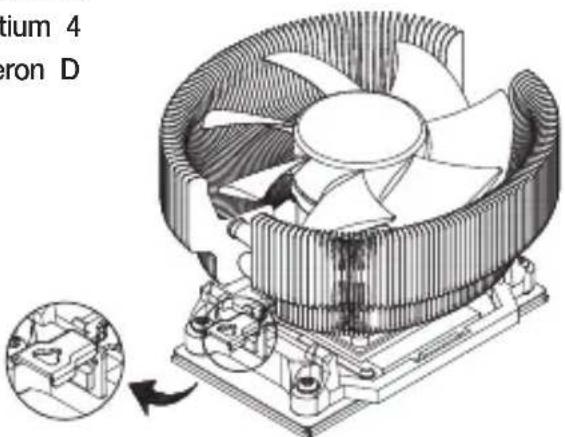
Technical illustration of a CPU fan with cooling fins and heatsink, showing internal components and a close-up inset (no text or symbols)Intel Socket 775 CPU
Core 2 Quad
Core 2 Extreme
Core 2 Duo
Pentium D
Pentium 4
Celeron D
AMD Socket AM2/754/939/940 CPU
Athlon 64 FX
Athlon 64 X2 Dual-Core
Athlon 64
Opteron
Dual-Core Opteron
Sempron
1. Features
1) Compatible with all single, dual, and quad core CPUs for Intel socket 775 and AMD socket AM2/754/939/940.
2) Compatible with Slim Tower / Low Profile Home Theatre PC Enclosures.
3) 100% pure copper heatsink with aerodynamically optimized "tunnel" design for high performance cooling.
4) Patented curved heatpipe design for heat transfer performance of up to 4 heatpipes using just 2.
5) Ultra-thin 0.2mm fins for minimized weight and significantly reduced airflow resistance.
6) Automatic Fan Speed Control feature included in the Ultra Quiet 110mm PWM(Pulse Width Modulation) enabled fan.
7) Cools not only the CPU, but the VGA card, Northbridge, FET, and RAM as well.
2. Specifications
| Spec. | Model | CNPS8700 NT |
| Material Pure Copper | ||
| Dimensions 120(L) X 123(W) X 67(H)mm | ||
| Heat Dissipation Area 3300cm2 | ||
| Weight 475g | (1) | |
| Fan | Bearing Type 2 Ball-Bearing | |
| Rotation Speed 1,150 ~ 2,100 rpm ± 10 % | ||
| Noise Level(2) | 17.5 ~ 30.0 dBA ± 10% | |
| Control Method PWM Control, Auto Restart | ||
Note ^(1) The maximum weight for a cooler is specified as 450g for Intel Socket 775 and AMD Sockets AM2/754/939/940. Special care should be taken when moving a computer equipped with a cooler that exceeds the specified weight limit. Zalman is not responsible for any damage that occurs when moving a computer. Note ^(2) Measured at 1m distance away from the sound source.
3. Exploded View

4. Precautions
1) Use and keep the product away from the reach of children.
2) Check the components list and condition of the product before installation. If any problem is found, contact your place of purchase to obtain a replacement.
3) Excessive force exerted on the fan may damage the fan, resulting in damage to the system.
4) Avoid inserting any objects into the fan while it is in operation.
5) Do not ingest or put the thermal grease into the mouth. If ingested, get medical attention.
Disclaimer)
Zalman Tech Co., Ltd. is not responsible for any damages due to external causes, including but not limited to, improper use, problems with electrical power, accident, neglect, alteration, repair, improper installation, or improper testing.
5. Components
1) Common Components
① Cooler (CNPS8700 NT)
② Thermal Grease
③ Clip
④ Clip Lever
⑤ User's Manual
2) Components for Intel Socket 775
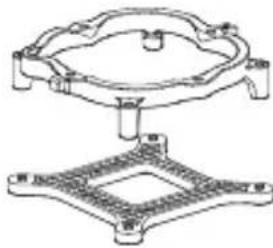
⑥ Four (4) Clip Support Fixing Bolts
⑦ One (1) Clip Support for Socket 775
⑧ One (1) Backplate for Socket 775
3) Components for AMD Socket AM2/754/939/940
* No additional components

natural_image
Illustration of a computer fan with visible blades and central hub (no text or symbols)
2

•

4

5

6
natural_image
Technical line drawing of a mechanical component with a flanged top and square base (no text or symbols)7
8
6. Compatible CPUs
1) All CPUs conforming to Intel Socket 775 platform
2) All CPUs conforming to AMD Socket AM2/754/939/940 platform
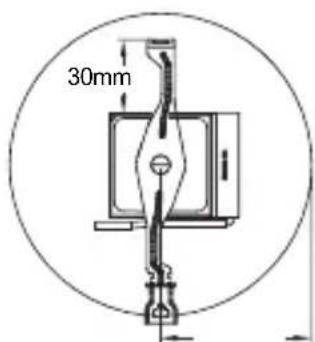
Caution) No motherboard components such as the PSU, disk drives, VGA card, and RAM with a height greater than 39mm should be present within a 61.5mm radius from the center of the CPU.

7. Installation (Intel Socket 775)
1) Clip Support Installation
Align the Clip Support for Socket 775(⑦) and the Backplate for Socket 775(⑧) with the mounting holes on the motherboard and fasten them together with the Clip Support Fixing Bolts(⑥). The Lever Slot on the Clip Support for Socket 775 should be properly oriented on the hinged side of the Socket Lever when installing.
※ If the Lug of the Clip Support for Socket 775 interferes with any motherboard components, install the Clip Support for Socket 775 with the Lug facing a different direction to avoid interference.

2) Clip Installation
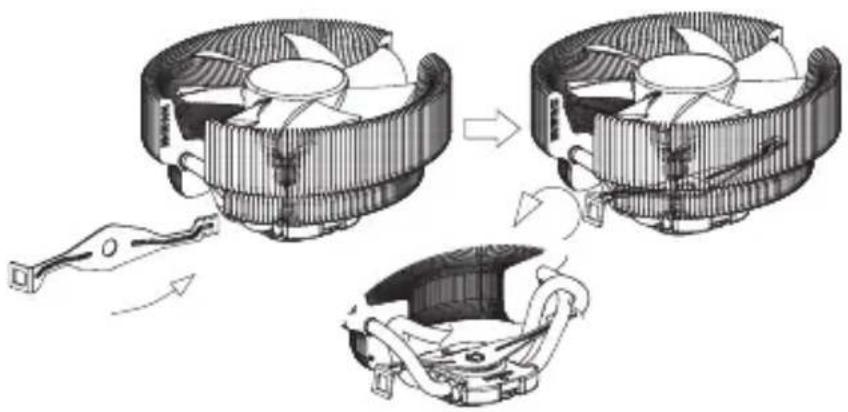
Insert the Clip(③) between the Heatpipes. Turn the Clip so that the central hole comes in alignment with the Base Cover's projecting part. Now attach the Clip so that its central hole slides over the projecting part of the Base Cover. Do not exert any excessive force on the fan during the Clip installation. Excessive force on the fan could lead to product damage.
natural_image
Diagram of a three-stage computer fan assembly showing fan arrangement and cooling mechanism (no text or labels)3) Thermal Grease Application
Clear off particles or any residue from the top of the CPU then spread a sufficient amount of the included Thermal Grease(②) on top of the CPU.

4) Cooler Installation
Slide the Clip Lever(④) onto the Clip's(③) Groove for Intel. Align and connect the Clip's Lug Slot with the Arrow Marked Lug on the Clip Support for Socket 775. Press onto the Clip Lever when aligning the Clip Lever's Lug Slot with the Lug. Make sure that the cooler is installed on the center of the CPU.

5) Power Connection
◆ Please refer to "9. Power Connection" on page 5.
8. Installation (AMD Socket AM2/754/939/940)
1) Clip Installation
Insert the Clip(③) between the Heatpipes. Turn the Clip so that the central hole comes in alignment with the Base Cover's projecting part. Now attach the Clip so that its central hole slides over the projecting part of the Base Cover. Do not exert any excessive force on the fan during the Clip installation. Excessive force on the fan could lead to product damage.

natural_image
Diagram showing three stages of a computer fan assembly: cooling, heating, and cooling mechanism (no text or labels)2) Thermal Grease Application
Clear off particles or any residue from the top of the CPU then spread a sufficient amount of the included Thermal Grease(②) on top of the CPU.

3) Cooler Installation
Slide the Clip Lever(④) onto the Clip's(③)Groove for AMD. Align and connect the Clip's Lug Slot with the Lug on the motherboard's Retention Frame. Press onto the Clip Lever when aligning the Clip Lever's Lug Slot with the Lug.

4) Power Connection
◆ Please refer to "9. Power Connection" on page 5.
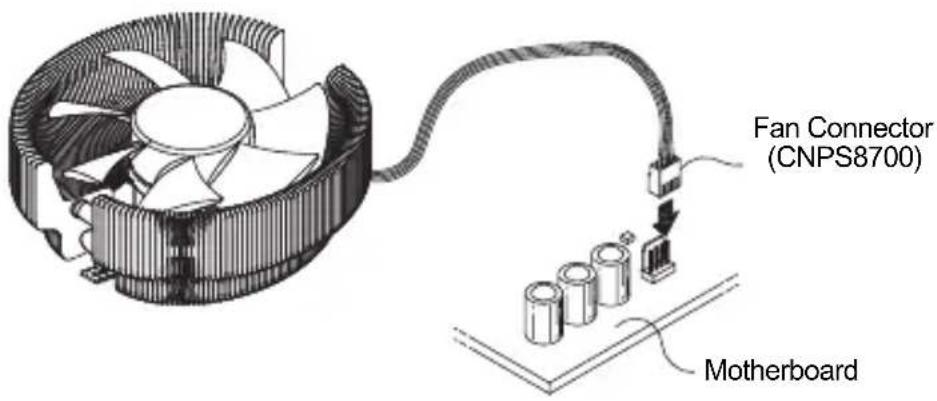
9. Power Connection
Connect the CNPS8700 NT's Fan Connector to the Motherboard as shown in the diagram.
10. Notes on Usage
1) Checking CPU Compatibility
Please refer to "Compatible CPUs" on page 2 to confirm that your CPU is compatible with CNPS8700 before using it.
2) Cautions During Booting
Operation of the PWM fan varies depending on the Motherboard's BIOS settings. Please activate the PWM Control mode in the BIOS settings after installation. Refer to the mother board's manual for detailed information regarding the PWM Control mode.
3) OVERCLOCKING
Zaman Tech Co., Ltd. is not responsible for any damages to the system and CPU resulting from overclocking.
11. Zalman Computer Noise Prevention Systems
Zalman's Noiseless Power Supplies, Fanless Northbridge Coolers, Heatpipe HDD Cooler, Noiseless Case Fans, VGA Coolers, and Fan Controllers facilitate stable performance and a noiseless computing environment.

Noiseless Power Supply Fanless Northbridge Cooler Heatpipe HDD Cooler

natural_image
Close-up of a black CPU fan with screwdriver and plastic components nearby (no visible text or symbols)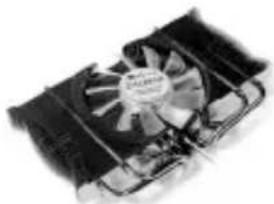
natural_image
Close-up of a computer cooling fan with visible cooling effect (no text or symbols)
Noiseless Case Fan Ultra Quiet VGA Cooler Fan Controller
12. Home Theatre PC Enclosures

natural_image
Front view of a Zelamix electronic device with control panel and display screen (no visible text or symbols)HD160XT
The HD160XT is designed for ultra quiet home theatre PC operation, utilizing optimized ventilation and anti-vibration reinforcements, making it ideal for environments that require silence such as living rooms, bedrooms, educational facilities, and offices.
For more information, please visit our website.
Disposal of Old Electrical & Electronic Equipment (Applicable in the European Union and other European countries with separate collection systems)


- Features
- Specifications
- Exploded View
- Precautions
- Disclaimer)
- Components
- Compatible CPUs
- Installation (Intel Socket 775)
- 1) Clip Support Installation
- 2) Clip Installation
- 3) Thermal Grease Application
- 4) Cooler Installation
- 5) Power Connection
- Installation (AMD Socket AM2/754/939/940)
- 1) Clip Installation
- 2) Thermal Grease Application
- 3) Cooler Installation
- 4) Power Connection
- Power Connection
- Notes on Usage
- 1) Checking CPU Compatibility
- 2) Cautions During Booting
- 3) OVERCLOCKING
- Zalman Computer Noise Prevention Systems
- Home Theatre PC Enclosures
Brand : ZALMAN
Model : CNPS8700 NT
Category : Computer Cooling Component