
BDVD-1093 - Portable DVD Player BRIGMTON - Free user manual and instructions
Find the device manual for free BDVD-1093 BRIGMTON in PDF.


| Product Type | Portable DVD Player |
| Brand | Brigmton |
| Model | BDVD-1093 |
| Display Size | 9 inches |
| Media Playback | DVD, CD, USB, SD Card |
| Battery Type | Rechargeable lithium |
| Battery Charging Time | 5–6 hours |
| Battery Playback Time | Approximately 100 minutes |
| TV Output | AV (composite) |
| Video System | NTSC / PAL / Auto |
| Screen Aspect Ratio | 4:3 PS, 4:3 LB, 16:9 |
| Audio | Stereo |
| Remote Control | Included |
| Power Supply | DC adapter (home and car) |
| Zoom Modes | 2x, 3x, 4x |
| Subtitle Support | Yes, selectable |
| Repeat Modes | A-B, One, All |
| Parental Control | Password (default 0000) |
| Maximum Operating Temperature | 35°C |
| Cleaning | Disconnect power, use dry cloth |
| Safety | Avoid moisture, heat, and magnets |
Frequently Asked Questions - BDVD-1093 BRIGMTON
User questions about BDVD-1093 BRIGMTON
0 question about this device. Answer the ones you know or ask your own.
Ask a new question about this device
Download the instructions for your Portable DVD Player in PDF format for free! Find your manual BDVD-1093 - BRIGMTON and take your electronic device back in hand. On this page are published all the documents necessary for the use of your device. BDVD-1093 by BRIGMTON.
USER MANUAL BDVD-1093 BRIGMTON
natural_image
Black-and-white photo of a portable electronic device with a car displayed on screen, no visible text or symbols on the device itself.BDVD-1093
DVD PORTÁTIL 9" - USB/SD-PVR - JUEGOS
natural_image
Illustration showing four steps of a hand holding a cup, with a cross symbol indicating a specific object (no text or symbols present)CONTROLES
natural_image
Black-and-white photo of a portable electronic device with a car displayed on screen, showing its front panel and control buttons (no readable text or symbols)BDVD-1093
PORTABLE DVD 9" - USB/SD-PVR - GAMES
- Do not expose the unit to rain or moisture.
- Do not expose to direct sunlight.
- Keep the appliance away from strong magnets, heat and dust.
- Do not place the unit on an unstable surface.
- If the unit is moved from a cold to a warm place, moisture may accumulate affecting the operation. If this happens leave the unit turned on for a few hours until the moisture evaporates.
PRECAUTIONS
- Do not drop any through openings.
- Do not spill liquid of any kind onto or into the unit.
- Do not place heavy objects on the unit.
- To ensure proper ventilation and proper operation not cover the unit with cloth or clothing
- Keep away from fire or flame.
- Do not replace the battery by your means, contact a service representative.
- The maximum working temperature is 35 degrees Celsius.
- Do not disassemble the unit there is a risk of electric shock and risk of exposure to laser damage.
- To clean the disconnect unit from power.
USING DVD / CD
- Do not leave the DVD / CD near sources of heat, in direct sunlight or in places with moisture.
- Store them in their cases when not in use.
- When handling by its edges.
- Write on them only suitable markers

natural_image
Illustration showing four steps of a hand holding a leaf, with a cross mark indicating the left side (no text or symbols present)CONTROLS
MENU: Press to return to the root menu of the DVD
STOP: Press to stop current issue
PLAY / PAUSE: Press once to pause playback. Press again to resume.
SETUP: Press to enter the setup menu, then use the arrow keys and OK to set the menu system.
MODE: Press repeatedly to change the mode.
USB / CARD: Press repeatedly to switch between DVD, USB or SD
ARROW KEYS: During playback you can use to switch tracks and move forward or backward within a track. In other menus to navigate between the options.
OK: To confirm the selections.
OPEN: Open DVD door.
REMOTE CONTROL/CONTROLS
POWER SWITCH

To turn on the unit.
USB/CARD

Check USD / SD.
SETUP

To enter and exit the SETUP menu.
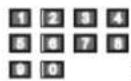
Keypad.
ENTER
To access the option.

Arrow keys.
DVD/AV IN
Select DVD or AV IN.
REPEAT

Repeat mode.

Press once to mark the start and repeat again to mark the end. The selected piece will be repeated. Pressing a third time cancels repeat.

Previous track.

Next track.

To start playback and select various types of reproduction.

To temporarily pause playback.

To stop playback, returning to the beginning.

Fast forward: 2X, 4X, 8X, 16X, 32X and normal speed.

Fast reverse: 2X, 4X, 8X, 16X, 32X and normal speed.
TIME
You can select the title, chapter, track, etc.. Press again to exit the TIME menu.
MUTE

To cut the sound. Press again to cancel.
VOLUME+/-
To increase or decrease the volume.
AUDIO

Press to select the versions on DVD.
MENU
To return to the top menu while playing a DVD.
SUBTITLE
Press repeatedly to able/disable subtitles. This function is available if it is included in the DVD setup.
DISPLAY
Displays information on the disc being played.
ZOOM
The zoom available are: 2X, 3X and 4X.
CHARGING THE BATTERY
The device has a rechargeable lithium battery. You must charge the battery completely; this process can take up to 5-6 hours. The playing time is depends on the use of the device, but is approximately 100 minutes.
To charge the battery connect the adapter to the unit by the DC inlet and outlet selected (home or car).
Be sure to turn the unit prior to loading. EL indicator will turn green when fully charged.
- The temperature of the battery is 0-45°.
- Unplug the unit when not in use.
- When charging the unit may become warm.
- Keep the unit away from moisture while loading.
CONNECTION TO THE TV
This unit can be connected to your TV, for that use the AV output.
- Press [SETUP] on the remote control or on the unit to display the SETUP menu. Two. Press [LEFT] / [RIGHT] to select an option. The submenu of the selected item will display the options.
Three. Press [UP] / [DOWN] to select an item and press [OK] / [ENTER] / [RIGHT] to enter or confirm. Use [UP] / [DOWN] to select an item and press [OK] / [ENTER] to confirm or Press [LEFT] to cancel.
April. Press [LEFT] to return to the top menu.
May. Press [SETUP] and press [ENTER] / [OK] to exit the configuration menu.
DVD
a) Press the SETUP button to access the setup menu:

b) Press the left and right to scroll on the settings buttons. After selecting an option using the up and down buttons to navigate the configurable options. To select the desired option then press ENTER.
BRIGHT Setting Example: Press the right button until you reach SETUP VIDEO.

Press down to highlight BRIGHTNESS. Select the ENTER button to enter setup. Adjust the brightness to the desired tone:

SETUP MENU - SETTING SPECIFIC
SYSTEM SETTINGS
TV System: Select from NTSC / PASL / AUTO

Summary: (Resume) Select on / off

TV Type: Select the screen format between 4.3PS / 4:3 LB/16 9

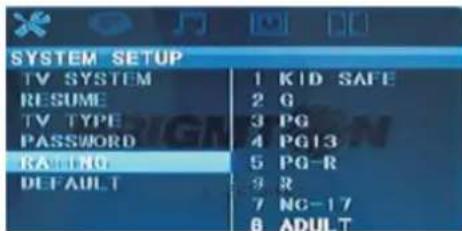
Password: factory set to access special settings. The set password is 0000. Note: For the 0 button 10 + button on the remote control is used. You can change the password in this menu, enter a new and press accept. IMPORTANT: Remember to reset your password because the device except that all values are restored, if it has been changed by you.

Sort: A limitation for playing DVD content by type or age. This way you can control the content displayed on the device.
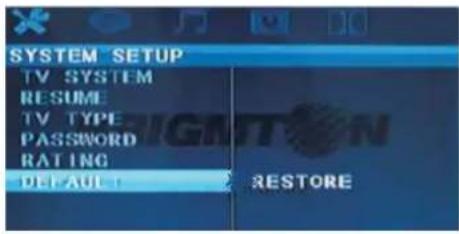
Default: To restore the factory settings. This option is useful when the device does not work properly. Some settings may not be correct and will need to do this to start with the factory settings.
LANGUAGE SETTINGS
OSD Language: Language of the main menu. Select the desired language and confirm with the ENTER button.

Audio Language: Language of disc being played. If you have the selected language will be played on it.

Language Subtitles: Subtitles language disc played. If the selected language has played the caption in English.

Menu Language: Select the desired language.

AUDIO SETTINGS
Set KEY:

VIDEO SETTINGS

Brightness settings

Contrast settings
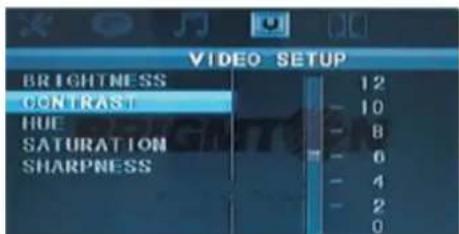
HUE/Tone settings

Saturation settings

Sharpness settings

"Features can change without notice"
BRIGMTN
Imported: I.R.P., S.L.
DECLARATION OF CONFORMITY
I.R.P., SL declare under our responsibility that the equipment meets the requirements indicated in the following directives:
EMC DIRECTIVES
EN60065:2002+A1:2006+A2:2008
Description of apparatus:
BRIGMTON Model BDVD-1093
Portable DVD
Importer: I.R.P., SL
Address: Avenida Santa Clara de Cuba 5, 41007, Sevilla.
Brand : BRIGMTON
Model : BDVD-1093
Category : Portable DVD Player